Webhook Reference
Production reference for the Custom Webhook integration — handshake, HMAC signing, every event, every field, response contract, idempotency on retry, self-hosting images, database schemas, troubleshooting, and receiver examples in six languages.
This is the end-to-end reference for theStacc's Custom Webhook integration. It covers everything a developer needs to ship a production receiver: how authentication works, every event we send, every field we put in the payload, what to return, how retries and idempotency behave, and ready-to-paste receiver and database-schema examples.
Quick orientation: if you're configuring this from theStacc's dashboard, start at Connect Platforms and choose Custom Webhook. This page is for the developer who needs to build (or audit) the receiving endpoint. For what happens when a publish fails and how to recover, see Publishing Errors & Retries.
When to use a webhook#
Choose the Custom Webhook integration when:
- Your site is built on a custom stack — Next.js, Astro, Remix, SvelteKit, Rails, Django, Laravel, etc. (anything that isn't one of our direct integrations).
- You want full control over what happens when a blog publishes — write to your own database, trigger a rebuild, push to a CDN, fan out to other systems.
- You already have a CMS but want theStacc to write into it via your own API, not theStacc's direct integrations.
If you use WordPress, Webflow, Ghost, Shopify, or Zepio, use those integrations instead — they handle authentication, image uploads, and field mapping for you. See Connect Platforms for the full list.
How the handshake works#
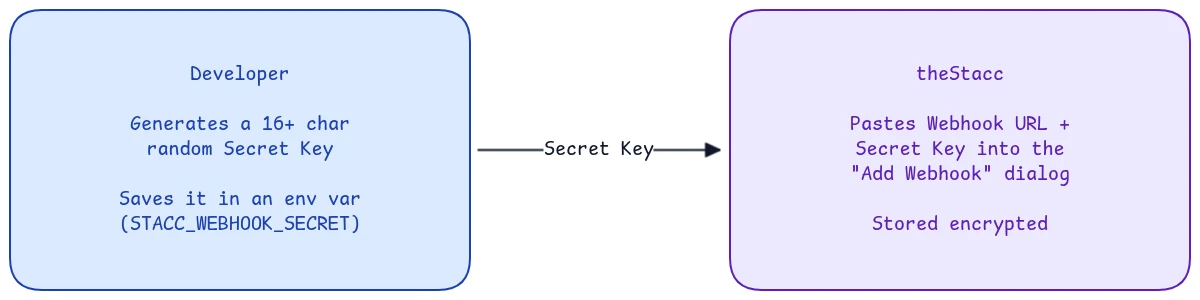
theStacc uses stateless per-request authentication via a shared secret — the same model as Stripe, GitHub, and Slack webhooks. There is no OAuth dance, no token exchange, no TLS-mutual-auth. The "handshake" happens once during setup: both sides record the same secret, then every subsequent request is independently signed and verified.
Step 1 — One-time setup#
The developer pastes a Webhook URL and Secret Key into the Content SEO > Settings > Publishing dialog when adding a Custom Webhook. theStacc stores the secret; the developer keeps a copy in an env var on their server. After this, both sides hold the same secret.
Step 2 — Per request (every blog publish, sync, unpublish, delete)#
theStacc serializes the payload to JSON, computes sig = HMAC-SHA256(secret, body), and POSTs the body to your webhook URL with the signature in the X-Webhook-Signature header. Your receiver reads the raw body bytes (not the parsed JSON), recomputes the same HMAC with its own copy of the secret, and compares. If the two signatures match, the request is authentic — process it and respond 200 with the live URL and your CMS id. If they don't, return 401.
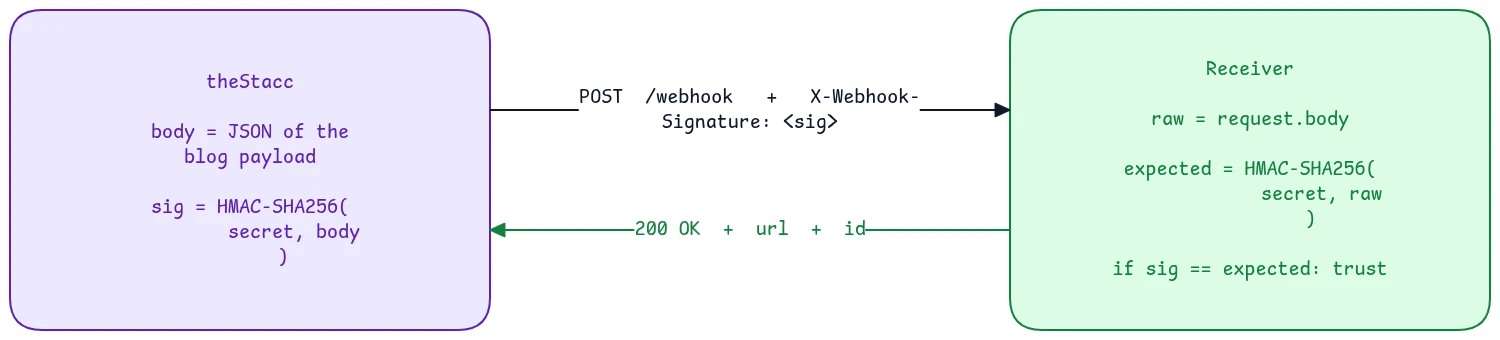
Both sides compute the same signature independently. If they match, the receiver knows the request really came from theStacc and wasn't modified in transit. That's the entire authentication mechanism.
The shared secret is the entire defense. Anyone who guesses your webhook URL but doesn't know the secret cannot forge a request. Treat it like a database password — store it in env vars, rotate it if leaked, and never commit it to git.
30-minute production setup#
A field-tested path from "we picked Webhook" to "first blog publishes live":
- Generate a secret —
openssl rand -hex 32(the secret must be 16+ characters, which theStacc enforces at save time). - Add an env var to your hosting platform:
STACC_WEBHOOK_SECRET=<the secret>. - Add a database table for incoming blogs (schema templates below).
- Add a receiver route at, for example,
POST /api/stacc-webhook(examples in six languages below). - Deploy. Note the public HTTPS URL.
- In theStacc: go to Content SEO > Settings > Publishing, add a Custom Webhook, enter the URL and secret, then click Test Connection. A green check means it's working.
- Click Sample Payload to validate your full publish handler with a fake blog (
blog_idwill start withpreview-). - Approve a blog and publish. The first real blog should land in your database within a few seconds.
If anything fails, the Troubleshooting section below covers every error we've seen, and Publishing Errors & Retries explains how theStacc surfaces and recovers from a failed publish.
Authentication: HMAC-SHA256 signing#
When you configure a webhook secret, every request includes a signature in the X-Webhook-Signature header.
How theStacc generates the signature#
# What runs in production
import hmac, hashlib

signature = hmac.new(
    secret.encode(),
    payload_bytes,   # the EXACT bytes POSTed in the body
    hashlib.sha256,
).hexdigest()

headers = {
    "Content-Type": "application/json",
    "X-Webhook-Signature": signature,  # 64-char lowercase hex string
}
Critical detail: the signature is always computed over the exact bytes theStacc puts on the wire, and theStacc POSTs those same bytes as the body. Your receiver MUST hash the raw body bytes it received, not parse-and-re-serialize the JSON. If you re-serialize, whitespace and key order can shift and the signature won't match. This is the single most common integration mistake.
Why "hash the raw bytes" matters even more than it looks. theStacc has two internal publish paths — a manual path (you click Publish) and an autopilot path (theStacc publishes on a schedule). The two paths serialize the JSON slightly differently internally (one compact, one with spacing), but each path always signs the exact bytes it sends. A receiver that hashes the raw body works identically on both paths. A receiver that re-serializes the parsed JSON can pass on one path and fail on the other. Hash the raw bytes and you never have to think about this.
Properties of the signature#
| Property | Behavior |
|---|---|
| Deterministic | Same secret + same body bytes always produce the same signature |
| Body-bound | Even one byte different in the body produces a completely different signature |
| Length | Always 64 hex characters (256 bits) |
| Format | Lowercase hex, no sha256= prefix on the X-Webhook-Signature header |
Legacy X-Fairview-Signature compatibility header#
On autopilot (scheduled) publishes, theStacc sends a second signature header alongside X-Webhook-Signature:
X-Webhook-Signature: 9f86d08...            (64-char hex, no prefix)
X-Fairview-Signature: sha256=9f86d08...    (same hex, with a sha256= prefix)
X-Fairview-Signature is a legacy compatibility header retained for receivers built before the standard X-Webhook-Signature header existed. Both headers carry the same HMAC-SHA256 of the same body bytes, so you can verify against either one. New receivers should read X-Webhook-Signature and ignore X-Fairview-Signature. Note that X-Fairview-Signature is sha256=-prefixed, so strip the sha256= prefix before comparing if you choose to use it.
Replay-attack note#
HMAC alone doesn't prevent replay — if an attacker captures a signed request, the signature still validates if they replay the exact same bytes. theStacc embeds a fresh published_at UTC timestamp in every blog event, so receivers can defend by rejecting requests older than a few minutes:
const sentAt = new Date(body.published_at);
const ageSec = (Date.now() - sentAt.getTime()) / 1000;
if (ageSec > 300) return new Response('Too old, possible replay', { status: 401 });
For most receivers this isn't necessary — the dominant threat is "someone guessed our webhook URL" and HMAC fully defends against that.
All events theStacc emits#
Five event types. Branch on the event field at the top of your handler.
| Event | When it fires | Body shape |
|---|---|---|
test.ping | User clicks Test Connection | { event, message, timestamp } |
blog.published | First successful publish of a blog | Full blog payload (see below) |
blog.updated | Re-publish or content sync of an existing blog | Full blog payload — same shape as blog.published |
blog.unpublished | User unpublishes from theStacc | { event, blog_id, title } |
blog.deleted | User deletes a published blog | { event, blog_id, title } |
Whether theStacc sends blog.published or blog.updated is decided by whether your receiver has published this blog before: the first successful publish fires blog.published; any subsequent re-publish or content sync of the same blog fires blog.updated. Treat both the same way — upsert on blog_id.
A note on preview- prefixed blog_ids: when the user clicks Sample Payload in the dashboard, theStacc fires a real-shaped blog.published event but with blog_id: "preview-00000000-0000-0000-0000-000000000000". Your handler should detect the prefix and skip the actual database write so test runs don't pollute production data.
test.ping payload#
{
  "event": "test.ping",
  "message": "This is a test from theStacc",
  "timestamp": "2026-04-30T12:00:00Z"
}
Respond 200 {"ok": true}. Do not require title, slug, or content for this event — there are none.
blog.published / blog.updated payload#
{
  "event": "blog.published",
  "blog_id": "8f3e1d2c-49ab-4d10-9e7f-7c0bf298faa4",
  "title": "10 SEO mistakes to avoid in 2026",
  "slug": "10-seo-mistakes-to-avoid-in-2026",
  "content": "<h2>Introduction</h2><p>If you've been running SEO...</p>",
  "excerpt": "A short summary of the blog post.",
  "excerpt_short": "A short summary of the blog post.",
  "meta_title": "10 SEO mistakes to avoid in 2026",
  "meta_description": "Avoid these 10 common SEO pitfalls...",
  "featured_image_url": "https://cdn.thestacc.com/blogs/abc123.jpg",
  "categories": ["SEO"],
  "tags": ["seo", "2026", "marketing"],
  "keyword": "seo mistakes 2026",
  "published_at": "2026-04-30T12:00:00Z",
  "images": [
    { "url": "https://cdn.thestacc.com/blog_images/proj-x/blog-y/illustration-1.png", "alt": "How keyword cannibalization happens" },
    { "url": "https://cdn.thestacc.com/blog_images/proj-x/blog-y/illustration-2.png", "alt": "Site audit checklist diagram" }
  ]
}
On autopilot (scheduled) publishes, the same payload additionally carries two retry-related fields — idempotency_key and publish_attempt. See Idempotency & retries below for exactly when they appear and how to use them.
blog.unpublished / blog.deleted payload#
{
  "event": "blog.unpublished",
  "blog_id": "8f3e1d2c-49ab-4d10-9e7f-7c0bf298faa4",
  "title": "10 SEO mistakes to avoid in 2026"
}
For these events, look up the post in your CMS using the blog_id (which you should have stored when handling the original blog.published) and delete or hide it.
Field reference#
Every field theStacc sends in a blog.published / blog.updated event:
| Field | Type | Always sent? | Practical limits | What it is |
|---|---|---|---|---|
event | string | Yes | enum: blog.published | blog.updated | blog.unpublished | blog.deleted | test.ping | Use this to route in your handler. |
blog_id | string (UUID) | Yes | 36 chars, or preview- + UUID for sample payloads | theStacc's stable identifier. Use as your dedup / foreign key. |
title | string | Yes | typically 50–120 chars | Blog title. Not HTML-escaped — your receiver renders it. |
slug | string | Yes | typically up to ~50 chars, lowercase, hyphenated | URL-safe identifier. Stable across re-publishes unless the user edits it. |
content | string (HTML) | Yes | typically 4,000–15,000 chars | Full blog HTML. Includes <h2>, <p>, <ul>, <a>, <img>, etc. The duplicate hero <img> is stripped (see note below). |
excerpt | string | "" | Yes (may be empty) | typically 100–300 chars | Short summary, plain text. |
excerpt_short | string | "" | Yes (may be empty) | word-boundary trimmed to roughly 256 chars | A truncated copy of excerpt. Use this when forwarding to a CMS with a strict Excerpt cap — notably Webflow's default 256-char Excerpt field. |
meta_title | string | null | Yes | up to ~70 chars (SEO best practice) | Optimized SEO title. May equal title. |
meta_description | string | null | Yes | up to ~160 chars (SEO best practice) | Optimized SEO description. |
featured_image_url | string (URL) | null | Yes | https://cdn.thestacc.com/... | Public CDN URL for the hero image. Separate from images[]. |
categories | string[] | Yes (may be []) | typically 0–3 items | One blog can have multiple categories. |
tags | string[] | Yes (may be []) | typically 0–10 items | Loose keywords. |
keyword | string | null | Yes | typically 1–8 words | Focus keyword the blog targets. null when the blog has no focus keyword set. |
published_at | string (ISO 8601 UTC) | Yes | always Z-suffixed UTC | When theStacc finalized this publish. |
images | {url, alt}[] | Yes (may be []) | typically 0–4 items | Every <img> URL embedded in the content body, in document order, deduped. Use it to self-host body images — see Self-hosting images below. Does not include featured_image_url. |
idempotency_key | string | Autopilot publishes only | "{blog_id}:{lifecycle}" | Stable across all retries of a single publish; different across separate publish intents. Dedup on this. See Idempotency & retries. |
publish_attempt | integer | Autopilot publishes only | 1 on the first try, then 2, 3, ... | The attempt counter for this publish lifecycle. > 1 means theStacc is retrying after a transient failure. Useful for logging. |
The hero image is stripped from
content. Every generated blog carries its hero image both asfeatured_image_urland (originally) inlined as the first<img>in the body. theStacc removes that inline duplicate before sending, socontentwon't render the hero twice andimages[]won't list the hero URL. Render the hero fromfeatured_image_urland the body images from insidecontent(or mirror them viaimages[]).
Field length is not enforced at the API level. Postgres
TEXTcolumns are unbounded, and theStacc-generated content stays well within the practical limits above. If you want hard caps in your database schema, the limits in the table are safe defaults.
Response contract#
Your receiver should return a JSON body. theStacc reads two fields from it:
{
  "ok": true,
  "url": "https://your-cms.com/blog/10-seo-mistakes-to-avoid-in-2026",
  "id": "your-internal-cms-post-id"
}| What theStacc reads | Required for | What theStacc does with it |
|---|---|---|
HTTP status 2xx | every request | Only 200, 201, 202, and 204 count as success. Anything else (3xx, 4xx, 5xx) fails the publish. |
url (also accepts post_url or permalink) | a clickable "View live post" link in theStacc | Stored against the blog. If omitted, theStacc shows a *"Sent to webhook — your receiver didn't return a public URL"* notice. |
id (also accepts post_id or external_id) | future updates / unpublishes to target the right CMS record | Stored as the external post id and sent back to you on later blog.updated / blog.unpublished events. |
A non-JSON 2xx response still counts as a successful publish — theStacc just won't have a URL or external id to store. For preview / test calls (test.ping, or blog_id starts with preview-), it's fine to skip both fields and return {"ok": true, "skipped": true}.
Idempotency and retries#
How retries behave depends on which path published the blog. Both paths fire the same events at the same URL — the difference is whether theStacc retries automatically.
Manual publish (you click Publish)#
A manual publish is single-shot. If your endpoint times out (the request budget is ~30 seconds) or returns a non-2xx status, the publish fails immediately and the user sees a "Failed to publish" notice. The user clicks Republish to try again. theStacc does not auto-retry a manual publish.
Autopilot publish (theStacc publishes on a schedule)#
Autopilot publishes retry automatically on transient failures (a timeout, a network error, or a 5xx from your receiver). theStacc makes up to 5 attempts with exponential backoff — roughly 60s, then 120s, 240s, 480s, and 960s, a full retry window of about 30 minutes. After 5 failed attempts the publish is marked failed. A 4xx from your receiver is treated as permanent and is not retried (fix your receiver and re-publish). For the full failure-and-recovery story, see Publishing Errors & Retries.
Why your receiver must be idempotent#
Because autopilot retries, the same blog can arrive at your endpoint more than once. The classic case: theStacc POSTs, your CMS creates the post, but the response packet is lost in transit (a network blip), so theStacc sees a timeout and retries — and a naive receiver creates a duplicate post.
Two fields on autopilot payloads exist specifically to defend against this:
idempotency_key— a string of the form"{blog_id}:{lifecycle}"that is stable across every retry of a single publish but different across separate publish intents (a fresh publish months later gets a different key). Persist the keys you've already processed and short-circuit on a repeat — that makes your receiver safe even if the same publish is delivered twice.publish_attempt— an integer that is1on the first attempt and increments (2,3, ...) on each retry. It's primarily for your logs and observability:publish_attempt > 1tells you theStacc is retrying after a transient hiccup.
Even without those fields, the simplest and most robust defense is to UPSERT on blog_id so duplicate deliveries (or a user clicking Republish twice) converge on the same row instead of creating two posts.
How theStacc itself avoids duplicates (direct CMS integrations)#
For theStacc's own direct integrations (WordPress, Webflow, Ghost, Shopify), before re-POSTing on a retry theStacc looks up the target CMS by slug and treats an existing post as "already published by us" only if it matches a fingerprint: the same title and a creation timestamp within a ~35-minute window (which comfortably covers the ~30-minute retry sequence plus headroom). If that fingerprint matches, theStacc reuses the existing post instead of creating a duplicate. You don't need to implement this for a webhook receiver — idempotency_key plus an UPSERT on blog_id is simpler and just as safe — but the slug field plus the ~35-minute window is the same idea you can mirror if your CMS lacks a stable id.
Respond fast, do heavy work async#
If your CMS write involves image processing, search re-indexing, or CDN purging, run those in a background job after responding 2xx. A slow synchronous write risks timing out theStacc's request.
export async function POST(request: Request) {
  // ... verify signature, parse body ...
  await db.thestaccBlog.upsert({ /* ... */ }); // fast — just writes the row
  enqueueBackgroundJob('process-blog', body.blog_id); // image upload, ISR revalidate, search index
  return Response.json({ ok: true, url, id });
}
Custom headers#
Each Custom Webhook integration can carry custom request headers — key/value pairs sent with every request. Use them for a bearer token, a static API key, or a routing header your gateway expects:
Authorization: Bearer your-token
X-Tenant: acme-prod
Practical guidance:
- Keep the set small — roughly up to 20 pairs is plenty for any real use (auth + a couple of routing headers). theStacc does not enforce a count, but a sprawling header set usually signals something that belongs in the URL or body instead.
Content-Typecannot be overridden. theStacc always sendsapplication/json. A customContent-Typeis ignored so your receiver's JSON parser never breaks.- The signature headers cannot be overridden. Custom headers named
X-Webhook-SignatureorX-Fairview-Signatureare ignored — theStacc always sets the real HMAC. This prevents a misconfigured (or malicious) custom header from spoofing the signature.
Everything else you set is passed through verbatim.
Self-hosting images (optional)#
By default, every <img> inside content and the featured_image_url point at theStacc's CDN (cdn.thestacc.com), served to your visitors directly. That's the simplest setup and works out of the box.
For deeper CMS integration, many sites prefer to host blog images on their own storage alongside the rest of their media library. The images array makes that a one-pass mirror with no HTML parsing required.
How it works#
The images field is a list of {url, alt} objects — one per <img> in the content body, in document order, with duplicates collapsed. Each url is byte-for-byte identical to what's in the corresponding src= attribute inside content, so a plain string find/replace handles the swap reliably.
let content = body.content;

// 1. Mirror every body image.
for (const img of body.images || []) {
  const bytes = await fetch(img.url).then(r => r.arrayBuffer());
  const newUrl = await uploadToMyStorage(bytes, suggestFilename(img.url));
  // The URL string IS the stable identifier — find/replace by full src=.
  content = content.replaceAll(`src="${img.url}"`, `src="${newUrl}"`);
}

// 2. Mirror the featured image separately. It's a top-level field, not
//    in images[] — most CMSes have a dedicated featured-image slot.
let featuredUrl = body.featured_image_url;
if (featuredUrl) {
  const bytes = await fetch(featuredUrl).then(r => r.arrayBuffer());
  featuredUrl = await uploadToMyStorage(bytes, suggestFilename(featuredUrl));
}

// 3. Store `content` (with rewritten src=) and `featuredUrl` in your CMS.
That's the entire pattern. No HTML parser, no DOM library, no positional tracking — the URL is the identifier.
Python receiver#
content = body["content"]

# 1. Mirror body images.
for img in body.get("images", []):
    blob = httpx.get(img["url"]).content
    new_url = upload_to_my_storage(blob, suggest_filename(img["url"]))
    content = content.replace(f'src="{img["url"]}"', f'src="{new_url}"')

# 2. Mirror the featured image separately.
featured_url = body.get("featured_image_url")
if featured_url:
    blob = httpx.get(featured_url).content
    featured_url = upload_to_my_storage(blob, suggest_filename(featured_url))

# 3. Persist content + featured_url to your CMS.
Security: allowlist your fetch host#
Whenever a server-side handler downloads URLs from any external source, allowlist trusted hosts before issuing the request. For theStacc images, the trusted host is cdn.thestacc.com:
const ALLOWED_HOSTS = new Set(['cdn.thestacc.com']);

async function safeFetch(url) {
  const parsed = new URL(url);
  if (parsed.protocol !== 'https:') throw new Error(`Refusing non-HTTPS URL: ${url}`);
  if (!ALLOWED_HOSTS.has(parsed.hostname)) throw new Error(`Untrusted host: ${parsed.hostname}`);
  return fetch(url);
}

for (const img of body.images || []) {
  const bytes = await safeFetch(img.url).then(r => r.arrayBuffer());
  // ...then upload + find/replace as before.
}
Apply the same allowlist to featured_image_url. With it in place, every body and featured image fetches through a single auditable choke point.
Notes#
- Featured image is NOT in
images[]. It's a separate top-level field (featured_image_url). theStacc strips the inline hero fromcontentbefore sending so the page doesn't render the same image twice. - Duplicate URLs are deduped. If the same body image appears twice, the array lists it once. Your
content.replaceAll(...)swaps every occurrence in one pass anyway. altmay be empty. Decorative images and images the generator didn't caption ship withalt: "". Pass it through verbatim to preserve accessibility on your re-hosted copy.- Backward compatible. Receivers that ignore
imagescontinue working unchanged — every other field is identical to before this field was added. - The URL is the stable identifier. theStacc does not inject any per-image marker attribute into the
<img>tags. URLs inimages[]mirrorcontentverbatim, so a one-to-one find/replace works without any normalization step.
Migrating blogs already published with theStacc's URLs#
If you have blogs already in your CMS with theStacc CDN URLs and you want to switch them to self-hosted images:
- Open each blog in theStacc and click Publish to re-publish.
- The webhook fires as
blog.updatedwith theimagesarray. - Your receiver runs the mirror loop above and updates the post (same
blog_idmeans the same CMS record). - The CMS post now stores your URLs instead of theStacc's.
There's no bulk-republish API — for most accounts this is a one-shot migration of a handful of posts.
Database schema templates#
Pick the database you already use. Each schema below maps directly to the webhook payload — no transformation needed.
Postgres#
CREATE TABLE thestacc_blogs (
    blog_id           UUID PRIMARY KEY,
    title             TEXT NOT NULL,
    slug              TEXT NOT NULL UNIQUE,
    content           TEXT NOT NULL,
    excerpt           TEXT,
    meta_title        TEXT,
    meta_description  TEXT,
    featured_image_url TEXT,
    keyword           TEXT,
    categories        TEXT[] NOT NULL DEFAULT '{}',
    tags              TEXT[] NOT NULL DEFAULT '{}',
    published_at      TIMESTAMPTZ NOT NULL,
    last_event        TEXT NOT NULL,
    received_at       TIMESTAMPTZ NOT NULL DEFAULT NOW(),
    updated_at        TIMESTAMPTZ NOT NULL DEFAULT NOW(),
    cms_post_id       TEXT,
    is_unpublished    BOOLEAN NOT NULL DEFAULT FALSE
);

CREATE INDEX idx_thestacc_blogs_slug ON thestacc_blogs(slug);
CREATE INDEX idx_thestacc_blogs_published_at ON thestacc_blogs(published_at DESC);
CREATE INDEX idx_thestacc_blogs_active ON thestacc_blogs(published_at DESC) WHERE is_unpublished = FALSE;
MySQL / MariaDB#
CREATE TABLE thestacc_blogs (
    blog_id            CHAR(36) PRIMARY KEY,
    title              VARCHAR(255) NOT NULL,
    slug               VARCHAR(255) NOT NULL UNIQUE,
    content            LONGTEXT NOT NULL,
    excerpt            TEXT,
    meta_title         VARCHAR(255),
    meta_description   VARCHAR(500),
    featured_image_url VARCHAR(2048),
    keyword            VARCHAR(255),
    categories         JSON NOT NULL,
    tags               JSON NOT NULL,
    published_at       DATETIME(3) NOT NULL,
    last_event         VARCHAR(50) NOT NULL,
    received_at        DATETIME(3) NOT NULL DEFAULT CURRENT_TIMESTAMP(3),
    updated_at         DATETIME(3) NOT NULL DEFAULT CURRENT_TIMESTAMP(3) ON UPDATE CURRENT_TIMESTAMP(3),
    cms_post_id        VARCHAR(255),
    is_unpublished     BOOLEAN NOT NULL DEFAULT FALSE,
    INDEX idx_slug (slug),
    INDEX idx_published_at (published_at DESC)
) ENGINE=InnoDB DEFAULT CHARSET=utf8mb4;
Prisma (Postgres-flavored)#
model ThestaccBlog {
  blogId            String    @id @map("blog_id") @db.Uuid
  title             String
  slug              String    @unique
  content           String
  excerpt           String?
  metaTitle         String?   @map("meta_title")
  metaDescription   String?   @map("meta_description")
  featuredImageUrl  String?   @map("featured_image_url")
  keyword           String?
  categories        String[]
  tags              String[]
  publishedAt       DateTime  @map("published_at")
  lastEvent         String    @map("last_event")
  receivedAt        DateTime  @default(now()) @map("received_at")
  updatedAt         DateTime  @updatedAt @map("updated_at")
  cmsPostId         String?   @map("cms_post_id")
  isUnpublished     Boolean   @default(false) @map("is_unpublished")

  @@index([slug])
  @@index([publishedAt(sort: Desc)])
  @@map("thestacc_blogs")
}MongoDB#
db.createCollection("thestaccBlogs", {
  validator: {
    $jsonSchema: {
      bsonType: "object",
      required: ["blog_id", "title", "slug", "content", "published_at", "last_event"],
      properties: {
        blog_id:            { bsonType: "string" },
        title:              { bsonType: "string" },
        slug:               { bsonType: "string" },
        content:            { bsonType: "string" },
        excerpt:            { bsonType: ["string", "null"] },
        meta_title:         { bsonType: ["string", "null"] },
        meta_description:   { bsonType: ["string", "null"] },
        featured_image_url: { bsonType: ["string", "null"] },
        keyword:            { bsonType: ["string", "null"] },
        categories:         { bsonType: "array", items: { bsonType: "string" } },
        tags:               { bsonType: "array", items: { bsonType: "string" } },
        published_at:       { bsonType: "date" },
        last_event:         { bsonType: "string" },
        cms_post_id:        { bsonType: ["string", "null"] },
        is_unpublished:     { bsonType: "bool" }
      }
    }
  }
});
db.thestaccBlogs.createIndex({ blog_id: 1 }, { unique: true });
db.thestaccBlogs.createIndex({ slug: 1 }, { unique: true });
db.thestaccBlogs.createIndex({ published_at: -1 });
Receiver examples#
Each example is production-ready — it handles every event type, verifies the HMAC signature, dedupes via blog_id, and returns the response shape theStacc expects.
Next.js (App Router)#
// app/api/stacc-webhook/route.ts
import crypto from 'crypto';

const SECRET = process.env.STACC_WEBHOOK_SECRET!;

export async function POST(request: Request) {
  // CRITICAL: read raw bytes BEFORE parsing JSON.
  // request.json() consumes the stream and re-serializing
  // would change byte order/whitespace -> signature mismatch.
  const rawBody = await request.text();

  const sig = request.headers.get('x-webhook-signature') || '';
  const expected = crypto.createHmac('sha256', SECRET).update(rawBody).digest('hex');

  // Decode both before comparing. Buffer.from with invalid hex returns
  // a shorter buffer (Node stops at the first non-hex char) which would
  // make timingSafeEqual throw RangeError instead of returning false.
  const sigBuf = Buffer.from(sig, 'hex');
  const expBuf = Buffer.from(expected, 'hex');
  const valid =
    sigBuf.length === expBuf.length
    && crypto.timingSafeEqual(sigBuf, expBuf);

  if (!valid) {
    return new Response('Invalid signature', { status: 401 });
  }

  const body = JSON.parse(rawBody);

  if (body.event === 'test.ping') {
    return Response.json({ ok: true });
  }

  if (body.event === 'blog.published' || body.event === 'blog.updated') {
    if (body.blog_id?.startsWith('preview-')) {
      return Response.json({ ok: true, skipped: true });
    }
    const post = await db.thestaccBlog.upsert({
      where: { blogId: body.blog_id },
      create: {
        blogId: body.blog_id,
        title: body.title,
        slug: body.slug,
        content: body.content,
        excerpt: body.excerpt || null,
        metaTitle: body.meta_title || null,
        metaDescription: body.meta_description || null,
        featuredImageUrl: body.featured_image_url || null,
        keyword: body.keyword || null,
        categories: body.categories || [],
        tags: body.tags || [],
        publishedAt: new Date(body.published_at),
        lastEvent: body.event,
      },
      update: {
        title: body.title,
        slug: body.slug,
        content: body.content,
        excerpt: body.excerpt || null,
        metaTitle: body.meta_title || null,
        metaDescription: body.meta_description || null,
        featuredImageUrl: body.featured_image_url || null,
        keyword: body.keyword || null,
        categories: body.categories || [],
        tags: body.tags || [],
        publishedAt: new Date(body.published_at),
        lastEvent: body.event,
        isUnpublished: false,
      },
    });
    return Response.json({
      ok: true,
      url: `https://example.com/blog/${post.slug}`,
      id: post.blogId,
    });
  }

  if (body.event === 'blog.unpublished' || body.event === 'blog.deleted') {
    await db.thestaccBlog.update({
      where: { blogId: body.blog_id },
      data: { isUnpublished: true, lastEvent: body.event },
    });
    return Response.json({ ok: true });
  }

  return Response.json({ error: 'Unknown event' }, { status: 400 });
}Express#
import express from 'express';
import crypto from 'crypto';

const app = express();
const SECRET = process.env.STACC_WEBHOOK_SECRET;

// CRITICAL: capture raw body BEFORE express.json() parses it.
app.post('/api/stacc-webhook',
  express.raw({ type: 'application/json' }),
  async (req, res) => {
    const raw = req.body; // Buffer
    const sig = req.get('x-webhook-signature') || '';
    const expected = crypto.createHmac('sha256', SECRET).update(raw).digest('hex');

    const sigBuf = Buffer.from(sig, 'hex');
    const expBuf = Buffer.from(expected, 'hex');
    if (sigBuf.length !== expBuf.length || !crypto.timingSafeEqual(sigBuf, expBuf)) {
      return res.status(401).send('Invalid signature');
    }

    const body = JSON.parse(raw.toString('utf8'));
    // ... handle body.event as in the Next.js example
    res.json({ ok: true });
  }
);
Astro (server endpoint)#
// src/pages/api/stacc-webhook.ts
import type { APIRoute } from 'astro';
import crypto from 'crypto';

export const prerender = false; // server-rendered, not static

const SECRET = import.meta.env.STACC_WEBHOOK_SECRET;

export const POST: APIRoute = async ({ request }) => {
  const raw = await request.text();
  const sig = request.headers.get('x-webhook-signature') || '';
  const expected = crypto.createHmac('sha256', SECRET).update(raw).digest('hex');

  const sigBuf = Buffer.from(sig, 'hex');
  const expBuf = Buffer.from(expected, 'hex');
  if (sigBuf.length !== expBuf.length || !crypto.timingSafeEqual(sigBuf, expBuf)) {
    return new Response('Invalid signature', { status: 401 });
  }

  const body = JSON.parse(raw);
  // ... handle events as in the Next.js example
  return new Response(JSON.stringify({ ok: true }), {
    headers: { 'Content-Type': 'application/json' },
  });
};
Python / FastAPI#
import hmac, hashlib, os, json
from fastapi import FastAPI, Request, HTTPException

app = FastAPI()
SECRET = os.environ["STACC_WEBHOOK_SECRET"].encode()

@app.post("/api/stacc-webhook")
async def receive(request: Request):
    raw = await request.body()  # bytes — DON'T re-serialize
    sig = request.headers.get("x-webhook-signature", "")
    expected = hmac.new(SECRET, raw, hashlib.sha256).hexdigest()

    if not hmac.compare_digest(expected, sig):
        raise HTTPException(401, "Invalid signature")

    body = json.loads(raw)

    if body["event"] == "test.ping":
        return {"ok": True}

    if body["event"] in ("blog.published", "blog.updated"):
        if body.get("blog_id", "").startswith("preview-"):
            return {"ok": True, "skipped": True}
        # ... upsert into your DB on blog_id
        return {
            "ok": True,
            "url": f"https://example.com/blog/{body['slug']}",
            "id": body["blog_id"],
        }

    if body["event"] in ("blog.unpublished", "blog.deleted"):
        # ... soft-delete by blog_id
        return {"ok": True}

    raise HTTPException(400, "Unknown event")
Python / Flask#
import hmac, hashlib, os
from flask import Flask, request, abort, jsonify

app = Flask(__name__)
SECRET = os.environ["STACC_WEBHOOK_SECRET"].encode()

@app.post("/api/stacc-webhook")
def receive():
    raw = request.get_data()
    sig = request.headers.get("X-Webhook-Signature", "")
    expected = hmac.new(SECRET, raw, hashlib.sha256).hexdigest()

    if not hmac.compare_digest(expected, sig):
        abort(401)

    body = request.get_json(force=True)
    # ... same event branching as the FastAPI example
return jsonify({"ok": True})PHP#
<?php
$raw = file_get_contents('php://input');
$sig = $_SERVER['HTTP_X_WEBHOOK_SIGNATURE'] ?? '';
$expected = hash_hmac('sha256', $raw, getenv('STACC_WEBHOOK_SECRET'));

if (!hash_equals($expected, $sig)) {
    http_response_code(401);
    exit('Invalid signature');
}

$body = json_decode($raw, true);

switch ($body['event']) {
    case 'test.ping':
        echo json_encode(['ok' => true]);
        break;
    case 'blog.published':
    case 'blog.updated':
        if (str_starts_with($body['blog_id'] ?? '', 'preview-')) {
            echo json_encode(['ok' => true, 'skipped' => true]);
            break;
        }
        // ... upsert into DB on blog_id
        echo json_encode([
            'ok'  => true,
            'url' => "https://example.com/blog/{$body['slug']}",
            'id'  => $body['blog_id'],
        ]);
        break;
    case 'blog.unpublished':
    case 'blog.deleted':
        // ... soft-delete
        echo json_encode(['ok' => true]);
        break;
    default:
        http_response_code(400);
        echo json_encode(['error' => 'Unknown event']);
}
Limits and operational rules#
| Rule | Value | Why |
|---|---|---|
| Response timeout | ~30 seconds | Slow CMS writes will fail. Return 2xx fast and queue heavy work. |
| HTTP status accepted | 200, 201, 202, 204 | Any other status (including 3xx, 4xx, 5xx) fails the publish. |
| Redirects | Rejected (not followed) | Anti-SSRF: a public receiver could 302 to an internal address. Configure the final URL. |
| HTTPS required | Yes | http:// URLs and private / internal IP ranges are rejected at save time. |
| Custom headers | Pass-through key/value pairs (keep it to roughly 20) | For bearer tokens / API keys. Content-Type and the signature headers can't be overridden. |
| Webhook secret length | 16+ characters (enforced) | Shorter secrets are brute-forceable. |
| Auto-retries | Autopilot: up to 5 (backoff ~60s..960s, ~30 min). Manual: none. | A transient autopilot failure retries; a manual publish stays failed until the user clicks Republish. |
| Concurrent publishes | Possible | A bulk-publish can hit your endpoint in parallel. Use UPSERT, not INSERT. |
Troubleshooting#
Concrete error, then cause, then fix. For the user-facing side of these — where the error shows up in theStacc and how to recover — see Publishing Errors & Retries.
| What you see in theStacc | Cause | Fix |
|---|---|---|
| "Could not reach the URL" on Test Connection | Receiver not deployed, wrong URL, or blocked by a firewall | curl your URL from outside your network. Check hosting platform logs. |
| "Webhook returned redirect 301/302" | Your route redirects (HTTP to HTTPS, or a trailing-slash redirect) | Configure theStacc with the FINAL URL. Receivers must respond directly with 2xx. |
| "Webhook returned 401" on Test Connection | Signature verification failing on your side | Almost always a re-serialization bug. Hash the raw body bytes, not parsed JSON. |
"Webhook returned 4xx" on a real publish but 2xx on Test | Your handler errors on blog.published but not on test.ping | Run Sample Payload in theStacc — it sends the real shape with a preview- prefix so your full handler runs without writing real data. |
| "Sent to webhook — your receiver didn't return a public URL" | You returned 2xx but no url field | Add url to your response JSON. theStacc displays it in the dashboard. |
| Publish "succeeds" but the post never appears | You returned 2xx without actually writing to your DB | Check your server logs — your handler probably threw after the response was sent. |
| "Webhook URL must be HTTPS" at save time | URL starts with http:// or points to localhost / a private IP | Deploy publicly with HTTPS. For local dev, use a tunnel like ngrok. |
| A blog publishes twice | Receiver isn't idempotent across autopilot retries | UPSERT on blog_id, or dedup on idempotency_key. See Idempotency & retries. |
Security best practices#
- Always set a webhook secret. Without one, anyone who guesses your URL can post fake blogs.
- Use
crypto.timingSafeEqual/hmac.compare_digestwhen comparing signatures — plain===is timing-attack vulnerable. - Hash the raw body, not the parsed JSON. Re-serialization changes whitespace and breaks signatures.
- Store the secret in env vars only. Never commit it to git, never include it in client-side code.
- Rotate the secret on suspected leak. Generate a new one, update both your env var and theStacc's integration settings, then redeploy. theStacc starts signing with the new secret on the next request.
- Run your receiver behind HTTPS-only. Add HSTS if you control the domain.
- Rate-limit the receiver. Even with HMAC, a flood of unauthenticated requests can pressure your endpoint while you reject them. Cloudflare or your hosting platform usually handles this.
FAQ#
How does the handshake work?
There's no traditional handshake — it's stateless per-request authentication. The "handshake" is just storing a shared secret on both sides, once, during setup. Every subsequent request is independently authenticated via HMAC.
What identifies a request as coming from theStacc?
The X-Webhook-Signature header verified against your secret. Nothing else is reliable — anyone can fake the body, the User-Agent, or the source IP.
What's the X-Fairview-Signature header for?
It's a legacy compatibility header sent on autopilot publishes, carrying the same HMAC as X-Webhook-Signature but sha256=-prefixed. New receivers should use X-Webhook-Signature. See Legacy X-Fairview-Signature compatibility header.
Why did the same blog arrive twice?
Autopilot publishes retry automatically on transient failures, so a lost response packet can cause a re-delivery. Dedup on idempotency_key (autopilot payloads include it) or UPSERT on blog_id. See Idempotency & retries.
Can I override the Content-Type or signature headers with a custom header?
No. Content-Type is always application/json, and the signature headers are always set by theStacc. Custom headers with those names are ignored.
What's the maximum title / slug / content length?
theStacc doesn't enforce hard length limits at the API level — generated content stays well within reasonable bounds. If your CMS or DB needs hard caps, the Field reference table lists safe defaults.
What if my receiver is slow or down when a publish happens?
On a manual publish, that publish fails and the user clicks Republish. On an autopilot publish, theStacc retries automatically (up to 5 attempts over ~30 minutes) before marking it failed. See Publishing Errors & Retries.
Can I get historical blogs through the webhook?
No — webhooks are forward-only. For backfills, use the Public Blog API, which lets you fetch all your published blogs.
Do I need to handle test.ping separately?
Yes — it has no blog fields. If your handler tries to read title or content from a test.ping event, it'll error and Test Connection will fail. Branch on event first.
Can theStacc post to multiple webhook URLs?
Yes — set up multiple Custom Webhook integrations on the same project. Each gets its own URL, secret, and headers, and theStacc fires every published blog at every active integration.
Does an agent or the MCP server publishing my blog use a different webhook?
No. Whether a teammate clicks Publish or an automation publishes through the MCP server, the publish flows through the same path and fires the same webhook events at the same URL. See Agent Keys & MCP.
What happens if I delete a blog in theStacc?
We send event: "blog.deleted" with the blog_id and title. Your handler should remove or hide the post. If your receiver fails, the blog stays deleted in theStacc but lingers on your site — periodic reconciliation via the Public Blog API is a defensive option.
Next steps#
- Set up the integration in Connect Platforms
- Understand failure handling in Publishing Errors & Retries
- Automate publishing with Agent Keys & MCP
- Backfill historical content with the Public Blog API