
How to Fix Wrong Business Info in AI Search (2026): 7-Step Guide
AI search showing wrong info about your business? 7 steps to correct errors in ChatGPT, Gemini, and Perplexity. Protect your brand in AI-generated answers.
A potential customer asks ChatGPT about your business. The response says you are located in the wrong city. Or lists services you do not offer. Or names a competitor as your parent company. This is happening to businesses every day. And most do not know it.
AI wrong business info is not a bug. It is a systemic problem. AI engines like ChatGPT, Gemini, Perplexity, and Claude pull from hundreds of web sources. If even 20% of those sources contain outdated or incorrect details, the AI treats that conflicting data as truth. The result: confident, authoritative answers about your business that are factually wrong.
The fix is not arguing with the AI. It is fixing the sources the AI reads from. This guide walks through the exact 7-step process to identify, correct, and prevent AI from spreading wrong information about your business.
We have published 3,500+ articles across 70+ industries with a 92% average SEO score. We optimize every piece for both traditional search and AI search engines. Here is the process we recommend.
Here is what you will learn:
- How to audit what AI engines are saying about your business right now
- The 7 specific steps to fix wrong information at the source
- Platform-by-platform feedback methods for ChatGPT, Gemini, and Perplexity
- How to use structured data to tell AI exactly who you are
- A monitoring system to catch new errors before customers do
Time required: 2-4 hours for initial audit and fixes. 30 minutes per month for monitoring.
Difficulty: Beginner to intermediate.
What you will need: Access to your website CMS, Google Business Profile, and accounts on major directories.
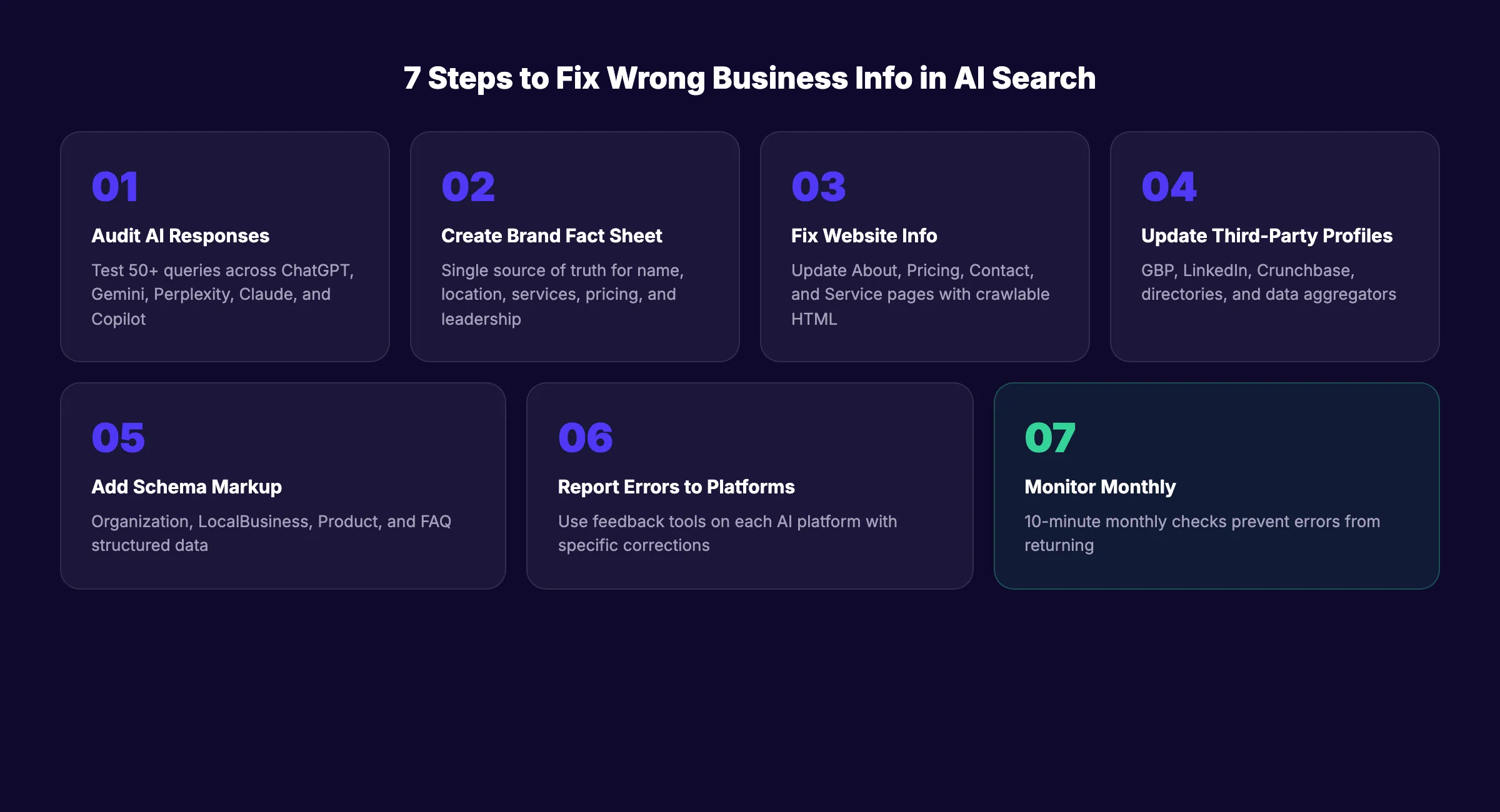
Step 1: Audit What AI Engines Say About Your Business
Before fixing anything, you need to know what is broken. Most businesses have never asked an AI engine about themselves.
Open each major AI platform and run these queries:
- “[Your business name]”
- “What does [business name] do?”
- “[Business name] pricing”
- “[Business name] location”
- “[Business name] reviews”
- “Is [business name] good for [your main service]?”
- “[Business name] vs [your top competitor]”
Test on all 5 major platforms: ChatGPT, Google Gemini, Perplexity, Claude, and Microsoft Copilot. Run each query at least twice. AI responses vary between sessions, so a single query does not give you the full picture.
Document every error in a simple spreadsheet:
| Platform | Query | Error Found | Correct Information |
|---|---|---|---|
| ChatGPT | ”What does [brand] do?” | Says we sell software (we sell services) | We are an SEO execution service |
| Gemini | ”[brand] location” | Lists old office address | New address is 123 Main St |
| Perplexity | ”[brand] pricing” | Shows outdated pricing from 2024 | Current pricing starts at $99/mo |
Why this step matters: You cannot fix what you do not know is broken. 50+ queries reveal patterns that a single query misses. The errors you find will tell you exactly which sources to fix in the next steps.
Pro tip: Ask questions the way your customers would. Not “tell me about [brand]” but “Is [brand] worth it for a small business?” or “What are the downsides of [brand]?”
Step 2: Create a Canonical Brand Fact Sheet
AI engines pull information from dozens of sources. If those sources disagree, the AI guesses. A canonical fact sheet gives you a single source of truth that every other page should match.
Create a document with these exact fields:
- Official business name (exact spelling, capitalization)
- Business description (2-3 sentences, factual, no marketing language)
- Year founded
- Headquarters location (full address)
- Services offered (complete list)
- Services NOT offered (critical for preventing hallucinations)
- Pricing model (current plans and prices)
- Key leadership (names and titles)
- Website URL
- Social media profiles (all official accounts)
- Industry and category
- Key differentiators (factual, verifiable claims only)
Store this fact sheet in a maintained document. Reference it every time you update any online profile or page.
Why this step matters: AI errors trace back to inconsistency across sources. If your website says “Founded in 2020,” LinkedIn says “Founded in 2019,” and Crunchbase says “Founded in 2021,” the AI cannot determine which is correct. One canonical fact sheet eliminates the guessing game.
Step 3: Fix Your Website Information
Your website is the highest-authority source AI engines check. Incorrect or outdated website content is the single biggest cause of AI hallucinations about businesses.
Check and update these pages:
- About page: Match every detail to your canonical fact sheet
- Pricing page: Show current pricing in plain HTML (not JavaScript-rendered)
- Contact page: Correct address, phone, email, and hours
- Service/product pages: Accurate descriptions of what you offer
- Team/leadership page: Current names, titles, and bios
- Footer: Correct business name, address, and copyright year
Critical detail: AI crawlers often cannot read JavaScript-rendered content. If your pricing or business details load via JavaScript, the AI sees a blank page. Make sure key business information is in static HTML that any crawler can read. Check our AI crawlers guide for technical details.
Why this step matters: Your website is the canonical source. If the AI gets your website content right but everything else wrong, your website is still the anchor. If your website is wrong, everything downstream will also be wrong.
Your SEO team. $99 per month. 30 optimized articles, published automatically. Every piece built for Google and AI search engines. Start for $1 →
Step 4: Update Third-Party Profiles and Directories
AI engines cross-reference your website against third-party sources. Outdated profiles on directories, review sites, and business databases are the second most common source of wrong AI business information.
Update these platforms to match your canonical fact sheet:
High priority (AI engines check these most):
- Google Business Profile (address, hours, services, categories)
- LinkedIn company page (description, industry, size, headquarters)
- Crunchbase profile (founding date, description, funding)
- Wikipedia (if you have an article. Do not create one just for this purpose)
Medium priority:
- Yelp business listing
- Better Business Bureau profile
- Industry-specific directories (G2, Capterra, TrustRadius for SaaS)
- Apple Maps and Bing Places
- Chamber of Commerce listings
Often overlooked:
- Old press releases (contact the publisher to update or add corrections)
- Guest posts and media mentions with outdated information
- Data aggregators (Foursquare, Factual, Localeze) that feed other directories
The key metric: if 20% of your citations have wrong information, the AI sees a 20% error rate. Aim for 100% consistency across every platform.
Why this step matters: AI does not rely on one source. It synthesizes across many. One outdated Crunchbase profile or old press release can override your correct website information if the AI assigns it equal weight.
Step 5: Implement Structured Data on Your Website
Schema markup is the most direct way to tell AI engines exactly who you are. Structured data does not guarantee AI accuracy. But it gives the AI machine-readable facts it can verify against other sources.
Add these schema types to your website:
Organization Schema (Required)
Add to your homepage. Include your official name, description, URL, logo, founding date, address, and sameAs links pointing to all your official profiles (LinkedIn, Twitter, Crunchbase, etc.).
The sameAs property is critical. It tells AI engines: “These are all the same entity.” Without it, the AI may treat your LinkedIn profile and your website as two different businesses.
LocalBusiness Schema (If Applicable)
Add to your location pages or contact page. Include address, phone, hours, geo coordinates, and service area.
Product or Service Schema
Add to your pricing or service pages. Include name, description, pricing, and availability.
FAQ Schema
Add to pages with question-answer content. AI engines extract FAQ schema directly. Read our guide on schema markup for blog posts for implementation details.
Why this step matters: Structured data is the closest thing to a direct conversation with AI engines. Plain text on your website can be misinterpreted. Schema markup cannot. It provides explicit, labeled facts in a format AI engines are built to parse.
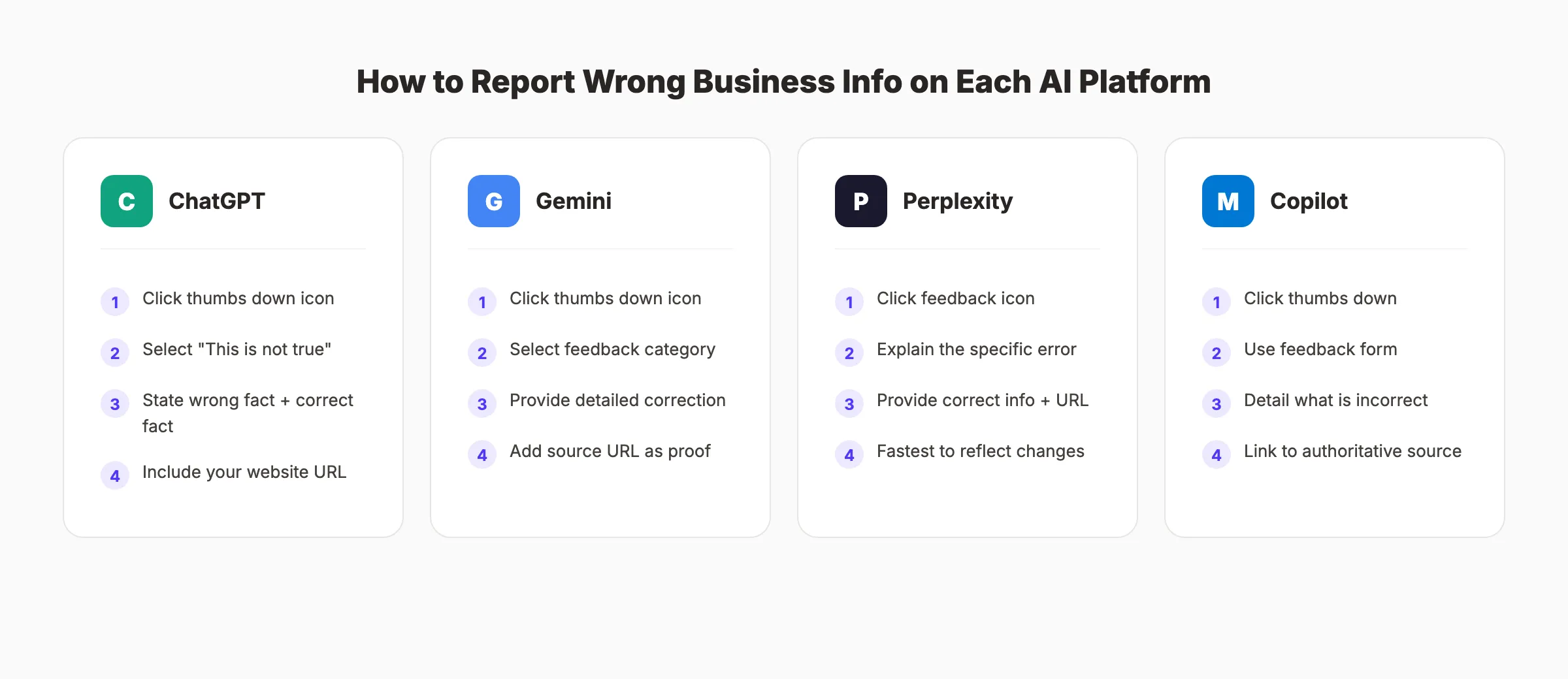
Step 6: Report Errors Directly to AI Platforms
After fixing the source information, report the specific errors to each AI platform. This accelerates the correction process.
ChatGPT (OpenAI)
- Generate the incorrect response
- Click the thumbs down icon on the response
- Select “This is not true” or “This is harmful or unsafe”
- In the feedback box, write: “This response contains incorrect information about [business name]. The AI states [wrong fact]. The correct information is [correct fact]. Source: [your website URL].”
- Be specific. Name the exact error. Provide the exact correction
Google Gemini
- Generate the incorrect response
- Click the thumbs down icon
- Select the relevant feedback category
- Provide detailed correction with your source URL
- For Google AI Overviews specifically, click “Feedback” below the overview box
Perplexity
- Generate the incorrect response
- Click the feedback icon
- Explain the error and provide the correct information
- Include your official website URL as the authoritative source
Microsoft Copilot
- Generate the incorrect response
- Use the feedback mechanism (thumbs down)
- Provide correction details
Why this step matters: Feedback reports do not produce instant fixes. AI models update on their own schedule. But reporting errors creates a signal that the platform uses during future model updates. Combine this with fixing the source data (Steps 3-5) for the fastest correction.
Pro tip: Be factual, not emotional. “Your AI says we are in Chicago. We are in Denver. Our website and Google Business Profile both confirm Denver.” works better than “Your AI is wrong about everything.”
Step 7: Set Up Ongoing Monitoring
Fixing AI errors is not a one-time project. New errors appear as AI models retrain, new content is published, and your business evolves. Build a monitoring system that catches problems early.
Monthly Monitoring Checklist
- Run your core brand queries on all 5 AI platforms (10 minutes)
- Check for new inaccuracies in pricing, location, services, and leadership
- Verify AI crawlers are still accessing your site (check server logs for GPTBot, ClaudeBot, PerplexityBot)
- Update your canonical fact sheet if any business details changed
- Confirm third-party profiles still match your fact sheet
Quarterly Deep Audit
- Test 50+ queries across all platforms (including competitor comparison queries)
- Check for new third-party content that references outdated information
- Review and update all schema markup to reflect current business data
- Track AI search visibility metrics (citation count, brand mention accuracy)
Trigger-Based Updates
Update all sources immediately when:
- You change pricing or plans
- You move offices or open new locations
- You launch new services or discontinue old ones
- Key leadership changes occur
- You rebrand or change your business name
Why this step matters: 83% of AI citations come from content updated within 12 months. If you fix errors once but never monitor, outdated information creeps back in. Monthly checks take 10 minutes and prevent weeks of wrong information reaching potential customers.
3,500+ blogs published. 92% average SEO score. See what Stacc can do for your site. Start for $1 →
Results: What to Expect
After completing these 7 steps, here is a realistic timeline:
- Immediately: Your website and profiles show correct information. Any human checking your details finds accurate data
- 2-4 weeks: Perplexity (which does real-time web search) begins showing corrected information
- 4-8 weeks: Google Gemini and AI Overviews start reflecting changes as Google reindexes your updated content
- 2-6 months: ChatGPT and Claude incorporate corrections during their model update cycles. These platforms update less frequently than real-time search tools
Some errors may persist longer depending on:
- How widely the wrong information was spread before correction
- How many third-party sources still contain outdated data
- The specific AI platform’s retraining schedule
Patience is required. But the compounding effect is powerful. Every source you fix makes the next AI update more likely to get your information right.
FAQ
Why does ChatGPT say wrong things about my business?
ChatGPT learns from web-crawled data during training. If outdated or incorrect information exists across your web profiles, press mentions, or directories, ChatGPT treats that data as fact. The AI does not verify against your website specifically. It synthesizes across all available sources and presents a confident answer even when the underlying data conflicts.
How long does it take for AI to correct wrong business information?
It depends on the platform. Perplexity uses real-time web search and may correct within days. Google Gemini and AI Overviews typically reflect changes within 4-8 weeks as they reindex. ChatGPT updates less frequently and may take 2-6 months to incorporate corrections from its training data updates.
Can I force ChatGPT to remove wrong information about my business?
No. You cannot force immediate removal. You can report errors using the feedback button, which creates a signal for future model updates. The most effective strategy is fixing the source data across your website, directories, and third-party profiles so the next model update pulls correct information.
What is the most important step to fix AI wrong business info?
Ensuring your website displays correct, crawlable information in plain HTML (Step 3) and implementing Organization schema markup (Step 5). Your website is the highest-authority source. Schema markup gives AI engines machine-readable facts. These two steps together address the root cause rather than treating symptoms.
How do I prevent AI from getting my business info wrong in the first place?
Maintain 100% consistency across every platform where your business appears. Use a canonical fact sheet (Step 2). Implement structured data (Step 5). Allow AI crawlers access to your site. Publish regular, accurate content that reinforces your correct business information. Our generative engine optimization guide covers the full strategy.
Does Stacc help with AI search accuracy for businesses?
Yes. Every article Stacc publishes includes structured data, accurate business information, and E-E-A-T signals that reinforce your brand’s correct details across Google and AI search engines. Consistent, accurate content publishing is the strongest long-term defense against AI misinformation. See pricing.
Wrong AI business information is not a problem you can ignore. As AI search grows and more customers use ChatGPT, Gemini, and Perplexity as their primary research tools, inaccurate AI answers will cost you leads and revenue. Fix the sources. Implement structured data. Monitor monthly. The businesses that control their AI narrative now will own their market position as AI search matures.
Related Tools & Resources
Free SEO Tools:
Best Lists:

Written by
Siddharth GangalSiddharth is the founder of theStacc and Arka360, and a graduate of IIT Mandi. He spent years watching great businesses lose organic traffic to competitors who simply published more. So he built a system to fix that. He writes about SEO, content at scale, and the tactics that actually move rankings.
30 SEO blog articles published every month
Keyword-optimized, scheduled, and live on your site. Automatically.
30-day trial · Cancel anytime
theStacc
Stop writing SEO content manually
30 blog articles, 30 GBP posts, and social media content. Published every month. Automatically.
Start Your $1 Trial$1 for 3 days · Cancel anytime