
12 Best Free Social Media Scheduling Tools (2026)
We tested 12 free social media scheduling tools and compared limits, features, and analytics. Find the best free scheduler for your needs. Updated March 2026.
Our Top Picks:
- Best overall: Buffer , 3 channels, 10 posts each, clean interface
- Best free analytics: Metricool , 50 posts/month with 3-month analytics
- Best for Instagram: Later. Visual grid planner built for creators
- Best unlimited option: Meta Business Suite. Unlimited posts for Facebook and Instagram
- Best for multi-platform: Zoho Social. No monthly post cap across major networks
How We Tested These Free Social Media Scheduling Tools
Most “best scheduling tools” lists rank products by affiliate commission. We tested each tool by connecting real accounts, scheduling real posts, and measuring what the free plan actually delivers.
We publish across 70+ industries and manage social content daily. We evaluated each tool on 5 criteria: free plan limits, platform support, analytics quality, ease of use, and whether the free tier is genuinely usable long-term.
Below is our honest breakdown of 12 free social media scheduling tools with actual post limits, platform counts, and the specific use case each one fits best.
What We Looked For
| Criteria | What We Measured |
|---|---|
| Free Plan Limits | Posts per month, channels allowed, scheduling horizon |
| Platform Support | Which social networks the free plan covers |
| Analytics | Whether free users get any performance data |
| Ease of Use | Time from signup to first scheduled post |
| Long-Term Viability | Whether the free plan works as a permanent option |
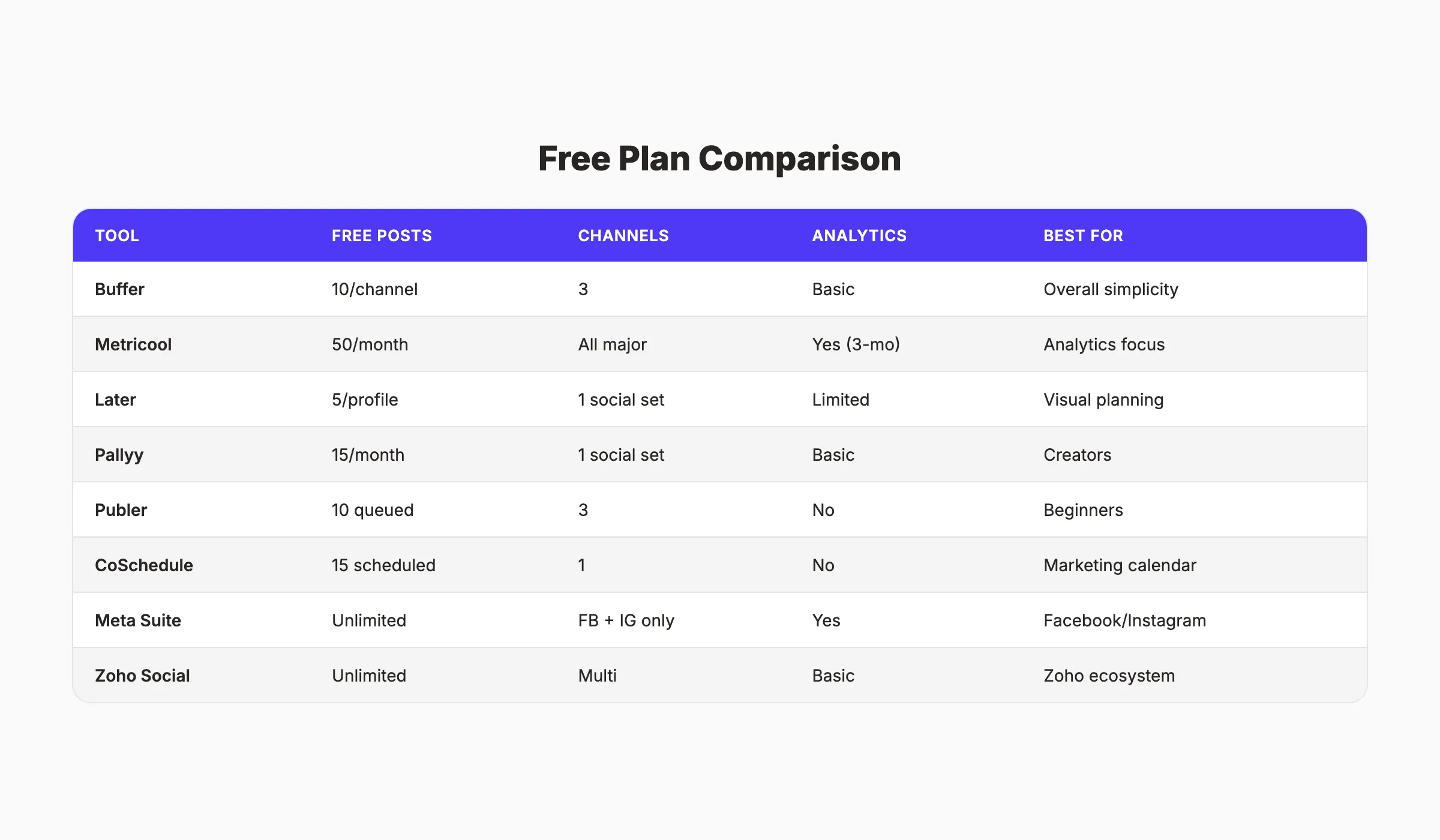
Free Social Media Scheduling Tools Compared
| Tool | Free Posts | Channels | Analytics | Best For |
|---|---|---|---|---|
| Buffer | 10/channel | 3 | Basic | Overall simplicity |
| Metricool | 50/month | All major | Yes (3 months) | Analytics + scheduling |
| Later | 5/profile | 1 social set | Limited | Instagram visual planning |
| Pallyy | 15/month | 1 social set | Basic | Creators and freelancers |
| Publer | 10 queued | 3 | No | Beginners |
| CoSchedule | 15 scheduled | 1 | No | Marketing calendar |
| Meta Business Suite | Unlimited | FB + IG | Yes | Facebook and Instagram |
| Zoho Social | Unlimited | Multi | Basic | Zoho ecosystem users |
| Postiz | Self-hosted | Unlimited | Yes | Open-source enthusiasts |
| Canva Planner | 1/channel/day | 8 | No | Design-first content |
| Pinterest Scheduler | 100 pins | Pinterest only | Yes | Pinterest marketing |
| TikTok Scheduler | Unlimited | TikTok only | Yes | TikTok creators |
1. Buffer. Best Free Social Media Scheduling Tool Overall
Buffer has been the default free scheduler since 2010. The interface is clean. The learning curve is near zero. And the free plan, while limited, covers the basics for solopreneurs and small businesses just starting out.
What It Does Well
Buffer’s strength is simplicity. You connect up to 3 social channels, write your posts in a single composer, and schedule them to a queue. The drag-and-drop calendar shows exactly when each post will publish. No clutter. No feature overload.
The free plan includes a landing page builder, basic analytics for published posts, and an AI assistant for caption suggestions. For someone managing a personal brand or a side project, Buffer’s free tier handles the job without paying anything.
Our Take: Buffer is where most people should start. The 10-post-per-channel limit forces you to be selective about what you publish. That constraint actually improves content quality for beginners.
Where It Falls Short
The 10-post limit per channel means you can only queue about 2 to 3 posts per week. If you publish daily on even one platform, you will hit the ceiling fast. No bulk scheduling on the free plan either.
Key Features
- Drag-and-drop content calendar
- AI assistant for caption writing
- Landing page builder (1 page on free plan)
- Basic post performance analytics
- Browser extension for quick sharing
Pricing
- Free: 3 channels, 10 posts per channel
- Essentials: $5/month per channel. Unlimited posts, engagement tools
- Team: $10/month per channel. Collaboration, approval workflows
Who Should Use Buffer
Strong fit:
- Solopreneurs managing 1 to 3 platforms
- Beginners who want the simplest setup
Probably not right for:
- Anyone posting more than 3 times per week per platform
2. Metricool. Best Free Analytics With Scheduling
Metricool offers the most generous free plan in this category. 50 posts per month across all major platforms, plus 3 months of analytics history. Most competitors lock analytics behind paid plans entirely.
What It Does Well
Metricool connects to Facebook, Instagram, Threads, X, LinkedIn, Pinterest, Google Business Profile, TikTok, YouTube, and Twitch. That is 10 platforms on the free plan. The analytics dashboard shows engagement, reach, and best posting times without upgrading.
The content calendar is clean and supports drag-and-drop rescheduling. Metricool also includes a competitor analysis feature on the free tier. You can track up to 1 competitor’s social performance alongside your own.
Our Take: If you need both scheduling and analytics without spending anything, Metricool is the clear winner. The 50-post monthly limit is 5 times Buffer’s effective capacity.
Where It Falls Short
The 3-month analytics history means your data disappears after 90 days. No bulk uploading. And the free plan only covers 1 brand, so agencies or multi-brand businesses need the paid tier immediately.
Key Features
- 50 posts/month scheduling across all platforms
- 3-month analytics with engagement data
- Best time to post recommendations
- Competitor tracking (1 competitor)
- Hashtag tracker for Instagram
Pricing
- Free: 1 brand, 50 posts/month, 3-month analytics
- Starter: $18/month , 200 posts, 6-month analytics, 5 competitors
- Advanced: $45/month. Unlimited posts, full analytics, reports
Who Should Use Metricool
Strong fit:
- Small businesses that want analytics without paying
- Multi-platform marketers on a tight budget
Probably not right for:
- Agencies managing multiple client brands
Your social media team. $49/month. Stacc publishes 30 social posts per month across 3 platforms. No scheduling. No writing. Just done. Start for $1 →
3. Later. Best Free Scheduler for Instagram
Later built its reputation on Instagram visual planning. The drag-and-drop grid preview shows exactly how your feed will look before you publish. For brands where Instagram aesthetics matter, that feature alone justifies choosing Later.
What It Does Well
The visual content calendar is the best in this category. You drag photos into a grid preview and rearrange them until the feed looks right. Later also includes a Linkin.bio page on the free plan. That turns your Instagram bio link into a mini landing page with clickable post links.
Later supports Instagram, Facebook, TikTok, Pinterest, LinkedIn, and X. The free plan gives you 1 social set (1 profile per platform) with 5 posts per profile per month.
Our Take: Later is the tool Instagram-first brands should start with. The visual planner saves time that other tools require you to spend imagining how posts will look together.
Where It Falls Short
5 posts per profile per month is restrictive. That is barely 1 post per week. The inbox (for managing comments and DMs) only covers Instagram, Facebook, and TikTok. No analytics on the free plan beyond basic post metrics.
Key Features
- Visual Instagram feed planner
- Linkin.bio landing page
- Media library with labels and notes
- Best time to post suggestions
- Multi-platform scheduling
Pricing
- Free: 1 social set, 5 posts/profile/month
- Starter: $18.75/month , 30 posts/profile, 1 social set
- Growth: $33.33/month , 150 posts, 3 social sets, analytics
Who Should Use Later
Strong fit:
- Instagram-focused brands and creators
- Anyone who cares about visual feed aesthetics
Probably not right for:
- High-volume publishers posting daily across platforms
4. Pallyy. Best Free Scheduler for Creators
Pallyy is designed for individual creators and freelancers who need a simple, visual-first scheduler. The free plan includes 15 posts per month and 1 social set covering Instagram, Facebook, X, LinkedIn, TikTok, Pinterest, and Google Business Profile.
What It Does Well
Pallyy’s interface is built around the content calendar. It is fast to load, easy to use, and focused on getting posts scheduled without extra steps. The Instagram grid planner is strong. Pallyy also includes basic bio link pages and a media library on the free tier.
The 15-post monthly limit sits in a useful middle ground. It is enough for roughly 3 to 4 posts per week on a single platform.
Our Take: Pallyy is underrated. The free plan is more usable than Later’s for someone who needs to post 3 or 4 times per week rather than once.
Where It Falls Short
The 1 social set limit means you pick one profile per platform. No team collaboration. No bulk scheduling. Analytics are basic at best.
Key Features
- Visual content calendar
- Instagram grid preview
- Bio link page builder
- Media library with search
- 15 posts/month free
Pricing
- Free: 1 social set, 15 posts/month
- Premium: $25/month per social set. Unlimited posts, analytics, team features
Who Should Use Pallyy
Strong fit:
- Solo creators and freelancers
- Instagram-focused brands on a budget
Probably not right for:
- Teams or agencies needing collaboration features
5. Publer. Best Free Scheduler for Beginners
Publer strips social media scheduling down to the basics. Connect 3 accounts, queue up to 10 posts per account, and publish. The free plan includes 25 draft slots and support for Facebook, Instagram, X, LinkedIn, Pinterest, TikTok, YouTube, and Google Business Profile.
What It Does Well
Publer’s strongest feature is its simplicity. The onboarding takes under 5 minutes. The post composer supports text, images, and video with platform-specific previews. You see exactly how each post will render on each network before scheduling.
Publer also includes a watermark tool, basic link shortening, and an RSS feed auto-poster on the free plan. These are features most competitors reserve for paid tiers.
Our Take: Publer is the fastest path from “I need to schedule posts” to actually scheduling posts. Zero learning curve.
Where It Falls Short
10 posts queued per account is a hard ceiling. Once your queue is full, you wait for posts to publish before adding more. No analytics. No team features. The AI writing assistant requires a paid plan.
Key Features
- 3 accounts, 10 posts queued per account
- 25 free drafts
- Platform-specific post previews
- RSS auto-posting
- Watermark tool for images
Pricing
- Free: 3 accounts, 10 posts queued, 25 drafts
- Professional: $12/month , 10 accounts, unlimited posts, analytics
- Business: $21/month. Team features, approval workflows
Who Should Use Publer
Strong fit:
- Complete beginners to social media scheduling
- Side-project owners who post infrequently
Probably not right for:
- Anyone posting daily or needing analytics
6. CoSchedule. Best Free Marketing Calendar
CoSchedule’s free tier is a marketing calendar first and a social scheduler second. You get 1 social profile and 15 scheduled messages. The real value is the calendar view that organizes all your marketing activities in one place.
What It Does Well
CoSchedule’s calendar shows blog posts, social messages, email campaigns, and tasks on a single timeline. For marketers who need to coordinate content across channels, this bird’s-eye view is genuinely useful. The drag-and-drop interface makes rescheduling fast.
The free plan also includes a headline analyzer (helpful for writing better blog headlines) and a basic task management system.
Our Take: CoSchedule is less of a social scheduler and more of a marketing planner that happens to schedule posts. If you already use a content calendar, this replaces it.
Where It Falls Short
1 social profile is extremely limited. 15 scheduled messages means you exhaust your capacity in 2 weeks of moderate posting. No analytics. No multi-platform publishing.
Key Features
- Full marketing calendar (not just social)
- Headline analyzer tool
- Task management and assignments
- Drag-and-drop rescheduling
- 15 scheduled social messages
Pricing
- Free: 1 social profile, 15 scheduled messages, marketing calendar
- Social Calendar: $19/month per user , 5 profiles, unlimited scheduling
- Content Calendar: $29/month per user. Full marketing suite
Who Should Use CoSchedule
Strong fit:
- Content marketers who need a planning calendar
- Teams coordinating blog and social publishing
Probably not right for:
- Anyone who needs more than 1 social platform scheduled
Stop writing. Start ranking. Stacc publishes 30 SEO articles per month for $99. Plus 30 social posts across 3 platforms for $49. Start for $1 →
7. Meta Business Suite. Best Free Scheduler for Facebook and Instagram
Meta Business Suite is Meta’s native scheduling tool. It is completely free with no post limits. If you only need to schedule content for Facebook and Instagram, there is no reason to pay for a third-party tool.
What It Does Well
Meta Business Suite offers unlimited scheduling for Facebook pages, Instagram business accounts, and Messenger. The content calendar supports posts, stories, and reels. You also get full analytics. Reach, engagement, follower growth, and audience demographics. All free.
The Planner view shows scheduled and published content on a monthly calendar. You can schedule posts up to 29 days in advance. Meta also provides AI-generated caption suggestions and optimal posting time recommendations.
Our Take: For Facebook and Instagram, Meta Business Suite is objectively the best free option. Unlimited posts. Full analytics. The only cost is that you are locked into Meta’s ecosystem.
Where It Falls Short
Meta Business Suite only covers Facebook and Instagram. No LinkedIn, X, Pinterest, TikTok, or YouTube. The interface can be slow to load. And Meta occasionally changes the UI without warning, which disrupts established workflows.
Key Features
- Unlimited scheduling for Facebook and Instagram
- Full analytics and audience insights
- Stories and Reels scheduling
- Unified inbox for messages and comments
- AI caption suggestions
Pricing
- Free: Unlimited. No paid tier exists
Who Should Use Meta Business Suite
Strong fit:
- Any business with Facebook and Instagram as primary channels
- Local businesses that rely on Google Business Profile and Facebook
Probably not right for:
- Brands that need to publish across 4+ platforms from one dashboard
8. Zoho Social. Best Free Multi-Platform Scheduler
Zoho Social’s free plan has no monthly post cap. You connect multiple platforms (Facebook, Instagram, LinkedIn, X, Google Business Profile) and schedule without hitting a wall. For businesses already in the Zoho ecosystem, the integration is a bonus.
What It Does Well
Zoho Social supports scheduling, monitoring, and basic analytics on the free plan. The SmartQ feature recommends optimal posting times based on your audience’s past engagement. The publishing calendar is clean and responsive.
The free tier integrates natively with Zoho CRM, Zoho Desk, and other Zoho products. For businesses running their operations on Zoho, adding social management costs nothing extra.
Our Take: Zoho Social is the best-kept secret in free scheduling. No post limits on the free plan is rare. The catch: you get 1 brand and 1 team member only.
Where It Falls Short
The free plan covers 1 brand and 1 user. No team collaboration. The analytics are basic compared to Metricool. And the interface feels more enterprise-oriented than creator-friendly.
Key Features
- No monthly post cap on free plan
- SmartQ optimal timing recommendations
- Multi-platform publishing (5+ networks)
- Zoho ecosystem integration
- Basic engagement analytics
Pricing
- Free: 1 brand, 1 user, no post cap
- Standard: $15/month , 11 channels, bulk scheduling
- Professional: $40/month. Custom reports, team workflows
Who Should Use Zoho Social
Strong fit:
- Businesses already using Zoho products
- Anyone who needs unlimited free posts across platforms
Probably not right for:
- Creators who want a visual-first, modern interface
9. Postiz. Best Free Open-Source Scheduler
Postiz is open-source social media scheduling software. You can self-host it on your own server at zero cost. No post limits. No brand limits. No feature restrictions. The trade-off: you need technical skills to set it up.
What It Does Well
Postiz supports scheduling to Instagram, Facebook, X, LinkedIn, TikTok, Pinterest, YouTube, Reddit, and Threads. The self-hosted version gives you full access to every feature including analytics, team collaboration, and AI caption generation.
For developers or businesses with technical teams, Postiz eliminates recurring subscription costs entirely. You own your data. You control the infrastructure.
Our Take: Postiz is the only tool on this list where “free” means truly free with no limits. The barrier is technical setup, not pricing.
Where It Falls Short
Self-hosting requires a server, domain, and basic DevOps knowledge. The hosted cloud version offers a 7-day trial but then requires a subscription. Documentation is good but assumes technical proficiency.
Key Features
- Full-featured self-hosted scheduling
- AI caption and content generation
- Team collaboration with roles
- Analytics dashboard
- All major platform integrations
Pricing
- Self-hosted: Free forever (open-source)
- Cloud hosted: $24/month after 7-day trial
Who Should Use Postiz
Strong fit:
- Technical teams and developers
- Businesses that want to avoid recurring SaaS fees
Probably not right for:
- Non-technical users who want a plug-and-play setup
10. Canva Content Planner. Best for Design-First Scheduling
Canva’s Content Planner lets you design social graphics and schedule them to platforms directly from the Canva editor. The free plan allows 1 scheduled post per channel per day across 8 supported platforms.
What It Does Well
The workflow is the differentiator. You design a graphic in Canva, write the caption, pick the platform, and schedule. No exporting. No re-uploading to a separate tool. For teams that already use Canva for design, the Content Planner removes a step from the process.
Canva supports scheduling to Instagram, Facebook, X, LinkedIn, Pinterest, TikTok, Tumblr, and Slack.
Our Take: If Canva is already your design tool, the Content Planner is a free bonus. But as a standalone scheduler, it is too limited for serious use.
Where It Falls Short
1 post per channel per day is a hard limit on the free plan. No analytics at all. No unified inbox. No bulk scheduling. The scheduling interface is buried inside the design tool rather than being a dedicated calendar.
Key Features
- Design-to-publish workflow inside Canva
- 8 platform integrations
- 1 post per channel per day (free)
- Basic content calendar view
Pricing
- Free: 1 post/channel/day (with free Canva account)
- Canva Pro: $12.99/month. Unlimited scheduling, Brand Kit, premium templates
Who Should Use Canva Content Planner
Strong fit:
- Teams already using Canva for graphic design
- Solo marketers who create visual content primarily
Probably not right for:
- Anyone who needs a dedicated scheduling workflow
11. Pinterest Native Scheduler. Best for Pinterest Marketing
Pinterest’s built-in scheduler lets you schedule up to 100 pins at a time, up to 30 days in advance. It is free for all Pinterest business accounts. No third-party tool required.
What It Does Well
Pinterest’s native scheduler integrates directly with your boards. You create a pin, pick the board, set the date and time, and schedule. Pinterest also provides its own analytics. Impressions, saves, clicks, and audience insights. All free.
The scheduling interface is simple. It handles standard pins, idea pins, and video pins. For businesses where Pinterest drives traffic, the native tool eliminates the need for an external scheduler entirely.
Our Take: If Pinterest is a primary traffic channel for your business, use the native scheduler. Third-party tools add a layer of complexity with no added value for a single platform.
Where It Falls Short
Pinterest only. No cross-platform scheduling. The 30-day advance scheduling window is shorter than most third-party tools. And you cannot schedule to specific time slots for different time zones without manual adjustment.
Key Features
- 100 pins scheduled at once
- 30-day advance scheduling window
- Built-in Pinterest analytics
- Standard, idea, and video pin support
Pricing
- Free: All features included with Pinterest business account
Who Should Use Pinterest Native Scheduler
Strong fit:
- E-commerce brands and bloggers who drive traffic from Pinterest
- Visual content creators in food, fashion, home, and DIY niches
Probably not right for:
- Brands that need to schedule across multiple platforms from one tool
12. TikTok Native Scheduler. Best for TikTok Creators
TikTok’s desktop web app includes built-in scheduling. You upload a video, add a caption and hashtags, and pick a future publish date. No cost. No limits beyond the 10-day scheduling horizon.
What It Does Well
TikTok’s native scheduler handles the basics. Upload a video from desktop, set the publish time, and the platform handles the rest. TikTok’s own analytics (available on all creator and business accounts) show views, likes, comments, shares, and audience demographics.
For creators who produce TikTok content natively and do not need cross-platform distribution, the built-in scheduler eliminates an extra tool.
Our Take: TikTok’s scheduler works. It is basic, but it does the job for creators who batch-produce TikTok content weekly.
Where It Falls Short
The 10-day scheduling horizon is the shortest on this list. You cannot schedule from the mobile app. No bulk upload. No content calendar view. And no caption suggestions or AI features.
Key Features
- Upload and schedule videos from desktop
- TikTok analytics included
- No post limits
- Supports all TikTok video formats
Pricing
- Free: All features included with TikTok business or creator account
Who Should Use TikTok Native Scheduler
Strong fit:
- TikTok-first creators who batch-produce content
- Brands experimenting with TikTok before investing in tools
Probably not right for:
- Anyone managing TikTok alongside 3+ other platforms
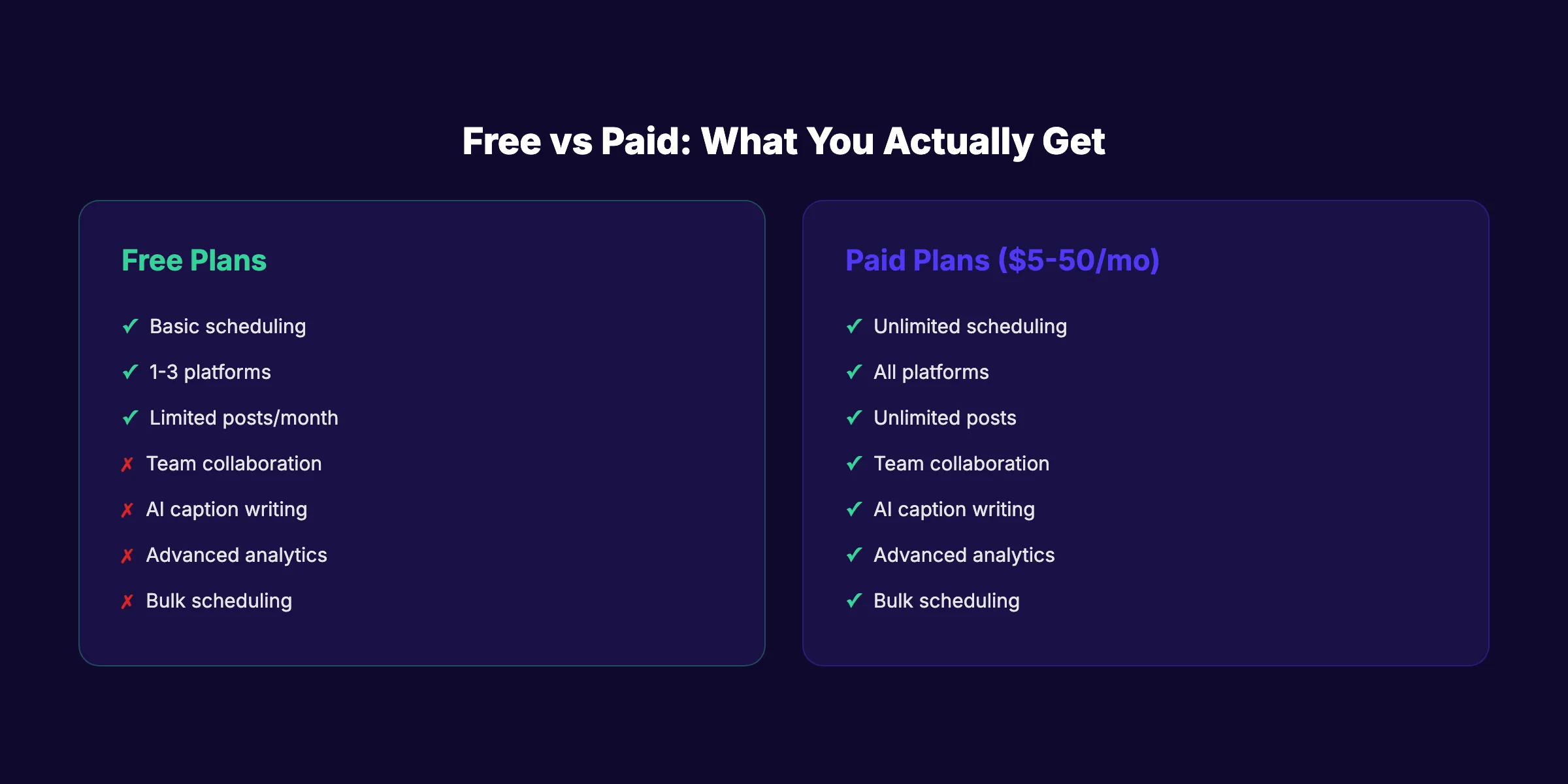
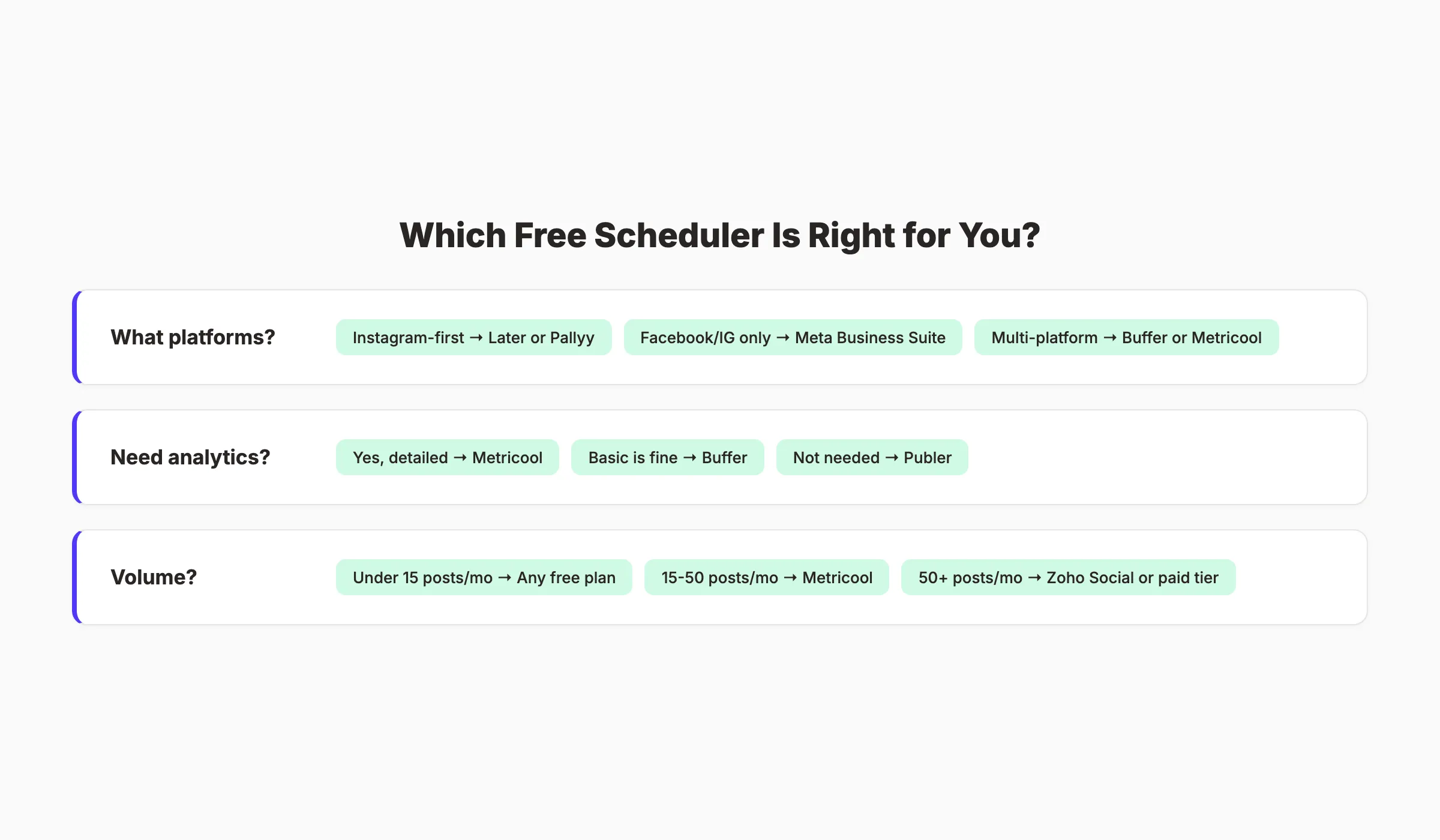
Which Free Scheduler Is Right for You?
What platforms do you need?
- Facebook and Instagram only → Meta Business Suite (unlimited, free)
- Instagram-first with visual planning → Later or Pallyy
- Multi-platform (4+ networks) → Buffer, Metricool, or Zoho Social
Do you need analytics?
- Yes, detailed → Metricool (3-month history on free plan)
- Basic metrics are fine → Buffer or Zoho Social
- Analytics not needed → Publer or CoSchedule
How often do you post?
- Under 15 posts/month → Any free plan on this list works
- 15 to 50 posts/month → Metricool (50/month) or Zoho Social (unlimited)
- 50+ posts/month → Zoho Social or upgrade to a paid tier
Want it done for you instead?
- Stacc publishes 30 social posts per month across 3 platforms for $49/month. No scheduling. No content creation. No managing a tool. Just social media on autopilot.
What Free Plans Actually Cost You
Free social media scheduling tools save money. They cost time. Here is the trade-off.
| Approach | Monthly Cost | Posts | Time Required |
|---|---|---|---|
| Free scheduling tool | $0 | 10-50 | 8-15 hrs/month |
| Paid scheduling tool | $5-50/mo | Unlimited | 5-10 hrs/month |
| Freelance social manager | $500-2,000/mo | 30-90 | 2-5 hrs/month |
| Social media agency | $1,500-5,000/mo | 60-120 | 1-3 hrs/month |
| Stacc Social | $49/mo | 30 posts, 3 platforms | 0 hrs/month |
Free tools work when your time is less expensive than the tool subscription. The moment you spend more than 2 hours per month wrestling with scheduling limits, a paid plan or a done-for-you service like Stacc saves money.
3,500+ blogs published. 92% average SEO score. Stacc handles your blog content, social media, and local SEO. All on autopilot. Start for $1 →
FAQ
What is the best free social media scheduling tool?
Buffer is the best overall free social media scheduling tool for its simplicity and clean interface. Metricool is the best free option if you need analytics. Meta Business Suite is the best free tool for Facebook and Instagram specifically, with unlimited posts and full analytics at no cost.
Are free social media scheduling tools worth it?
Yes, for individuals and small businesses posting under 50 times per month. Free plans from Buffer (10 posts/channel), Metricool (50 posts/month), and Zoho Social (unlimited posts) handle basic scheduling needs. The limits become a problem only when you scale beyond 3 to 4 posts per week per platform.
How many social media posts should I schedule per week?
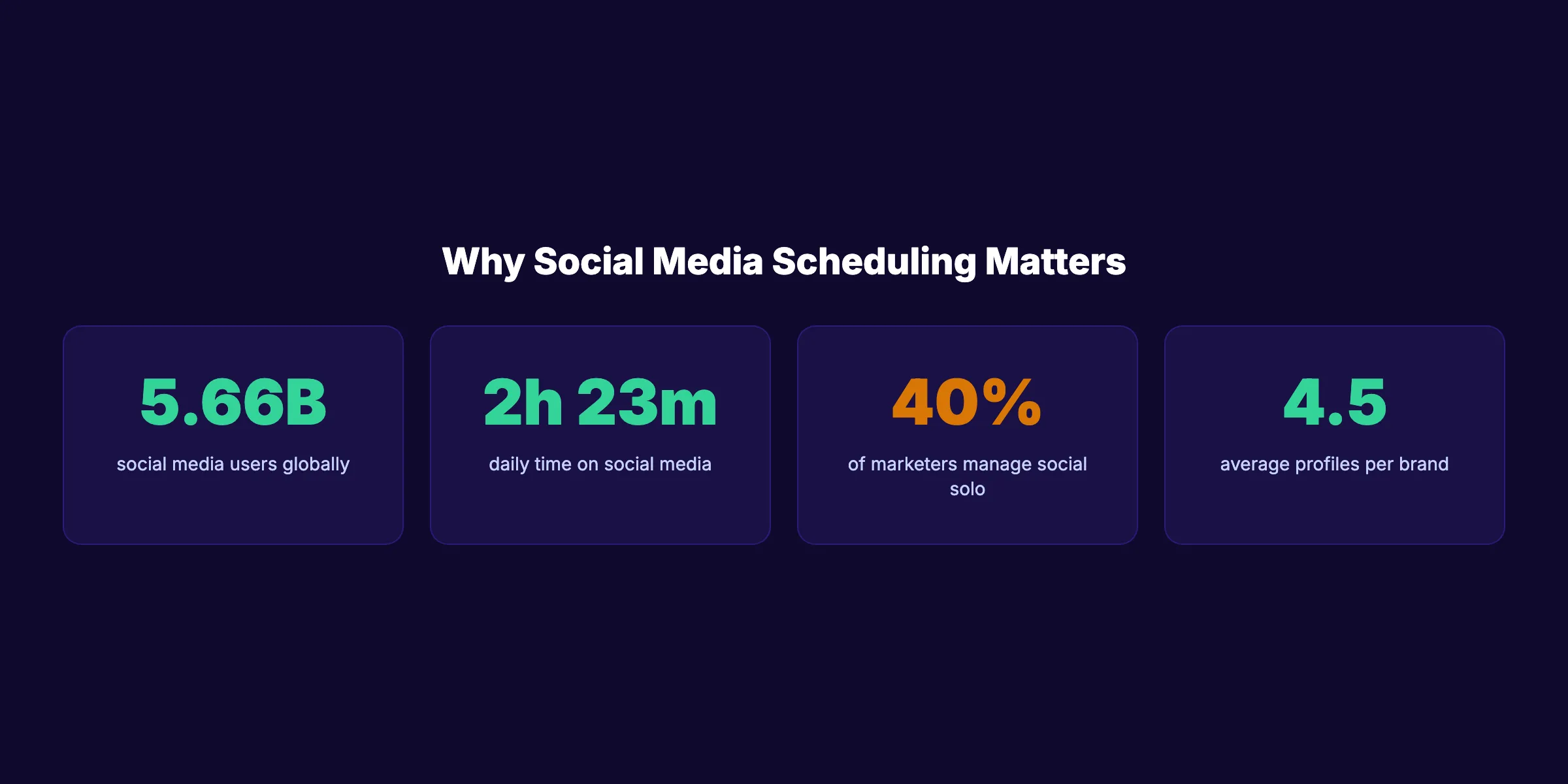
Research from Hootsuite suggests 3 to 5 posts per week on most platforms for consistent engagement. The average brand manages 4.5 social profiles. At 4 posts per week across 4 platforms, you need roughly 64 posts per month. Most free plans cannot handle that volume.
Can I schedule posts on Instagram for free?
Yes. Meta Business Suite schedules unlimited Instagram posts for free. Buffer, Later, Metricool, and Pallyy also support Instagram on their free plans with varying post limits. Later is the best free option specifically for Instagram because of its visual grid planner.
What is the difference between a social media scheduler and a social media manager?
A scheduler publishes posts at preset times. A manager handles scheduling, analytics, inbox management, team collaboration, and reporting. Tools like Metricool and Zoho Social blur this line on free plans by including analytics alongside scheduling. A done-for-you service like Stacc goes further and handles content creation, publishing, and optimization without you managing any tool.
Does Stacc offer social media scheduling?
Stacc does not offer a scheduling tool. Stacc is a done-for-you social media service that creates and publishes 30 posts per month across 3 platforms (Instagram, LinkedIn, X, and Facebook) for $49/month. You do not write, schedule, or manage anything. Posts are created, optimized, and published automatically.
Free social media scheduling tools solve a real problem for businesses with more time than budget. Start with Buffer or Metricool for the most usable free plans. Use native schedulers (Meta Business Suite, Pinterest, TikTok) for single-platform needs. And when the time cost of managing tools exceeds $49 per month, consider a done-for-you service that handles social media, blog SEO, and content strategy in one stack.

Written by
Siddharth GangalSiddharth is the founder of theStacc and Arka360, and a graduate of IIT Mandi. He spent years watching great businesses lose organic traffic to competitors who simply published more. So he built a system to fix that. He writes about SEO, content at scale, and the tactics that actually move rankings.
Stop researching. Start ranking.
30 SEO blog articles published to your site every month. No writers, no workflow, no waiting.
30-day trial · Cancel anytime
theStacc
Stop writing SEO content manually
30 blog articles, 30 GBP posts, and social media content. Published every month. Automatically.
Start Your $1 Trial$1 for 3 days · Cancel anytime