Which free scheduler fits your calendar?
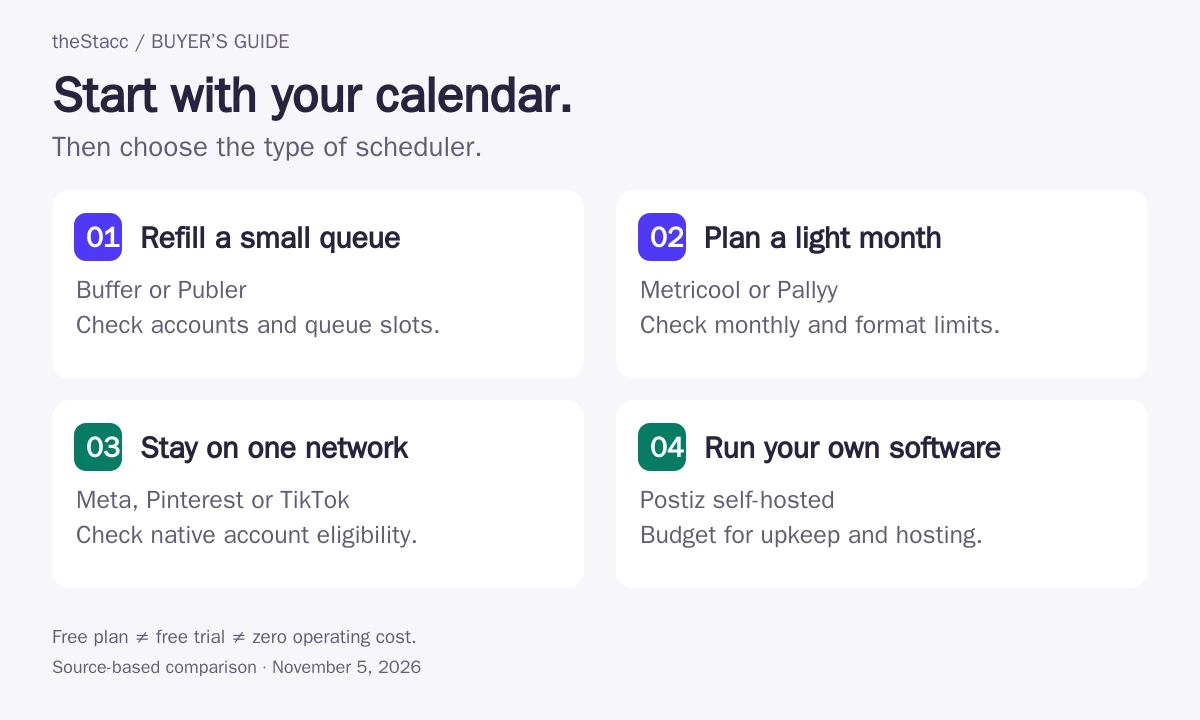
Compare Buffer and Publer. Check account eligibility and how far ahead you need to queue posts.
Look at Metricool. Its monthly allowance and excluded networks matter more than a long feature list.
Consider Pallyy if its image-only free plan matches the content you actually publish.
Need the posts written as well as scheduled? theStacc Social Media is a paid option that plans and writes posts for Instagram, Facebook, LinkedIn and X; it is not counted in this free list.
Free social media scheduling tools compared
These are use-case recommendations, not a performance ranking. The last option is self-hosted software: it has operating costs even though the software is open source.
| Tool and category | Account scope | Scheduling limit | Important restriction |
|---|---|---|---|
| Buffer Hosted free plan | 3 channels | 10 queued posts per channel; refill as posts publish | One user; check format support for each channel |
| Metricool Hosted free plan | 1 brand | 20 posts per month | LinkedIn and X excluded; 30 days of analytics |
| Publer Hosted free plan | 3 social accounts | 10 queued posts per account | X excluded; published history retained for 24 hours |
| Pallyy Hosted free plan | 1 social set | 15 scheduled posts per month | Image posts only on Free |
| Meta Business Suite Native tool | Your connected Facebook and Instagram business assets | Scheduling availability depends on account and format | Does not replace a cross-network scheduler |
| Pinterest native scheduler Native tool | Pinterest business account | 10 future Pins; up to 30 days ahead | Pinterest only; create scheduled Pins individually |
| TikTok native scheduler Native tool | Business account for the documented desktop workflow | Documented window: 15 minutes to 10 days ahead | Confirm eligibility and controls in your current interface |
| Postiz self-hosted Self-hosted open source | Depends on configured integrations | Your deployment and network API limits apply | Hosting, maintenance and API access may cost money |
How this comparison was researched
This guide uses vendor pricing pages, documentation and official walkthroughs. The criteria are account coverage, scheduling limits, supported content formats, operating effort and upgrade requirements. It does not report a hands-on benchmark or measured performance scores.
Publisher disclosure: theStacc sells social media software and managed services. Our paid option appears separately below. This update used automated editorial assistance; no individual reviewer approval or customer testimonial is claimed. See our editorial standards.
The eight options: who each one suits
1. Buffer
Good fit: A straightforward queue for a few channels
Buffer is a useful starting point when you already have your captions and images ready. Its free plan connects three channels and holds ten scheduled posts per channel. That is a queue size, not a ten-post monthly allowance. As a post goes live, you can add another.
Choose it for a small set of accounts you can refill regularly. If you prepare a whole campaign in one sitting, count how many posts need to sit in the queue at the same time. A monthly calendar can be modest overall and still exceed a queue limit on the day you upload it.
Before you commit: Connect your exact account type and try the formats you use: an image, a carousel or a video. Do not assume every network supports identical publishing features.
2. Metricool
Good fit: Light publishing with recent analytics
Metricool combines a monthly publishing allowance with recent performance data. The free plan covers one brand, twenty posts a month and thirty days of analytics. LinkedIn and X are excluded. It is a sensible shortlist option when you want publishing and reporting in the same place and your monthly output is small.
Choose it after checking your total planned output, including posts adapted for several networks. A brand allowance is not the same as an unlimited number of accounts. Confirm the plan's counting rules before moving a busy calendar across.
Before you commit: If LinkedIn is central to your business, the free plan is not a fit for that channel. If you need long-term reports, check the available history and export options.
3. Publer
Good fit: A refillable queue with saved drafts
Publer's free plan supports three social accounts, ten scheduled posts per account and twenty-five saved drafts. A slot opens when a queued post is published or deleted. X is excluded from the free plan, so it should not be recommended as a free X scheduler.
Shortlist it when you want to keep ideas in drafts and move them into a small queue. Its free published-post history lasts only twenty-four hours. Keep your own content record if you need to look back at campaign copy or show a client what was published.
Before you commit: Count accounts individually: a Facebook Page and an Instagram account use separate slots. Check the current plan for analytics and approval features before promising a client report.
4. Pallyy
Good fit: An image-led calendar for one brand
Pallyy's free plan is narrower than its paid product: one social set, fifteen scheduled posts a month and image posts only. That can suit a business publishing a small selection of photos or designed graphics. It is not a free video-scheduling recommendation.
Choose it when images carry your message and the monthly allowance covers your calendar. A social set groups the accounts for one brand; it is different from buying several client workspaces. Check what a set includes for your particular networks.
Before you commit: If Reels or other video formats are part of every campaign, test the required paid plan instead of building the workflow around the free tier.
5. Meta Business Suite
Good fit: Facebook and Instagram publishing
If your audience is on Facebook and Instagram, start by checking Meta Business Suite. Meta's own walkthrough shows how to schedule feed posts and stories without switching accounts. You may not need a separate scheduling subscription for that job.
The advantage is keeping the work inside Meta's tools. The trade-off is that your LinkedIn, Pinterest or other publishing still needs a separate workflow. Check that you have the correct Page permissions and that the Instagram account is connected before preparing a batch.
Before you commit: Available formats and scheduling windows can differ by account and interface. This comparison does not claim unlimited posts or a universal advance-scheduling window.
6. Pinterest native scheduler
Good fit: A small queue of standard Pins
Pinterest's native scheduler lets a business account keep up to ten Pins scheduled for the future, up to thirty days ahead. That is a useful fit for a small Pinterest calendar. The published limit is ten future Pins, not one hundred.
Use it when you are happy to manage Pinterest separately. Pinterest says you can edit a scheduled Pin's date, title, board, description and link, but not its image or video. Prepare the final asset before scheduling and check the destination link.
Before you commit: A large catalogue or several campaigns may outgrow the queue even when the calendar window is long enough. Count pending Pins, not just the number you publish each month.
Pinterest native scheduler: official source and current terms
7. TikTok native scheduler
Good fit: A short video calendar on TikTok
TikTok's published desktop scheduler guide describes a window from fifteen minutes to ten days ahead and requires a Business Account for that workflow. It provides a starting point for planning videos without a separate cross-network scheduling subscription.
Check the controls in your account before preparing a long batch. This published guide describes a particular workflow; it is not a promise that every TikTok account or newer interface has identical limits. Pick a tool based on the video formats and features you actually need.
Before you commit: Do not assume native scheduling gets preferential reach. This guide has no controlled evidence that one publishing method produces better distribution than another.
8. Postiz self-hosted
Good fit: Teams that can operate their own software
Postiz offers self-hosted software under the AGPL-3.0 licence. That makes it a different proposition from a hosted free plan. You run the service and handle its infrastructure, updates, credentials and backups. Postiz Cloud is a separate hosted subscription.
Consider it if someone on your team can maintain the deployment and configure the required social integrations. Open-source access does not make the server, support time or third-party API access free. A nontechnical solo operator may find a limited hosted plan easier to keep running.
Before you commit: Verify the current licence, platform setup steps and external API costs. The old description of Postiz as MIT-licensed with unlimited free channels was not accurate.
Queue limits and monthly post limits mean different things
A queue is the set of posts waiting to go live. A monthly allowance counts usage during a month. Comparing those numbers as if they measure the same thing leads to the wrong purchase.
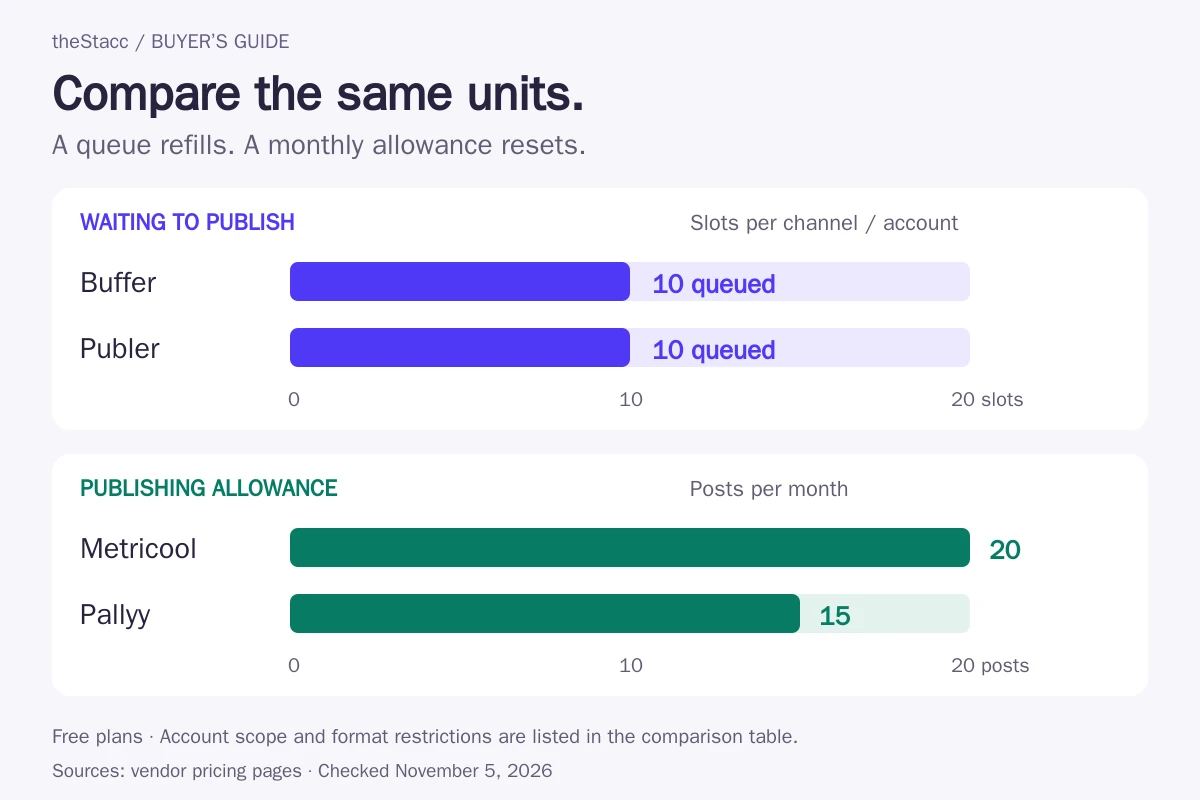
Worked example: suppose you plan three posts a week for one channel across four weeks. That is twelve posts. A ten-slot queue cannot hold all twelve on day one, but you can add the last two after earlier posts publish. A fifteen-post monthly allowance covers those twelve posts if they count as twelve under the plan. Posting each item to more than one network may change the usage total.
The example explains capacity, not recommended posting frequency. Your calendar should follow what your audience needs and what you can produce well.
What about Later, Canva, CoSchedule and Zoho Social?
These names often appear in free-tool lists. Check the specific entitlement before treating any of them as an ongoing free scheduler.
| Product | What to check |
|---|---|
| Later | The current pricing page presents paid plans and a trial. An ongoing free scheduling entitlement for new users was not verified; old or legacy allowances should not be assumed. |
| Canva Content Planner | Canva lists scheduling for eligible Pro, Business, Education and Nonprofits roles. A standard free design account does not establish scheduling access. |
| CoSchedule | The current offer describes paid plans with a trial. A permanent free calendar with the old two-profile scheduling allowance was not verified. |
| Zoho Social | The free edition describes publishing and recent performance. Confirm advance-scheduling entitlement in the plan table or your account; a paid-plan testimonial is not evidence of a free feature. |
A practical checklist before moving your posts
- List each account. Include the network, account type and owner. Two profiles on the same network may use two slots.
- Write a real calendar. Count both monthly output and the largest queue you need to upload at once.
- Try your actual formats. Test an image, video or carousel as appropriate. Check whether publication is automatic or needs a phone notification.
- Check editing and recovery. Confirm how to correct a scheduled post, stop a campaign and reconnect an expired account.
- Check collaboration. A solo plan may not include approvals, separate logins or client access.
- Keep an export or source calendar. Preserve captions, media and destination links outside the scheduler.
When a free scheduler stops being good value
Upgrade when a specific limit interrupts work you need to do: more accounts, longer queues, video publishing, approvals or reporting history. Identify that requirement before paying. A larger feature list will not fix a calendar that nobody has time to fill.
Track the work for one publishing cycle: preparing assets, loading posts, handling failures and reporting. Compare the subscription with the work it actually removes. There is no measured time-saving claim in this guide, and a scheduling tool does not automatically supply a content strategy.
When the missing piece is content, not scheduling
If you already have useful photos, captions and offers, a free scheduler may be enough. If those assets never get created, compare content production or a managed service instead of buying a bigger queue.
Our paid alternative: theStacc offers Social Media software and separate managed services. Confirm the channels, review process, output and current pricing for the option you choose. It is not counted as a free scheduling tool.
Start free → (free for 3 days, no card needed) to explore the product, or Book a demo → to discuss your workflow. Paid service terms are shown separately.
Choose the smallest workflow that covers your needs
Start with the networks and formats you already use. Pick a refillable queue if you can load posts regularly, a monthly allowance if it comfortably covers your calendar, or native scheduling if one network does the job. Self-hosting makes sense when you can operate the software. Check the current plan again before migrating a live campaign.
Free social media scheduler questions
What is the best free social media scheduler?
For a small set of channels, start by comparing Buffer and Publer: both offer refillable queues, while Publer excludes X on its free plan. Metricool suits a lighter monthly calendar with recent analytics. Choose by the accounts, formats and queue size you need; there is no single winner for every business.
Are ten queued posts the same as ten posts per month?
No. A queue cap limits the posts waiting to publish at one time. When a post leaves the queue, its slot becomes available again. A monthly allowance limits activity during the billing or calendar period. Buffer and Publer describe queue caps; Metricool and Pallyy publish monthly free-plan allowances.
Can I schedule Facebook and Instagram posts without a paid tool?
Check Meta Business Suite first. Meta documents scheduling feed posts and stories for Facebook and Instagram. Your account permissions, connected assets and post format affect the available controls. If you also need other networks in the same calendar, compare the hosted free plans above.
Is Canva Content Planner free?
A standard Canva Free account is not the same as access to scheduled publishing. Canva lists scheduling for eligible Pro, Business, Education and Nonprofits roles. Check your account entitlement before relying on Content Planner; creating a design for free does not establish that scheduling it is included.
Does Later still have a free scheduling plan?
The current public pricing page presents paid plans and a trial. This guide did not verify an ongoing free scheduling plan for new users, so Later is not counted in the free shortlist. Check the terms inside your account if you have legacy access.
What should I use to schedule LinkedIn or X for free?
Check the exact network and account type on the selected plan. Metricool excludes both LinkedIn and X from Free, and Publer excludes X. Do not infer free-plan support from a vendor homepage listing every network its paid product supports. Confirm the connection before moving your calendar.
Is a self-hosted social scheduler completely free?
The software licence may have no purchase price, but hosting, maintenance and network API access can still cost money. Postiz self-hosting requires someone to run the service and keep integrations working. Compare that operating work with the limits of a hosted free plan.
Sources and update notes
Each option links to its primary source. Product facts were checked on November 5, 2026; the native TikTok workflow is explicitly tied to its published guide. Meta's public product page required login during this review, so the scheduling description uses Meta's official walkthrough and makes no numerical limit claim.
This revision corrects the earlier Metricool, Publer, Pinterest, Canva and Postiz descriptions, separates paid and uncertain free entitlements, and removes unsupported testing and testimonial language. Plan details can change; the linked vendor pages are the place to check before subscribing.
Related reading: Instagram scheduling tools, social tools for local businesses and Google Business Profile posting tools.