
What Is Headless WordPress? Complete Guide
Headless WordPress separates content from display for faster, more secure sites. Learn architecture, SEO trade-offs, and setup steps. Updated 2026.
WordPress powers 43% of all websites. Most run the traditional way: one system handles content storage and page display together. Headless WordPress breaks that model. It keeps WordPress as the content engine but replaces the frontend with a separate application built on modern JavaScript frameworks.
The result is faster page loads, stronger security, and total frontend freedom. The cost is complexity. You need developers. SEO requires manual implementation. Hosting gets more expensive.
We publish 3,500+ blogs across 70+ industries and push content to WordPress sites through the REST API every day. This guide covers everything we know about headless WordPress, from architecture to SEO trade-offs to real implementation decisions.
In this guide, you will learn:
- How headless WordPress architecture separates backend from frontend
- The 3 API options that connect WordPress to a custom frontend
- SEO challenges unique to headless setups and how to solve each one
- When headless WordPress makes sense and when traditional WordPress wins
- Step-by-step setup with Next.js, Astro, or Gatsby
- The 7 mistakes that break headless WordPress SEO
What Is Headless WordPress?
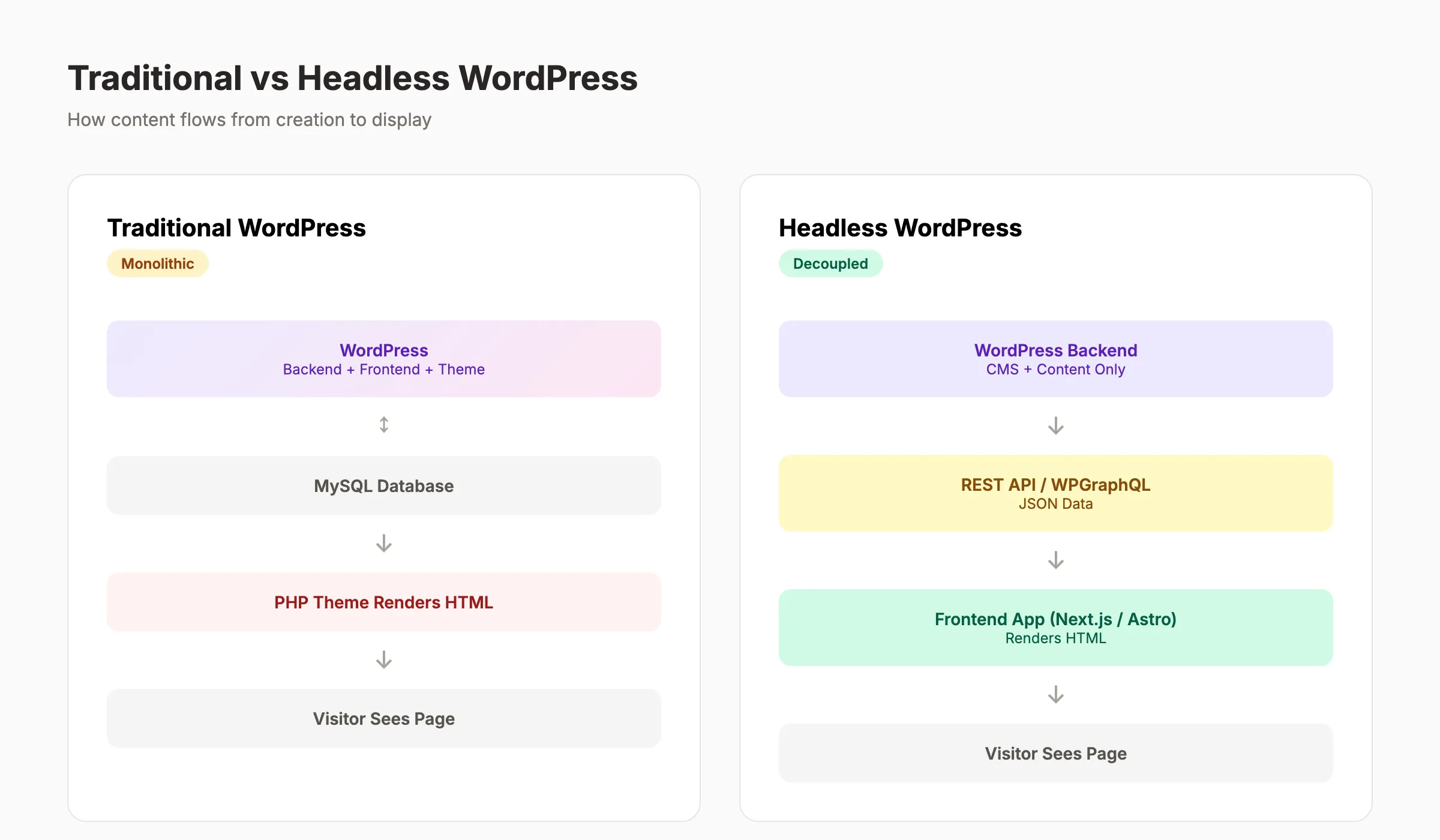
Headless WordPress is a configuration where WordPress serves only as a backend content management system. The frontend that visitors see is a separate application. WordPress and the frontend communicate through an API.
In traditional WordPress, the system is monolithic. You write a post. WordPress stores it in the database, applies your theme, and renders the page for visitors. Backend and frontend are one unit.
In headless WordPress, you write the post in the same WordPress editor. But WordPress does not display it. A separate frontend application requests the content through the WordPress REST API or the WPGraphQL plugin. The frontend receives raw JSON data and renders it with its own templates.
The Kitchen Analogy
Traditional WordPress is both the kitchen and the dining room. It cooks the food and serves it at the same table. Headless WordPress is a delivery-only kitchen. It prepares the content. A completely separate storefront serves it to customers.
Key Terminology
| Term | Definition |
|---|---|
| Headless CMS | Any CMS that delivers content through an API without a built-in frontend |
| Decoupled | Architecture where backend and frontend are separate but can still communicate |
| Monolithic | Traditional setup where backend and frontend are one system |
| REST API | WordPress built-in API that returns content as JSON |
| WPGraphQL | Plugin that adds a GraphQL endpoint to WordPress |
| SSR | Server-side rendering. The server generates HTML before sending it to the browser |
| SSG | Static site generation. Pages are pre-built as HTML files at build time |
The critical distinction: headless WordPress keeps the familiar WordPress editor for content creation. Authors, editors, and content managers use the same dashboard they already know. Only the display layer changes.
How Headless WordPress Architecture Works
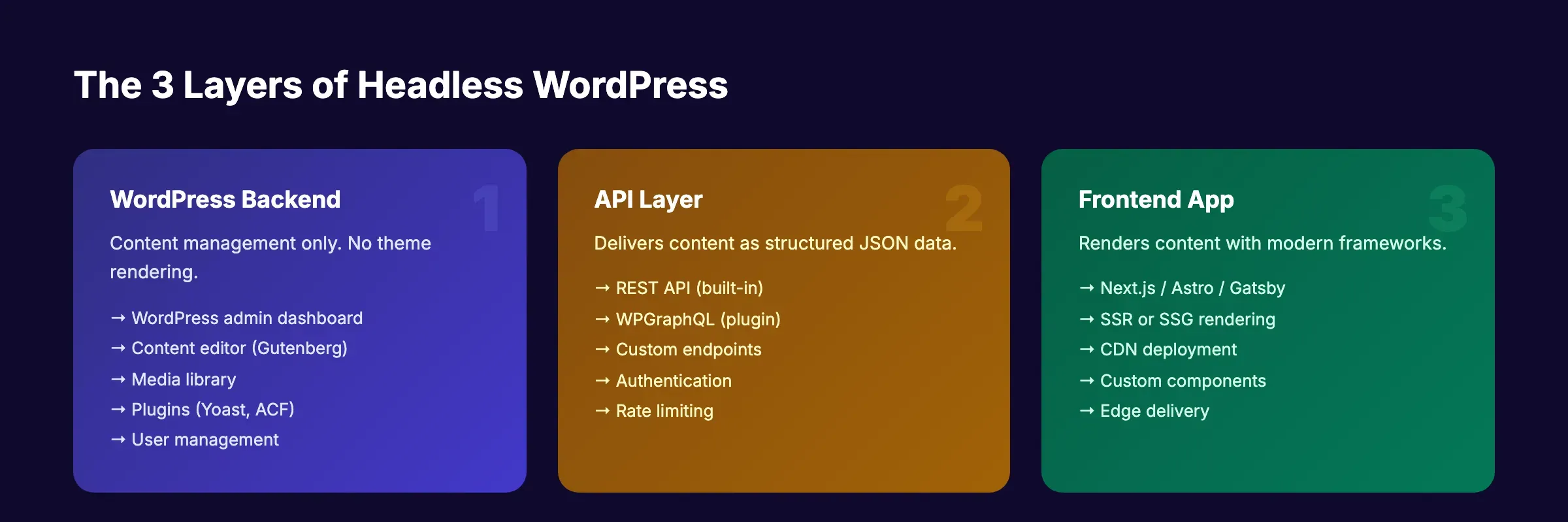
The architecture has 3 distinct layers. Each operates independently. Understanding how they connect is essential before choosing this approach.
Layer 1: WordPress Backend
WordPress runs on a server as a standard installation. Authors create posts, upload media, manage taxonomies, and organize content through the admin dashboard. The experience is identical to traditional WordPress SEO setups.
Plugins still work on the backend. Yoast SEO generates metadata. Advanced Custom Fields (ACF) creates custom content structures. WPGraphQL adds a query endpoint. The difference: no active WordPress theme renders public-facing pages.
The WordPress backend lives on its own domain or subdomain. Common patterns include cms.yoursite.com or admin.yoursite.com. Visitors never see it.
Layer 2: The API
Content moves from WordPress to the frontend through an API. WordPress offers 2 native options, plus a third via plugin.
| API | How It Works | Best For |
|---|---|---|
| REST API | Built into WordPress core. Returns JSON for posts, pages, media, and custom types | Simple projects. Broad compatibility. No plugins needed |
| WPGraphQL | Plugin that adds a GraphQL endpoint. Fetch only the exact fields you need | Complex sites. Reduces data transfer. Faster queries |
| REST API + ACF | Extends REST responses with custom field data from Advanced Custom Fields | Sites with rich custom content models |
WPGraphQL 2.x is the preferred choice for most headless builds in 2026. It reduces over-fetching, supports nested queries, and integrates with frameworks like Next.js through libraries like Faust.js.
The REST API remains the simpler starting point. It requires zero plugins and works immediately after WordPress installation. For sites with fewer than 50 custom fields per post type, REST API performance is comparable to GraphQL.
Layer 3: The Frontend Application
A separate application built with a JavaScript framework fetches content from the API, applies styling and layout, and serves final HTML to visitors.
This is where headless WordPress gets powerful. The frontend team uses modern tools. No PHP. No WordPress theme constraints. Full control over every line of HTML, CSS, and JavaScript.
| Framework | Rendering | Performance | WordPress Integration |
|---|---|---|---|
| Next.js | SSR + SSG + ISR | Excellent | Faust.js, native fetch |
| Astro | Static-first, zero JS default | Best in class | REST/GraphQL fetch |
| Gatsby | SSG at build time | Very good | gatsby-source-wordpress |
| Nuxt | SSR + SSG (Vue-based) | Excellent | REST/GraphQL fetch |
| SvelteKit | SSR + SSG | Excellent | REST/GraphQL fetch |
Next.js dominates the headless WordPress ecosystem. Its combination of server-side rendering, static generation, and incremental static regeneration (ISR) handles most use cases. Astro is gaining ground for content-heavy sites where page speed matters most.
Your SEO team. $99 per month. Stacc publishes 30 optimized articles to your WordPress site via REST API. Traditional or headless, the content arrives automatically. Start for $1 →
Why Headless WordPress Matters in 2026
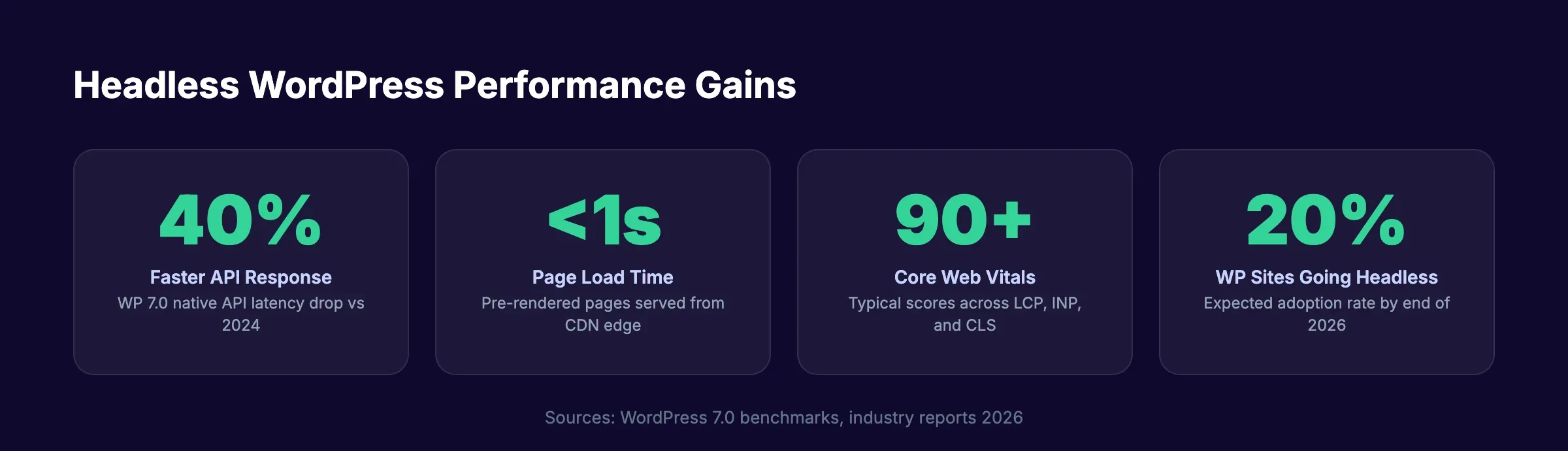
20% of WordPress sites are expected to run headless by the end of 2026. That is up from single digits in 2023. 3 forces are driving this shift.
Performance That Impacts Rankings
Native API response latency dropped 40% compared to 2024 benchmarks. WordPress 7.0 added built-in response compression and conditional GET support. The frontend gains compound on top of that.
Pre-rendered headless sites eliminate PHP processing on every page request. No database queries per visitor. No theme overhead. Pages load from a CDN edge node closest to the user.
The SEO impact is direct. Google uses Core Web Vitals as a ranking signal. Improving those metrics directly affects your page speed scores. Headless WordPress sites routinely score 90+ on all 3 metrics: Largest Contentful Paint, Interaction to Next Paint, and Cumulative Layout Shift.
Multi-Platform Content Delivery
A headless WordPress backend serves content to a website, a mobile app, an email system, a digital kiosk, and a voice assistant. One content source. 5 outputs. Traditional WordPress can only serve content through its PHP theme system.
For ecommerce brands managing product descriptions across web, mobile, and in-store displays, headless WordPress eliminates duplicate content workflows.
Frontend Freedom
React, Next.js, Vue, Astro, Svelte. Headless WordPress lets developers use whatever framework fits the project. No more fighting WordPress theme limitations. No more PHP template files. The frontend team builds with modern tools. The content team uses the WordPress editor they already know.
Companies like TechCrunch, The New Yorker, Disney, and Microsoft run headless WordPress in production. This is not experimental technology. It is the standard for high-performance WordPress development.
Pros and Cons of Headless WordPress
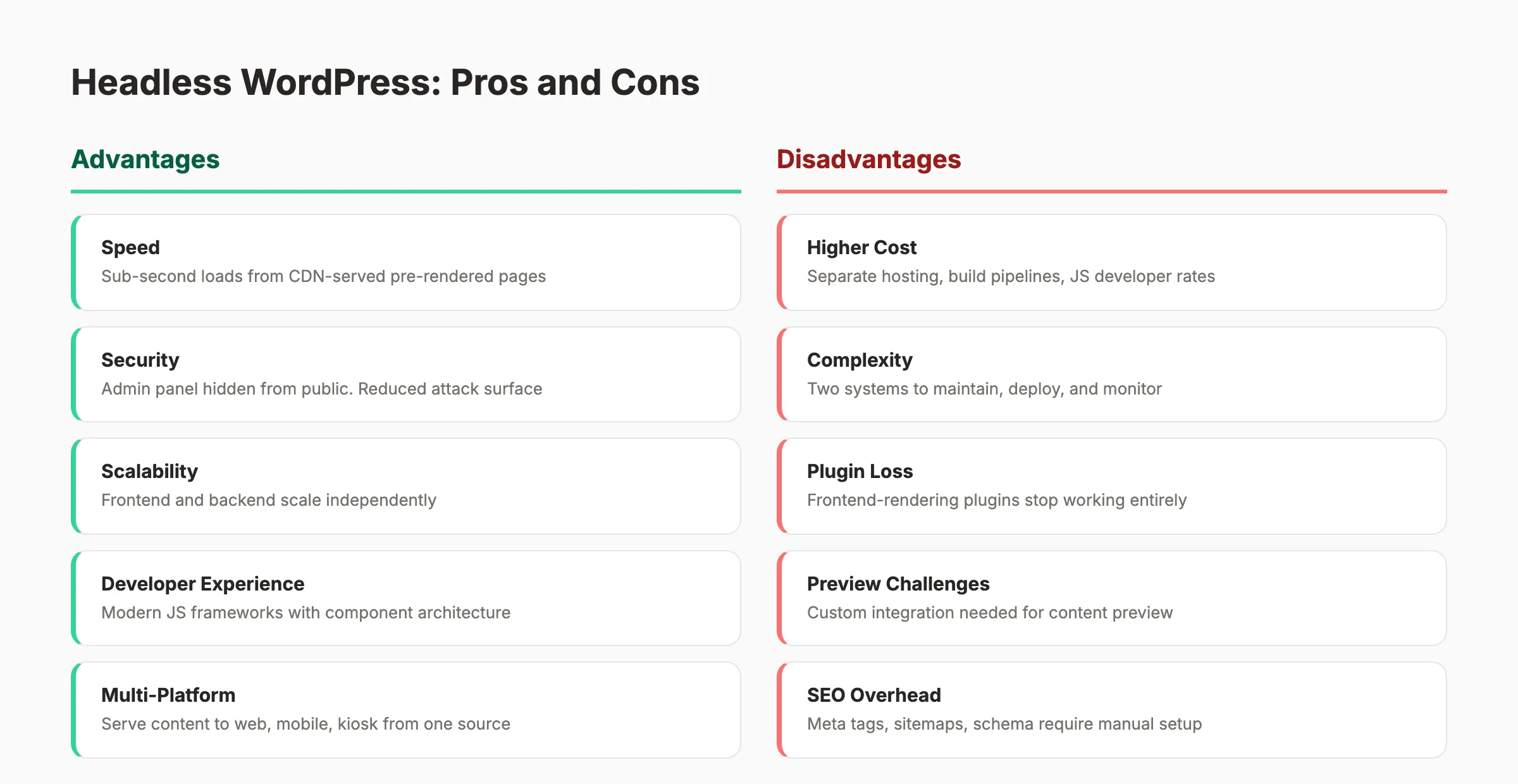
Headless WordPress is not right for every project. Here is an honest assessment of the trade-offs.
Advantages
Speed. Pre-rendered pages served from a CDN load in under 1 second. Traditional WordPress pages that process PHP and query databases on every request average 2 to 4 seconds without heavy caching.
Security. The WordPress admin panel lives on a separate domain. Visitors never interact with it. The attack surface shrinks dramatically. No brute-force login attempts on your public site. No PHP vulnerabilities exposed to visitors.
Scalability. Frontend and backend scale independently. A traffic spike hits your CDN-served frontend, not your WordPress server. The backend only handles API requests from your build process or server-side rendering.
Developer experience. Modern JavaScript frameworks offer component-based architecture, hot reloading, TypeScript support, and testing ecosystems that PHP-based WordPress themes lack.
Future-proofing. Swap the frontend without touching your content. Move from Gatsby to Next.js. Add a mobile app. Your WordPress content stays the same.
Disadvantages
Cost. You need separate hosting for WordPress and for the frontend. Build pipelines add cost. Developer rates for React or Next.js exceed WordPress theme developer rates.
Complexity. 2 systems to maintain instead of 1. 2 hosting environments. 2 deployment processes. 2 sets of logs to monitor.
Plugin loss. Any WordPress plugin that renders HTML on the frontend stops working. Contact forms, table of contents, related posts, FAQ accordions. The frontend must replicate every piece of functionality.
Preview challenges. The WordPress preview button shows content in the theme. Without a theme, preview requires custom integration. Many headless setups use draft API endpoints that the frontend consumes, but the setup is non-trivial.
SEO overhead. Traditional WordPress with Yoast or RankMath handles meta tags, sitemaps, schema, and canonical URLs automatically. Headless WordPress requires the frontend team to implement each element manually. Miss one, and your technical SEO suffers.
| Factor | Traditional WordPress | Headless WordPress |
|---|---|---|
| Setup time | Hours | Weeks |
| Monthly hosting cost | $10 to $50 | $50 to $200+ |
| Developer requirement | Optional | Required |
| Page load speed | 2 to 4 seconds (uncached) | Under 1 second |
| Plugin ecosystem | Full access | Backend only |
| SEO setup | Automatic via plugins | Manual implementation |
| Multi-platform delivery | No | Yes |
| Frontend flexibility | Theme-limited | Unlimited |
Publish 30 SEO articles per month. Automatically. Traditional or headless WordPress, Stacc handles the content. You handle the business. Start for $1 →
SEO Implications of Headless WordPress
Headless WordPress introduces SEO challenges that traditional WordPress handles automatically. Every challenge is solvable. But each one requires deliberate implementation.
What You Lose
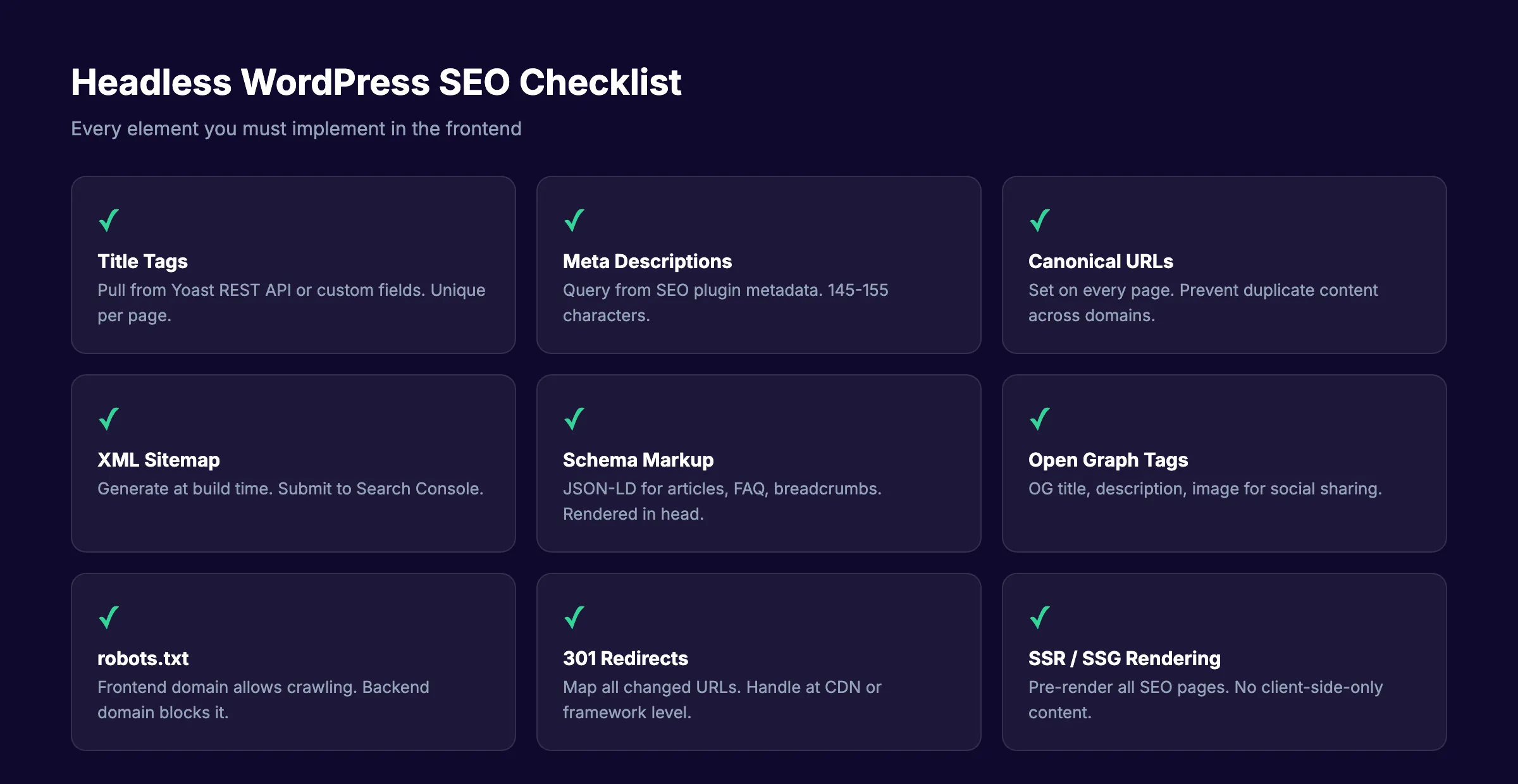
Meta tag generation. Yoast SEO and RankMath generate title tags, meta descriptions, Open Graph tags, and Twitter cards through the WordPress theme. Without a theme, those outputs do not render. Your frontend must pull metadata from the Yoast REST API extension or custom fields and inject it into page headers.
Automatic sitemaps. WordPress SEO plugins generate XML sitemaps that search engines use for crawling and indexing. In headless mode, the frontend or a separate build process must generate sitemaps. Next.js has a built-in sitemap API. Astro generates sitemaps through its integration system.
Schema markup from plugins. Yoast, RankMath, and Schema Pro inject structured data into the page. Headless setups require the frontend to generate JSON-LD blocks. Pull the data from WordPress custom fields or the SEO plugin API, then render it in the page head.
WordPress preview. Content editors lose the ability to see how a post looks before publishing. Custom preview environments solve this, but they require development work. Next.js draft mode and Astro server routes are the common solutions.
Crawl budget considerations. If both your WordPress backend and frontend are accessible to search engines, Googlebot wastes crawl budget on the backend. Block the WordPress domain from indexing.
What You Gain
Faster Largest Contentful Paint. Pre-rendered HTML loads faster than PHP-generated pages. Page speed improvements translate directly to better Core Web Vitals scores.
Clean HTML output. No theme bloat. No plugin-injected scripts you did not request. Every line of HTML serves a purpose. Search engines parse clean markup more efficiently.
Edge deployment. Frontend applications deploy to CDN edges globally. Every visitor gets served from the closest server. Time to first byte drops to under 100 milliseconds.
Full JavaScript SEO control. You choose the rendering strategy. SSR for dynamic pages. SSG for static pages. ISR for pages that update periodically. No uncertainty about whether Googlebot processes your JavaScript correctly.
The Golden Rule
Use server-side rendering or static site generation for every page that needs to rank. Client-side JavaScript rendering is unreliable for SEO. Googlebot processes JavaScript, but SSR and SSG produce faster indexing, more reliable crawling, and better Core Web Vitals scores.
How to Build a Headless WordPress Site
Building a headless WordPress site involves 6 steps. This section covers the architecture decisions, not a line-by-line code tutorial.
Step 1: Install WordPress on a Separate Domain
Set up WordPress on a subdomain like cms.yoursite.com or admin.yoursite.com. Use any managed WordPress host. The backend does not serve public traffic, so you do not need a premium hosting plan.
Block search engines from indexing the backend. Add noindex meta tags or use robots.txt to prevent crawl budget waste.
Step 2: Install Required Plugins
| Plugin | Purpose |
|---|---|
| WPGraphQL | Adds a GraphQL API endpoint |
| WPGraphQL for ACF | Exposes Advanced Custom Fields data in GraphQL |
| Yoast SEO | Generates metadata that the frontend can query |
| WPGraphQL for Yoast | Exposes Yoast metadata through the GraphQL API |
| ACF (Advanced Custom Fields) | Creates custom content models |
| WP Headless | Redirects frontend visits to your actual frontend domain |
Step 3: Choose a Frontend Framework
For most teams, Next.js is the safest choice. It handles SSR, SSG, and ISR. It has the largest community. Faust.js provides a WordPress-specific integration layer.
For content-heavy sites that prioritize page speed above all else, Astro ships zero JavaScript by default and produces the fastest static pages.
For teams already using Vue.js, Nuxt offers comparable capabilities to Next.js.
Step 4: Connect the Frontend to WordPress
Configure your frontend to fetch content from the WordPress API. With WPGraphQL, a typical query looks like this:
query GetPosts {
  posts(first: 10) {
    nodes {
      title
      content
      slug
      seo {
        title
        metaDesc
        opengraphImage {
          sourceUrl
        }
      }
    }
  }
}
The frontend receives JSON data and renders it with your own components. Title tags, meta descriptions, and Open Graph data come from the Yoast SEO fields exposed through WPGraphQL.
Step 5: Implement SEO Elements in the Frontend
This is the step most teams rush and regret. Every SEO element that WordPress plugins handle must exist in the frontend.
- Title tags from Yoast metadata
- Meta descriptions from Yoast metadata
- Canonical URLs for every page
- Open Graph and Twitter Card tags
- JSON-LD structured data for articles, FAQ, and breadcrumbs
- XML sitemap generated at build time
- robots.txt on the frontend domain
- 301 redirects for changed URLs
- Pagination with
rel="next"andrel="prev" - Hreflang tags for multilingual sites
Step 6: Deploy and Verify
Deploy the frontend to Vercel, Netlify, Cloudflare Pages, or AWS. These platforms offer edge deployment out of the box.
After deployment:
- Verify pages in Google Search Console
- Run a technical SEO audit
- Check all Core Web Vitals scores
- Confirm sitemaps are accessible and submitted
- Test mobile rendering through the Mobile SEO lens
SEO content on autopilot. Stacc pushes articles directly to your WordPress backend via API. Your headless frontend picks them up automatically. Start for $1 →
Best Practices for Headless WordPress
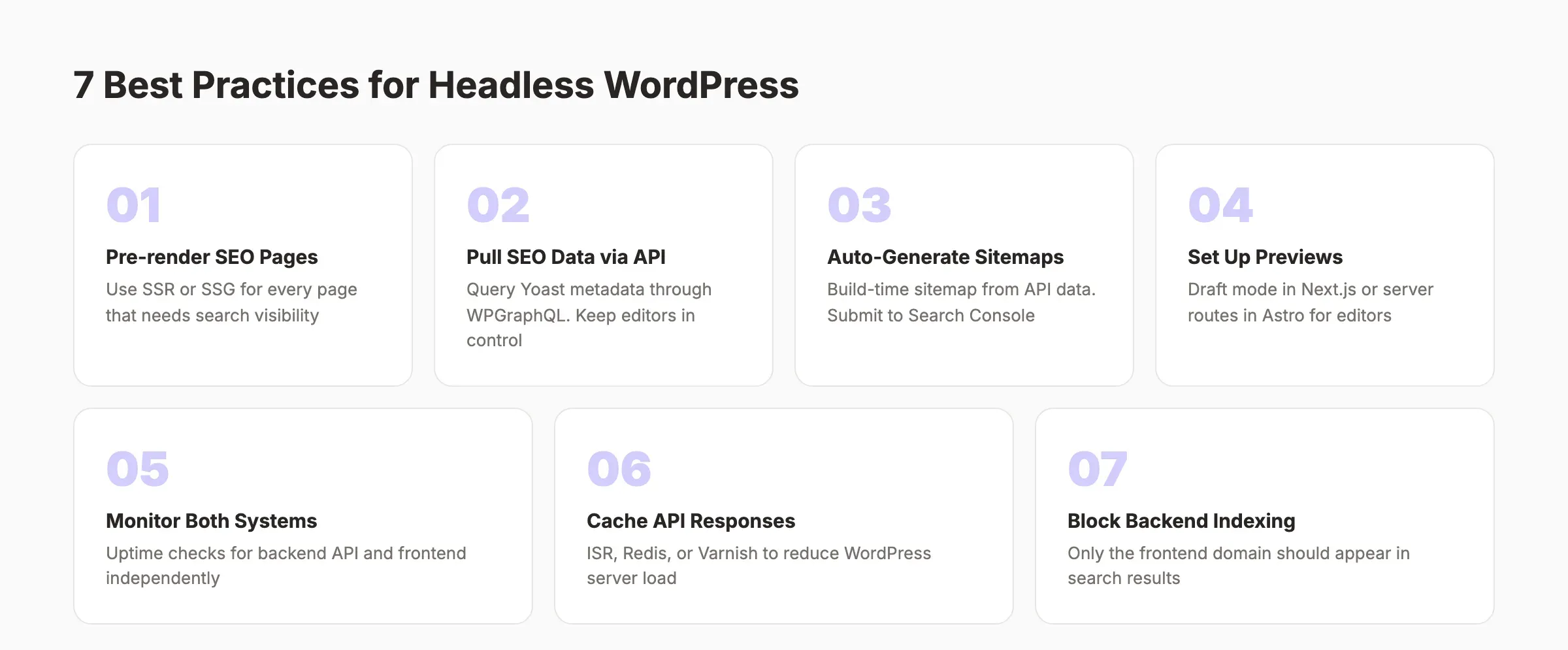
These 7 practices separate successful headless WordPress builds from failed ones.
1. Pre-render Every SEO Page
Never rely on client-side rendering for pages that need search visibility. Use SSR or SSG. Next.js getStaticProps and Astro’s default static mode handle this natively. ISR (Incremental Static Regeneration) works for pages that change frequently.
2. Pull SEO Data from WordPress
Do not recreate SEO metadata in the frontend. Pull it from Yoast or RankMath through the API. This keeps content editors in control of titles, descriptions, and social sharing images without touching code.
3. Generate Sitemaps Automatically
Build a sitemap that queries the WordPress API and generates a valid XML file. Next.js sitemap API and Astro’s sitemap integration automate this. Submit the sitemap to Google Search Console after every deployment.
4. Set Up Content Previews
Content editors need to see how posts look before publishing. Implement preview mode in your frontend. Next.js draft mode queries the WordPress preview API and renders unpublished content. Without this, editorial workflows break down.
5. Monitor Both Systems
Set up uptime monitoring for the WordPress backend and the frontend independently. If the WordPress API goes down, your frontend build process fails. If the frontend goes down, visitors see nothing. Monitor API response times. Alert on latency spikes.
6. Cache API Responses
Do not query the WordPress API on every page request. Use ISR, build-time caching, or an API caching layer like Redis or Varnish in front of WordPress. This reduces WordPress server load and improves frontend build times.
7. Block the WordPress Backend from Indexing
Search engines should only index your frontend domain. Block the WordPress backend with robots.txt and noindex meta tags. If both domains are indexed, you create duplicate content problems that hurt rankings.
Common Mistakes That Break Headless WordPress
Teams make the same mistakes repeatedly. Here are 7 to avoid.
1. Going Headless Without a Clear Reason
If your site is a standard blog or small business website, traditional WordPress is simpler, cheaper, and already optimized for SEO. Headless adds development cost and ongoing complexity. Only adopt it if you genuinely need the performance, multi-platform delivery, or frontend flexibility.
The exception: if your development team already works in React or Vue and has no PHP experience. In that case, headless makes the developer experience significantly better.
2. Forgetting Technical SEO in the Frontend
On-page SEO elements like meta tags, canonical URLs, hreflang, and structured data must be manually implemented. Traditional WordPress handles all of this through plugins. Every element you skip is an SEO gap.
Run a full technical SEO checklist after launching a headless WordPress site. Audit every page type, not just the homepage.
3. Using Client-Side Rendering for SEO Content
Pages that render only in the browser with JavaScript may not get indexed reliably. Googlebot processes JavaScript, but the process is slower and less reliable than crawling server-rendered HTML. Always use SSR or SSG for pages that need to rank.
4. Ignoring Preview Functionality
Content editors who cannot preview their work publish more errors. Broken formatting, missing images, and layout issues reach production. Invest in preview mode early in the project.
5. Over-Engineering the Architecture
Not every headless project needs microservices, multiple API gateways, and a complex build pipeline. Start with WordPress + WPGraphQL + Next.js deployed to Vercel. That handles 90% of headless WordPress use cases. Add complexity only when you hit a real limitation.
6. Skipping Redirect Management
If you migrate from traditional WordPress to headless, URL structures may change. Every changed URL needs a 301 redirect. Missing redirects destroy organic traffic overnight.
7. Neglecting Image Optimization
WordPress handles image resizing through its media library. In headless mode, the frontend must handle responsive images, lazy loading, and format conversion (WebP, AVIF). Use a CDN with image optimization like Cloudflare Images or Imgix. Missing this step tanks your Core Web Vitals scores.
When to Choose Headless WordPress
Headless WordPress is not an upgrade. It is a trade-off. Here is a decision framework.
Choose Headless When
- Your site serves 100,000+ monthly visitors and page speed directly impacts revenue
- You deliver content to multiple platforms (web, mobile app, digital signage)
- Your development team works in React, Vue, or Svelte and has limited PHP experience
- You need granular control over frontend performance and HTML output
- Your site requires features that WordPress themes cannot provide
Stay Traditional When
- You run a standard business website or blog
- Your team uses WordPress page builders like Elementor or Divi
- You rely heavily on WordPress plugins for frontend functionality
- Your budget does not support ongoing JavaScript developer costs
- SEO is critical and your team lacks frontend development resources
| Scenario | Recommendation |
|---|---|
| Small business website | Traditional WordPress |
| Content-heavy blog | Traditional WordPress (or Astro with WordPress API) |
| Enterprise publisher (1M+ pages) | Headless WordPress |
| Ecommerce with mobile app | Headless WordPress |
| Marketing agency building client sites | Traditional WordPress |
| SaaS product with blog | Headless WordPress |
| Local service business | Traditional WordPress with automated publishing |
FAQ
Is headless WordPress good for SEO?
Headless WordPress can be excellent for SEO when implemented correctly. Pre-rendered pages load faster, which improves Core Web Vitals. You get full control over HTML output. But you must manually implement meta tags, schema markup, sitemaps, and canonical URLs in the frontend. Without this work, headless WordPress hurts SEO. Use SSR or static generation for every page that needs to rank.
How much does headless WordPress cost?
A typical headless WordPress setup costs $50 to $200 per month for hosting (WordPress backend plus frontend hosting on Vercel or Netlify). Development costs range from $5,000 to $50,000 for the initial build, depending on complexity. Ongoing maintenance requires a JavaScript developer, which adds $500 to $2,000 per month for part-time support.
Do I need a developer for headless WordPress?
Yes. Traditional WordPress lets non-developers build sites with themes and page builders. Headless WordPress requires a JavaScript developer to build and maintain the frontend application. You also need someone to maintain the API connection between WordPress and the frontend. The ongoing development cost is higher than traditional WordPress.
What is the difference between headless and decoupled WordPress?
The terms are often used interchangeably. Strictly speaking, “decoupled” means the backend and frontend are separate but the CMS can still render pages if needed. “Headless” means the CMS has no frontend rendering capability at all. In practice, most WordPress headless implementations are decoupled because WordPress still has a theme layer available, even if it is not used.
Which frontend framework works best with headless WordPress?
Next.js is the most popular choice. It handles SSR, SSG, and ISR. Faust.js provides WordPress-specific integration. Astro produces the fastest static sites with zero JavaScript by default. Gatsby works for smaller marketing sites. The right choice depends on your team, your performance requirements, and whether you need server-side rendering.
Can I use headless WordPress with Shopify?
Yes. You can use WordPress as the content backend for blog posts, landing pages, and editorial content while Shopify handles product pages and checkout. The frontend application pulls content from both APIs. This is a common pattern for ecommerce brands that want WordPress publishing workflows with Shopify commerce features.
Headless WordPress is a powerful architecture for the right use case. If your site demands maximum performance, multi-platform content delivery, or freedom from PHP theme limitations, headless is worth the investment. Start with the simplest possible stack. Add complexity only when you hit a real limitation. And implement every SEO element before you launch.
3,500+ blogs published. 92% average SEO score. Stacc publishes content to WordPress sites via REST API, headless or traditional. Start for $1 →

Written by
Siddharth GangalSiddharth is the founder of theStacc and Arka360, and a graduate of IIT Mandi. He spent years watching great businesses lose organic traffic to competitors who simply published more. So he built a system to fix that. He writes about SEO, content at scale, and the tactics that actually move rankings.
30 SEO blog articles published every month
Keyword-optimized, scheduled, and live on your site. Automatically.
30-day trial · Cancel anytime
theStacc
Stop writing SEO content manually
30 blog articles, 30 GBP posts, and social media content. Published every month. Automatically.
Start Your $1 Trial$1 for 3 days · Cancel anytime