How a CDN affects SEO: the TTFB gains it delivers, the Core Web Vitals it moves, and the misconfigurations that block crawlers or break canonical tags.
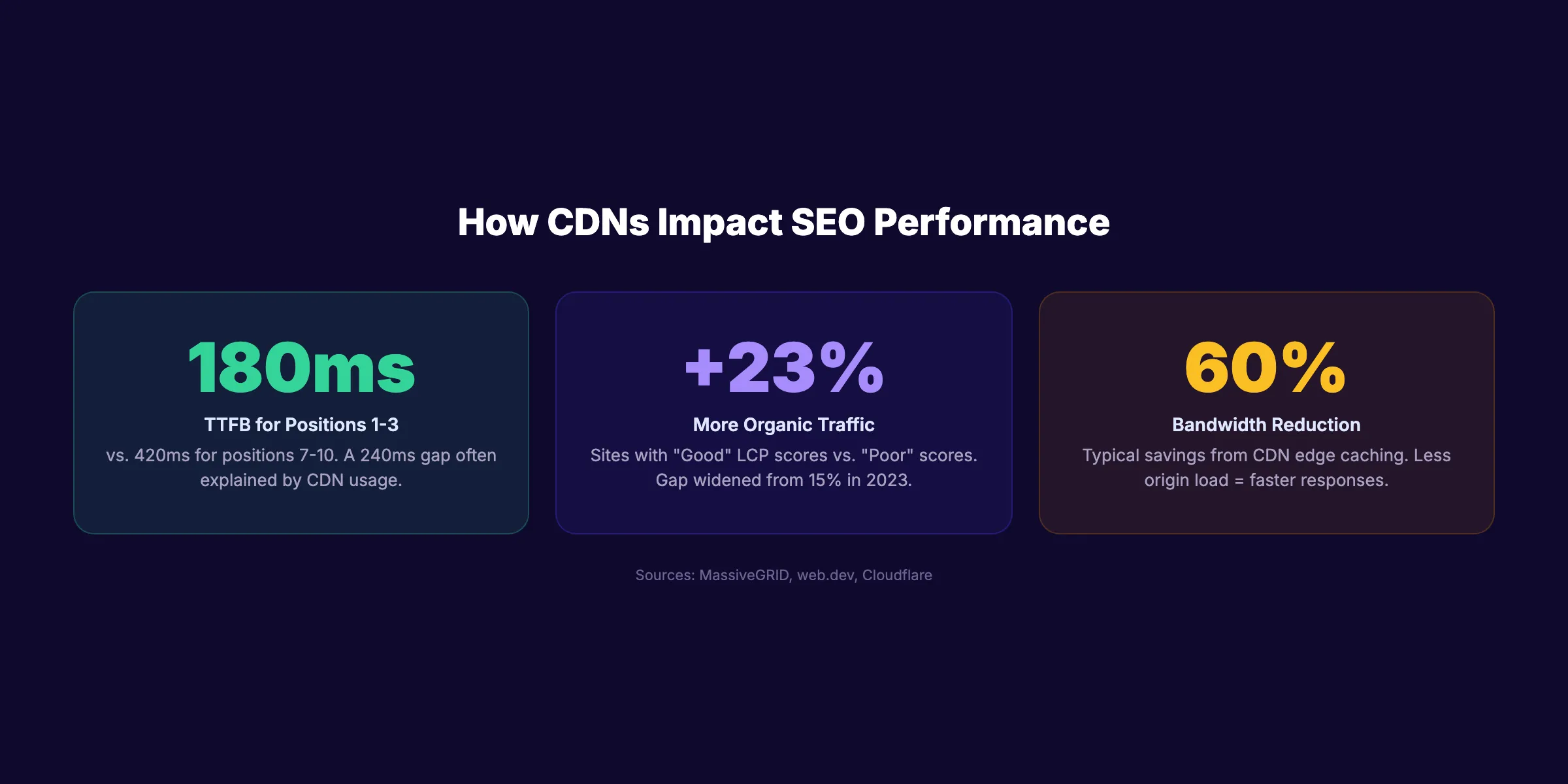
A CDN helps SEO mainly by cutting time to first byte, the server-response part of Core Web Vitals. Sites ranking in positions 1 through 3 show a median TTFB near 180ms against 420ms for positions 7 through 10. A misconfigured CDN can block crawlers or break canonical tags.
Sites ranking in positions 1 through 3 on Google have a median TTFB of 180ms. Sites in positions 7 through 10 average 420ms. That 240ms gap is often the difference between a CDN and no CDN.
A CDN (Content Delivery Network) is not a direct ranking factor. Google has never said "use a CDN and rank higher." But CDN and SEO are deeply connected through speed, crawl efficiency, and Core Web Vitals. Every performance metric that Google measures improves when a CDN sits between your server and your visitors.
Most guides cover the basics. Few cover what actually goes wrong. Misconfigured CDNs block Googlebot, create duplicate content, and serve errors that get pages deindexed. We see these problems regularly across the 3,500+ blog posts we publish for clients in 70+ industries.
This guide covers everything about how CDNs affect SEO in 2026. The benefits, the risks, the setup, and the mistakes that cost rankings.
Here is what you will learn:
- How CDNs improve the Core Web Vitals that Google measures
- Why Google automatically crawls CDN-backed sites faster
- The 7 CDN mistakes that silently kill rankings
- How to choose and configure a CDN for maximum SEO impact
- Why CDN configuration matters for AI search crawlers in 2026
- A complete CDN audit checklist you can run today
What a CDN Is and How It Works
A CDN is a network of servers distributed across multiple locations worldwide. Instead of serving every request from a single origin server, a CDN caches your content on edge servers closer to your visitors.
The Speed Problem CDNs Solve
Without a CDN, a visitor in Tokyo requesting a page from a server in New York waits for data to travel 10,800 miles round-trip. That physical distance adds 100-300ms of latency before the first byte arrives.
A CDN eliminates this by caching static assets (HTML, CSS, JavaScript, images) on edge servers in Tokyo, London, Sydney, and dozens of other locations. The visitor gets the page from the nearest server, not the farthest one.
| Metric | Without CDN | With CDN | Improvement |
|---|---|---|---|
| TTFB (global average) | 400-800ms | 50-200ms | 60-75% faster |
| DNS resolution (mobile) | Standard | 19% faster | Per HTTP Archive 2025 |
| DNS resolution (desktop) | Standard | 60% faster | Per HTTP Archive 2025 |
| Bandwidth consumption | 100% origin | 40% origin | 60% reduction typical |
What a CDN Caches
CDNs handle different content types with different caching strategies:
Static assets (always cached): Images, CSS files, JavaScript bundles, fonts, PDFs, and videos. These rarely change and benefit most from edge caching.
HTML documents (sometimes cached): According to the HTTP Archive Web Almanac, only one-third of HTML requests go through CDN infrastructure. This is a massive missed opportunity. Caching HTML at the edge reduces TTFB for the document itself, not just its assets.
Dynamic content (selectively cached): Logged-in pages, cart contents, and personalized content require careful cache rules. Over-caching dynamic content is one of the most common CDN mistakes.
CDN Adoption Rates
CDN usage varies dramatically by site size. The top 1,000 websites have 71% CDN adoption. For the top 10 million sites, that drops to 35%. Smaller sites leave the most performance on the table.
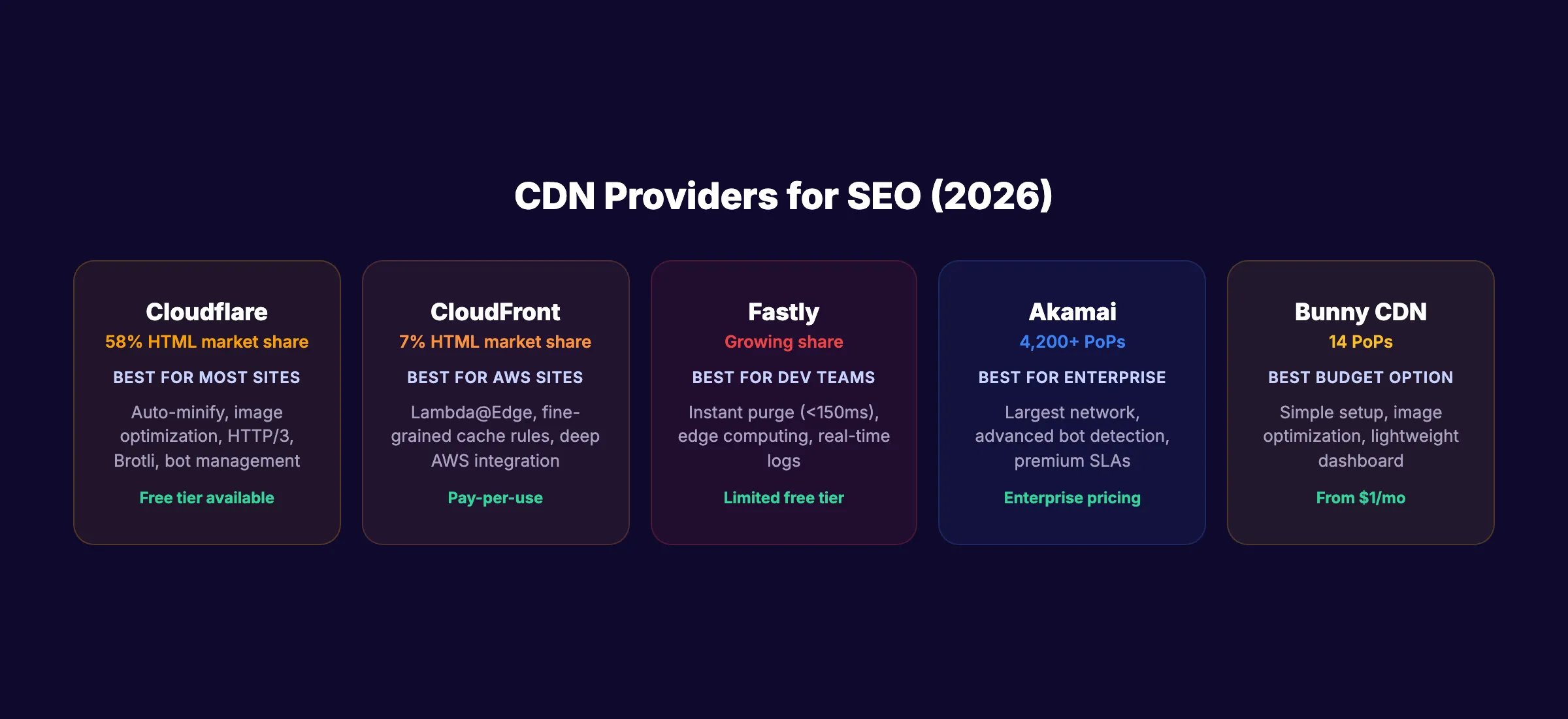
Cloudflare dominates HTML delivery at 58% market share. Google CDN handles 21%. CloudFront serves 7%. The rest split among Fastly, Akamai, and dozens of smaller providers.
Stop writing. Start ranking. theStacc publishes 30 SEO articles per month for $99. Every page loads fast, scores high, and follows technical best practices.
How CDNs Affect Core Web Vitals
Google uses Core Web Vitals as a ranking signal. Three metrics matter: LCP, INP, and CLS. CDNs directly improve two of them.
LCP (Largest Contentful Paint)
LCP measures how fast the largest visible element loads. Google wants LCP under 2.5 seconds. Sites with "Good" LCP scores receive 23% more organic traffic than sites with "Poor" scores. That gap widened from 15% in 2023.
A CDN improves LCP by reducing TTFB. The document loads faster. Images load from nearby edge servers. Fonts arrive without cross-continent round trips.
The web.dev performance guide lists CDN usage as one of the most effective ways to reduce TTFB. Yet most sites only route static assets through their CDN. Route your HTML through the CDN too. That single change can cut TTFB by 200-400ms for distant visitors.
INP (Interaction to Next Paint)
INP replaced FID in March 2024. It measures responsiveness to user interactions. Google wants INP under 200ms.
CDNs affect INP indirectly. Faster JavaScript delivery means the browser parses and executes scripts sooner. Edge-cached assets free up bandwidth for interaction processing. The effect is smaller than the LCP improvement, but measurable on JavaScript-heavy sites.
CLS (Cumulative Layout Shift)
CLS measures visual stability. CDNs help CLS by ensuring images and fonts load predictably. When assets arrive from a nearby edge server, they arrive faster and more consistently. This reduces the layout shifts caused by late-loading images or font swaps.
The biggest CLS win from a CDN is font delivery. Self-hosted fonts served through a CDN eliminate the flash of unstyled text (FOUT) that causes layout shifts.
The Core Web Vitals Improvement You Can Expect
For a site currently without a CDN serving a global audience:
| Metric | Typical Improvement | SEO Impact |
|---|---|---|
| LCP | 30-50% faster | Direct ranking signal |
| INP | 10-20% faster | Direct ranking signal |
| CLS | 5-15% better | Direct ranking signal |
| TTFB | 60-75% faster | Affects crawl rate and LCP |
Your results depend on your current server location, audience geography, and content type. A US-only audience visiting a US-hosted site sees smaller gains than a global audience visiting the same server. Use our Core Web Vitals improvement guide for the full optimization process.
How CDNs Affect Google Crawling
Google published a detailed explanation of how CDNs affect crawling in December 2024. The key findings change how you should think about CDN and SEO.
Google Automatically Crawls CDN-Backed Sites Faster
Googlebot detects when a site uses a CDN by checking the IP address of the serving infrastructure. When it detects a CDN, it automatically increases the crawl rate.
The logic is simple. CDN-backed sites handle more concurrent requests without performance degradation. Google takes advantage of that capacity. More crawling means faster indexing of new and updated content.
This matters most for large sites. A 10,000-page site without a CDN might take weeks for Google to fully crawl. The same site behind a CDN gets crawled faster because Googlebot sends more requests per second.
The Cold Cache Problem
A CDN only speeds up requests for cached content. The first request to any URL after a cache expiration hits the origin server at full latency. Google calls this the "cold cache" problem.
If your CDN cache expires every hour and Googlebot visits during a cold cache window, the bot experiences origin-server latency. For sites with low traffic, the cache stays cold most of the time because no real users warm it up between Googlebot visits.
Fix: Set longer cache TTLs for static content. Use cache warming scripts for critical pages. Monitor cache hit rates in your CDN dashboard.
Server Errors Trigger Crawl Throttling
This is where CDNs can hurt SEO. When a CDN serves 500 or 502 errors, Googlebot throttles the crawl rate. Continued errors cause URLs to drop from the index entirely.
The worst version of this problem: a CDN that serves an error page with a 200 status code. Googlebot thinks the error page IS the content. It indexes the error message and replaces your real content in search results.
Check your CDN error logs weekly. Any spike in 5xx errors needs immediate investigation. Read our SEO audit guide for a complete server error monitoring process.
Your SEO team. $99 per month. 30 optimized articles, published automatically. Technical SEO handled from day one.
7 CDN Mistakes That Hurt SEO Rankings
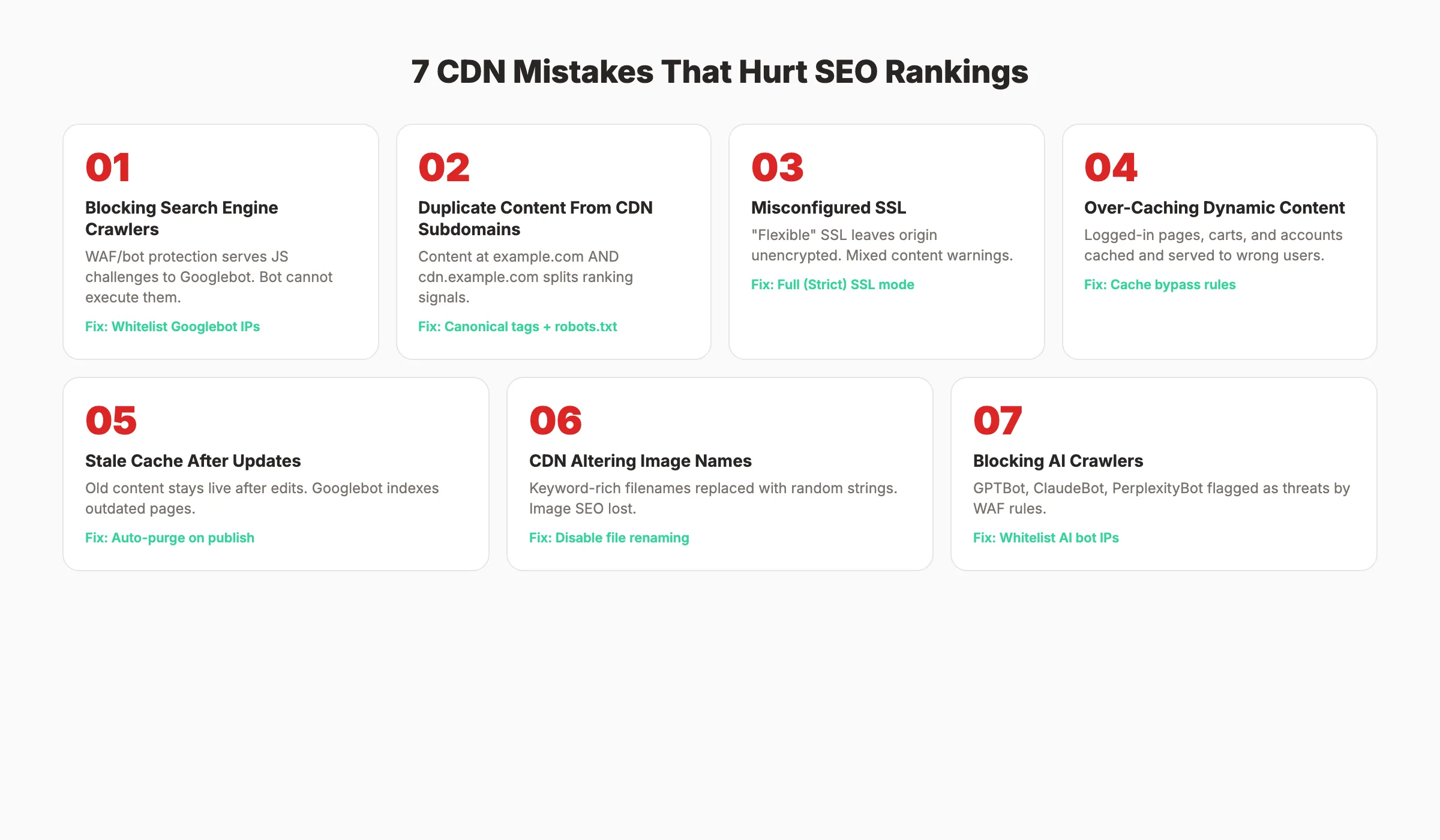
Most CDN SEO problems come from configuration errors, not the CDN itself. These are the 7 mistakes we see most often.
Mistake 1: Blocking Search Engine Crawlers
CDN security features (WAFs, bot protection, JavaScript challenges) can block Googlebot. Cloudflare's "Under Attack" mode is the most common culprit. It serves a JavaScript challenge page to every visitor, including search engine bots.
Googlebot cannot execute JavaScript challenges. It receives a blank or challenge page instead of your content.
Fix: Whitelist known Googlebot IP ranges in your CDN firewall. Use Google's IP verification to confirm you are whitelisting the right addresses. Never enable "Under Attack" mode permanently.
Mistake 2: Creating Duplicate Content From CDN Subdomains
Some CDN setups expose content at both example.com/page and cdn.example.com/page. Google treats these as two separate pages with identical content. That creates a duplicate content problem that splits ranking signals.
Fix: Block CDN subdomains in robots.txt. Set canonical tags pointing to your primary domain. Or use a CNAME configuration to keep all URLs on your main domain.
Mistake 3: Misconfigured SSL Across CDN Nodes
A CDN must serve HTTPS consistently across every edge node. Mixed content warnings (HTTP assets on HTTPS pages) degrade trust signals and trigger browser warnings.
Fix: Enable "Full (Strict)" SSL mode in your CDN settings. This ensures encryption from visitor to edge server AND from edge server to origin. "Flexible" SSL only encrypts the first hop and leaves the origin connection unencrypted.
Mistake 4: Over-Caching Dynamic Content
Serving cached logged-in pages to logged-out visitors. Showing one user's cart to another user. Displaying stale prices after a sale ends. These problems happen when cache rules are too aggressive.
Fix: Set cache-control headers at the application level. Use Cache-Control: no-store for authenticated pages. Create bypass rules for URLs containing cart, checkout, or account paths.
Mistake 5: Stale Cache After Content Updates
You publish a new blog post or fix a typo. But visitors still see the old version because the CDN cache has not expired yet. Worse, Googlebot crawls the cached version and indexes outdated content.
Fix: Purge the CDN cache after every content update. Most CDNs offer API-based purging. Integrate cache purging into your CMS publish workflow. Many WordPress CDN plugins handle this automatically.
Mistake 6: CDN Altering Image File Names
Some CDN image optimization features rename files. A keyword-rich image like seo-audit-checklist.png becomes img_a7f3x2.webp. This removes image SEO value from the file name.
Fix: Disable automatic file renaming in your CDN image optimization settings. Use format conversion (WebP, AVIF) without changing the base file name.
Mistake 7: Blocking AI Search Crawlers
In 2026, CDN WAFs increasingly block AI crawlers like GPTBot, ClaudeBot, and PerplexityBot. These crawlers behave differently from traditional search bots. They send higher request volumes and get flagged as suspicious traffic.
Blocking AI crawlers means your content never appears in AI search results or gets cited by AI assistants.
Fix: Review your CDN WAF logs for blocked bot user agents. Whitelist legitimate AI crawlers. Read our AI crawlers guide for the full list of bots to allow.
How to Choose a CDN for SEO
Not every CDN suits every site. Size, budget, audience geography, and technical requirements all matter.
CDN Provider Comparison
| Provider | Best For | Free Tier | SEO-Relevant Features |
|---|---|---|---|
| Cloudflare | Most websites | Yes (generous) | Auto-minification, image optimization, bot management, HTTP/3, Brotli |
| CloudFront (AWS) | AWS-hosted sites | Pay-per-use | Lambda@Edge for dynamic content, fine-grained cache rules |
| Fastly | Developer teams | Limited | Instant purge (<150ms), edge computing, real-time logging |
| Akamai | Enterprise sites | No | Largest network (4,200+ locations), advanced bot detection |
| Bunny CDN | Budget-conscious | No ($1/mo minimum) | 14 PoPs, image optimization, simple setup |
When You Do Not Need a CDN
A CDN adds the most value for sites with global audiences, heavy media content, or high traffic volumes. You may not need one if:
- Your audience is 90%+ in one country and your server is in that country
- Your site has under 1,000 monthly visitors
- Your pages are mostly text with few images
- You already use a managed host with built-in edge caching (Vercel, Netlify, Cloudflare Pages)
For most business websites publishing content regularly, a CDN is worth it. The free Cloudflare tier alone handles the majority of use cases.
3,500+ blogs published. Every article is SEO-scored before publish. See what theStacc can do for your site.
How to Set Up a CDN for SEO (Step by Step)
This walkthrough uses Cloudflare as the example because it has the largest free tier and the simplest setup. The principles apply to any CDN.
Step 1: Add Your Domain
Create a Cloudflare account and add your domain. Cloudflare scans your existing DNS records and imports them. Verify every record transferred correctly before changing nameservers.
Step 2: Update Your Nameservers
Point your domain's nameservers to Cloudflare. This routes all traffic through the CDN. DNS propagation takes 1-48 hours. During this window, some visitors hit the CDN and others hit the origin directly.
Step 3: Configure SSL
Set SSL mode to "Full (Strict)." This encrypts both hops: visitor to edge, and edge to origin. Install an origin certificate from Cloudflare on your server for the second hop.
Step 4: Set Cache Rules
Cloudflare caches static assets by default. For HTML caching, create a Page Rule or Cache Rule:
- Cache HTML pages with a TTL of 2-4 hours for content sites
- Bypass cache for
/admin/,/cart/,/demo/,/account/ - Set
Cache-Control: stale-while-revalidateto serve stale content while fetching fresh versions
Step 5: Enable Performance Features
Turn on these SEO-relevant features:
- Brotli compression (46% of CDN traffic uses Brotli vs. 39% at origins)
- HTTP/3 (116ms faster connection times at P95)
- Early Hints (103 status code for preloading critical assets)
- Image optimization (WebP/AVIF conversion without renaming files)
- Auto-minification (remove whitespace from HTML, CSS, JavaScript)
Step 6: Whitelist Search Engine Crawlers
In the WAF settings, create rules to allow known search engine and AI crawler IPs. This prevents your security settings from blocking crawlers that bring organic traffic.
Step 7: Verify With Google Search Console
After setup, check Google Search Console for:
- Crawl rate changes (should increase within 1-2 weeks)
- Server error spikes (any new 5xx errors indicate CDN misconfiguration)
- Core Web Vitals improvement (check the CWV report after 28 days)
- Coverage issues (any new "excluded" pages may indicate CDN blocking)
Google's documentation confirms that moving to a CDN causes a temporary crawl rate drop followed by a steady increase, often to rates higher than before.
CDN SEO Audit Checklist
Run this checklist to verify your CDN is helping SEO, not hurting it. Pair this with a full technical SEO audit for best results.
Crawl Access
- ✓ Googlebot can access all important pages (test with URL Inspection tool)
- ✓ No JavaScript challenges served to search engine bots
- ✓ AI crawlers (GPTBot, ClaudeBot) not blocked by WAF
- ✓ Robots.txt accessible and returns 200 status code through CDN
- ✓ XML sitemap loads correctly through CDN
Content Integrity
- ✓ No duplicate content from CDN subdomains
- ✓ Canonical tags point to primary domain, not CDN domain
- ✓ Cache purge runs after every content update
- ✓ Dynamic pages (login, cart, account) bypass cache
- ✓ Error pages return proper HTTP status codes (not 200)
Performance
- ✓ TTFB under 200ms for top landing pages (test globally)
- ✓ LCP under 2.5 seconds on mobile
- ✓ Brotli or Zstandard compression enabled
- ✓ HTTP/3 enabled
- ✓ Image optimization active without file renaming
Security
- ✓ SSL set to "Full (Strict)" mode
- ✓ No mixed content warnings on any page
- ✓ HSTS headers present
- ✓ "Under Attack" mode disabled (or set per-page only)
Monitoring
- ✓ CDN analytics dashboard reviewed weekly
- ✓ Cache hit ratio above 80% for static assets
- ✓ 5xx error rate under 0.1%
- ✓ Google Search Console crawl stats reviewed monthly
Rank everywhere. Do nothing. Blog SEO, Local SEO, and Social on autopilot.
What practitioners are saying on X
AI search advice ages quickly. Here is high-signal public discussion from SEO and growth operators — context for your roadmap, not a substitute for primary data.
- @hridoyreh (Mar 2026): Widely shared SEO skill tree: foundations, research, technical, on-page, content, links, AI SEO/GEO, analytics, UX, brand, programmatic — useful map for stats and how-to posts. See the post on X.
- @jakezward (Feb 2026): 2026 SEO predictions emphasize AI Overview share-of-SERP, schema for LLM token efficiency, brand mentions in AI answers as a KPI, proprietary data as a moat, and content refresh beating net-new AI slop. See the post on X.
- @HlynurStefDev (Jul 2026): Public case: niche site traffic jumped from ~18 to 4,162 Google visits/month after focused technical/on-page SEO work (GSC screenshots claimed) — reminds that fundamentals still move numbers. See the post on X.
Grok, AI Overviews, and multi-engine visibility
Technical topics like “cdn seo impact” win AI citations when steps, code samples, and failure modes are explicit. Grok and other engines prefer ordered fix lists over vague “best practices” marketing language.
- Google AI Overviews: Use passage-ready answers, tables, and FAQ schema where relevant.
- ChatGPT / Perplexity: Cite named sources next to key claims.
- Grok: Maintain accurate entity facts on-site and in high-signal X posts.
FAQ
No. Google has never confirmed CDN usage as a direct ranking factor. The SEO benefit is indirect. CDNs improve page speed, Core Web Vitals, and crawl efficiency. Those metrics ARE ranking factors. Sites with "Good" LCP scores get 23% more organic traffic than sites with "Poor" scores. A CDN is the fastest way to improve LCP for most sites.
Yes, if misconfigured. The most common problems are WAF rules blocking Googlebot, CDN subdomains creating duplicate content, and error pages served with 200 status codes. All of these are configuration issues, not CDN issues. A properly configured CDN only helps.
Probably not, if your hosting server is in the same country as your audience. A local plumber in Dallas with a server in Texas does not gain much from edge caching. But if you use shared hosting with slow response times, even Cloudflare's free tier can cut TTFB in half. The cost is zero. The setup takes 15 minutes.
Cloudflare is the default recommendation. It has the largest free tier, 58% market share for HTML delivery, and the simplest setup. CloudFront works well for AWS-hosted sites. Fastly suits teams that need instant cache purging. Akamai is enterprise-grade. For most business websites, free Cloudflare is enough.
Typical improvements: 60-75% faster TTFB, 30-50% faster LCP, and 60% bandwidth reduction. Cloudflare reports 95% improvement in page load times and 23% faster HTTPS performance than the nearest competitor at P95. Real results depend on your current server speed, audience location, and content type.
Yes. The HTTP Archive Web Almanac shows CDNs deliver 19% faster DNS resolution on mobile. With Google's mobile-first indexing, mobile performance directly affects rankings. CDNs also improve TLS handshake speed. CDN servers use TLS 1.3 at 99% adoption vs. 77.7% for origin servers. Faster TLS means faster secure connections on mobile networks.
Related Tools & Resources
Free SEO Tools:
Best Lists:
Sources & references
- [1] Princeton / Georgia Tech et al. — GEO research (arXiv:2311.09735)
- [2] @hridoyreh on X — Widely shared SEO skill tree: foundations, research, technical, on-page, content, links, AI SEO/GEO, analytics, UX, bran
- [3] @jakezward on X — 2026 SEO predictions emphasize AI Overview share-of-SERP, schema for LLM token efficiency, brand mentions in AI answers
- [4] @HlynurStefDev on X — Public case: niche site traffic jumped from ~18 to 4,162 Google visits/month after focused technical/on-page SEO work (G
- [5] Referenced source — almanac.httparchive.org

Plan topics, review article drafts, and publish to a connected CMS.
Weekly local SEO teardowns
One practical email a week. Map Pack, GBP, AI Overviews — no fluff. Unsubscribe anytime.