
HTTP Status Codes for SEO: The Complete Guide
Learn every HTTP status code that affects SEO. Covers 200, 301, 302, 404, 410, 500, 503, soft 404s, and crawl budget impact. Updated March 2026.
Every page on your site returns an HTTP status code. That 3-digit number tells Google whether the page works, where it moved, or why it failed. Most site owners never check these codes. They assume everything returns 200. It does not.
A single misconfigured redirect chain can leak link equity across 4 hops. A batch of soft 404 pages can waste 30% of your crawl budget on pages Google will never index. A 503 error lasting more than 2 days causes Google to drop those URLs from the index entirely.
HTTP status codes for SEO are not optional knowledge. They are the foundation of every technical SEO audit. Every crawl error, redirect loop, and indexing failure traces back to a status code.
We have published 3,500+ blog posts across 70+ industries. Every site audit we run starts with a status code crawl. This guide covers every code that matters for SEO, what each one means for your rankings, and how to fix the problems they reveal.
Here is what you will learn:
- What HTTP status codes are and how they affect crawling and indexing
- Every status code Google uses for ranking decisions
- How 3xx redirects pass or lose link equity
- Why soft 404s damage crawl budget more than real 404s
- How 5xx errors trigger crawl rate reductions
- How to audit your site for status code problems
- Which status codes affect AI search visibility
What Are HTTP Status Codes?
An HTTP status code is a 3-digit number your server returns every time a browser or bot requests a URL. The code tells the requester what happened. Did the page load? Did it move? Did the server fail?
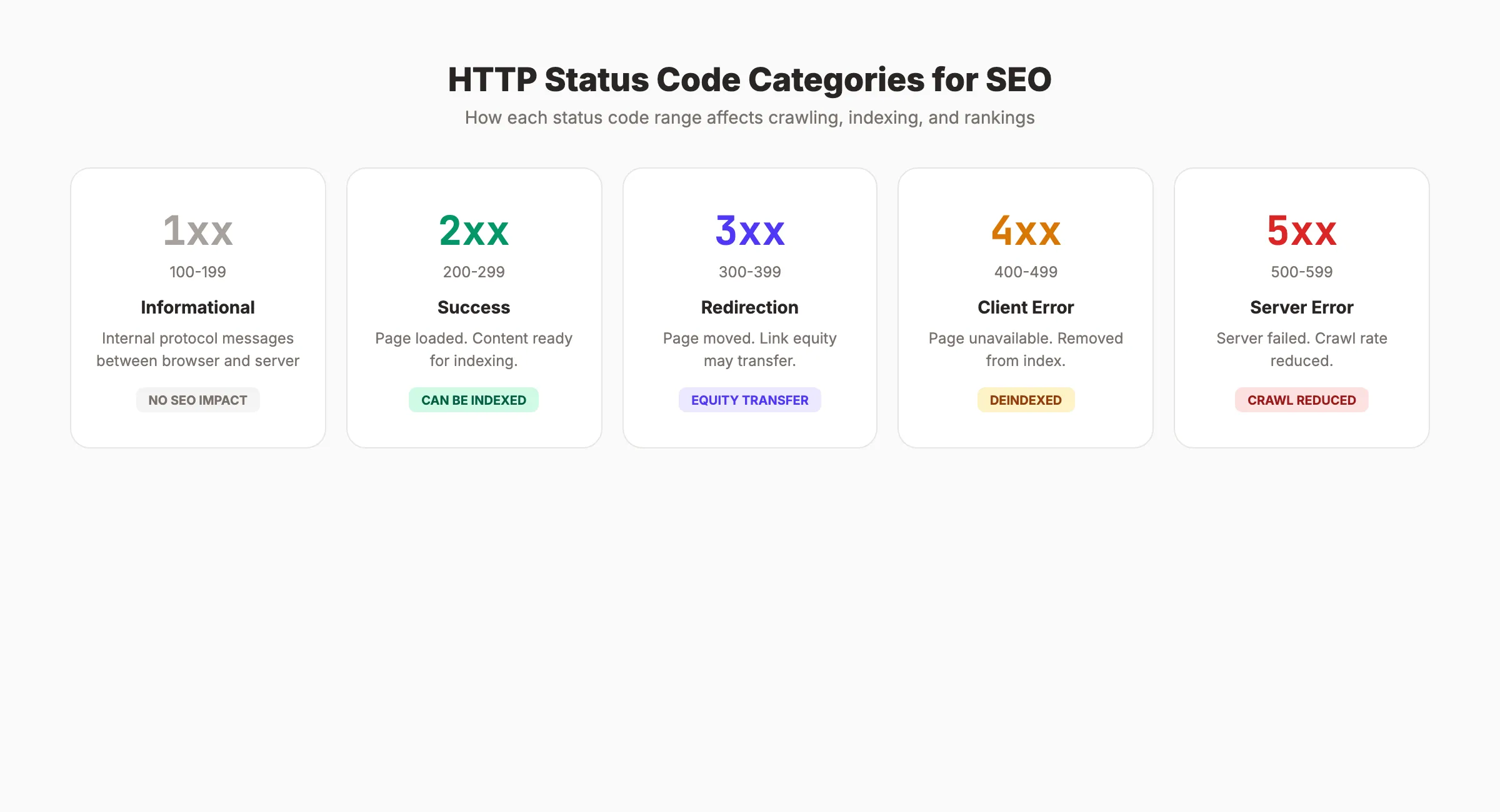
Every status code falls into 1 of 5 categories:
| Category | Range | Meaning | SEO Impact |
|---|---|---|---|
| 1xx | 100-199 | Informational | None. Internal browser codes. |
| 2xx | 200-299 | Success | Page can be indexed. |
| 3xx | 300-399 | Redirection | Affects link equity and crawl paths. |
| 4xx | 400-499 | Client error | Page removed from index. |
| 5xx | 500-599 | Server error | Reduces crawl rate. Can cause deindexing. |
For SEO, codes in the 2xx, 3xx, 4xx, and 5xx ranges matter most. The 1xx codes are internal protocol messages between browser and server. You will never need to fix a 1xx code for SEO.
How Google Uses Status Codes
When Googlebot crawls a URL, it reads the status code before anything else. The code determines what happens next:
- 2xx: Google reads the page content. May consider it for indexing.
- 3xx: Google follows the redirect to the new URL. Updates its index over time.
- 4xx: Google removes the URL from its index. Stops crawling it eventually.
- 5xx: Google retries later. Persistent errors reduce crawl rate across the entire site.
A 2xx status code does not guarantee indexing. Google still evaluates content quality, canonical tags, and duplicate signals before deciding to index a page. But without a 2xx response, indexing is impossible.
2xx Success Codes
The 2xx range means the request succeeded. For SEO, only 2 codes in this range matter.
200 OK
The ideal status code. The server received the request, processed it, and returned the page content. Every page you want indexed should return 200.
SEO rules for 200 responses:
- Verify that the page content actually matches the URL. A 200 response with “Page not found” text is a soft 404 (covered below).
- Check that 200 pages are not also blocked by robots.txt or noindex tags. Conflicting signals confuse Google.
- Monitor response times. A 200 that takes 8 seconds to load still hurts rankings through Core Web Vitals signals.
304 Not Modified
The server tells the crawler that the page has not changed since the last visit. Google does not need to download the content again. This saves bandwidth and crawl budget.
A 304 is a positive signal. It means your server handles conditional requests efficiently. You do not need to fix 304 responses. They help Google crawl your site faster.
Stop writing. Start ranking. Stacc publishes 30 SEO articles per month for $99. Every page returns the right status code from day one. Start for $1 →
3xx Redirect Codes
Redirects tell Google that a URL has moved. The type of redirect determines how much link equity transfers to the new location and how Google updates its index.
301 Moved Permanently
The most important redirect for SEO. A 301 tells Google the page has permanently moved to a new URL. Google transfers the indexing signals (including link equity) from the old URL to the new one.
When to use 301:
- You changed a URL slug permanently
- You migrated to a new domain
- You consolidated duplicate pages into one canonical version
- You deleted a page and want to redirect traffic to a relevant alternative
Google has confirmed that 301 redirects pass link equity. There is no longer a “PageRank tax” on 301s. The full ranking signals transfer.
302 Found (Temporary Redirect)
A 302 tells Google the move is temporary. The old URL keeps its place in the index. Google does not transfer ranking signals to the new URL immediately.
When to use 302:
- A/B testing with different URLs
- Maintenance pages that last hours, not days
- Geolocation or language redirects
Most teams misuse 302s when they mean 301s. If the redirect is permanent, use 301. A 302 that stays in place for months signals confusion to Google. Google may eventually treat a long-standing 302 as a 301, but the delay wastes months of indexing clarity.
307 Temporary Redirect and 308 Permanent Redirect
HTTP/2 equivalents of 302 and 301. They preserve the original HTTP method (GET, POST) during the redirect. For most SEO work, 301 and 302 cover everything. Use 307 and 308 when your application requires method preservation.
Redirect Chains and Loops
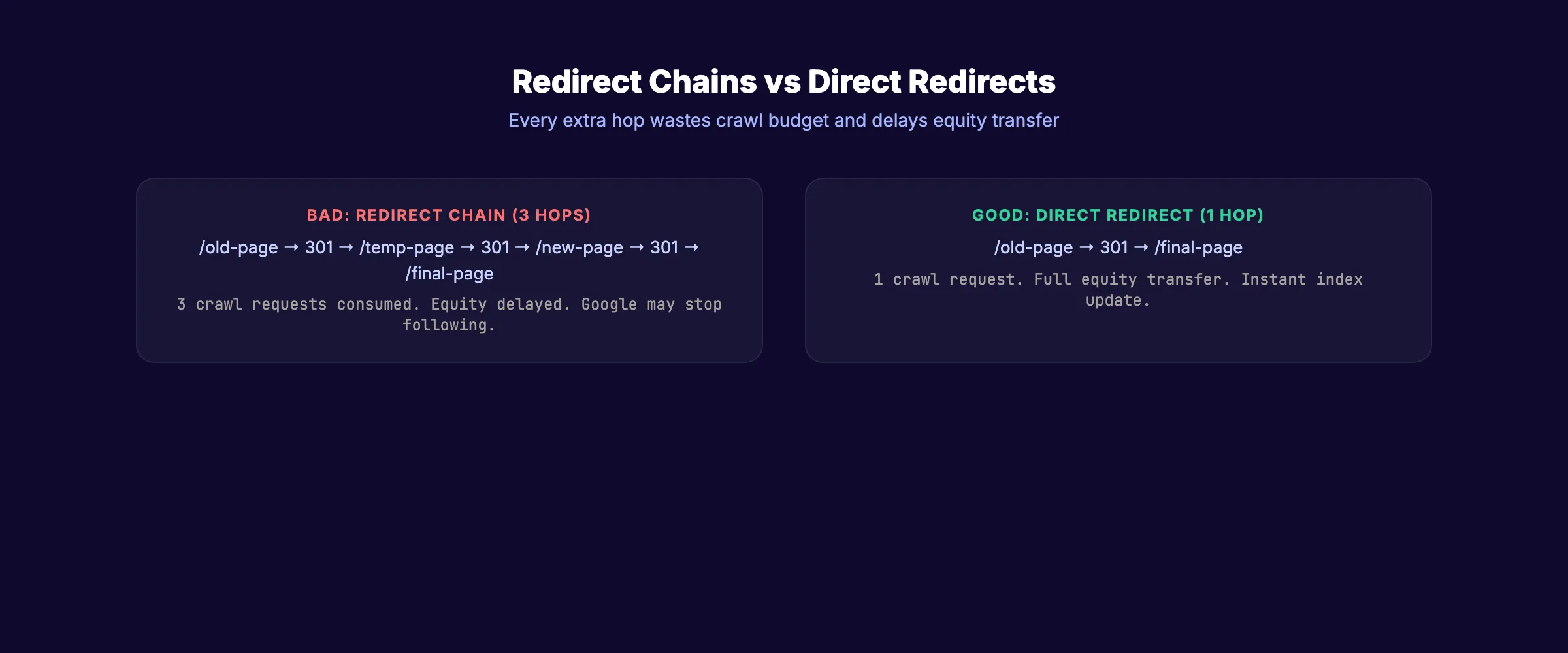
A redirect chain happens when URL A redirects to URL B, which redirects to URL C. Each hop slows down crawling and may leak a small amount of link equity.
Google follows up to 10 redirect hops before giving up. But best practice is 1 hop. Every chain should point directly from the old URL to the final destination.
A redirect loop happens when URL A redirects to URL B, and URL B redirects back to URL A. Google stops following immediately. The page becomes inaccessible.
How to fix redirect chains:
- Crawl your site with Screaming Frog or Sitebulb.
- Filter for redirect chains (3xx → 3xx).
- Update each chain to point directly to the final URL.
- Update internal links to use the final URL. Do not rely on redirects for internal navigation.
4xx Client Error Codes
The 4xx range means the requested resource is unavailable. Google removes these URLs from the index and eventually stops crawling them.
404 Not Found
The server cannot find the requested URL. The page does not exist, was deleted, or the URL was typed incorrectly.
404 and SEO:
- Google will deindex a 404 page over time. This process takes days to weeks depending on crawl frequency.
- A few 404 pages are normal and do not hurt your site overall. Google expects some pages to come and go.
- Mass 404 errors (hundreds at once) signal a problem. Google may reduce crawl rate if it encounters too many errors in a single session.
- External backlinks pointing to 404 pages waste link equity. Redirect those URLs to relevant live pages with 301 redirects.
Custom 404 pages help users but do not help SEO. The server must still return a 404 status code. A custom page that returns 200 instead of 404 is a soft 404.
410 Gone
A 410 tells Google the page was intentionally removed and will not return. Google deindexes 410 pages faster than 404 pages.
When to use 410 vs 404:
| Scenario | Use | Why |
|---|---|---|
| Page deleted permanently | 410 | Faster deindexing |
| Page URL changed | 301 redirect | Preserves equity |
| Page temporarily unavailable | 503 | Tells Google to retry |
| URL never existed | 404 | Standard response |
| Outdated product or event | 410 | Clean removal from index |
403 Forbidden
The server understands the request but refuses to authorize it. Use 403 for pages that require authentication or have restricted access.
Google treats 403 similarly to 404. The page gets removed from the index. Use 403 when the page exists but should not be publicly accessible. Use 404 when the page does not exist.
429 Too Many Requests
The server rate-limits the crawler. Google respects 429 responses and slows down crawling. Persistent 429 errors (more than 2 days) can cause Google to drop URLs from the index.
If Googlebot is hitting your server too hard, returning 429 is the correct way to throttle it. Do not block Googlebot in robots.txt as a workaround. Use 429 to signal that the server needs breathing room.
Your SEO team. $99 per month. 30 optimized articles, published automatically. Zero status code errors. Start for $1 →
5xx Server Error Codes
The 5xx range means the server failed to process a valid request. These are the most damaging status codes for SEO.
500 Internal Server Error
A generic server failure. The server encountered something unexpected and could not complete the request. Common causes include misconfigured .htaccess files, PHP errors, database connection failures, and exceeded memory limits.
500 errors and SEO:
- Google retries 500 URLs. If the error persists, Google eventually treats the page as unavailable and removes it from the index.
- Widespread 500 errors reduce your site’s overall crawl rate. Google assumes the server is unstable and backs off.
- Fix 500 errors immediately. Every hour a page returns 500 is an hour where Google cannot access your content.
502 Bad Gateway
The server, acting as a gateway or proxy, received an invalid response from the upstream server. Common with reverse proxies, load balancers, and CDN configurations.
Fix by checking your origin server health, CDN configuration, and proxy timeout settings.
503 Service Unavailable
The server is temporarily unable to handle the request. Common during planned maintenance, server overload, or deployment.
503 is the correct code for maintenance. Google reads 503 as “come back later” and retries. Unlike a 500, a 503 with a Retry-After header tells Google exactly when to return.
Critical rule: Returning 503 for more than 2 days causes Google to start dropping those URLs from the index. If your maintenance window exceeds 48 hours, you have a serious infrastructure problem.
HTTP/1.1 503 Service Unavailable
Retry-After: 3600
The Retry-After header tells Google to wait 3,600 seconds (1 hour) before retrying.
504 Gateway Timeout
The upstream server failed to respond in time. Similar to 502 but specifically a timeout issue. Fix by increasing server timeout limits, optimizing slow database queries, or upgrading server resources.
Soft 404 Errors
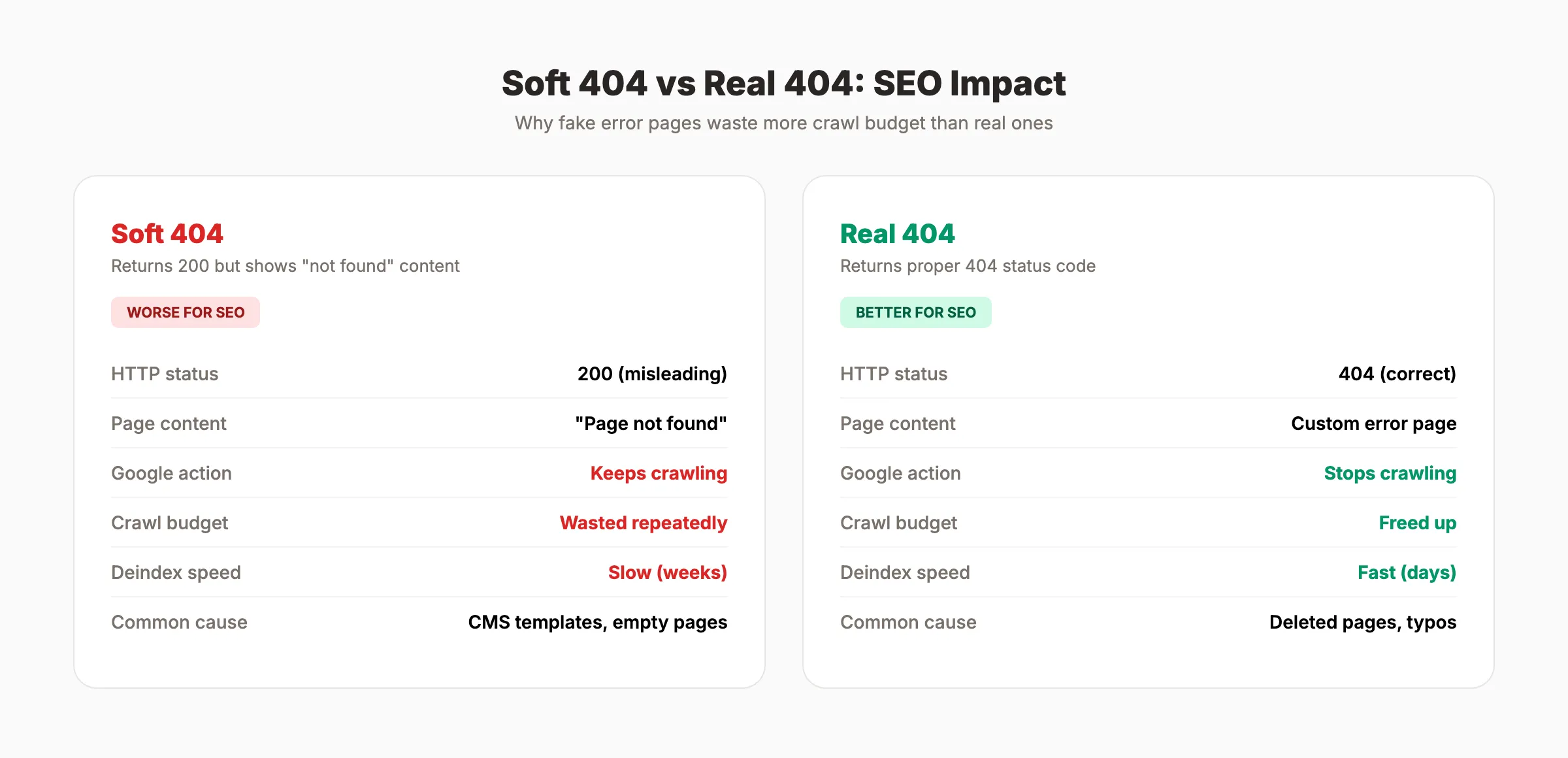
Soft 404s are the most deceptive status code problem in SEO. The server returns a 200 (success) status code, but the page content tells the user the content does not exist.
Why Soft 404s Are Worse Than Real 404s
A real 404 sends a clear signal to Google: this page does not exist. Google deindexes it and moves on.
A soft 404 sends a contradictory signal: the server says “success” but the content says “not found.” Google has to figure out the truth by analyzing the page content. This wastes crawl budget because Google keeps crawling the page trying to determine its status.
Common Causes of Soft 404s
- Empty category pages. An ecommerce category with 0 products that still returns 200.
- Search results pages.
/search?q=xyznonexistentreturning 200 with “no results found.” - Deleted products. Product pages showing “This item is no longer available” with a 200 status.
- Homepage redirects for missing URLs. Redirecting all 404s to the homepage. Google detects this and classifies the homepage as a soft 404.
- Thin template pages. Pages generated by CMS templates with no real content.
How to Fix Soft 404s
- Check Google Search Console under “Pages” > “Not indexed” > “Soft 404.”
- For each flagged URL, decide: should this page exist?
- If yes, add real content. Make the page useful.
- If no, return a proper 404 or 410 status code.
- Never redirect all missing pages to the homepage. This creates more soft 404s.
How HTTP Status Codes Affect Crawl Budget
Google allocates a crawl budget to every site. Status codes directly affect how that budget gets spent.
Codes That Waste Crawl Budget
- Soft 404s. Google crawls them repeatedly because the 200 status does not signal removal.
- Redirect chains. Each hop in a chain consumes a crawl request. A 4-hop chain uses 4 requests to reach 1 page.
- 5xx errors with retries. Google retries failed pages, using crawl budget on broken content.
Codes That Conserve Crawl Budget
- 404 and 410. Google eventually stops crawling these URLs. 410 triggers faster removal.
- 304 Not Modified. Google skips downloading unchanged content.
- Proper 301s. A single-hop 301 uses 1 extra request but permanently resolves the URL.
Impact on Large Sites
For sites under 10,000 pages, crawl budget rarely matters. Google crawls small sites fully without issues. For sites with 100,000+ pages, every wasted request means fewer priority pages get crawled.
Log file analysis reveals exactly how status codes consume your crawl budget. Cross-reference Googlebot activity with your status code data to find waste.
How to Audit Your Site for Status Code Issues
Run status code audits monthly and after every major site change. A single deployment can introduce hundreds of new errors.
Step 1: Crawl Your Site
Use Screaming Frog, Sitebulb, or Lumar to crawl all URLs. Export the results filtered by status code. Look for:
- Any 5xx errors (fix immediately)
- Redirect chains with 2+ hops (collapse to single hop)
- Redirect loops (break the loop)
- 302 redirects that should be 301s
- Pages returning 200 with thin or empty content (soft 404 candidates)
Step 2: Check Google Search Console
In GSC, go to “Pages” to review indexing issues:
- “Server error (5xx)”. Priority fix. These pages are failing.
- “Not found (404)”. Review each. Redirect valuable pages. Leave intentional deletions.
- “Soft 404”. Add real content or return proper 404/410.
- “Redirect error”. Fix redirect chains and loops.
- “Blocked due to other 4xx issue”. Check for 403, 429, or other client errors.
Step 3: Validate Redirects
Test every redirect on your site. Verify that:
- Every 301 points to a live 200 page (not another redirect).
- No redirect chains exist.
- Internal links point to final URLs, not redirected URLs.
- Redirect mapping files from site migrations are complete.
Step 4: Monitor Ongoing
Set up automated alerts for new 5xx errors. Track your overall status code distribution weekly. A healthy site profile looks like this:
| Code | Target % of All Crawled URLs |
|---|---|
| 200 | 90%+ |
| 301 | Under 5% |
| 304 | 2-5% (positive signal) |
| 404/410 | Under 3% |
| 5xx | 0% (zero tolerance) |
A full SEO audit should include status code analysis as a core check every time.
3,500+ blogs published. 92% average SEO score. See what Stacc can do for your site. Start for $1 →
HTTP Status Codes and AI Search Visibility
Status codes now affect more than traditional search. AI models like GPTBot, ClaudeBot, and PerplexityBot rely on the same HTTP responses to access your content.
Pages returning 4xx or 5xx errors are invisible to AI crawlers. If AI models cannot access your content, your site will not appear in AI-generated search responses or AI Overviews.
A site with frequent HTTP errors may find its content underrepresented in both traditional search results and AI-generated answers. Clean status codes are now a requirement for visibility across all search surfaces.
Read the full guide on getting cited in AI search for more on AI visibility.
FAQ
What is the best HTTP status code for SEO?
200 OK is the ideal status code. It tells Google the page is accessible and ready for indexing. Every page you want to rank should return 200 with real, valuable content.
Do 404 errors hurt SEO?
A small number of 404 errors are normal and do not hurt site-wide rankings. Mass 404 errors can reduce crawl rate. The real damage comes from 404 pages that have external backlinks. Redirect those to relevant live pages with 301s to recover the link equity.
What is the difference between a 301 and 302 redirect?
A 301 redirect is permanent. It transfers link equity to the new URL and tells Google to update its index. A 302 is temporary. It keeps the original URL in the index and does not transfer ranking signals. Use 301 for permanent moves. Use 302 only for genuinely temporary situations.
What is a soft 404 and how do I fix it?
A soft 404 occurs when a page returns a 200 status code but displays “not found” or empty content. Fix by returning a proper 404 or 410 status code, or add real content if the page should exist. Check Google Search Console under “Pages” to find soft 404s on your site.
How do 5xx errors affect SEO?
Server errors trigger Google to reduce crawl rate across your entire site. Persistent 503 or 429 errors lasting more than 2 days can cause Google to drop affected URLs from the index. Fix all 5xx errors immediately.
How often should I check my site for status code errors?
Run a full crawl monthly at minimum. Set up automated monitoring for 5xx errors with immediate alerts. Run additional checks after every deployment, site migration, or major content change.
HTTP status codes are the first thing Google reads on every page visit. Get them right and your crawl budget flows to priority pages. Get them wrong and Google wastes resources on errors, chains, and ghost pages that will never rank. Audit your codes, fix redirects to single hops, eliminate soft 404s, and maintain zero tolerance for server errors.

Written by
Siddharth GangalSiddharth is the founder of theStacc and Arka360, and a graduate of IIT Mandi. He spent years watching great businesses lose organic traffic to competitors who simply published more. So he built a system to fix that. He writes about SEO, content at scale, and the tactics that actually move rankings.
30 SEO blog articles published every month
Keyword-optimized, scheduled, and live on your site. Automatically.
30-day trial · Cancel anytime
theStacc
Stop writing SEO content manually
30 blog articles, 30 GBP posts, and social media content. Published every month. Automatically.
Start Your $1 Trial$1 for 3 days · Cancel anytime