
Toxic Backlinks (2026): Strategies, Tactics & Examples
Step-by-step toxic backlinks guide guide for 2026: proven tactics, real examples, common mistakes to avoid, and implementation tips.
Toxic backlinks are the most misunderstood concept in SEO. Tool vendors flag thousands of links as “toxic” to sell subscriptions. Google says they just ignore bad links. SEO forums split between panic and apathy.
Here is the reality: Ahrefs ran an experiment where they disavowed 129 “toxic” backlinks flagged by a popular SEO tool. The result was a 7.1% drop in traffic. Not an improvement. A loss.
That does not mean toxic backlinks are fictional. Real spam attacks happen. Manual penalties exist. Google’s Penguin algorithm was built specifically to devalue manipulative links. The question is not whether toxic backlinks exist. The question is whether YOUR links require action.
We have published 3,500+ blog posts across 70+ industries and run backlink audits regularly. This guide covers what we have learned about identifying real threats versus false alarms.
Here is what you will learn:
- What actually counts as a toxic backlink (and what does not)
- Why Google’s John Mueller calls toxic link fears “a billable waste of time”
- The 10 red flags that signal genuinely harmful links
- A decision framework for when to act versus when to ignore
- Step-by-step disavow process for confirmed threats
- How to respond to negative SEO attacks
- How to build a clean link profile going forward
Chapter 1: What Toxic Backlinks Actually Are
A toxic backlink is any inbound link that could trigger a Google penalty or signal manipulative link building patterns. The key word is “could.” Most links flagged as toxic by SEO tools are harmless.
The Technical Definition
Google does not use the term “toxic backlinks” in its documentation. The concept was created by SEO tool vendors to classify links that match patterns associated with Google penalties.
What Google actually penalizes:
- Paid links designed to pass PageRank
- Link exchange schemes (“I link to you, you link to me”)
- Private blog network (PBN) links from sites that exist only to manipulate rankings
- Automated link building through bots or software
- Links with over-optimized anchor text
- Large-scale guest posting campaigns with exact-match anchors
Google’s spam policies define “link spam” clearly. A link is problematic when it was created with the intent to manipulate rankings.
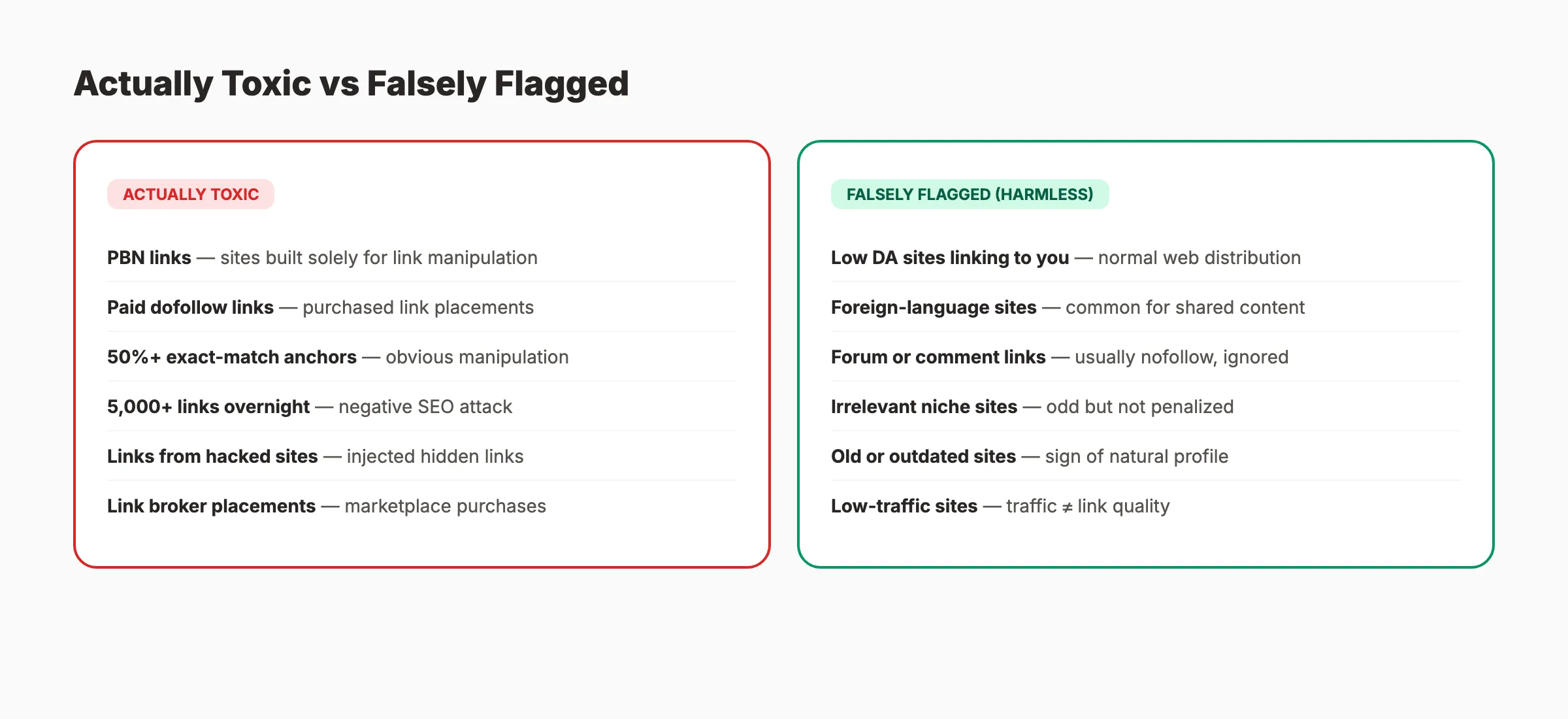
What Is NOT Toxic
Many links that SEO tools flag as “toxic” are harmless:
| Flagged as “Toxic” | Actually… |
|---|---|
| Low domain authority site linking to you | Normal. Most of the web has low DA. |
| Foreign-language site linking to you | Common if your content gets shared internationally |
| Forum or comment links | Usually nofollow. Google ignores them. |
| Irrelevant niche linking to you | Strange, but not penalized |
| Old or outdated sites linking to you | A sign of a natural link profile |
The confusion exists because SEO tools use proprietary “toxicity scores” that do not match how Google evaluates links. A link from a DR 5 site is not inherently toxic. It is just low-value.
Google’s John Mueller has called the concept of toxic links “fabricated by SEO tools” and described disavowing them as a “billable waste of time.”
Chapter 2: The Great Debate. Does Google Already Ignore Them?
This is the most polarized topic in SEO. Two credible camps disagree completely.
Camp 1: Google Handles It
Google’s position is clear: SpamBrain, their AI-based spam detection system, identifies and devalues spammy links automatically. Google’s 2022 Spam Report stated that SpamBrain reduced search spam by 99% compared to pre-machine-learning baselines. AI detection is 70x more efficient than the old rule-based systems.
The March 2026 spam update rolled out in under 20 hours. Google is actively improving its ability to detect and ignore link spam without webmaster intervention.
John Mueller has repeatedly stated that webmasters do not need to worry about random spam links pointing to their sites. Google simply ignores them.
Camp 2: Real Damage Still Happens
Despite Google’s assurances, documented cases exist where link spam caused ranking damage:
- One ecommerce site ignored a 30% spike in spam links and lost 40% of organic traffic within a month
- Sites that receive manual actions must address their link profiles to get the penalty lifted
- Negative SEO attacks with thousands of spam links can overwhelm SpamBrain’s ability to filter at scale
The Balanced View
Both camps have valid points. Google handles most spam links automatically. But “most” is not “all.” The practical framework:
- Small volume of random spam links? Google ignores them. Do nothing.
- Sudden massive influx of spam links? Possible negative SEO attack. Monitor closely.
- Manual action penalty in Search Console? Act immediately. Disavow is required.
- Suspicious ranking drop coinciding with link spam? Investigate before assuming links caused it.
The worst mistake is not having toxic links. The worst mistake is over-disavowing legitimate links because a tool flagged them.
Your SEO team. $99 per month. Stacc publishes 30 optimized articles every month so you can focus on growing your link profile. Start for $1 →
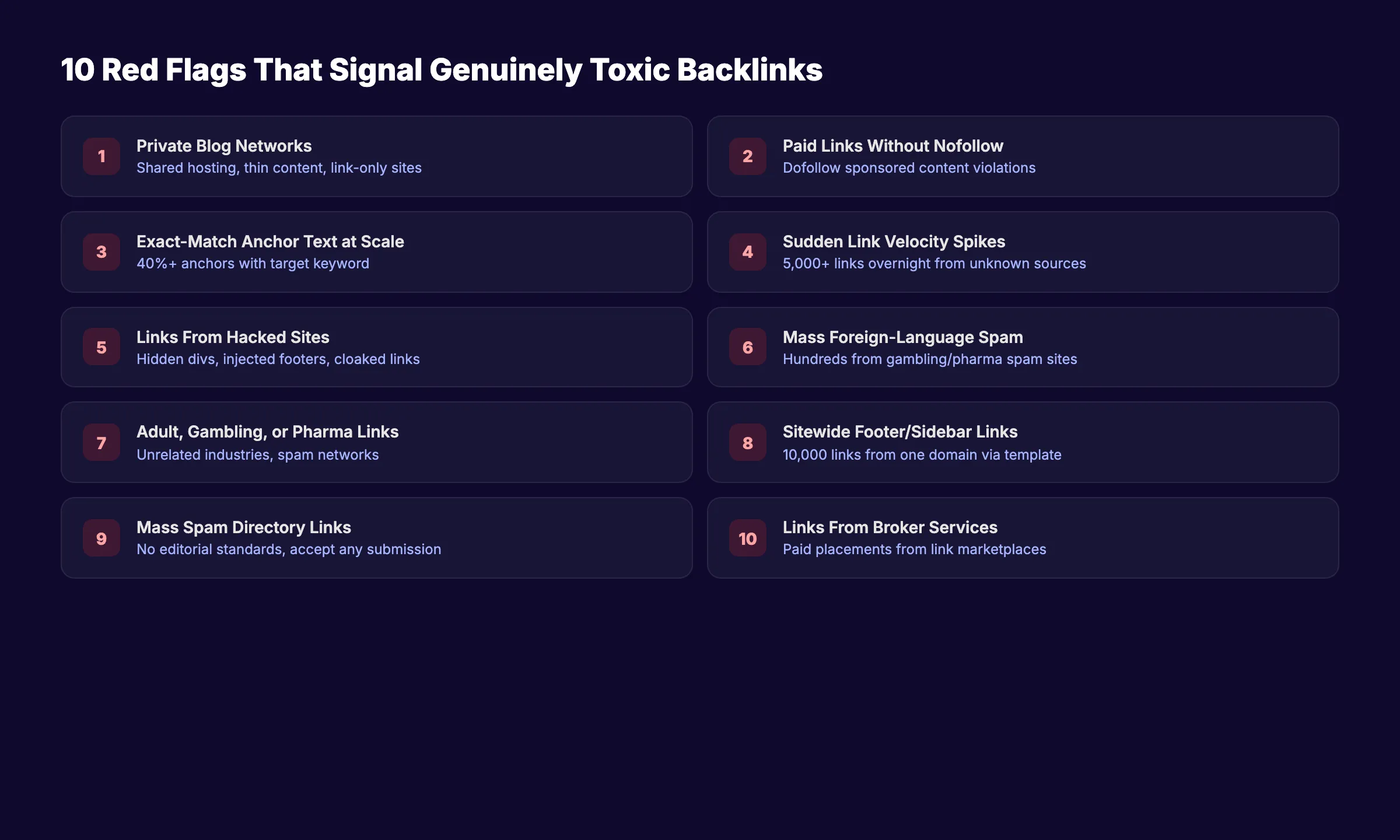
Chapter 3: 10 Red Flags That Signal Genuinely Toxic Backlinks
Not all suspicious links are harmful. These 10 signals indicate real problems.
Red Flag 1: Links From Private Blog Networks
PBNs are networks of websites created solely to build links. They share hosting, IP addresses, similar templates, and thin content. Google specifically targets PBNs. Links from identified PBN sites carry real penalty risk.
Red Flag 2: Paid Links Without Nofollow
Paying for links that pass link equity violates Google’s policies. Sponsored content and paid placements must use rel="sponsored" or rel="nofollow" attributes. Paid dofollow links are a manual action trigger.
Red Flag 3: Exact-Match Anchor Text at Scale
If 40% of your anchor text profile is “best CRM software” pointing to your CRM page, that pattern screams manipulation. Natural anchor text profiles are diverse: brand names, URLs, generic phrases, and varied descriptions.
Red Flag 4: Sudden Link Velocity Spikes
Gaining 5,000 links overnight from unknown sources is not natural. Sudden spikes in link velocity signal either a negative SEO attack or an automated link building campaign. Normal link growth is gradual.
Red Flag 5: Links From Hacked Sites
Hacked websites often get injected with hidden links. If a normally legitimate site suddenly links to your site from a hidden <div> or injected footer, the link is toxic. These links disappear when the site owner cleans the hack.
Red Flag 6: Links From Irrelevant Foreign-Language Sites
A handful of foreign-language links are normal. Hundreds or thousands from Chinese, Russian, or Japanese gambling or pharmaceutical sites are not. This pattern typically indicates a negative SEO attack or automated spam campaign.
Red Flag 7: Links From Adult, Gambling, or Pharma Spam Sites
Links from sites in these categories that have no connection to your business signal manipulation. These domains are frequently associated with link spam networks.
Red Flag 8: Sitewide Footer or Sidebar Links
A single site linking to you from every page via a footer or sidebar widget creates an unnatural link pattern. One site with 10,000 pages generates 10,000 links from a single source. Google devalues sitewide links, but at extreme volumes they can signal manipulation.
Red Flag 9: Links From Known Spam Directories
Mass-submission directory links from sites with no editorial standards are a legacy spam tactic. Modern spam directories accept any submission and exist only to sell link placements.
Red Flag 10: Links You Paid For Through Link Brokers
Link marketplaces and brokers that sell “guaranteed placements” on specific sites violate Google’s policies. If you bought links through a broker service, those links carry penalty risk regardless of the site quality.
Chapter 4: Tools for Finding Toxic Backlinks
Every major SEO tool offers backlink analysis. The key is understanding what their “toxicity scores” actually measure.
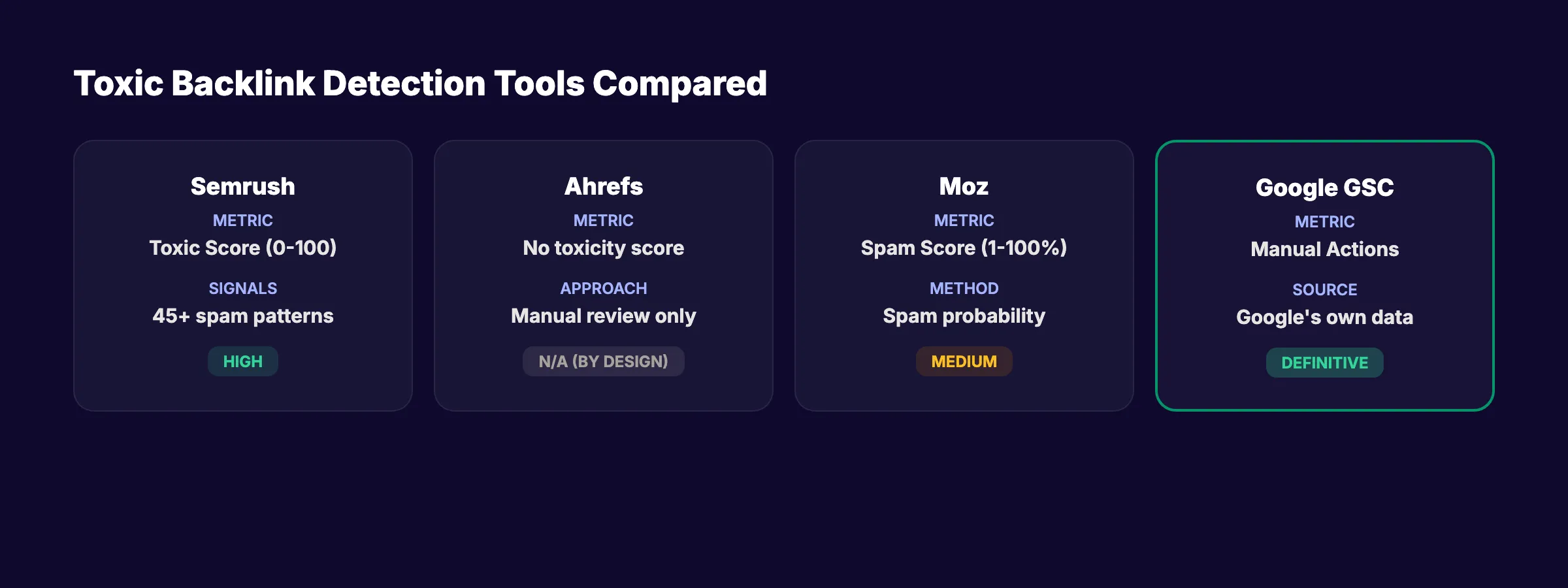
Tool Comparison
| Tool | Toxicity Metric | What It Measures | Reliability |
|---|---|---|---|
| Semrush | Toxic Score (0-100) | Pattern matching against 45+ spam signals | High (most signals) |
| Ahrefs | No toxicity score | They argue the concept is flawed | N/A (manual review only) |
| Moz | Spam Score (1-100%) | Probability link source is spam | Medium |
| Google Search Console | Manual Actions | Google’s own penalty notifications | Definitive |
Ahrefs deliberately does not provide a toxicity score. Their position: automated toxicity detection creates more false positives than real detections. They recommend manual review instead.
Google Search Console Is the Only Definitive Source
Google Search Console tells you exactly two things no other tool can:
- Manual Actions. If Google has penalized your site for unnatural links, it appears here. This is the only confirmed “toxic link” signal.
- Links Report. Shows every link Google has found pointing to your site. Use this as your ground truth for link data.
If you have no manual action in Search Console, the urgency of toxic link cleanup drops significantly.
How to Run a Toxic Link Audit
- Export your full backlink profile from Search Console and your preferred SEO tool
- Cross-reference the two lists (tools miss links GSC finds, and vice versa)
- Sort by referring domain to identify patterns
- Flag links matching the 10 red flags from Chapter 3
- Verify each flagged link manually before acting
Do NOT rely solely on a tool’s toxicity score. Manual verification catches false positives that automated detection misses.
3,500+ blogs published. 92% average SEO score. See what Stacc can do for your site. Start for $1 →
Chapter 5: The Decision Framework. When to Act vs When to Ignore
Most SEO advice either says “disavow everything” or “ignore everything.” Neither is correct. Use this framework.
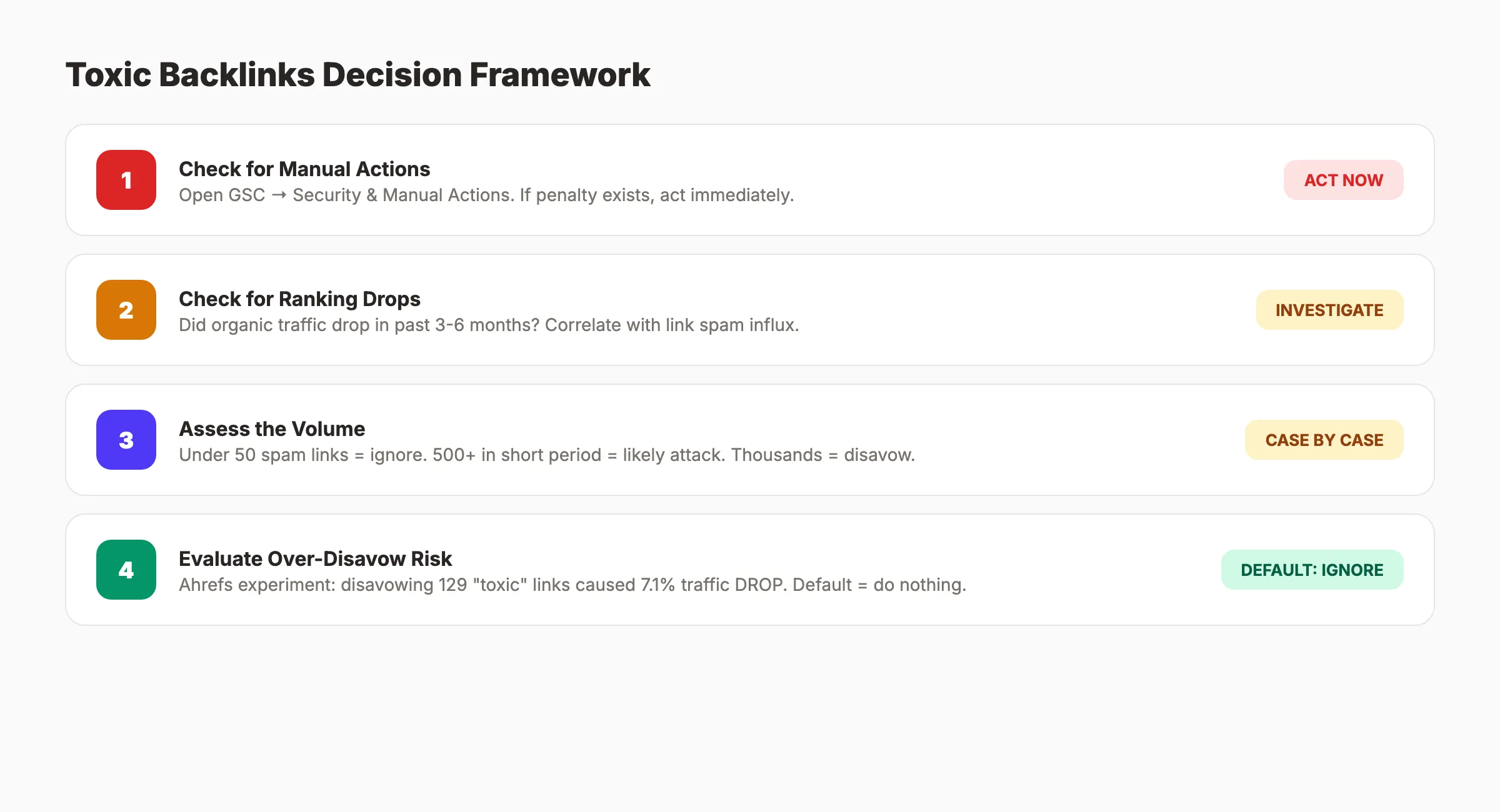
The Toxic Backlink Decision Framework
Step 1: Check for Manual Actions
Open Google Search Console. Go to Security & Manual Actions → Manual Actions. If a manual action exists for “Unnatural links to your site,” you must act. Skip to Chapter 6.
Step 2: Check for Ranking Drops
Did your organic traffic drop significantly in the past 3-6 months? If yes, investigate whether the drop correlates with a link spam influx. Check your link data for sudden spikes.
If no ranking drop exists, the risk is low. Proceed to Step 3.
Step 3: Assess the Volume
| Scenario | Action |
|---|---|
| Under 50 suspicious links | Do nothing. Google ignores them. |
| 50-500 suspicious links | Monitor monthly. Act only if rankings drop. |
| 500+ suspicious links in a short period | Likely attack. Consider disavowing the worst offenders. |
| Thousands from the same spam network | Disavow the domains. |
Step 4: Evaluate the Risk of Over-Disavowing
The Ahrefs experiment showed that disavowing “toxic” links caused a 7.1% traffic drop. Some links flagged as toxic by tools actually pass value.
Before disavowing, ask:
- Am I certain these links are manipulative (paid, PBN, automated)?
- Or am I just flagging links from low-DA sites?
- Would I rather risk keeping a few bad links or risk removing good ones?
The default should be: do nothing unless you have a manual action or confirmed negative SEO attack.
When 38% of SEOs Choose Correctly
61% of SEO experts do not use the disavow tool at all. 38% of specialists do nothing about spam backlinks. In most cases, doing nothing is the correct decision.
Chapter 6: How to Remove Toxic Backlinks
When action is necessary, follow this process in order.
Step 1: Attempt Manual Removal
Contact the website owners hosting toxic links and request removal. Be realistic about expectations. Response rates from spam sites are near zero.
Email template:
Subject: Link removal request ,  [Your Site Name]

Hi,

Your page [URL of page with toxic link] contains a link to my
website [your URL]. This link appears to be part of a spam
pattern and we are cleaning up our backlink profile.

Could you remove the link? If the page is no longer maintained,
removing the entire page would also resolve this.

Thank you,
[Your Name]
Send to 50+ flagged sites. Wait 2 weeks. Document every attempt. Move to Step 2 for non-responses.
Step 2: Build Your Disavow File
The disavow tool tells Google to ignore specific links or entire domains when assessing your site.
Format your disavow file:
## Disavow file for example.com
## Generated [date]
## Reason: Spam link network attack

## Individual URLs
https://spamsite1.com/page-with-link
https://spamsite2.com/another-page

## Entire domains (use for sitewide spam)
domain:spamnetwork1.com
domain:spamnetwork2.com
domain:spamnetwork3.com
Rules:
- One URL or domain per line
- Use
domain:prefix to disavow an entire domain - Add comments with
#to document your reasoning - Save as a plain
.txtfile with UTF-8 encoding
Step 3: Submit to Google
- Go to Google’s Disavow Tool
- Select your property
- Upload your
.txtfile - Confirm submission
Google processes disavow files within a few weeks. Ranking impact takes longer. For manual action penalties, recovery typically takes 2 weeks to several months after submitting a reconsideration request.
Step 4: Monitor and Verify
After submitting your disavow file:
- Check Search Console weekly for manual action status changes
- Monitor organic traffic in Google Analytics for recovery signals
- Run a fresh backlink audit 30 days after submission
- Update your disavow file if new spam links appear from the same networks
- Document everything for future reference
Stop writing. Start ranking. Stacc publishes 30 SEO articles per month for $99 so you can focus on your link profile. Start for $1 →
Chapter 7: Negative SEO. When Someone Attacks You With Toxic Links
Negative SEO is real but rare. Understanding it prevents both overreaction and underreaction.
What a Negative SEO Attack Looks Like
A competitor or malicious actor points thousands of spammy links at your site. The links typically come from:
- Foreign-language gambling or pharmaceutical sites
- PBN networks with thin, auto-generated content
- Comment spam across thousands of blogs
- Hacked sites with injected links
The attack creates a sudden, massive spike in your referring domain count. Your link profile goes from natural to obviously manipulative overnight.
How Google Handles It
Google claims SpamBrain handles most negative SEO attacks automatically. Their position: “we know when links are not natural and we simply ignore them.”
This is true in most cases. Google sees millions of spam link patterns daily and filters them.
But “most cases” is not “all cases.” Large-scale attacks targeting smaller sites with limited existing authority can overwhelm the filter. A site with 200 referring domains that suddenly receives 5,000 spam domains is more vulnerable than a site with 10,000 existing domains.
How to Respond
If you suspect a negative SEO attack:
- Document the attack. Screenshot your link growth chart. Export the new links. Note the date the spike began.
- Check Search Console for manual actions. If none exist, Google may already be handling it.
- Monitor your rankings daily for 2-3 weeks. If rankings remain stable, Google is filtering the spam.
- Disavow only if rankings drop and the drop correlates with the link influx.
- Report to Google via the spam report form if the attack comes from identifiable sources.
Do not panic-disavow thousands of domains on day 1. Give Google time to filter. Act only on confirmed impact.
Chapter 8: Building a Clean Link Profile Going Forward
The best defense against toxic links is a strong, diverse, natural link profile.
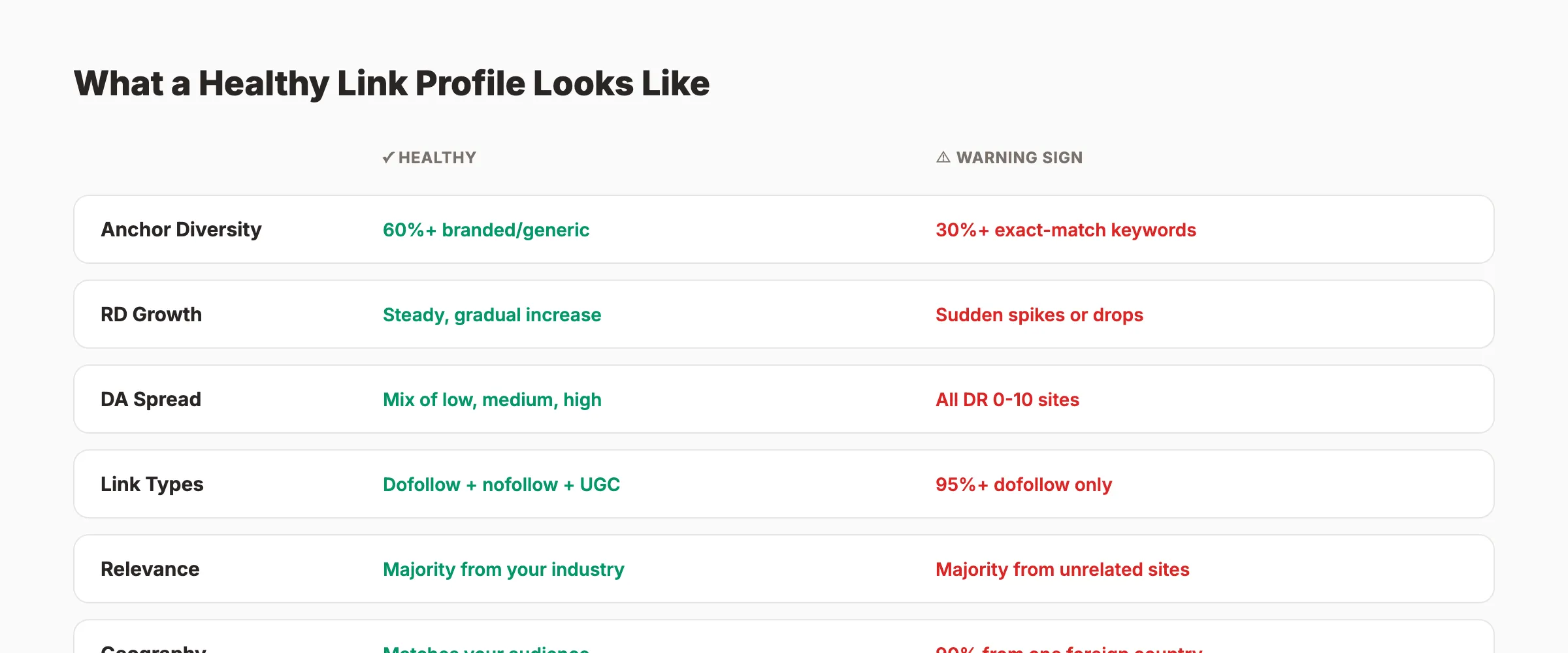
What a Healthy Link Profile Looks Like
| Metric | Healthy Range | Warning Sign |
|---|---|---|
| Anchor text diversity | 60%+ branded or generic | 30%+ exact-match keywords |
| Referring domain growth | Steady, gradual increase | Sudden spikes or drops |
| Domain authority spread | Mix of low, medium, and high DA | All links from DR 0-10 sites |
| Link type mix | Dofollow + nofollow + UGC | 95%+ dofollow |
| Relevance | Majority from your industry | Majority from unrelated sites |
| Geographic spread | Matches your audience | 90% from one foreign country |
Proactive Steps
- Audit quarterly. Run a link profile review every 3 months. Catch problems early.
- Build quality links. Invest in link building strategies that earn editorial links from relevant sites.
- Monitor link velocity. Set up alerts for sudden spikes in new referring domains.
- Diversify anchor text. Keep exact-match anchors under 10% of your total profile.
- Earn, do not buy. Every paid link carries risk. Earned links through content marketing, digital PR, and guest posting are safe.
- Strengthen your site authority. A strong domain authority makes your site more resilient against link spam.
The sites that worry least about toxic backlinks are the ones that built their authority the right way.
Toxic Backlinks Checklist
Use this to audit your link profile systematically:
- Checked Google Search Console for manual actions
- Exported full backlink profile from GSC and SEO tool
- Cross-referenced tool data with GSC data
- Flagged links matching the 10 red flags
- Manually verified each flagged link
- Applied the decision framework (act or ignore)
- Attempted manual removal for confirmed toxic links
- Built and submitted disavow file (if necessary)
- Set up quarterly audit schedule
- Monitoring link velocity for future spikes
FAQ
What are toxic backlinks?
Toxic backlinks are inbound links from websites that could trigger a Google penalty or signal manipulative link building patterns. They include links from private blog networks, paid link schemes, hacked sites, and automated spam campaigns. Google does not use the term “toxic” in its documentation. The label was created by SEO tool vendors.
Should I disavow toxic backlinks?
Only disavow if you have a manual action penalty in Google Search Console or confirmed evidence that specific links are causing ranking damage. 61% of SEO experts do not use the disavow tool at all. The Ahrefs experiment showed that disavowing 129 “toxic” links caused a 7.1% traffic drop. The default should be: do nothing unless you have strong evidence.
Does Google automatically ignore toxic backlinks?
In most cases, yes. Google’s SpamBrain system reduced search spam by 99% compared to pre-machine-learning baselines. John Mueller has called toxic link concerns “a billable waste of time” and stated Google “just ignores them.” The exception is large-scale coordinated spam attacks targeting smaller sites.
How long does it take to recover from a Google link penalty?
After submitting a disavow file and a reconsideration request, Google typically processes the request within 2-4 weeks. Full recovery can take 2 weeks to several months depending on the severity of the penalty and the quality of your cleanup.
Can competitors hurt my rankings with toxic backlinks?
Negative SEO attacks are real but rare. Google handles most spam link attacks automatically through SpamBrain. Smaller sites with fewer existing backlinks are more vulnerable. If you suspect an attack, monitor rankings for 2-3 weeks before acting. Only disavow if you see confirmed ranking damage.
What tools check for toxic backlinks?
Semrush offers a Toxic Score (0-100) based on 45+ spam signals. Moz provides a Spam Score. Ahrefs deliberately does not provide a toxicity score because they argue the concept creates more false positives than detections. Google Search Console is the only definitive source for manual action penalties.
The smartest approach to toxic backlinks is restraint. Audit your links quarterly. Act on confirmed threats. Ignore automated tool scores that create panic without evidence. Build quality links instead of worrying about bad ones. The sites with the strongest backlink profiles spend more time earning links than removing them.
Related Tools & Resources
Free SEO Tools:
Best Lists:

Written by
Siddharth GangalSiddharth is the founder of theStacc and Arka360, and a graduate of IIT Mandi. He spent years watching great businesses lose organic traffic to competitors who simply published more. So he built a system to fix that. He writes about SEO, content at scale, and the tactics that actually move rankings.
30 SEO blog articles published every month
Keyword-optimized, scheduled, and live on your site. Automatically.
30-day trial · Cancel anytime
theStacc
Stop writing SEO content manually
30 blog articles, 30 GBP posts, and social media content. Published every month. Automatically.
Start Your $1 Trial$1 for 3 days · Cancel anytime