Comparison pages capture buyers ready to decide. See the template, SEO structure, and examples for writing vs pages that convert. Updated 2026.
A comparison page targets buyers at the decision stage, which is why comparison queries convert at 2 to 3 times the rate of informational searches. This guide gives the page template, the heading structure search engines expect, the comparison table format, and examples of vs pages that convert.
Comparison queries have 2 to 3 times higher conversion rates than informational searches. Someone typing "Ahrefs vs Semrush" is not researching. They are deciding. They have a credit card ready. And they will buy from whoever gives them the clearest answer.
A comparison page template turns that buying intent into traffic and conversions. Yet most businesses never create comparison content because they think it is too aggressive, too niche, or too hard to write well.
We have published 3,500+ articles across 70+ industries, including hundreds of comparison pages. The pattern for what works is clear. This guide gives you the exact template, structure, and SEO strategy to write comparison pages that rank and convert.
Here is what you will learn:
- Why comparison pages are the highest-converting content type in SEO
- The exact page structure and comparison page template that ranks
- How to choose which comparisons to write
- SEO optimization specific to comparison content
- Common mistakes that kill comparison page rankings
- Examples of comparison pages done right
Why Comparison Pages Convert Better Than Any Other Content
Comparison searches sit at the bottom of the buyer funnel. The searcher has already identified their options. They are choosing between 2 or 3 specific products or services. This intent converts at 2 to 3 times the rate of informational content.
According to Ahrefs' content study, pages targeting "X vs Y" keywords have an average conversion rate of 4 to 8%. Standard blog posts convert at 1 to 3%. The difference comes from intent. A person reading "what is SEO" is learning. A person reading "Surfer SEO vs Clearscope" is buying.
The Business Case for Comparison Content
| Metric | Comparison Pages | Standard Blog Posts |
|---|---|---|
| Conversion rate | 4-8% | 1-3% |
| Search intent | Commercial (ready to buy) | Informational (researching) |
| Competition level | Usually lower | Usually higher |
| Content length | 1,500-3,000 words | 2,000-5,000 words |
| Time to rank | 2-4 months | 4-8 months |
| Lifetime value | High (drives sales directly) | Medium (builds authority) |
Comparison pages also rank faster than guide-style content. Why? The keyword pool is more specific. "Ahrefs vs Semrush" has fewer competing pages than "best SEO tools." Specificity reduces competition. Lower competition means faster rankings.
The Comparison Page Template That Ranks
Every high-ranking comparison page follows a predictable structure. Use this template as your starting point.
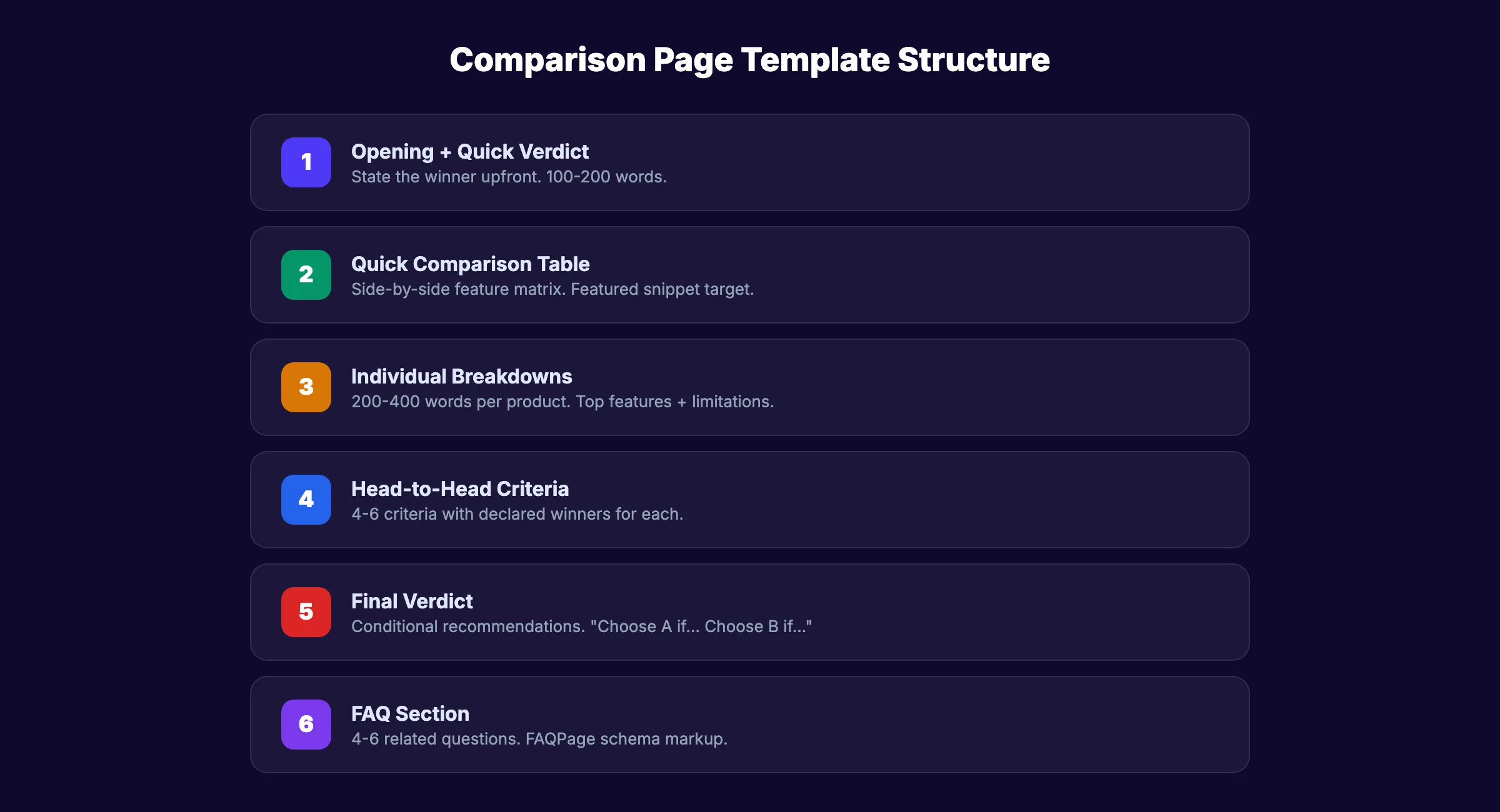
Page Structure Overview
- Opening (100-200 words). State who the comparison is for and give a quick verdict
- Quick comparison table. Side-by-side feature matrix
- Individual breakdowns. Deep dive on each option
- Head-to-head sections. Compare on specific criteria (pricing, features, ease of use)
- Verdict. Clear recommendation with reasoning
- FAQ. Answer related comparison questions
1. Opening With a Quick Verdict
Start with a verdict. Do not make readers scroll through 3,000 words to find your recommendation. The best comparison pages lead with the answer and then support it.
Example opening:
Quick verdict: If you need a full-service SEO platform with the best backlink database, choose Ahrefs. If you need an all-in-one marketing suite with PPC and social tools, choose Semrush. If budget is your priority, neither is the right fit.
This approach satisfies impatient readers (they get the answer immediately) and encourages deeper reading (they want to understand why).
2. Quick Comparison Table
Place a feature comparison table within the first 500 words. This table is your featured snippet target. Google pulls tables from comparison pages into search results more often than any other format.
| Feature | Option A | Option B |
|---|---|---|
| Starting Price | $99/mo | $129/mo |
| Free Trial | 7 days | 14 days |
| Key Strength | Backlink analysis | All-in-one platform |
| Key Weakness | No PPC tools | Steeper learning curve |
| Best For | SEO specialists | Marketing teams |
| Our Rating | 4.5/5 | 4.3/5 |
Every comparison table should include: pricing, key strengths, key weaknesses, best-for recommendation, and a rating. This structure gives Google a clean, extractable answer for the search snippet.
3. Individual Product Breakdowns
After the comparison table, give each option its own section. Cover:
- What it does (1 to 2 sentences)
- Top 3 features with brief explanations
- Pricing tiers
- Who it is best for
- Biggest limitation
Keep each breakdown to 200 to 400 words. The goal is not a full review. Link to your detailed review page if one exists. The comparison page summarizes. The review page goes deep.
4. Head-to-Head Comparisons
Compare both options on 4 to 6 specific criteria. Each criterion gets its own H3 heading.
Common comparison criteria:
- Pricing and value. Which costs more? Which delivers more per dollar?
- Ease of use. Which is simpler for beginners?
- Feature depth. Which has stronger capabilities for specific tasks?
- Customer support. Which has better response times and resources?
- Integrations. Which connects to more tools?
- Scalability. Which grows better with your business?
For each criterion, declare a winner. "For pricing, Option A wins. At $99 per month vs $129, you get comparable features at a lower cost." Readers want clarity, not balance. Pick a side on every criterion.
5. Final Verdict
Close with a clear, opinionated recommendation. Do not say "it depends" and leave it there. Provide conditional recommendations.
Example:
Choose Option A if you are an SEO professional who needs the deepest backlink data and does not need PPC tools.
Choose Option B if you are a marketing manager who needs SEO, PPC, and social media tools in one platform.
This conditional format helps every reader find their answer regardless of their specific situation.
Stop writing. Start ranking. theStacc plans, writes and publishes SEO articles to your blog from $99 per month. Including comparison pages, guides, and reviews.
How to Choose Which Comparisons to Write
Not every "X vs Y" comparison is worth writing. Focus on comparisons that have search volume, commercial intent, and relevance to your audience.
Finding Comparison Keywords
Use these methods to identify comparison opportunities:
- Competitor analysis. Search your competitors' names + "vs" in Ahrefs or Semrush. See which comparison terms have volume.
- Google Autocomplete. Type your product name or a competitor name followed by "vs" and see what Google suggests.
- People Also Ask. Search any product in your category. Google often shows "Is X better than Y?" in the PAA box.
- Your sales team. Ask which competitors prospects mention most. Those are your highest-priority comparisons.
Prioritization Framework
| Priority | Comparison Type | Example |
|---|---|---|
| Highest | Your product vs direct competitor | "theStacc vs Surfer SEO" |
| High | Two competitors (you are the alternative) | "Ahrefs vs Semrush" (theStacc is a third option) |
| Medium | Category comparisons | "SEO agency vs freelancer" |
| Lower | Concept comparisons | "Google Ads vs SEO" |
The highest-priority comparisons are the ones where your product or service is a direct participant. You control the narrative. You can position your strengths against their weaknesses.
The second priority is competitor-vs-competitor comparisons where you are the unstated third option. A page comparing Ahrefs vs Semrush that ends with "If neither fits your needs, here is what we recommend" captures buyers who are dissatisfied with both options.
Volume Is Not the Only Factor
Some comparison keywords have only 50 to 200 searches per month. That is fine. A comparison page with 100 monthly visitors that converts at 6% generates 6 qualified leads per month. A blog post with 1,000 visitors converting at 1% generates 10 leads, but those leads are earlier in the funnel and harder to close.
Search intent quality matters more than volume for comparison content.
SEO Optimization for Comparison Pages
Comparison pages have specific SEO requirements that differ from standard blog content.
Title Tag Formula
Use one of these proven title formats:
| Format | Example |
|---|---|
| [A] vs [B]: Which Is Better? ([Year]) | "Ahrefs vs Semrush: Which Is Better? (2026)" |
| [A] vs [B]: Honest Comparison ([Year]) | "Surfer SEO vs Clearscope: Honest Comparison (2026)" |
| [A] vs [B]: [Key Differentiator] | "Mailchimp vs ConvertKit: Best for Small Business" |
Keep titles under 60 characters. Include the year for freshness signals. Place the primary keyword ("A vs B") at the beginning.
URL Structure
Use a clean, keyword-focused slug:
- Good:
/blog/ahrefs-vs-semrush - Bad:
/blog/comparing-ahrefs-and-semrush-which-seo-tool-is-better
Short slugs rank better and look cleaner in search results.
Schema Markup
Comparison pages benefit from specific schema markup:
- FAQPage schema. For the FAQ section
- Article schema. Standard blog article markup
- Product schema. If comparing products with prices and ratings
- Table schema. For the comparison matrix
Schema helps Google understand your page format and extract rich results. Comparison tables marked with Product schema can appear as rich snippets in search results.
Content Freshness Signals
Comparison pages need freshness signals more than any other content type. Pricing changes quarterly. Features launch monthly. A comparison page with last year's pricing destroys credibility instantly.
Add these freshness signals to every comparison page:
- "Updated [Month] [Year]" in the title or subtitle
- A last-updated date near the top of the article
- Current pricing pulled from each product's official page
- Recent screenshots (not recycled from 2 years ago)
- A note about the most recent feature additions
Google rewards freshness for comparison queries. A page updated this month outranks an identical page from 6 months ago. Schedule quarterly reviews of every comparison page in your content calendar.
Featured Snippet Optimization
Comparison tables are the #1 format Google pulls into featured snippets for "X vs Y" queries. Optimize your table for snippet extraction:
- Use a clean HTML table (not an image of a table)
- Include both product names in the first row
- Keep cell content concise (under 10 words per cell)
- Place the table within the first 600 words of the page
- Add a clear H2 heading directly above the table like "Quick Comparison"
40% of featured snippets for comparison queries are tables. The other 60% split between paragraph snippets and lists. Your comparison table gives you the best chance of capturing position 0.
Internal Linking Strategy
Comparison pages are high-value internal link targets. Link to them from:
- Related blog posts that mention either product
- Review pages for each product in the comparison
- Best-of list pages where both products appear
- Your homepage or navigation (for your own product comparisons)
Link from comparison pages to:
- Individual product review pages
- Your pricing page (if your product is in the comparison)
- Related comparison pages ("If you are also considering X, see our Y vs Z comparison")
- Relevant guides for each topic area
3,500+ blogs published. Every article is SEO-scored before publish. See what theStacc can do for your comparison content.
3 Types of Comparison Pages
Not all comparison content follows the same format. Choose the right type based on the keyword and your goals.
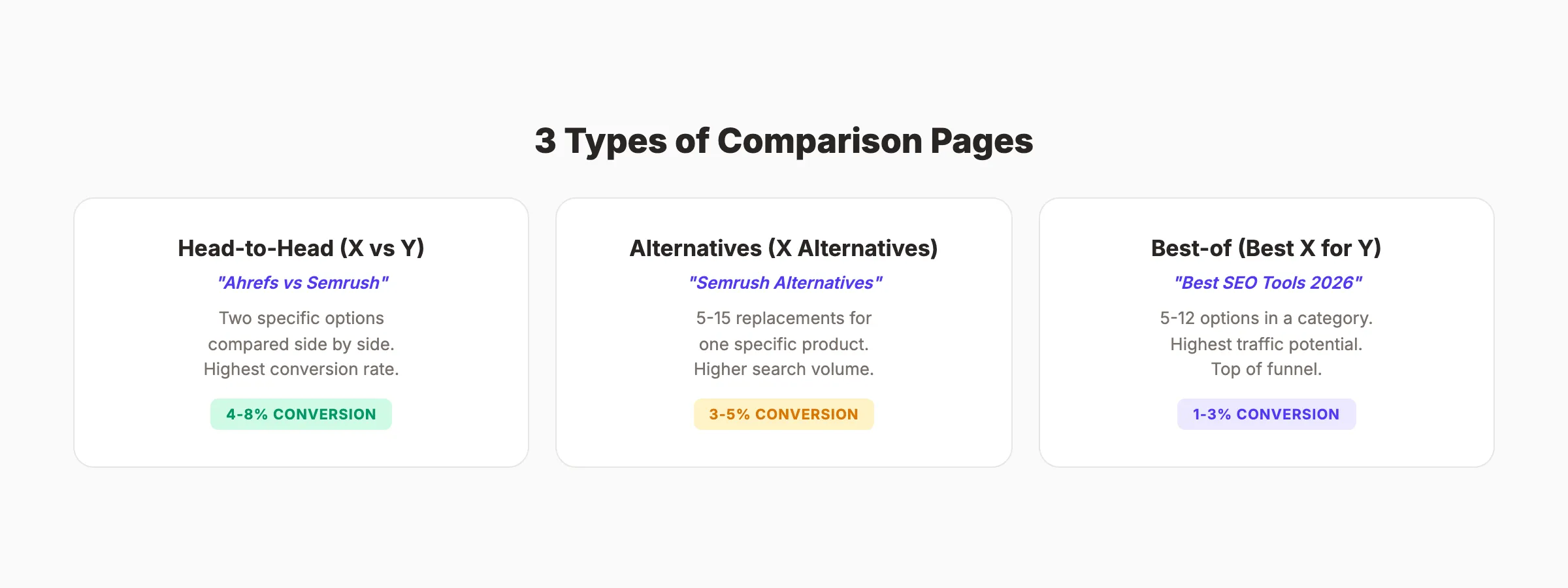
Type 1: Head-to-Head (X vs Y)
The classic "A vs B" comparison. Two specific products, services, or approaches compared side by side.
Best for: Direct competitor comparisons, tool evaluations, concept debates.
Example: "Google Ads vs SEO" or "WordPress vs Webflow"
Type 2: Alternatives Page (X Alternatives)
Lists 5 to 15 alternatives to a specific product. The searcher is unhappy with their current tool and wants options.
Best for: Capturing dissatisfied users of a competitor product.
Example: "Semrush Alternatives" or "Mailchimp Alternatives"
Alternatives pages have higher search volume than head-to-head comparisons in most markets. They also let you position your product as the #1 recommendation in a list format.
Type 3: Best-of Comparison (Best X for Y)
Compares 5 to 12 options in a category. The searcher has not narrowed down to 2 options yet. They want a shortlist.
Best for: Capturing early-stage comparison shoppers who need a starting point.
Example: "Best SEO Tools for Small Business" or "Best Email Marketing Software 2026"
Best-of pages have the highest search volume but the lowest conversion rate of the 3 types. They work best as top-of-funnel content that feeds into your head-to-head and alternatives pages through internal links.
Common Comparison Page Mistakes
1. Being Too Balanced
Readers want opinions. A comparison page that says "both are great, it depends on your needs" helps no one. Pick winners for every criterion. Provide conditional recommendations. Take a clear position.
The exception: if you are comparing 2 competitors and neither is your product, genuine balance is appropriate. But even then, declare a winner for each specific use case.
2. Ignoring Your Own Product
If you sell a competing product, your comparison page should mention it. The reader landed on your site. They are already considering you as an option. A "Third Option" section at the end naturally introduces your product without being pushy.
3. Outdated Information
Comparison pages decay faster than other content. Pricing changes. Features launch. Products pivot. Audit and update every comparison page quarterly. Outdated pricing or features destroy trust and hurt rankings.
Set a reminder to update old comparison pages every 90 days with current pricing, feature changes, and fresh screenshots.
4. No Comparison Table Above the Fold
The quick comparison table should appear within the first screen. 40% of comparison page visitors look at the table and leave. If your table is at the bottom, those visitors never see it. Move it up.
5. Writing a Review Instead of a Comparison
A comparison page is not 2 reviews glued together. It is a head-to-head evaluation on shared criteria. Every section should compare. "Option A does X. Option B does Y instead." That contrast is what makes comparison content valuable.
Skip the agency. Keep the results. theStacc starts at $99/mo. Articles planned, written and published automatically, including comparisons and reviews.
Comparison Page Checklist
Before publishing any comparison page, verify these elements:
- ✓ Quick verdict in the opening paragraph
- ✓ Side-by-side comparison table within 500 words
- ✓ Individual breakdowns for each option (200-400 words each)
- ✓ 4-6 head-to-head criteria with declared winners
- ✓ Conditional recommendation in the verdict
- ✓ FAQ section with 4-6 related questions
- ✓ Primary keyword in title, slug, first 100 words, and 1 H2
- ✓ Title tag under 60 characters with year
- ✓ Meta description between 145 and 155 characters
- ✓ FAQPage and Article schema markup
- ✓ Internal links to review pages, related comparisons, and pricing
- ✓ Current pricing and feature data (audit quarterly)
- ✓ At least 1 image (comparison table screenshot or feature matrix)
- ✓ Mobile-friendly table formatting (horizontal scroll on small screens)
What practitioners are saying on X
AI search advice ages quickly. Here is high-signal public discussion from SEO and growth operators — context for your roadmap, not a substitute for primary data.
- @hridoyreh (Mar 2026): Widely shared SEO skill tree: foundations, research, technical, on-page, content, links, AI SEO/GEO, analytics, UX, brand, programmatic — useful map for stats and how-to posts. See the post on X.
- @jakezward (Feb 2026): 2026 SEO predictions emphasize AI Overview share-of-SERP, schema for LLM token efficiency, brand mentions in AI answers as a KPI, proprietary data as a moat, and content refresh beating net-new AI slop. See the post on X.
Grok, AI Overviews, and multi-engine visibility
For “write comparison pages”, multi-engine visibility still starts with clear definitions, sourced numbers, and extractable section answers. Grok additionally factors live X discussion — keep public claims consistent with this page.
- Google AI Overviews: Use passage-ready answers, tables, and FAQ schema where relevant.
- ChatGPT / Perplexity: Cite named sources next to key claims.
- Grok: Maintain accurate entity facts on-site and in high-signal X posts.
Publish content built for Google and AI citations. theStacc’s Content SEO module ships SEO-scored articles structured for rankings and generative engines — including clearer entity pages models like Grok can quote.
FAQ
Most effective comparison pages are 1,500 to 3,000 words. Long enough to cover every comparison criterion with depth. Short enough to respect the reader's decision-making intent. Buyers comparing 2 options do not want a 5,000-word essay. They want a clear answer with supporting evidence.
Honest, factual comparison content does not damage relationships. Avoid subjective attacks, misleading claims, or outdated data. The best comparison pages acknowledge competitor strengths while clearly stating your advantages. Readers respect fairness and trust honest assessments more than biased takedowns.
Every 90 days minimum. Comparison pages contain pricing, features, and product details that change frequently. Outdated information damages trust and can trigger ranking drops. Set quarterly calendar reminders for each comparison page.
Yes. Many successful affiliate and content sites rank for "X vs Y" without selling either product. These pages work best when you offer a genuine third-party perspective. The key is adding real value through hands-on testing, specific use-case recommendations, and honest assessments.
The format that wins featured snippets most often includes: a comparison table near the top, individual product sections, head-to-head criteria comparisons, and a verdict with conditional recommendations. FAQPage schema markup on the FAQ section increases visibility for related questions.
Target low-competition "X vs Y" keywords first. Build internal links from related content. Use the exact "X vs Y" phrase in your title, URL, and H1. Add a comparison table for featured snippet eligibility. Publish with current-year data. Most well-optimized comparison pages rank within 2 to 4 months.
Yes. Screenshots of each product's interface add credibility and visual proof. Use current screenshots with visible UI elements. Annotate them to highlight key differences. Alt text should describe the screenshot content and include relevant keywords. Fresh screenshots also serve as proof that you have tested both products recently.
Comparison pages are the highest-ROI content type in SEO. They target buyers at the decision point, convert at 2 to 3 times the rate of standard content, and rank faster because the keywords are more specific.
Start with your top 5 competitor comparisons. Use the template above. Publish one per week. And if producing comparison content at scale feels like too much, Blog SEO starts at $99 per month when writing and publishing happen automatically.
Sources & references
- [1] Princeton / Georgia Tech et al. — GEO research (arXiv:2311.09735)
- [2] @hridoyreh on X — Widely shared SEO skill tree: foundations, research, technical, on-page, content, links, AI SEO/GEO, analytics, UX, bran
- [3] @jakezward on X — 2026 SEO predictions emphasize AI Overview share-of-SERP, schema for LLM token efficiency, brand mentions in AI answers
- [4] Referenced source — ahrefs.com

Plan topics, review article drafts, and publish to a connected CMS.
Weekly local SEO teardowns
One practical email a week. Map Pack, GBP, AI Overviews. No fluff. Unsubscribe anytime.