
10 Best Free Keyword Research Tools (2026)
We tested the 10 best free keyword research tools and ranked them by accuracy and features. Truly free vs freemium, compared. Updated March 2026.
Ahrefs costs $129 per month. Semrush costs $140 per month. For a small business or solo blogger, that is $1,680 per year before you write a single blog post.
The good news: you do not need paid tools to do keyword research. The best free keyword research tools provide real search volume data, keyword ideas, and competitive insights at zero cost. The catch is knowing which ones are truly free and which ones bait you with a “free tier” that hides the useful data behind a paywall.
We tested 10 free keyword research tools and ranked them by what you actually get without paying. This guide separates truly free tools from freemium traps and shows you how to combine them into a complete keyword research workflow.
We have published 3,500+ blog posts across 70+ industries using both free and paid tools. Here is what works.
What you will learn:
- 10 free keyword research tools ranked by usefulness
- Which tools are truly free vs freemium with hidden limits
- A free-only workflow that replaces a $140/month paid tool
- How accurate free tools are compared to paid alternatives
- The best free tool for each use case (SEO, PPC, YouTube, ecommerce)
Quick Comparison: All 10 Free Keyword Research Tools
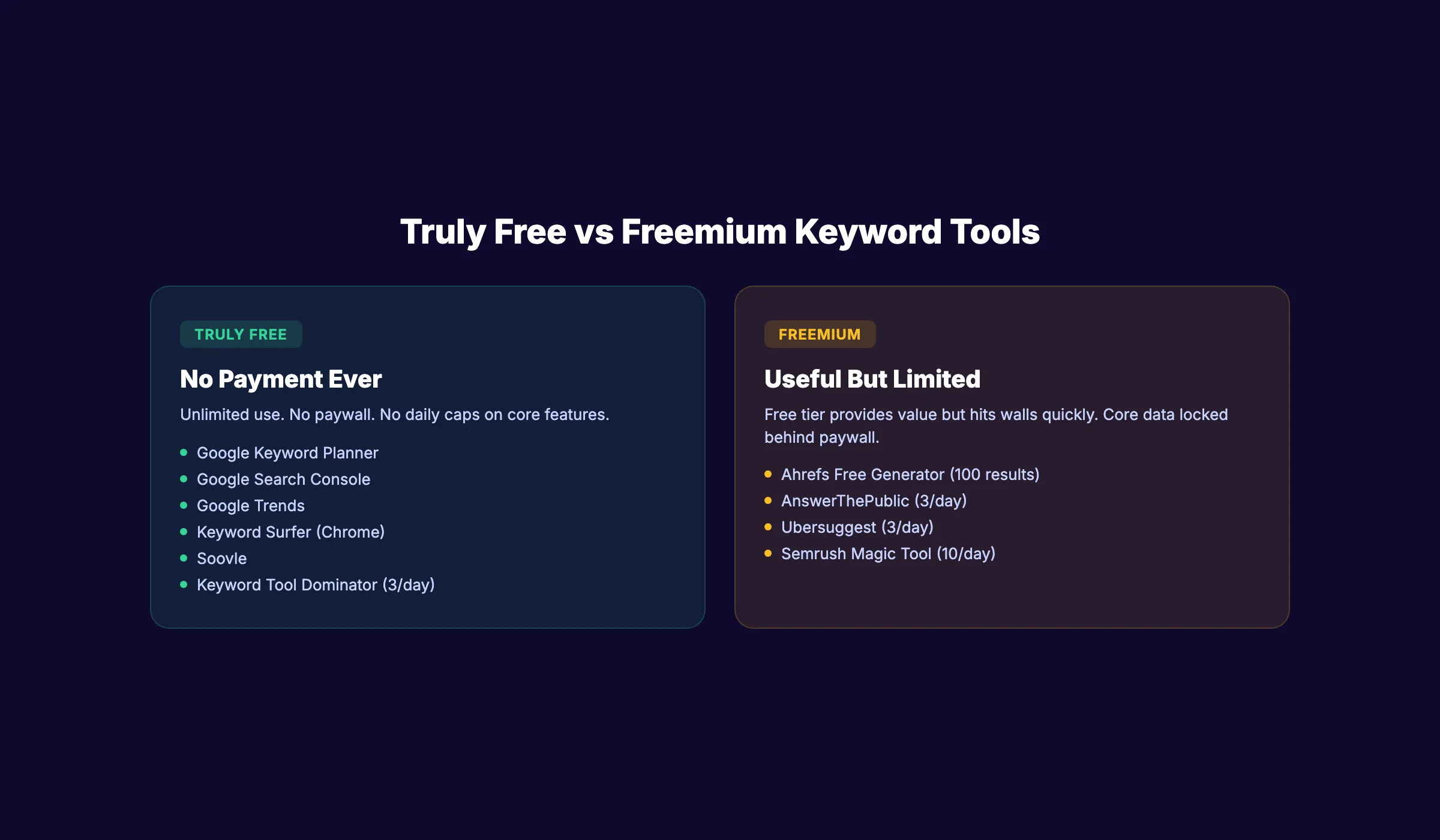
| Tool | Truly Free? | Volume Data | Daily Limit | Best For |
|---|---|---|---|---|
| Google Keyword Planner | Yes | Ranges | Unlimited | Volume validation, PPC keywords |
| Google Search Console | Yes | Exact | Unlimited | Finding opportunities on your own site |
| Google Trends | Yes | Relative | Unlimited | Seasonal trends, topic comparison |
| Keyword Surfer | Yes | Estimated | Unlimited | Quick checks in Google SERPs |
| Ahrefs Free Keyword Generator | Freemium | KD scores | 100 results | Low-difficulty keyword discovery |
| AnswerThePublic | Freemium | None | 3/day | Question-based content ideas |
| Ubersuggest | Freemium | Estimated | 3/day | Beginners wanting an all-in-one feel |
| Semrush Keyword Magic | Freemium | Yes | 10/day | Sampling enterprise-grade data |
| Keyword Tool Dominator | Yes | None | 3/day | Amazon, YouTube, multi-platform |
| Soovle | Yes | None | Unlimited | Multi-platform keyword brainstorming |
Truly Free Tools (No Payment Ever Required)
1. Google Keyword Planner
Best for: Validating search volume and finding PPC keyword ideas.
Google Keyword Planner is the only free tool that provides search volume data directly from Google. It requires a Google Ads account (free to create, no spending required). The data is PPC-oriented, but search volume applies to SEO equally.
What you get free:
- Search volume ranges for any keyword (e.g., 1K-10K monthly searches)
- Keyword ideas based on seed keywords or URLs
- Competition level (low, medium, high)
- Average CPC data
- Forecasting for ad spend planning
Limitations:
- Volume is shown in ranges, not exact numbers (unless you run ads)
- Competition metric reflects PPC competition, not SEO difficulty
- Interface is designed for advertisers, not SEO practitioners
- No backlink data, no SERP analysis
How to use it for SEO: Enter your seed keyword. Filter by “Avg. monthly searches” to find volume. Sort by relevance. Export the full list. Cross-reference volume data with Keyword Surfer or GSC for more precision.
Pro tip: Google Keyword Planner shows exact volumes when you set up a campaign (even without spending). Create a campaign, add keywords, and check the forecast report. The exact volume appears in the forecast. Pause the campaign before it runs. You get exact data at zero cost.
For a full guide on using this for blog content, read our keyword research guide.
2. Google Search Console
Best for: Finding keyword opportunities on your existing site.
Google Search Console is the most underrated free keyword research tool. It shows you the exact queries your site already ranks for, along with impressions, clicks, CTR, and average position. No other tool provides this data. Not even Ahrefs or Semrush.
What you get free:
- Every query your site appears for in Google Search (with exact impression counts)
- Click-through rate by keyword
- Average ranking position per keyword
- Page-level query data (which page ranks for which keywords)
- 16 months of historical data
Limitations:
- Only works for sites you own (verified through DNS, meta tag, or HTML upload)
- No competitor keyword data
- Data is delayed by 2-3 days
- Cannot research keywords you do not already rank for
How to use it for keyword research: Go to Performance > Search Results. Filter by “Average position” between 8 and 20. These are keywords where you already rank on page 1-2 but have room to improve. Optimize those pages to move into the top 5. This is the highest-ROI keyword research strategy available.
Advanced technique: Export your GSC data and sort by impressions (highest first). Keywords with high impressions but low clicks are your biggest opportunities. These are terms where Google already considers your page relevant but your content or title is not compelling enough to earn the click. Rewrite the title tag, update the meta description, and add more depth to the content targeting that keyword.
Also check the “Pages” tab. If multiple pages appear for the same keyword, you have keyword cannibalization. Consolidate or differentiate those pages.
For a full walkthrough, read our Google Search Console guide.
Stop writing. Start ranking. Stacc publishes 30 SEO articles per month for your business, starting at $99. Start for $1 →
3. Google Trends
Best for: Understanding seasonal patterns and comparing topic popularity.
Google Trends shows how search interest changes over time. It does not give absolute volume numbers. Instead, it shows relative interest on a 0-100 scale. This makes it perfect for timing decisions and topic comparisons.
What you get free:
- Interest over time (5 years of data, or real-time for the last 7 days)
- Geographic breakdown (which regions search for a term most)
- Related queries and rising topics
- Side-by-side comparison of up to 5 terms
- YouTube search data (toggle “YouTube Search” as the source)
Limitations:
- No absolute search volume numbers
- Relative scale makes low-volume keywords invisible
- No keyword difficulty or CPC data
- No page-level competitive analysis
How to use it for keyword research: Compare your target keyword against alternatives to see which has more demand. Check seasonality to time your content. Use “Rising” related queries to find emerging topics before they peak.
Example: A plumber comparing “water heater repair” vs “water heater replacement” in Google Trends discovers that “replacement” searches spike in October-November (pre-winter), while “repair” peaks in January (mid-winter). Publishing a repair guide in December and a replacement guide in September captures both demand waves at the right time.
Google Trends also reveals geographic demand. A keyword that is trending in Texas but flat in New York tells you where to focus your local SEO or ad spend. Use the “Subregion” filter to drill down to the state or metro level.
4. Keyword Surfer (Chrome Extension)
Best for: Checking keyword volume without leaving Google.
Keyword Surfer is a free Chrome extension that displays estimated search volume, CPC, and related keywords directly in Google search results. No separate tool needed. No account needed. Install the extension and volume data appears alongside every Google search you run.
What you get free:
- Estimated monthly search volume for your query
- CPC data
- Related keywords with volume (displayed in a sidebar)
- Word count and estimated traffic for each ranking page
- Content editor for planning articles
Limitations:
- Chrome-only (does not work in Firefox, Safari, or Edge)
- Volume estimates are less accurate than Google Keyword Planner for niche terms
- No keyword difficulty score
- No backlink or competitor analysis
How to use it for keyword research: Search for your target keyword in Google. Keyword Surfer instantly shows the volume. Check the sidebar for related terms. Click on any related term to see its volume. This is the fastest way to validate keywords on the fly.
5. Keyword Tool Dominator
Best for: Multi-platform keyword research (Amazon, YouTube, eBay, Etsy).
Most free keyword tools only cover Google. Keyword Tool Dominator pulls autocomplete suggestions from Google, Amazon, YouTube, Bing, eBay, Etsy, Walmart, and Home Depot. If you sell products on Amazon or create YouTube videos, this tool is essential.
What you get free:
- Autocomplete keyword suggestions from 8 platforms
- Export to CSV
- No account required
Limitations:
- 3 free searches per day per platform
- No search volume data
- No keyword difficulty or competition metrics
- Suggestions are based on autocomplete, not search data
How to use it for keyword research: Enter your product or topic. Select the platform (Amazon for ecommerce, YouTube for video). Export the autocomplete list. Cross-reference volume with Google Keyword Planner or Keyword Surfer.
3,500+ blogs published. 92% average SEO score. See what Stacc can do for your site. Start for $1 →
Freemium Tools (Useful Free Tier With Limits)
6. Ahrefs Free Keyword Generator
Best for: Finding low-difficulty keywords for new or small sites.
Ahrefs provides a free keyword generator that returns up to 100 keyword ideas per query. Each result includes a Keyword Difficulty (KD) score. For small sites and new blogs, filtering by KD 0-10 reveals keywords you can realistically rank for without backlinks.
What you get free:
- Up to 100 keyword ideas per search
- Keyword Difficulty score for each result
- Results for Google, Bing, YouTube, and Amazon
- No account required
Limitations:
- Capped at 100 results (paid Ahrefs shows thousands)
- No search volume data in the free version
- No SERP analysis or competitor data
- No export option in the free tier
How to use it for keyword research: Enter a broad seed keyword. Sort results by KD (lowest first). Target keywords with KD 0-15 if your site has low domain authority. Cross-reference with Google Keyword Planner for volume data.
For a deeper look at Ahrefs, read our Ahrefs review.
7. AnswerThePublic
Best for: Discovering questions people ask about your topic.
AnswerThePublic generates visual maps of questions, prepositions, and comparisons around any seed keyword. The output is organized by question type (what, how, why, when, where, who, can, is, are). This makes it excellent for finding FAQ content, blog post ideas, and People Also Ask targets.
What you get free:
- Visual question maps for any keyword
- Preposition-based keyword variations (“keyword for,” “keyword with,” “keyword near”)
- Comparison keywords (“keyword vs,” “keyword or,” “keyword and”)
- Alphabetical keyword variations
- Export to CSV (in the free tier)
Limitations:
- 3 free searches per day (was unlimited, now capped)
- No search volume or difficulty data
- Owned by Neil Patel (aggressive upgrade prompts)
- Data quality varies for niche topics
How to use it for keyword research: Enter your primary keyword. Download the question map. Use the questions as H2/H3 headers in your blog posts. Target the most common questions as FAQ sections to capture featured snippets.
8. Ubersuggest
Best for: Beginners who want an all-in-one free SEO experience.
Ubersuggest provides keyword ideas, search volume, SEO difficulty, CPC, and content suggestions. The free tier limits you to 3 searches per day, but each search returns enough data for a single blog post’s keyword planning.
What you get free:
- Keyword ideas with estimated volume and SEO difficulty
- Content ideas (top-performing articles for your keyword)
- Site audit (limited)
- Backlink data (limited)
- Domain overview with traffic estimates
Limitations:
- 3 searches per day on the free tier
- Aggressive upgrade prompts throughout the interface
- Search volume accuracy is questioned by experienced SEOs
- Free features have been steadily reduced over time
How to use it for keyword research: Enter your keyword. Check the SEO difficulty score. If it is under 40, you have a realistic chance of ranking. Check the “Content Ideas” tab to see what is already ranking. Use the suggested keywords to plan supporting content.
9. Semrush Keyword Magic Tool
Best for: Sampling enterprise-grade keyword data.
Semrush offers 10 free queries per day through its Keyword Magic Tool. Each query taps into a database of 26+ billion keywords. The free tier provides the same data quality as the $140/month plan. You just get fewer queries.
What you get free:
- Keyword suggestions from 26B+ keyword database
- Search volume, keyword difficulty, CPC, SERP features
- Broad match, phrase match, exact match, and related keyword filters
- Question-only filter for FAQ targeting
- 10 queries per day
Limitations:
- 10 queries per day (enough for light research, not batch work)
- Limited results shown per query
- No project-level tracking or saved keyword lists
- Full feature set requires $140+/month
How to use it for keyword research: Enter your seed keyword. Use the “Questions” filter to find FAQ-style queries. Check KD% scores. Export the top opportunities and add them to your content plan. For a deeper analysis, read our Semrush review.
10. Soovle
Best for: Rapid multi-platform keyword brainstorming.
Soovle pulls instant autocomplete suggestions from Google, YouTube, Bing, Amazon, Wikipedia, Yahoo, and Answers.com simultaneously. Type a keyword and see suggestions from all 7 platforms on one screen in real time.
What you get free:
- Instant autocomplete suggestions from 7 platforms
- Real-time results as you type
- Drag-and-drop saved suggestions
- No account required
- Completely free with no daily limits
Limitations:
- No search volume, difficulty, or CPC data
- Suggestions are autocomplete-based (not search query data)
- No export feature
- Interface is dated
How to use it for keyword research: Use Soovle for rapid brainstorming at the start of your research process. Type in your broad topic. Capture the most relevant suggestions from each platform. Then validate them with Google Keyword Planner or Keyword Surfer for volume data.
Skip the agency. Keep the results. Stacc starts at $99/mo with a $1 trial. Start for $1 →
The Free Keyword Research Workflow
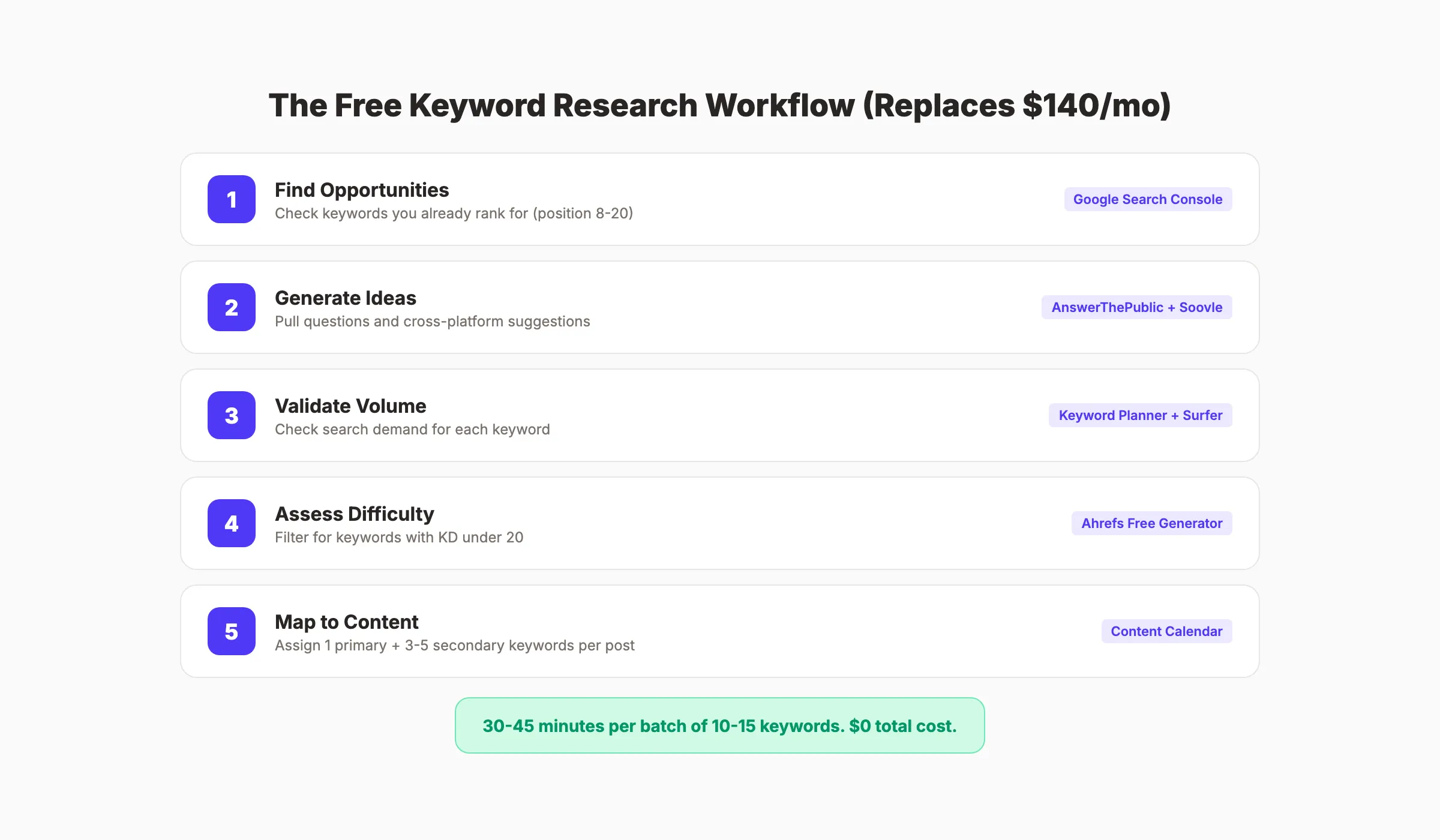
No single free tool replaces a $140/month Semrush subscription. But 4 free tools combined cover approximately 80% of what paid tools offer.
Step 1: Find Opportunities (Google Search Console)
Start with keywords you already rank for. Go to GSC > Performance > Search Results. Filter by position 8-20. These are keywords where a small content improvement could push you into the top 5.
Step 2: Generate Ideas (AnswerThePublic + Soovle)
Enter your topic into AnswerThePublic for question-based keywords. Use Soovle for cross-platform brainstorming. Export both lists.
Step 3: Validate Volume (Google Keyword Planner + Keyword Surfer)
Take your keyword list to Google Keyword Planner for volume ranges. Use Keyword Surfer to spot-check specific terms. Remove anything with zero demand.
Step 4: Assess Difficulty (Ahrefs Free Keyword Generator)
Run your shortlisted keywords through the Ahrefs free tool. Focus on keywords with KD under 20. These are realistic targets for sites without extensive backlink profiles.
Step 5: Map to Content (Keyword Optimization)
Assign 1 primary keyword and 3-5 secondary keywords to each planned blog post. Map keywords to your content calendar. Do not target the same primary keyword on multiple pages to avoid keyword cannibalization.
This workflow takes 30-45 minutes per batch of 10-15 keywords. It costs nothing.
How Accurate Are Free Keyword Tools?
This is the question every competitor article avoids. Here is an honest assessment.
| Data Point | Free Tool Accuracy | Notes |
|---|---|---|
| Search volume | 60-75% accurate | Google Keyword Planner gives ranges. Keyword Surfer estimates vary by niche. Free tools are directionally correct but not precise. |
| Keyword difficulty | 50-70% accurate | Ahrefs free KD is reliable. Ubersuggest difficulty scores are inconsistent. No free tool matches Semrush or Ahrefs paid accuracy. |
| Keyword ideas | 85-95% relevant | Autocomplete and question tools generate genuinely useful ideas. This is where free tools shine. |
| CPC data | 80-90% accurate | Google Keyword Planner CPC data is directly from Google Ads. Very reliable for PPC planning. |
| Trend data | 95%+ accurate | Google Trends data comes from Google. It is as accurate as any tool can be. |
The verdict: Free tools are excellent for keyword discovery and directional volume. They are weaker for precise volume numbers and competitive analysis. If you need exact monthly search volumes and competitive gap analysis, paid tools like Ahrefs or Semrush are worth the investment.
For most small businesses and bloggers, free tools provide enough data to make smart content decisions. Exact volume rarely changes the strategy.
When to Upgrade to Paid Tools
Free tools work for most bloggers and small businesses. But you should consider upgrading when:
- You manage more than 3 websites
- You need competitive keyword gap analysis
- You require precise volume data for client reports
- You publish more than 20 articles per month
- You need automated rank tracking
- You want backlink analysis alongside keyword data
If you are not ready for paid keyword tools, Stacc handles the keyword research, writing, and publishing for you. 30 SEO-optimized articles per month for $99. No keyword tools needed.
For a list of both free and paid options, see our full list of best keyword research tools.
Free Keyword Tools vs Paid: What You Actually Miss
The question is not whether free tools work. They do. The question is what you give up by not paying.
| Capability | Free Tools | Paid Tools ($100-250/mo) |
|---|---|---|
| Keyword ideas | Good (autocomplete + questions) | Excellent (billions of keywords, filters, clustering) |
| Search volume | Ranges or estimates | Exact monthly numbers with historical trends |
| Keyword difficulty | Available from Ahrefs free (100 results) | Full KD with SERP analysis and backlink requirements |
| Competitor keyword gap | Not available | Full gap analysis showing keywords competitors rank for that you do not |
| Rank tracking | Manual (check GSC weekly) | Automated daily tracking with alerts |
| SERP analysis | Manual (Google the keyword yourself) | Automated with content scores and optimization tips |
| Batch research | Limited (daily caps on most tools) | Unlimited queries, bulk export, saved lists |
| Content recommendations | Not available | AI-driven content outlines, gap analysis, optimization scoring |
For most bloggers and small businesses publishing 2-4 posts per month, free tools are enough. The gap starts to matter when you scale beyond 10 posts per month, manage multiple sites, or need client-facing reports.
The honest break-even point: if your organic traffic generates more than $200/month in revenue, a paid tool pays for itself through time savings alone.
Honorable Mentions
These tools did not make the top 10 but deserve a mention for specific use cases.
KeywordTool.io generates 750+ long-tail keyword suggestions per search. The free version shows the keywords but hides volume and CPC behind the paywall. Useful for brainstorming only.
AlsoAsked visualizes People Also Ask question trees. The free tier has been heavily limited (capped queries per day). When available, it is one of the best tools for mapping related questions.
SearchVolume.io lets you bulk check search volume for up to 800 keywords at once. Free, no login required. Data freshness varies, but it is useful for validating large keyword lists quickly.
ChatGPT and Claude are not keyword tools, but they are useful for brainstorming keyword ideas and clustering topics. They do not provide real volume data. Use them for ideation, then validate with Google Keyword Planner.
Bing Webmaster Tools includes a free keyword research feature that most SEOs overlook. The data reflects Bing search, not Google, but the keyword ideas are often the same.
How to Choose Your Free Keyword Tool Stack
| If You Are… | Recommended Free Stack |
|---|---|
| A blogger with an existing site | GSC + Keyword Planner + Keyword Surfer |
| Starting a brand new site | Keyword Planner + Ahrefs Free Generator + AnswerThePublic |
| An ecommerce seller | Keyword Tool Dominator + Google Keyword Planner + Google Trends |
| A YouTube creator | Keyword Tool Dominator (YouTube) + Google Trends (YouTube filter) + Ahrefs Free |
| A freelance SEO | GSC + Keyword Planner + Ahrefs Free + Semrush (10/day) |
| A local business owner | GSC + Google Keyword Planner + Google Trends (regional filter) |
Pick the stack that matches your situation. Master those 3-4 tools. You do not need all 10.
Your SEO team. $99 per month. 30 optimized articles, published automatically. Start for $1 →
FAQ
What is the best truly free keyword research tool?
Google Keyword Planner is the best truly free keyword research tool. It provides search volume data directly from Google, requires no payment, and has no daily search limits. Combine it with Google Search Console for existing site data and Keyword Surfer for in-SERP volume checks.
Can I do keyword research without paying for any tools?
Yes. Combine Google Keyword Planner (volume), Google Search Console (existing keywords), Google Trends (seasonal data), Keyword Surfer (SERP-level checks), and Ahrefs Free Keyword Generator (difficulty scores). This stack covers approximately 80% of what a $140/month paid tool provides.
How accurate are free keyword research tools?
Free tools are 60-75% accurate for search volume and 50-70% accurate for keyword difficulty compared to paid tools. They are excellent for keyword discovery (85-95% relevant ideas) and directional volume. For precise monthly search volumes and competitive analysis, paid tools are more reliable.
Is Ubersuggest really free?
Ubersuggest offers a free tier with 3 searches per day. The free version provides keyword ideas, volume estimates, and SEO difficulty scores. However, the interface aggressively promotes paid upgrades, and the free features have been reduced over time. The volume accuracy is also questioned by experienced SEO practitioners.
What is the best free keyword tool for YouTube?
Keyword Tool Dominator and the Ahrefs Free Keyword Generator both support YouTube keyword research. Keyword Tool Dominator pulls YouTube autocomplete data. Ahrefs shows keyword difficulty for YouTube specifically. Google Trends also lets you filter by “YouTube Search” to see trending video topics.
Does Stacc do keyword research for you?
Yes. Stacc handles the full content workflow: keyword research, article writing, optimization, and publishing. You get 30 SEO-optimized blog posts per month starting at $99. Each post targets specific keywords based on your industry and competitors. No keyword tools or writing required on your end.
The best free keyword research tool is the one that gives you enough data to make a content decision. Google Keyword Planner for volume. Google Search Console for existing opportunities. Keyword Surfer for quick validation. Combine 3-4 free tools, run the workflow from this guide, and you have everything you need to plan content that ranks.
Free tools do not give you everything. They do not provide competitor gap analysis, automated rank tracking, or content scoring. But they give you enough to identify the right keywords, validate demand, and create content that targets real search queries. For most businesses, that is what matters. The keywords you choose are more important than the tool you used to find them.

Written by
Siddharth GangalSiddharth is the founder of theStacc and Arka360, and a graduate of IIT Mandi. He spent years watching great businesses lose organic traffic to competitors who simply published more. So he built a system to fix that. He writes about SEO, content at scale, and the tactics that actually move rankings.
Stop researching. Start ranking.
30 SEO blog articles published to your site every month. No writers, no workflow, no waiting.
30-day trial · Cancel anytime
theStacc
Stop writing SEO content manually
30 blog articles, 30 GBP posts, and social media content. Published every month. Automatically.
Start Your $1 Trial$1 for 3 days · Cancel anytime