
AI Agents for WordPress Content: The Complete Guide
Learn how AI agents for WordPress content create, edit, and publish posts. Covers MCP setup, tools, quality control, and automation workflows for 2026.
WordPress powers 43% of all websites. Most of those sites struggle to publish content consistently.
Business owners know they need blog posts, landing pages, and regular updates. They do not have the time, budget, or team to produce them. The result is a stale website that ranks for nothing.
AI agents for WordPress content change that equation. These autonomous programs connect directly to your WordPress site, draft posts, manage metadata, and publish on your behalf. They do not just suggest edits. They execute tasks.
We have published 3,500+ blogs across 70+ industries. We have watched AI agent technology shift from experiment to production-ready infrastructure. This guide covers everything we know about using AI agents for WordPress content in 2026.
Here is what you will learn:
- What AI agents are and how they differ from traditional plugins
- How the Model Context Protocol (MCP) connects agents to WordPress
- The 6 core tasks AI agents handle on WordPress sites
- Which AI agent tools work best for WordPress content
- How to set up AI agents on your site step by step
- Quality control frameworks that prevent bad content from going live
- Where this technology is heading in 2026 and beyond
Table of Contents
- What Are AI Agents for WordPress Content?
- How AI Agents Work With WordPress
- 6 Tasks AI Agents Handle on WordPress Sites
- Best AI Agent Tools for WordPress Content
- How to Set Up AI Agents on Your WordPress Site
- AI Agents vs Traditional WordPress Plugins
- Quality Control and Human Oversight
- The Future of AI Agents in WordPress Content
- FAQ
What Are AI Agents for WordPress Content? {#chapter-1}
An AI agent is software that acts on your behalf. It does not wait for you to click buttons. You give it a goal, and it figures out the steps to reach that goal.
For WordPress, this means an agent can research a topic, write a draft, format it with the correct headers, add categories and tags, insert alt text on images, and publish the post. All from a single instruction.
How Agents Differ From AI Writing Tools
Traditional AI content creation tools generate text. You paste a prompt, get output, copy it, open WordPress, format it, add metadata, and hit publish. The human does 80% of the work.
AI agents eliminate most of those manual steps. They interact with your WordPress site through APIs. They read your existing content, understand your site structure, and take action without you opening the dashboard.
Think of it this way. A writing tool is a calculator. An agent is an accountant.
The Rise of Autonomous Content Workflows
The shift toward agents started accelerating in late 2025. AI agent adoption statistics show that 76% of developers now use or plan to use AI agents in their workflows. WordPress recognized this trend.
In January 2026, WordPress.org announced a new AI agent skill. By March 2026, WordPress.com launched full write capabilities for AI agents. The platform added 19 new writing abilities across 6 content types.
This is not a beta feature. It is production infrastructure used on sites that power nearly half the internet.
Why WordPress Content Teams Should Care
Publishing velocity determines ranking velocity. Sites that publish 30+ articles per month build topical authority faster than sites publishing 2 to 4.
AI agents make high-volume publishing possible without a large team. A single operator can instruct an agent to produce, format, and schedule an entire content calendar. The bottleneck shifts from production to strategy.
How AI Agents Work With WordPress {#chapter-2}
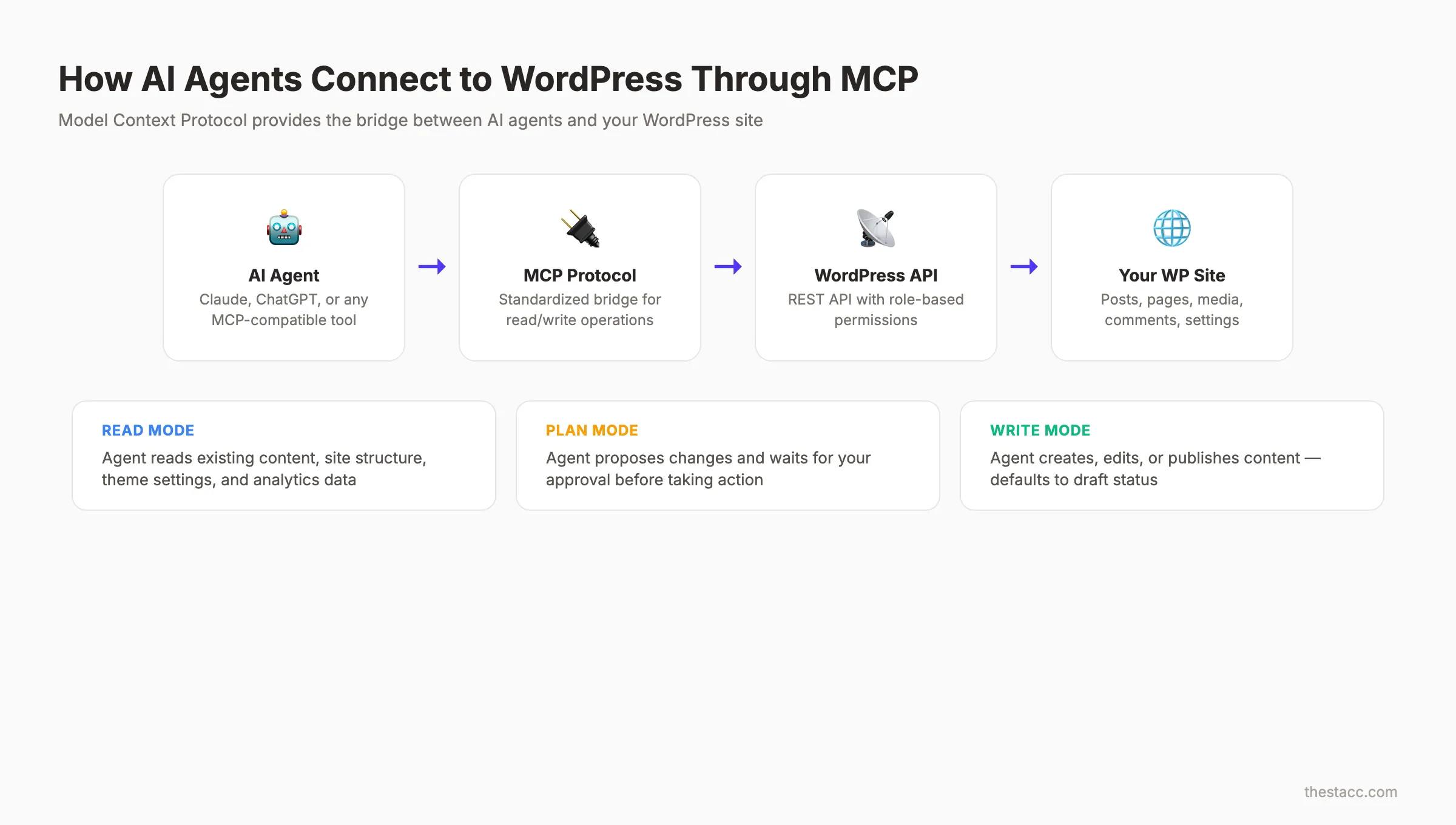
AI agents connect to WordPress through the Model Context Protocol, or MCP. This is the technical bridge that lets an agent read and write to your site.
What Is MCP?
MCP stands for Model Context Protocol. Anthropic introduced it as a standard way for AI models to interact with external services. WordPress adopted it in October 2025.
Think of MCP as a universal adapter. It gives AI agents like Claude, ChatGPT, and Cursor a structured way to access your site content, analytics, and settings. Before MCP, every integration required custom code.
The Read-Write Pipeline
The workflow follows 3 stages:
| Stage | What Happens | Example |
|---|---|---|
| Read | Agent scans your site structure, existing posts, categories, and design tokens | ”Show me all blog posts tagged SEO” |
| Plan | Agent proposes changes and requests approval | ”I will draft a 1,500-word post about local SEO tips” |
| Write | Agent creates, edits, or publishes content | Post appears as draft in WordPress |
Every action requires your approval. The agent describes what it plans to do and waits for confirmation. Nothing publishes without explicit consent.
Design-Aware Content Creation
Here is where WordPress AI agents get interesting. The agent reads your theme, understands your colors, fonts, spacing, and block patterns. When it builds a page or post, the output matches your site design.
This eliminates the formatting gap that plagues most automated content creation workflows. You do not need to fix styling after every generated post.
Security and Permissions
WordPress enforces its standard permission roles on AI agents. An agent with editor access cannot change site settings. An agent with author access cannot delete other users’ posts.
You can also toggle individual operations on or off. Want the agent to draft posts but not publish them? That is a single setting. Every change appears in your Activity Log for full audit trails.
Your content, published on autopilot. Stacc writes and publishes 30 SEO-optimized articles every month to your WordPress site. Start for $1 →
6 Tasks AI Agents Handle on WordPress Sites {#chapter-3}
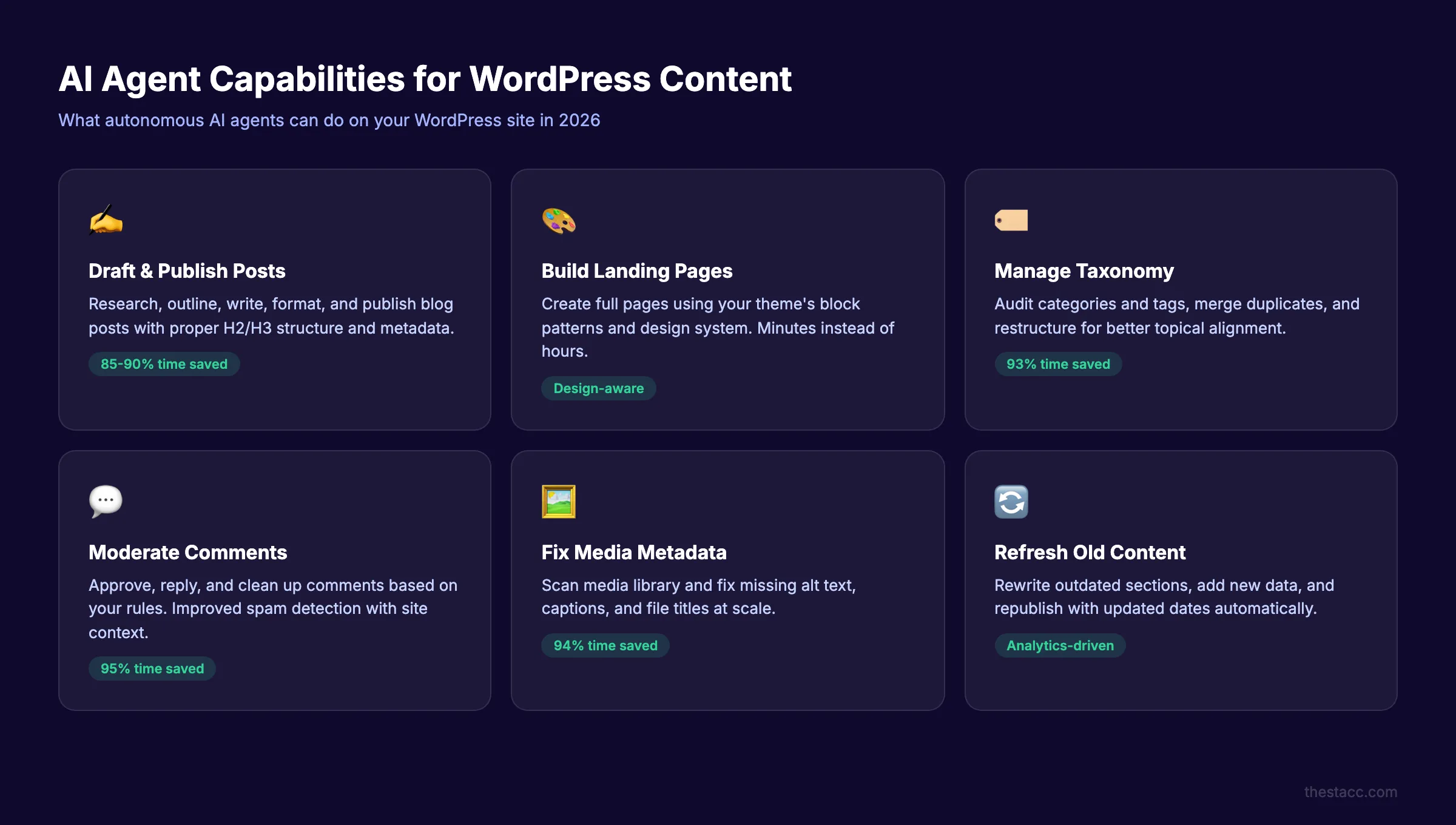
AI agents do not just write blog posts. They handle 6 distinct content operations on WordPress.
1. Drafting and Publishing Blog Posts
The primary use case. You instruct the agent with a topic, target keyword, and word count. The agent researches, outlines, writes, and formats the post with proper H2 and H3 structure.
The best agents pull data from your existing content to maintain voice consistency. They also check your category and tag taxonomy before assigning labels. This keeps your WordPress SEO structure clean.
2. Building and Updating Landing Pages
AI agents create full pages with your site design specifications. Need a new service page? Describe the offer, and the agent builds it using your theme block patterns.
This is valuable for businesses running seasonal campaigns or A/B tests. You can spin up landing pages in minutes instead of hours.
3. Managing Comments
Comment moderation is tedious. AI agents approve, reply to, or clean up comments based on rules you define. Spam detection improves because the agent learns your site context.
4. Organizing Categories and Tags
Taxonomy drift is a real problem on WordPress sites with hundreds of posts. AI agents audit your categories and tags, merge duplicates, and restructure the taxonomy for better AI content strategy alignment.
| Task | Manual Time | Agent Time | Savings |
|---|---|---|---|
| Write 1 blog post | 3-4 hours | 15-30 minutes | 85-90% |
| Update 50 meta descriptions | 5-6 hours | 20 minutes | 94% |
| Audit and merge tags | 2-3 hours | 10 minutes | 93% |
| Build a landing page | 4-6 hours | 30-45 minutes | 85% |
| Moderate 100 comments | 1-2 hours | 5 minutes | 95% |
| Fix alt text on 200 images | 6-8 hours | 30 minutes | 94% |
5. Updating Media Metadata
Alt text, captions, and file titles matter for SEO and accessibility. AI agents scan your media library and fix missing or poor metadata at scale. This is one of those tasks that humans never get around to.
According to AI content statistics, 40% of businesses now use AI for SEO tasks. Metadata cleanup is one of the highest-ROI applications.
6. Content Repurposing and Updates
AI agents can take an old blog post, rewrite outdated sections, add new data, and republish it with an updated date. Content refreshing is one of the fastest ways to recover lost rankings.
The agent reads your analytics data through MCP, identifies declining posts, and prioritizes updates. No spreadsheet tracking required.
Best AI Agent Tools for WordPress Content {#chapter-4}
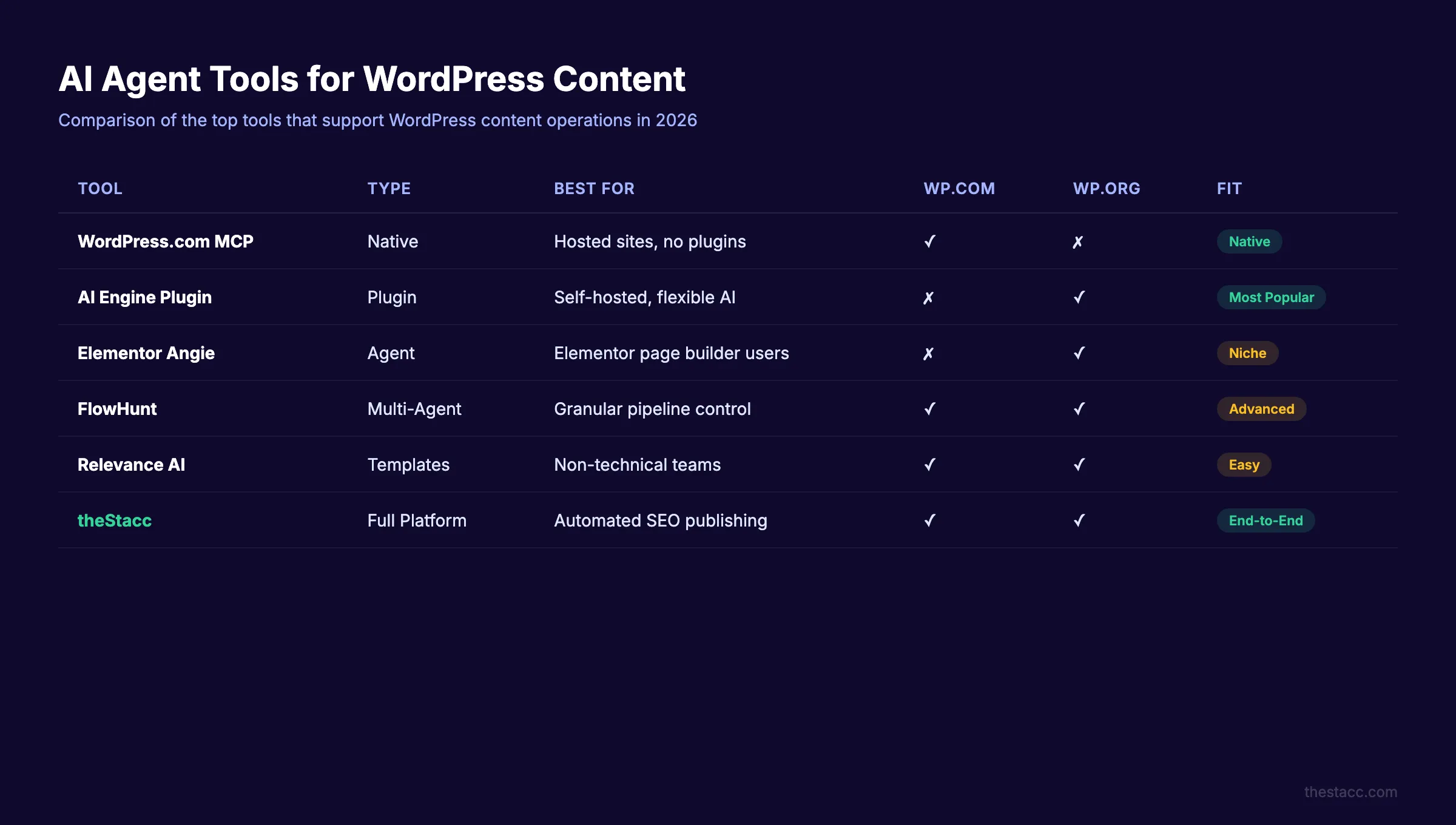
Not all AI agents work the same way with WordPress. Here are the tools that currently support WordPress content operations.
WordPress.com Native MCP
WordPress.com built MCP support directly into the platform. Any AI agent that supports MCP can connect to your WordPress.com site. This includes Claude, ChatGPT, OpenClaw, and Cursor.
Best for: WordPress.com hosted sites that want native integration without plugins.
Limitation: Only works on WordPress.com paid plans. Self-hosted WordPress.org sites need a different approach.
AI Engine Plugin
The AI Engine plugin by Meow Apps is the most popular AI framework for WordPress. It provides chatbot functionality, content generation, and MCP server capabilities for self-hosted sites.
The top 40 AI WordPress plugins drew 315 million combined visits in a single year. AI Engine sits at the center of that ecosystem.
Best for: WordPress.org self-hosted sites that need a flexible AI framework.
Elementor Angie
Elementor launched Angie as an AI agent for WordPress creation and management. It understands your site structure, installed plugins, and design system. You give it natural language commands, and it executes complex tasks.
Best for: Sites already using Elementor as their page builder.
FlowHunt
FlowHunt offers multi-agent workflows for WordPress. You can build separate agents for content generation, tagging, and SEO enrichment. These agents run on scheduled cron jobs.
Best for: Teams that want granular control over each stage of the content pipeline.
Relevance AI
Relevance AI provides WordPress-specific agent templates. You select a template, connect your WordPress site, and the agent handles the rest. Templates exist for blog generation, product descriptions, and FAQ pages.
Best for: Non-technical teams that want pre-built workflows.
For a deeper comparison of writing-focused tools, see our list of the best AI blog writers for WordPress.
How to Set Up AI Agents on Your WordPress Site {#chapter-5}
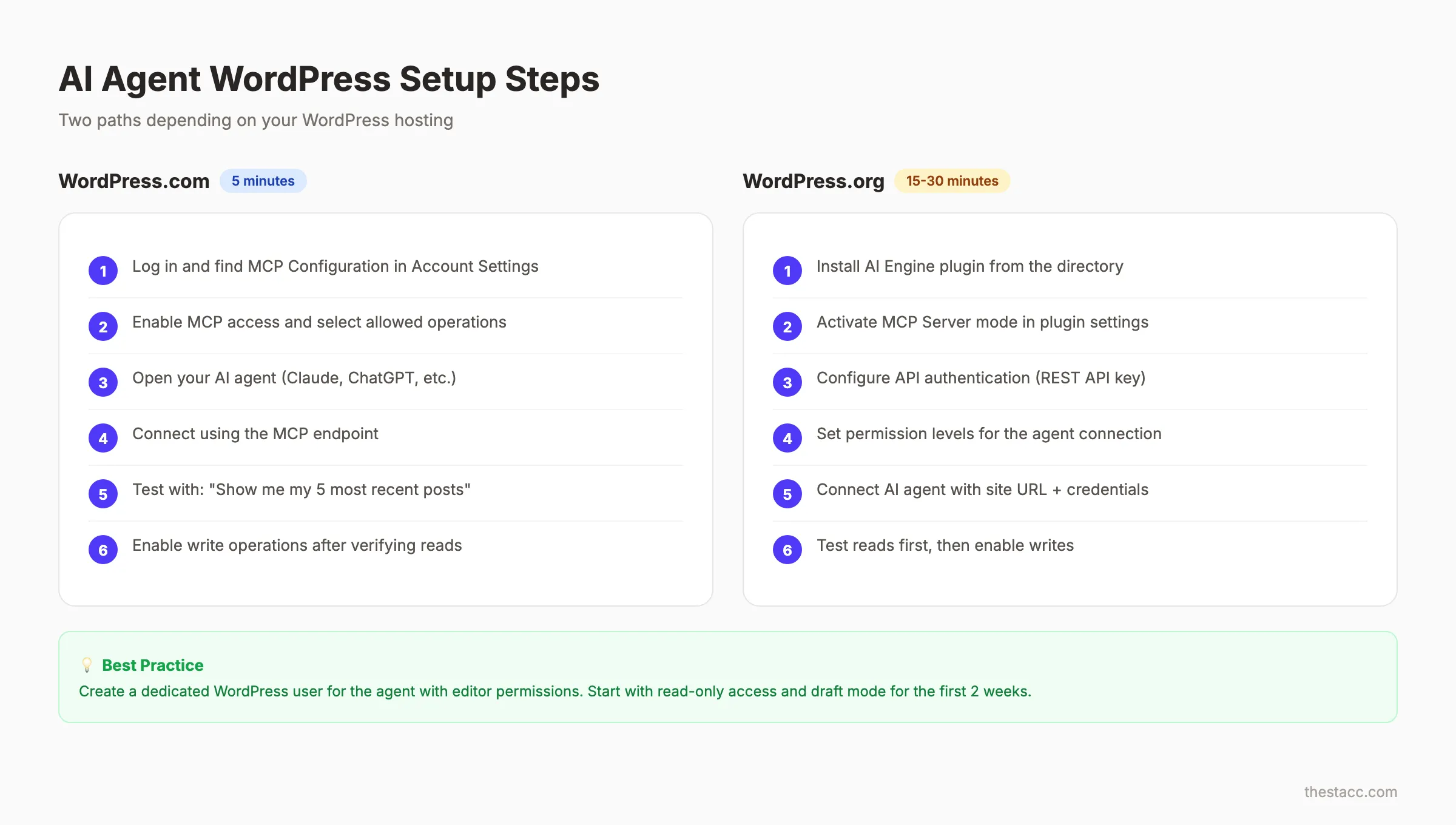
Setup depends on whether you use WordPress.com or self-hosted WordPress.org. Here is a step-by-step breakdown for both.
WordPress.com Setup (5 Minutes)
- Log in to your WordPress.com account
- Go to Account Settings and find MCP Configuration
- Enable MCP access and select which operations to allow
- Open your AI agent (Claude, ChatGPT, or another MCP-compatible tool)
- Connect to your WordPress.com site using the MCP endpoint
- Test with a simple command: “Show me my 5 most recent posts”
- Verify the agent can read your content before enabling write operations
Every change defaults to draft status. You must explicitly enable auto-publishing if you want it.
WordPress.org Setup (15-30 Minutes)
Self-hosted sites require a plugin to expose MCP capabilities.
- Install the AI Engine plugin from the WordPress plugin directory
- Activate MCP Server mode in the plugin settings
- Configure API authentication (REST API key or application password)
- Set permission levels for the agent connection
- Connect your AI agent using the site URL and API credentials
- Test read operations first, then enable write operations
- Set up approval workflows if multiple team members manage content
Configuration Best Practices
Start with read-only access. Let the agent analyze your site for a few days before granting write permissions. This builds your confidence in its understanding of your content.
Use draft mode for the first 2 weeks. Review every piece of content the agent creates. Patterns emerge quickly. You will spot recurring issues to address in your prompt instructions.
Create an agent-specific WordPress user. Do not connect the agent to your admin account. Create a dedicated user with editor or author permissions. This keeps your Activity Log clean and limits blast radius if something goes wrong.
For more on building publishing workflows, read our guide on how to automate blog publishing.
Stop formatting posts manually. Stacc connects to your WordPress site and publishes SEO-optimized content every week. No plugins. No prompt engineering. See How It Works →
AI Agents vs Traditional WordPress Plugins {#chapter-6}
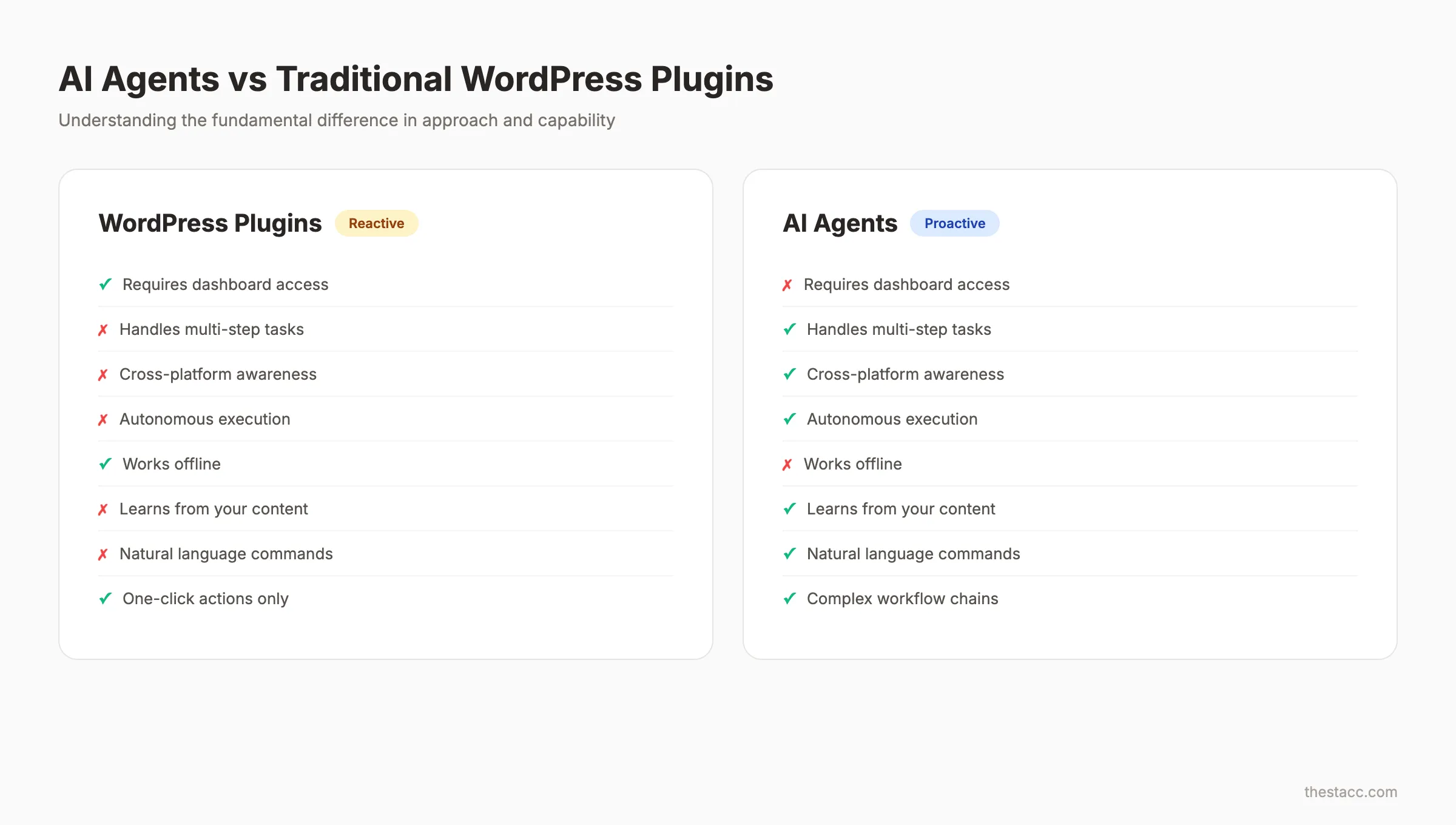
WordPress users have relied on plugins for AI content help since 2023. AI agents represent a fundamentally different approach. Understanding the distinction matters for choosing the right setup.
Plugins: Reactive Tools
Traditional AI plugins sit inside your WordPress dashboard. You open a post, click a button, and the plugin generates a paragraph, rewrites a sentence, or suggests a headline. The human drives every action.
Plugins like Yoast SEO and RankMath analyze content and flag issues. They do not fix those issues for you. You still make every edit manually.
Agents: Proactive Operators
AI agents operate outside the dashboard. They connect through APIs, assess your entire site, and execute multi-step workflows autonomously. You define the goal. The agent handles execution.
| Feature | WordPress AI Plugin | AI Agent |
|---|---|---|
| Requires dashboard access | Yes | No |
| Handles multi-step tasks | No | Yes |
| Learns site context | Limited | Full |
| Works on a schedule | No | Yes |
| Creates content end-to-end | Rarely | Yes |
| Updates old content automatically | No | Yes |
| Manages metadata at scale | No | Yes |
When to Use Each
Use plugins for in-editor assistance while you write. Grammar checking, readability scoring, and SEO analysis work well as plugins.
Use agents for production workflows. Content calendars, bulk publishing, metadata cleanup, and content refreshing are agent territory.
The best WordPress content operations use both. Plugins help you write better. Agents help you publish more. For teams exploring AI marketing automation, agents are the natural next step.
Quality Control and Human Oversight {#chapter-7}
AI agents produce content fast. Speed without quality control creates a different kind of problem. Here is how to keep standards high while publishing at scale.
The Approval Layer
WordPress.com requires explicit approval for every agent action. Use this feature. Do not enable auto-publishing until you have reviewed at least 50 agent-generated posts and confirmed consistent quality.
Every agent action should follow this loop:
- Agent proposes the action
- Human reviews the proposal
- Agent executes after approval
- Human spot-checks the published result
Content Quality Checklist
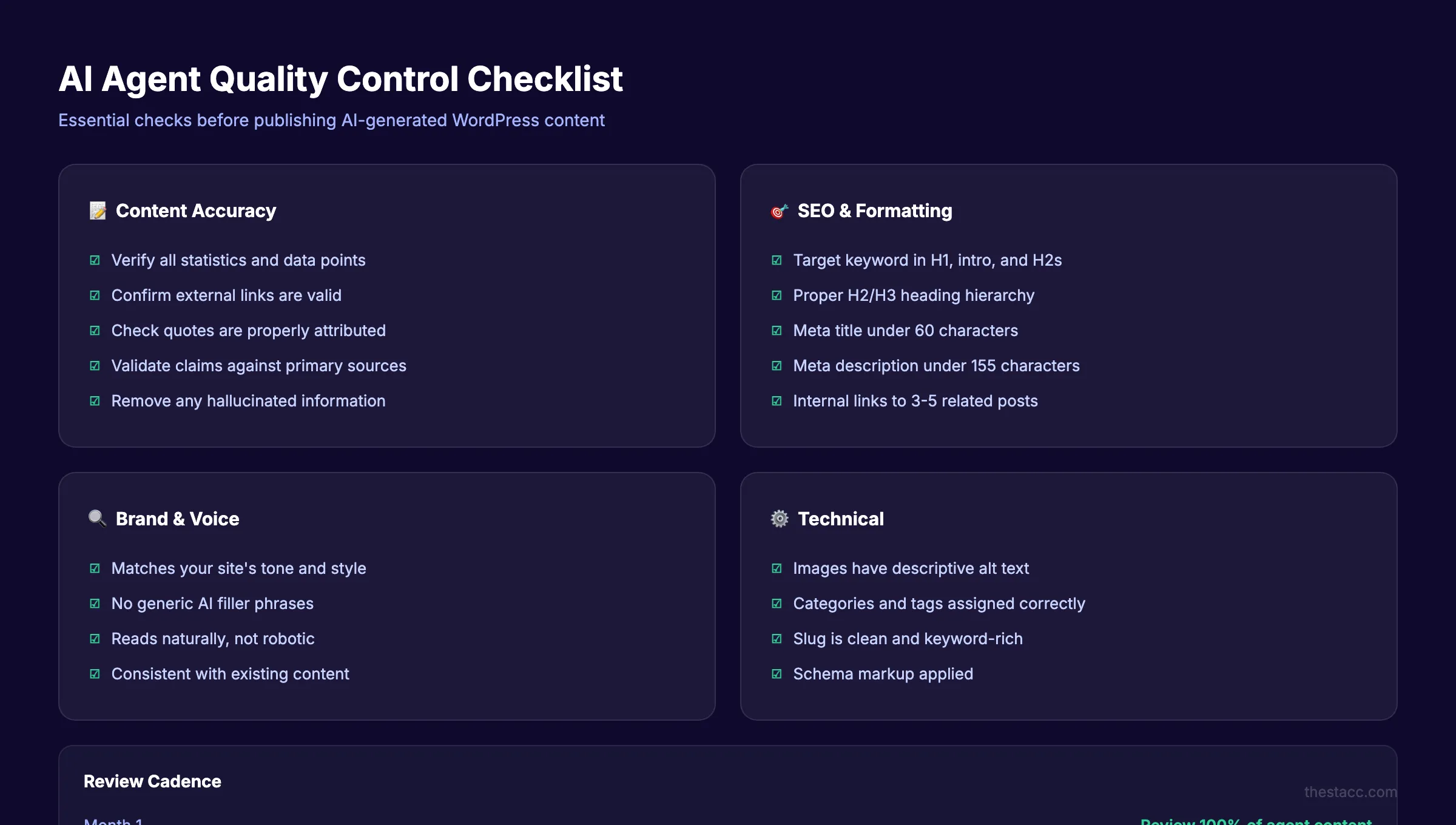
Run this checklist on every AI-generated post before publishing:
- Factual claims are verified with source links
- Statistics include publication dates (reject anything older than 18 months)
- No hallucinated brand names, products, or URLs
- Tone matches your existing published content
- Internal links point to real pages on your site
- Meta description includes the target keyword
- Alt text exists on every image
- Post length meets your minimum word count standard
The Hallucination Problem
79% of professionals express concern about AI spreading misinformation. This concern is valid. AI agents can present fabricated data as fact.
The fix is a verification step. Never publish statistics, quotes, or specific claims without confirming the source. Build this into your workflow as a non-negotiable gate.
Editing Cadence
Review 100% of agent content in month 1. Move to 50% spot-checks in month 2. By month 3, review 25% if quality remains consistent. Never drop below 10% review rates, even with a proven agent setup.
For guidance on making AI-generated content sound natural, read our guide on how to humanize AI content.
3,500+ blogs published. 92% average SEO score. Stacc handles the writing, optimization, and publishing. You handle the strategy. Start for $1 →
The Future of AI Agents in WordPress Content {#chapter-8}
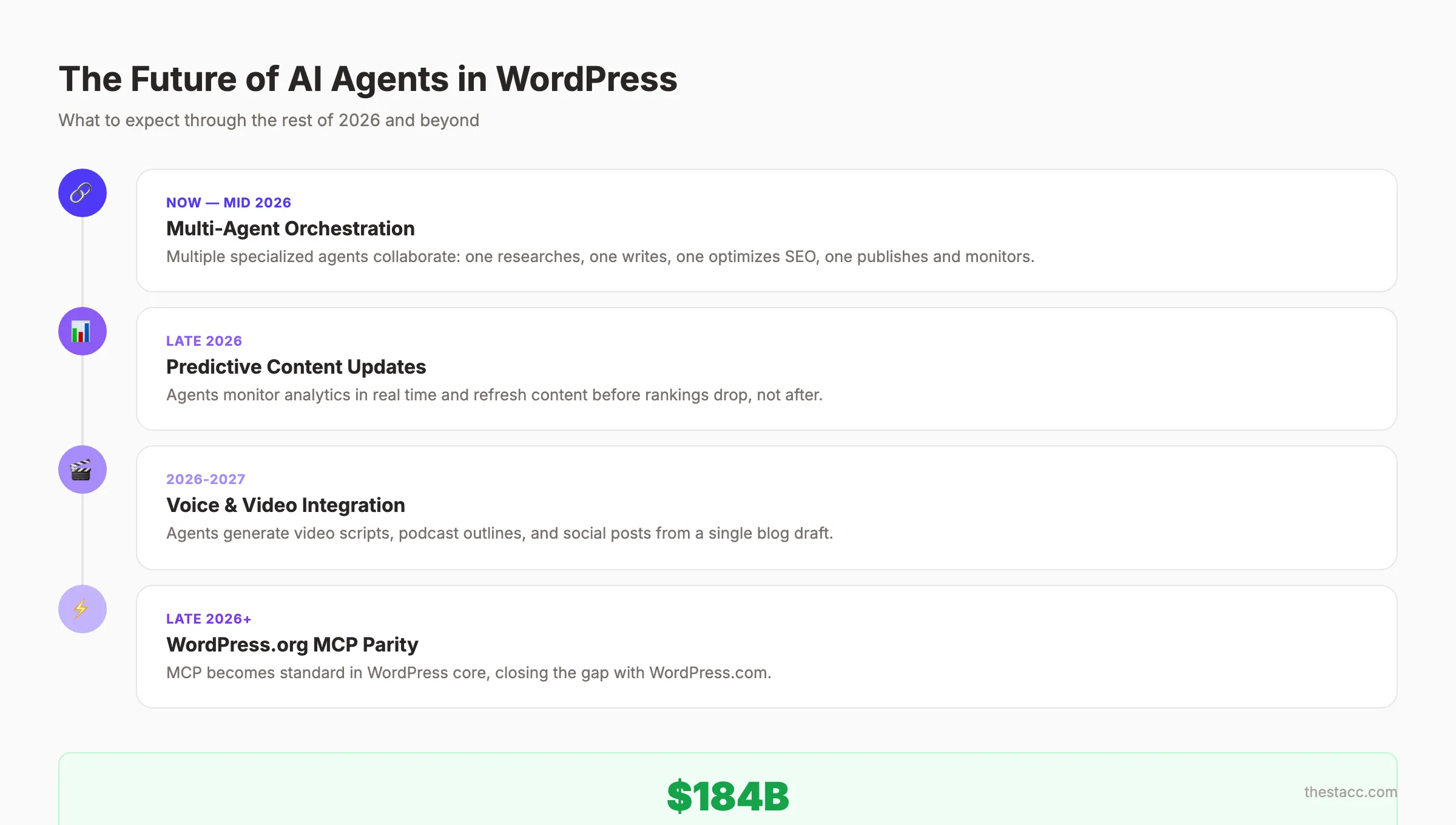
AI agents for WordPress content are 6 months into their production lifecycle. The technology is moving fast. Here is what to expect through the rest of 2026.
Multi-Agent Orchestration
Single agents handle individual tasks. The next wave involves AI agent orchestration where multiple specialized agents collaborate. One agent researches keywords. Another writes the draft. A third optimizes for SEO. A fourth publishes and monitors performance.
This mirrors how human content teams operate. Each agent has a defined role and handoff protocol.
Predictive Content Updates
Agents will soon monitor your analytics data in real time and trigger content updates before rankings drop. Instead of reacting to traffic declines, the agent preemptively refreshes content based on SERP movement patterns.
Voice and Video Content Integration
Current agents focus on text. The 2026 roadmap includes agents that generate video scripts, podcast outlines, and social media posts from a single blog draft. One piece of content feeds an entire distribution pipeline.
WordPress.org Parity
Right now, WordPress.com has the richest AI agent support. WordPress.org self-hosted sites rely on third-party plugins. Expect this gap to close by late 2026 as MCP becomes a standard part of the WordPress core.
The global AI market hit $184 billion in 2024 and continues growing at 35% annually. WordPress sites that adopt AI agents early will have a structural content advantage over competitors still publishing manually.
FAQ {#faq}
Do AI agents work with self-hosted WordPress.org sites?
Yes, but you need a plugin like AI Engine to expose MCP capabilities. WordPress.com has native support. Self-hosted sites require an extra setup step. The functionality is equivalent once connected.
Will AI agents replace human content writers?
No. AI agents handle production tasks like drafting, formatting, metadata, and publishing. Strategy, original research, brand voice development, and editorial judgment remain human responsibilities. The role of the writer shifts from producer to editor and strategist.
How much does it cost to use AI agents with WordPress?
WordPress.com MCP access is included on all paid plans starting at $4 per month. AI agent costs vary by provider. Claude and ChatGPT charge based on usage. Third-party plugins like AI Engine have free tiers with premium options at $50 to $150 per year.
Can AI agents damage my WordPress site?
Not if you use the built-in safety controls. WordPress enforces permission roles on agent connections. All actions require approval by default. New posts default to draft status. You control which operations the agent can perform.
What is the best AI agent for WordPress content in 2026?
For WordPress.com sites, native MCP with Claude or ChatGPT offers the smoothest experience. For WordPress.org, the AI Engine plugin provides the most flexible framework. For teams wanting pre-built workflows, FlowHunt and Relevance AI are strong choices. See our full list of autoblogging tools for more options.
How do AI agents handle SEO optimization for WordPress posts?
Most agents can add meta titles, descriptions, alt text, categories, and tags. Some integrate with SEO plugins like Yoast or RankMath to check optimization scores before publishing. For best results, include your target keywords and SEO guidelines in the agent instructions.
AI agents for WordPress content are production-ready in 2026. The technology connects to your site, understands your design, and publishes content that matches your brand.
The businesses that adopt this workflow now will build a content library their competitors cannot catch. Start with read-only access, prove the quality, then scale your publishing velocity.

Written by
Siddharth GangalSiddharth is the founder of theStacc and Arka360, and a graduate of IIT Mandi. He spent years watching great businesses lose organic traffic to competitors who simply published more. So he built a system to fix that. He writes about SEO, content at scale, and the tactics that actually move rankings.
30 SEO blog articles published every month
Keyword-optimized, scheduled, and live on your site. Automatically.
30-day trial · Cancel anytime
theStacc
Stop writing SEO content manually
30 blog articles, 30 GBP posts, and social media content. Published every month. Automatically.
Start Your $1 Trial$1 for 3 days · Cancel anytime