
How to Get Found on Google (2026): 7 Steps for Local Businesses
7 steps to get your local business found on Google: GBP optimization, review strategy, local keywords, citations, and content that ranks in the local pack.
98% of consumers search online before choosing a local business. 76% of people who search “near me” visit a business within 24 hours, according to Backlinko. If your business does not show up when those searches happen, you lose to competitors who do.
Getting found on Google as a local business is not complicated. But it does require doing 7 specific things in the right order. Most small businesses skip 3 or 4 of them and wonder why they are invisible.
This guide walks you through every step. From claiming your Google Business Profile to building the content that ranks you in the local pack and AI Overviews.
We have published 3,500+ blog posts and managed local SEO across 70+ industries. Here is the exact process.
What you will learn:
- How to set up and optimize your Google Business Profile from scratch
- The 3 factors Google uses to rank local businesses (and how to influence each one)
- How to build a review pipeline that runs on autopilot
- A website content strategy that drives local organic traffic
- How to track whether any of this is actually working
How Google Decides Which Local Businesses to Show
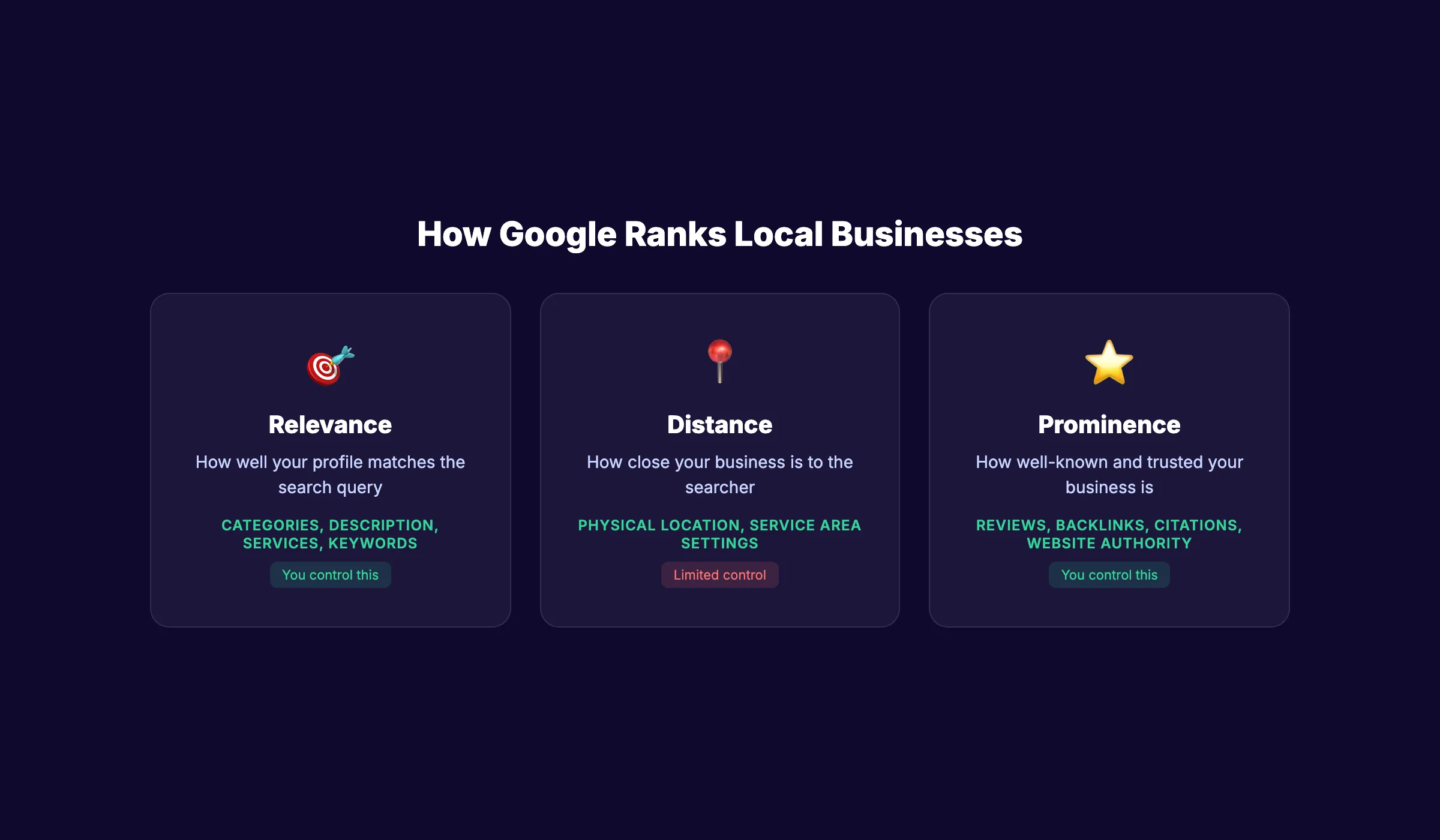
Before diving into the steps, you need to understand how Google ranks local businesses. Google uses 3 primary factors, confirmed in their official documentation:
| Factor | What It Means | How You Influence It |
|---|---|---|
| Relevance | How well your profile matches the search query | Complete GBP fields, accurate categories, keywords in description |
| Distance | How close your business is to the searcher | Set your service area accurately. You cannot change your physical location. |
| Prominence | How well-known and trusted your business is | Reviews, backlinks, citations, website authority, online mentions |
You cannot control distance. But you can control relevance and prominence. That is what the 7 steps below focus on.
Businesses that appear in Google’s Local 3-pack get 126% more traffic and 93% more actions (calls, directions, website clicks) than businesses ranked 4th through 10th. The goal is the top 3.
Step 1: Claim and Complete Your Google Business Profile
Your Google Business Profile is the single most important asset for local visibility. Verified, complete profiles appear 80% more frequently in search results than incomplete ones. Complete profiles generate 4 times more website visits and 12% more calls.
How to Set Up Your GBP
- Go to google.com/business and sign in with a Google account
- Search for your business name. If it exists, claim it. If not, create a new listing.
- Enter your exact legal business name (do not add keywords to the name)
- Select your primary business category (this is the most important field)
- Add your address (storefront) or service area (mobile businesses)
- Add your phone number and website URL
- Verify your business (postcard, phone, email, or video verification)
Complete Every Field
After verification, fill in every available field:
- Business hours (regular and special/holiday hours)
- Business description (750 characters, include your main services and service area naturally)
- Secondary categories (add 3-5 relevant ones)
- Services or products list with descriptions
- Attributes (payment methods, accessibility, amenities)
- Opening date
Why this step matters: 86% of GBP views come from discovery searches, not brand searches, per Birdeye. That means people find you by searching for what you do, not who you are. A complete profile ensures Google matches your business to relevant queries.
For a deeper walkthrough, read our Google Business Profile optimization guide.
Step 2: Add Photos and Post Weekly
Businesses with photos get 42% more direction requests and 35% more website clicks than those without. Photos prove your business is real, active, and professional.
Photos to Upload
Add a minimum of 10 photos. Include:
- Exterior: Storefront from the street (helps customers find you)
- Interior: Clean, well-lit shots of your workspace
- Team: Staff photos with names (builds trust)
- Work in action: Products, services, or jobs in progress
- Logo and cover photo: Brand identity
Add new photos at least monthly. Fresh images signal an active, operating business.
Google Business Profile Posts
Post to your GBP at least once per week. Google Posts now directly influence AI Overview citations in 2026. Businesses that post weekly rank higher in the local pack than those that do not.
Post types that work:
- Seasonal tips related to your services
- Special offers with a clear expiration date
- New service announcements
- Community involvement and events
- Customer spotlight stories (with permission)
Use our GBP Post Generator to create posts quickly.
Why this step matters: Google rewards activity. A profile with weekly posts, fresh photos, and recent reviews signals a thriving business. A stale profile signals one that may have closed.
Rank everywhere. Do nothing. Blog SEO, Local SEO, and Social on autopilot. Stacc handles your content marketing for $99/mo. Start for $1 →
Step 3: Build a Consistent Review Pipeline
88% of consumers read Google reviews before choosing a local business. 68% will only use a business rated 4 stars or higher, per BrightLocal. Reviews are the most visible trust signal on your profile.
How to Get More Reviews
Do not wait for reviews to happen. Build a system.
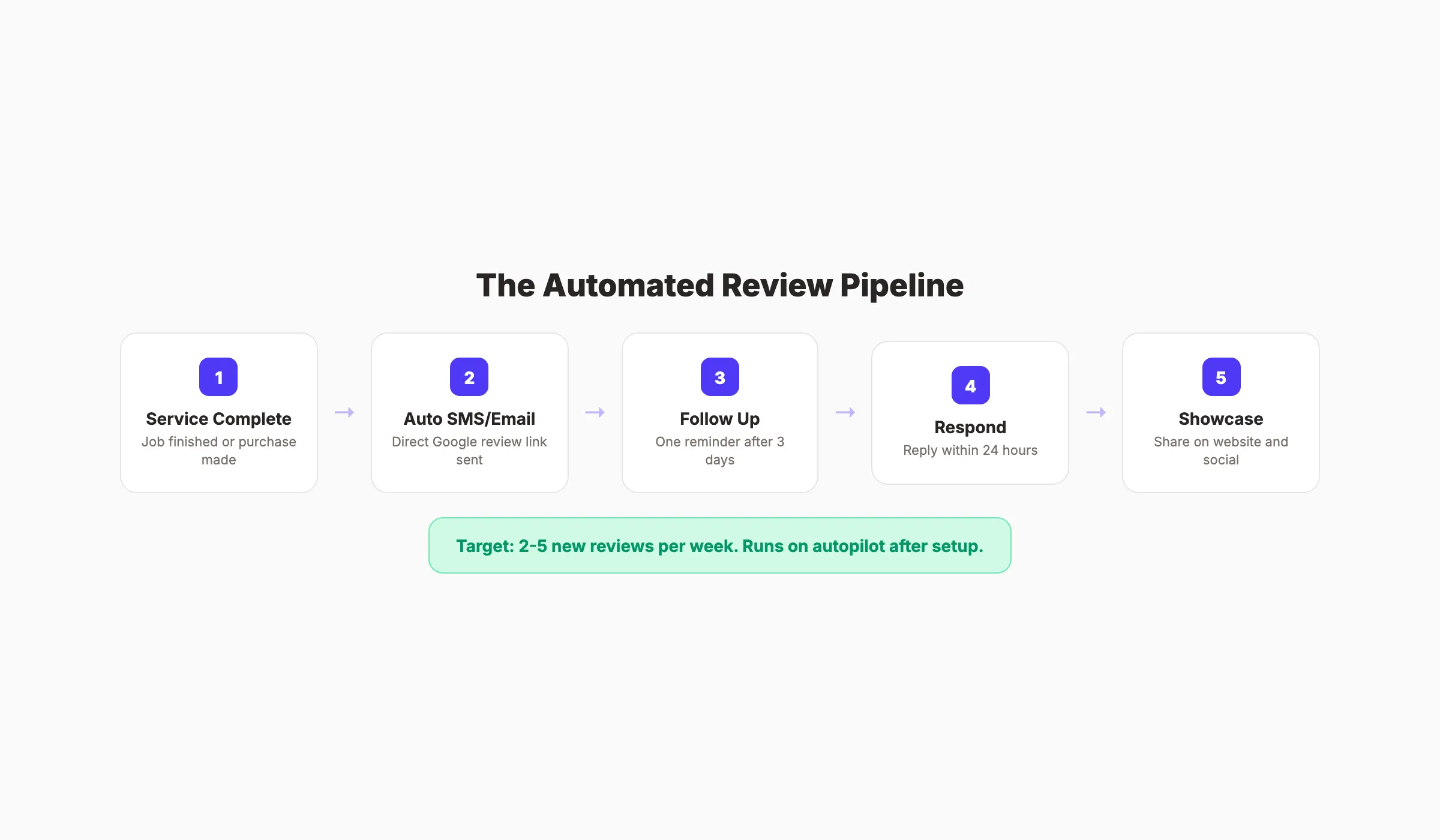
After every completed service or transaction:
- Send an automated SMS or email with a direct Google review link
- Include a simple message: “How did we do? Leave us a quick review.”
- If no review after 3 days, send one gentle follow-up
- Never send more than one reminder
Use our Review Request Generator to create your review request messages and our Review QR Code Generator for physical signage.
Respond to Every Review
Respond to every review within 24 hours. Positive reviews get a personalized thank-you. Negative reviews get a professional acknowledgment and an offer to resolve the issue offline.
For detailed response strategies, read our guide on responding to negative Google reviews. For more strategies on increasing review volume, see our guide on getting more Google reviews.
Why this step matters: Review velocity (how frequently you receive new reviews) is a confirmed local ranking signal. A steady stream of 2-5 new reviews per week signals a healthy, active business. A burst of 20 reviews in one week followed by silence looks artificial.
Step 4: Fix Your NAP Consistency Across the Web
NAP stands for Name, Address, Phone number. Google cross-references your business information across every directory, social profile, and website where it appears. Inconsistencies create doubt.
Common NAP Problems
| Problem | Example | Impact |
|---|---|---|
| Different business names | ”Joe’s Plumbing” vs “Joe’s Plumbing LLC” vs “Joes Plumbing” | Google treats these as potentially different businesses |
| Address variations | ”123 Main St” vs “123 Main Street, Suite 1” | Weakens location confidence |
| Multiple phone numbers | Old landline on Yelp, new mobile on GBP | Fragments trust signals |
| Closed locations still listed | Old address on a directory you forgot about | Confuses Google and customers |
How to Fix It
- Search your business name on Google. Note every directory listing that appears.
- Check Yelp, Facebook, Bing Places, Apple Maps, Yellow Pages, and industry-specific directories.
- Update every listing to match your GBP exactly. Same name format. Same address. Same phone number.
- Remove duplicate listings.
Why this step matters: Each consistent citation (a directory listing with matching NAP) strengthens Google’s confidence in your business data. Each inconsistency weakens it. Clean NAP is the foundation of local SEO.
Priority Directories for Local Businesses
Not all directories carry equal weight. Start with these:
| Directory | Why It Matters |
|---|---|
| Google Business Profile | Primary local listing. Already done in Step 1. |
| Bing Places | Second-largest search engine. Free to claim. |
| Apple Maps | Default maps app on iPhones. Free business listing. |
| Yelp | High domain authority. Appears in Google SERPs. |
| Facebook Business Page | Social signal + local discovery. |
| Better Business Bureau | Trust signal. Check if accreditation makes sense. |
| Industry-specific directories | Healthgrades (healthcare), Avvo (legal), HomeAdvisor (home services) |
After these core directories, search for “[your industry] directory” and claim listings on any reputable site that ranks on page 1. Update each listing annually to keep information current.
For a deeper guide on local search optimization, read our local SEO guide.
Step 5: Build a Website With Local Content
A Google Business Profile without a website is like a storefront without an interior. GBP gets you into the local pack. A website gets you into organic search results. Together, they compound.
Essential Website Pages for Local Businesses
- Homepage with your primary service and location in the H1
- Service pages for each service you offer (one page per service)
- Location pages for each city or area you serve
- About page with team photos and business history
- Contact page with NAP, map embed, and contact form
- Blog with regular content targeting local keywords
Local Keyword Strategy
Target keywords that combine your service with your location:
- “[service] in [city]” , “plumber in Austin”
- “[service] near [landmark]” , “dentist near downtown Phoenix”
- “best [service] [city]” , “best electrician San Diego”
- “emergency [service] [city]” , “emergency HVAC repair Dallas”
For a complete keyword research process, read our keyword research guide.
Add LocalBusiness Schema Markup
Add JSON-LD LocalBusiness schema to your website. This structured data tells Google explicitly who you are, where you are, and what you do. It feeds your Knowledge Panel and improves rich result eligibility.
For implementation details, see our schema markup guide.
Why this step matters: 28% of local searches lead directly to a purchase. A website with local content captures the searchers who scroll past the local pack and into organic results. It also builds the domain authority that feeds back into your GBP prominence.
Your SEO team. $99 per month. 30 optimized articles, published automatically. Start for $1 →
Step 6: Publish Blog Content Consistently
Most local businesses publish zero blog content. The ones that publish consistently build topical authority that Google rewards with higher rankings across their entire site.
What to Write About
Write content that answers the questions your customers actually ask:
| Content Type | Example | Keyword Target |
|---|---|---|
| Service explainer | ”What to Expect During a Roof Inspection" | "[service] [city]“ |
| Cost guide | ”How Much Does a Kitchen Remodel Cost in [City]?" | "[service] cost [city]“ |
| Comparison | ”Tankless vs Tank Water Heater: Which Is Right for Your Home?" | "[product] comparison” |
| Seasonal tip | ”5 Ways to Prevent Frozen Pipes This Winter" | "prevent [problem] [season]“ |
| FAQ | ”Do I Need a Permit to Replace My Water Heater?" | "[common question]“ |
How Much to Publish
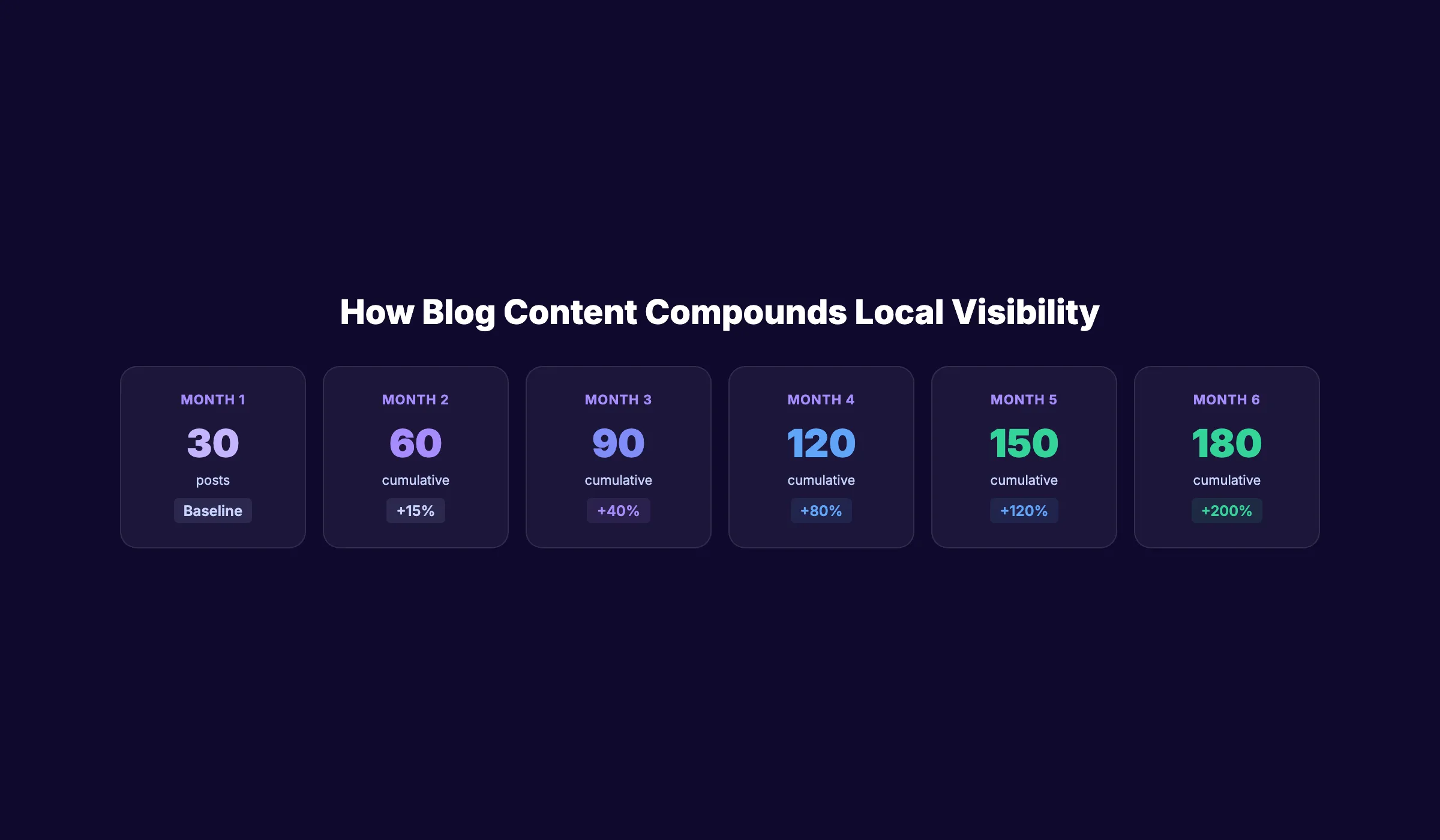
The more you publish, the faster you build authority. The industry average for small businesses is 1-2 posts per month. Businesses that publish 4+ posts per week see ranking movement within 60-90 days.
Stacc publishes 30 SEO-optimized blog posts per month starting at $99. Each post targets specific keywords, includes internal links, and builds the content depth that Google rewards. Read how blog SEO and local SEO work together for your business.
Why this step matters: Content creates new entry points to your website. Every blog post targeting a local keyword is another chance to appear in search results. Over 6-12 months, 100+ posts create a content moat that competitors cannot match without an equal investment.
Step 7: Track Performance and Improve
Everything above is useless if you do not measure what is working. Most local businesses never look at their data. That is why they do not improve.
What to Track Monthly
| Metric | Where to Find It | What It Tells You |
|---|---|---|
| GBP views and actions | GBP Insights | How many people see and interact with your profile |
| Search queries driving impressions | Google Search Console | Which keywords bring people to your site |
| Review count and rating | Google Maps / GBP | Your trust signal strength |
| Website traffic by page | Google Analytics | Which pages drive the most visits |
| Phone calls and direction requests | GBP Insights | Direct lead generation from your profile |
| Local pack position | Manual search or rank tracker | Whether you are in the top 3 |
How to Use the Data
If GBP views are low: Your profile is not matching search queries. Revisit your categories, business description, and services list. Add missing keywords.
If views are high but actions are low: Your profile does not convert. Add more photos, update your hours, and check that your phone number and website link work.
If website traffic is flat: You need more content. Increase your publishing frequency. Target new local keywords with blog posts.
If reviews have slowed: Reactivate your review request pipeline. Make it easier for customers to leave reviews with a direct link and QR code.
For a full guide on setting up analytics, read our Google Analytics 4 setup guide. For Search Console, read our Google Search Console guide.
Why this step matters: The businesses that rank well in local search are not the ones that set up once and walked away. They are the ones that check their data monthly, identify what is working, and do more of it.
3,500+ blogs published. 92% average SEO score. See what Stacc can do for your local business. Start for $1 →
Results: What to Expect
After completing these 7 steps, here is a realistic timeline:
- Week 1-2: GBP claimed, verified, and fully optimized. Immediate visibility improvement for brand searches.
- Month 1: Review pipeline active. First batch of blog content published. NAP cleaned up across directories.
- Month 2-3: GBP views and actions increase. Website traffic from local keywords begins growing. Review count climbs.
- Month 3-6: Local pack rankings improve for target keywords. Organic traffic compounds as blog content accumulates. Phone calls and direction requests increase measurably.
- Month 6-12: Strong local presence established. Consistent review flow. Content moat building. Competitors would need months of equal effort to catch up.
The businesses that see the fastest results are the ones that do all 7 steps simultaneously. GBP optimization alone helps. Adding reviews helps more. Adding content helps the most. The compound effect of all 7 together is what produces real, lasting local visibility.
FAQ
How long does it take for a new business to show up on Google?
After claiming and verifying your Google Business Profile, your listing typically appears within 1-2 weeks. Verification itself takes 3-14 days depending on the method (postcard is slowest, phone/email is fastest). A complete profile with photos, reviews, and regular posts accelerates visibility significantly.
Why is my business not showing up on Google Maps?
The most common reasons are: your GBP is not verified, your profile is incomplete, your NAP information is inconsistent across directories, or your business category does not match what people search for. Check all 4 and fix any issues. Also ensure your business was not suspended for a guideline violation (keyword-stuffed business name, virtual office, etc.).
How many Google reviews do I need to rank in the local pack?
There is no minimum number, but data shows that businesses with 20+ reviews rank significantly better than those with fewer. 47% of consumers will not use a business with fewer than 20 reviews. Focus on velocity (consistent new reviews) rather than a one-time burst. 2-5 new reviews per week is a healthy pace for most local businesses.
Is Google Business Profile free?
Yes. Creating, claiming, and managing a Google Business Profile is completely free. There is no paid version. Google offers paid advertising (Google Ads, Local Services Ads) separately, but the profile itself costs nothing.
Does having a website help my GBP rank higher?
Yes. A website connected to your GBP provides Google with additional signals about your business: content depth, backlinks, domain authority, and structured data. Businesses with optimized websites rank higher in the local pack than those with GBP alone. The website and GBP reinforce each other.
How does Stacc help local businesses get found on Google?
Stacc publishes 30 SEO-optimized blog posts per month ($99/mo) that target local keywords and build topical authority. The Local SEO module ($49/mo) handles 30 GBP posts per month. The Social Media module ($49/mo) publishes 30 posts across 3 platforms. Together, these automate the content, social, and local presence that Google rewards.
Getting found on Google as a local business comes down to 7 actions: claim your GBP, add photos and post weekly, build a review pipeline, fix your NAP, create a website with local content, publish blog posts consistently, and track your results monthly. The businesses that do all 7 outrank the ones that do 2 or 3. Start with Step 1 today and work through the list in order.

Written by
Siddharth GangalSiddharth is the founder of theStacc and Arka360, and a graduate of IIT Mandi. He spent years watching great businesses lose organic traffic to competitors who simply published more. So he built a system to fix that. He writes about SEO, content at scale, and the tactics that actually move rankings.
Automate your Google Business Profile content
30 GBP posts, local SEO articles, and review responses. Published every month automatically.
30-day trial · Cancel anytime
theStacc
Stop writing SEO content manually
30 blog articles, 30 GBP posts, and social media content. Published every month. Automatically.
Start Your $1 Trial$1 for 3 days · Cancel anytime