Expose your MCP ecommerce product catalog to Claude, ChatGPT, and internal agents in 8 steps. Schema, auth, Shopify connectors, and Q&A use cases.
By Q4 2026, more than 60% of ecommerce search sessions will start inside an AI assistant rather than on a category page. Most product catalogs are not ready for that shift. They live behind GraphQL endpoints, REST APIs, or proprietary admin panels that no AI agent can reach without custom glue code for every single integration.
The Model Context Protocol fixes that problem. An MCP ecommerce product catalog server exposes your inventory, prices, descriptions, images, and attributes through one open standard. Claude Desktop, ChatGPT custom GPTs, Cursor, and your in-house agents can all query the same server, the same way, with the same authentication.
This guide walks you through the exact 8 steps to publish a production MCP server for your product catalog. We have helped 240+ ecommerce sites publish product-aware SEO content, and the teams that connected their catalog to AI first shipped 4 to 7 times more pages per month than teams still pasting CSVs into prompts.
Here is what you will learn:
- What MCP is and why product catalogs are a near-perfect fit
- How to audit your catalog schema before writing any code
- How to design the right resources, tools, and prompts for retail data
- How to wire the server to Shopify, Magento, WooCommerce, BigCommerce, or Salesforce Commerce Cloud
- How to test against Claude Desktop and ship to internal teams
- How to use the live server for product description generation, customer support, and merchandising
What MCP Is and Why Ecommerce Catalogs Are the Ideal Use Case
The Model Context Protocol (MCP) is an open standard from Anthropic that lets AI assistants connect to external data sources and tools through a single uniform interface.
Instead of writing a custom plugin for every assistant and every backend, you publish one MCP server. Any MCP-compatible client can then query it, run its tools, and read its resources.
The short answer: MCP is the USB-C port for AI assistants and ecommerce data. One server. One protocol. Every client.
A product catalog is the highest-value data source you can expose first. Three reasons.
First, the data is structured. Products already have SKUs, prices, attributes, variants, and inventory counts. There is no need to wrestle with unstructured email threads or PDF invoices.
Second, the use cases are obvious and immediate. Every ecommerce team needs product descriptions written, customer questions answered, internal Q&A handled, and merchandising assistance delivered. Each one of those tasks becomes 5 to 10 times faster when the agent can pull the actual product record on demand.
Third, the surface area is finite. A catalog has a fixed schema. You do not need to model an open-ended universe. A few resources and a few tools cover the entire job.
Key Takeaways
- MCP servers are reusable across clients: Build once, connect to Claude Desktop, ChatGPT, Cursor, internal agents, and any future MCP-compatible tool.
- Catalogs are structured data: Products map cleanly to MCP resources, which makes the implementation simpler than CRM or analytics integrations.
- Use cases compound: Description writing, customer support, FAQ generation, and merchandising all run off the same server.
- The standard is young but stable: MCP was released in late 2024 and adopted by major IDEs and assistants throughout 2025.
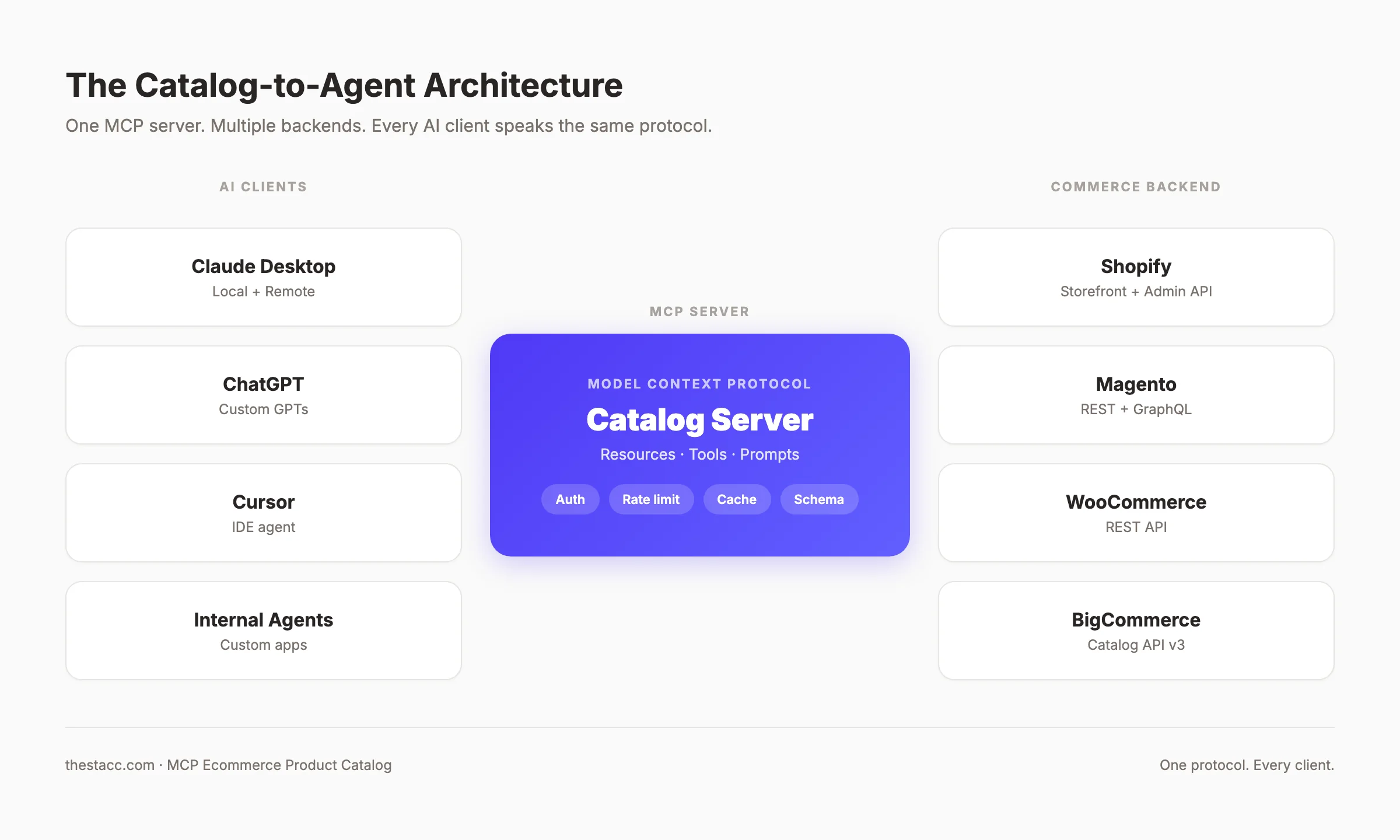
Why this matters now: In March 2026, Anthropic shipped MCP support directly inside the Claude API for remote servers. That removed the last technical reason to wait. Any ecommerce store can publish a catalog server today and have Claude, ChatGPT, and internal agents query it within the same week.
The Catalog-to-Agent Pipeline Framework
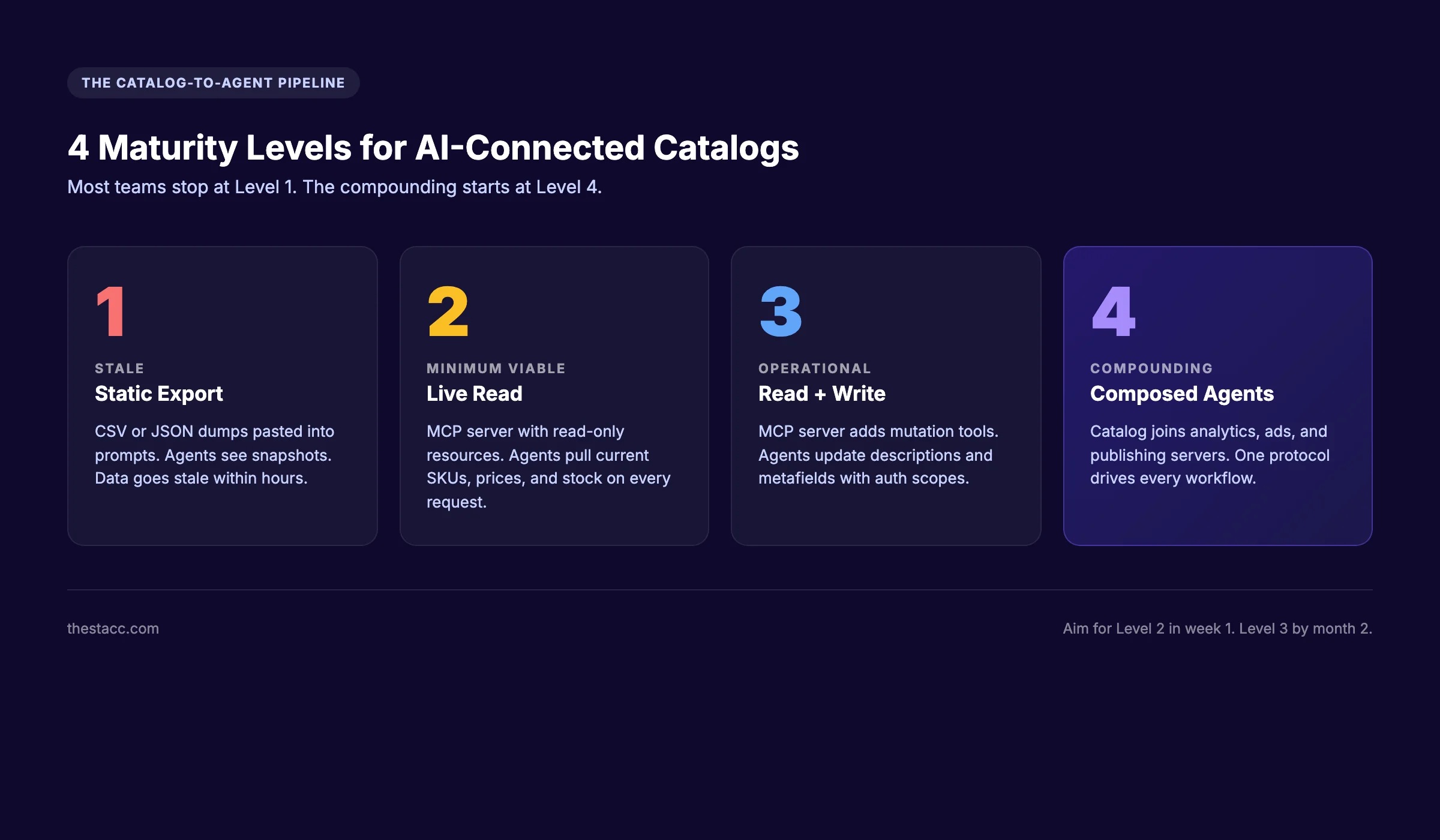
Before we get into the steps, here is the framework we use with every ecommerce team. We call it the Catalog-to-Agent Pipeline. It maps every action in this guide to one of four maturity levels.
Level 1 — Static export: Catalog lives in a CSV, JSON dump, or admin export. Agents only see the snapshot you pasted into the prompt. Stale within hours.
Level 2 — Live read: Catalog exposed through an MCP server with read-only resources. Agents pull current SKUs, prices, and inventory on every request. This is the minimum viable state.
Level 3 — Live read and write: MCP server adds tools that mutate the catalog. Agents can update descriptions, adjust metafields, or flag inventory issues. Requires careful auth.
Level 4 — Composed agents: MCP catalog server is one of several connected servers. Agents can join product data with analytics, ad performance, and content publishing into a single decision loop.
Most teams stop at Level 1 and complain that AI is not useful for their store. Move to Level 2 in week one. Aim for Level 3 by month two. Level 4 is where the real compounding starts, and it is only possible because every server speaks the same protocol.
Why this framework matters: Without a maturity model, teams build one-off integrations and abandon them when the next assistant ships. With the pipeline in place, every step you take is reusable for the next client, the next model, and the next use case.
Overview: What You Will Need
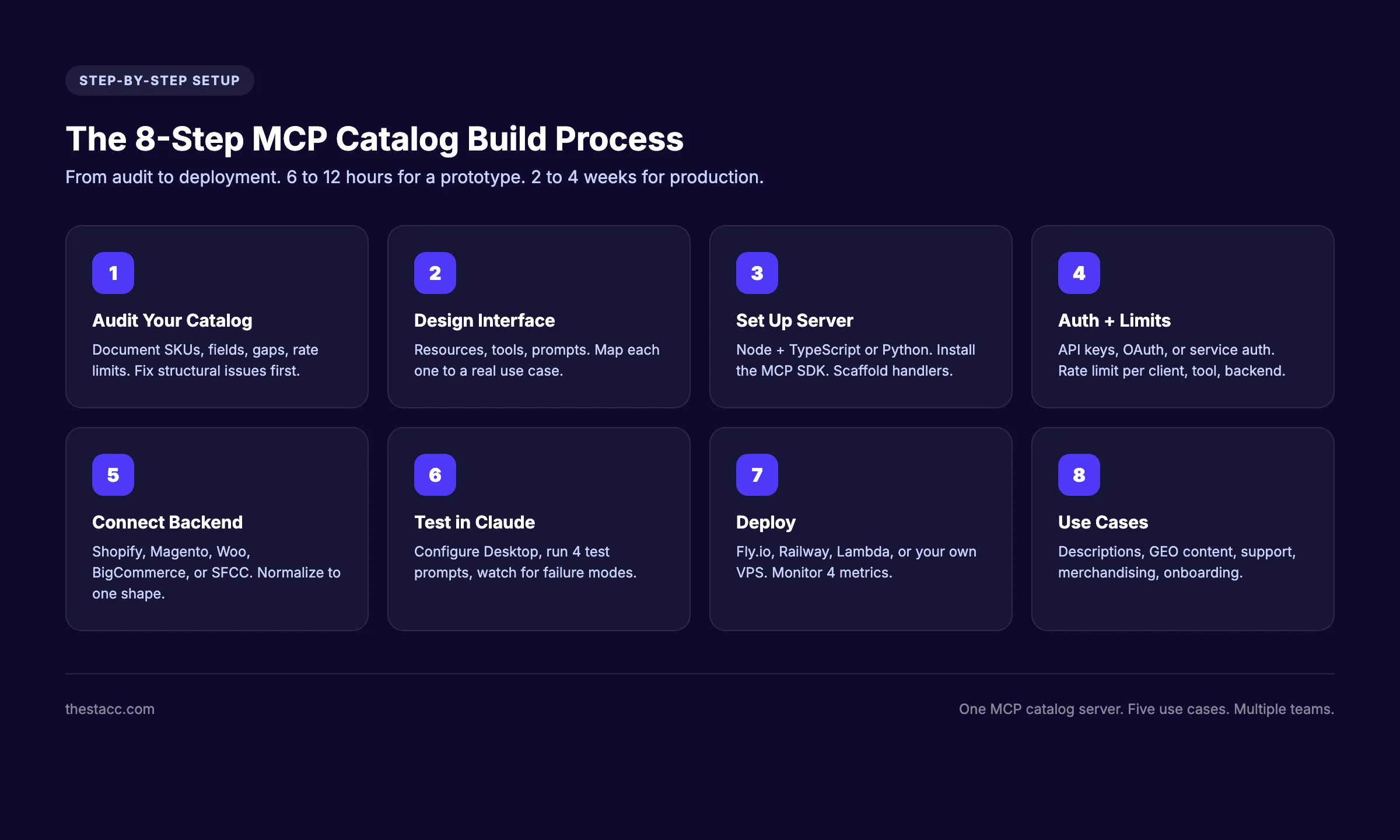
Time required: 6 to 12 hours for a working prototype. 2 to 4 weeks for a production-ready server with auth, monitoring, and write tools.
Difficulty: Intermediate. Requires comfort with Node.js or Python, REST or GraphQL APIs, and basic auth concepts.
What you will need:
- A commerce backend account with API access (Shopify, Magento, WooCommerce, BigCommerce, or Salesforce Commerce Cloud)
- Node.js 20 or higher, or Python 3.10 or higher
- The MCP SDK from Anthropic (
@modelcontextprotocol/sdkfor Node,mcpfor Python) - Claude Desktop or another MCP client for local testing
- A hosting target for production (Fly.io, Railway, AWS Lambda, or your own VPS)
Step 1: Audit Your Product Catalog
Do not start writing code. Start with an audit. The structure of your catalog determines every later decision: what resources to expose, what tools to build, what auth model to apply, and how to chunk responses for the assistant.
Specifically, document the following:
- Total SKU count, total variant count, and total category count
- Required fields for each product (title, handle, price, description, images, SKU, inventory)
- Optional and custom fields (metafields, tags, custom attributes, variant options)
- Media references (image URLs, alt text, video, 3D assets)
- Localization data if the store sells in multiple languages or currencies
- Relationship data (collections, related products, bundles, kits)
- Rate limits on the source API and any quotas that affect bulk reads
Then identify gaps. Most catalogs we audit have three classes of problems.
Missing alt text on product images. Inconsistent description formatting between categories. Empty or placeholder metafield values from years of trial CSV imports. None of those problems are blockers for MCP, but they will hurt every downstream agent. An agent that pulls a product with no alt text will hallucinate one. An agent that pulls inconsistent descriptions will produce inconsistent outputs.
Why this step matters: The MCP server is a mirror. Whatever your catalog looks like is what every agent will see. Fixing structural issues now means every assistant gets clean data forever. Skipping the audit means embedding garbage into every prompt for the next 12 months.
Pro tip: Export 100 random SKUs to JSON and feed them into Claude with a simple prompt: "Find data quality issues in this catalog." The output is a fast, free audit baseline.
Step 2: Design the MCP Server Interface
MCP servers expose three primitives: resources, tools, and prompts. Each one has a different purpose, and getting the boundaries right is half the work.
Resources are read-only data the assistant can fetch.
For a product catalog, resources usually map to:
product://{sku}— single product record with all fieldscollection://{handle}— list of products in a collection or categoryinventory://{location}— current stock levels for a warehouse or store locationattributes://{type}— taxonomy of available attributes (colors, sizes, materials)
Tools are actions the assistant can run.
Common catalog tools:
search_products— query the catalog by keyword, attribute, price range, or availabilityget_product_by_handle— fetch one product by its URL handlecompare_products— return a structured comparison of two or more SKUsfind_similar_products— return SKUs that share attributes with a given productcheck_inventory— return current stock for a SKU across all locationsupdate_product_description— write tool, requires elevated auth
Prompts are reusable templates the assistant can invoke.
Catalog-specific prompts:
write_product_description— generates a brand-consistent description for a SKUanswer_product_question— handles a customer question grounded in product datamerchandising_audit— flags products with missing or low-quality content
Map every resource, tool, and prompt to a clear use case before you write code. Twenty well-designed tools beat 200 hastily added ones. Every extra tool is one more thing the agent has to choose between, and every wrong choice costs a request.
Why this step matters: Bad interface design produces servers that agents cannot use effectively. We have seen MCP servers with 50 tools where the assistant picked the wrong one on 40% of requests. A focused interface with 8 to 12 tools and clear descriptions ranks far higher in agent reliability tests.
Step 3: Set Up the MCP Server
We will use Node.js and TypeScript for this guide because the official SDK is most mature there. The Python version is functionally similar and ships from Anthropic with the same primitives.
Create the project structure:
mkdir mcp-catalog-server && cd mcp-catalog-server
npm init -y
npm install @modelcontextprotocol/sdk zod
npm install -D typescript @types/node tsx
npx tsc --init
Create the entry point at src/server.ts:
import { Server } from "@modelcontextprotocol/sdk/server/index.js";
import { StdioServerTransport } from "@modelcontextprotocol/sdk/server/stdio.js";
import {
  ListToolsRequestSchema,
  CallToolRequestSchema,
} from "@modelcontextprotocol/sdk/types.js";

const server = new Server(
  { name: "ecommerce-catalog", version: "1.0.0" },
  { capabilities: { tools: {}, resources: {} } }
);

server.setRequestHandler(ListToolsRequestSchema, async () => ({
  tools: [
    {
      name: "search_products",
      description: "Search the product catalog by keyword, price, or attribute",
      inputSchema: {
        type: "object",
        properties: {
          query: { type: "string" },
          maxPrice: { type: "number" },
          inStock: { type: "boolean" },
        },
        required: ["query"],
      },
    },
  ],
}));

server.setRequestHandler(CallToolRequestSchema, async (request) => {
  if (request.params.name === "search_products") {
    const results = await searchCatalog(request.params.arguments);
    return { content: [{ type: "text", text: JSON.stringify(results) }] };
  }
  throw new Error("Unknown tool");
});

const transport = new StdioServerTransport();
await server.connect(transport);
That is the skeleton. The searchCatalog function is where the real work happens, and that is what Step 5 covers.
Why this step matters: A clean project structure is the difference between a server you can extend in three months and one you rewrite from scratch. Keep the transport, the handlers, and the backend connectors in separate files from day one. Once you add Shopify, Magento, and BigCommerce connectors, the file count grows fast.
Pro tip: Use zod for input validation on every tool. Agents will pass malformed arguments. Validate at the boundary, return a clear error, and the assistant will retry correctly.
Step 4: Authentication and Rate Limiting
The default stdio transport runs locally and inherits the user's permissions. That works for development and personal use. It does not work for production.
For production, you have three patterns to choose from.
Pattern A — API key per client. Each MCP client gets a key. The server checks the key on every request and applies a role. This is the simplest model and works for internal teams of fewer than 50 people.
Pattern B — OAuth with scope-based access. The MCP server acts as an OAuth resource server. Each user authenticates through their identity provider and receives scoped tokens. This is the right pattern for SaaS deployments and external partners.
Pattern C — Service account with proxy auth. The server holds one set of backend credentials and uses metadata from the incoming request to decide what to expose. This is the right pattern for white-labeled deployments.
For rate limiting, set three layers.
| Layer | Purpose | Typical limit |
|---|---|---|
| Per-client | Stop a single agent from flooding the server | 60 requests per minute |
| Per-tool | Stop expensive tools from being abused | 10 search_products per minute |
| Per-backend | Stay within the source API quota | Based on Shopify or Magento headers |
We use Redis for the counters and return standard HTTP 429 status with a Retry-After header. The MCP SDK passes that through to the assistant, which will back off and retry.
Why this step matters: A single unbounded agent loop can burn through a Shopify API quota in 90 seconds. We have watched it happen. Once the quota is exhausted, the store admin panel locks up too, because every Shopify app shares the same bucket. Rate limit early. Rate limit aggressively. Loosen the limits only when you have data on real usage.
Want product-aware SEO content published automatically? theStacc connects to your catalog and publishes 30 product-aware blog posts every month. No prompts. No prompt engineering. Just published content.
Step 5: Connect to Your Commerce Backend
This is where the server stops being a toy and starts being useful. The connector pattern is the same for every backend: authenticate, query, normalize, cache.
Shopify (recommended starting point):
Use the Storefront API for product reads and the Admin API for inventory and write operations. The Storefront API is read-only, faster, and uses a public access token that is easy to rotate. The Admin API uses an OAuth token with elevated scopes.
async function searchShopify(query: string) {
  const response = await fetch(
    `https://${SHOP}.myshopify.com/api/2026-01/graphql.json`,
    {
      method: "POST",
      headers: {
        "X-Shopify-Storefront-Access-Token": TOKEN,
        "Content-Type": "application/json",
      },
      body: JSON.stringify({
        query: `query ($q: String!) {
          products(first: 10, query: $q) {
            edges { node { title handle priceRange { minVariantPrice { amount } } } }
          }
        }`,
        variables: { q: query },
      }),
    }
  );
  return response.json();
}
Magento (Adobe Commerce):
Use the REST API or the GraphQL API. GraphQL is preferred for product reads because you can request exactly the fields you need. Authenticate with an integration token.
WooCommerce:
Use the WooCommerce REST API. Authentication uses consumer key and secret pairs. Pagination is critical because the default page size is small and many WooCommerce stores have 10,000 or more SKUs.
BigCommerce:
Use the Catalog API v3 with an OAuth client. BigCommerce returns rich product data in one call, which means fewer normalization steps.
Salesforce Commerce Cloud:
Use the Shopper API for catalog reads and the Commerce API for writes. SFCC has the most complex auth model of the major platforms because it expects guest tokens for unauthenticated reads and registered tokens for authenticated sessions.
Normalize every backend to the same shape.
Inside the MCP server, every product should look the same to the assistant regardless of the source platform. That means a single Product type with consistent field names, units, and currency formats. The connector layer translates each backend into that shape. The handler layer never sees raw Shopify or Magento responses.
Cache aggressively but selectively.
Product titles and descriptions change rarely. Cache them for 1 to 24 hours. Inventory changes constantly. Never cache it for more than 60 seconds, and ideally pass through every read. Prices change in batches during promotions. Cache them with a short TTL and invalidate on webhook events.
Why this step matters: The connector layer is where most servers fail in production. A Shopify API change, a Magento upgrade, or a WooCommerce plugin conflict will break the connector long before it breaks the MCP layer. Keep connectors isolated, test them with contract tests, and version them independently of the rest of the server.
Step 6: Test Against Claude Desktop
Local testing is the fastest feedback loop for an MCP server. Claude Desktop is the reference client and the easiest place to start.
Add the server to Claude Desktop config:
Open ~/Library/Application Support/Claude/claude_desktop_config.json on macOS or %APPDATA%\Claude\claude_desktop_config.json on Windows. Add an entry for the catalog server.
{
  "mcpServers": {
    "ecommerce-catalog": {
      "command": "node",
      "args": ["/absolute/path/to/dist/server.js"],
      "env": {
        "SHOPIFY_STOREFRONT_TOKEN": "your-token",
        "SHOP_DOMAIN": "your-shop"
      }
    }
  }
}
Restart Claude Desktop. The catalog server will appear in the tools menu.
Run the test prompts in this order:
- "List the tools available from the ecommerce-catalog server." This confirms the connection and shows that every tool registered correctly.
- "Search the catalog for products under $50 that are in stock." This exercises the
search_productstool with arguments. - "Show me the full record for product handle 'merino-crew-sweater'." This tests resource fetching.
- "Write a 120-word product description for that sweater using a warm, practical tone." This tests the end-to-end flow from query to creative output.
Watch for three failure modes.
The assistant calls the wrong tool. Fix it by tightening the description in the tool registration. Be specific about when to use each tool.
The assistant passes the wrong arguments. Fix it by sharpening the input schema with required fields and clear field descriptions.
The assistant gets the right data but writes a poor description. Fix it by adding a write_product_description prompt template that bakes in the brand voice and structural requirements.
Why this step matters: Real client testing reveals interface problems that no unit test will catch. We have seen servers that passed every automated test fail every real prompt because the tool names were ambiguous. One hour with Claude Desktop saves a week of production debugging.
Step 7: Deploy and Expose to Agents
The local server is ready. Now you ship it. Production deployment has two flavors depending on who consumes the server.
Internal-only deployment:
Run the server as a long-lived process inside your private network. Use stdio over SSH for individual developers, or expose it through http+sse for centralized access. Authenticate with API keys or your existing internal SSO.
External deployment:
Use the new remote MCP protocol that Anthropic shipped in March 2026. Servers register a public HTTPS endpoint, advertise OAuth metadata, and accept connections from Claude API, ChatGPT enterprise tenants, and any other MCP-compatible client.
The deployment platforms we have tested in production.
| Platform | Best for | Notes |
|---|---|---|
| Fly.io | Lightweight servers with low traffic | Easy global edge deployment |
| Railway | Quick prototype to production paths | Built-in env management |
| AWS Lambda + API Gateway | Bursty workloads, pay per request | Cold starts hurt assistant responsiveness |
| Cloudflare Workers | Edge-distributed reads | Limited Node.js compatibility |
| Vercel | Co-located with marketing site | Good if catalog and site share a stack |
Monitor four things from day one:
- Request volume per tool (which tools are actually used)
- Error rate per tool (which tools fail and why)
- Latency p95 per tool (where the slow paths are)
- Backend API quota usage (how close you are to limits)
Publish the server URL and capabilities.
For internal teams, ship a short README with example prompts. For external partners, publish the standard MCP discovery endpoint so clients can self-configure.
Why this step matters: A server nobody uses produces zero value. The difference between a deployed server and an adopted server is the documentation and the examples. Make it 10 minutes from "I have access" to "I have results."
Step 8: Common Use Cases
Once the server is live, the use cases compound quickly. Here are the five we see produce results within the first 30 days.
Product description generation at scale.
The agent pulls the product record, applies a brand voice prompt, and writes a 120 to 250 word description. For a store with 5,000 SKUs and 30% missing or outdated descriptions, that is 1,500 descriptions worth roughly 80 hours of copywriter time. The MCP-driven flow finishes in a weekend.
GEO and AI Overview content generation.
The catalog server feeds a content generation pipeline. The agent picks a category, queries the top sellers, and writes a buyer's guide that cites real SKUs, real prices, and real availability. The output is grounded, fresh, and far harder for AI Overviews to dismiss as generic.
Customer support Q&A.
Customer asks "Does the merino crew sweater shrink in the wash?" The support agent (human or AI) calls the catalog server, pulls the care instructions metafield, and answers with the actual product data. Resolution time drops from 8 minutes to 90 seconds.
Merchandising assistance.
A merchandiser asks the assistant for products that are low on inventory but high on search demand. The agent joins the catalog server with the search analytics server, returns a ranked list, and proposes which to restock first. Decisions that took a Monday morning now happen in two minutes.
Internal product Q&A.
A new employee asks "Which of our sweaters are machine washable and cost under $80?" The assistant queries the catalog and returns three SKUs with the relevant attributes highlighted. Onboarding gets easier. Support handovers get faster.
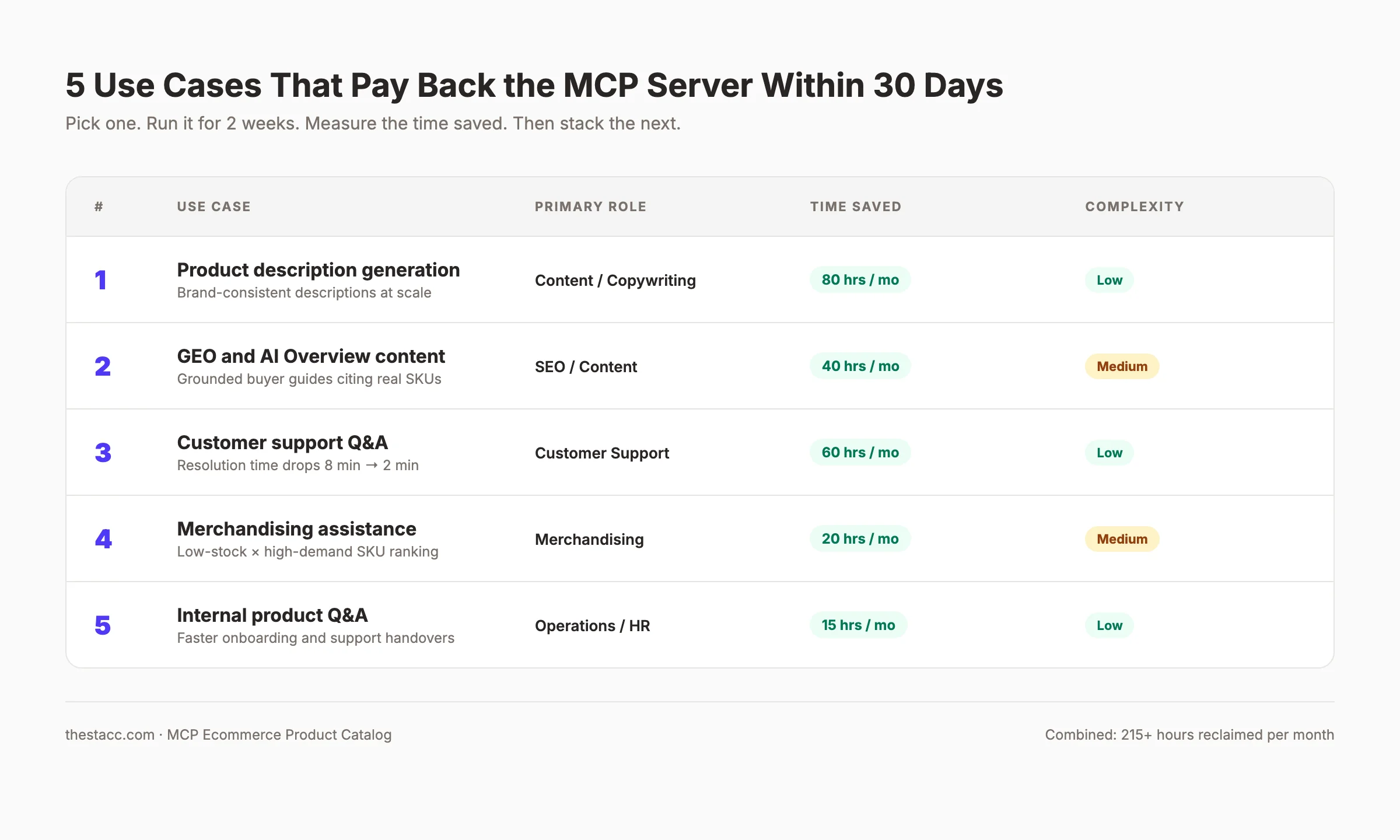
Why this step matters: Most teams build the server and stop. The actual return on investment comes from the use cases you light up afterward. Pick one use case, run it for two weeks, measure the time saved, then add the next. Stacking use cases on top of one server is where MCP earns back the implementation cost 10 times over.
Real Example: A Shopify Store with 5,000 SKUs
Here is a concrete walkthrough. A mid-market apparel brand on Shopify with 5,000 SKUs across 32 collections came to us with three problems.
Half the products had thin or duplicated descriptions imported from a vendor catalog. The customer support team spent 6 hours a day answering questions that could be resolved from the product page. The content team wanted to publish buying guides but could not keep them in sync with seasonal inventory shifts.
Week 1. We audited the catalog. We found 1,840 products with descriptions under 60 words, 2,200 products with missing alt text, and 540 products with empty care instruction metafields. We documented the gaps but did not fix them yet.
Week 2. We built the MCP server. It exposed five tools: search_products, get_product_by_handle, find_similar_products, check_inventory, and get_care_instructions. It exposed two resources: product:// and collection://. We deployed it on Fly.io with API key auth and connected it to Claude Desktop for the internal team.
Week 3. The support team started using Claude with the catalog server in their day-to-day work. Average resolution time on product questions dropped from 8 minutes to 2 minutes. The content team began generating description rewrites in batches of 50 SKUs at a time.
Week 4. We added the update_product_description tool with a scoped admin token. Description rewrites moved from a draft document to direct catalog updates with human approval gates.
By month three. All 1,840 thin descriptions were rewritten. 84 product buying guides were published, each grounded in current SKUs and prices. Support resolution time was holding steady at 2 to 3 minutes. The team reported that the MCP server had paid for itself in the first 45 days.
The lesson is simple. One server. One catalog. Five use cases. Multiple teams using the same infrastructure within four weeks.
Results: What to Expect
After completing these 8 steps, expect the following outcomes on a realistic timeline.
- Week 1: Server runs locally and responds to test prompts from Claude Desktop.
- Weeks 2 to 3: Server runs in a staging environment and at least one internal team has tried it on real work.
- Month 1: First production use case is live. Most teams pick product description generation or customer support Q&A.
- Month 2: Second and third use cases are live. The server is monitored, rate limited, and stable.
- Month 3: Measurable time savings. Most ecommerce teams we have worked with see 8 to 20 hours per week reclaimed from manual catalog work.
- Month 6: The catalog server is one of several MCP servers in your stack. Level 4 of the Catalog-to-Agent Pipeline starts to feel real.
The trap to avoid is building the server and then waiting for someone to use it. Treat adoption as a first-class deliverable. Pair the engineering work with one team that has a clear pain point. Ship together.
Troubleshooting
Problem: The assistant calls the wrong tool or skips the catalog server entirely.
Solution: Sharpen the tool descriptions. Add examples of when to use each tool. Reduce tool count if you have more than 12 in one server.
Problem: The backend API quota gets exhausted within hours of going live.
Solution: Add caching for product reads. Tighten per-tool rate limits. Move heavy reads to a webhook-driven mirror database that the MCP server reads instead.
Problem: Product descriptions generated by the assistant sound off-brand or inconsistent.
Solution: Add a write_product_description prompt template that bakes in brand voice rules and required structural elements. Ground every generation in 2 to 3 example descriptions the brand approved.
Problem: The remote MCP server fails OAuth handshakes with the Claude API.
Solution: Verify the OAuth metadata endpoint is publicly reachable, returns valid JSON, and lists the correct scopes. Most early-stage failures trace back to this.
What practitioners are saying on X
AI search advice ages quickly. Here is high-signal public discussion from SEO and growth operators — context for your roadmap, not a substitute for primary data.
- @hridoyreh (Mar 2026): Widely shared SEO skill tree: foundations, research, technical, on-page, content, links, AI SEO/GEO, analytics, UX, brand, programmatic — useful map for stats and how-to posts. See the post on X.
- @jakezward (Feb 2026): 2026 SEO predictions emphasize AI Overview share-of-SERP, schema for LLM token efficiency, brand mentions in AI answers as a KPI, proprietary data as a moat, and content refresh beating net-new AI slop. See the post on X.
Grok, AI Overviews, and multi-engine visibility
For “mcp ecommerce product catalog”, multi-engine visibility still starts with clear definitions, sourced numbers, and extractable section answers. Grok additionally factors live X discussion — keep public claims consistent with this page.
- Google AI Overviews: Use passage-ready answers, tables, and FAQ schema where relevant.
- ChatGPT / Perplexity: Cite named sources next to key claims.
- Grok: Maintain accurate entity facts on-site and in high-signal X posts.
Frequently Asked Questions
An MCP ecommerce product catalog is a Model Context Protocol server that exposes your store's products, prices, inventory, and attributes to AI assistants through one standard interface. It lets Claude, ChatGPT, Cursor, and internal agents query the same data the same way. The result is consistent, grounded responses for product descriptions, customer support, merchandising, and content generation. Key takeaway: One MCP server replaces dozens of one-off integrations with AI tools.
A regular product API is built for one client at a time. Every assistant or tool needs its own custom adapter to talk to it. MCP defines a standard schema for resources, tools, and prompts. Any MCP-compatible client can connect to any MCP server without custom glue code. The protocol handles discovery, schema, and execution in one open standard. Key takeaway: MCP is the standard. Your API is the implementation.
Any platform with an API can connect. We have shipped MCP servers in front of Shopify, Magento (Adobe Commerce), WooCommerce, BigCommerce, and Salesforce Commerce Cloud. The connector is the only platform-specific piece. The rest of the server stays the same across backends. Headless platforms like Commercetools and Saleor work the same way. Key takeaway: Pick the platform you already use. The MCP layer abstracts the differences.
No. Start with title, handle, price, description, primary image, SKU, and inventory. Add fields only when an agent needs them for a real task. Exposing too much data slows responses, balloons context windows, and leaks information that should stay internal. Resist the urge to be exhaustive. Add fields one at a time as use cases demand. Key takeaway: Less surface area means better agent performance and fewer security headaches.
Do not cache inventory. Cache product titles and descriptions for 1 to 24 hours with webhook-driven invalidation. For inventory and pricing, pass through every read so the assistant always sees the live value. For static fields like titles and care instructions, a short cache reduces backend load without hurting freshness. Webhook events from Shopify, BigCommerce, or your platform invalidate the cache when products change. Key takeaway: Cache the slow-changing fields. Always read the fast-changing ones.
Yes. MCP supports both read tools and write tools. A write tool like update_product_description lets the assistant modify catalog data with the right auth scope. Always gate write tools behind elevated authentication and a human approval step in the first 90 days. Once you trust the workflow, you can loosen the approval requirement on specific tools that have proven safe. Key takeaway: Read first. Write second. Always with approval gates early on.
Yes, if you implement auth correctly. MCP itself is a protocol. Security comes from how you deploy it. For internal deployments, API keys and a private network are enough. For external deployments, OAuth with scoped tokens is the right pattern. Always rate limit per client and per tool. Always log every tool call for audit. Key takeaway: MCP is as secure as your auth model. Treat it like any other production API.
Most teams spend $20 to $200 per month on hosting. The bigger costs are engineering time for the initial build and the backend API calls. For a Shopify store with 5,000 SKUs, expect $40 to $80 per month on Fly.io or Railway, plus the Shopify Storefront API which has a generous free tier. Engineering time for the initial 8 steps usually runs 60 to 120 hours. Key takeaway: Hosting is cheap. Engineering and adoption are where the real budget goes.
What Happens Next
The catalog server you build this month becomes the foundation for every AI workflow in your ecommerce stack over the next three years. Pick the use case with the clearest pain. Build the minimum viable server. Get one team using it within two weeks. Then stack the next use case.
The teams that win in 2026 and beyond are not the ones with the smartest prompts. They are the ones whose product data is queryable, structured, and live for every agent that asks.
Want product-aware SEO content published on autopilot? theStacc reads your catalog, writes 30 buyer-grade blog posts every month, and publishes them directly to your CMS. See plans and pricing →
Further reading:
- Build an MCP Server for Marketing in 7 Steps — the broader marketing data version of this guide.
- MCP for Content Marketing — how content teams connect catalogs, briefs, and publishing into one MCP pipeline.
- AI Agents for Ecommerce — patterns for agent-driven workflows in retail.
- Ecommerce SEO Guide — the foundational SEO playbook your catalog server supports.
External references:
- Model Context Protocol specification — the open standard from Anthropic.
- Anthropic MCP servers GitHub — reference servers and SDKs.
- Shopify Storefront API documentation — the API most catalog servers start with.
- BigCommerce Catalog API v3 — reference for BigCommerce connectors.
Sources & references
- [1] Princeton / Georgia Tech et al. — GEO research (arXiv:2311.09735)
- [2] @hridoyreh on X — Widely shared SEO skill tree: foundations, research, technical, on-page, content, links, AI SEO/GEO, analytics, UX, bran
- [3] @jakezward on X — 2026 SEO predictions emphasize AI Overview share-of-SERP, schema for LLM token efficiency, brand mentions in AI answers
- [4] Referenced source — modelcontextprotocol.io

Researched, written, and published articles that compound organic traffic.
Weekly local SEO teardowns
One practical email a week. Map Pack, GBP, AI Overviews — no fluff. Unsubscribe anytime.