Optimize voice assistants SEO for Alexa, Siri, and Google Assistant in 2026. 8 steps to capture conversational queries and featured snippets.
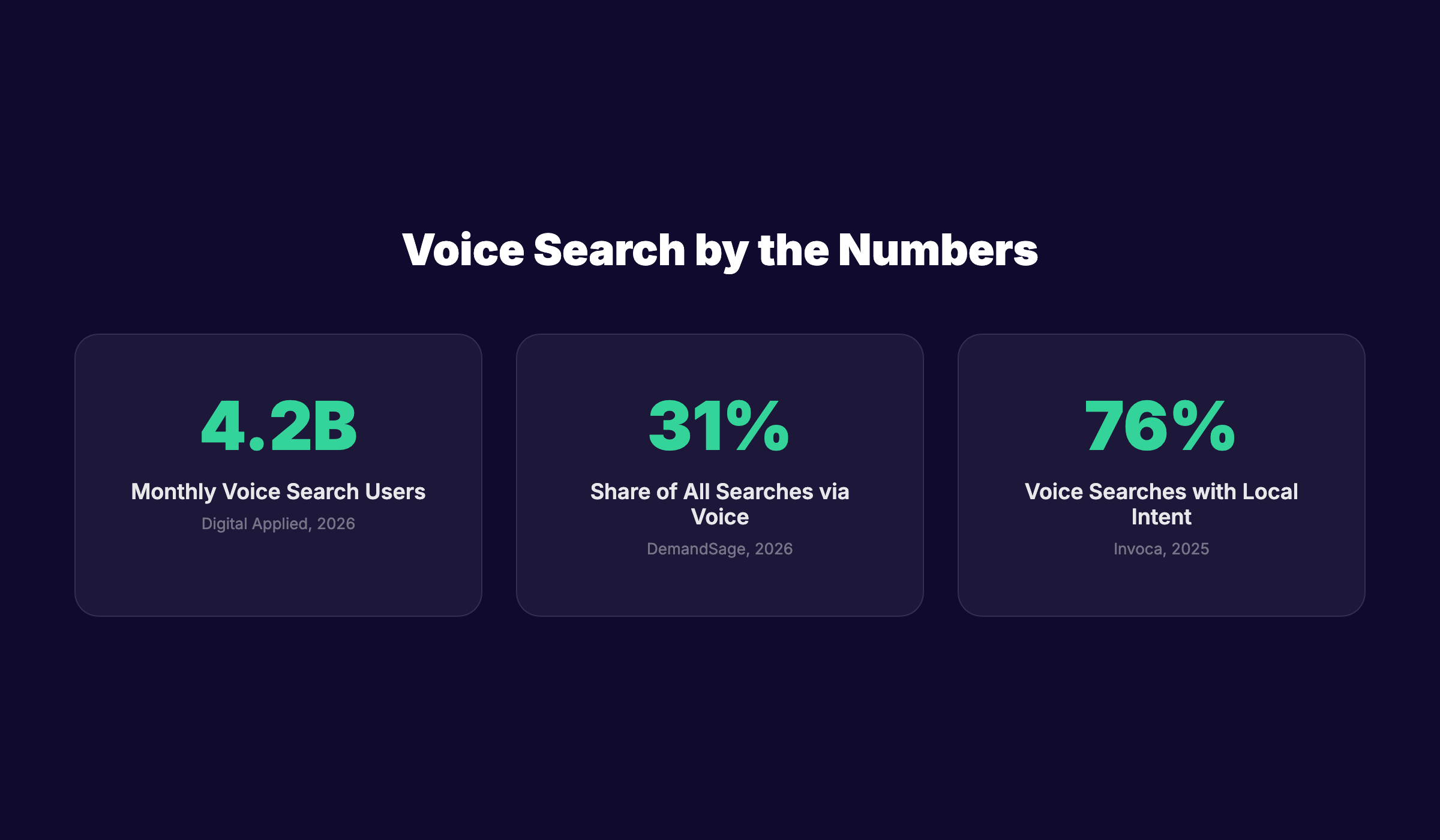
Over 4.2 billion people use voice search every month. Yet most websites are still built for fingers on keyboards, not spoken questions to Alexa, Siri, and Google Assistant. If your content is not optimized for voice, you are invisible to the fastest-growing search channel on the planet.
This is not a small problem. Voice searches convert at 3× the rate of typed searches for local queries. A restaurant that ranks for "best Italian restaurant near me" via voice captures diners at the exact moment of decision. A plumber who shows up for "emergency plumber open now" books calls while competitors sleep.
At theStacc, we have analyzed how voice assistants select answers from millions of web pages. The pattern is clear: voice results favor structured, conversational, fast-loading content that answers questions directly. This guide shows you the exact 8-step process to make your site the source voice assistants choose.
Here is what you will learn:
- How to find the exact conversational keywords your audience speaks aloud
- The content structure that wins featured snippets (the source of 41% of voice answers)
- Platform-specific tactics for Google Assistant, Siri, and Alexa
- Local SEO adjustments that capture "near me" voice queries
- Technical optimizations that speed up your site for voice-first indexing
- Schema markup that tells voice assistants exactly what your content means
Let us get started.
Overview: What You Will Need
| Requirement | Details |
|---|---|
| Time required | 4–6 hours spread across 2 weeks |
| Difficulty | Intermediate (basic SEO knowledge helpful) |
| Tools needed | Google Search Console, Google Keyword Planner, PageSpeed Insights, schema validator |
| Prerequisites | A live website with indexed pages, Google Business Profile (for local) |
Step 1: Find Conversational Keywords Your Audience Actually Speaks
Voice searches are longer, more natural, and framed as questions. A typed search for "Italian restaurant Chicago" becomes "What is the best Italian restaurant near me that is open now?" when spoken. Your keyword research must account for this shift.
Start with your existing search data. Open Google Search Console and filter queries containing question words: who, what, when, where, why, how. These represent your current voice traffic. Export the top 50 queries by impressions.
Next, expand your list using these methods:
Method A: AnswerThePublic Enter your core topic and collect all question-format suggestions. Focus on queries starting with "how to," "what is," "where can I," and "why does."
Method B: "People Also Ask" Mining Search your target keywords on Google. Expand every PAA question. Each expansion reveals 2–4 related questions. Continue until you have 30+ unique questions.
Method C: Competitor Voice Gap Analysis Identify which featured snippets your competitors own. Tools like Semrush or Ahrefs show snippet ownership by domain. Target questions where the current snippet is weak or outdated.
Method D: Long-Tail Conversation Starters Voice queries average 7+ words. Build a list of 20+ long-tail phrases that include:
- "Near me" + service + location
- "Best" + category + "for" + specific need
- "How to" + action + "without" + common obstacle
- "What is the cheapest" + product + "that" + quality qualifier
Organize your findings into a keyword map. Group related questions under topic clusters. Each cluster becomes one optimized page or section.
Why this step matters: Without conversational keyword targeting, you are optimizing for the wrong behavior. Typed and spoken searches have different intent, length, and conversion patterns. Skip this step and every optimization that follows will miss the mark.
Pro tip: Record yourself asking your target questions aloud. The phrasing you use is likely how your audience speaks. Compare your natural phrasing against your written keyword list. Adjust where they diverge.
Stop guessing what your audience asks. theStacc analyzes real search data to find the exact questions your customers speak into their phones. Every article we publish targets verified conversational queries — not assumptions. See how theStacc finds voice keywords automatically
Step 2: Structure Content for Featured Snippet Capture
Voice assistants pull 41% of their answers directly from Google's featured snippets. If you do not own the snippet, you do not get the voice answer. Period.
The snippet-winning structure is simple but strict. Every target page needs a "snippet block" — a self-contained answer that Google can extract verbatim.
The Snippet Block Formula:
- Question as H2 or H3 — Mirror the exact query phrasing
- 40–60 word answer — Direct, complete, no fluff. One or two sentences maximum.
- Supporting detail — Elaboration, examples, or data after the answer block
Here is an example for the query "How do I optimize my website for voice search?"
H2: How Do I Optimize My Website for Voice Search?
Optimize your website for voice search by targeting conversational long-tail keywords, structuring content with direct 40–60 word answer blocks, implementing FAQ schema markup, and ensuring your site loads in under 2.5 seconds on mobile devices. Voice assistants favor pages that answer questions immediately without requiring additional clicks.
[Then expand with detail, examples, and related subtopics]
Snippet format by type:
| Snippet Type | Structure to Use | Example |
|---|---|---|
| Paragraph | 40–60 word direct answer | "Voice search optimization is..." |
| List | Numbered or bulleted list with 5–8 items | "8 steps to optimize for voice..." |
| Table | Clean HTML table with 3–5 columns | "Voice search stats by platform" |
Additional formatting rules:
- Place the snippet block within the first 300 words of the page
- Use simple sentence structure (subject → verb → object)
- Avoid pronouns without clear antecedents
- Include the target keyword naturally in the answer block
- Add a table of contents with jump links for long pages
Why this step matters: Featured snippets are the primary source for voice answers. Without snippet-optimized content, voice assistants have nothing to read from your site. This single structural change can multiply your voice visibility overnight.
Pro tip: Test your snippet blocks by asking the question to Google Assistant or Siri. If the assistant reads your exact answer, you have structured it correctly. If it reads a competitor, study their format and improve yours.
Step 3: Implement Schema Markup for Voice Assistants
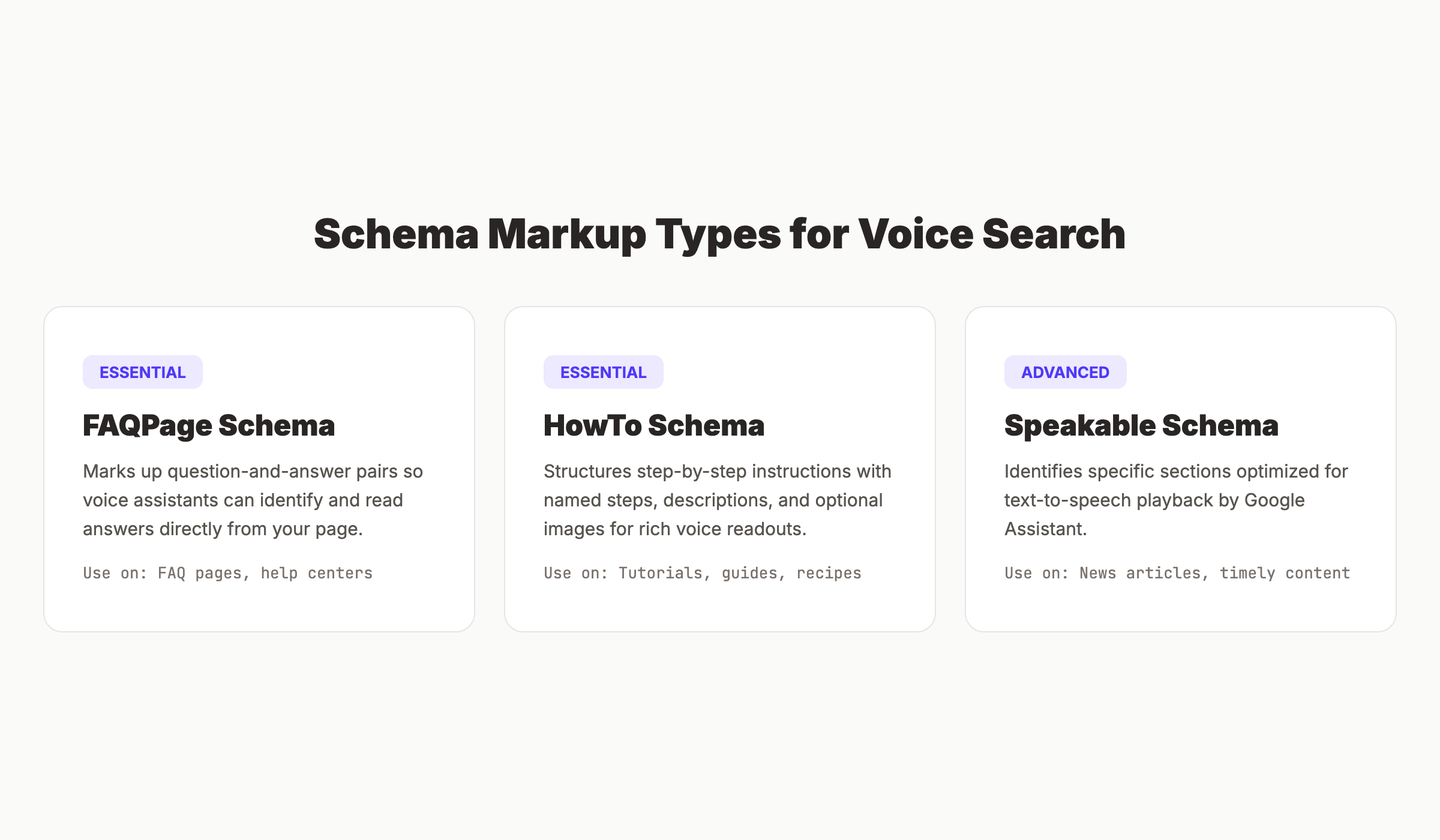
Schema markup is machine-readable context that tells search engines exactly what your content means. For voice search, three schema types matter most: FAQPage, HowTo, and Speakable.
FAQPage Schema Use this for any page with 3+ question-and-answer pairs. The schema enables Google to display rich results and helps voice assistants identify answerable content.
Each FAQ entry needs:
- A clear question in plain language
- A concise answer (recommended: under 150 words)
- No duplicate questions on the same page
HowTo Schema Use this for step-by-step guides (like this article). HowTo schema enables voice assistants to read steps sequentially and helps Google display rich results with images and time estimates.
Each HowTo step needs:
- A named step title
- A text description of the action
- Optional: image, URL, and time required
Speakable Schema (BETA) Google's Speakable schema identifies specific sections of content that are optimized for text-to-speech playback. Currently limited to news publishers in the United States, but worth implementing if you publish timely content.
Mark speakable sections with: ```json { "@type": "SpeakableSpecification", "cssSelector": [".speakable-intro", ".speakable-answer"] } ```
Implementation checklist:
- ✓ Add FAQPage schema to all FAQ sections
- ✓ Add HowTo schema to all step-by-step guides
- ✓ Validate all schema using Google's Rich Results Test
- ✓ Submit updated pages for re-indexing via Search Console
- ✓ Monitor rich result status in Search Console's "Enhancements" report
Why this step matters: Schema markup is the bridge between your content and voice assistants. Without it, assistants must guess what your content means. With it, you give them exact instructions on how to interpret and present your information.
Pro tip: Use Google's Structured Data Markup Helper if you are new to schema. It generates the JSON-LD code for you. Paste the output into your page's <head> section and validate before publishing.
Step 4: Optimize for Platform-Specific Voice Assistants
Google Assistant, Siri, and Alexa do not work the same way. Each pulls from different data sources, prioritizes different signals, and serves different user contexts. Your optimization strategy must account for these differences.
Google Assistant
Google Assistant is the dominant voice platform with 91.9 million U.S. users. It pulls answers primarily from:
- Google Search featured snippets
- Google Business Profile (for local queries)
- Google Knowledge Graph
- YouTube video content
Optimization priorities for Google Assistant:
- Own featured snippets — 41% of Google Assistant answers come from snippets
- Complete your Google Business Profile — Critical for local voice queries
- Build Knowledge Graph presence — Use Organization schema, get listed on Wikipedia/Wikidata
- Create YouTube content — Google Assistant often plays video answers for "how-to" queries
Siri
Siri serves 86.5 million U.S. users and relies on multiple search engines depending on the query type:
- Apple Maps and Yelp (for local business queries)
- Google (for general web search)
- Bing (for some informational queries)
Optimization priorities for Siri:
- Claim and optimize Apple Business Connect — This is Siri's primary local data source
- Maintain strong Yelp presence — Siri reads Yelp ratings and reviews for local queries
- Ensure Bing indexing — Submit your sitemap to Bing Webmaster Tools
- Focus on mobile speed — 91% of Siri queries come from iPhones
Alexa
Alexa serves 77.2 million U.S. users and is unique among voice assistants because it uses Bing as its primary search engine, not Google.
Optimization priorities for Alexa:
- Optimize for Bing search — Submit to Bing Webmaster Tools, use Bing's keyword data
- Build Bing-friendly content — Bing favors established domains, exact-match keywords, and social signals
- Create Alexa Skills (advanced) — Custom skills let you build branded voice experiences
- Focus on e-commerce — Alexa users make purchases at higher rates than other platforms
Platform Comparison Summary
| Factor | Google Assistant | Siri | Alexa |
|---|---|---|---|
| U.S. users | 91.9M | 86.5M | 77.2M |
| Primary search engine | Google/Bing | Bing | |
| Local data source | Google Business Profile | Apple Business Connect + Yelp | Bing Places |
| Snippet dependency | Very high (41%) | Moderate | Moderate |
| Top device | Android phones | iPhone | Echo speakers |
| Best for | Informational queries | Local + navigation | E-commerce + smart home |
Why this step matters: Treating all voice assistants as identical is a common mistake. Alexa uses Bing, not Google. Siri prioritizes Apple Maps and Yelp. Optimizing for only one platform leaves 60% of voice users uncovered.
Pro tip: Test your target queries on all three platforms weekly. Ask the same question to Google Assistant, Siri, and Alexa. Document which site each assistant reads from. If it is never yours, your content or schema needs adjustment.
Voice optimization is platform-specific work. theStacc publishes content structured for featured snippets across all three major assistants — Google, Siri, and Alexa — so your business shows up no matter which device your customer uses. See how theStacc structures content for voice
Step 5: Strengthen Local SEO for "Near Me" Voice Queries
76% of voice searches have local intent. "Near me" queries have grown 150% since 2020. If you serve a local market, this step is not optional — it is the highest-ROI voice optimization you can make.
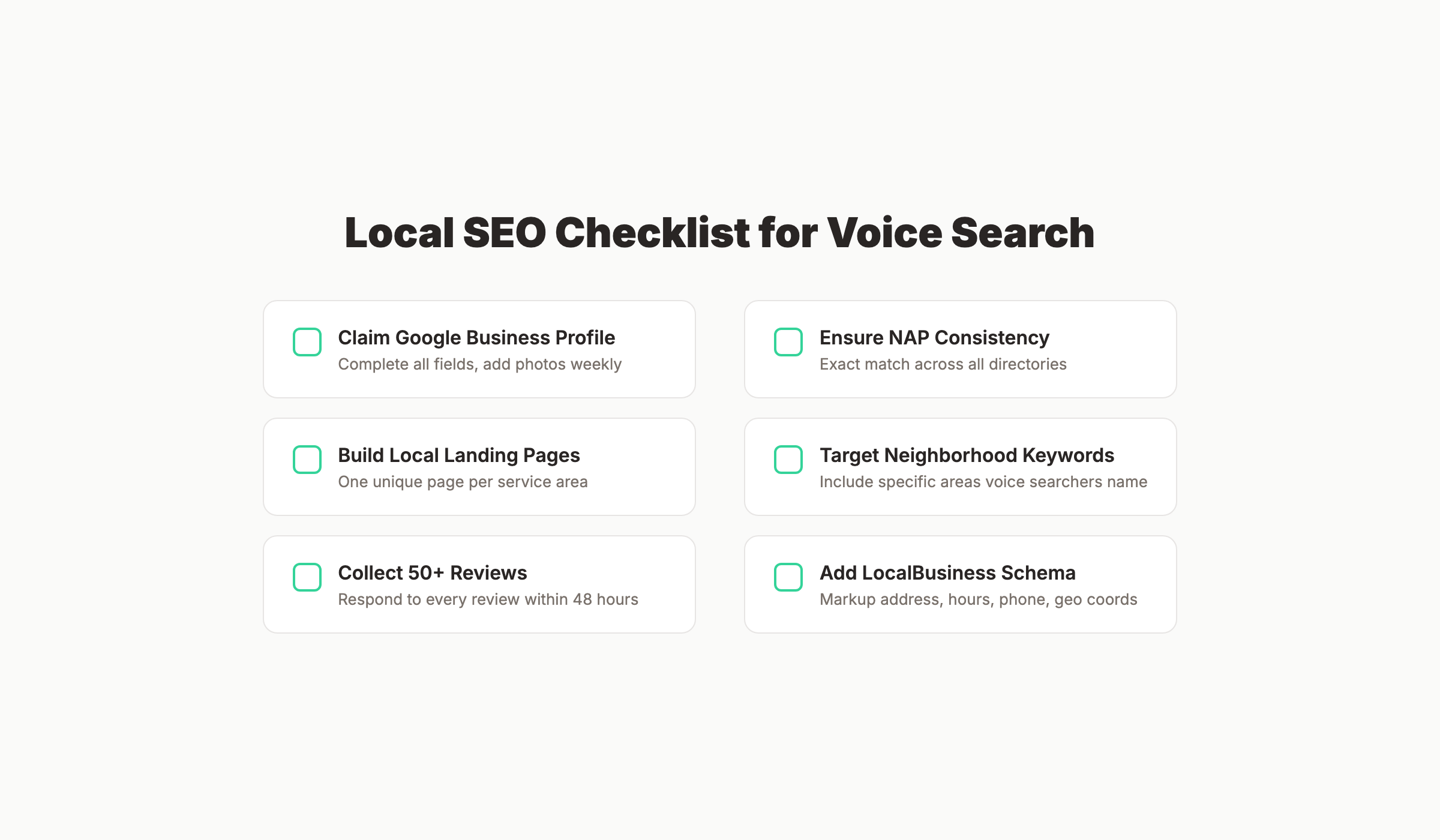
The local voice optimization checklist:
1. Claim and complete Google Business Profile
- Business name, address, phone (exact match across all listings)
- Primary and secondary categories (choose the most specific options)
- Business hours, including holiday hours
- High-quality photos (interior, exterior, team, products)
- Regular Google Posts (weekly minimum)
- Q&A section populated with common questions and answers
2. Build local landing pages Create dedicated pages for each service area. Each page needs:
- Unique content (never duplicate across locations)
- Local landmarks, neighborhoods, and street references
- Customer testimonials from that area
- Embedded Google Map
- Local phone number
3. Ensure NAP consistency Your Name, Address, and Phone number must be identical everywhere:
- Your website
- Google Business Profile
- Apple Business Connect
- Yelp, Bing Places, Facebook
- Industry directories
Even small differences ("St." vs "Street") confuse search engines and hurt rankings.
4. Target neighborhood-level keywords Voice searchers often include specific neighborhoods. Instead of "plumber Chicago," target "plumber Lincoln Park Chicago" or "emergency plumber near Wrigleyville."
5. Encourage and respond to reviews Voice assistants read review counts and ratings aloud. Businesses with 4.5+ stars and 50+ reviews get preferential treatment. Respond to every review within 48 hours.
6. Add local schema markup ```json { "@type": "LocalBusiness", "name": "Your Business Name", "address": { "@type": "PostalAddress", "streetAddress": "123 Main St", "addressLocality": "Chicago", "addressRegion": "IL", "postalCode": "60601" }, "telephone": "+1-312-555-0123", "openingHours": "Mo-Fr 08:00-18:00" } ```
Why this step matters: Local voice searches convert at 3× the rate of non-local voice searches. A "near me" query signals immediate intent. The business that answers first gets the customer. Local SEO is the mechanism that puts you in that position.
Pro tip: Ask your customers how they found you. If they say "I asked Siri" or "I told Alexa to find...," you know voice is already driving revenue. Double down on the platform and query type that brought them in.
Step 6: Speed Up Your Site for Voice-First Indexing
Voice assistants will not wait for slow pages. The average voice search result page loads in 4.6 seconds, but top-ranking pages load significantly faster. Google has used mobile-first indexing since 2023, and voice search is almost entirely mobile.
Core Web Vitals targets for voice optimization:
| Metric | Target | Why It Matters |
|---|---|---|
| Largest Contentful Paint (LCP) | Under 2.5 seconds | Voice users expect instant answers |
| First Input Delay (FID) | Under 100ms | Interaction must feel immediate |
| Cumulative Layout Shift (CLS) | Under 0.1 | Prevents content jumping during voice readout |
| Time to First Byte (TTFB) | Under 600ms | Server response speed affects all other metrics |
| Total page size | Under 1.5MB | Large pages load slowly on mobile networks |
Speed optimization actions:
- Compress images — Use WebP format, lazy loading, and responsive images
- Minimize JavaScript — Defer non-critical scripts, remove unused code
- Enable browser caching — Set cache headers for static assets
- Use a CDN — Serve content from edge locations near your users
- Implement critical CSS inlining — Render above-the-fold content immediately
- Remove render-blocking resources — Load CSS and JS asynchronously where possible
- Enable text compression — Gzip or Brotli compression reduces transfer size by 70%+
Mobile-specific optimizations:
- Use responsive design (no separate mobile site)
- Ensure tap targets are at least 48×48 pixels
- Use readable font sizes (16px minimum for body text)
- Eliminate pop-ups that cover content on mobile
Test your speed using Google PageSpeed Insights. Aim for a score of 90+ on mobile. Record your baseline scores before optimization and compare after each change.
Why this step matters: Voice assistants skip slow pages. If your competitor loads in 1.8 seconds and you load in 4.2 seconds, the assistant will read their answer, not yours. Speed is a competitive advantage in voice search.
Pro tip: Use the "Performance" tab in Chrome DevTools to record a page load. Look for long tasks (yellow blocks) that block the main thread. These are your biggest optimization opportunities.
What practitioners are saying on X
AI search advice ages quickly. Here is high-signal public discussion from SEO and growth operators — context for your roadmap, not a substitute for primary data.
- @hridoyreh (Mar 2026): Widely shared SEO skill tree: foundations, research, technical, on-page, content, links, AI SEO/GEO, analytics, UX, brand, programmatic — useful map for stats and how-to posts. See the post on X.
- @jakezward (Feb 2026): 2026 SEO predictions emphasize AI Overview share-of-SERP, schema for LLM token efficiency, brand mentions in AI answers as a KPI, proprietary data as a moat, and content refresh beating net-new AI slop. See the post on X.
Grok, AI Overviews, and multi-engine visibility
For “optimize voice assistants seo”, multi-engine visibility still starts with clear definitions, sourced numbers, and extractable section answers. Grok additionally factors live X discussion — keep public claims consistent with this page.
- Google AI Overviews: Use passage-ready answers, tables, and FAQ schema where relevant.
- ChatGPT / Perplexity: Cite named sources next to key claims.
- Grok: Maintain accurate entity facts on-site and in high-signal X posts.
Publish content built for Google and AI citations. theStacc’s Content SEO module ships SEO-scored articles structured for rankings and generative engines — including clearer entity pages models like Grok can quote.
Step 7: Create FAQ Pages That Voice Assistants Love
FAQ pages are voice search gold. They match the question-and-answer format that voice assistants use natively. A well-structured FAQ page can capture dozens of voice queries from a single URL.
- Organize by topic cluster — Group related questions under H2 headings
- Mirror natural phrasing — Use the exact questions people speak, not marketing language
- Lead with the answer — Answer in the first sentence, then elaborate
- Keep answers concise — 40–80 words per answer for snippet optimization
- Link to detailed guides — Each answer should link to a full article on that topic
- Add FAQPage schema — Mandatory for rich result eligibility
How do I optimize my website for voice search?
Optimize your website for voice search by targeting conversational keywords, structuring content with direct answer blocks, implementing schema markup, and ensuring fast mobile loading speeds. Voice assistants read from featured snippets, so format your answers in 40–60 word blocks that answer questions immediately. Learn more in our complete voice search guide.
- Your customer service team's most common questions
- Google Search Console query data
- "People Also Ask" boxes for your target keywords
- Competitor FAQ pages (identify gaps they miss)
- Industry forums and Reddit discussions
Update frequency: Review and refresh your FAQ page monthly. Add new questions as they emerge in search data. Remove outdated answers. Voice search trends shift quickly, and stale content loses rankings. Why this step matters: FAQ pages are the most efficient voice search capture tool. One page can rank for 50+ voice queries. They are also the easiest content to create — you already know the answers from serving customers. Pro tip: Record 10 customer service calls. The questions customers ask your team are the same questions they ask voice assistants. Transcribe the calls and convert the top questions into FAQ entries.
Step 8: Monitor, Test, and Refine Your Voice Performance
Voice search optimization is not a one-time task. Voice assistant algorithms update constantly. Competitors improve their content. New questions emerge. You need a monitoring system.
Weekly monitoring tasks:
- Test target queries on all three platforms — Ask Google Assistant, Siri, and Alexa your top 10 target questions. Document which site answers each query. Track changes week over week.
- Check featured snippet ownership — Use Search Console or a rank tracking tool to monitor which snippets you own. Set alerts for lost snippets.
- Review Search Console query data — Filter for question-format queries. Track impressions and clicks. New question queries indicate emerging voice opportunities.
- Monitor page speed scores — Run PageSpeed Insights weekly. Any score drop needs immediate investigation.
Monthly optimization tasks:
- Refresh outdated content — Update statistics, examples, and recommendations
- Expand FAQ sections — Add new questions from customer interactions and search data
- Audit schema markup — Validate all structured data using Google's Rich Results Test
- Review competitor voice presence — Test competitor target queries. If they start winning snippets, analyze their content structure and improve yours.
Key metrics to track:
| Metric | Tool | Target |
|---|---|---|
| Featured snippet ownership | Semrush / Ahrefs | 10+ snippets per 100 target queries |
| Question-query impressions | Google Search Console | 15% month-over-month growth |
| Page speed (mobile) | PageSpeed Insights | Score 90+ |
| Local pack appearances | Local rank tracker | Top 3 for 5+ target local queries |
| Voice answer accuracy | Manual testing | Your site answers 3+ of top 10 queries |
Why this step matters: Voice search is competitive and dynamic. The site that answers a query today may be replaced tomorrow. Without ongoing monitoring, your optimizations decay. Regular testing ensures you maintain and improve your voice visibility over time.
Pro tip: Create a simple spreadsheet with columns for Query, Platform, Current Answer Source, and Your Ranking. Update it weekly. Over time, you will see patterns in which content types and structures win voice answers for your industry.
Voice search optimization never ends. theStacc continuously monitors your content performance, refreshes outdated articles, and expands your FAQ coverage based on real search data. Your voice visibility grows while competitors stagnate. Start optimizing for voice with theStacc
Results: What to Expect
After completing these 8 steps, you should expect:
- Week 1–2: Schema markup validated, FAQ pages published, conversational keyword map complete
- Week 3–4: Initial featured snippet captures for low-competition question queries
- Month 2–3: Measurable increase in question-query impressions in Search Console
- Month 3–6: Consistent voice answer appearances for target queries across Google Assistant, Siri, and Alexa
- Ongoing: Compounding returns as voice search usage grows 15–20% annually
Voice search optimization is a long-term investment. The businesses that start now will dominate as voice usage crosses 40% of all searches by 2028.
Troubleshooting Common Voice SEO Problems
Problem: My content ranks on page 1 but never gets the voice answer.
Solution: Check your snippet block formatting. Voice assistants need a 40–60 word direct answer near the top of the page. If your answer is buried in paragraph 5, the assistant will not find it. Move the answer block to within the first 300 words.
Problem: I own the featured snippet but the voice assistant reads a different site.
Solution: The assistant may be pulling from a different data source. For local queries, check your Google Business Profile completeness. For informational queries, verify your schema markup is valid and your page loads under 2.5 seconds.
Problem: My local business never appears for "near me" voice searches.
Solution: Verify NAP consistency across all directories. Check that your Google Business Profile category matches the search intent. Build local landing pages for each neighborhood you serve. Encourage more reviews — voice assistants favor businesses with 50+ reviews.
Frequently Asked Questions
While each assistant uses different data sources, the core optimizations overlap. Focus on featured snippets, schema markup, and fast mobile loading — these help across all platforms. Then add platform-specific touches: Google Business Profile for Google Assistant, Apple Business Connect for Siri, and Bing Webmaster Tools for Alexa.
Initial results appear within 2–4 weeks for low-competition queries. Competitive queries may take 2–3 months. Voice search optimization compounds over time — each snippet you capture makes the next one easier.
Google Analytics does not segment voice traffic directly. Use these proxies: filter for question-format queries in Search Console, monitor featured snippet ownership, and track "near me" query performance. Some third-party tools like Semrush offer voice search tracking features.
Yes. Every voice optimization — conversational keywords, featured snippets, schema markup, page speed — also improves traditional search rankings. Voice SEO is not separate from SEO. It is SEO optimized for a specific behavior.
Voice search refers to spoken queries to search engines and assistants. Conversational AI refers to AI systems that engage in back-and-forth dialogue. The optimization overlap is significant: both favor direct answers, structured data, and natural language content.
Critical. 91% of voice searches happen on mobile devices. If your site is not mobile-friendly, you are invisible to voice search regardless of your content quality. Mobile-first indexing means Google evaluates your mobile site first for all rankings.
No. Optimize your existing content for voice by adding snippet blocks, FAQ sections, and schema markup. Create new content only when you identify voice-specific keyword opportunities that your current content does not cover.
Sometimes, but they prefer structured content from the page body. Meta descriptions are fallback sources. Your best strategy is to structure the page content itself for voice readout, not rely on meta tags.
Conclusion
Voice search is not the future. It is the present. Over 4.2 billion people use voice search monthly. 76% of those searches have local intent. The businesses that optimize now will capture this traffic while competitors wait.
Here is what to remember:
- Target conversational, question-format keywords — not typed search phrases
- Structure every page with a 40–60 word answer block for featured snippets
- Implement FAQPage, HowTo, and LocalBusiness schema markup
- Optimize separately for Google Assistant, Siri, and Alexa
- Strengthen local SEO — it drives 76% of voice queries
- Speed up your site — voice assistants skip slow pages
- Build FAQ pages — they capture the most voice queries per page
- Monitor weekly — voice search is dynamic and competitive
Which step will you start with? Step 1 (conversational keywords), Step 4 (platform-specific optimization), or Step 5 (local SEO)? The sooner you begin, the sooner your content becomes the answer voice assistants read aloud.
Ready to own the voice search results in your industry? theStacc builds voice-optimized content that captures featured snippets across Google Assistant, Siri, and Alexa. Every article targets real spoken queries — not guesses. Start your voice optimization with theStacc
Related Tools & Resources
Free SEO Tools:
Best Lists:
Sources & references
- [1] Princeton / Georgia Tech et al. — GEO research (arXiv:2311.09735)
- [2] @hridoyreh on X — Widely shared SEO skill tree: foundations, research, technical, on-page, content, links, AI SEO/GEO, analytics, UX, bran
- [3] @jakezward on X — 2026 SEO predictions emphasize AI Overview share-of-SERP, schema for LLM token efficiency, brand mentions in AI answers

Researched, written, and published articles that compound organic traffic.
Weekly local SEO teardowns
One practical email a week. Map Pack, GBP, AI Overviews — no fluff. Unsubscribe anytime.