8 steps to launch a business blog that ranks on Google. Platform, keyword strategy, first content cluster, and 90-day publishing plan. Updated March 2026.
Companies with blogs generate 67% more leads per month than companies without one. They receive 55% more website visitors and 97% more inbound links. The data has been consistent for years. Blogging drives organic traffic better than any other content format.
Yet most business blogs fail. They launch with enthusiasm, publish 3 posts, run out of topics, and go silent for 6 months. The blog sits on the website generating nothing. No traffic. No leads. No return on the hours invested.
The problem is not the blog. It is the lack of a system. Starting a blog that gets organic traffic requires more than a WordPress install and a list of topic ideas. It requires keyword research, a content cluster strategy, a publishing cadence, and tracking from day 1.
This guide walks you through 8 steps to launch a business blog that ranks on Google. We publish 3,500+ blog posts per month across 70+ industries. Every new blog we launch follows this exact system. By the end, you will have a 90-day plan for your first content cluster, your analytics configured, and a publishing schedule that builds momentum.
Here is what you will learn:
- How to choose the right blogging platform for SEO
- How to plan your first 10 posts around a keyword cluster
- How to structure your blog for search engines from day 1
- How to set up Google Search Console and Analytics before publishing
- How to build a sustainable publishing schedule
- What results to expect at 30, 60, and 90 days
Overview
| Detail | Info |
|---|---|
| Time required | 4 to 6 hours for initial setup. Then 2 to 4 hours per post. |
| Difficulty | Beginner |
| What you need | A domain name, hosting, and a Google account |
Step 1: Choose Your Blogging Platform
Your platform determines how easy it is to publish, optimize, and scale your blog. Pick the wrong one and you will fight your own website every time you hit publish.
Platform Comparison
| Platform | Best For | SEO Control | Price Range |
|---|---|---|---|
| WordPress.org | Most businesses | Full control (plugins, schema, speed) | $5-50/month hosting |
| Webflow | Design-focused brands | Good (but blog editor is clunky) | $14-39/month |
| Ghost | Content-first businesses | Good (fast out of the box, built-in newsletters) | $9-25/month |
| Shopify | E-commerce blogs | Limited (basic SEO controls) | $39+/month |
Our recommendation: WordPress with managed hosting (Cloudways, WP Engine, or Kinsta) for most businesses. It powers 43% of all websites for a reason. The plugin ecosystem includes Rank Math and Yoast SEO for on-page optimization, and the developer community means every technical SEO need is covered.
Ghost is the strongest alternative if your blog is the product itself and you plan to publish daily. Webflow works if visual design outweighs publishing speed for your brand.
Why this step matters: Switching platforms later means rebuilding every page, every URL, and every internal link. A site migration without proper redirects causes 20% to 60% traffic loss. Get this right once.
Step 2: Set Up Your Blog Structure for SEO
Structure determines whether Google can crawl, index, and rank your posts. A messy blog with random URLs and no categories confuses search engines and readers.
URL Format
Use /blog/post-title-here. Keep URLs short, descriptive, and keyword-rich. Avoid dates in URLs. A post at /blog/2026/03/27/my-post looks outdated the moment the year changes. A post at /blog/keyword-phrase stays evergreen.
Categories
Create 3 to 5 categories that match your main topic areas. Each category should map to a keyword cluster you plan to cover. For a marketing agency, categories might be SEO, Content Strategy, Local Marketing, and Analytics. For a dental practice, they might be Procedures, Patient Education, and Dental SEO.
Do not create 15 categories with 1 post each. Start with 3 to 5 and expand only when a category reaches 5 or more posts.
Author Pages
Set up author profiles with real names, headshots, and credentials. Google's E-E-A-T framework (Experience, Expertise, Authoritativeness, Trustworthiness) evaluates who created the content. Anonymous blogs signal low credibility. A named author with a professional bio signals expertise.
Blog Index Page
Display your most recent posts with featured images, titles, excerpts, and category labels. Add category filters so readers can browse by topic. A clean index page tells both visitors and Google that your blog is active and organized.
Why this step matters: URL structures and categories are permanent decisions. Changing URLs after Google indexes your posts creates broken links and lost rankings. For a deeper dive into heading and content structure, read our blog post structure for SEO guide.
Pro tip: Install your SEO plugin (Rank Math or Yoast) and configure it before publishing your first post. The plugin handles title tags, meta descriptions, XML sitemaps, and schema markup automatically.
Step 3: Plan Your First 10 Posts Around a Keyword Cluster
Do not write randomly. Plan 10 posts before you write a single word. This creates a content cluster that signals topical authority to Google from your very first month.
Build Your Keyword Cluster
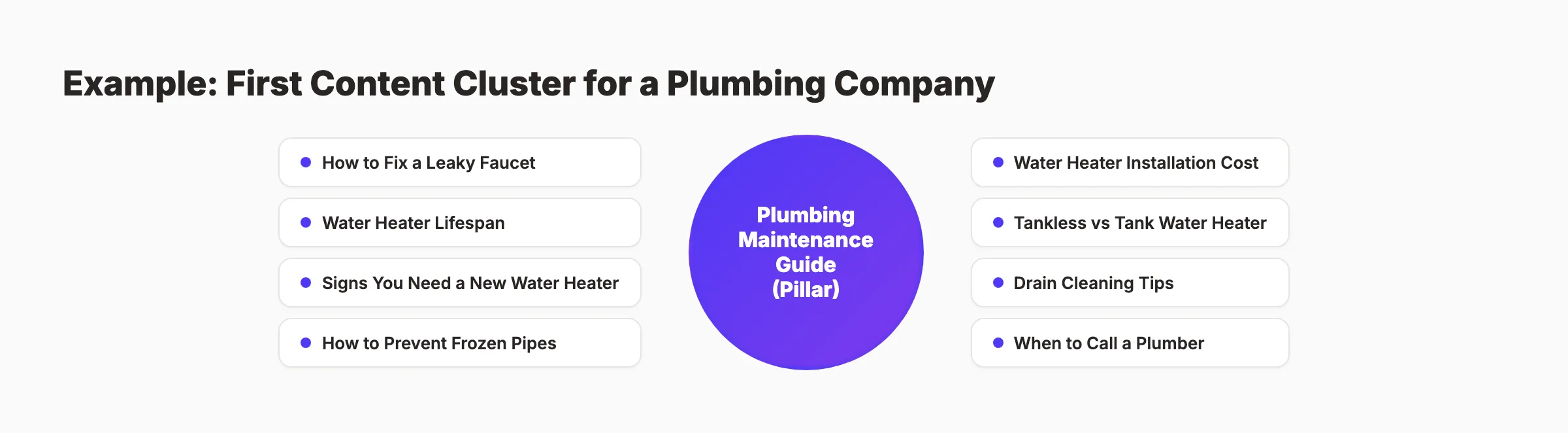
A keyword cluster has 1 pillar topic and 9 supporting posts. The pillar post targets a broad keyword. Supporting posts target specific long-tail questions within that topic.
Example cluster for a plumbing company:
| Post Type | Keyword | Format |
|---|---|---|
| Pillar | "plumbing maintenance guide" | Ultimate guide (3,000+ words) |
| Cluster | "how to fix a leaky faucet" | Step-by-step |
| Cluster | "water heater lifespan" | Informational |
| Cluster | "signs you need a new water heater" | Listicle |
| Cluster | "emergency plumber vs regular plumber" | Comparison |
| Cluster | "how to prevent frozen pipes" | Step-by-step |
| Cluster | "water heater installation cost [city]" | Local + pricing |
| Cluster | "tankless vs tank water heater" | Comparison |
| Cluster | "drain cleaning tips" | Listicle |
| Cluster | "when to call a plumber" | Informational |
Every supporting post links back to the pillar page. The pillar page links to every supporting post. This interlinking creates a topical authority signal that no single post can generate alone.
How to Research Keywords
Use Google Autocomplete, People Also Ask, and a keyword research tool. Filter for keywords with:
- 100 to 5,000 monthly searches
- Keyword difficulty under 30 (for new blogs)
- Clear informational intent
Long-tail keywords (3 or more words) account for 91.8% of all searches and convert at 2.5x the rate of head terms. New blogs should target these exclusively for the first 6 months.
Why this step matters: A planned cluster of 10 interlinked posts builds topical authority 3 to 5 times faster than 10 random, disconnected articles. Google evaluates whether your site covers a topic deeply enough to be considered authoritative. 10 connected posts prove depth. 10 random posts do not.
Step 4: Write Your First Post (Follow SEO Best Practices)
Pick the post from your cluster that has the clearest search intent and write it first. Follow SEO blog writing best practices from the start.
The Blog Post Checklist
Every post must include these elements:
- ✓ Title tag with primary keyword, under 60 characters. Test with a headline analyzer.
- ✓ Meta description between 145 and 155 characters with keyword and benefit. Check with meta tag analyzer.
- ✓ H1 heading matching the title tag closely
- ✓ Primary keyword in the first 100 words
- ✓ H2 and H3 header hierarchy with keyword variations
- ✓ Internal links to at least 2 other pages on your site (even if you only have a homepage and services page)
- ✓ At least 1 image with descriptive alt text
- ✓ A clear call to action at the end
Word Count Guidance
The average first-page Google result contains 1,447 words. But pages in positions 1 through 3 average 2,100 to 2,500 words. For your first posts, aim for 1,500 to 2,500 words. Cover the topic thoroughly. Do not pad for length. Depth beats word count.
Write for Humans, Optimize for Google
Write in short paragraphs. 2 to 3 sentences maximum. Use active voice. Use bullet points for lists. Add visual breaks every 300 words. Read our guide on optimizing content for SEO for the complete optimization process.
Your first post sets the quality bar for everything that follows. Google evaluates your entire site based on its weakest content. Make the first post strong.
Why this step matters: Your first post is your proof of concept. If it follows SEO best practices, it has a chance of ranking within 2 to 4 months. If it does not, it joins the 96.55% of pages that get zero organic traffic. The habits you build with post 1 compound across every post that follows.
Skip the learning curve. Start ranking this week. theStacc plans, writes, and publishes your blog content on autopilot. 30 articles per month for $99.
Step 5: Set Up Google Search Console and Analytics
Set up tracking before publishing your first post. Every day without tracking is a day of lost data.
Google Search Console (GSC)
Go to search.google.com/search-console. Add your domain as a property. Verify ownership via DNS record, HTML tag, or file upload. Submit your XML sitemap at yourdomain.com/sitemap.xml.
GSC shows you:
- Which keywords your site appears for in Google
- Your average ranking position for each keyword
- Click-through rates per query and per page
- Indexing errors that prevent pages from ranking
Google Analytics 4 (GA4)
Create a GA4 property at analytics.google.com. Install the tracking code via Google Tag Manager or paste it directly in your site header. Set up key events: page views, scroll depth, and form submissions.
Link Them Together
Inside GSC, go to Settings and link your GA4 property. This lets you see search performance data alongside on-site behavior data. The combination shows which keywords drive traffic and what those visitors do after clicking.
Set up both tools before your first post goes live. Data starts collecting immediately. By the time your posts start ranking, you will have a baseline to measure growth against.
Why this step matters: Without tracking, you cannot measure what works. GSC data takes 48 to 72 hours to appear after setup. Install it now so data is waiting when you need it. Our SEO audit tool provides a quick health check alongside your GSC data.
Step 6: Create a Publishing Schedule
Consistency matters more than volume. A blog that publishes 2 posts per week for 12 months will outperform a blog that publishes 20 posts in month 1 and then goes silent.
Publishing Frequency Benchmarks
| Frequency | Expected Results | Best For |
|---|---|---|
| 1 post per week | Slow, steady growth. Rankings start at month 4 to 6. | Solo operators with limited time |
| 2 to 3 posts per week | Moderate growth. Rankings start at month 3 to 4. | Small teams or businesses with 1 writer |
| Daily (20 to 30 posts per month) | Fast growth. Rankings start at month 2 to 3. | Businesses using a service like theStacc |
Companies publishing 16 or more posts per month generate 4.5x more leads than those publishing 0 to 4. That data holds across industries.
Build a Pipeline
At any given time, have 3 posts in draft, 2 in editing, and 1 scheduled. This buffer prevents gaps when life gets busy.
Set a specific day and time for publishing. Treat it like a meeting you cannot cancel. The publishing schedule is the commitment that turns a blog from a side project into a traffic asset.
Why this step matters: Google rewards fresh content. A blog that publishes consistently earns crawl priority over one that publishes in bursts. Search engines interpret regular publishing as a signal that the site is active, maintained, and worth ranking. Read our blog SEO guide for the complete strategy.
Pro tip: Batch your writing. Write 4 posts in 1 sitting instead of 1 post per week. Batching cuts total writing time by 30% because you stay in creative flow.
Step 7: Promote Your First Posts
Publishing is half the job. Promotion puts your content in front of readers before Google starts ranking it. New blogs have zero domain authority. Promotion generates the initial traffic and engagement signals that tell Google your content deserves attention.
4 Promotion Channels That Work for New Blogs
1. Email. If you have even a list of 50 subscribers, send every new post to them. Email traffic delivers 2x higher engagement than social media traffic.
2. LinkedIn. Repurpose your post into 3 to 5 short-form social posts. Pull out a stat, a surprising claim, or a checklist. Post natively on LinkedIn. Link to the full post in the comments, not the main body.
3. Communities. Share in relevant Reddit threads, Facebook groups, Slack communities, or industry forums. Add genuine value to the discussion. Do not just drop a link. Answer a question and reference your post as supporting detail.
4. Internal links from existing pages. Your homepage, service pages, and about page should all link to your newest blog posts. These links pass authority from your strongest pages to your new content.
After each post, go back to 2 to 3 older posts and add links pointing to the new one. This backward linking habit is what most bloggers skip. It is also what accelerates indexing and ranking for fresh content. Read our guide on internal linking for blog posts for the full strategy.
Why this step matters: New pages with zero backlinks and zero traffic can take weeks for Google to discover. Promotion generates the first signals that accelerate discovery. Early traffic builds engagement metrics that influence how quickly Google ranks the page.
Step 8: Measure Results at 30, 60, and 90 Days
Do not evaluate your blog SEO results before 90 days of consistent publishing. Rankings fluctuate heavily in the first 3 months. Patience is the hardest part. But the data at each milestone tells you whether the system is working.
30-Day Milestone
What to check:
- Are your pages indexed? Check the Pages report in Google Search Console.
- Do you see any impressions for your target keywords?
- Is your analytics tracking firing correctly?
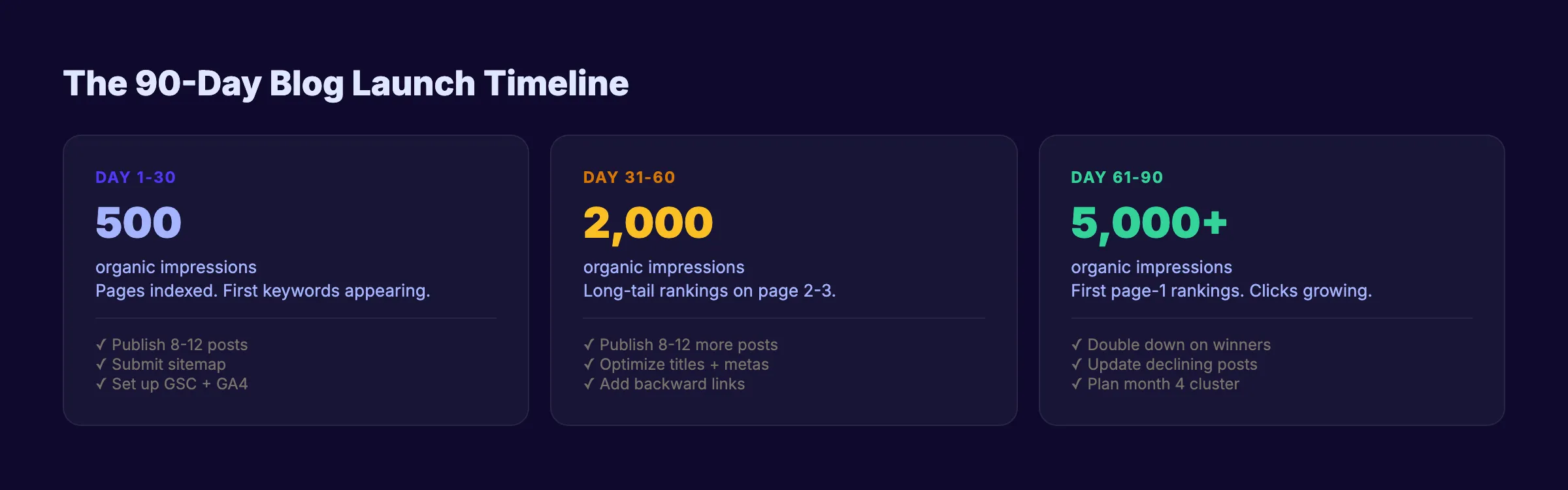
What to expect: 100 to 500 organic impressions. Few or no clicks. This is normal. Google is discovering and evaluating your content.
60-Day Milestone
What to check:
- Which keywords are gaining impressions? Filter GSC for queries in positions 10 to 30.
- Which posts have the highest engagement time in GA4?
- Are there indexing errors you need to fix?
What to expect: 500 to 2,000 organic impressions. First clicks from long-tail keywords. Some posts reaching page 2 or 3.
90-Day Milestone
What to check:
- Which posts rank on page 1 for any keyword? These are your winners. Write more posts in those topic clusters.
- What is your overall CTR? If impressions are high but CTR is below 2%, rewrite your title tags and meta descriptions.
- Has any post generated a lead or conversion?
What to expect: 2,000 to 10,000 organic impressions. 50 to 200 organic clicks per month. First page-1 rankings for low-competition keywords. These numbers vary by niche and competition.
The 90-Day Decision
Based on product docs, public reviews, and hands-on product exploration. Double down on the topics that drive impressions. Update posts that rank in positions 5 to 15. Cut topics with zero impressions and no potential.
The compounding effect starts at month 4. Month 1 through 3 is the investment phase. Month 4 through 6 is where growth accelerates. Month 6 through 12 is where new blogs start consistently ranking on page 1 for their target keywords.
Why this step matters: Month 1 gives you a baseline. Month 2 shows you trends. Month 3 gives you enough data to optimize intelligently. Blogs that measure and adjust at 90 days outperform blogs that publish blindly for 12 months. The data tells you what to write next.
Results: What to Expect After 12 Months
After following this 8-step system for 12 months:
- 50 to 100 indexed pages working as organic traffic assets
- 10,000 to 50,000 monthly organic impressions (varies by niche)
- 500 to 5,000 monthly organic clicks depending on keyword competition
- First page rankings for 10 to 30 target keywords
- Consistent lead generation from blog CTAs and internal links
These are not guaranteed numbers. They are benchmarks based on blogs that follow this system with consistent publishing at 8 or more posts per month. Lower frequency produces slower results. Higher frequency accelerates them.
The compounding effect means your blog generates more traffic per post over time. Post 50 will rank faster and generate more traffic than post 5 because it sits on a stronger foundation of topical authority, internal links, and domain trust.
Troubleshooting
Problem: Your posts are not getting indexed after 2 weeks.
Check Google Search Console for indexing errors. Common causes: robots.txt blocking the blog directory, noindex tags added by your theme or SEO plugin, or missing XML sitemap. Submit each URL manually via the URL Inspection tool to accelerate crawling.
Problem: Impressions are growing but clicks are near zero.
Your pages appear in search results but nobody clicks. The issue is almost always the title tag or meta description. Rewrite them with a specific benefit, a number, and a freshness signal. Read our guide on writing headlines that get clicks.
Problem: You ran out of topic ideas after month 2.
Your initial keyword research was too narrow. Go back to Google Autocomplete, People Also Ask, and your keyword research process. Check what competitors publish. Expand into adjacent subtopics within your cluster.
3,500+ blogs published. Every article is SEO-scored before publish. See what theStacc can do for your site. Every article follows the system in this guide.
What practitioners are saying on X
AI search advice ages quickly. Here is high-signal public discussion from SEO and growth operators — context for your roadmap, not a substitute for primary data.
- @varunram (Jul 2026): Critique of GEO slopfarm products that combine SEO clickbait with unresearched content marketing — quality and research still separate winners from farms. See the post on X.
- @jakezward (Feb 2026): 2026 SEO predictions emphasize AI Overview share-of-SERP, schema for LLM token efficiency, brand mentions in AI answers as a KPI, proprietary data as a moat, and content refresh beating net-new AI slop. See the post on X.
- @HlynurStefDev (Jul 2026): Public case: niche site traffic jumped from ~18 to 4,162 Google visits/month after focused technical/on-page SEO work (GSC screenshots claimed) — reminds that fundamentals still move numbers. See the post on X.
Grok, AI Overviews, and multi-engine visibility
Content topics like “start blog organic traffic” get AI citations when process steps, quality bars, and examples are concrete. Operator consensus on X is clear: research-backed pages beat unedited bulk generation — reflect that honestly.
- Google AI Overviews: Use passage-ready answers, tables, and FAQ schema where relevant.
- ChatGPT / Perplexity: Cite named sources next to key claims.
- Grok: Maintain accurate entity facts on-site and in high-signal X posts.
Publish content built for Google and AI citations. theStacc’s Content SEO module ships SEO-scored articles structured for rankings and generative engines — including clearer entity pages models like Grok can quote.
FAQ
Most blogs see initial traffic between 20 and 30 published posts. The 25-article cluster threshold is where topical authority signals become meaningful. Blogs publishing 8 or more posts per month reach this threshold in about 3 months. Blogs publishing 4 per month take 6 months or more.
Not necessarily. Many successful blogs start with the business owner writing the first 10 to 20 posts. The founder has domain expertise that freelance writers lack. However, maintaining 8 or more posts per month while running a business is difficult long-term. Most businesses either hire writers or use a publishing service like theStacc to sustain volume.
Every business answers questions that customers search for. A plumber answers "how to fix a leaky faucet." An accountant answers "how to choose a business structure." A dentist answers "how much do dental implants cost." These are real searches with real volume. Blog SEO works for every industry because every industry has customers searching for answers.
No. 61% of small businesses are not investing in SEO. That means for most local and niche markets, the competition is thin. A blog that publishes consistently for 12 months will outrank most competitors who are doing nothing. The sites that started 5 years ago have an advantage. But they are not unbeatable. A focused blog with a proper keyword strategy can rank within 3 to 6 months for low-competition terms.
Platform costs range from $5 to $50 per month for hosting. A domain name costs $10 to $15 per year. SEO tools are optional but helpful (free options cover the basics). The real cost is time: 3 to 5 hours per post for research, writing, and optimization. At $99 per month, theStacc handles the content production so you focus on running your business.
Write as long as the topic demands. The average page-1 result is 1,447 words. Positions 1 through 3 average 2,100 to 2,500 words. A 500-word overview will not outrank a 2,000-word guide for a competitive keyword. But a thorough 1,500-word post beats a padded 3,000-word post every time. Match the depth of the top-ranking content for your specific keyword.
Starting a blog is the easy part. Building a blog that generates organic traffic requires a system: keyword-driven topics, SEO-optimized posts, consistent publishing, and measurement at every milestone. The 8 steps in this guide give you that system.
The businesses ranking on page 1 in 2026 are not the ones with the best writers. They are the ones who started with a plan, published consistently, and let the compounding effect do its work. The best time to start was 6 months ago. The second best time is today.
Your blog, published on autopilot. theStacc plans, writes, and publishes 30 SEO blog posts per month for your business. No writers to manage. No deadlines to miss.
Sources & references
- [1] Princeton / Georgia Tech et al. — GEO research (arXiv:2311.09735)
- [2] @varunram on X — Critique of GEO slopfarm products that combine SEO clickbait with unresearched content marketing — quality and research
- [3] @jakezward on X — 2026 SEO predictions emphasize AI Overview share-of-SERP, schema for LLM token efficiency, brand mentions in AI answers
- [4] @HlynurStefDev on X — Public case: niche site traffic jumped from ~18 to 4,162 Google visits/month after focused technical/on-page SEO work (G
- [5] Referenced source — optinmonster.com

Plan topics, review article drafts, and publish to a connected CMS.
Weekly local SEO teardowns
One practical email a week. Map Pack, GBP, AI Overviews — no fluff. Unsubscribe anytime.