Internal linking for blog posts, done properly: which pages to link from, what anchor text to use, how many links per post, and how to find orphans.
Most blog posts sit alone. They get published, indexed, and forgotten. No other page on the site points to them. No reader discovers them through related content. Google struggles to understand where they fit.
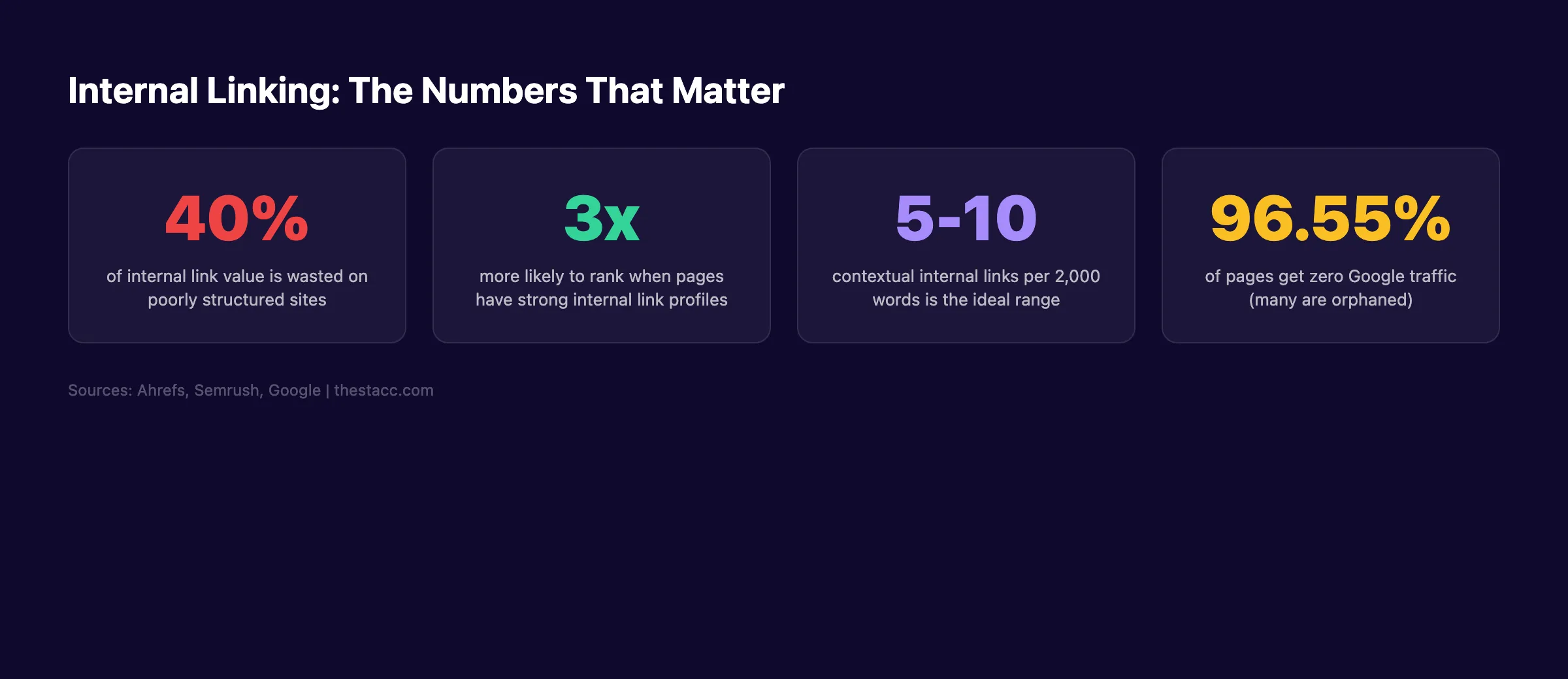
That isolation kills rankings. 96.55% of all pages get zero traffic from Google. A major reason is poor internal linking for blog posts. Pages without internal links are invisible to both search engines and readers.
The fix is not more content. It is better connections between the content you already have. Internal linking distributes authority, establishes topic relevance, and keeps visitors moving through your site. One well-linked post can lift the rankings of 10 surrounding pages.
We publish 3,500+ blog posts across 70+ industries. Internal linking is part of every single article we produce. Our average on-page SEO score is 92%, and a structured internal linking strategy is one of the primary reasons.
Here is what you will learn:
- What internal links are and which types carry the most SEO weight
- How internal links directly affect your Google rankings
- How to use the topic cluster model to organize your linking strategy
- A 7-step process for building internal links across your blog
- Anchor text rules that maximize relevance signals
- How to audit and fix your existing internal link structure
- The 6 most common internal linking mistakes and how to avoid them
Table of Contents
- Chapter 1: What Are Internal Links?
- Chapter 2: How Internal Links Affect SEO Rankings
- Chapter 3: The Topic Cluster Model for Internal Linking
- Chapter 4: How to Build an Internal Linking Strategy
- Chapter 5: Anchor Text Best Practices for Internal Links
- Chapter 6: How to Audit Your Internal Links
- Chapter 7: Common Internal Linking Mistakes to Avoid
- Chapter 8: Internal Linking Tools and Automation
- FAQ
Chapter 1: What Are Internal Links?
Internal links are hyperlinks that connect one page on your website to another page on the same website. Every time you link from a blog post to another blog post, a service page, or a resource on your own domain, that is an internal link.
External links point to a different domain. Internal links stay within yours. The distinction matters because Google treats them differently. Internal links are signals you control entirely.
Types of Internal Links
Not all internal links carry equal weight. Three main types exist.
Contextual links sit inside your body content. They appear naturally within paragraphs. Google assigns contextual links the highest SEO value because the surrounding text provides topical relevance signals.
Navigational links live in your header menu, sidebar, and breadcrumbs. They help users find major sections of your site. Every page typically shares these links. That means their per-page authority is diluted.
Footer links appear at the bottom of every page. They carry the least SEO weight. Useful for legal pages and secondary navigation, but not for ranking your blog content.
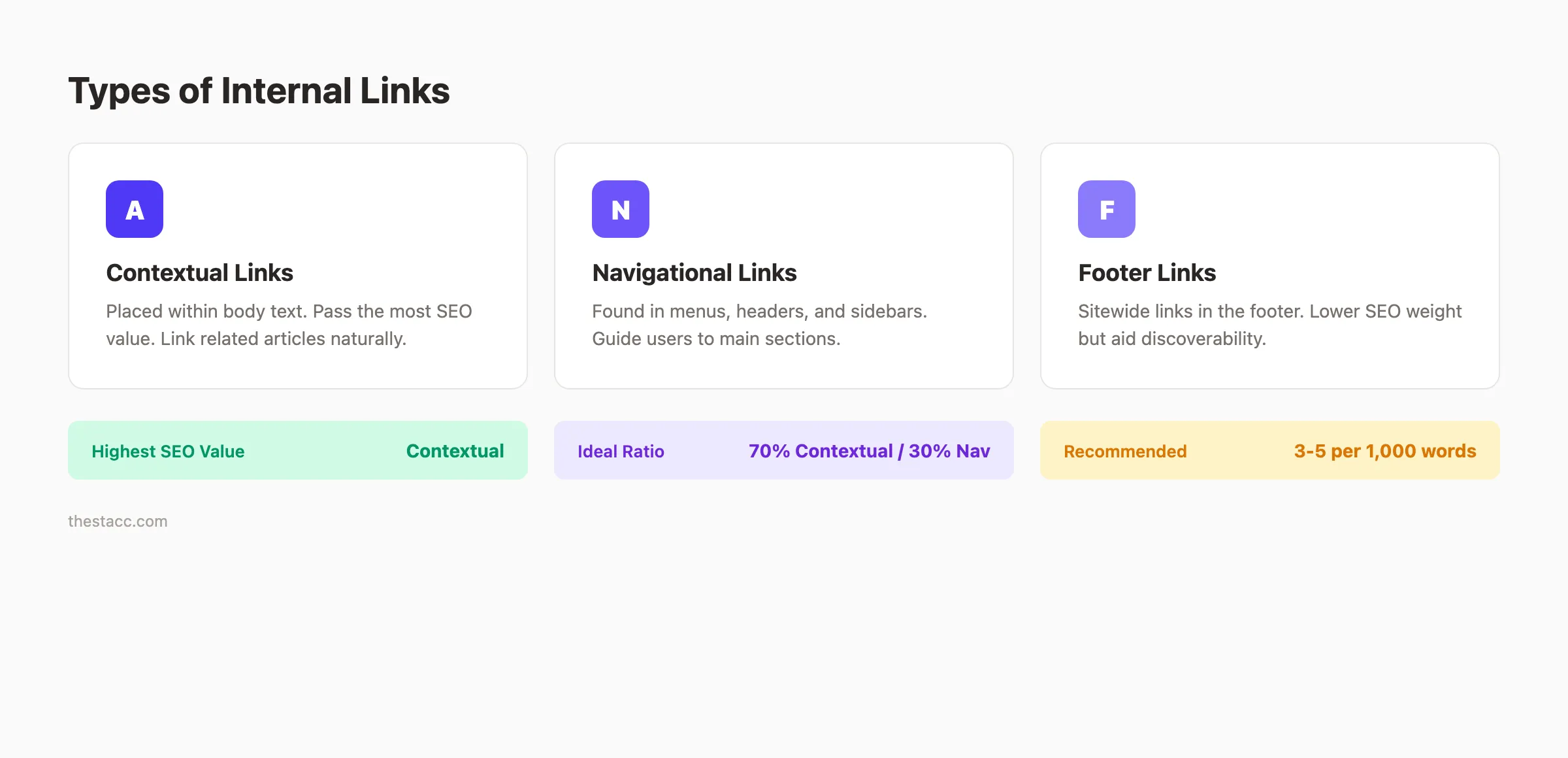
Contextual Links Carry the Most Weight
Google confirmed that links within body content pass more value than navigational links. The surrounding text gives Google context about the relationship between pages. A link from a paragraph about keyword research tells Google the target page is relevant to that topic.
This is why adding links to your main navigation is not enough. Your blog posts need contextual links embedded in the actual content.
How Many Internal Links Should a Blog Post Have?
A practical target is 3 to 5 internal links per 1,000 words. For a 2,000-word article, 6 to 10 contextual internal links is reasonable. Semrush recommends 5 to 10 internal links for articles of that length.
Do not stuff links. Every internal link should feel natural to a reader. If you have to force a link, the connection between pages is probably too weak.
| Content Length | Recommended Internal Links | Link Type Focus |
|---|---|---|
| Under 1,000 words | 3-5 links | Contextual only |
| 1,000-2,000 words | 5-10 links | 80% contextual, 20% navigational |
| 2,000-4,000 words | 10-15 links | 70% contextual, 30% mixed |
| Over 4,000 words | 15-20 links | Distribute evenly across sections |
Chapter 2: How Internal Links Affect SEO Rankings
Internal linking is not a nice-to-have. It is a direct ranking factor. Google uses internal links to discover pages, understand site structure, and distribute authority. Skip internal linking and your content loses on all 3 fronts.
Crawling and Indexing
Google discovers new pages by following links. If a new blog post has zero internal links pointing to it, Google may never find it. Or it finds it weeks later through your sitemap. Either way, your page sits in limbo.
About 40% of internal link value is wasted on poorly structured websites with orphaned pages. An orphaned page has no internal links pointing to it. Google sees it as disconnected from your site.
When you publish a new article, add internal links from existing high-traffic pages within 24 hours. This tells Google the new page exists and matters.
PageRank Distribution
Google uses an internal system to assign authority to pages. Pages with more backlinks have more authority. Internal links pass a portion of that authority to the pages they link to.
Your homepage typically has the most authority. Pages linked directly from the homepage receive more authority than pages buried 5 clicks deep. The general rule: keep every important page within 3 clicks of the homepage.
Strong on-page SEO combined with strategic internal linking creates a compounding effect. Authority flows from your strongest pages to your newer ones.
Topical Relevance Signals
Google uses internal links to understand what your site is about. When 10 blog posts about SEO all link to your main blog SEO guide, Google interprets that page as your authority hub for that topic.
This is how topical authority works. Sites that demonstrate deep coverage of a topic through interlinked content rank higher than sites with scattered, unconnected pages. Google rewards depth and organization.
Internal linking also supports E-E-A-T signals. A well-structured site with logical internal links demonstrates expertise and trustworthiness.
Chapter 3: The Topic Cluster Model for Internal Linking
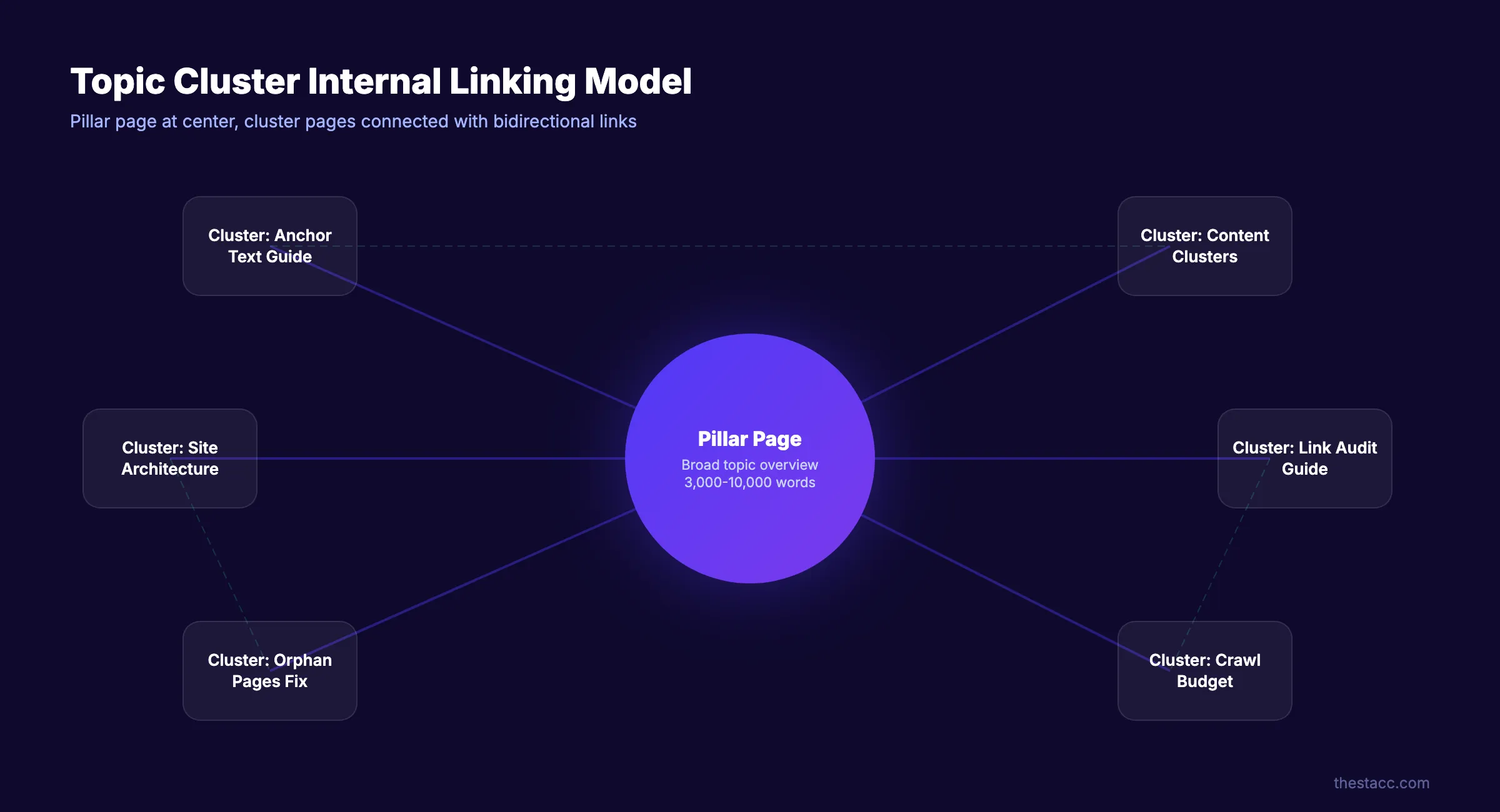
The topic cluster model is the most effective framework for internal linking in 2026. It organizes your blog content into groups of related posts, each connected through strategic internal links.
Pillar Pages and Cluster Content
A pillar page covers a broad topic in depth. It targets a high-volume keyword. Cluster pages cover specific subtopics. They target long-tail keywords.
Every cluster page links back to the pillar page. The pillar page links out to every cluster page. Cluster pages also link to each other when relevant.
For example, a content marketing strategy pillar page might link to cluster posts about content calendars, content audits, and content gaps. Each of those cluster pages links back to the pillar.
Why Clusters Beat Random Linking
Random internal linking sends confused signals. Linking a blog post about recipes to a blog post about car insurance provides no topical relevance. Google cannot determine what your site specializes in.
Clusters solve this. They create clear topical boundaries. Google can identify that your site covers "blog SEO" as a topic because 15 interlinked posts all address subtopics of blog SEO.
Sites using the topic cluster model consistently outrank sites with flat, unorganized structures. The reason is simple. Google can map the semantic relationships between your pages. That mapping builds topical authority.
How to Design Your First Cluster
Start with your highest-priority topic. For most blogs, this is the topic closest to your core product or service.
- Pick 1 broad topic as your pillar
- List 8 to 12 subtopics you can write separate posts about
- Write the pillar page first (aim for 3,000+ words)
- Write cluster pages targeting specific long-tail keywords
- Link every cluster page to the pillar and to 2 to 3 sibling cluster pages
A blog about SEO might build a content cluster around "blog SEO" with subtopics like internal linking, meta descriptions, blog structure, and keyword research. That is exactly the model we use.
The question of how many blog posts you need to rank depends partly on how well those posts link to each other. Ten tightly linked posts outperform 30 disconnected ones.
Your blog content, published and interlinked automatically. theStacc writes 30 SEO articles per month with strategic internal links built in.
Chapter 4: How to Build an Internal Linking Strategy
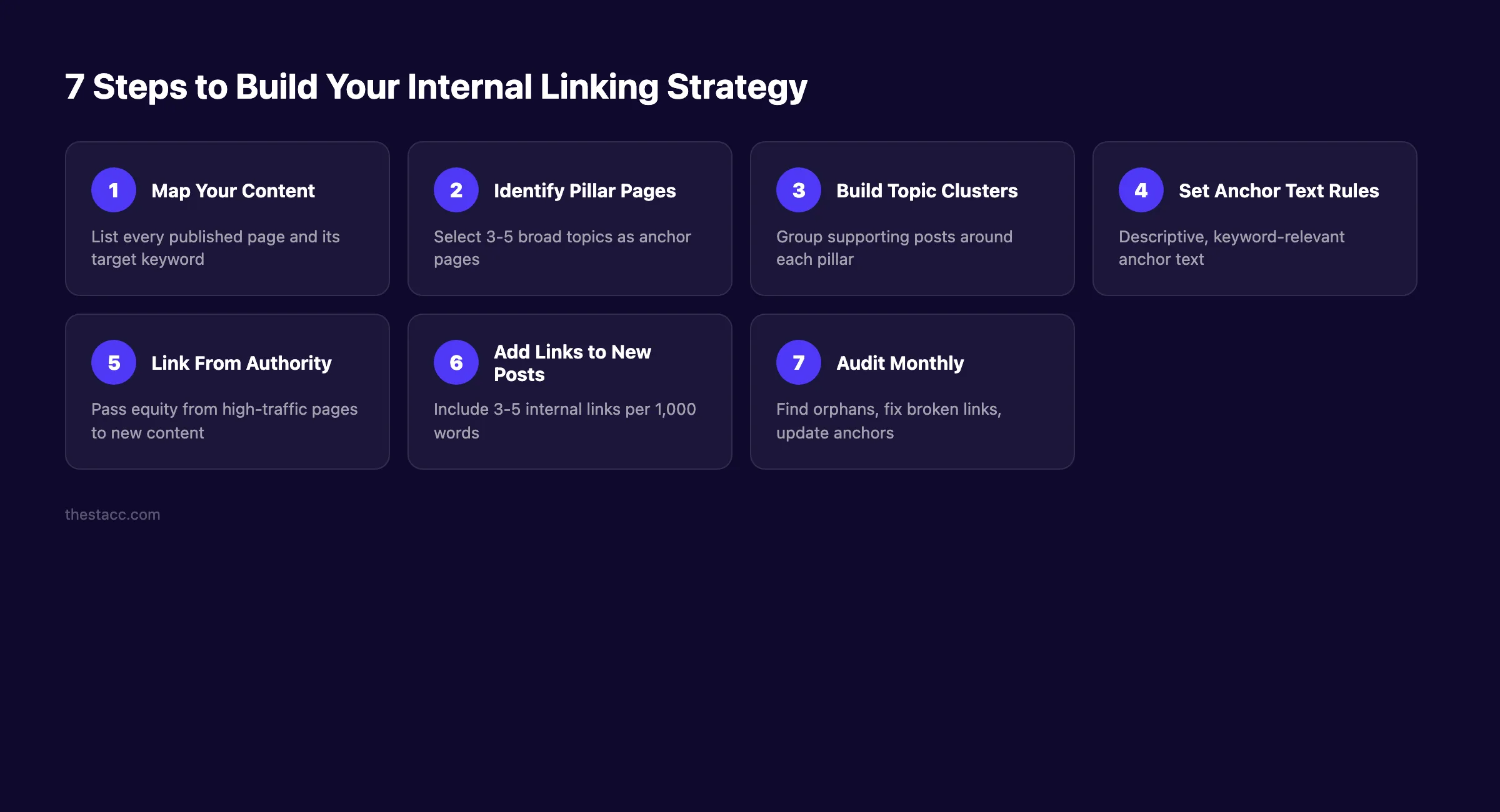
A strategy prevents your internal links from becoming random. Follow these 7 steps to build a system that scales with your content.
Step 1: Map Every Published Page
Open a spreadsheet. List every blog post, service page, and resource page on your site. Include the URL, target keyword, and current word count.
This becomes your content inventory. You cannot build links between pages if you do not know what pages exist.
Sort by organic traffic. Your highest-traffic pages have the most authority to pass. Those are your priority linking sources.
Step 2: Identify Pillar Pages
From your content inventory, select 3 to 5 pages that cover your broadest topics. These are your pillars. Every other page should eventually connect to one of these pillars.
If you write about SEO, your pillars might be:
- A complete blog SEO guide
- An on-page SEO guide
- A guide on how to rank higher on Google
Pillar pages should be your longest, most thorough content. They target your highest-volume keywords.
Step 3: Group Content Into Clusters
Assign every remaining page to one pillar. Some pages fit multiple clusters. Choose the strongest match.
A page about writing SEO blog posts fits under a "blog SEO" pillar. A page about blog post outlines fits there too. Group them together.
Pages that do not fit any cluster signal a content gap. Either create a pillar for that topic or reconsider whether those orphan pages serve your strategy.
Step 4: Create Linking Rules
Set clear rules so every writer on your team follows the same approach:
- ✓ Every new blog post must include 3 to 5 internal links
- ✓ Every new post must link to its parent pillar page
- ✓ Every new post must link to at least 2 sibling cluster pages
- ✓ Add links from 2 to 3 existing posts back to the new post within 24 hours
- ✓ Use descriptive anchor text that includes the target keyword of the linked page
These rules prevent orphaned content. They also ensure your cluster structure stays intact as you publish more.
Step 5: Link From High-Authority Pages
Your highest-traffic pages pass the most authority. Find your top 10 pages by organic traffic. Add internal links from those pages to your newest or most important content.
This is the fastest way to help new content rank. A link from a page that gets 5,000 monthly visits sends a stronger signal than a link from a page with 50 visits.
Updating old blog posts is one of the easiest ways to add these high-authority links. Review your top pages quarterly and insert links to recent content.
| Action | Frequency | Priority |
|---|---|---|
| Add internal links to new posts | Every post | Required |
| Update old posts with links to new content | Within 24 hours of publishing | High |
| Review pillar-to-cluster links | Monthly | Medium |
| Full internal link audit | Quarterly | Medium |
| Check for orphaned pages | Monthly | High |
Chapter 5: Anchor Text Best Practices for Internal Links
Anchor text is the clickable text of a hyperlink. For internal links, anchor text tells Google what the target page is about. Get it right and you reinforce relevance signals. Get it wrong and you send confusing signals.
Use Descriptive, Keyword-Rich Anchors
The anchor text should describe the target page. If you link to a page about blog post structure, use anchor text like "blog post structure for SEO" or "structuring your blog posts." Do not use "click here" or "read more."
Google uses anchor text to understand the content of the linked page. Descriptive anchors reinforce the target page's keyword targeting. Generic anchors waste that signal.
For SEO content writing, the same principle applies. Your anchor text should match the topic of the destination page naturally.
Vary Your Anchor Text
Do not use the exact same anchor text every time you link to a page. If 15 posts all link to your SEO guide with the anchor "SEO guide," that looks unnatural.
Mix it up. Use variations:
- "complete SEO guide"
- "our guide to search engine optimization"
- "SEO best practices guide"
- "learn SEO fundamentals"
Variation signals naturalness to Google. It also helps the target page rank for multiple keyword variations, not just one exact phrase.
Match Anchor Text to Search Intent
The anchor text should align with the search intent of the target page. If the target page answers "how to" questions, use action-oriented anchors. If the target page defines a concept, use informational anchors.
| Target Page Type | Good Anchor Text | Bad Anchor Text |
|---|---|---|
| How-to guide | "learn how to optimize content" | "click here" |
| Definition page | "what topical authority means" | "this page" |
| Tool comparison | "best SEO tools compared" | "see our list" |
| Case study | "how we increased traffic 300%" | "read more" |
Matching intent to anchor text creates a consistent experience. Readers click expecting specific content. The target page delivers exactly that. Google notices this consistency.
When you optimize content for SEO, anchor text is one of the elements that most people overlook. It takes 5 extra seconds per link to write a descriptive anchor. That small effort compounds across hundreds of posts.
Stop building links manually. theStacc publishes 30 interlinked blog posts per month. Every article includes strategic internal links from day one.
Chapter 6: How to Audit Your Internal Links
Even a good linking strategy degrades over time. Pages get deleted. URLs change. New content gets published without links. A quarterly audit catches these problems before they hurt rankings.
Find Orphaned Pages
An orphaned page has zero internal links pointing to it. Google may still index it through your sitemap, but it receives no authority from other pages.
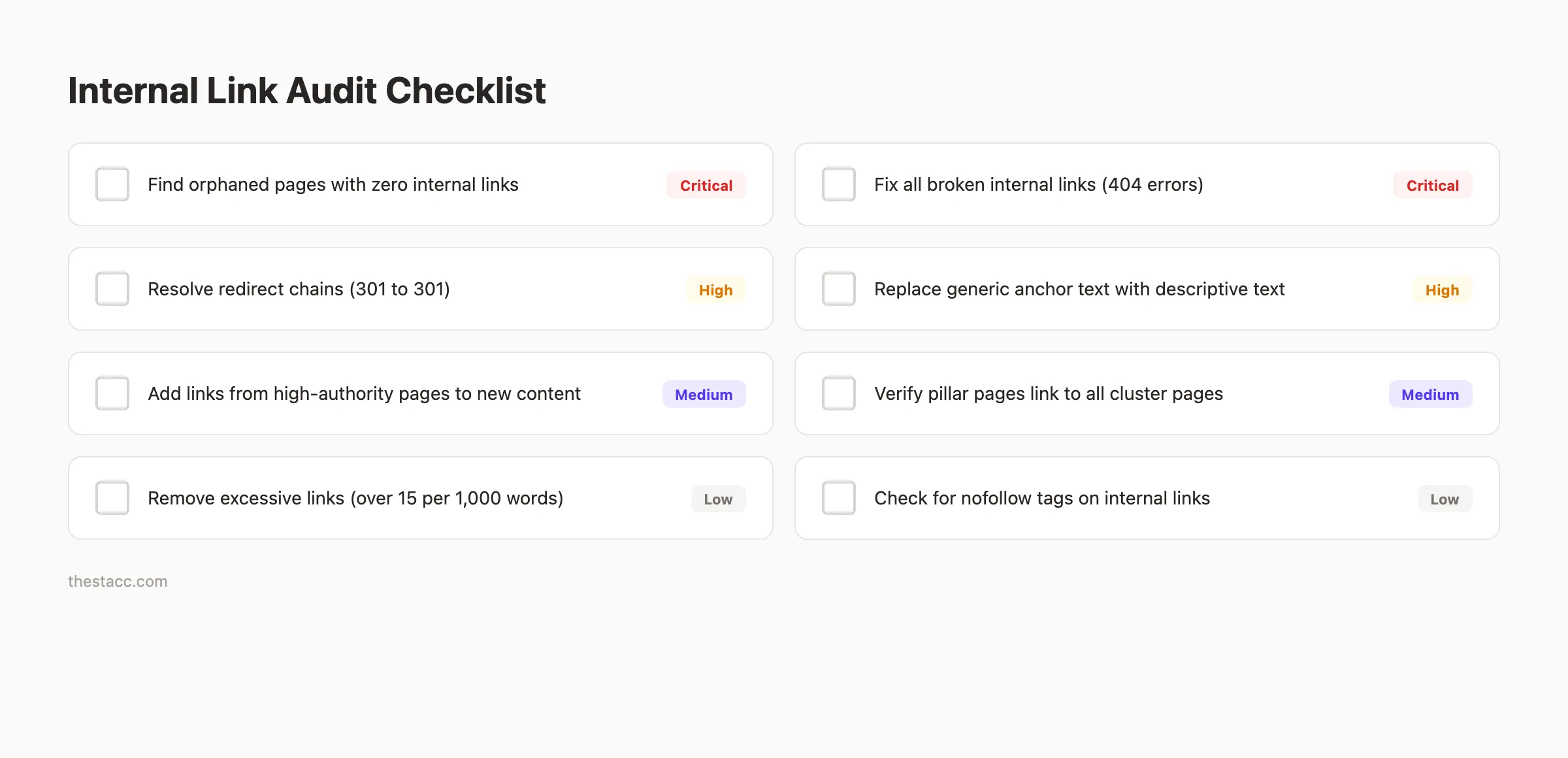
Run a crawl of your site using Screaming Frog, Ahrefs, or Semrush. Filter for pages with zero inlinks. These are your orphans.
For each orphan, decide: link to it from relevant existing pages or remove it entirely. Every page on your site should receive at least one contextual internal link. A full content audit will surface these gaps.
Fix Broken Internal Links
Broken links return 404 errors. They waste crawl budget and create dead ends for readers. A site with many broken internal links signals poor maintenance to Google.
Use your crawl tool to find all internal links returning 4xx or 5xx status codes. Then fix broken links by updating the URL, redirecting the old URL, or removing the link.
Check for redirect chains too. A link that goes through 2 or 3 redirects before reaching the final page loses authority at each hop. Update those links to point directly to the final URL.
Review Link Distribution
Some pages accumulate too many internal links. Others get too few. Balance matters.
Export your internal link data and sort by number of inlinks. Pages with 50+ internal links probably do not need more. Pages with 1 to 2 internal links need attention.
Your pillar pages should have the most internal links. Cluster pages should have 5 to 15 each. If a cluster page has zero inlinks, your cluster structure has a hole.
Combine this with a broader SEO audit to catch technical issues that affect how Google processes your links.
Chapter 7: Common Internal Linking Mistakes to Avoid
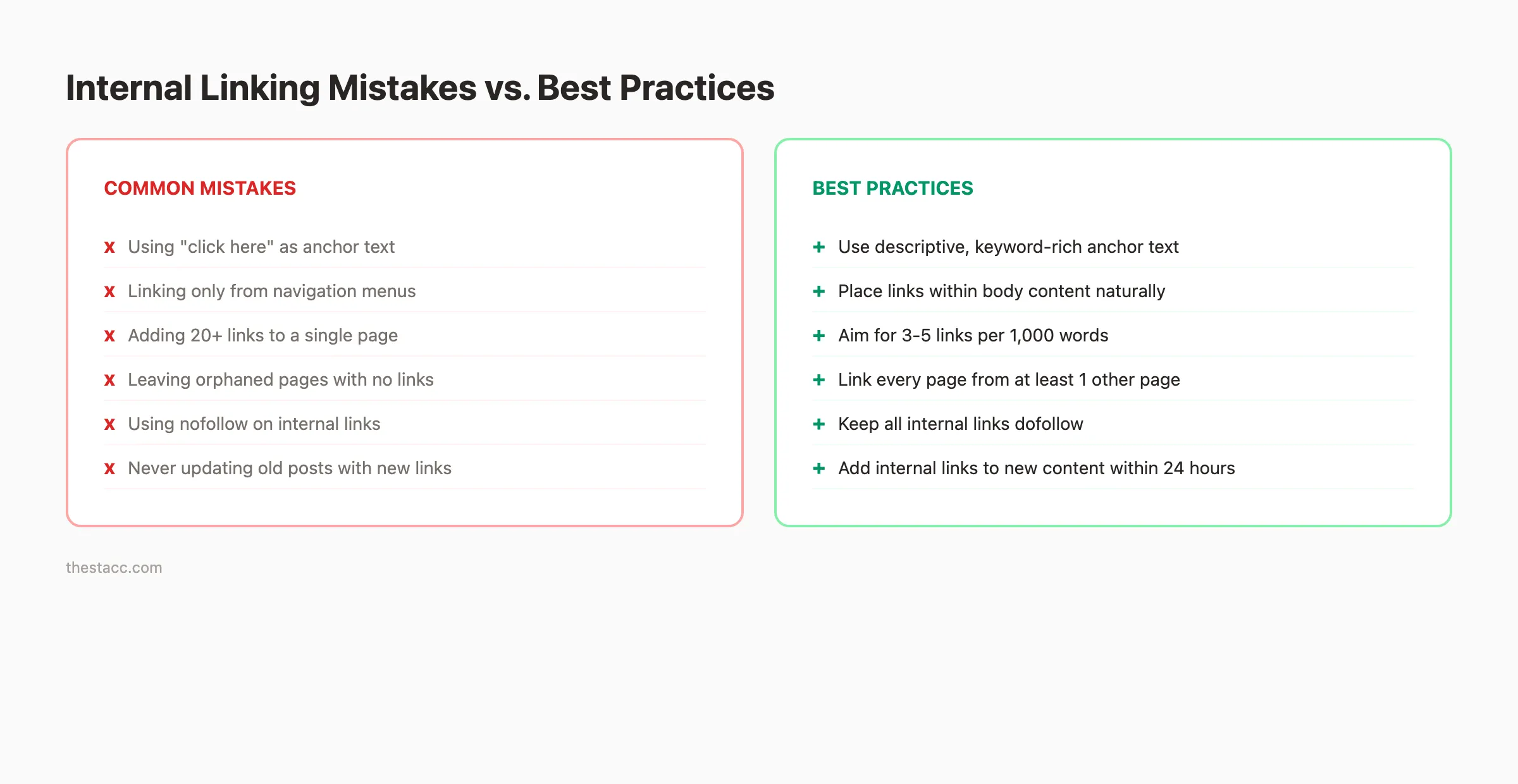
These 6 mistakes appear on nearly every blog we audit. Each one limits the SEO value of your internal links.
Mistake 1: Using Generic Anchor Text
"Click here," "read more," and "this article" tell Google nothing about the target page. Every generic anchor is a wasted relevance signal.
Replace every generic anchor with descriptive text. Instead of "click here to learn about headlines," write "our guide to writing blog headlines that drive clicks."
Mistake 2: Only Linking From Navigation
Navigation links appear on every page. That means Google sees them everywhere. The per-page signal is diluted.
Contextual links inside body content carry more weight. A blog post with 5 relevant contextual links passes more value than a sidebar with 50 sitewide links. Prioritize body-content links.
Mistake 3: Linking Only to New Content
Many bloggers add internal links only when publishing new posts. They never go back to add links from old posts to new ones.
This creates one-directional linking. New posts link to old posts, but old posts never link forward. Set a rule: every time you publish, update 2 to 3 existing posts with links to the new content.
Mistake 4: Leaving Orphaned Pages
About 40% of link value is wasted on sites with orphaned pages. An orphaned page cannot receive authority from the rest of your site.
Monthly checks prevent this. Run a crawl, filter for pages with zero inlinks, and find content gaps that need filling.
Mistake 5: Over-Linking a Single Page
Cramming 30 internal links into a 1,000-word post dilutes the value of each link. It also creates a poor reading experience.
Stick to the 3 to 5 links per 1,000 words rule. Every link should feel relevant and natural. If you remove a link and the paragraph reads the same, that link was unnecessary.
Mistake 6: Ignoring Link Depth
Important pages buried 5 or 6 clicks from the homepage receive less crawl attention. Google prioritizes pages that are easy to reach.
Keep your most valuable content within 3 clicks of the homepage. Use your pillar pages as hubs that connect deep content back to the surface of your site. This helps you increase organic traffic across your entire blog.
Chapter 8: Internal Linking Tools and Automation
Manual internal linking works at small scale. Once your blog has 50+ posts, you need tools to keep your link structure clean and consistent.
Free Tools for Internal Link Audits
Google Search Console shows which pages Google has crawled and indexed. It also flags crawl errors. Use it as your first-line audit tool. Google's own link documentation explains how Googlebot processes links.
Screaming Frog (free up to 500 URLs) crawls your site and maps every internal link. It identifies orphaned pages, broken links, and redirect chains. Export the data to a spreadsheet for deeper analysis.
Paid Tools Worth Considering
Ahrefs Site Audit provides a full internal link profile. It shows link distribution, anchor text patterns, and orphaned pages. The visual site structure map makes it easy to spot clustering gaps.
Semrush Site Audit includes a dedicated internal linking report. It scores your internal link health and flags issues by priority. Run it monthly to catch problems early.
Both tools cost between $99 and $199 per month. They pay for themselves if your blog has over 100 pages.
| Tool | Best For | Cost | Link Audit Feature |
|---|---|---|---|
| Google Search Console | Basic crawl monitoring | Free | Limited |
| Screaming Frog | Full site crawls under 500 pages | Free / $259/yr | Full link mapping |
| Ahrefs | Authority analysis + link profiles | $99-199/mo | Detailed |
| Semrush | Internal link scoring + suggestions | $129-249/mo | Dedicated report |
Automating Internal Links at Scale
Manually adding internal links to every post works when you publish 4 articles per month. It breaks down at 20 or 30 articles per month.
Automation handles the volume. theStacc builds internal links into every article during the writing process. Each post gets linked to its parent cluster, sibling posts, and relevant pillar pages before it publishes. No manual work required.
The Content Compound Effect means every new article strengthens the internal link structure of your entire blog. Article 30 links back to articles 1 through 29 where relevant. Article 29 gets updated to link forward to article 30. The network grows denser with every publish.
30 articles per month. Internal links built in. theStacc handles your blog SEO on autopilot. Every post connects to your existing content automatically.
What practitioners are saying on X
Content operations advice ages quickly. Here is high-signal operator discussion on X about quality, refresh, and systems.
- @jakezward (Feb 2026): 2026 SEO predictions emphasize AI Overview share-of-SERP, schema for LLM token efficiency, brand mentions in AI answers as a KPI, proprietary data as a moat, and content refresh beating net-new AI slop. See the post on X.
- @varunram (Jul 2026): Critique of GEO slopfarm products that combine SEO clickbait with unresearched content marketing — quality and research still separate winners from farms. See the post on X.
- @HlynurStefDev (Jul 2026): Public case: niche site traffic jumped from ~18 to 4,162 Google visits/month after focused technical/on-page SEO work (GSC screenshots claimed) — reminds that fundamentals still move numbers. See the post on X.
Grok, AI Overviews, and multi-engine visibility
Technical topics like “internal linking blog posts” win AI citations when steps, code samples, and failure modes are explicit. Grok and other engines prefer ordered fix lists over vague “best practices” marketing language.
- Google AI Overviews: Use passage-ready answers, tables, and FAQ schema where relevant.
- ChatGPT / Perplexity: Cite named sources next to key claims.
- Grok: Maintain accurate entity facts on-site and in high-signal X posts.
Publish content built for Google and AI citations. theStacc’s Content SEO module ships SEO-scored articles structured for rankings and generative engines — including clearer entity pages models like Grok can quote.
FAQ
Aim for 3 to 5 internal links per 1,000 words. A 2,000-word article should have 6 to 10 contextual internal links. Focus on relevance over quantity. Every link should connect the reader to genuinely related content.
Yes. Internal links are a confirmed ranking factor. They help Google discover and index pages, distribute page authority across your site, and establish topical relevance. Sites with strong internal linking structures consistently outrank sites with weak or missing internal links.
Internal links connect pages on the same domain. External links point to a different domain. Both matter for SEO. Internal links distribute your own site's authority. External links to authoritative sources add credibility. A balanced approach uses both.
Use descriptive anchor text that includes your target keyword, but vary it across different links. Do not use the exact same anchor text from every page. Natural variation signals authenticity to Google. Mix exact-match with partial-match and natural-language anchors.
An orphaned page has zero internal links pointing to it from other pages on your site. Google may still find it through your XML sitemap, but it receives no internal authority. Orphaned pages rarely rank well. Run a monthly crawl to identify and fix orphaned pages.
Run a full internal link audit quarterly. Do lighter monthly checks to catch orphaned pages and broken links. Any time you delete a page or change a URL, check for internal links that now point to a 404 page. Tools like Screaming Frog and Ahrefs make these audits fast.
Internal linking separates blogs that rank from blogs that sit idle. Every link you add strengthens the connections across your site. Start with one topic cluster, set your linking rules, and audit quarterly. The compounding effect does the rest.
Your SEO team. $99/month. theStacc publishes interlinked blog content on autopilot. Zero writing. Zero link building. Just rankings.
Sources & references
- [1] Princeton / Georgia Tech et al. — GEO research (arXiv:2311.09735)
- [2] @hridoyreh on X — Widely shared SEO skill tree: foundations, research, technical, on-page, content, links, AI SEO/GEO, analytics, UX, bran
- [3] @jakezward on X — 2026 SEO predictions emphasize AI Overview share-of-SERP, schema for LLM token efficiency, brand mentions in AI answers
- [4] @HlynurStefDev on X — Public case: niche site traffic jumped from ~18 to 4,162 Google visits/month after focused technical/on-page SEO work (G
- [5] Referenced source — ahrefs.com

Plan topics, review article drafts, and publish to a connected CMS.
Weekly local SEO teardowns
One practical email a week. Map Pack, GBP, AI Overviews — no fluff. Unsubscribe anytime.