Updating an old post usually beats writing a new one because the page already has history, links, and indexation. This system audits your library in Search Console, scores which posts to refresh first, re-researches intent, rewrites the decayed sections, and re-promotes the page so it recovers its position.
Your best blog post is dying right now. Not the one you published last week. The one you published 18 months ago that used to bring in 500 visits per month. That post now brings in 50.
This is content decay. And 82% of high-ranking posts start losing traffic within 12 to 24 months without maintenance, according to Semrush. Every month you ignore an aging post, competitors publish fresher content and take your position.
The fix is not writing more blog posts. The fix is to update old blog posts you already have.
We have published 3,500+ blogs across 70+ industries. Content refreshes are part of every engagement we run. The results are consistent: updated posts recover lost traffic faster than new posts earn it.
Here is what you will learn:
- How to identify which posts are losing traffic right now
- A scoring system to prioritize which posts to update first
- 8 steps from audit to republish, including optimization for AI search
- What results to expect in the first 30, 60, and 90 days
- Common mistakes that waste your refresh effort
Why Updating Old Blog Posts Works Better Than Writing New Ones
Most content teams chase new posts. They publish 4 articles per week and never look back. That is a mistake backed by clear data.
76% of monthly blog views come from older posts, not recent ones. Your archive is your biggest traffic asset. Yet most sites treat it as a graveyard.
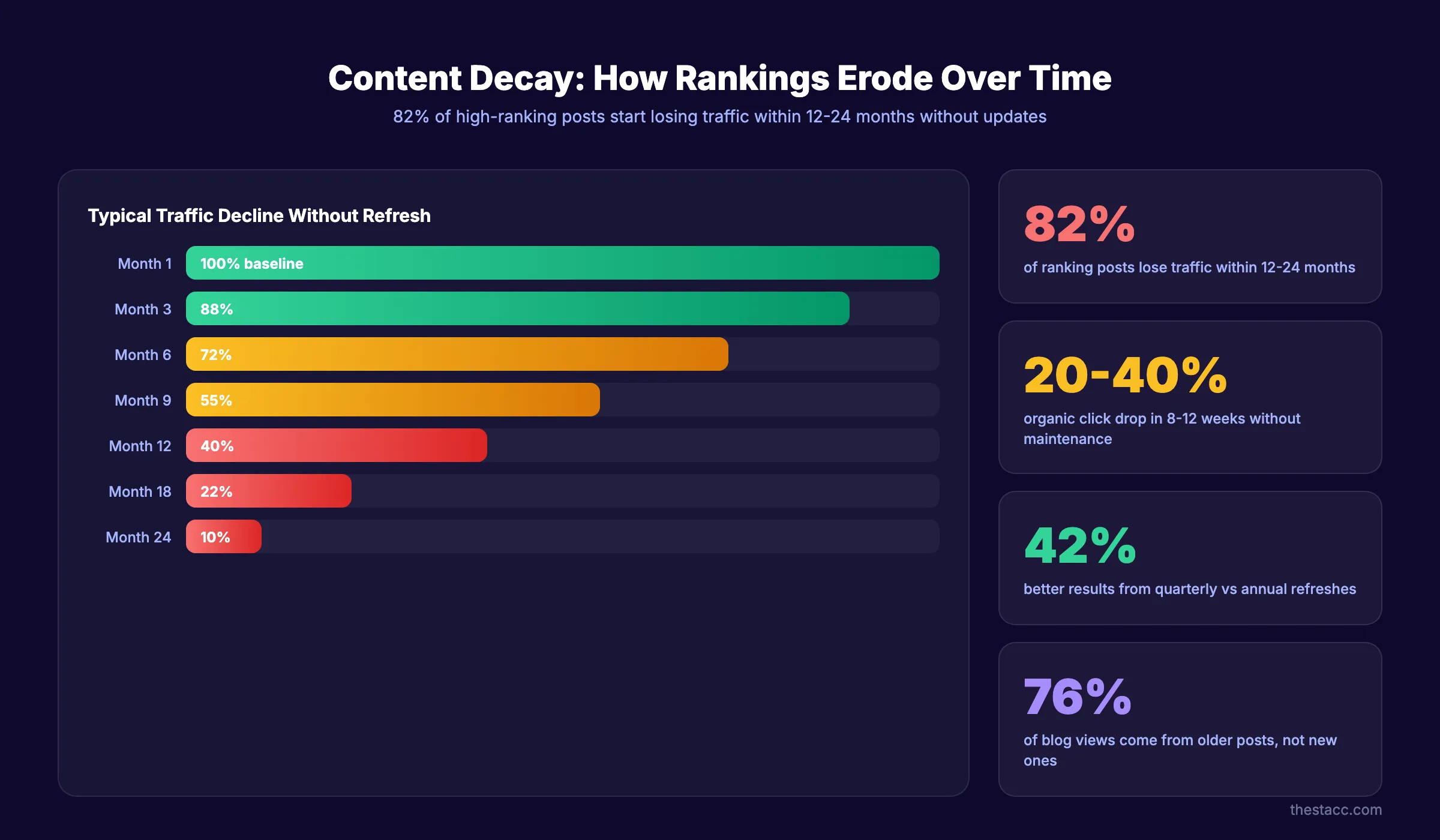
Content decay hits every post eventually. Ahrefs data shows a 20 to 40% drop in organic clicks over 8 to 12 weeks for posts that are not maintained. That means a post ranking in position 3 today could slip to position 12 by next quarter.
Refreshing old content beats writing new content on nearly every metric. 53% of marketers report better engagement from updating existing posts versus producing new ones. The reason is simple: old posts already have backlinks, domain trust, and indexing history. A refresh compounds that authority instead of starting from zero.
This is the Content Compound Effect in action. An updated post with 40 existing backlinks will outperform a brand-new post with zero backlinks, every single time. Check our blogging statistics roundup for more data on this pattern.
Quarterly refreshes yield 42% better results than annual refreshes. That makes content updates a recurring task, not a one-time project. Build it into your content calendar now.
Step 1: Audit Your Content Library in Google Search Console
Start with data, not assumptions. Google Search Console shows exactly which posts are declining, which are stable, and which are growing.
Open GSC and go to Performance, then Pages. Set the date range to the last 6 months. Sort by impressions from high to low. This shows your most visible content.
Export the full list to a spreadsheet. Add columns for clicks, impressions, CTR, and average position. Now compare the last 3 months against the previous 3 months for each URL.
Look for these signals:
| Signal | What It Means | Priority |
|---|---|---|
| High impressions, declining clicks | Content is visible but losing relevance | High |
| Position 8-20, high impressions | Close to page 1, small updates could push it up | High |
| Position 1-5, stable clicks | Performing well, monitor quarterly | Low |
| Zero impressions, zero clicks | May need consolidation or deletion | Medium |
Posts sitting in positions 8 through 20 are your biggest opportunity. They already rank. Google already considers them relevant. A targeted refresh can push them onto page 1.
Flag every post older than 12 months that shows declining clicks. These are your update candidates.
Why this step matters: Without GSC data, you are guessing. Teams that audit first focus their effort on posts with the highest return potential. Teams that skip this step waste time updating posts that were never ranking to begin with.
Step 2: Score and Prioritize Which Posts to Update First
You now have a list of candidates. But you cannot update them all at once. You need a scoring system to decide the order.
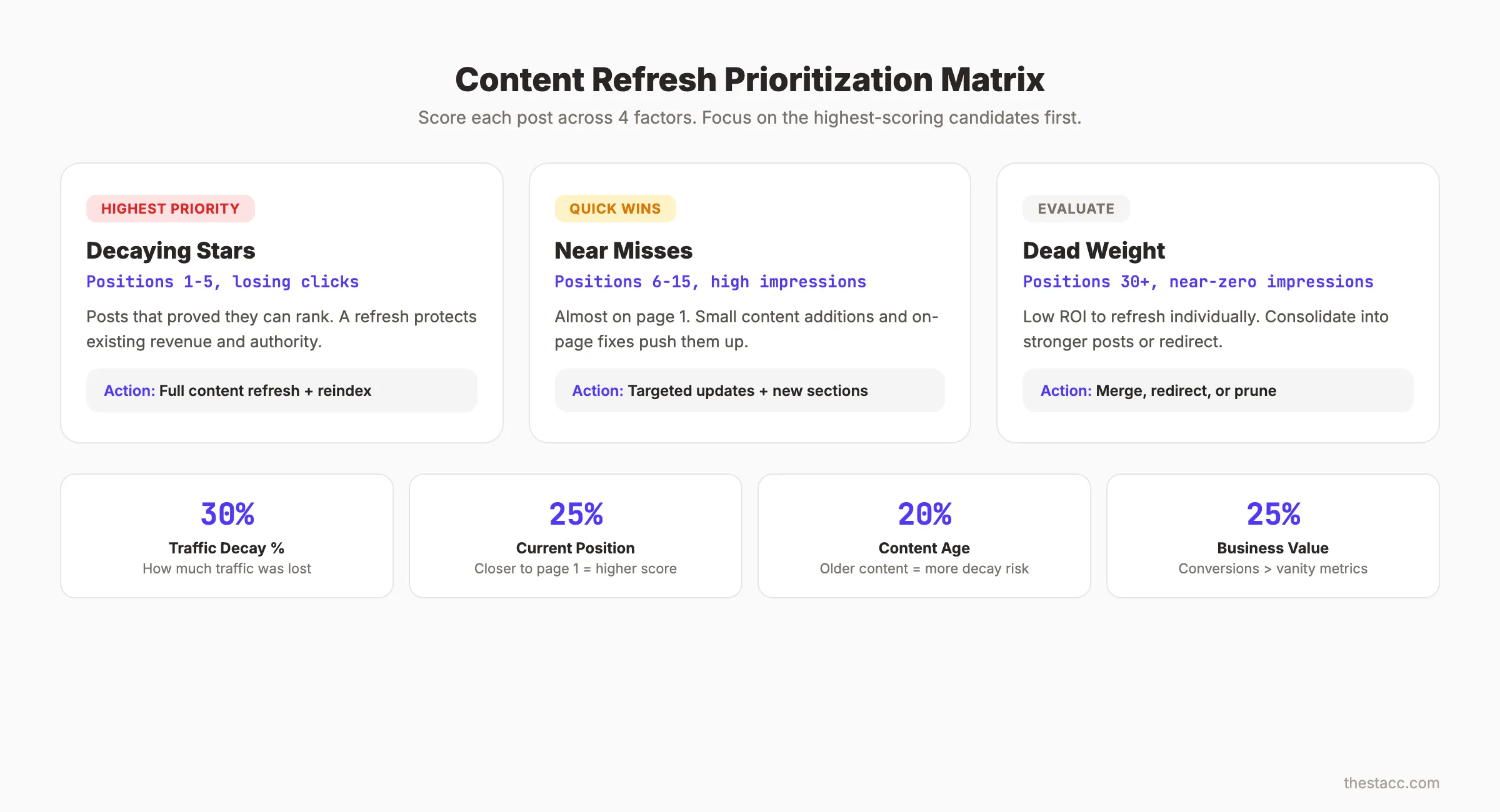
Use this 4-factor prioritization matrix:
| Factor | Weight | Scoring (1-5) |
|---|---|---|
| Traffic decay percentage | 30% | 5 = lost 50%+ traffic, 1 = stable |
| Current position | 25% | 5 = positions 6-15, 1 = positions 50+ |
| Content age (months) | 20% | 5 = 18+ months old, 1 = under 6 months |
| Business value | 25% | 5 = drives conversions, 1 = vanity topic |
Multiply each score by its weight and sum the result. Sort your candidates by total score.
Group them into 3 categories:
- Decaying Stars (positions 1 to 5, losing clicks). These are your highest priority. They already proved they can rank. A refresh protects revenue.
- Near Misses (positions 6 to 15, high impressions). These are quick wins. Small content additions and better on-page SEO can push them to page 1.
- Dead Weight (positions 30+, zero or near-zero impressions). These need a different approach. Consolidate them into stronger posts or redirect them. Run a full SEO audit to decide.
Focus on your top 10 to 20 posts first. A single batch of 10 refreshed posts will move the needle more than 10 new posts on untested topics.
Use your content audit data to find content gaps that your competitors now cover but your old post does not.
Why this step matters: Prioritization prevents wasted effort. A post in position 7 with 5,000 monthly impressions deserves your attention before a post in position 45 with 30 impressions. The scoring matrix removes emotion from the decision.
Step 3: Research Updated Keywords and Search Intent
Your original keyword research is likely outdated. Search behavior changes. New terms emerge. Intent shifts.
Re-run keyword research for blog posts on every post you plan to update. Check 3 things:
1. Has the primary keyword changed in volume or competition?
A keyword that had 2,000 monthly searches 2 years ago might have 800 now. Or it might have 5,000. If volume dropped significantly, consider retargeting a related keyword with more demand.
2. Has search intent shifted?
This is the most common reason posts lose rankings. A keyword that was informational 2 years ago might now be commercial. Google may now show product pages where it once showed blog posts. Check the current SERP. If the top 5 results are a different format than your post, intent has shifted.
| Intent Shift | What Changed | Your Action |
|---|---|---|
| Informational to Commercial | Searchers now want to buy | Add product comparisons, pricing info |
| How-to to Listicle | Google prefers list format | Restructure as a numbered list |
| Long-form to Short answer | Featured snippet dominates | Add a concise answer in the first 100 words |
| Single topic to Broad guide | Competitors expanded scope | Add sections to match |
3. Have new related keywords emerged?
Look for long-tail variations, "People Also Ask" questions, and related searches that did not exist when you first wrote the post. Add these as new H2 or H3 sections.
A post originally targeting "email marketing tips" in 2024 should now also cover AI personalization, AMP for email, and interactive email elements. The topic expanded. Your post must expand with it.
Why this step matters: You cannot fix a post by rewriting the same content with the same keywords. If the keyword map changed, the content must change to match. Skipping this step means you refresh the wrong content for the wrong audience.
Step 4: Rewrite Outdated Sections and Add New Content
This is where the real work happens. Open your post alongside the current top 3 results for your target keyword. Compare section by section.
Update statistics with current data. Replace any stat older than 2 years. Cite the source with a link. Readers and search engines both reward recency. A post citing 2022 data in 2026 signals neglect.
Replace outdated examples, tools, or screenshots. If your post mentions a tool that no longer exists or a feature that changed, update it. Outdated screenshots are an instant credibility killer.
Add new sections that competitors now cover. If the current number 1 result has 3 sections your post does not, add those sections. Do not copy their angle. Bring your own data or perspective.
Expand thin sections. Any H2 section under 100 words is too thin. Google treats thin sections as low-quality signals. Expand them with examples, data, or step-by-step instructions. Read our guide on how to fix thin content for specific techniques.
Remove irrelevant content. If a section no longer matches the keyword intent, cut it. Keeping irrelevant sections dilutes the page focus and confuses ranking signals.
Set a target: beat the current number 1 result in word count by 20%. If they have 2,500 words, aim for 3,000. But only add substance. Padding with filler words does the opposite of what you want.
Apply SEO content writing best practices as you rewrite. Every section should follow the pattern: claim, evidence, action.
For a full framework on structuring rewrites, see our guide on how to optimize content for SEO.
Why this step matters: Content quality is the single biggest ranking factor. A post that was thorough in 2024 may be incomplete in 2026. Google compares your page against every other page targeting the same keyword. If competitors added sections you lack, your rankings drop. This step closes that gap.
Stop writing. Start ranking. theStacc publishes 30 SEO articles per month for $99. We handle the refreshes too.
Step 5: Refresh Internal and External Links
Links decay just like content. A post published 18 months ago probably has broken external links, missing internal links, and outdated references.
Remove broken links. Run your post URL through a link checker or click every link manually. Dead links hurt user experience and send negative quality signals. Our guide on how to fix broken links walks through the full process.
Add new internal links. This is the most overlooked step in content refreshes. Since you published the original post, your site has likely added dozens of new pages. Link to them.
Check for new blog posts, comparison pages, glossary entries, and tool pages that relate to the topic. Every old post refresh is a chance to strengthen your internal linking structure across the entire site.
Target 3 to 5 internal links per 1,000 words. Distribute them naturally across sections. Use descriptive anchor text. "Learn more about topical authority" is better than "click here."
Update external links to current sources. Replace links to 2023 studies with 2025 or 2026 versions. Link to primary sources, not summaries. Google values content that cites authoritative, recent data.
Here is a quick checklist for link refresh:
- ✓ Click every link in the post. Remove or replace dead ones.
- ✓ Add internal links to pages published after the original post date.
- ✓ Update external sources to the most recent available data.
- ✓ Remove links to tools or services that no longer exist.
- ✓ Ensure no two internal links point to the same page from one post.
Why this step matters: Internal links distribute authority across your site. External links signal credibility to Google. A post with 3 broken links and zero internal links to recent content tells Google this page is abandoned. Fresh links tell Google someone maintains this page.
Step 6: Optimize Title, Meta Description, and Headers
On-page SEO elements directly affect click-through rate. Even if your rankings recover, poor CTR means lost traffic.
Rewrite the title if CTR is below 3%. Check CTR in Google Search Console for your target keyword. A title that earned clicks in 2024 might feel stale in 2026. Add the current year. Add a specific number. Add a clear benefit.
| Weak Title | Strong Title |
|---|---|
| "Blog Writing Tips" | "9 Blog Writing Tips That Increased Our Traffic 47% (2026)" |
| "How to Do Keyword Research" | "How to Do Keyword Research for Blog Posts (8-Step Guide)" |
| "SEO Guide" | "On-Page SEO: The Complete 2026 Guide With Checklist" |
Read our blog headlines guide for more title formulas that drive clicks.
Update the meta description. Keep it between 145 and 155 characters. Include the primary keyword, a specific benefit, and a freshness signal like the current year. See our guide on writing meta descriptions that earn clicks.
Restructure the heading hierarchy. Check that every H2 targets a relevant keyword or question. Ensure H3 headings sit under appropriate H2 parents. Remove any heading that does not add value.
Your primary keyword should appear in:
- ✓ The title tag
- ✓ The first 100 words of the article
- ✓ At least 1 H2 heading
- ✓ The meta description
- ✓ At least 1 image alt text
Do not stuff the keyword. Use natural variations and related terms. Google understands synonyms and topical relevance better than exact-match repetition.
Why this step matters: A post can rank in position 4 and still get almost no clicks if the title and description do not compel action. CTR is a behavioral signal that Google tracks. Higher CTR reinforces rankings. Lower CTR erodes them.
Step 7: Update for AI Search Visibility
This is the step every competitor guide misses. Google is not the only search engine your content must satisfy in 2026. AI search engines like ChatGPT, Perplexity, and Google AI Overviews now answer user questions directly. If your content is not cited, you lose visibility.
The data is clear. Fresh pages earn 25.7% more AI citations than stale ones. Otterly.AI found that 76.4% of pages most cited by ChatGPT were updated within the last 30 days.
AI Overviews reduce click-through rates to traditional organic results by 30 to 60%. That means even if you rank on page 1, an AI answer above your listing steals your traffic. The defense: become the source the AI cites.
Here is how to optimize your refreshed posts for AI citation:
Add clear, quotable definitions. AI models pull concise answers. Start key sections with a 1 to 2 sentence definition or answer. Make it easy to extract.
Use structured data. FAQ schema, HowTo schema, and article schema help AI models understand your content structure. Our guide on how to get cited by AI search covers implementation details.
Include original data or unique analysis. AI models prefer citing primary sources over summaries. Add your own data, case studies, or survey results when possible.
Ensure AI crawlers can access your page. Check your robots.txt and meta tags. Some sites accidentally block AI crawlers like GPTBot or ClaudeBot. Read our AI crawlers guide to verify your setup.
Add FAQ sections with direct answers. AI models pull from FAQ blocks frequently. Each question should have a concise, standalone answer in 2 to 3 sentences.
See our full guide on how to optimize for AI Overviews for more techniques.
Why this step matters: AI search is not a future trend. It is a current traffic source. Sites that optimize for AI citation now will capture traffic that competitors lose to zero-click answers. Every content refresh in 2026 should include an AI visibility check.
Your SEO team. $99 per month. 30 optimized articles, published automatically. AI search optimization included.
Step 8: Republish, Reindex, and Track Results
The final step turns your refresh into a relaunch. This is where you signal freshness to Google, your audience, and AI search engines.
Update the publish date only if the content meaningfully changed. Google's John Mueller was direct: "Changing the date without doing anything else is just noise and useless." If you rewrote 30% or more of the post, updating the date is appropriate. If you fixed 2 typos, it is not.
Submit the updated URL in Google Search Console. Go to URL Inspection, paste the post URL, and click "Request Indexing." This tells Google to re-crawl the page and evaluate the updated content. Most pages get re-crawled within 24 to 48 hours. Our guide on how to submit your website to Google covers the full process.
Share the post on social media as if it were new. Updated posts deserve the same promotion as new posts. Share on LinkedIn, X, and any relevant communities. Mention that the post was updated with fresh data for 2026.
Monitor rankings for 30 to 60 days. Set up position tracking in GSC or your preferred SEO tool. Watch for these signals:
- ✓ Position improvements within the first 2 weeks
- ✓ CTR changes after title and meta description updates
- ✓ New keyword rankings from added sections
- ✓ Traffic recovery compared to pre-decay baseline
Do not panic if rankings dip briefly in the first week. Google sometimes re-evaluates updated content before restoring or improving rankings. The dip usually resolves within 7 to 14 days.
Set up Google Analytics 4 event tracking to measure engagement on the refreshed post. Track scroll depth, time on page, and conversion events.
Why this step matters: A refresh without a relaunch is invisible. Google needs a re-crawl signal. Your audience needs to see the post again. Social shares drive initial engagement signals that reinforce the ranking boost. Skip this step and your update sits unnoticed.
Results: What to Expect After Updating Old Blog Posts
Content refreshes do not deliver overnight results. But they deliver faster results than new content.
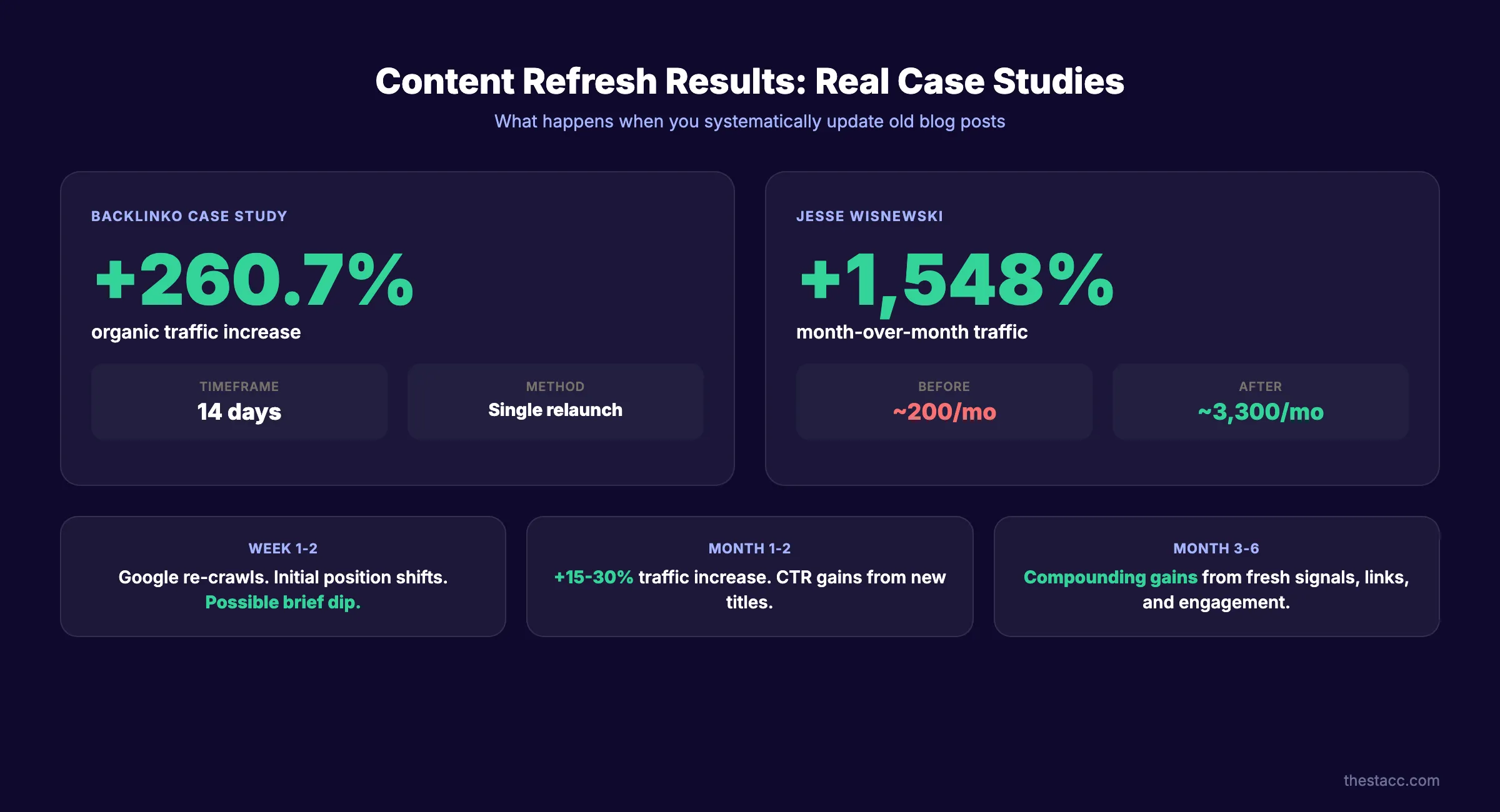
Here is a realistic timeline:
| Timeframe | Expected Result |
|---|---|
| Week 1-2 | Google re-crawls and reindexes. Initial position movement. Possible brief ranking dip. |
| Month 1-2 | 15 to 30% traffic increase for refreshed posts. CTR improvements from new titles. |
| Month 3-6 | Compounding gains as freshness signals, new internal links, and engagement data accumulate. |
The case studies back this up. Backlinko documented a 260.7% organic traffic increase in just 14 days from a single content relaunch. Jesse Wisnewski reported a 1,548% month-over-month traffic increase from systematic republishing over 5 months.
These are not outliers. They are what happens when you apply structured refreshes to posts with existing authority. The post already earned backlinks and trust. The update removes the decay. The result is a rapid return to peak performance and often beyond it.
The compound effect grows over time. Each refreshed post strengthens internal links to other posts. Each set of fresh stats signals site-wide maintenance. Google rewards sites that maintain their content library.
Plan to refresh your top-performing posts quarterly. Semrush data shows quarterly refreshes yield 42% better results than annual refreshes. Build this into your content calendar as a recurring task.
For sites publishing at scale, consider how to scale blog content with AI while maintaining quality during refresh cycles.
Common Mistakes When Updating Blog Posts
Refreshing content seems straightforward. But these 5 mistakes turn a potential win into a ranking disaster.
1. Changing URLs without proper 301 redirects. Never change a post URL during a refresh. If you must change it, set up a 301 redirect from the old URL to the new one. A URL change without a redirect loses all backlink equity and resets ranking history.
2. Updating the date without changing the content. Google calls this fake freshness. It does not work. Mueller confirmed it publicly. If you update the date, the content must have meaningfully changed.
3. Deleting content instead of redirecting it. If you decide a post is beyond saving, do not delete it. Redirect it to the most relevant existing page. A deleted page returns a 404 error and wastes whatever authority it accumulated.
4. Removing sections that currently drive traffic. Check GSC before cutting content. Some sections rank for keywords you did not target intentionally. Removing them kills traffic you did not know you had. Add a new section instead of cutting the existing one.
5. Over-optimizing for a keyword that shifted intent. If the SERP now shows product pages for your informational keyword, rewriting your blog post will not fix the mismatch. You need to either target a different keyword or create a different content format.
Avoid these mistakes and your refresh rate of return will stay high. For a broader view of SEO maintenance, run a complete SEO audit before beginning a large-scale refresh campaign.
How Often Should You Update Old Blog Posts?
Build a refresh schedule based on content type and performance tier.
| Content Tier | Refresh Frequency | What to Check |
|---|---|---|
| Top 10 traffic posts | Every 3 months | Stats, links, competitors, AI citations |
| Posts in positions 6-20 | Every 6 months | Keywords, intent, content gaps |
| Low-traffic posts | Annually | Consolidation, redirect, or prune |
| Evergreen reference posts | Every 3 months | Accuracy, freshness signals, internal links |
| Seasonal or trending posts | Before each season or trend cycle | Dates, stats, examples |
Most sites benefit from refreshing 5 to 10 posts per month. That pace maintains freshness across your library without overwhelming your team.
Track which refreshes delivered the best results. Double down on the post types and topics where updates consistently drive traffic gains. Over time, you will develop a pattern for which content decays fastest and needs the most attention.
3,500+ blogs published. Every article is SEO-scored before publish. See what theStacc can do for your site.
What practitioners are saying on X
AI search advice ages quickly. Here is high-signal public discussion from SEO and growth operators — context for your roadmap, not a substitute for primary data.
- @varunram (Jul 2026): Critique of GEO slopfarm products that combine SEO clickbait with unresearched content marketing — quality and research still separate winners from farms. See the post on X.
- @jakezward (Feb 2026): 2026 SEO predictions emphasize AI Overview share-of-SERP, schema for LLM token efficiency, brand mentions in AI answers as a KPI, proprietary data as a moat, and content refresh beating net-new AI slop. See the post on X.
- @HlynurStefDev (Jul 2026): Public case: niche site traffic jumped from ~18 to 4,162 Google visits/month after focused technical/on-page SEO work (GSC screenshots claimed) — reminds that fundamentals still move numbers. See the post on X.
Grok, AI Overviews, and multi-engine visibility
Content topics like “update old blog posts” get AI citations when process steps, quality bars, and examples are concrete. Operator consensus on X is clear: research-backed pages beat unedited bulk generation — reflect that honestly.
- Google AI Overviews: Use passage-ready answers, tables, and FAQ schema where relevant.
- ChatGPT / Perplexity: Cite named sources next to key claims.
- Grok: Maintain accurate entity facts on-site and in high-signal X posts.
Publish content built for Google and AI citations. theStacc’s Content SEO module ships SEO-scored articles structured for rankings and generative engines — including clearer entity pages models like Grok can quote.
FAQ
Yes. The data is unambiguous. HubSpot found that updating old content can increase organic traffic by up to 106%. The reason: old posts have existing authority from backlinks and indexing history. A refresh removes content decay while preserving that authority. New posts start from zero.
Quarterly refreshes yield the best results. Semrush data shows a 42% performance improvement with quarterly updates versus annual ones. At minimum, review your top 20 posts every 3 months. Check for outdated stats, broken links, and new competitor content that you need to match.
Only if the content meaningfully changed. Google's John Mueller confirmed that changing the date without real content updates is "noise and useless." If you rewrote 30% or more of the post, updated stats, and added new sections, updating the date is appropriate and signals freshness.
For most sites, updating delivers faster results. Old posts already have backlinks, indexing history, and topical authority. A refresh compounds that foundation. New posts take 3 to 6 months to build similar authority. The ideal strategy combines both: update old winners monthly and publish new posts to fill content gaps.
There is no official threshold from Google. Based on case study data, meaningful updates include: refreshing 30% or more of the content, adding 2 or more new sections, updating all statistics to current sources, and fixing all broken links. Minor edits like fixing typos or changing 1 sentence do not constitute a meaningful update.
Yes. theStacc publishes and maintains blog content at scale. Our service includes identifying posts that need refreshes, rewriting outdated sections, updating internal links, and optimizing for AI search visibility. We manage the entire process. You do not need a content team or SEO specialist. Visit our pricing page to .
Your Content Library Is an Asset. Treat It Like One.
Every post you have ever published is either growing or decaying. There is no in-between. The sites that win organic search in 2026 are not the ones publishing the most new content. They are the ones maintaining and compounding what they already have.
Start with your top 10 posts. Score them. Refresh them. Republish them. Then move to the next 10. Within 90 days, you will see measurable traffic recovery and growth from pages you thought were finished.
If you do not have the team to run this process, theStacc handles it. We publish, optimize, and refresh blog content across 70+ industries.
Rank Everywhere. Do Nothing. theStacc is your SEO team for $99 per month. Content refreshes included.
Sources & references
- [1] Princeton / Georgia Tech et al. — GEO research (arXiv:2311.09735)
- [2] @varunram on X — Critique of GEO slopfarm products that combine SEO clickbait with unresearched content marketing — quality and research
- [3] @jakezward on X — 2026 SEO predictions emphasize AI Overview share-of-SERP, schema for LLM token efficiency, brand mentions in AI answers
- [4] @HlynurStefDev on X — Public case: niche site traffic jumped from ~18 to 4,162 Google visits/month after focused technical/on-page SEO work (G
- [5] Referenced source — www.semrush.com

Plan topics, review article drafts, and publish to a connected CMS.
Weekly local SEO teardowns
One practical email a week. Map Pack, GBP, AI Overviews — no fluff. Unsubscribe anytime.