Submit product feeds to ChatGPT to get your products in AI shopping results. Step-by-step setup for merchants and ecommerce stores. Updated May 2026.
To submit product feeds to ChatGPT, allow the OAI-SearchBot crawler, add Product schema to every product page, then send a direct feed through OpenAI's merchant program. Some platforms sync their catalogue automatically. This guide covers all six steps and how to keep the feed healthy afterwards.
Why Product Visibility in ChatGPT Matters in 2026
Shopping behavior is changing in a way that is hard to overstate. Consumers increasingly start product searches not with a Google query but with a conversational prompt in ChatGPT, Perplexity, or Gemini. They ask "what's the best waterproof running jacket under $150?" and receive a curated set of product recommendations with prices, images, and direct purchase links — without visiting a traditional search results page.
ChatGPT's shopping integration is powered primarily through Bing's product index. OpenAI and Microsoft have a longstanding deal that gives ChatGPT access to Bing's web index, including Bing Shopping data. When a user asks a product question, ChatGPT queries that index and surfaces products that match the intent. This means the mechanics of appearing in ChatGPT Shopping are closely tied to your visibility in Bing's product ecosystem, not just Google's.
The share of product discovery happening through conversational AI is growing. Salesforce's 2025 State of Commerce report noted that AI-assisted commerce touchpoints increased significantly in the past year, and OpenAI's own data cited 800 million weekly active users as of early 2026. Not all of those users are shopping, but the pool is large enough that ignoring it means ceding ground to competitors who do not.
Unlike Google Shopping, ChatGPT Shopping results are currently unsponsored. There is no pay-to-play option. Products appear based on relevance, data quality, structured markup, and crawl accessibility. The merchants who invest in the technical foundations now will have a compounding advantage as the channel grows and eventually becomes more competitive.
How to Submit Your Products to ChatGPT: Step-by-Step
Step 1: Ensure Your Product Pages Are Crawlable
Before anything else, verify that AI crawlers can access your product pages. Check your robots.txt file to confirm that OAI-SearchBot (OpenAI's crawler) and Bingbot (Microsoft's crawler) are both allowed. Neither should have a Disallow: / directive. Also check that your product pages are not accidentally blocked by noindex meta tags, which would prevent them from being picked up regardless of crawl access. Use Google Search Console's URL Inspection tool and Bing Webmaster Tools to verify individual product pages are being indexed. A clean sitemap submitted to both tools gives crawlers the most direct path to your catalog.
Step 2: Add Structured Data (Product Schema)
Product schema is the primary way ChatGPT extracts structured product information from your pages. Add schema.org/Product markup in JSON-LD format to every product page. The most important fields are name, description, image, offers.price, offers.priceCurrency, and offers.availability. Also include aggregateRating if your site displays reviews — ChatGPT Shopping surfaces review data prominently in product cards. Use Google's Rich Results Test to validate your schema before and after implementation. Missing or malformed schema means ChatGPT must guess your product attributes from unstructured HTML, which reduces accuracy and visibility.
Step 3: Create or Update Your llms.txt File
An llms.txt file is a plain-text document placed at the root of your website (yourdomain.com/llms.txt) that tells AI language models what your site is about and which pages are most important. It is analogous to robots.txt but designed for AI context rather than crawl permissions. A basic format includes a one-paragraph description of your business, a list of your most important product category pages, and any specific context you want AI tools to understand about your catalog (e.g., your brand specializes in sustainable outdoor gear, or all products ship within the US only). While llms.txt is not yet universally adopted or required, several AI platforms including Perplexity have confirmed they read it. Creating one costs nothing and provides AI crawlers with direct context about your product catalog.
Step 4: Submit Your Sitemap to Bing
Because ChatGPT sources product data primarily from Bing's index, Bing Webmaster Tools is more important for ChatGPT Shopping visibility than Google Search Console. Create a free account at bing.com/webmasters, verify ownership of your domain, and submit your XML sitemap. Bing crawls sitemaps independently of Google, so submission accelerates indexation significantly compared to waiting for organic discovery. For ecommerce sites, submit both your product sitemap and your category sitemap separately if your platform generates them. Bing Webmaster Tools also shows which pages have been indexed, their crawl status, and any indexation errors — all directly relevant to ChatGPT Shopping visibility.
Step 5: Verify With Microsoft Clarity or Bing Webmaster Tools
After submitting your sitemap, monitor two things in Bing Webmaster Tools: (1) the indexed page count for your product URLs, and (2) the crawl status report, which shows how frequently Bingbot is visiting your pages. A healthy product catalog should show regular crawl activity and a high ratio of indexed to submitted URLs. Microsoft Clarity (a free heatmap and session recording tool) also provides referral data from Bing properties. Set up both to create a baseline before you make further changes, so you can measure the impact of optimizations over time.
Step 6: Optimize Product Descriptions for Conversational Queries
Users asking ChatGPT about products phrase their queries conversationally: "What hiking boot is best for wide feet and wet trails?" Your product descriptions should answer those questions directly. Write descriptions that include the problem the product solves, who it is designed for, the key features in plain language, and how it compares to the generic product category. Avoid keyword-stuffed descriptions that read like a spec sheet. ChatGPT generates product recommendations by matching the user's stated need against your product content — the more clearly your description addresses specific use cases and buyer considerations, the more accurately it will match relevant queries.
Step 7: Monitor Mentions in AI Tools
ChatGPT does not provide a dedicated analytics dashboard for organic product mentions. Track your visibility indirectly using these methods: (1) search for your brand name and top products in ChatGPT manually each month and note whether your products appear; (2) set up Google Alerts or a brand monitoring tool for your brand name to catch any new AI-generated content referencing your products; (3) monitor referral traffic from chatgpt.com in your analytics platform — direct referral traffic from ChatGPT is the clearest signal that product recommendations are driving clicks; (4) segment and compare conversion rates on sessions originating from AI referrers versus standard organic search to assess traffic quality.
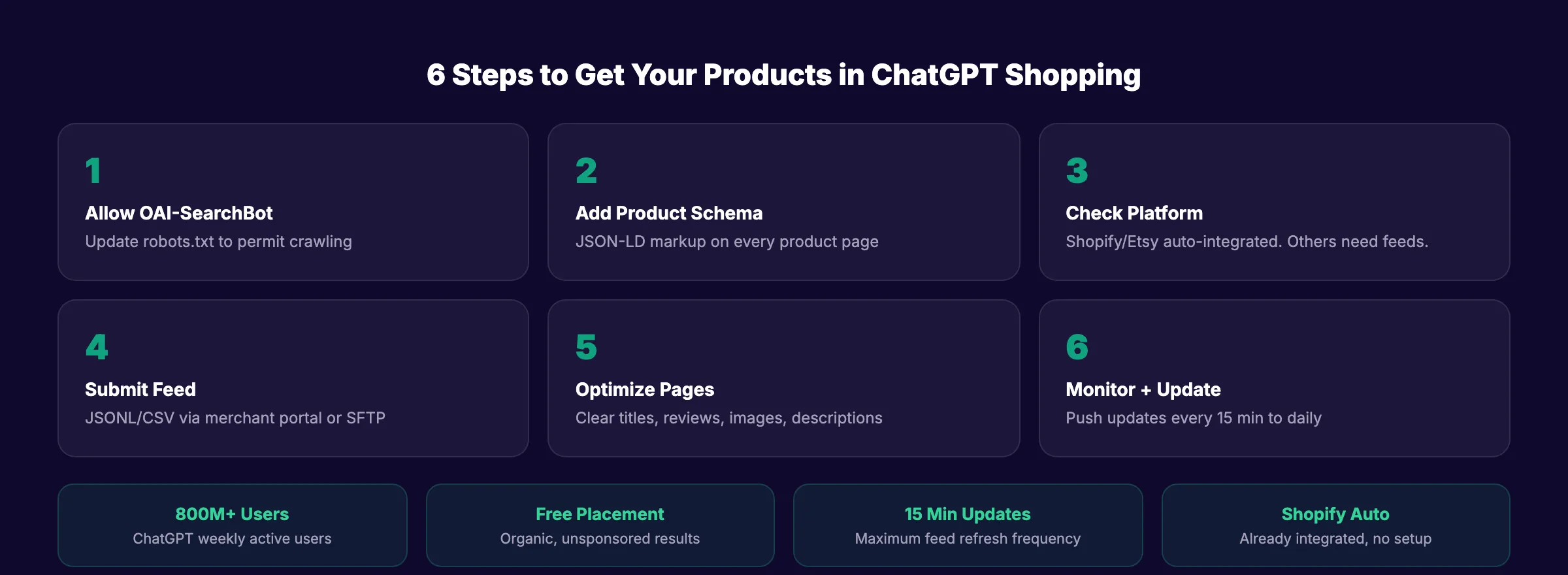
ChatGPT Shopping reaches over 800 million weekly users. When someone asks "best running shoes under $100," ChatGPT shows product cards with images, prices, reviews, and direct links. Those product results are organic and unsponsored. They rank purely on relevance.
If you want to submit product feeds to ChatGPT, you now have 2 paths. The first is automatic: allow the OAI-SearchBot crawler to index your product pages. The second is direct: submit a structured product feed through OpenAI's merchant portal.
Shopify and Etsy merchants already have their catalogs integrated automatically. Everyone else needs to take action. This guide walks through both paths step by step.
Time required: 1-3 hours for feed setup. Ongoing: 15-minute update cycles.
Difficulty: Intermediate (requires access to product data and basic feed formatting).
What you will need: Product catalog data, website with Product schema, robots.txt access, and optionally an account at chatgpt.com/merchants/.
Step 1: Allow the OAI-SearchBot Crawler
Before any feed submission, make sure ChatGPT can find your product pages organically. OpenAI uses a crawler called OAI-SearchBot to index websites for shopping results. If this crawler is blocked in your robots.txt, your products will not appear.
Check your robots.txt file for these lines:
User-agent: OAI-SearchBot
Disallow: /
If those lines exist, remove them. The correct configuration allows OAI-SearchBot full access:
User-agent: OAI-SearchBot
Allow: /
Also confirm that GPTBot (used for general ChatGPT training and retrieval) has access. Both crawlers serve different functions. OAI-SearchBot specifically powers shopping results.
Why this step matters: Even if you submit a direct product feed, OAI-SearchBot crawls your product pages for additional context. Reviews, descriptions, and page content all influence how ChatGPT presents your products. Blocking the crawler eliminates your shopping visibility entirely.
Step 2: Implement Product Schema Markup
ChatGPT uses Product schema markup to extract structured product data from your pages. Without schema, ChatGPT must guess your product's name, price, and availability from unstructured HTML. With schema, ChatGPT reads exact, labeled data.
Add schema.org/Product markup to every product page. Include these fields:
| Schema Field | What It Provides | Required? |
|---|---|---|
name | Product title | Yes |
description | Product description | Yes |
image | Product image URL | Yes |
offers.price | Current price | Yes |
offers.priceCurrency | Currency (USD, EUR, etc.) | Yes |
offers.availability | In stock / out of stock | Yes |
brand | Brand name | Recommended |
aggregateRating | Star rating + review count | Recommended |
sku | Product identifier | Recommended |
offers.url | Purchase URL | Recommended |
Use JSON-LD format. Place it in the <head> of each product page.
Why this step matters: Product schema markup is the primary way ChatGPT Shopping extracts product attributes. Pages with complete Product schema appear more accurately and more frequently in shopping results.
Step 3: Check if Your Platform Auto-Integrates
Some ecommerce platforms already have direct product feed integration with OpenAI. No manual feed submission needed.
| Platform | Integration Status | Action Required |
|---|---|---|
| Shopify | Automatically integrated | None. Your catalog is already in ChatGPT |
| Etsy | Automatically integrated | None |
| Google Merchant Center | Feeds indexed by OAI-SearchBot | Ensure GMC feed is active and up to date |
| Amazon | Products crawled organically | No direct feed. Optimize product listings |
| WooCommerce | Not auto-integrated | Submit feed manually (Step 4) |
| BigCommerce | Not auto-integrated | Submit feed manually (Step 4) |
| Custom store | Not auto-integrated | Submit feed manually (Step 4) |
If you sell on Shopify or Etsy, your products are already available to ChatGPT Shopping. Focus on Steps 1, 2, and 5 to maximize how they appear.
Why this step matters: Submitting a manual feed when your platform already auto-integrates wastes time and can create data conflicts. Check your platform first.
Your SEO team. $99 per month. 30 optimized articles that drive organic traffic to your product pages.
Step 4: Submit a Direct Product Feed via OpenAI
For merchants not on auto-integrated platforms, OpenAI offers direct product feed submission through the Agentic Commerce Protocol (ACP).
How to Apply
- Visit chatgpt.com/merchants/
- Submit your business details for verification
- OpenAI reviews and approves your merchant account
- You receive an SFTP endpoint for feed uploads
- Push your feed via encrypted HTTPS to the provided endpoint
Feed Format Requirements
OpenAI accepts these formats (all must be compressed):
| Format | Compression |
|---|---|
| JSONL | gzip |
| CSV | gzip |
| TSV | gzip |
| Parquet | zstd |
Required Feed Fields
Every product in your feed must include:
feed_id. Unique identifier for the feedaccount_id. Your merchant account IDtarget_merchant. Merchant nametarget_country. ISO 3166-1 alpha-2 country code (e.g., "US")product_id. Unique product identifiervariant_id. Variant identifier (e.g., size/color)variant_title. Variant display nametitle. Product titledescription. Product descriptionprice. Current pricecurrency. Currency codeavailability. Stock statusimage_url. Primary product imageproduct_url. Link to product page
Update Frequency
You can push feed updates every 15 minutes. Fresh pricing and inventory data ensure ChatGPT shows accurate information. Stale feeds with wrong prices or out-of-stock items create poor user experiences and reduce your visibility over time.
Why this step matters: Direct feeds give OpenAI the most accurate, structured version of your product catalog. Pages crawled organically may miss variants, pricing tiers, or inventory status. Direct feeds eliminate guesswork.
Pro tip: Major retailers including Target, Sephora, Nordstrom, and Best Buy already use direct feeds. OpenAI plans to launch a self-service merchant portal later in 2026.
Step 5: Optimize Product Pages for ChatGPT Discovery
Whether you use organic crawling or direct feeds, your product pages determine how ChatGPT presents your products.
- ✓ Write clear, specific product titles (include brand, product type, key attribute)
- ✓ Write detailed descriptions that answer common buyer questions
- ✓ Use high-quality product images (ChatGPT Shopping shows image carousels)
- ✓ Display real customer reviews on product pages (ChatGPT reads review sentiment)
- ✓ Show pricing clearly in HTML (not rendered by JavaScript only)
- ✓ Include size, color, and variant information in structured data
- ✓ Link to your product pages from category pages and blog content
- ✓ Maintain an ecommerce SEO foundation (fast load times, clean URLs, internal links)
ChatGPT reads your product pages the same way a human shopper would. Clear, complete, well-structured pages appear better in shopping results.
Why this step matters: The feed gets your products into ChatGPT's index. The product page determines whether ChatGPT recommends your product over a competitor's. Weak product pages lose to competitors with better content even if both are in the feed.
Step 6: Monitor and Maintain Your Feed
Product feeds are not a set-and-forget task. Prices change. Products go out of stock. New items launch.
Ongoing Maintenance Checklist
- ✓ Push feed updates at least daily (every 15 minutes for high-volume stores)
- ✓ Remove discontinued products from the feed immediately
- ✓ Update pricing within 1 hour of any price change
- ✓ Add new products to the feed within 24 hours of launch
- ✓ Monitor ChatGPT Shopping results for your brand and top products monthly
- ✓ Check that OAI-SearchBot is still allowed in
robots.txtquarterly - ✓ Verify Product schema is valid using Google's Rich Results Test
Track Shopping Performance
ChatGPT Shopping does not currently offer a dedicated analytics dashboard for merchants. Track these proxy metrics:
- Referral traffic from
chatgpt.comin your analytics - Product page traffic from AI-related referrers
- Conversion rate on product pages segmented by AI referral source
- Brand mention tracking in ChatGPT responses (manual or via monitoring tools)
Why this step matters: Stale feeds with incorrect prices or unavailable products reduce trust signals. ChatGPT deprioritizes products with data quality issues over time.
3,500+ blogs published. Every article is SEO-scored before publish. See what theStacc can do for your site.
Results: What to Expect
After completing these steps:
- Immediately: OAI-SearchBot begins crawling your product pages (if not already doing so)
- 1-2 weeks: Products with strong schema markup begin appearing in ChatGPT Shopping results
- 2-4 weeks: Direct feed products are ingested and indexed by OpenAI
- Ongoing: Products appear when ChatGPT determines they match user shopping queries
ChatGPT Shopping results are unsponsored. There is no way to pay for placement. Relevance, data quality, and review sentiment determine which products appear.
What practitioners are saying on X
Fundamentals plus AI-search measurement remain the dual stack.
- @jakezward (Feb 2026): 2026 SEO predictions emphasize AI Overview share-of-SERP, schema for LLM token efficiency, brand mentions in AI answers as a KPI, proprietary data as a moat, and content refresh beating net-new AI slop. See the post on X.
- @hridoyreh (Mar 2026): Widely shared SEO skill tree: foundations, research, technical, on-page, content, links, AI SEO/GEO, analytics, UX, brand, programmatic — useful map for stats and how-to posts. See the post on X.
- @HlynurStefDev (Jul 2026): Public case: niche site traffic jumped from ~18 to 4,162 Google visits/month after focused technical/on-page SEO work (GSC screenshots claimed) — reminds that fundamentals still move numbers. See the post on X.
Grok, AI Overviews, and multi-engine visibility
For topics covered in “submit product feeds chatgpt”, multi-engine visibility still starts with clear definitions, sourced statistics, and extractable section answers. Grok additionally factors live X discussion — keep public claims consistent with this page.
- Google AI Overviews: Use passage-ready answers and structured data.
- ChatGPT / Perplexity: Cite named sources next to key claims.
- Grok: Maintain accurate entity facts on-site and in high-signal X posts.
Publish content built for Google and AI citations. theStacc’s Content SEO module ships SEO-scored articles structured for rankings and generative engines — including clearer entity pages models like Grok can quote.
How to measure multi-engine visibility in 2026
Split KPIs across classic search, AI Overview citations, chat referrals, and Grok-ready brand accuracy.
- GSC: non-brand clicks and query annotations.
- Citations: named in AI answers?
- Referrals: ChatGPT / Perplexity in GA4.
- Grok: on-site claims match public X discussion.
FAQ
Is ChatGPT Shopping free for merchants?
Yes. Product results in ChatGPT Shopping are currently organic and unsponsored. There is no cost to submit a product feed or have products appear in shopping results. OpenAI began testing ads in January 2026 for Free and Go tier users, but product discovery results remain unpaid.
Do I need a direct feed if I use Shopify?
No. Shopify catalogs are automatically integrated with ChatGPT Shopping. Your products are already discoverable. Focus on Product schema markup, product page quality, and customer reviews to maximize how your products appear.
What file format should I use for the product feed?
JSONL with gzip compression is the most common choice. OpenAI also accepts CSV, TSV (both gzip-compressed), and Parquet with zstd compression. Use whichever format your ecommerce platform exports most easily.
How often should I update my product feed?
At minimum, daily. High-volume stores should update every 15 minutes (the maximum frequency OpenAI supports). Price changes and inventory updates should push to the feed within 1 hour. Stale data reduces your product's visibility in shopping results.
Can I submit my product feed directly to ChatGPT?
Yes, for merchants not on auto-integrated platforms (Shopify, Etsy), OpenAI offers direct product feed submission through the Agentic Commerce Protocol. Apply at chatgpt.com/merchants/, get approved, and push your feed via SFTP to the provided endpoint. OpenAI accepts JSONL, CSV, TSV, and Parquet formats. For Shopify merchants, no submission is needed — your catalog is already integrated automatically.
Does ChatGPT use Google Shopping or Bing for products?
ChatGPT primarily uses Bing's product index, not Google Shopping. OpenAI has a longstanding deal with Microsoft that gives ChatGPT access to Bing's web index, including Bing Shopping data. This means submitting your sitemap to Bing Webmaster Tools and ensuring Bingbot can crawl your product pages is more directly relevant to ChatGPT Shopping visibility than Google Search Console activity.
What structured data helps products appear in ChatGPT?
schema.org/Product markup in JSON-LD format is the most important structured data for ChatGPT product visibility. The required fields are name, description, image, offers.price, offers.priceCurrency, and offers.availability. Including aggregateRating (star rating and review count) and brand further improves how your products are presented in ChatGPT Shopping results. Validate your schema using Google's Rich Results Test to catch any errors before relying on it for visibility.
How do I know if ChatGPT is recommending my products?
There is no dedicated analytics dashboard for ChatGPT product recommendations yet. The most reliable indicators are: (1) referral traffic from chatgpt.com appearing in your analytics, (2) direct manual searches of your brand name and top products in ChatGPT, and (3) conversion rate analysis on sessions where the referrer is an AI platform. Monitor these monthly and look for growth after you complete feed submission and schema implementation.
Is llms.txt required for ChatGPT product visibility?
No, llms.txt is not currently required by OpenAI or any AI platform. It is a voluntary file that provides AI crawlers with structured context about your site. Some AI platforms including Perplexity have confirmed they read it. Creating one is low-effort and provides a clear signal to AI models about what your site sells, which pages matter most, and any relevant context about your catalog. For product-heavy sites, it is worth creating even if adoption is still uneven across platforms.
Can I submit product feeds to other AI shopping platforms?
Google AI Shopping uses Google Merchant Center feeds. Perplexity crawls product pages organically. Each platform has different data sources. Read our Gemini vs ChatGPT search comparison for platform-specific details. Optimizing Product schema and allowing AI crawlers covers the broadest set of platforms.
ChatGPT Shopping is the largest new product discovery channel since Google Shopping. 800 million weekly users. Organic placement. No ad spend required. The merchants who submit their feeds and optimize their product pages now will capture the early traffic before the channel becomes as competitive as Google.
Sources & references
- [1] Princeton / Georgia Tech et al. — GEO research (arXiv:2311.09735)
- [2] @jakezward on X — 2026 SEO predictions emphasize AI Overview share-of-SERP, schema for LLM token efficiency, brand mentions in AI answers
- [3] @alexgroberman on X — Case narrative: organic value plus multi-engine citations (ChatGPT, Perplexity, Grok) from knowledge-hub pages, category
- [4] Referenced source — www.bing.com

Plan topics, review article drafts, and publish to a connected CMS.
Weekly local SEO teardowns
One practical email a week. Map Pack, GBP, AI Overviews. No fluff. Unsubscribe anytime.