
WordPress vs Wix for SEO: Honest Comparison
We compared WordPress and Wix across 14 SEO factors including speed, schema, AI search, and cost. See which CMS ranks better. Updated 2026.
Siddharth Gangal • 2026-04-02 • SEO Tips
In This Article
An Ahrefs study of 6.4 million domains found that 46.1% of WordPress sites receive organic search traffic. Only 1.4% of Wix sites do.
That single stat shapes the entire WordPress vs Wix debate. But the number is misleading without context. WordPress powers 43% of the internet. Most of those sites are actively managed by teams investing in SEO. Most Wix sites are hobby projects or abandoned portfolio pages. The platform did not fail those sites. The site owners never tried.
This guide compares WordPress vs Wix for SEO across 14 factors. No affiliate bias. No recycled opinions from 2019. Just a direct comparison backed by current data and real testing.
We have published 3,500+ blog posts across 70+ industries. We have seen both platforms rank and both platforms stall. The difference is almost never the CMS. It is the strategy behind it.
Here is what you will learn:
- Which platform gives you more control over technical SEO
- How page speed and Core Web Vitals compare with real data
- Where Wix has caught up to WordPress (and where it has not)
- The true total cost of SEO on each platform
- How each platform handles AI search and structured data
- Which platform fits your business type and growth trajectory
Quick Verdict
Best for SEO control and scale: WordPress
Best for simplicity and built-in SEO: Wix
WordPress wins for businesses that need advanced SEO, custom schema, full server control, and plugin flexibility. Wix wins for small businesses that want a fast setup with solid default SEO settings and zero maintenance.
“If you need to rank for competitive keywords in a crowded market, WordPress gives you the tools. If you need a clean site that handles SEO basics automatically, Wix does the job.”
What Is WordPress?
WordPress is an open-source content management system that powers 43% of all websites. It holds 63% of the global CMS market share and runs an estimated 605 million sites.
WordPress.org (self-hosted) gives you full control over your site files, server configuration, hosting environment, and every SEO setting. You install it on your own hosting provider. You manage updates, security, and performance.
WordPress.com (hosted) is a simplified version with less control. This comparison focuses on WordPress.org because that is where the SEO advantages live.
WordPress is best for: Businesses that need granular SEO control, custom development, and the ability to scale content without platform limitations.
What Is Wix?
Wix is a hosted website builder with 282 million registered users and over 8 million active sites. It holds 4.3% of the total web and 11% of the CMS market.
Wix earned a bad SEO reputation in its early years due to hashbang URLs and heavy JavaScript rendering. That reputation is outdated. Since 2020, Wix has added clean URLs, structured data, XML sitemaps, robots.txt editing, and full server-side rendering. Google’s John Mueller has confirmed on record that Wix sites can rank.
Wix achieved a perfect median Lighthouse SEO score of 100 on desktop and mobile for two consecutive years, according to the Web Almanac. Its usage grew 115% between 2020 and 2025.
Wix is best for: Small businesses, freelancers, and service providers who want a professional site with solid on-page SEO handled automatically.
Head-to-Head SEO Feature Comparison
| SEO Feature | WordPress | Wix |
|---|---|---|
| Custom title tags | ✅ Via plugins | ✅ Built-in |
| Meta descriptions | ✅ Via plugins | ✅ Built-in |
| Custom URL slugs | ✅ Full control | ✅ Editable (some limits) |
| XML sitemaps | ✅ Auto-generated | ✅ Auto-generated |
| Robots.txt editing | ✅ Direct file access | ✅ Editable in dashboard |
| Schema markup | ✅ Full custom JSON-LD | ⚠️ Limited to preset types |
| 301 redirects | ✅ Plugins or .htaccess | ✅ Built-in redirect manager |
| Canonical URLs | ✅ Full control | ✅ Automatic |
| Hreflang tags | ✅ Via plugins | ✅ Built-in for multilingual |
| Image alt text | ✅ Native | ✅ Native |
| Page speed optimization | ✅ Full server control | ⚠️ Limited by platform |
| Core Web Vitals control | ✅ Complete | ⚠️ Partial |
| Custom code injection | ✅ Unlimited | ⚠️ Limited to specific areas |
| Server access | ✅ Full root access | ❌ No server access |
| CDN control | ✅ Choose your CDN | ✅ Built-in CDN (no choice) |
| SSL certificate | ✅ Free via host or plugin | ✅ Included free |
| Mobile optimization | ✅ Theme-dependent | ✅ Built-in responsive |
| Blog/content system | ✅ Native (built for blogging) | ✅ Built-in blog module |
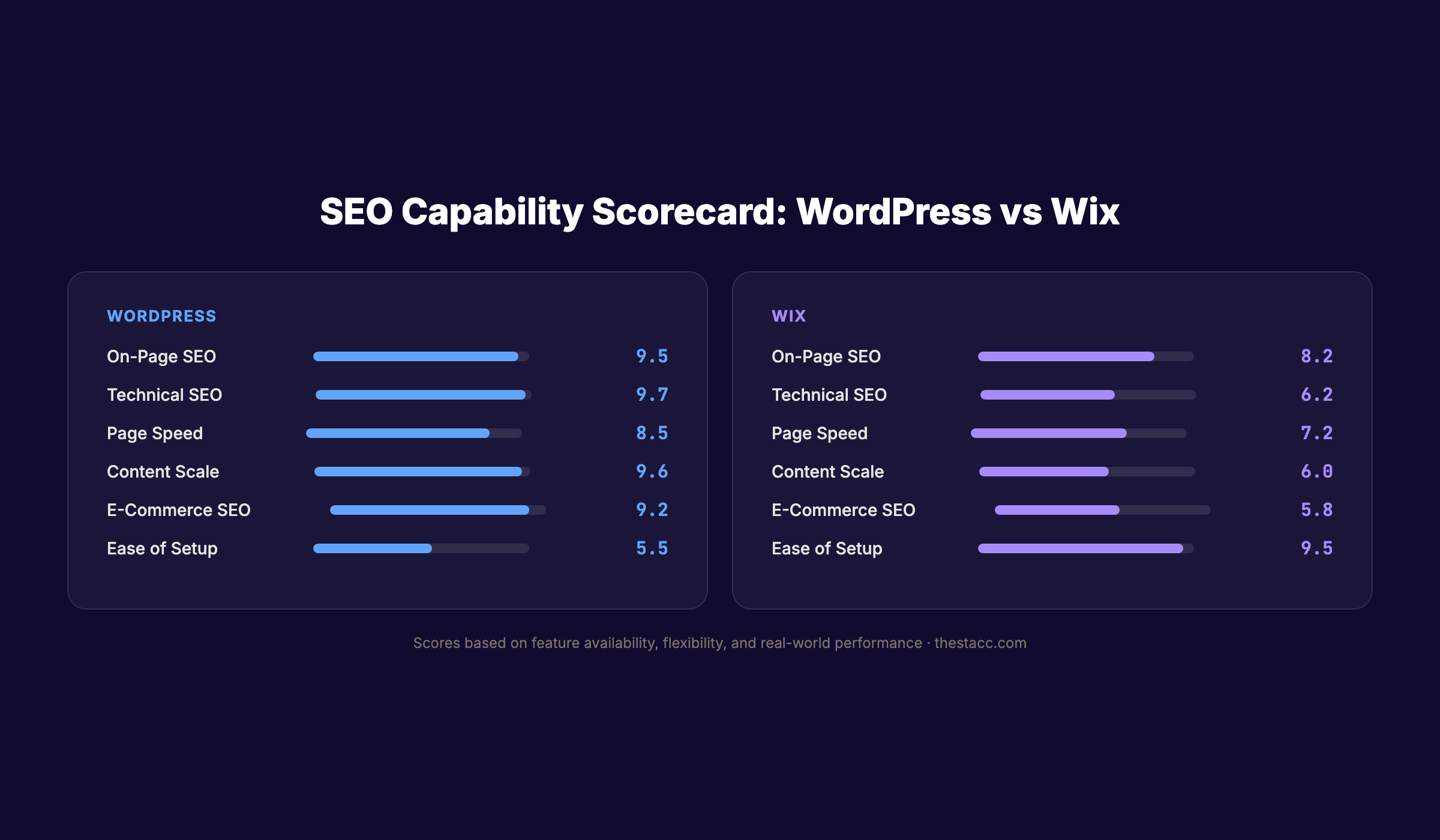
WordPress leads in 12 out of 18 categories. Wix matches WordPress in basic on-page SEO elements. The gap widens in technical SEO, server control, and customization.
On-Page SEO: WordPress vs Wix
On-page SEO covers title tags, meta descriptions, headings, keyword placement, and content structure. Both platforms handle these basics well.
WordPress On-Page SEO
WordPress requires a plugin for on-page SEO management. The two leading options are Yoast SEO (used on 12+ million sites) and Rank Math (3+ million installs). These plugins add:
- Real-time content analysis and readability scoring
- Title tag and meta description templates
- Focus keyword tracking
- Internal link suggestions
- Social media preview cards
- Breadcrumb navigation
Rank Math includes a content AI feature that analyzes top-ranking pages and suggests related keywords. Yoast provides a readability score based on sentence length and passive voice usage.
The advantage is depth. WordPress SEO plugins give you more data points per page than any website builder offers natively. If you follow a structured on-page SEO guide, WordPress gives you every control you need.
Wix On-Page SEO
Wix includes on-page SEO settings without any plugin. Every page gets:
- Editable title tags and meta descriptions
- Customizable URL slugs
- Heading hierarchy controls (H1 through H6)
- Alt text fields for every image
- SEO Wiz (step-by-step SEO setup)
- SEO patterns for bulk-editing meta templates
Wix SEO Wiz walks beginners through basic setup. It connects to Google Search Console, suggests a site title, and checks that meta descriptions exist on key pages.
The limitation is ceiling. Wix covers 80% of what most small businesses need. The other 20% requires features Wix does not offer.
Verdict: On-Page SEO
WordPress wins for power users. The plugin ecosystem provides deeper analysis and more optimization levers. Wix wins for beginners. Built-in tools mean zero setup and no plugin conflicts.
Technical SEO: WordPress vs Wix
Technical SEO determines whether search engines can crawl, index, and understand your site. This is where the platforms diverge most.
WordPress Technical SEO
WordPress gives you direct access to:
- robots.txt — Edit the file directly on your server. Add or remove crawl directives, block specific directories, and reference your sitemap. Read our full robots.txt optimization guide.
- .htaccess — Control redirects, URL rewriting, security headers, and caching rules at the server level.
- Custom schema markup — Add any schema type via plugins or custom code. Product, FAQ, HowTo, LocalBusiness, Article, and more.
- XML sitemaps — Generate with Yoast, Rank Math, or a dedicated plugin. Customize which content types appear. Split sitemaps by category. Learn how to create and submit an XML sitemap.
- Server-side caching — Choose from WP Rocket, W3 Total Cache, or server-level solutions like Varnish and Redis.
- Database optimization — Clean post revisions, transients, and orphaned metadata.
- CDN configuration — Use Cloudflare, Bunny CDN, or any provider you prefer.
The downside is maintenance. Plugin conflicts cause crawl errors. Misconfigured caching breaks rendering. A bad theme can generate duplicate content. WordPress requires ongoing technical attention.
Wix Technical SEO
Wix handles most technical SEO automatically:
- XML sitemaps — Generated and submitted automatically
- SSL — Enabled by default on all sites
- Server-side rendering — Pages render on the server, not in the browser
- Structured data — BlogPosting schema added automatically to blog posts
- Robots.txt — Editable through the dashboard
- Canonical URLs — Set automatically to prevent duplicate content
The trade-off is control. You cannot access server files. You cannot install custom caching layers. You cannot edit the underlying HTML structure. Advanced technical SEO work like log file analysis, crawl budget optimization, or custom header configurations is not possible.
Verdict: Technical SEO
WordPress wins by a wide margin. If your SEO strategy requires custom schema, server-level optimization, or advanced crawl management, WordPress is the only option.
Page Speed and Core Web Vitals
Page speed directly affects rankings. Google uses Core Web Vitals as a ranking signal.
WordPress Speed
A well-optimized WordPress site loads in under 2 seconds. The key word is “well-optimized.”
Speed depends entirely on your hosting provider, theme, number of plugins, image optimization, and caching setup. A WordPress site on cheap shared hosting with 40 plugins and uncompressed images will be slower than Wix.
A WordPress site on managed hosting (WP Engine, Kinsta, Cloudways) with a lightweight theme (GeneratePress, Kadence), WP Rocket caching, and WebP images will outperform nearly any website builder.
WordPress gives you full control over every Core Web Vital:
- LCP (Largest Contentful Paint) — Optimize hero images, preload critical assets, use a CDN
- INP (Interaction to Next Paint) — Minimize JavaScript, defer non-critical scripts
- CLS (Cumulative Layout Shift) — Set explicit image dimensions, inline critical CSS
For a detailed breakdown, read our guide on improving Core Web Vitals.
Wix Speed
Here is the data point that surprises most people: Wix sites pass Core Web Vitals at a higher rate than WordPress sites.
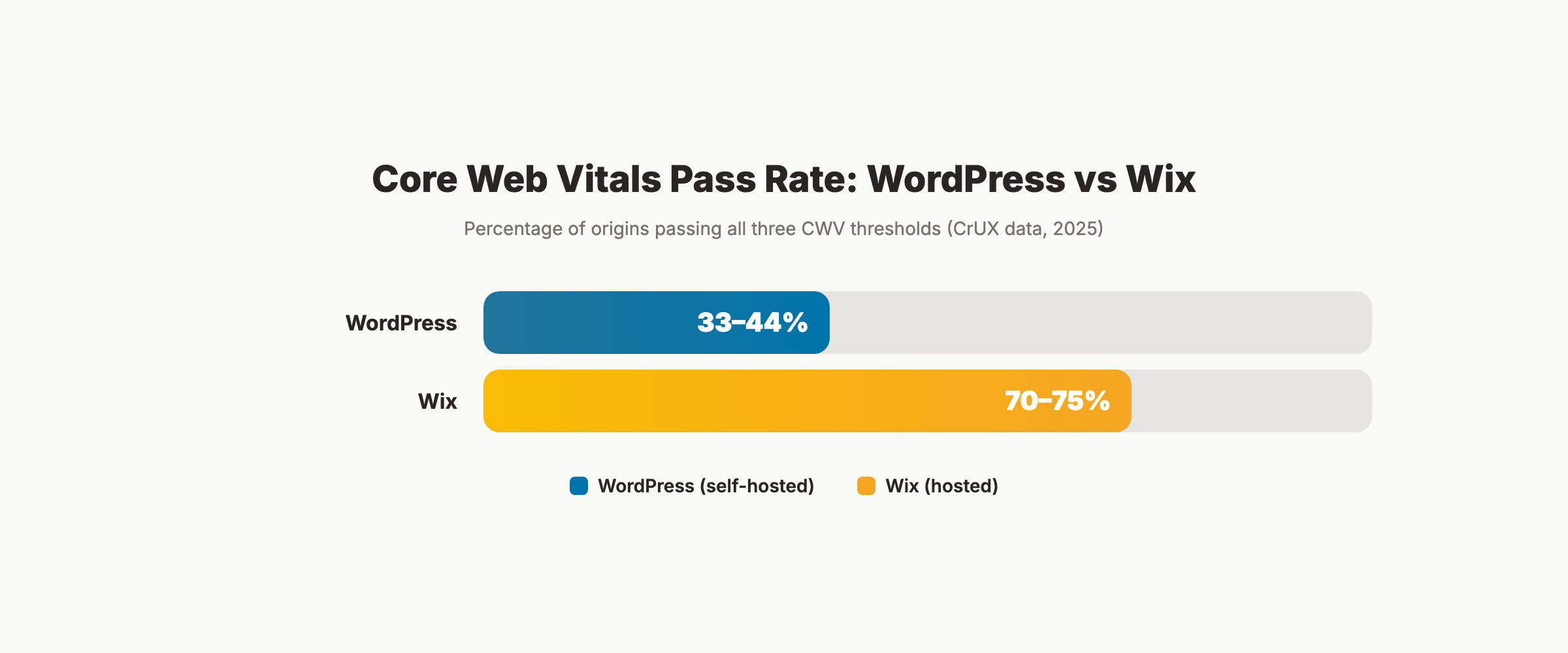
According to CrUX data from the Chrome User Experience Report, 70-75% of Wix origins pass all three Core Web Vitals thresholds. Only 33-44% of WordPress origins do.
This does not mean Wix is faster. It means the average Wix site is faster than the average WordPress site. WordPress has a higher ceiling but a much lower floor. Bad hosting, unoptimized themes, and plugin bloat drag the average down.
Wix infrastructure includes a global CDN, automatic image compression (WebP and AVIF), and server-side rendering. You cannot control JavaScript bundling, third-party script loading, or server configuration. But you also cannot break it.
The improvement trajectory matters. Wix sites in 2026 are measurably faster than Wix sites in 2022. They still cannot match a purpose-built WordPress stack on Kinsta or WP Engine with a lightweight theme.
Verdict: Page Speed
WordPress wins — with a caveat. An optimized WordPress site is faster. But most WordPress sites are not optimized. If you will not invest in proper hosting and performance tuning, Wix delivers more consistent speed out of the box.
Content Publishing and Blogging
Content drives organic traffic. Your platform’s blogging system directly affects how efficiently you publish SEO-optimized articles.
WordPress for Blogging
WordPress was built as a blogging platform. It excels at content:
- Native categories and tags for content organization
- Custom post types for different content formats
- Gutenberg block editor with reusable blocks
- Revision history for every post
- Scheduled publishing
- RSS feeds for content syndication
- 60,000+ plugins for extending functionality
WordPress handles internal linking through plugins like Link Whisper or Rank Math. You can build topical authority through content clusters with full control over URL structure and taxonomy.
For businesses publishing 10+ articles per month, WordPress provides the infrastructure to scale. Content teams can use editorial workflows, user roles, and staging environments.
Wix for Blogging
Wix has a capable blog module with:
- Rich text editor with media embedding
- Categories and tags
- Scheduled publishing
- SEO fields per post (title, description, slug)
- Automatic BlogPosting schema
- Built-in social sharing
The blog editor is simpler than WordPress Gutenberg. For basic blog publishing, this is an advantage. Less complexity means fewer formatting errors.
The limitation shows at scale. Wix does not support custom post types. Content taxonomy options are basic. Managing 200+ blog posts on Wix becomes cumbersome compared to WordPress.
Verdict: Content Publishing
WordPress wins for scale. If your SEO strategy depends on publishing volume, WordPress handles it better. Wix wins for simplicity. If you publish 2-4 posts per month, Wix covers the basics without overhead.
Stop writing. Start ranking. Stacc publishes 30 SEO-optimized articles per month on your website automatically. Start for $1 →
E-Commerce SEO
If you sell products online, e-commerce SEO adds another layer of comparison.
WordPress + WooCommerce
WooCommerce is the most popular e-commerce plugin for WordPress. It powers over 5 million online stores. For SEO, it provides:
- Custom product URLs
- Product schema markup (price, availability, reviews)
- Category and tag pages for keyword targeting
- Breadcrumb navigation
- Faceted filtering (with proper canonical handling via plugins)
- Integration with Yoast WooCommerce SEO or Rank Math
WooCommerce gives you full control over product page structure. You can add comparison tables, size guides, FAQ sections, and custom fields that help pages rank for long-tail keywords.
Wix E-Commerce
Wix Stores includes:
- Product pages with SEO fields
- Category pages
- Basic product schema (auto-generated)
- Mobile-optimized checkout
Wix e-commerce is functional for small catalogs (under 500 products). The SEO tools are adequate for basic product optimization. But you lack the depth of WooCommerce for advanced product SEO like custom faceted navigation, programmatic product pages, or complex internal linking between products and blog content.
Verdict: E-Commerce SEO
WordPress + WooCommerce wins. The customization depth and plugin ecosystem give you more ranking opportunities per product page.
Local SEO Features
For service businesses, local SEO determines whether you appear in Google Maps and the local pack.
WordPress Local SEO
WordPress handles local SEO through plugins:
- Rank Math — LocalBusiness schema, multiple locations, opening hours
- Yoast Local SEO — Premium add-on for multi-location businesses
- Schema Pro — Advanced local schema generation
- Google Maps embedding via shortcodes or blocks
You can build location-specific landing pages with unique content, custom URLs, and targeted internal links. WordPress gives you full control over your local SEO architecture.
Wix Local SEO
Wix includes:
- Business info fields (address, phone, hours) in site settings
- Automatic LocalBusiness schema when business info is filled
- Google Maps integration
- Built-in contact forms
Wix handles the basics of local SEO well. For a single-location business, Wix provides everything you need without plugins.
Multi-location businesses will find Wix limiting. Building 20+ location pages with unique content and schema requires manual work that WordPress plugins automate.
Verdict: Local SEO
Tie for single locations. Both platforms handle single-location local SEO. WordPress wins for multi-location businesses that need scalable local landing pages.
Your SEO team. $99 per month. 30 optimized articles, published automatically to WordPress or any CMS. Start for $1 →
SEO Plugins and Tools Ecosystem
WordPress Plugin Ecosystem
WordPress has 60,000+ plugins. For SEO, the key categories include:
| Category | Top Plugins |
|---|---|
| All-in-one SEO | Yoast SEO, Rank Math, AIOSEO |
| Schema markup | Schema Pro, Rank Math (built-in) |
| Speed optimization | WP Rocket, LiteSpeed Cache |
| Image optimization | ShortPixel, Imagify, Smush |
| Internal linking | Link Whisper, Rank Math |
| Analytics | MonsterInsights, Site Kit by Google |
| Sitemap management | Yoast, Rank Math, XML Sitemap Generator |
| Broken link checking | Broken Link Checker, Ahrefs |
This ecosystem is both a strength and a weakness. More plugins mean more options. More plugins also mean more potential conflicts, more updates to manage, and more security vulnerabilities to monitor.
Wix App Market
Wix offers a curated app market with SEO-related apps:
- Site Booster (local directory submissions)
- Visitor Analytics
- Google Ads integration
- Social media auto-posting
The selection is smaller but safer. Apps are vetted by Wix. Conflicts are rare. But you cannot replicate the depth of WordPress SEO plugins.
Verdict: SEO Tools
WordPress wins on depth. The plugin ecosystem is unmatched. Wix wins on simplicity. Fewer choices mean less room for error.
The True Cost of SEO on Each Platform
Platform cost includes more than the subscription price. Here is the full picture.
| Cost Factor | WordPress | Wix |
|---|---|---|
| Hosting | $5-$50/mo (shared to managed) | Included in plan |
| Platform/plan | Free (open-source) | $17-$159/mo |
| Domain | $10-$15/year | Free first year, then $15/year |
| SSL certificate | Free (Let’s Encrypt or host) | Included |
| SEO plugin | Free (Yoast/Rank Math) or $99/year | Included (built-in) |
| Speed plugin | $49-$99/year (WP Rocket) | Not needed |
| Image optimization | Free-$10/mo | Included |
| Theme | Free-$79 one-time | Included (700+ templates) |
| Backup solution | $2-$10/mo | Included |
| Security plugin | Free-$199/year | Included |
| Total year 1 | $200-$800+ | $204-$1,908 |
| Annual ongoing | $150-$600+ | $204-$1,908 |
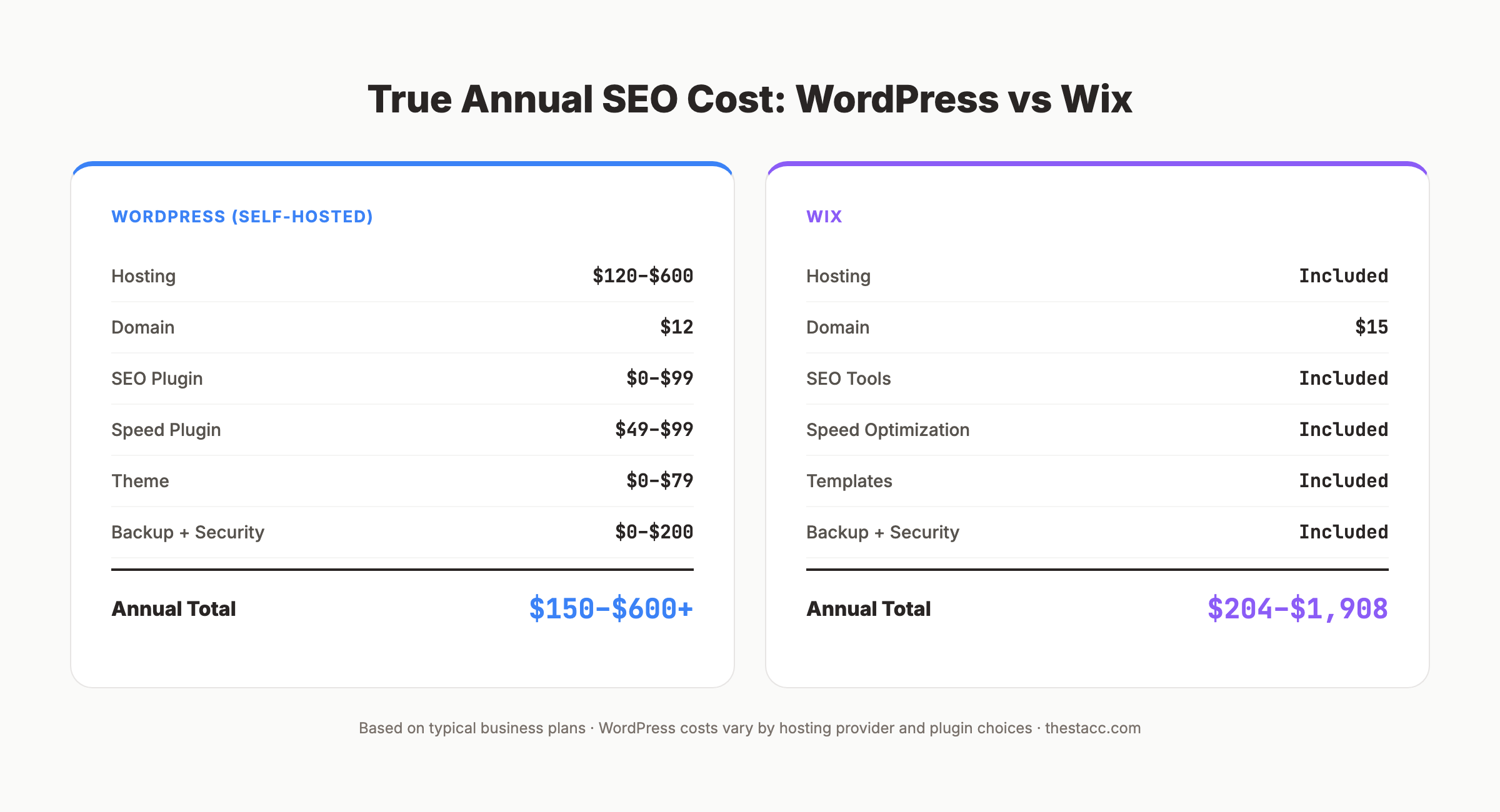
WordPress is cheaper for a basic setup. Wix is cheaper when you factor in the time and plugins needed to match its built-in features. The real cost is labor. WordPress requires more technical knowledge or a developer on retainer.
Where WordPress Wins
-
Total SEO control. Every file, every setting, every configuration is accessible. Nothing is locked behind platform limitations.
-
Plugin depth. 60,000+ plugins cover every SEO use case. From advanced schema to automated internal linking to AI content optimization.
-
Page speed ceiling. With proper hosting and optimization, WordPress achieves faster load times than any hosted website builder.
-
Content at scale. Custom post types, editorial workflows, and staging environments support teams publishing 30+ articles per month. Learn more about scaling blog content.
-
E-commerce SEO. WooCommerce provides product schema, faceted navigation, and programmatic optimization that Wix cannot match.
-
Custom schema. Implement any schema type, including FAQ, HowTo, Product, and Event, with full control over the JSON-LD output.
-
Server-side optimization. Control caching, CDN, database queries, and server responses for maximum crawl efficiency.
Where Wix Wins
-
Zero setup time. SEO basics work immediately. No plugins to install. No hosting to configure. No security updates to manage.
-
Consistent performance. Every Wix site gets the same infrastructure. No plugin conflicts. No bad hosting decisions. Median Lighthouse SEO score of 100 across all sites.
-
Built-in structured data. BlogPosting and LocalBusiness schema generate automatically. No plugin required.
-
Beginner-friendly SEO. SEO Wiz guides new users through basic optimization. Title tags, meta descriptions, and Google Search Console connection take minutes, not hours.
-
Lower maintenance burden. No updates to manage. No security patches. No plugin compatibility issues. Build and focus on your business.
-
Multilingual SEO. Built-in multilingual support with automatic hreflang tags. WordPress requires a plugin (WPML or Polylang) that costs $39-$99/year.
3,500+ blogs published. 92% average SEO score. See what Stacc can do for your site. Start for $1 →
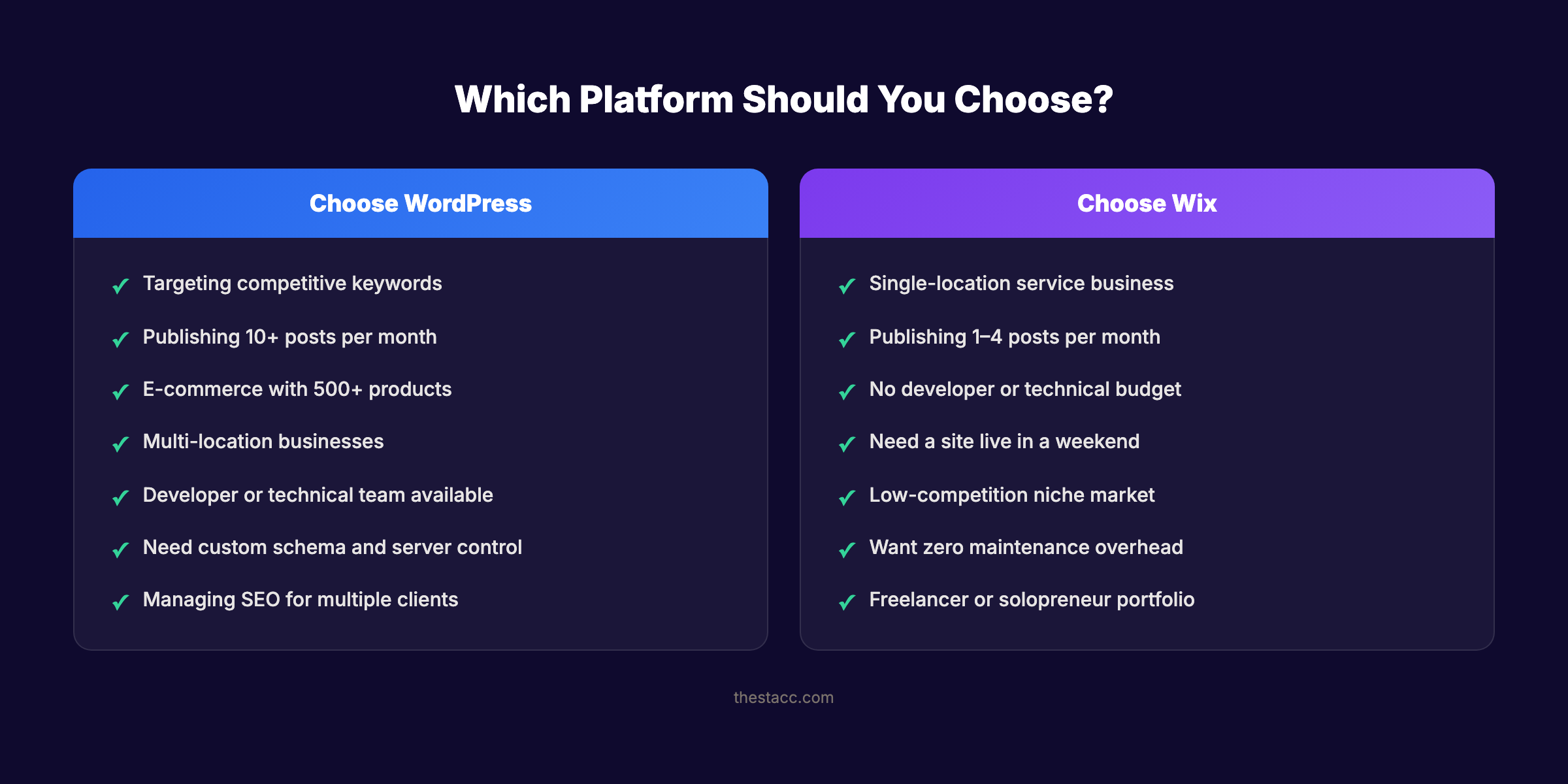
Who Should Choose WordPress for SEO?
- Businesses targeting competitive keywords where every ranking factor matters
- Companies publishing 10+ blog posts per month
- E-commerce stores with 500+ products
- Multi-location businesses needing scalable local landing pages
- Marketing teams with technical resources (developer access or a dedicated webmaster)
- Agencies managing SEO for multiple clients
- Anyone who needs advanced keyword research workflows integrated into their CMS
Rank everywhere. Do nothing. Blog SEO, Local SEO, and Social on autopilot. Works with WordPress, Wix, and every major CMS. Start for $1 →
AI Search and Generative Engine Optimization
Generative engine optimization is becoming a ranking factor. AI search engines like Google AI Overviews, ChatGPT, and Perplexity pull answers from websites that structure content clearly.
WordPress for AI Search
WordPress gives you full control over the signals that AI search engines use:
- Custom schema markup for every content type (FAQ, HowTo, Article, Product)
- llms.txt files for AI crawler guidance
- Granular control over AI crawler access via robots.txt
- Speakable schema for voice search optimization
- Clean HTML output that AI parsers can process reliably
You can optimize every page specifically for AI Overview inclusion. WordPress gives you the markup flexibility that AI citation depends on.
Wix for AI Search
Wix automatically generates BlogPosting and LocalBusiness structured data. It handles basic schema well. But you cannot add custom schema types like HowTo, FAQ (beyond blog posts), or Speakable.
Wix recently added AI-related features in its SEO dashboard, including the ability to track how pages appear in ChatGPT responses. The built-in structured data is sufficient for simple content. Complex schema strategies require WordPress.
Verdict: AI Search
WordPress wins. Full schema control and custom markup give WordPress sites more surface area for AI search visibility.
Programmatic SEO at Scale
Programmatic SEO generates hundreds or thousands of pages from structured data. Think city landing pages, product comparison pages, or directory listings.
WordPress handles programmatic SEO through custom post types, Advanced Custom Fields, and templating systems like Elementor or custom PHP templates. You can build 500 location pages from a CSV in an afternoon.
Wix does not support programmatic page generation. Every page requires manual creation. For businesses that need city-specific landing pages or large-scale content generation, this is a hard limitation.
WordPress wins. Programmatic SEO is not possible on Wix.
Who Should Choose Wix for SEO?
- Single-location service businesses (dentists, plumbers, consultants)
- Freelancers and solopreneurs building a portfolio site
- Small businesses publishing 1-4 blog posts per month
- Business owners with no technical background and no developer budget
- Anyone who wants a professional site live in a weekend with SEO basics handled
- Businesses in low-competition niches where basic SEO is enough to rank
FAQ
Is WordPress better than Wix for SEO?
WordPress offers more SEO control, a deeper plugin ecosystem, and full server access. For competitive keywords and large-scale content strategies, WordPress is the better choice. Wix handles SEO fundamentals well and is a strong option for small businesses in low-competition markets.
Can Wix sites rank on Google?
Yes. Google’s John Mueller has confirmed that Wix sites can rank. Wix earned a perfect Lighthouse SEO score of 100 for two consecutive years. The platform handles crawling, indexing, and basic on-page SEO well. Ranking depends on your content quality and backlink profile, not just your CMS.
Does Wix have SEO plugins like WordPress?
Wix does not have an equivalent plugin ecosystem. Instead, Wix builds SEO features directly into the platform. You get title tags, meta descriptions, schema markup, sitemaps, and redirects without installing anything. For advanced needs like custom schema types or automated internal linking, WordPress plugins offer more options.
Is WordPress SEO free?
The core WordPress software is free. The essential SEO plugins (Yoast SEO and Rank Math) have free versions that cover most needs. You pay for hosting ($5-$50 per month), a domain ($10-$15 per year), and optional premium plugins. Total annual cost ranges from $150 to $600 depending on your setup.
Should I migrate from Wix to WordPress for SEO?
Migrate only if you have hit Wix’s ceiling. Signs include: you need custom schema types Wix does not support, your site loads too slowly and you cannot fix it, you publish 10+ articles per month and need editorial workflows, or you need server-level optimizations for Core Web Vitals. If Wix handles your current SEO needs, stay. Migration carries risk (broken URLs, lost rankings) and costs time.
Which platform is better for local SEO?
Both platforms handle single-location local SEO well. WordPress has an edge for multi-location businesses because plugins like Rank Math and Schema Pro automate LocalBusiness schema across many pages. Wix is sufficient for a single storefront or office. Read our full local SEO guide for platform-agnostic optimization tips.
The Bottom Line
WordPress gives you a higher SEO ceiling. Wix gives you a higher SEO floor.
If you have the technical resources and plan to invest in content, WordPress will outperform Wix in competitive markets. If you need a clean, professional site with solid SEO defaults and zero maintenance, Wix delivers without the overhead.
The platform matters less than what you publish on it. A Wix site with 50 well-optimized blog posts will outrank a WordPress site with 5 thin pages every time. Consistent, high-quality content is the factor that separates sites that rank from sites that do not.
Choose the platform that fits your resources. Then focus on publishing content that earns rankings.
Written and published by Stacc. We publish 3,500+ articles per month across 70+ industries. All data verified against public sources as of March 2026.
