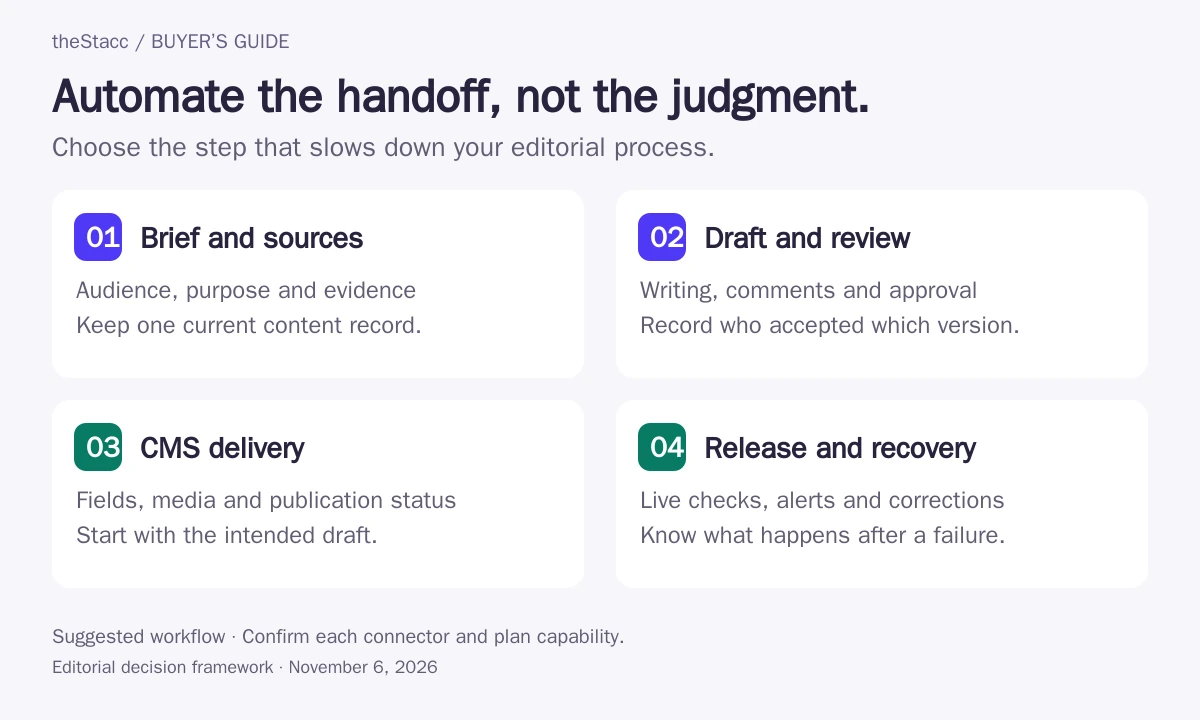
Automate the handoff that is slowing the team down
A blog workflow connects decisions as well as files. Someone accepts the topic, someone approves the brief, and someone decides whether the finished article is ready for readers. Automation becomes useful when it passes the right version and fields between those people without losing the decision. If you want the brief, draft and CMS publishing in one workflow, compare SEO automation software such as theStacc's Blog & SEO module.
| Where work gets stuck | Options to examine | Decision the team still owns |
|---|---|---|
| Research never becomes a usable brief | Content Harmony; Frase | Audience, search intent, evidence and the article’s useful contribution |
| Writers and editors lose track of drafts | PublishPress Planner; Frase Professional | Who reviews each version and who can approve publication |
| Approved documents need repeated formatting | Wordable | Whether the destination draft preserves headings, images, links and tables |
| Tracker, assets and CMS need to exchange fields | Zapier; Make; n8n | Approval conditions, field mappings and ownership of failed runs |
| Finished posts only need a publication date | WordPress.com native scheduling | Final preview, site timezone and confirmation that the page goes live |
If the main requirement is generating articles, use the separate autoblogging tools comparison. This guide focuses on getting an editorial team’s work from an accepted topic to a checked live page.
Compare tools by the handoff they support
| Option | Workflow role | Billing unit and scope to check |
|---|---|---|
| Zapier | Workflow connector | Free tier; paid plans scale with task usage. Confirm the selected task allowance and billing term. |
| Make | Visual workflow orchestration | Credit-based subscriptions; the actions in each scenario determine usage. Check the live calculator. |
| n8n | Workflow orchestration with cloud and self-hosted options | Cloud Starter lists €20/month billed annually for 2,500 executions. Self-hosted Community Edition also exists; infrastructure and maintenance are separate. |
| WordPress.com native scheduling | Native publishing schedule | Scheduling is a native workflow; website plan and hosting costs remain separate. |
| PublishPress Planner | Editorial calendar and status board | Free and Pro editions; confirm the current Pro license. Slack and publishing-date reminders are Pro features. |
| Wordable | Document-to-CMS publishing bridge | Export-based plans; confirm the live quote and site allowance. Numeric plan prices were not exposed in the accessible pricing page. |
| Content Harmony | Research and reusable content briefs | Standard 5 lists $50/month for five content workflows; unlimited users and projects. Annual billing differs. |
| Frase | Content platform with publishing connections | Starter: $49/month or $468/year. Professional: $129/month or $1,236/year; its published scope adds the content calendar and team capacity. |
How this shortlist was researched
theStacc sells SEO software and managed services. This guide uses official-source research and automated editorial assistance. We have not run account-level tool tests or measured publishing speed, cost savings, rankings or AI citations. The options are organized by workflow fit, without numerical quality scores.
Options are grouped by useful fit rather than scored from first to last. Each profile links to its source. Confirm the selected plan or proposal before buying. See our editorial standards.
Eight tools for different editorial bottlenecks
1. Zapier
Good fit: Teams connecting an existing editorial tracker to their CMS
Zapier can connect editorial apps with WordPress actions such as creating and updating posts and uploading media. It suits teams whose writing process already works but whose handoffs still involve copying fields between tools.
Use a defined approved status to trigger the CMS handoff. A connector executes your rules; it does not establish search intent, verify facts, or decide whether an article deserves publication.
Before you buy: Can the workflow preserve a CMS post ID, stop unapproved items, and alert an owner if a handoff fails?
2. Make
Good fit: Teams with multi-step content routing and field transformations
Make connects WordPress with other apps through configurable scenarios. It is a candidate when editorial records, assets and publishing fields need several transformation or routing steps.
Map the approval condition before the publishing action. Make documents incomplete executions, but storing them is disabled by default and automatic retries apply only to supported errors or configured handlers.
Before you buy: Who enables and monitors incomplete executions, and how will a retry avoid creating a duplicate post?
3. n8n
Good fit: Technical teams that want to own workflow logic and maintenance
The WordPress node supports creating, retrieving and updating posts and pages. n8n also supports error workflows that can notify an owner when an execution fails.
Choose it when someone can maintain mappings, error paths and the hosting arrangement. Flexible workflow logic is useful only if the team also owns review and recovery.
Before you buy: Who maintains the workflow, and can a failed CMS step be retried against the existing post instead of creating another one?
4. WordPress.com native scheduling
Good fit: Small teams whose approved posts already live in WordPress
WordPress.com can schedule posts and pages for a future date, then reschedule or unschedule them. This can be sufficient when the only missing step is publication timing.
Check the site timezone and scheduling behavior on the actual hosting setup. Native scheduling does not replace topic research, editorial assignments, or fact review.
Before you buy: Does the item show as scheduled, and has the team checked timezone and low-traffic publishing behavior for this site?
WordPress.com native scheduling: official offering and current details
5. PublishPress Planner
Good fit: WordPress editorial teams managing drafts, review and deadlines
PublishPress Planner adds a calendar, content overview, status board and editorial notifications inside WordPress. Its Pro edition adds Slack updates and reminders around publishing dates.
Use it when posts are getting stuck between writers and editors. A board makes progress visible, but the team must still define who can approve and publish.
Before you buy: Which statuses require review, who owns each post, and which notifications actually prompt action?
6. Wordable
Good fit: Teams writing in Google Docs and handing finished content to WordPress
Wordable transfers Google Docs content into WordPress and offers image and formatting transformations. Publishing templates can reduce repeated formatting work across an editorial team.
Keep editorial approval before export and preview the destination page. The vendor describes image handling and export automation, but no independent speed or quality benchmark was run for this guide.
Before you buy: What publication status will the export use, and do headings, tables, image descriptions and links survive a representative sample?
7. Content Harmony
Good fit: SEO leads handing consistent research briefs to writers
Content Harmony combines keyword research, content briefs and grading. Custom brief templates, shareable links and brief exports help keep the writer handoff consistent across a content team.
Use it upstream of drafting and publishing when briefs are inconsistent or research gets lost. Brief sharing is not evidence of an automatic CMS publishing integration.
Before you buy: Can the brief carry audience, intent, required evidence, exclusions and an approver into the writer’s existing workspace?
8. Frase
Good fit: Teams wanting research, content planning and supported CMS publishing together
Frase lists publishing connections for WordPress, Webflow, Sanity and Wix. Its Professional plan includes a content calendar; Content Guard proposes changes to selected existing pages for approval by default.
Match the plan to the actual team workflow. Treat optional agent autopublishing separately from Content Guard approvals, and verify the destination draft/live behavior during a pilot.
Before you buy: Which actions can publish without review, which require approval, and does the plan include the calendar and seats this team needs?
Design a handoff a colleague can actually use
Start with a representative article from your real publishing queue. Include its normal table, graphic, citations and internal links. A workflow that moves a plain paragraph successfully may still mishandle the page your team publishes every week.
- Make the brief actionable. Record the audience, intended question, search intent, required sources, original contribution, exclusions, writer, approver and due date. A keyword on its own is not an approved brief.
- Agree on what approval means. Use separate states for drafting, review, changes requested and approved for CMS handoff. Identify who can change the approval state and who can publish at the destination.
- Map the fields. Carry the article identifier, CMS post ID when available, title, slug, article body, SEO title, description, image alt text, taxonomy and intended publication status. Check where your CMS or SEO extension stores each field.
- Preview a draft. Inspect the destination layout, tables, graphic captions, links, image descriptions and mobile reading order. Confirm the intended publication date and timezone before scheduling.
- Exercise a controlled failure. In a draft workflow, stop a media or CMS handoff and inspect the alert, retained state and retry path. Check for an existing post before replaying an uncertain creation step.
- Close the loop. Assign a person to verify the live URL, content version and page fields. Record the result back in the editorial tracker so a completed run is not mistaken for a checked publication.
For article-level checks, use the SEO content checker guide. For help developing or revising the answer itself, compare content optimization tools. Neither replaces the CMS handoff check.
Choose the recovery path before enabling publication
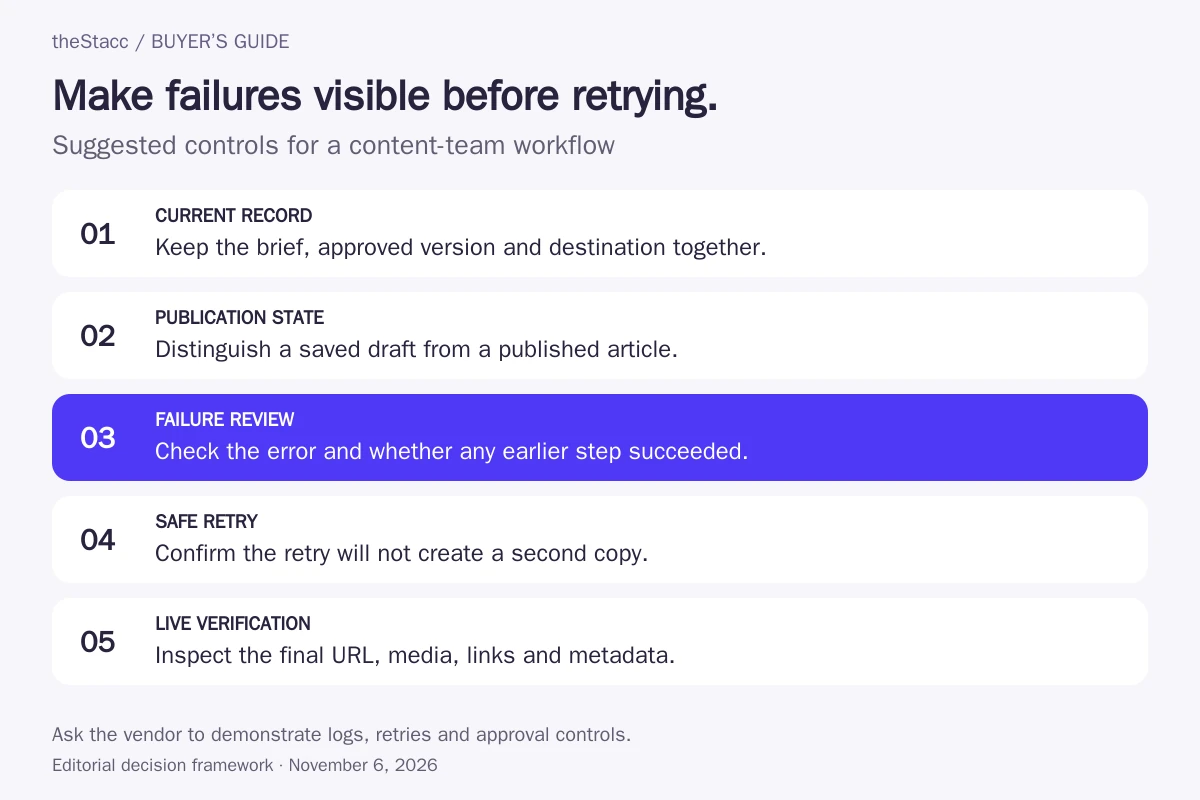
A failed run can leave a partially completed post. The CMS may have saved the article even if the connector did not receive confirmation. Before pressing retry, inspect the destination and the stored post ID. Repeating every step from the beginning can create a second article or overwrite a newer revision.
| Failure or uncertainty | Immediate response | Check before continuing |
|---|---|---|
| Approval is missing or the draft changed after approval | Pause the handoff and return it to the editor | The approval applies to the content version being exported |
| The same trigger arrives again | Look up the editorial item and existing CMS post | Whether to ignore the event or update the existing draft |
| An image upload fails | Keep publication paused and notify the assigned owner | The intended asset, image description and placement reached the preview |
| A usage allowance or integration error stops the run | Retain the item’s state and inspect the failed step | Capacity or access has been restored, with no duplicate destination post |
| The date or timezone is wrong | Inspect and correct the destination schedule | The CMS shows the intended publication time and status |
| The export drops a table, link or SEO field | Return the draft to the publishing owner | The mapping or template is corrected and the preview passes review |
Recovery features need configuration. Make says incomplete-execution storage is disabled by default; its retry behavior depends on the error or configured handler. n8n documents error workflows for failed executions. An alert tells someone to investigate. It does not prove that a post was recovered or that a duplicate was prevented.
Price the complete workflow, including revisions
Comparing the monthly subscription alone hides the work each unit buys. A task, a credit, an execution and a content workflow describe different activities. Sketch the steps for an article, then ask how drafting changes, repeated exports, retries and connected sites affect the selected plan.
| Tool or category | Published billing basis | Question for your pilot |
|---|---|---|
| Zapier | Tasks and selected plan features | Which actions consume tasks, and does the chosen plan support the required multi-step handoff? |
| Make | Credits used by scenario actions | How do routing, processing and repeated actions change credit usage? |
| n8n cloud | Workflow execution allowance | How many runs, retries and retained executions does the team need? |
| Wordable | Export plan and connected-site capacity | Do revisions use another export, and when do unused exports expire? |
| Content Harmony | Content workflows containing research, a brief and grading | How many new research workflows are needed, apart from publishing activity? |
| Frase | Plan features, capacity and team scope | Does the plan include the content calendar, seats and publishing connections required? |
| Native scheduling and editorial plugins | Website costs and any paid plugin license | Which notification or planning features require an upgrade? |
Keep the workflow owner’s time in the estimate. A self-hosted option also needs someone to maintain its infrastructure and integrations. No cost-saving benchmark was run for this comparison; a pilot should tell you whether the repeated work removed is worth the software and upkeep.
Decide who will own the publishing process
Build the workflow in-house when the team can define its review rules, maintain the mappings and respond when a connection breaks. A connector is most useful when the underlying editorial process is already clear. Automating an ambiguous approval status just moves that ambiguity into the CMS.
If an agency or implementation partner manages the workflow, ask for a named publishing owner, a field map, the approval rule, a failure queue and a documented handover. Specify whether their work ends at creating a CMS draft, scheduling the article or verifying the live page. Keep access and publication rights tied to the agreed responsibilities.
An editorial calendar may be enough when the problem is ownership and deadlines. A document export may be enough when the writing process is sound but formatting consumes attention. Add orchestration when there is a real cross-tool handoff to maintain.
Choose the tool for the blocked step
For repeatable briefs, examine Content Harmony and Frase. For review visibility inside WordPress, examine PublishPress Planner. For Google Docs handoffs, examine Wordable. For connecting an existing tracker and CMS, compare Zapier, Make and n8n against the same approval and recovery requirements. If approved articles already live in WordPress.com, check whether native scheduling solves the remaining need.
Start with one complete editorial path: accepted topic, approved brief, reviewed draft, checked CMS preview, publication and live-page verification. Keep the article’s clear answers, evidence and useful examples intact at each stage. A successful automation run is an operational result; search performance and AI citations need separate observation after publication.
Evaluate theStacc against your actual workflow
If you are evaluating theStacc for content production, compare its current workflow with the handoffs your team needs. Confirm the briefing, review, CMS delivery and exception-handling responsibilities before choosing a plan. Review the current plans before choosing a paid service.
Start free → to explore the software, or Book a demo → to discuss your requirements.
Blog automation tools for SEO: questions answered
What is the difference between blog automation and autoblogging?
Blog automation can move a brief, notify an editor, export an approved document or schedule a finished post. It does not have to generate the article. Autoblogging tools focus more on producing and publishing content. Choose based on the blocked step, and keep factual review and publication approval explicit in either process.
Can a blog automation tool publish without editorial approval?
Some workflows can publish when a trigger fires, so verify the destination status and account permissions before enabling them. A status named Approved is useful only if the workflow checks it and the right people control it. For a pilot, send the article to a CMS draft and inspect the actual destination page.
How do I prevent duplicate posts when a workflow retries?
Give the editorial item a stable identifier and record the CMS post ID after creation. Before retrying a failed or uncertain run, inspect the destination for an existing post and decide whether to update it. Ask the provider or implementer to demonstrate this behavior; an error notification alone does not prevent duplicates.
Will an automation carry my SEO title and description into the CMS?
Do not assume that moving the article body transfers every field. Map the page title, slug, SEO title, description, image descriptions and relevant taxonomy explicitly. SEO fields may belong to a CMS extension rather than the core post. Preview the exported draft and verify the rendered page after publication.
Which pricing unit should I compare across these tools?
Compare the actions your real workflow needs. Zapier uses tasks, Make uses credits and n8n cloud uses executions; these units are not interchangeable. Wordable plans depend on exports, while Content Harmony meters content workflows. Include revisions, retries, seats, connected sites and maintenance in the buying decision.
Can automated blog workflows improve SEO or AI visibility?
A workflow can make review and publishing steps more consistent, but that does not establish a ranking or citation improvement. Use it to preserve clear answers, accurate sources, useful examples and correct page fields. Review the published page and its subsequent search performance separately from whether the automation completed.
Sources and scope of this comparison
Official product documentation and pricing information were checked on November 6, 2026. Features are vendor descriptions, not independently measured outcomes. Some pricing pages are dynamic; confirm the selected billing term, usage allowance and publishing permissions before purchasing. Frase pricing was checked through official indexed information after its direct pricing-page fetch timed out.