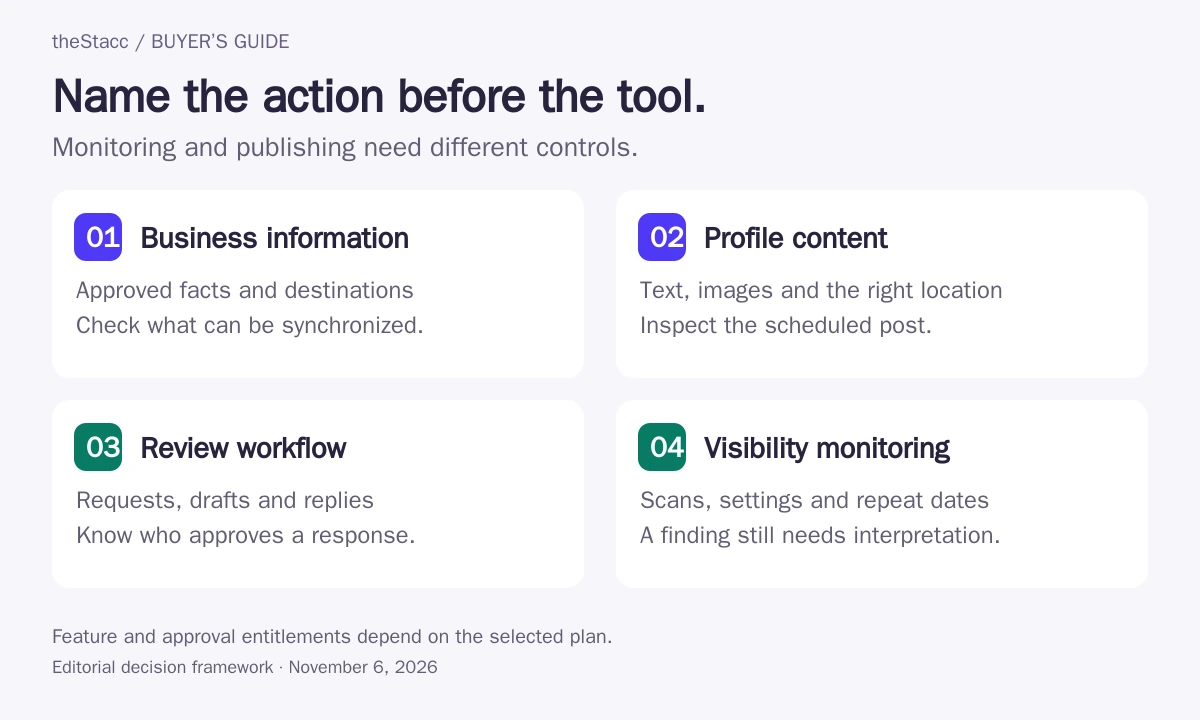
Which local SEO task needs automation?
| Task | Possible automation | Control to verify |
|---|---|---|
| Business information | Distribute approved changes or flag inconsistencies | Which fields and destinations can the tool change? |
| Profile content | Schedule posts or prepare content | Can an owner review the text, image and location? |
| Review workflow | Send requests, organize reviews or prepare replies | Who controls recipients, wording and reply approval? |
| Visibility monitoring | Repeat scans and alert on changes | Which locations, terms, settings and credits are used? |
Write down the authoritative business facts before synchronizing them. A tool can distribute the wrong hours as efficiently as the right ones. Use a named owner for changes to service information, contact details, availability and public replies.
Compare the work automated and the limits to check
| Option | Useful role | Cost basis and limit to check |
|---|---|---|
| BrightLocal | Local monitoring, listing synchronization and plan-based reputation tools | Choose Track, Manage or Grow by task; location count and billing affect price |
| Whitespark Local Platform | GBP change monitoring, bulk editing and update review | US$1/month per location, billed annually |
| Localo | Post scheduling, review assistance and profile task guidance | Per-profile plans; confirm promotional rate, annual charge and VAT |
| Semrush Local | GBP AI Agent, map monitoring and plan-based directory/review management | Local Base US$30/month per location; Local Pro US$60/month per location |
| Yext | Listing creation and synchronization with configurable confirmation | Request a quote for the locations, publishers and products required |
| Uberall | Central listing management and publication across supported directories | Request a scope-specific quote for locations, markets and modules |
| Synup | Listings, reviews and publishing with an agent approval inbox | Solo US$49/month for one location; larger tiers bundle locations |
| Local Falcon | Scheduled geo-grid monitoring and Falcon Agent actions | Starter scan subscription US$24.99/month; confirm Agent entitlement in the selected plan |
How this shortlist was researched
theStacc sells SEO software and managed services. This guide uses official-source research and automated editorial assistance. Inclusion is not a hands-on performance test, a customer endorsement or a promise of results. We have not assigned numerical quality scores.
Options are grouped by useful fit rather than scored from first to last. Each profile links to its source. Confirm the selected plan or proposal before buying. See our editorial standards.
Eight local tools and platforms by operational fit
1. BrightLocal
Good fit: A business or agency separating monitoring from listing and review work
BrightLocal separates visibility tracking from actions on business listings. Manage adds business-detail synchronization and Google Business Profile post scheduling; Grow adds review monitoring, responses and request campaigns.
Start with the job you need to run, not the cheapest tier name. A citation audit identifies issues, while synchronization and a separate citation-building order address different kinds of work.
Before you buy: Confirm which directories, scheduled posts and review channels are included for every location you will manage.
2. Whitespark Local Platform
Good fit: An operator who wants alerts and control over changes to Google Business Profiles
Whitespark Local Platform notifies you when Google Business Profile information changes and lets you reject unwanted updates or edit locations in bulk. It records changes after a location is imported, giving the operator a history to inspect.
This is a focused profile-management purchase, not automatic access to every Whitespark product. Keep ranking grids, citation services and review-request tools separate when calculating the stack you need.
Before you buy: Demonstrate a change alert, the acceptance or rejection step and an edit across only the intended locations.
Whitespark Local Platform: official offering and current details
3. Localo
Good fit: A small business or agency managing GBP content and guided tasks
Localo combines position monitoring, guided optimization tasks and a content publisher. Its review manager suggests replies that an operator can edit and submit, which is different from assuming every review receives an unattended response.
Separate tasks the product recommends from changes it actually publishes. Test the review step and the scheduled-post destination before deciding how much ongoing supervision the account needs.
Before you buy: Confirm active-profile and optimization-seat limits, publication controls and the complete charge at checkout.
4. Semrush Local
Good fit: A business wanting GBP automation with an optional wider listings package
Semrush Local Base includes GBP AI Agent for posts, supplied photos and review replies alongside map tracking. Pro adds listing distribution, review-request campaigns and broader profile-management features.
Review the initial setup and automation settings before activation. A proposed business description can be approved separately, while recurring posts and replies run according to the settings you enable.
Before you buy: Check which actions require review, how to change reply behavior and which directories support the business’s country.
5. Yext
Good fit: A multi-location organization controlling business information across publishers
Yext documents separate controls for opting into publishers, updating existing listings and creating new listings. Disabling automatic creation or updates can leave affected listings waiting for manual confirmation.
Treat synchronization as a process with states and exceptions. Yext distinguishes two-way synced listings from information submitted to a one-way publisher, and some problems require the publisher or support team to act.
Before you buy: Ask how the account handles an incorrect match, missing field and failed connection, and what changes when a location leaves the service.
6. Uberall
Good fit: A brand coordinating location data across countries or a larger network
Uberall describes centrally managing business information and synchronizing changes across its supported publisher network. Bulk updates and location-data workflows make it a candidate when the same operational change affects many sites.
Define the correct source information before distributing it. Ask which publishers and fields apply in each market, then test how the team sees pending updates or handles an exception instead of assuming every destination behaves identically.
Before you buy: Demonstrate a holiday-hours update, a location-specific exception and the record showing which destinations received the change.
7. Synup
Good fit: An agency or brand wanting local marketing actions routed through approval rules
Synup combines local marketing tools with an agent and an approvals inbox. Its documentation distinguishes Manual and Semi-auto work that reaches the inbox from Full auto actions that skip it but remain in the audit trail.
Choose the operating mode deliberately and test it with the people who approve work. The pricing page includes credit promotions and tier-specific capacity, so do not assume every displayed launch allowance applies to a new account.
Before you buy: Confirm location capacity, current credit entitlement, approval permissions and how an incorrectly proposed action is rejected.
8. Local Falcon
Good fit: An operator combining repeat local scans with optional actions on the profile
Local Falcon combines scheduled local scans with Falcon Agent, which documents profile edits, recurring posts and review replies under location-specific settings. Evaluate the measurement and action features separately against the work you need.
Keep scan capacity and action permissions separate. Official pages disagree about the minimum plan for Agent access, so obtain confirmation before buying for automation. Test the action log and a location-level pause as part of the evaluation.
Before you buy: Check grid and scan credit consumption, credit expiry and the exact Agent functions enabled in your account.
Pilot one authorized location before scaling
- Confirm the account, location and permissions being connected.
- Choose a low-impact change the business has approved.
- Inspect the draft or proposed update and its destination.
- Check the live result, including rejected or delayed changes.
- Test pause controls, alerts and the history available to your team.
- Confirm how access and scheduled actions are removed at handover.
Use the selected plan in the pilot. A demonstration account may include approval, reporting or automation features that an entry subscription does not. Ask the vendor to show the workflow for the exact purchase you are considering.
Keep suggestion, approval and publication distinct
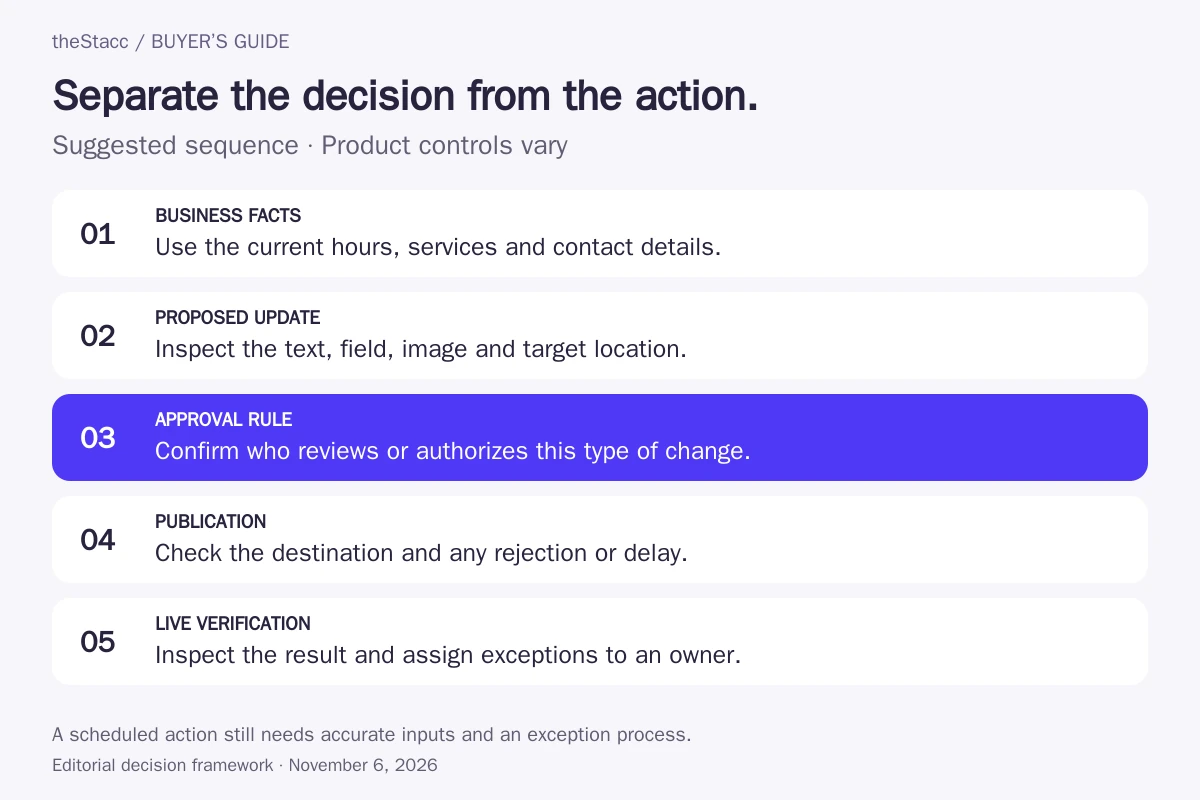
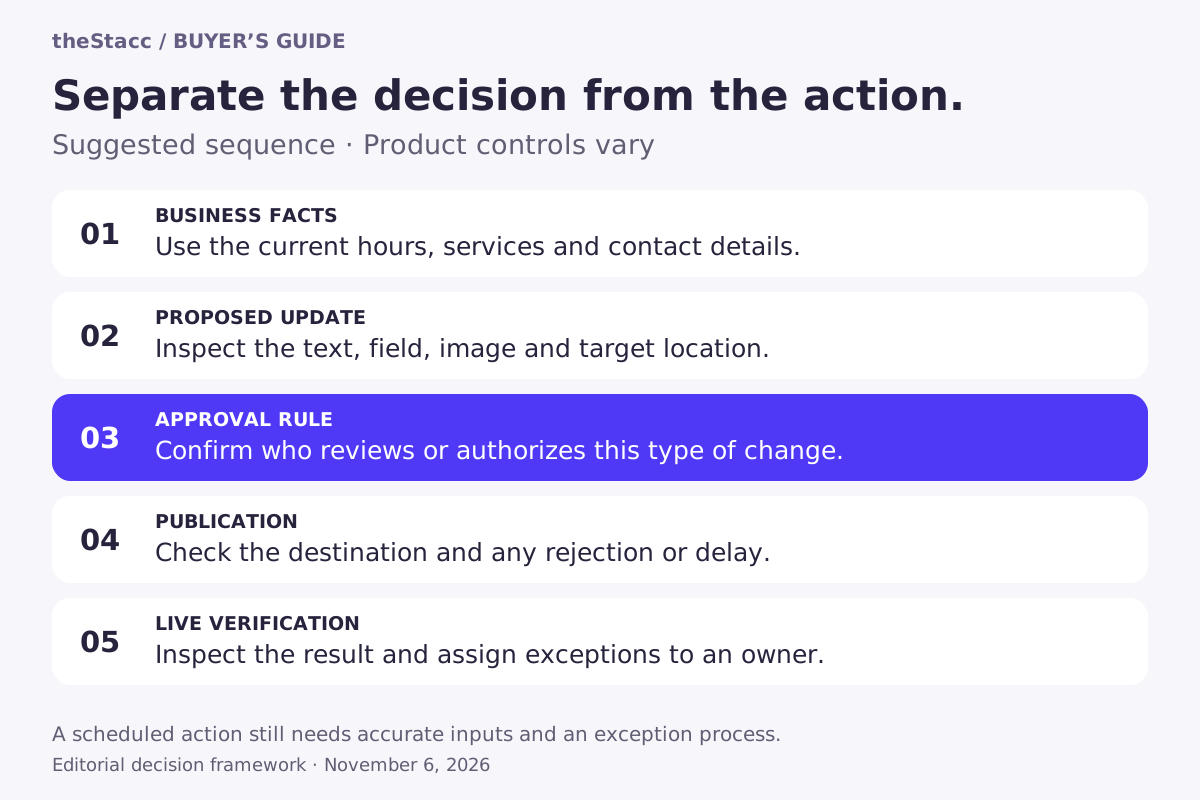
Decide which work can run on a schedule and which needs a person to inspect it. A prepared review reply can be useful without sending it automatically. A scan alert can identify something to investigate without establishing that a public profile should change.
Agree on exception handling. If a profile rejects an edit, a connection expires or a planned post contains an outdated offer, somebody needs to see the issue and own the next action. Check that workflow before adding more locations.
Price locations, usage and add-ons separately
Start with the number of eligible locations and the recurring actions you need. Then add scan credits, review requests, messaging charges, extra seats or separate services where applicable. A low entry price can describe one profile-management feature while the wider local-marketing workflow requires other products.
| Unit | Confirm in the chosen plan |
|---|---|
| Locations | How many profiles or business locations are included? |
| Distribution | Which networks, fields and update frequencies are supported? |
| Scans | How do grid size, search terms and scan frequency consume credits? |
| Reviews | Are requests, messages, reply assistance and publishing separate? |
| People and controls | Which seats, approvals and history features are included? |
| Services | What still needs implementation or management outside the tool? |
Automation still depends on accurate local information
Google’s representation guidelines apply to the business information you publish. A software subscription does not establish that a location or business name is eligible. Keep the profile aligned with the actual business and review changes that a tool proposes from incomplete inputs.
For review workflows, use genuine customer experiences and follow the platform’s current policies. Check how requests and replies are controlled; do not assume a prebuilt campaign is appropriate for every business. Google’s review guidance is a useful starting point.
If you need someone to deliver the work, compare SEO service providers. For wider research and site monitoring, see automated SEO tools.
Judge the completed action before the dashboard
Choose the tool that can complete your recurring task with controls your team can use. Review the actual listing, post, reply or report, then record the remaining manual work. For multiple locations, keep local facts and responsibilities distinct even when the software uses a shared account.
Google explains that local ranking depends on relevance, distance and prominence or popularity. Publishing on a schedule does not guarantee a position. Keep profile actions, observed visibility and business enquiries separate in reporting.
Evaluate theStacc against your actual workflow
If you are evaluating theStacc for local work, confirm the supported profile actions, review controls and reporting in your chosen plan. Keep any listing distribution or implementation work outside that scope assigned to an owner. Review the current plans before choosing a paid service.
Start free → to explore the software, or Book a demo → to discuss your requirements.
Local SEO automation tools: questions answered
What can local SEO software automate?
Depending on the product and plan, it may synchronize business information, schedule profile posts, support review requests and replies, or repeat visibility scans. Verify the actual action: an alert or suggestion is different from a published change.
Is local rank tracking the same as local SEO automation?
Tracking can automate measurement, but it does not necessarily change a listing or perform SEO work. Some products now combine scans with action features. Confirm both the monitoring settings and the separate entitlement for any changes you want the system to make.
Can I approve changes before they are published?
That depends on the feature, plan and integration. Test the actual workflow and permissions for your account. Do not assume that an editable draft also provides a formal approval gate or that every scheduled action waits for someone to review it.
Will a tool guarantee a higher Google Maps position?
No. A tool can help execute or monitor work, but it does not control local search results. Compare the accuracy and completion of agreed actions and use consistent measurement settings without interpreting a subscription as a ranking guarantee.
How do I compare prices across local SEO tools?
Separate locations, listings, scan credits, messages, seats and services. Use the same workload and billing period, then check add-ons and the amount due upfront. One location-management feature may be priced separately from the rest of a vendor’s product range.
What should I check before disconnecting a local tool?
Confirm which scheduled actions stop, what happens to distributed information, which records can be exported and how profile access is removed. Keep the business’s own administrative access. Ask about the selected product’s handover behavior rather than assuming every listing network behaves the same way.
Sources and scope of this comparison
Product and service information was checked against the official pages linked in the profiles on November 6, 2026. Published features are vendor descriptions, not independently measured performance. Confirm the selected plan and current terms before purchasing.
Explore this topic: Marketing Automation for Local Business: 5 High-ROI Plays.