
Editorial Calendar for SEO (2026): Strategies, Tactics & Examples
Step-by-step editorial calendar guide guide for 2026: proven tactics, real examples, common mistakes to avoid, and implementation tips.
Most content teams publish without a plan. They write what feels timely, chase trends, and react to competitors. The result is a blog with 50 posts that cover 50 unrelated topics. No topical authority. No keyword clusters. No compounding traffic.
An editorial calendar fixes this by replacing reactive publishing with strategic planning. It maps every piece of content to a keyword, a topic cluster, a publish date, and a business goal before a single word gets written.
HubSpot found that 56% of marketers worry about burnout. An editorial calendar prevents burnout by spreading work evenly across weeks and months. No last-minute scrambles. No “what should we publish this week?” meetings. Every post is planned, assigned, and scheduled.
We have published 3,500+ blog posts across 70+ industries. Every one started in an editorial calendar before it became a published page. This guide covers exactly how to build one that drives SEO results.
Here is what you will learn:
- What an editorial calendar is and why it matters for SEO
- The difference between an editorial calendar and a content calendar
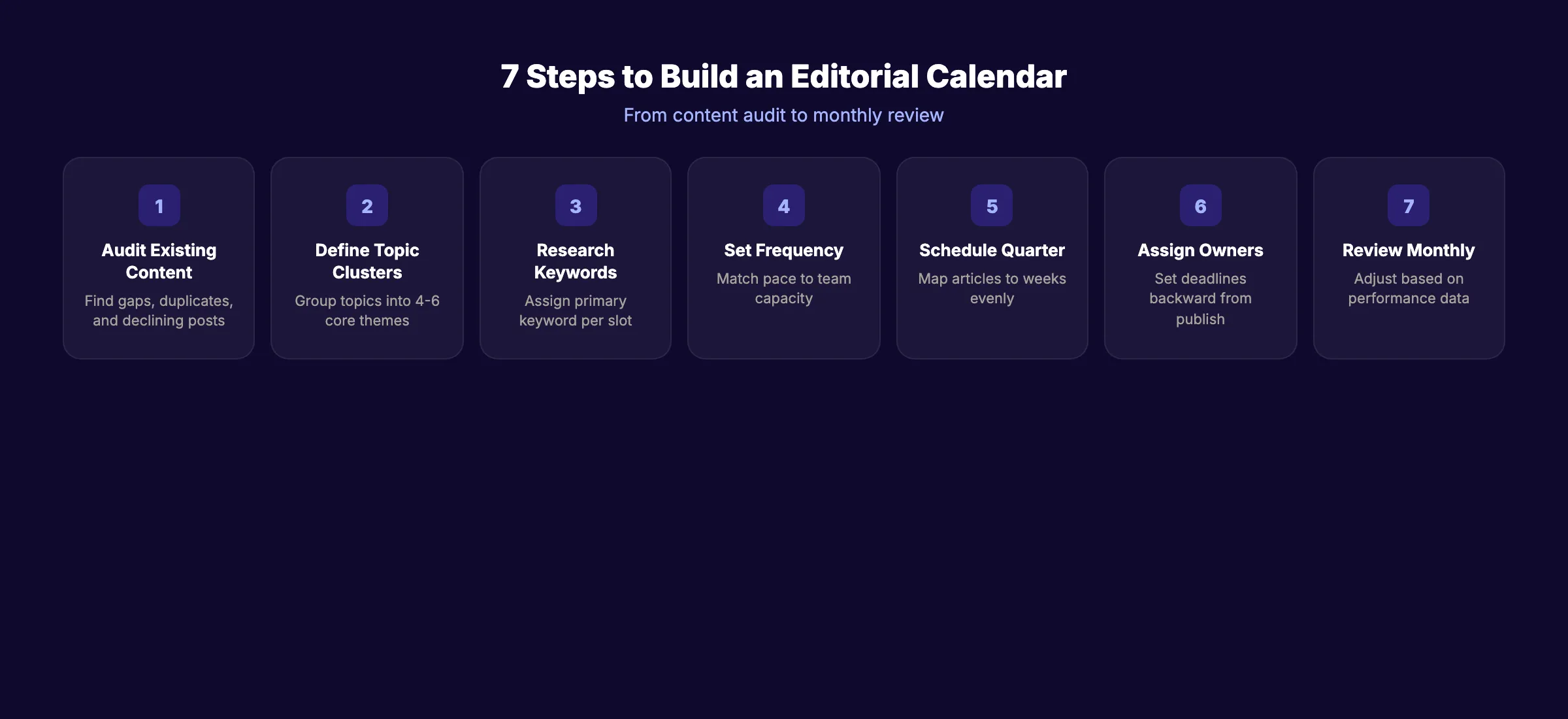
- How to build an editorial calendar in 7 steps
- What to include in every calendar entry
- How to set the right publishing frequency
- The best tools for managing your editorial calendar
- How to measure whether your calendar is working
What Is an Editorial Calendar?
An editorial calendar is a planning document that maps your content publishing schedule over weeks, months, or quarters. It shows what you will publish, when you will publish it, who creates it, and which business goal each piece supports.
Think of it as the bridge between your content strategy and your published output. The strategy defines your topics, audience, and goals. The editorial calendar turns that strategy into a schedule with deadlines and assignments.
What an Editorial Calendar Includes
A complete editorial calendar entry contains:
| Field | Purpose | Example |
|---|---|---|
| Title | Working title of the post | ”How to Build an Editorial Calendar” |
| Target keyword | Primary SEO keyword | ”editorial calendar” |
| Topic cluster | The parent topic this post belongs to | Content Strategy |
| Content type | Format of the piece | Guide, listicle, how-to |
| Author | Who writes it | Content team member |
| Publish date | Scheduled publication date | April 15, 2026 |
| Status | Current workflow stage | Draft, Review, Scheduled |
| Business goal | What the post achieves | Organic traffic, lead gen |
| Internal links | Pages to link to and from | Related blog posts |
| Notes | Brief outline or angle | Key points to cover |
Every field serves a purpose. Skipping the keyword field means you publish content without SEO intent. Skipping the status field means no one knows what stage each piece is in. Skipping the topic cluster field means you cannot measure coverage balance across your core themes.
Some teams add extra fields for word count targets, target persona, content format, and internal linking targets. These additional fields increase planning overhead but improve output quality. Start with the 10 essential fields above and add more as your process matures.
Editorial Calendar vs Content Calendar
These terms get used interchangeably. They are not the same thing.
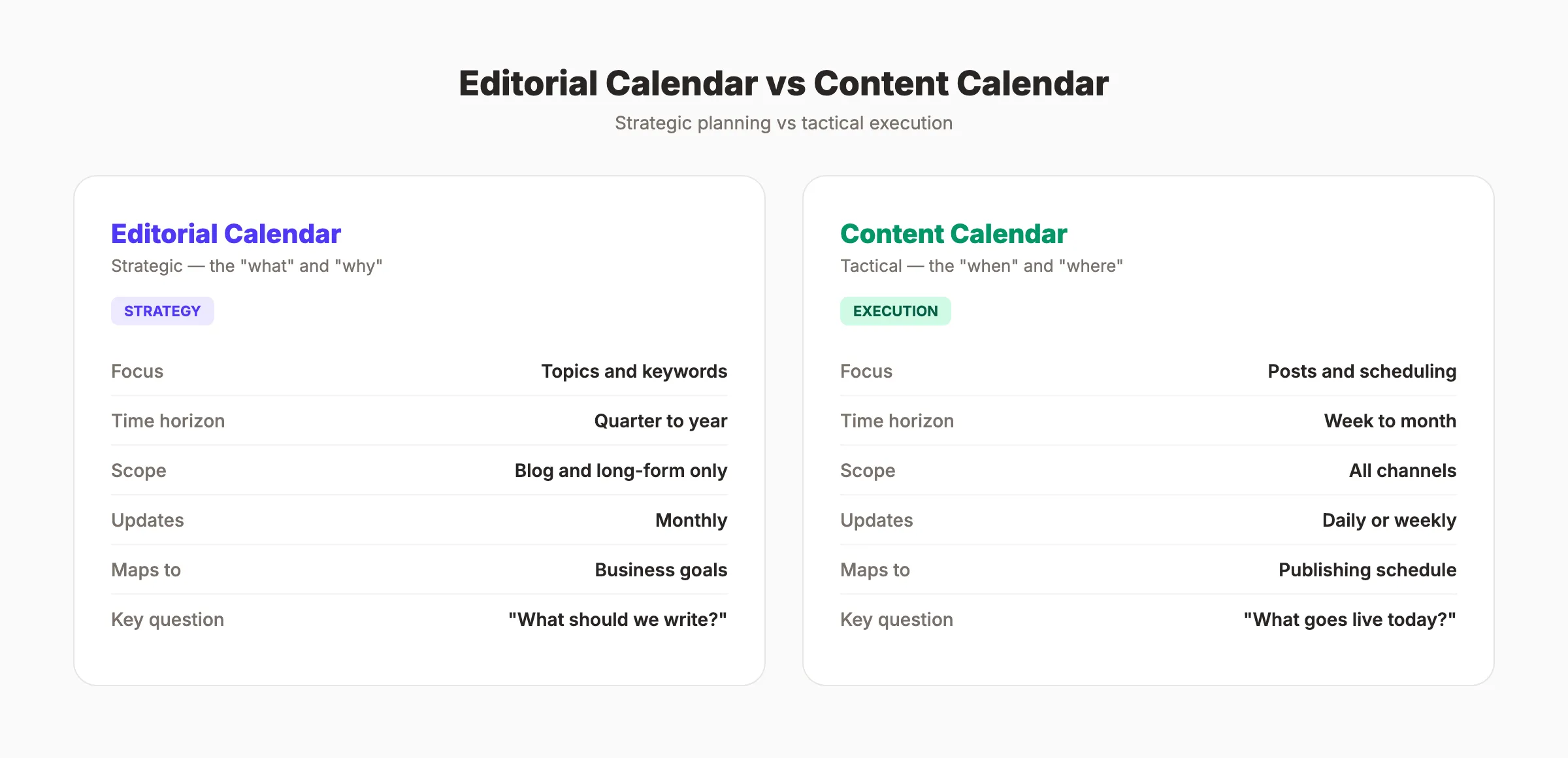
An editorial calendar is strategic. It covers weeks to months of planning. It maps content to business goals, topic clusters, and keyword targets. It answers “what should we publish and why?”
A content calendar is tactical. It covers day-to-day publishing across all channels: blog, social media, email, and video. It answers “what goes live today and on which platform?”
Most teams need both. The editorial calendar feeds the content calendar. Plan topics and keywords quarterly in the editorial calendar. Schedule individual posts and social shares daily in the content calendar.
Why an Editorial Calendar Matters for SEO
Publishing content without an editorial calendar is like running a PPC campaign without a keyword list. You spend resources without knowing if they target the right outcome.
Consistency Drives Rankings
Google rewards sites that publish regularly. A site publishing 4 posts per week builds topical authority faster than a site publishing 4 posts per month. An editorial calendar locks in a publishing cadence and holds the team accountable to it.
Research shows that sites publishing 16+ blog posts per month receive 3.5 times more traffic than sites publishing 0 to 4 posts. The editorial calendar is how you maintain that pace without burning out your team.
Consistency also builds trust with Google’s crawl scheduler. Sites that publish on a predictable rhythm get crawled more frequently. Google learns your publishing pattern and adjusts its crawl schedule to match. Irregular publishing means irregular crawling, which means slower indexing for every new page.
Topic Clustering Requires Planning
Random publishing creates content silos with no internal connections. Planned publishing builds topic clusters where a pillar page links to 10 to 15 supporting articles. This structure signals expertise to Google and earns higher rankings for competitive keywords.
An editorial calendar makes clustering visible. You can see at a glance whether your “Local SEO” cluster has 12 supporting articles while your “Content Strategy” cluster has 3. That gap is a ranking opportunity.
Keyword Cannibalization Prevention
Without a calendar, teams accidentally write 3 posts targeting the same keyword. Each post competes against the others in search results. Google does not know which page to rank, so it ranks none of them well.
The editorial calendar prevents keyword cannibalization by tracking every assigned keyword in a single source of truth. If “editorial calendar” is already claimed, the next writer picks a different angle or a related long-tail keyword. The calendar makes conflicts visible before content gets created, not after it gets published.
Internal Linking Architecture
A well-planned editorial calendar shows exactly which articles link to which. When you publish a new post on “content briefs,” the calendar tells you which existing posts should link to it and which it should link back to. This planned internal linking creates a web of connected content that distributes authority across your entire site.
Stop writing. Start ranking. Stacc publishes 30 SEO articles per month for $99. Every post follows an editorial calendar built for your niche. Start for $1 →
How to Build an Editorial Calendar in 7 Steps
Step 1: Audit Your Existing Content
Before planning new content, audit what you already have. Run a full content audit to identify:
- Pages with declining traffic (candidates for updates)
- Topics you have covered well (do not duplicate)
- Topics you have not covered at all (biggest opportunities)
- Pages targeting the same keyword (cannibalization issues)
- Content types that perform best (guides vs listicles vs how-tos)
The audit reveals gaps. Those gaps become the foundation of your editorial calendar.
Step 2: Define Your Topic Clusters
Group all potential topics into 4 to 6 core clusters. Each cluster gets a pillar page and 10 to 20 supporting articles.
For example, a digital marketing blog might use these clusters:
| Cluster | Pillar Page | Supporting Articles |
|---|---|---|
| SEO | ”SEO: The Complete Guide” | Keyword research, on-page, technical, link building |
| Content Strategy | ”Content Marketing Strategy Guide” | Editorial calendars, content briefs, content audits |
| Local SEO | ”Local SEO Guide” | GBP optimization, citations, local reviews |
| Social Media | ”Social Media for Business” | Platforms, scheduling, analytics |
Map every planned article to a cluster. If an article does not fit any cluster, either create a new cluster or reconsider whether the article supports your goals.
Step 3: Research Keywords for Each Slot
Every calendar entry needs a target keyword. Use your keyword research process to assign primary and secondary keywords.
Prioritize keywords by:
- Search volume. Monthly search volume determines potential traffic.
- Difficulty. Start with lower-difficulty keywords if your site is new.
- Search intent. Match the content format to the intent (guide for informational, comparison for commercial).
- Business relevance. Keywords that attract your ideal customer rank higher in priority than high-volume vanity keywords.
Step 4: Set Your Publishing Frequency
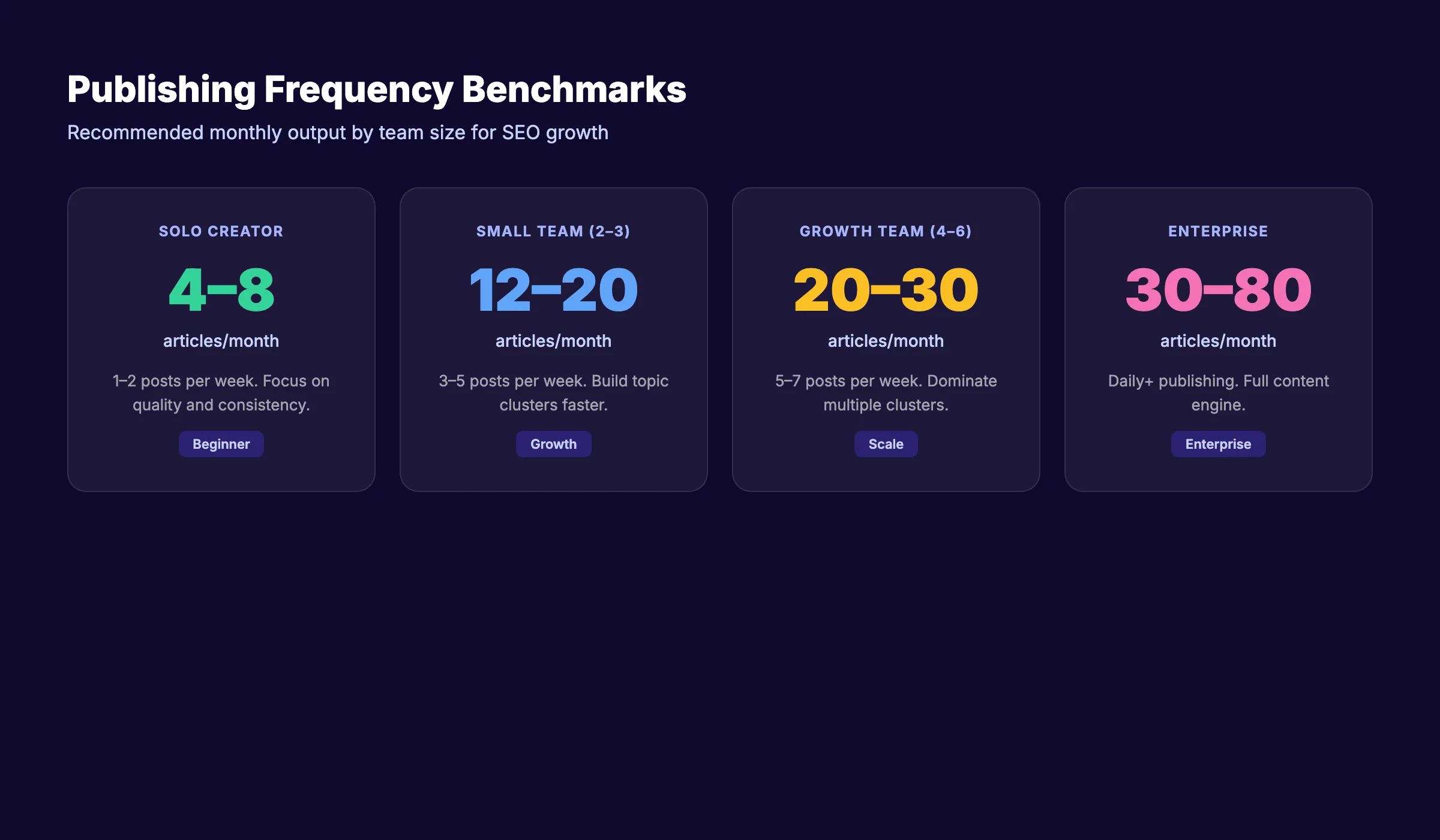
Publishing frequency depends on your team capacity and goals. More is better for SEO, but only if quality stays consistent. A team that publishes 3 high-quality, well-researched articles per week outperforms a team that publishes 7 thin posts. The editorial calendar enforces this standard by giving each article enough lead time for research, writing, review, and SEO optimization.
| Team Size | Recommended Frequency | Monthly Output |
|---|---|---|
| Solo / 1 writer | 1-2 posts per week | 4-8 articles |
| Small team (2-3) | 3-5 posts per week | 12-20 articles |
| Growth team (4-6) | 5-7 posts per week | 20-30 articles |
| Enterprise | Daily+ | 30-80 articles |
Do not commit to a pace you cannot maintain. Dropping from 5 posts per week to 1 post per week signals inconsistency. Start with a sustainable pace and increase it as your process matures.
Balance your content mix across formats too. A strong editorial calendar allocates roughly 40% to evergreen guides, 30% to keyword-targeted posts, 20% to content cluster support articles, and 10% to timely or reactive pieces. This ratio ensures steady organic growth while leaving room for opportunistic publishing.
Step 5: Schedule Content Across the Quarter
Map articles to specific weeks. Spread topic clusters evenly. Do not publish 8 SEO articles in week 1 and 0 in week 2.
Scheduling rules:
- Alternate between clusters each week. Variety keeps your site balanced.
- Front-load your highest-priority keywords. These take longer to rank, so publish them first.
- Leave 10 to 15% of slots open for reactive content: industry news, trending topics, or timely opportunities.
- Align seasonal content with calendar dates. Publish “Holiday Marketing Tips” in October, not December.
Step 6: Assign Ownership and Deadlines
Every article needs a clear owner and a deadline. Without assignment, articles sit in “planned” status indefinitely.
Set deadlines backward from the publish date:
| Milestone | Timing |
|---|---|
| Keyword and outline approved | 2 weeks before publish |
| First draft complete | 10 days before publish |
| Editorial review complete | 5 days before publish |
| Final version and images ready | 2 days before publish |
| Scheduled or published | Publish date |
This backward schedule gives each stage enough time without cramming everything into the last 48 hours.
Step 7: Review and Adjust Monthly
An editorial calendar is a living document. Review it at the end of every month.
- Which published articles hit their traffic targets?
- Which keywords moved into the top 10?
- Which planned articles got delayed and why?
- Are there new keyword opportunities from Google Search Console data?
- Does the topic cluster balance need adjusting?
Adjust the next month based on what the data shows. Double down on clusters that are gaining traction. Pause clusters that show no movement.
Your SEO team. $99 per month. 30 optimized articles, published automatically. An editorial calendar managed for you. Start for $1 →
Best Tools for Managing an Editorial Calendar
The best tool is the one your team will actually use. Complexity kills adoption.
Google Sheets (Free)
A spreadsheet is the simplest option. Create columns for title, keyword, cluster, status, author, publish date, and notes. Share it with your team. Color-code by status: green for published, yellow for in review, red for not started.
Best for: Solo creators and teams under 5 people.
Trello
Visual board-based planning. Create columns for each workflow stage: Idea, Assigned, Writing, Review, Scheduled, Published. Move cards through stages as work progresses.
Best for: Visual thinkers and small teams who prefer kanban boards.
Asana
Full project management with timeline views, dependencies, and templates. Build editorial calendar templates that auto-populate with recurring tasks.
Best for: Teams with complex workflows and multiple content types.
Notion
Combines spreadsheets, databases, kanban boards, and documents in one platform. Build a custom editorial calendar with any view you need.
Best for: Teams that want a single tool for planning, writing, and reviewing.
CoSchedule
Purpose-built editorial calendar for content marketing. Includes built-in social scheduling, task management, and analytics.
Best for: Marketing teams that manage blog and social content together.
Choosing the Right Tool
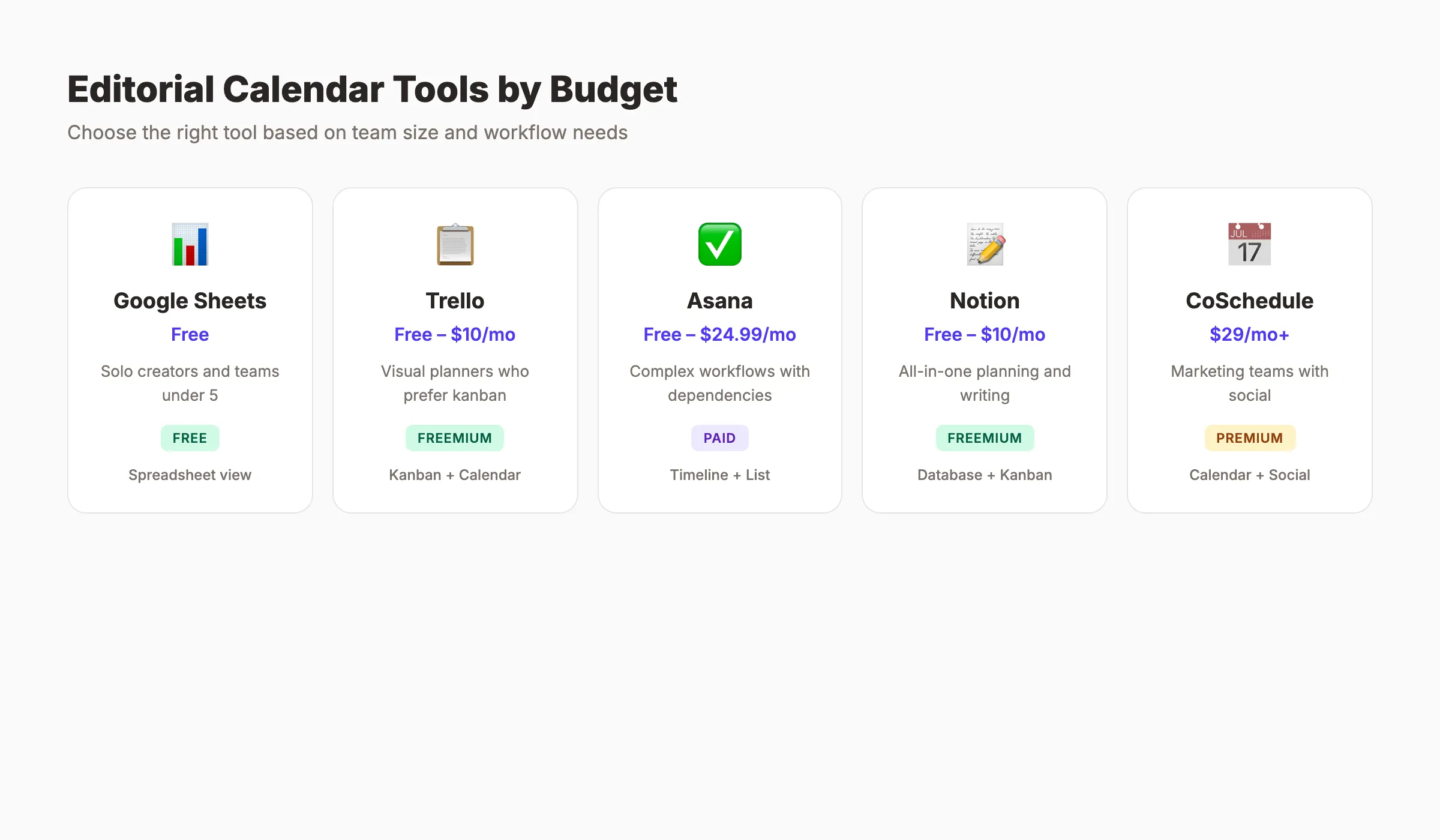
The decision comes down to team size and workflow complexity. Solo creators and teams under 5 should start with Google Sheets. The learning curve is zero, and the cost is zero. Move to a dedicated tool only when you outgrow the spreadsheet. Signs you have outgrown it: multiple people editing simultaneously causes conflicts, status tracking requires manual updates that get missed, and you cannot visualize your publishing timeline at a glance.
| Tool | Price | Best For | Calendar View |
|---|---|---|---|
| Google Sheets | Free | Solo and small teams | Spreadsheet |
| Trello | Free to $10/month | Visual planners | Kanban + calendar |
| Asana | Free to $24.99/month | Complex workflows | Timeline + list |
| Notion | Free to $10/month | All-in-one planning | Database + kanban |
| CoSchedule | $29/month+ | Marketing teams | Calendar + social |
Common Editorial Calendar Mistakes
Even teams with calendars make planning errors that hurt their SEO results.
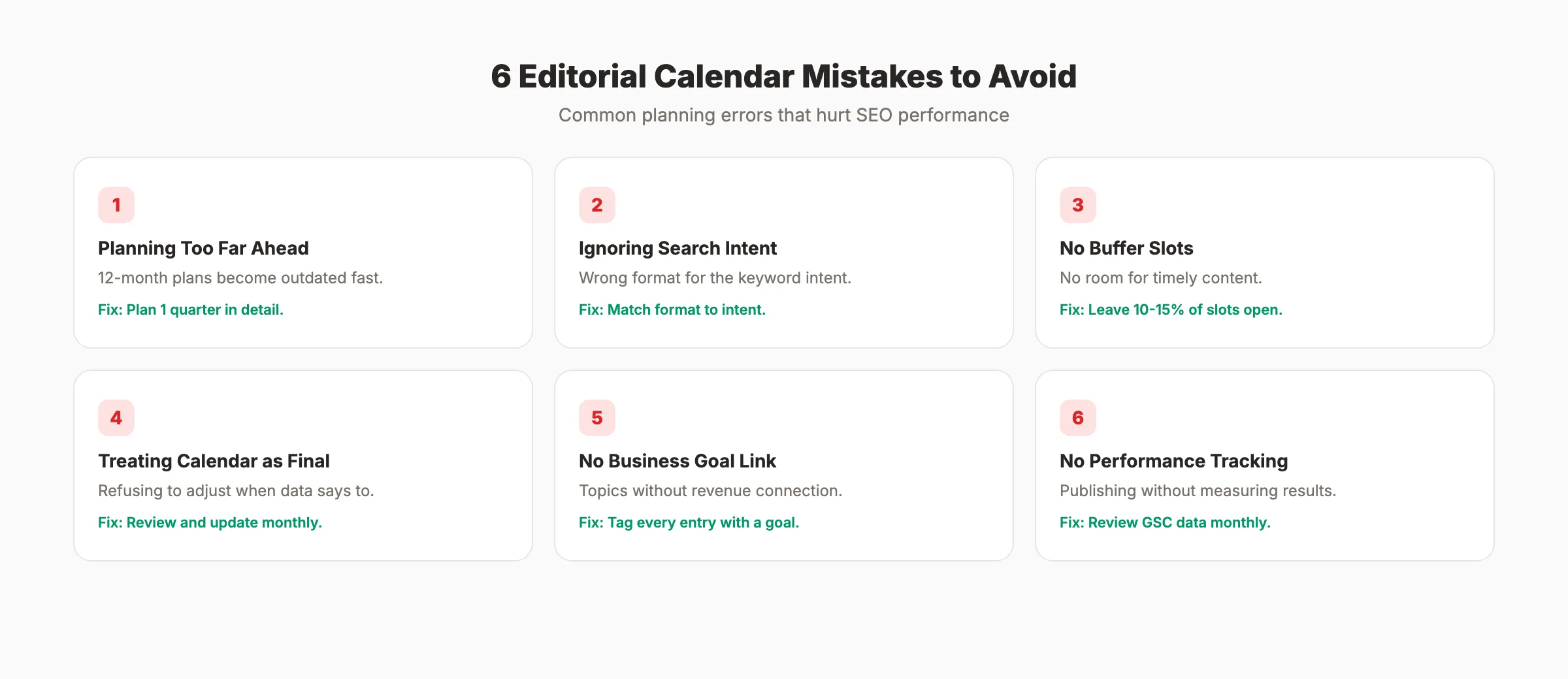
Mistake 1: Planning Too Far Ahead
Planning 12 months of content sounds strategic. In practice, priorities shift, new keywords emerge, and competitor moves create opportunities. Plan 1 quarter at a time. Sketch the next 2 quarters at a high level. Anything beyond 6 months is guesswork.
Mistake 2: Ignoring Search Intent
Filling the calendar with topics without checking search intent wastes publishing slots. A keyword with informational intent needs a guide. A keyword with commercial intent needs a comparison or review. Match the format to the intent before locking in the calendar entry.
Mistake 3: No Buffer for Reactive Content
Filling every slot leaves no room for timely opportunities. When a competitor launches a new feature or Google announces an algorithm update, you need capacity to respond. Leave 10 to 15% of your calendar open.
Mistake 4: Treating the Calendar as Final
Some teams treat published calendars as contracts. They refuse to move, cut, or add articles even when the data says they should. An editorial calendar is a plan, not a promise. Update it when new information makes old plans obsolete.
Mistake 5: No Connection to Business Goals
A calendar full of interesting topics that do not map to revenue is a content hobby, not a content strategy. Every article should trace back to a keyword that attracts potential customers or supports a page that converts visitors.
The fix is a simple column in your calendar: “Business Goal.” Every entry should state whether the article targets organic traffic growth, lead generation, brand authority, or customer education. If an article does not serve at least one of these goals, it does not belong on the calendar.
Mistake 6: Not Tracking What Works
Building a calendar without reviewing past performance means repeating mistakes. Check your Google Search Console and analytics monthly. Identify which content formats, topics, and clusters drive the most traffic and conversions. Use that data to adjust your next quarter of planning.
Sites that measure content marketing ROI consistently outperform those that publish blindly. The editorial calendar is where performance data meets future planning. Every monthly review should produce at least 2 to 3 adjustments for the next 30 days.
How to Measure Editorial Calendar Success
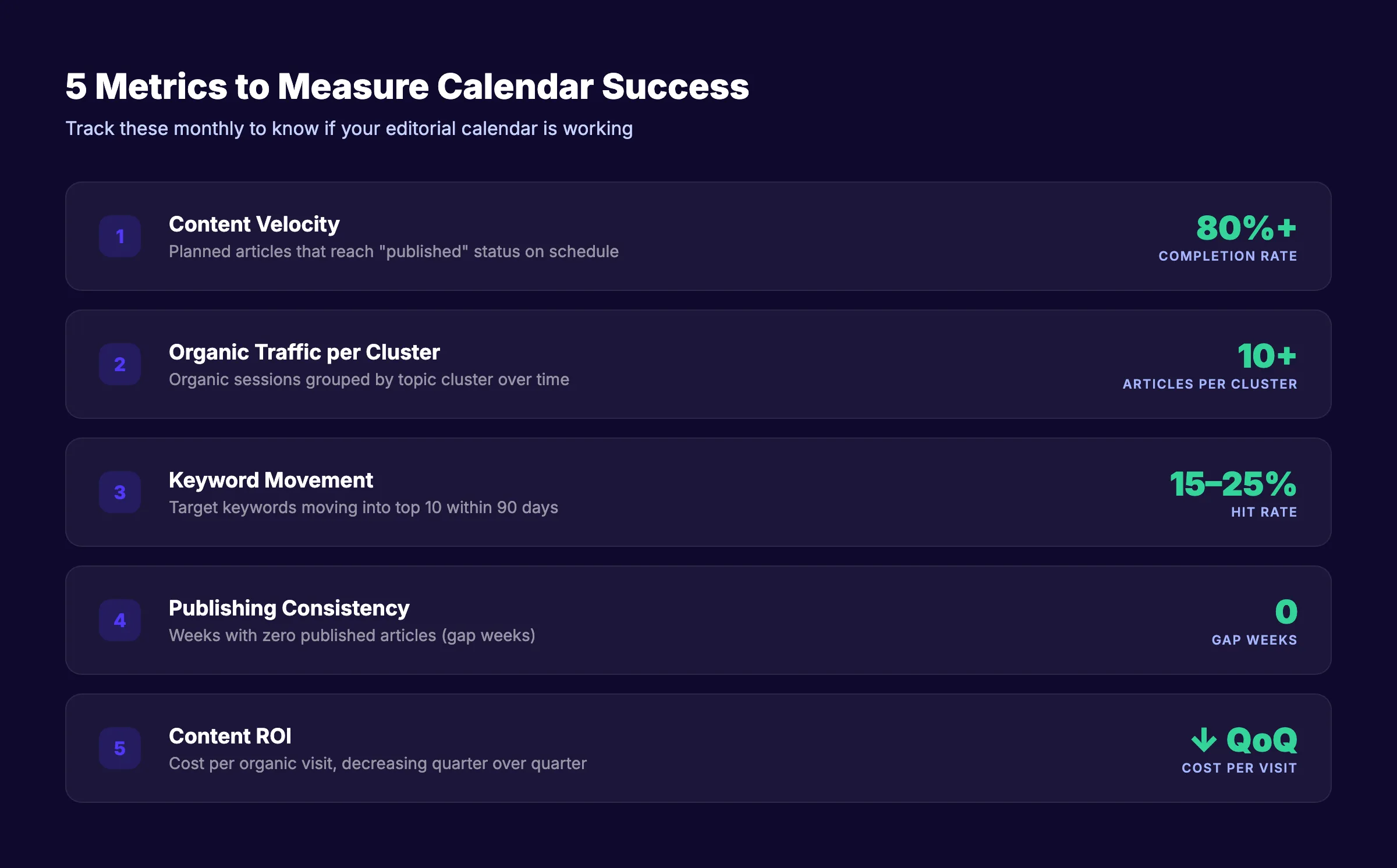
An editorial calendar only works if you track whether it produces results. Measure these 5 metrics monthly.
Content Velocity
Track how many articles move from “planned” to “published” each month. A healthy team publishes 80% or more of its planned content on schedule. If your completion rate drops below 70%, the calendar is too ambitious. Scale back the pace before quality suffers.
Organic Traffic per Cluster
Group your published articles by topic cluster and measure organic sessions for each group. Clusters with 10+ published articles should show compounding traffic growth. Clusters with fewer than 5 articles rarely gain traction. Use this data to prioritize which clusters get more calendar slots next quarter.
Keyword Movement
Track how many target keywords move into the top 20, top 10, and top 3 positions each month. Google Search Console shows this data for free. A well-planned editorial calendar should move 15 to 25% of targeted keywords into the top 10 within 90 days of publishing.
Publishing Consistency Score
Count the number of weeks with zero published articles. Every gap week hurts crawl frequency and audience expectations. The goal is zero gap weeks. If your team needs a break, schedule lighter weeks with shorter articles instead of skipping entirely.
Content ROI
Divide your total content investment (writer time, tools, editing) by the organic traffic or leads generated. Compare this number quarter over quarter. A strong editorial calendar should show decreasing cost per visit as your content library compounds. Sites that measure content marketing ROI consistently make better calendar decisions.
3,500+ blogs published. 92% average SEO score. See what Stacc can do for your site. Start for $1 →
FAQ
What is an editorial calendar?
An editorial calendar is a planning document that maps your content publishing schedule. It shows what you will publish, when, who creates it, and which business goal each piece supports. It turns your content strategy into an actionable publishing plan.
How far ahead should I plan my editorial calendar?
Plan 1 quarter (3 months) in detail with assigned topics, keywords, and deadlines. Sketch the following quarter at a high level with topic clusters and themes. Do not plan specific articles more than 6 months out because priorities shift.
How often should I publish blog content for SEO?
Sites publishing 16+ posts per month receive 3.5 times more traffic than sites publishing fewer than 4. Start with a pace your team can sustain. For most small teams, 2 to 4 posts per week is a strong starting point.
What is the difference between an editorial calendar and a content calendar?
An editorial calendar is strategic. It maps content to topics, keywords, and business goals over weeks or months. A content calendar is tactical. It schedules specific posts across all channels (blog, social, email) on a daily basis. Most teams benefit from using both together.
What tool should I use for an editorial calendar?
Google Sheets works well for solo creators and small teams. Trello and Notion suit visual planners and teams under 10. Asana handles complex workflows with dependencies. CoSchedule is purpose-built for content marketing with built-in social scheduling.
Can I automate my editorial calendar?
Partially. Tools like CoSchedule and Asana automate recurring tasks, reminders, and workflow stages. Stacc automates the entire publishing pipeline. We create content calendars mapped to your niche keywords and publish 30 articles per month on autopilot.
An editorial calendar is the difference between publishing content and building a content asset. Plan by cluster, assign by keyword, schedule by quarter, and review every month. The teams that treat their calendar as a living strategy document instead of a static spreadsheet are the ones building organic traffic that compounds month over month.

Written by
Siddharth GangalSiddharth is the founder of theStacc and Arka360, and a graduate of IIT Mandi. He spent years watching great businesses lose organic traffic to competitors who simply published more. So he built a system to fix that. He writes about SEO, content at scale, and the tactics that actually move rankings.
30 SEO blog articles published every month
Keyword-optimized, scheduled, and live on your site. Automatically.
30-day trial · Cancel anytime
theStacc
Stop writing SEO content manually
30 blog articles, 30 GBP posts, and social media content. Published every month. Automatically.
Try for free$1 for 3 days · Cancel anytime