
Local Business Schema (2026): Strategies, Tactics & Examples
local business schema guide for 2026: strategies, tactics, real examples, and implementation steps to get results faster.
Local business schema tells Google exactly what your business is, where it is, when it is open, and how to contact it. Without it, Google guesses. With it, Google knows.
72.6% of pages ranking on the first page of Google use schema markup. Businesses that implement local business schema see a 20-30% increase in click-through rates. Rich results powered by schema receive 58% of all user clicks, compared to 41% for standard listings.
Yet most local businesses have zero structured data on their website. Their competitors show up with star ratings, hours, and phone numbers in search results. They show up with a plain blue link.
This guide covers every property, sub-type, and implementation detail you need to add LocalBusiness schema to your website. We have published 3,500+ SEO-optimized articles across 70+ industries. Structured data is part of every local SEO strategy we recommend.
In this guide, you will learn:
- What local business schema is and why Google recommends it
- Every required and recommended property with explanations
- How to choose the right LocalBusiness sub-type for your industry
- Complete JSON-LD code examples you can copy and customize
- How to add schema to your website (WordPress, Shopify, custom)
- Testing and validation tools to catch errors before they cost you
- Common mistakes that block rich results and how to fix them
- Multi-location schema for businesses with more than one address
What Is Local Business Schema?
Local business schema is structured data markup that communicates your business information to search engines in a standardized format. It uses the Schema.org vocabulary and JSON-LD syntax to describe your business name, address, phone number, hours, services, and more.
Think of it as a machine-readable business card. When you put your hours on your website, humans can read them. Schema markup ensures Google, Bing, and AI search tools can read them too.
How Google Uses LocalBusiness Schema
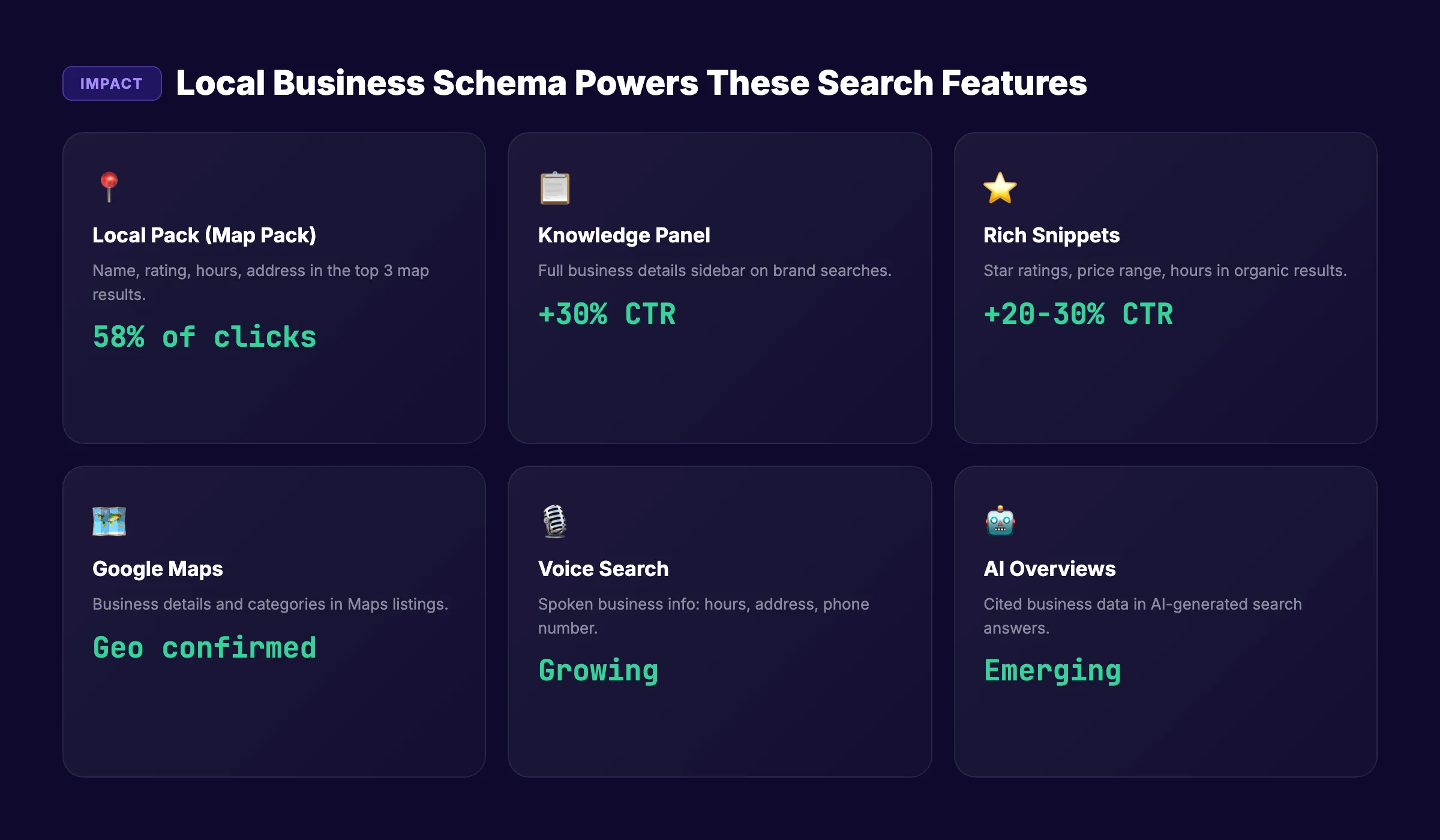
Google processes LocalBusiness schema to power:
| Feature | What It Shows | Impact |
|---|---|---|
| Local Pack (Map Pack) | Business name, rating, hours, address | Primary local search placement |
| Knowledge Panel | Full business details sidebar | Brand queries and direct searches |
| Rich snippets | Star ratings, price range, hours in SERPs | 20-30% higher CTR |
| Google Maps | Business details, categories, hours | ”Near me” search visibility |
| Voice search | Spoken business info (hours, address) | Growing search channel |
| AI Overviews | Cited business data in AI answers | Emerging search channel |
Schema does not guarantee placement in these features. But without it, Google relies on signals from your Google Business Profile, third-party sites, and page content alone. Schema gives Google direct, structured confirmation of your business details.
For a broader overview of how structured data works for SEO, see our schema markup guide.
Required and Recommended Properties
Google defines two required properties and 15+ recommended properties for LocalBusiness schema. The more properties you include, the more search features you qualify for.
Required Properties
These two must be present or Google ignores your markup entirely.
| Property | Description | Example |
|---|---|---|
name | Official business name | ”Downtown Dental Care” |
address | Physical business address (PostalAddress object) | Street, city, state, zip, country |
The address property requires a nested PostalAddress object with streetAddress, addressLocality, addressRegion, postalCode, and addressCountry.
Recommended Properties
These are optional but directly affect which rich results you qualify for.
| Property | Description | Rich Result Impact |
|---|---|---|
telephone | Primary phone number | Knowledge Panel, Local Pack |
url | Website homepage URL | Knowledge Panel |
openingHoursSpecification | Business hours by day | Hours display in search |
geo | Latitude and longitude coordinates | Map placement accuracy |
priceRange | Price indicator (”$”, ”$$”, ”$$$“) | Price display in search |
aggregateRating | Average star rating | Star ratings in SERPs |
review | Individual customer reviews | Review snippets |
image | Business photo URL | Image display |
logo | Business logo URL | Knowledge Panel |
sameAs | Social media profile URLs | Entity connections |
description | Business description | AI search context |
email | Contact email | Direct contact |
servesCuisine | Cuisine type (restaurants only) | Food search filters |
menu | Menu URL (restaurants only) | Menu link in search |
department | Sub-departments with own details | Multi-department businesses |
The NAP Consistency Rule
Your schema name, address, and telephone must match your Google Business Profile exactly. Character for character. “123 Main St” in your schema and “123 Main Street” on your GBP creates an inconsistency.
Search engines use NAP consistency as a trust signal. Mismatches between your schema, GBP, and website content reduce confidence in your data.
Stop writing. Start ranking. Stacc publishes 30 SEO articles per month for $99. Blog content that supports your local SEO and schema strategy. Start for $1 →
Choose the Right LocalBusiness Sub-Type
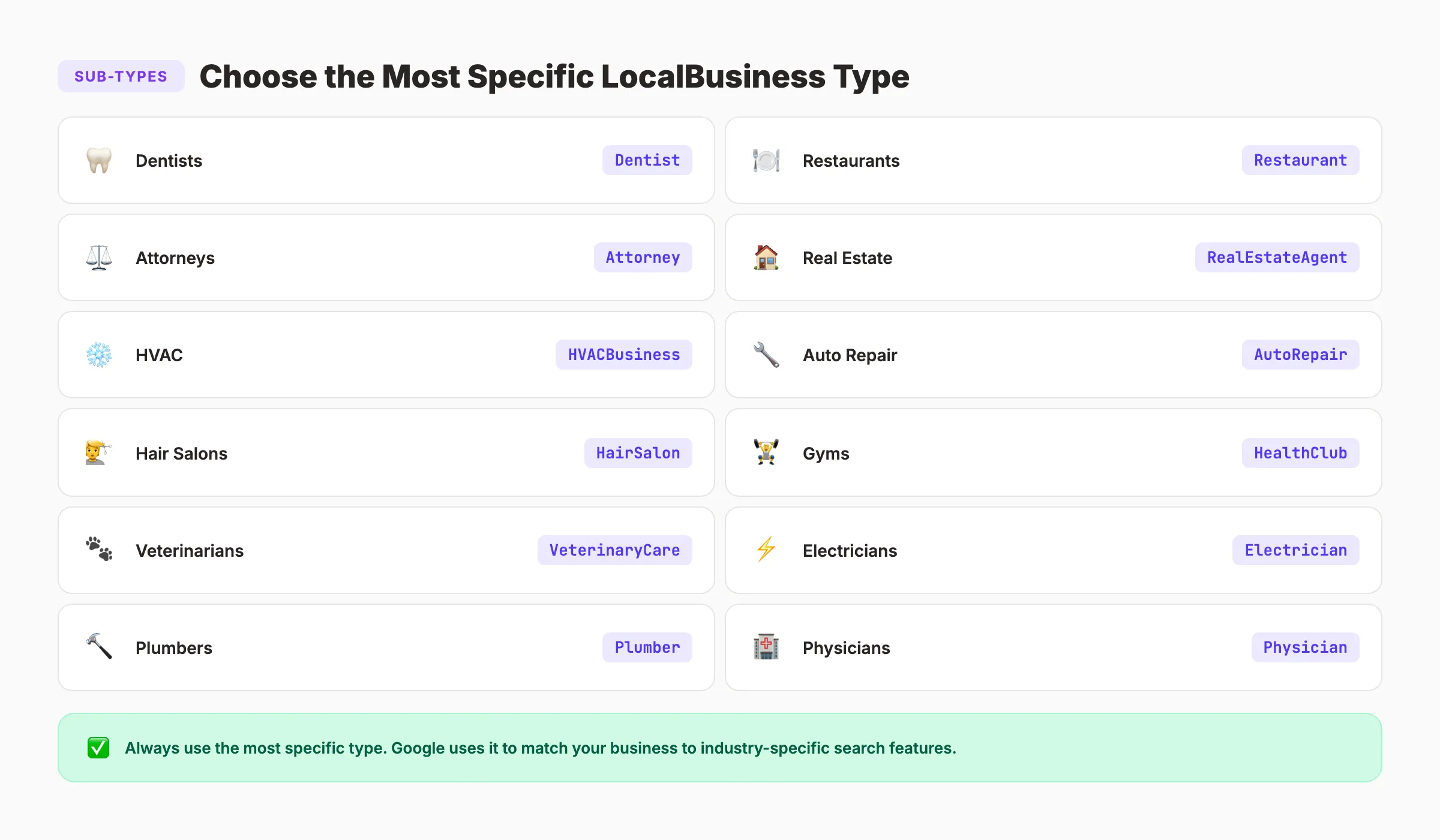
The generic LocalBusiness type works. But using the most specific sub-type available tells Google more about what kind of business you operate. Google supports dozens of sub-types.
Common LocalBusiness Sub-Types
| Industry | Recommended Sub-Type | Schema.org Type |
|---|---|---|
| Dentists | Dentist | Dentist |
| Restaurants | Restaurant (or FastFoodRestaurant, CafeOrCoffeeShop) | Restaurant |
| Attorneys | Attorney | Attorney |
| Real estate agents | RealEstateAgent | RealEstateAgent |
| HVAC companies | HVACBusiness | HVACBusiness |
| Auto repair | AutoRepair | AutoRepair |
| Hair salons | HairSalon | HairSalon |
| Gyms | HealthClub | HealthClub |
| Veterinarians | VeterinaryCare | VeterinaryCare |
| Electricians | Electrician | Electrician |
| Plumbers | Plumber | Plumber |
| Physicians | Physician | Physician |
| Pharmacies | Pharmacy | Pharmacy |
| Hotels | Hotel | Hotel |
If your exact business type does not have a dedicated sub-type, use the closest parent. A chiropractor would use Chiropractor. A pet groomer without a specific type would use LocalBusiness or AnimalShelter depending on services.
Find the full list at Schema.org/LocalBusiness. Click “More specific Types” to browse all available options.
Why Sub-Types Matter
Using Dentist instead of LocalBusiness tells Google you are a dental practice. Google can then:
- Show your listing for dental-specific searches
- Display dental-relevant attributes (emergency services, insurance accepted)
- Connect your entity to the dental category in its knowledge graph
- Match your business to industry-specific search features
Complete JSON-LD Code Examples
JSON-LD is Google’s recommended format for structured data. It sits in a <script> tag in your page’s HTML. It does not affect your visible page content.
Basic LocalBusiness Example
This is the minimum viable implementation. Copy it, replace the values, and add it to your homepage.
{
  "@context": "https://schema.org",
  "@type": "LocalBusiness",
  "name": "Downtown Dental Care",
  "address": {
    "@type": "PostalAddress",
    "streetAddress": "123 Main Street, Suite 200",
    "addressLocality": "Austin",
    "addressRegion": "TX",
    "postalCode": "78701",
    "addressCountry": "US"
  },
  "telephone": "+1-512-555-0123",
  "url": "https://www.downtowndentalcare.com",
  "openingHoursSpecification": [
    {
      "@type": "OpeningHoursSpecification",
      "dayOfWeek": ["Monday", "Tuesday", "Wednesday", "Thursday", "Friday"],
      "opens": "08:00",
      "closes": "17:00"
    },
    {
      "@type": "OpeningHoursSpecification",
      "dayOfWeek": "Saturday",
      "opens": "09:00",
      "closes": "13:00"
    }
  ]
}
Extended Example With All Recommended Properties
This version includes geo coordinates, ratings, social profiles, and logo.
{
  "@context": "https://schema.org",
  "@type": "Dentist",
  "name": "Downtown Dental Care",
  "description": "Family dentistry serving Austin, TX since 2010. Cleanings, crowns, implants, and emergency care.",
  "address": {
    "@type": "PostalAddress",
    "streetAddress": "123 Main Street, Suite 200",
    "addressLocality": "Austin",
    "addressRegion": "TX",
    "postalCode": "78701",
    "addressCountry": "US"
  },
  "geo": {
    "@type": "GeoCoordinates",
    "latitude": 30.2672,
    "longitude": -97.7431
  },
  "telephone": "+1-512-555-0123",
  "email": "[email protected]",
  "url": "https://www.downtowndentalcare.com",
  "logo": "https://www.downtowndentalcare.com/logo.png",
  "image": "https://www.downtowndentalcare.com/office-photo.jpg",
  "priceRange": "$$",
  "openingHoursSpecification": [
    {
      "@type": "OpeningHoursSpecification",
      "dayOfWeek": ["Monday", "Tuesday", "Wednesday", "Thursday", "Friday"],
      "opens": "08:00",
      "closes": "17:00"
    }
  ],
  "aggregateRating": {
    "@type": "AggregateRating",
    "ratingValue": "4.8",
    "reviewCount": "127"
  },
  "sameAs": [
    "https://www.facebook.com/downtowndentalcare",
    "https://www.instagram.com/downtowndentalcare",
    "https://www.yelp.com/biz/downtown-dental-care-austin"
  ]
}
Restaurant Example With Menu and Cuisine
Restaurants should use Restaurant (or a sub-type like ItalianRestaurant) and add food-specific properties.
{
  "@context": "https://schema.org",
  "@type": "Restaurant",
  "name": "Bella Cucina",
  "servesCuisine": "Italian",
  "menu": "https://www.bellacucina.com/menu",
  "priceRange": "$$$",
  "address": {
    "@type": "PostalAddress",
    "streetAddress": "456 Oak Avenue",
    "addressLocality": "Chicago",
    "addressRegion": "IL",
    "postalCode": "60601",
    "addressCountry": "US"
  },
  "telephone": "+1-312-555-0456",
  "url": "https://www.bellacucina.com",
  "openingHoursSpecification": [
    {
      "@type": "OpeningHoursSpecification",
      "dayOfWeek": ["Tuesday", "Wednesday", "Thursday", "Friday", "Saturday"],
      "opens": "17:00",
      "closes": "22:00"
    },
    {
      "@type": "OpeningHoursSpecification",
      "dayOfWeek": "Sunday",
      "opens": "11:00",
      "closes": "15:00"
    }
  ]
}
For a full breakdown of structured data formats beyond LocalBusiness, see our structured data guide.
Your SEO team. $99 per month. 30 optimized articles, published automatically. Blog SEO + Local SEO working together. Start for $1 →
How to Add Schema to Your Website
Where and how you add your JSON-LD depends on your website platform.
WordPress
Option 1: Plugin (easiest)
Install Yoast SEO, Rank Math, or Schema Pro. These plugins generate LocalBusiness schema automatically based on your settings.
- Yoast SEO: Settings → General → Site Representation → Organization → Fill in business details
- Rank Math: Schema Templates → LocalBusiness → Configure all fields
- Schema Pro: Add New Schema → Local Business → Map fields to your content
Option 2: Manual (more control)
Add JSON-LD directly to your header using a plugin like “Insert Headers and Footers” or by editing your theme’s header.php file.
<script type="application/ld+json">
{
  "@context": "https://schema.org",
  "@type": "YourBusinessType",
  ...your properties here...
}
</script>
Shopify
Add the JSON-LD to your theme’s theme.liquid file, just before the closing </head> tag. Or use an app like JSON-LD for SEO or Schema Plus.
Custom HTML / Static Sites
Place the <script type="application/ld+json"> block in the <head> or <body> of your homepage. JSON-LD works in either location.
Where to Place Schema
| Page | Schema Type | Scope |
|---|---|---|
| Homepage | LocalBusiness (full details) | Primary implementation |
| About page | LocalBusiness or Organization | Supplementary |
| Contact page | LocalBusiness (address-focused) | Supplementary |
| Service pages | Service + LocalBusiness reference | Service-specific |
| Location pages | LocalBusiness (per location) | Multi-location |
Your homepage should carry the full LocalBusiness schema. Other pages can reference it or include simplified versions.
Testing and Validation
Published schema with errors is worse than no schema at all. Invalid markup can confuse Google and block your rich results.
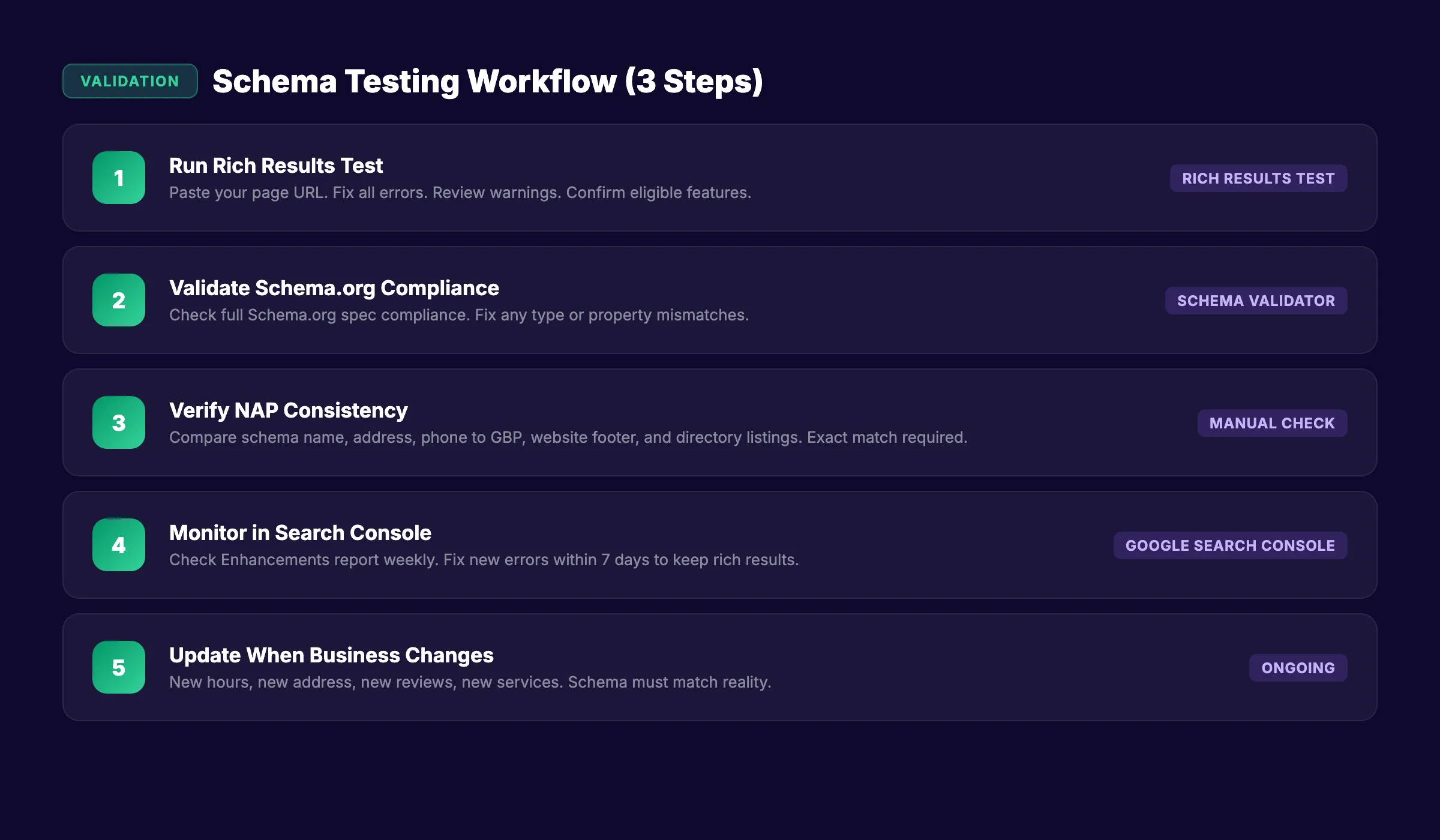
3 Tools to Test Your Schema
| Tool | What It Checks | URL |
|---|---|---|
| Google Rich Results Test | Eligibility for Google rich results | search.google.com/test/rich-results |
| Schema Markup Validator | Full Schema.org compliance | validator.schema.org |
| Google Search Console | Schema errors across your entire site | search.google.com/search-console |
Validation Checklist
After adding schema to your site, run through this checklist:
- Paste your page URL into the Rich Results Test
- Confirm zero errors (errors block rich results entirely)
- Review warnings (warnings do not block results but reduce quality)
- Verify
namematches your Google Business Profile exactly - Verify
addressmatches your GBP and website footer - Verify
telephoneuses international format (+1-XXX-XXX-XXXX) - Verify
openingHoursSpecificationuses 24-hour time format - Check
geocoordinates point to your actual building - Confirm
@typeuses the most specific sub-type available - Test on mobile (schema renders regardless of device)
Monitor Schema in Google Search Console
After validation, check Google Search Console under “Enhancements” for your structured data type. Google reports errors, warnings, and valid items over time. Fix any new errors within 7 days to avoid losing rich result eligibility.
For a complete technical SEO approach that includes schema, see our local SEO checklist.
Common Local Business Schema Mistakes
These mistakes are the reason most local businesses do not get rich results. Each one is preventable.
1. Using the Generic LocalBusiness Type
A plumber using LocalBusiness instead of Plumber misses out on industry-specific rich result features. Always use the most specific sub-type available.
2. NAP Inconsistencies
“123 Main St” in your schema, “123 Main Street” on your GBP, and “123 Main St.” in your website footer. Three versions of the same address. Google sees three different signals and trusts none of them fully.
Pick one format. Use it everywhere. Schema, GBP, website footer, directory listings. Exact match.
3. Missing Geo Coordinates
Without geo (latitude and longitude), Google cannot precisely confirm your physical location. Get your coordinates from Google Maps (right-click your location, click the coordinates to copy). Adding geo takes 30 seconds and strengthens your Map Pack signal.
4. Incorrect Opening Hours Format
Schema uses 24-hour time and ISO day names. “9am-5pm” is wrong. “09:00” to “17:00” is correct. “Mon” is wrong. “Monday” is correct. Small formatting errors cause validation failures.
5. Schema Data That Does Not Match the Page
Google requires that schema data be visible on the page or otherwise verifiable. If your schema says you have a 4.8 rating with 127 reviews, that rating should appear somewhere on the page. Markup that describes invisible content violates Google’s guidelines.
6. Duplicate Schema Across Multiple Pages
Your homepage and about page should not both carry identical full LocalBusiness schema. Use the full markup on your homepage. Use simplified references or no schema on secondary pages. Duplicates confuse crawlers.
7. Forgetting to Update Schema
Changed your hours for summer? Moved to a new office? Got your 200th review? Your schema needs updating too. Outdated schema creates the same trust issues as outdated GBP information.
For more on maintaining consistent local signals, see our guide on Google Maps SEO.
Multi-Location Schema
Businesses with more than one location need separate LocalBusiness schema for each address. This is where most multi-location businesses make mistakes.
One Schema Block Per Location
Each location gets its own JSON-LD block with its own unique:
name(include the location identifier: “Downtown Dental Care - Austin”)address(unique physical address)telephone(local phone number for that location)geo(unique coordinates)openingHoursSpecification(may vary by location)url(link to that location’s specific page)
Organization + Location Structure
For multi-location brands, use an Organization schema on your homepage and LocalBusiness schema on each location page.
{
  "@context": "https://schema.org",
  "@type": "Organization",
  "name": "Downtown Dental Care",
  "url": "https://www.downtowndentalcare.com",
  "logo": "https://www.downtowndentalcare.com/logo.png",
  "sameAs": ["https://facebook.com/downtowndentalcare"],
  "subOrganization": [
    {
      "@type": "Dentist",
      "name": "Downtown Dental Care - Austin",
      "url": "https://www.downtowndentalcare.com/austin"
    },
    {
      "@type": "Dentist",
      "name": "Downtown Dental Care - Dallas",
      "url": "https://www.downtowndentalcare.com/dallas"
    }
  ]
}
Each location page then carries its own full LocalBusiness schema with complete address, hours, phone, and coordinates.
For a deeper guide on managing SEO across multiple locations, see our multi-location SEO guide.
3,500+ blogs published. 92% average SEO score. Blog content supports local authority. Schema confirms your business details. Both drive local rankings. Start for $1 →
Advanced Schema Properties for Local SEO
Once you have the basics in place, add these advanced properties to gain an edge over competitors.
Service Schema
Describe specific services you offer:
"hasOfferCatalog": {
  "@type": "OfferCatalog",
  "name": "Dental Services",
  "itemListElement": [
    {
      "@type": "Offer",
      "itemOffered": {
        "@type": "Service",
        "name": "Teeth Whitening",
        "description": "Professional in-office teeth whitening."
      }
    },
    {
      "@type": "Offer",
      "itemOffered": {
        "@type": "Service",
        "name": "Dental Implants",
        "description": "Full dental implant placement and restoration."
      }
    }
  ]
}
Review Markup
Individual review markup can trigger review rich snippets:
"review": [
  {
    "@type": "Review",
    "author": {
      "@type": "Person",
      "name": "Sarah Johnson"
    },
    "datePublished": "2026-02-15",
    "reviewRating": {
      "@type": "Rating",
      "ratingValue": "5",
      "bestRating": "5"
    },
    "reviewBody": "Best dental experience I have ever had."
  }
]
Reviews in schema must be genuine reviews that appear on your website. Fabricated reviews violate Google’s guidelines and can result in manual actions.
Businesses that actively collect and display Google reviews can feed those reviews into their schema markup for additional search visibility.
SpeakableSpecification for AI and Voice Search
Add speakable to indicate which parts of your page are suitable for voice assistants and AI systems:
"speakable": {
  "@type": "SpeakableSpecification",
  "cssSelector": [".business-description", ".hours-summary"]
}
This signals to Google Assistant, Siri, and AI search tools which content to read aloud or cite when answering voice queries about your business.
FAQ
Is local business schema required for local SEO?
Schema is not required for ranking in local search. You can rank without it. But businesses with schema markup get 20-30% higher click-through rates and qualify for rich results that display ratings, hours, and contact details directly in search results. 72.6% of page-1 results use schema. Skipping it puts you at a disadvantage.
How do I find my business coordinates for the geo property?
Open Google Maps. Search for your business address. Right-click the map pin. Click the coordinates that appear. They copy to your clipboard automatically. Paste the latitude as geo.latitude and the longitude as geo.longitude in your schema.
Can I add reviews to my schema markup?
Yes. Google supports aggregateRating (average rating and review count) and individual review markup. The reviews must be real, published on your website, and visible to users. Do not fabricate reviews or use schema to mark up reviews that only exist on third-party sites.
Should I put schema on every page or only the homepage?
Place the full LocalBusiness schema on your homepage. For multi-location businesses, place location-specific schema on each location page. Service pages can include Service schema that references your LocalBusiness. Do not duplicate the full LocalBusiness block across every page.
What format should I use for local business schema?
JSON-LD. Google explicitly recommends JSON-LD over Microdata and RDFa. JSON-LD is easier to implement, easier to maintain, and does not interfere with your page’s HTML structure. Place it in a <script type="application/ld+json"> tag in your <head> or <body>.
How long does it take for schema to show in search results?
Google typically processes new schema within days to a few weeks. Rich results may appear sooner for frequently crawled sites. After adding schema, submit the page in Google Search Console using “Request Indexing” to speed up the process.
Local business schema is the single fastest technical SEO win for any business with a physical location. It takes 15 minutes to implement. It costs nothing. And it gives Google the structured confirmation it needs to display your business details in rich results, the Local Pack, Knowledge Panels, and AI answers. Add it today. Validate it. Update it when your business changes.

Written by
Siddharth GangalSiddharth is the founder of theStacc and Arka360, and a graduate of IIT Mandi. He spent years watching great businesses lose organic traffic to competitors who simply published more. So he built a system to fix that. He writes about SEO, content at scale, and the tactics that actually move rankings.
Automate your Google Business Profile content
30 GBP posts, local SEO articles, and review responses. Published every month automatically.
30-day trial · Cancel anytime
theStacc
Stop writing SEO content manually
30 blog articles, 30 GBP posts, and social media content. Published every month. Automatically.
Try for free$1 for 3 days · Cancel anytime