A step-by-step playbook for CMOs to design AI skills tied to MCP servers. 8 steps, real examples, and a framework to scale marketing ops in 2026.
The Model Context Protocol (MCP) ecosystem grew from 1,000 active servers in early 2025 to more than 10,000 in Q1 2026 — a 10x jump in twelve months, according to data summarized by SegmentStream. That growth changed what AI can do inside a marketing org. The bottleneck is no longer access to data. The bottleneck is the discipline to package work into reusable, versioned skills your team can run on demand.
Most marketing leaders are still stuck on the prompt engineering hamster wheel. They open a new chat. They re-explain the brand voice. They paste the same context document. They get one decent output. Then they close the tab and start over the next time.
Skill engineering is the alternative. It treats every recurring marketing task as a small, named, version-controlled asset — a skill — that any operator on your team can invoke against live data through MCP. The CMO who runs this loop in 2026 ships more campaigns with fewer people, and the work compounds.
We publish 3,500+ SEO articles a month across 70+ industries, and we have built and shipped internal skills for every part of that pipeline. This guide is the playbook we use ourselves.
Here is what you will learn:
- What skill engineering means for marketing and how it differs from prompt engineering
- The exact 8-step loop to identify, build, deploy, and iterate on marketing skills
- A skill specification template you can copy on day one
- How to wire MCP servers to your CRM, analytics, GBP, and social tools
- A proprietary scoring matrix for which skills to build first
- Real skill examples — content brief, competitor research, weekly KPI report, GEO audit
- The six failure modes that kill marketing skills in production
What Skill Engineering Means for Marketing
Skill engineering for marketing is the practice of packaging recurring marketing workflows into named, versioned, MCP-connected AI capabilities that any team member can invoke.
Instead of writing a new prompt every time, your team calls a skill —
content-brief-v3orweekly-kpi-report-v2— and the skill runs against live data, returns structured output, and logs every step.
The short answer: A skill is a small markdown file plus a structured contract that tells the AI what to do, what tools it can use, and what shape the output must take. MCP is the wire that lets the skill talk to your actual marketing data.
Why CMOs Should Care
Prompt engineering is tactical. Skill engineering is strategic. The first dies in a chat window. The second becomes an operating asset on your balance sheet.
The shift matters for three reasons:
- Quality compounds. Every fix to a skill improves every future run. Prompts do not.
- Output scales without headcount. One skill can run 500 times a month with zero additional payroll.
- Knowledge persists. When a marketing manager leaves, the brand voice, ICP context, and approval rules stay in the skill registry.
Anthropic, OpenAI, and the broader MCP community formalized this pattern in 2025. Anthropic's Claude for Small Business launched in May 2026 with 15 ready-to-run skills and connectors to HubSpot, QuickBooks, Canva, and Google Workspace. The pattern is becoming the default way teams build with AI. For the broader context on agent design, our guide to AI agent orchestration for marketing covers how skills fit inside larger multi-agent systems.
Key Takeaways
- Skills are assets, not prompts. They live in a registry, get versioned, and have owners.
- MCP is the data layer. It connects skills to your CRM, analytics, GBP, and ad platforms.
- The CMO is the architect. Skill engineering is an operating asset, not a side project for the data team.
The CMO Skill Engineering Loop
Before the steps, the framework. Every skill we ship runs through the same eight-stage loop. The loop is the system.
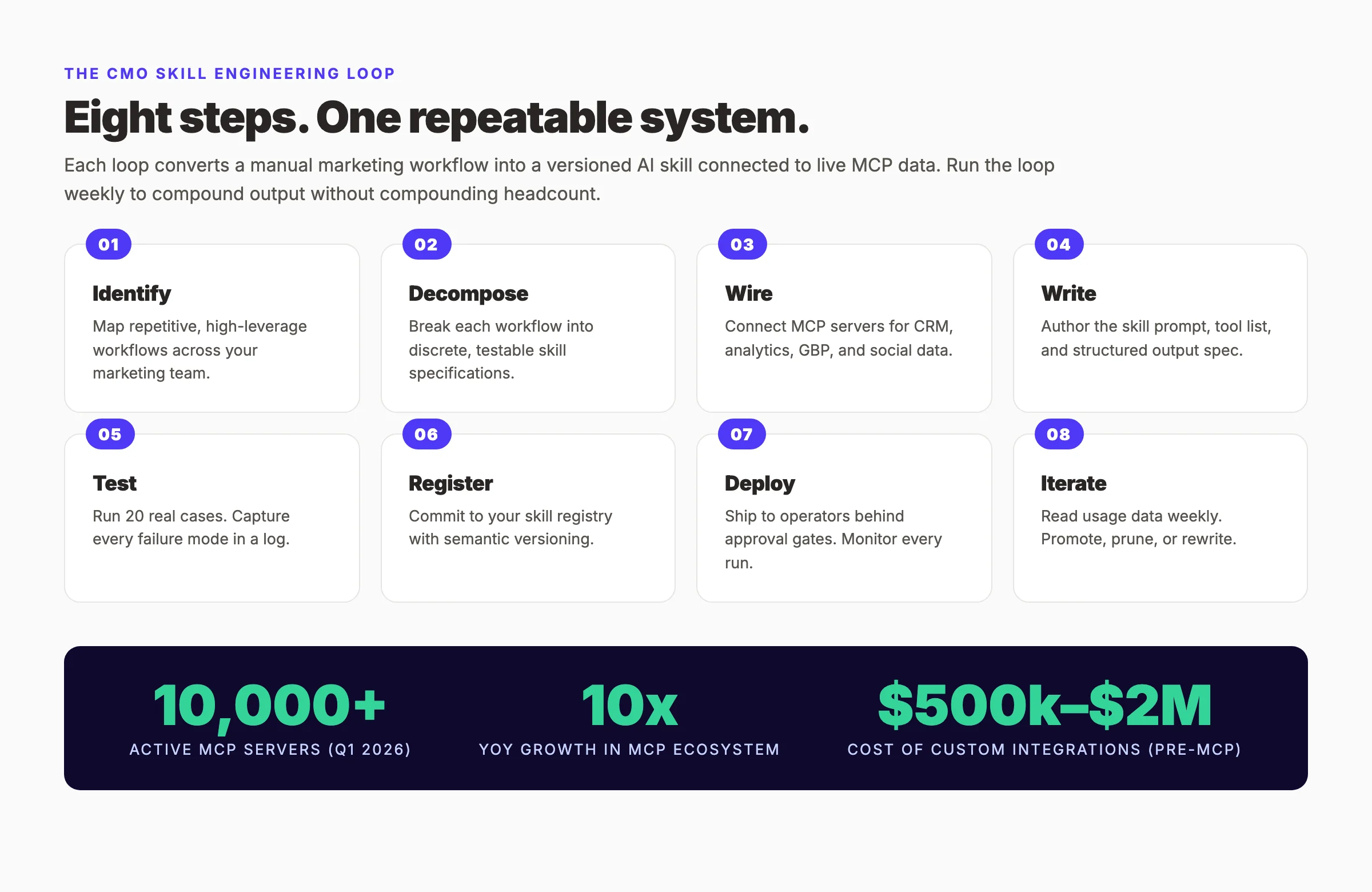
The loop is sequential the first time you build a skill, and parallel after that. Once you have ten skills in production, you are running stages 1-3 on the next candidate while stages 7-8 hum along on the last release. The discipline is the loop. The output is a registry of named, working capabilities your operators run every day.
The CMO who treats skills as products — with owners, versions, and roadmaps — wins the next decade of marketing. Most leaders still treat AI as a chat window. That gap is the opportunity.
Step 1: Identify High-Value Repetitive Workflows
Open a blank doc. Pull your marketing org chart. Then, for every role, list the tasks that person does more than three times a week. Be specific. "Write content" is not a task. "Produce a content brief from a target keyword" is a task.
A high-value candidate has three properties. It is repetitive (runs more than once a week). It is structured (the inputs and outputs follow a pattern). It is rules-based at the core (a skilled human applies a known process, not a creative leap).
Walk the funnel:
- Top of funnel: keyword research, content briefs, competitor scans, GEO audits, SERP feature checks
- Middle of funnel: outreach drafting, sales enablement summaries, email A/B variant generation
- Bottom of funnel: weekly KPI reports, attribution reconciliation, churn-risk flags
- Local SEO: Google Business Profile post drafting, review responses, citation audits
- Social: post variants, hashtag scoring, content calendar drafts
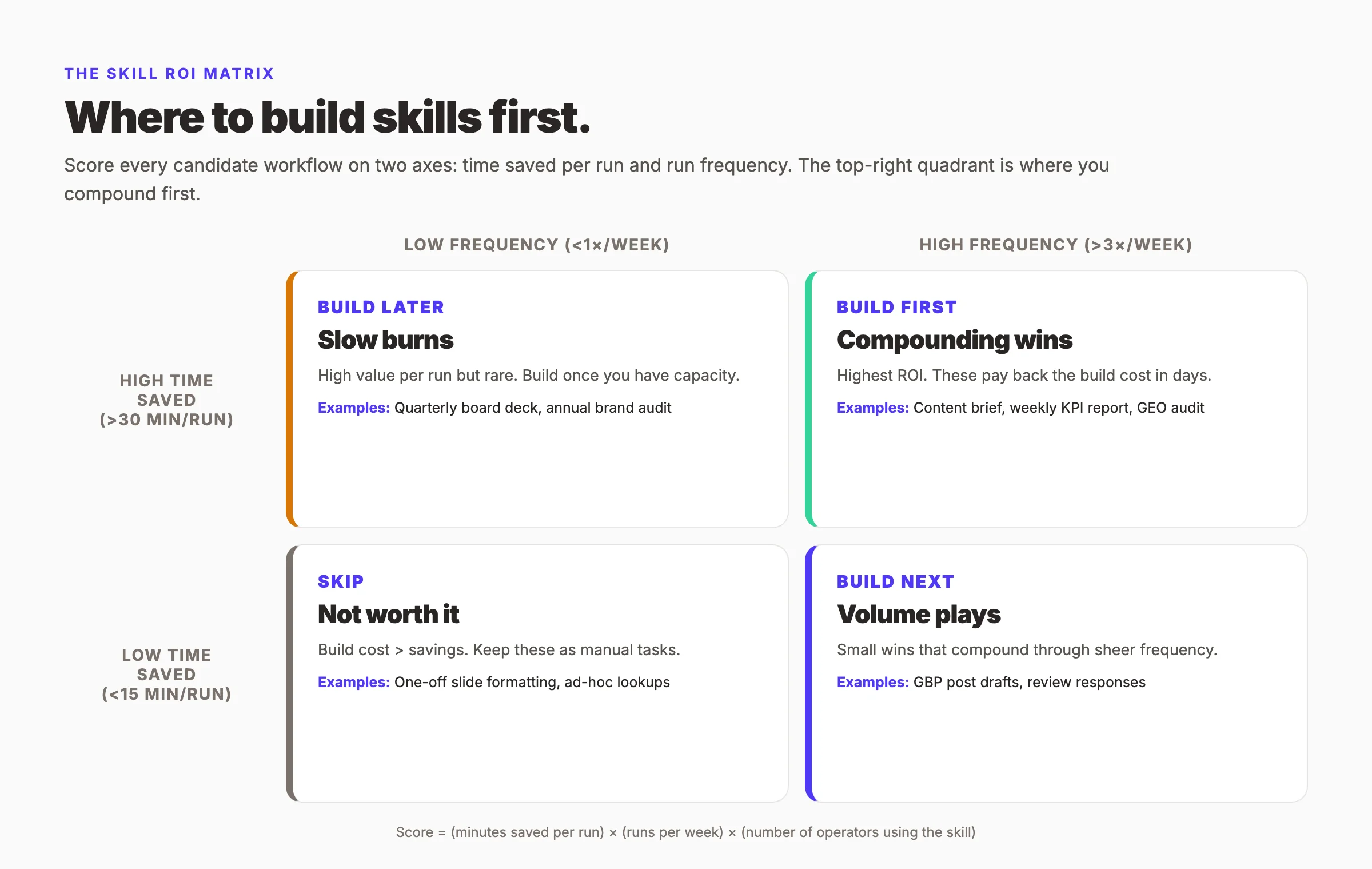
For each candidate, score it on the Skill ROI Matrix below. Be honest. A weekly KPI report that saves the marketing manager 45 minutes and runs 4 times a month is worth more than a flashy "AI campaign concept generator" that runs twice a year.
Why this step matters. If you skip identification, you build skills nobody uses. The fastest way to lose internal trust in skill engineering is to ship something the team does not need. We learned this the hard way in our first build cycle, when two of the first four skills we shipped got zero invocations after week one. Both were technically impressive. Neither solved a workflow anyone actually had.
Pro tip: Shadow one operator for a day before you write a single skill specification. Watch the tab-switching. The tabs are the workflows. The friction is where the skill goes.
Step 2: Decompose Each Workflow Into a Discrete Skill Specification
Take your top three candidates from Step 1. For each one, write a specification before you write a prompt. The spec is one page. It answers six questions.
1. What is the input? Be precise. "A keyword string" is not enough. Specify the format: { primary_keyword: string, funnel_stage: "awareness" | "consideration" | "decision" }.
- What is the output? Define the JSON schema. Downstream systems will consume it.
- What tools does it need? List the MCP servers explicitly. No wildcards.
- What is the approval level? None (auto-run), soft (notify a human), or hard (block until signed off).
- Who owns it? One named human. Not a team. Not a Slack channel.
- What does success look like? A measurable bar: "Brief passes the editor review on first read 80% of the time."
The shape of a working skill specification looks like this:
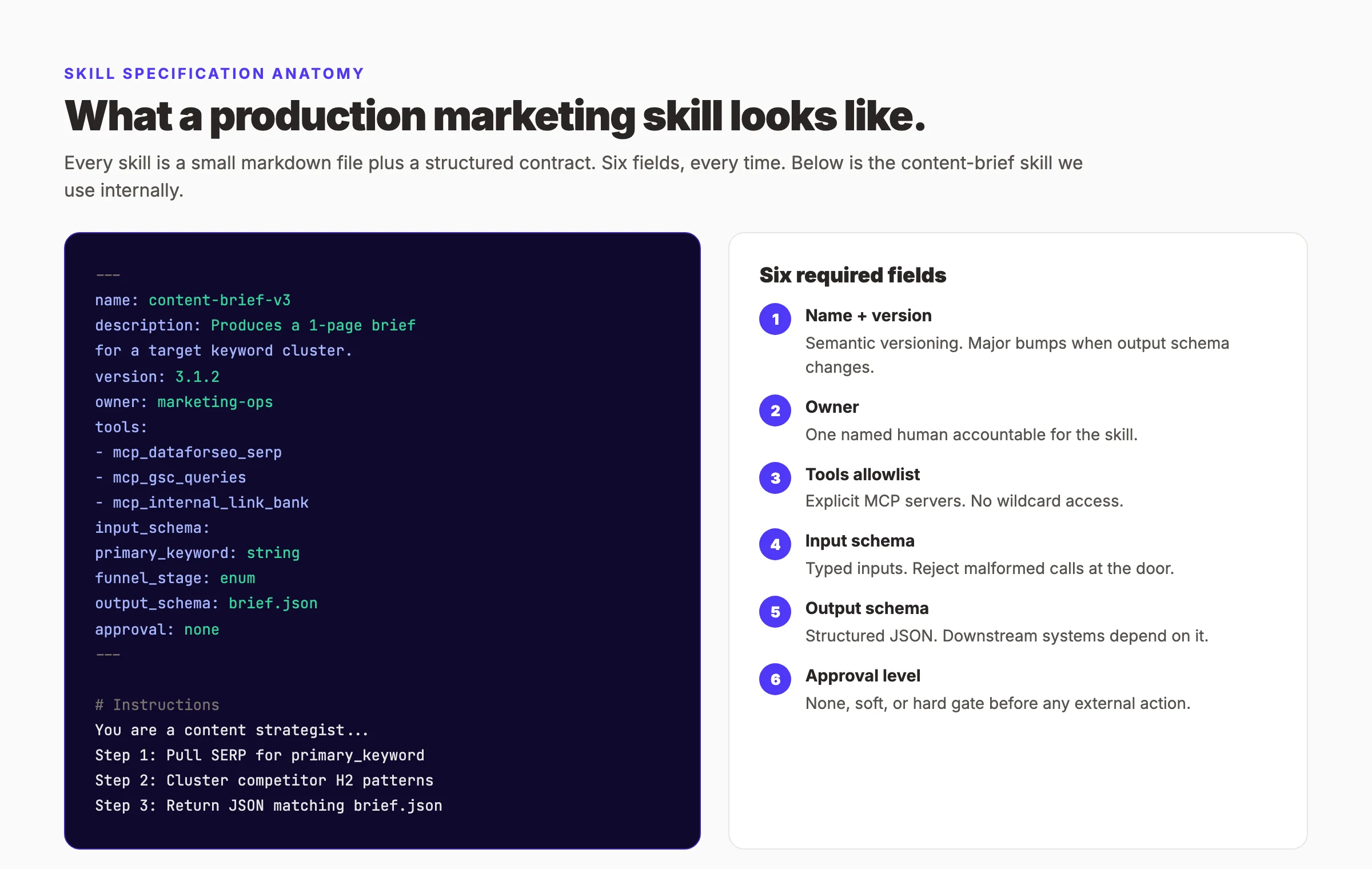
The discipline of writing a one-page spec before writing the prompt is the single highest-impact habit we have. It forces the conversation between marketing and engineering before code gets written. It surfaces hidden assumptions. It produces an artifact that survives staff turnover.
Why this step matters. A skill without a spec is a prompt with delusions of grandeur. Specs let you version. Specs let you delegate. Specs let you say no when someone asks for a new feature that breaks the contract.
Pro tip: Keep specs under one page. If the spec needs two pages, the skill needs to be two skills.
Step 3: Wire Up MCP Servers for the Data Your Skills Need
A skill without data is a writer with no eyes. MCP — the Model Context Protocol — is the standard way to give skills structured access to your tools and data. By Q1 2026, the MCP ecosystem reached more than 10,000 active servers, and 17 of the top 25 marketing-focused servers ship native OAuth flows. Our walkthrough on building an MCP server for marketing covers the engineering side in depth.
Audit your stack. Then map each system to an MCP server. Here is the coverage we recommend for a typical marketing org:
| System | MCP server source | What the skill can do |
|---|---|---|
| CRM (HubSpot, Salesforce, Pipedrive) | Vendor-official MCP servers shipped in 2025-26 | Pull lead lists, update lifecycle stages, log activity |
| Analytics (GA4, Plausible, PostHog) | Vendor or community | Query sessions, conversions, custom events |
| Search Console | Community MCP | Pull queries, pages, impressions, click data |
| Google Business Profile | Community MCP | Post drafts, review pulls, insight reports |
| Ad platforms (Google Ads, Meta Ads) | Custom server or wrapper | Pull spend, CPA, ROAS by campaign |
| Internal content store | Custom MCP over your CMS | Pull existing posts for internal linking |
You do not need all of them on day one. Start with the two MCP servers that unblock the highest-ROI skill from Step 1. For most marketing teams, that pair is Search Console plus the CRM.
Security matters here. OAuth is now the baseline for production servers. Improvado's MCP overview noted that prompt-to-RCE vulnerabilities accounted for the majority of MCP CVEs disclosed in the first two months of 2026. Three rules keep you safe:
- Allowlist tools per skill. No skill gets wildcard access. Each skill lists the exact MCP tools it can call.
- Deny shell access to skills that handle untrusted input. A skill that ingests a customer review must never have access to a shell-executing tool.
- Log every tool call. Every invocation, every response, every error. Without logs, you cannot debug or improve.
Why this step matters. Without MCP, your skill is a clever writer with no source of truth. With MCP, it is an operator. The gap between those two states is the difference between novelty and impact.
Pro tip: Stack sprawl is the most common MCP failure mode in 2026. Resist the urge to add a server because the directory listed it. Add servers because a specific skill needs them.
Step 4: Write the Skill Prompt and Tool Definitions
Now the writing. A production skill prompt has five sections. Keep it short. Most of our shipped skills run 200 to 500 lines including comments.
Section 1 — Identity. Two sentences. "You are a senior content strategist with eight years of B2B SaaS experience. You produce briefs that pass editor review on the first read."
Section 2 — Instructions. Numbered steps. The skill follows them in order. Be explicit about what each step does. Do not assume the model will infer.
Section 3 — Tool usage rules. When to call each MCP tool, with examples. When NOT to call a tool. What to do if a tool returns null.
Section 4 — Output contract. The JSON schema, restated in plain English. "Always return exactly this shape. If you cannot fill a field, set it to null. Never invent values."
Section 5 — Edge cases. The three or four failure modes you discovered in testing. Tell the skill what to do for each.
Avoid the temptation to make the prompt clever. Clever prompts impress humans and confuse models. Boring, numbered, explicit prompts win in production.
Two anti-patterns to avoid:
- The persona trap. "You are a 10x marketer with deep expertise..." adds nothing. The model knows what marketing is.
- The mega prompt. A 3,000-word prompt that tries to be every skill at once. Break it into two skills.
Why this step matters. The prompt is the contract between your team and the model. A vague contract produces vague output. A precise contract produces precise output. The prompt is also the artifact that survives — when the model improves next year, your skill gets better for free.
Pro tip: Write the output JSON schema first. Then write the prompt that produces that schema. Working backward from the contract eliminates 80% of the rewriting.
Step 5: Test Against Real Cases and Capture Failure Modes
Twenty runs. That is the test budget for a new skill before it ships.
Pick twenty real inputs from the last quarter. Not synthetic data. Not toy examples. Twenty inputs your team would actually feed the skill. Run each one. Record the output. Have the skill owner from Step 2 grade each output on a 1-to-5 scale.
Then build a failure log. Every output that scored 3 or lower gets an entry. The entry has four fields:
- Input that triggered the failure
- What the skill produced
- What it should have produced
- Root cause hypothesis
Most marketing skills fail in one of six predictable ways. Tag every failure against this list:
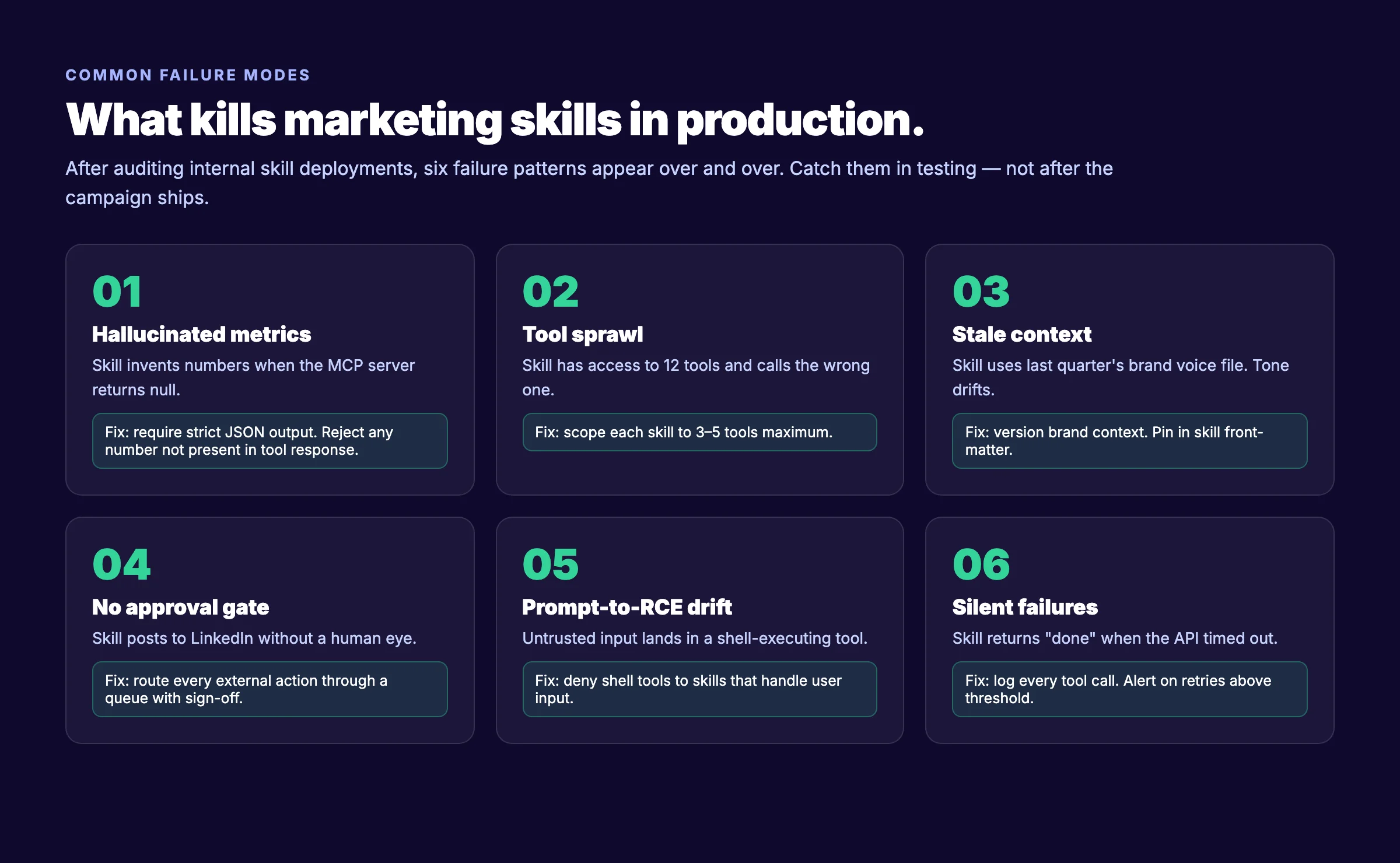
The failure log becomes the input to your next prompt revision. The skill is not done until 18 of 20 runs score 4 or 5, and the failures that remain are documented.
We built 23 internal skills at theStacc over the last 18 months and shipped 17. The other six died in testing. Each of those six taught us a failure mode we never would have caught in design. Test budgets are not overhead. They are the cheapest insurance against a public failure.
Why this step matters. Marketing operators trust skills that have been tested. They never trust skills that fail in production. The cost of a public skill failure — a hallucinated stat in a board deck, a hallucinated competitor in a brief — is far higher than the cost of running twenty test cases.
Pro tip: Pick your twenty test cases from a real backlog, not from imagination. Your real backlog contains edge cases your imagination will not.
Want every blog SEO skill we use at theStacc, running in your stack from day one? Our Blog SEO module ships content briefs, internal link bank, and weekly performance reports built on the same skill engineering loop described here. See plans and pricing →
Step 6: Version Control and a Skill Registry for Your Team
Skills are code. Treat them like code.
Every skill lives in a single repository — call it marketing-skills — with one directory per skill. Each directory contains the spec, the prompt, the output schema, the test cases, and a CHANGELOG. Every change to any skill is a commit. Every release is a tag.
Use semantic versioning, with one tweak. Major version bumps happen when the output schema changes. Minor bumps happen when the prompt changes. Patch bumps happen when tool definitions change. Operators downstream key off the major version. If a skill bumps from 2.x to 3.0, the operator knows the output shape may have changed.
A skill registry is the front end. It is a simple internal page that lists every shipped skill with five columns:
| Column | Example |
|---|---|
| Skill name | content-brief-v3 |
| One-line description | Produces a one-page brief for a target keyword cluster |
| Owner | Marketing ops lead |
| Version | 3.1.2 |
| Last 30-day usage | 412 invocations, 94% success rate |
Operators check the registry before asking for a new skill. The registry kills duplicate work. A 50-person marketing org will produce 6 different versions of "content brief generator" if there is no registry. With a registry, there is one. And it gets better every week.
Why this step matters. Without a registry, every operator builds their own private skills. The team gets fragmented. Quality drifts. Knowledge does not compound. With a registry, skills are shared assets and improvements flow to everyone.
Pro tip: Make the registry a single page anyone can read. No login. No tickets. The moment a registry needs a request form, it dies.
Step 7: Deploy and Monitor Performance
A skill is in production when three conditions hold. The skill has passed Step 5. The skill is in the registry from Step 6. And the skill has a monitoring dashboard.
The dashboard answers four questions every day:
- Invocations. How many times was this skill called in the last 24 hours?
- Success rate. What percentage returned a valid output?
- Latency. P50 and P95 response time.
- Operator rating. When operators flag an output as good or bad, what is the running average?
If you can answer those four questions for every shipped skill, you have observability. If you cannot, the skill is technically deployed but practically a black box.
Deployment also means approval gates. Every skill from Step 2 has an approval level. Enforce it. A skill marked "hard gate" must route every external action through a human. No exceptions. No engineering shortcuts. A skill that posts to LinkedIn without an approval gate is a brand crisis waiting for the wrong Tuesday.
Two operational habits separate teams that scale skills from teams that stall:
- Weekly skill review. A 30-minute meeting. The skill owners review the dashboards. Anything below 90% success rate gets triaged. Anything below 50% gets pulled.
- Skill changelog email. A monthly email to the marketing team listing every skill release. Two sentences each. The team needs to know what changed.
Why this step matters. Skills degrade silently. Models update. Tools change their APIs. Brand voice shifts. Without monitoring, you discover the degradation in a board meeting. With monitoring, you discover it on the dashboard at 9 a.m. on Monday.
Pro tip: Start with operator ratings before you build anything fancier. A thumbs up or thumbs down per run is enough data to find your worst skills.
Step 8: Iterate Based on Usage Data
Skills are not done at launch. They are barely started.
Every Monday, look at the four dashboard metrics and the failure log from Step 5. Three actions come out of that review:
- Promote. Skills with rising usage and high success rates get more investment. Maybe a v2 with an expanded scope. Maybe a sibling skill that handles an adjacent workflow.
- Patch. Skills with declining success rates get a prompt revision or a tool definition fix. Document the change in the CHANGELOG. Increment the version.
- Prune. Skills with zero invocations for 30 days get archived. Not deleted. Archived. They sit in the registry under "archived" so the team knows they existed and why they died.
The iteration cadence matters as much as the iteration itself. Once a week is enough for most skills. Daily becomes overhead. Monthly is too slow — by the time you notice the regression, the campaign has already shipped.
The compounding effect is real. Our first version of the content brief skill was version 1.0 in October 2025. By April 2026, it was version 3.1.2. Each iteration was small. Each iteration came from a real failure or a real operator request. The cumulative effect was a skill that now produces briefs our editors accept on the first read 91% of the time, up from 62% at v1.0.
Why this step matters. A skill that does not iterate stops being useful. Marketing changes. Brand voice evolves. Algorithms shift. Skills that iterate stay valuable. Skills that do not become technical debt.
Pro tip: Keep the iteration meeting under 30 minutes. If it runs long, you have too many skills for one owner. Split the registry across two owners.
Real Marketing Skill Examples
The eight-step loop is abstract. Here are four real skills the loop produces, with the spec sketch for each.
Content Brief Skill
Takes a primary keyword, a funnel stage, and a target word count. Pulls the live SERP via DataForSEO MCP. Pulls existing content from your CMS via an internal link bank MCP. Returns a structured brief with H2 outline, target entities, internal link suggestions, and a 60-word brief summary the writer reads first.
Real impact: our editors accept first-read briefs 91% of the time. Brief production dropped from 45 minutes per piece to 6 minutes.
Competitor Research Skill
Takes a competitor URL and a research scope. Pulls their last 90 days of indexed content. Tags by topic cluster. Identifies gaps against your own coverage. Returns a JSON file with three sections: what they cover that you do not, what you cover better, and three suggested counter-positions.
Real impact: our content strategist runs this skill weekly across five competitors. The output replaces a half-day of manual research.
Weekly KPI Report Skill
Takes a date range and a list of channels. Pulls data from Search Console, GA4, HubSpot, and the ad platforms via their respective MCP servers. Returns a one-page Markdown report with anomaly callouts, week-over-week deltas, and three recommended actions.
Real impact: our marketing operations lead used to spend two hours every Monday on this report. It now takes nine minutes including the review pass.
GEO Audit Skill
Takes a target URL and a list of LLM platforms to check. Pings each platform with a set of queries that should cite the URL. Records the citations. Returns a structured audit of which AI Overviews and LLM answers mention the brand, which competitors are cited instead, and three specific gaps to close.
Real impact: this skill turned a manual GEO audit from a two-week consulting project into a 20-minute automated run. We rerun it monthly on every priority page.
One skill is a curiosity. Ten skills are a moat. The CMO who ships their tenth skill before their competitors ship their first has built operational scale that does not show up on the org chart.
The Skill ROI Matrix: What to Build First
Most marketing teams stall not because they cannot build skills, but because they build the wrong ones first. The Skill ROI Matrix exists to prevent that.
Score every candidate workflow on two axes:
- Time saved per run. How many minutes does the skill save versus doing the task manually?
- Run frequency. How many times per week does the workflow run across your team?
Multiply, then weight by the number of operators who would use the skill. The top of the resulting list is your build order. Examples by quadrant:
- Build first (high time saved, high frequency): content brief, weekly KPI report, GEO audit
- Build next (low time saved, high frequency): GBP post drafts, review responses, social variants
- Build later (high time saved, low frequency): quarterly board deck, annual brand audit
- Skip: one-off slide formatting, ad-hoc lookups, things you can solve with a saved view
The matrix is not perfect. Some workflows score low but unblock something else. Some workflows score high but require an MCP server you do not have yet. The matrix is a starting point, not a verdict.
Results: What to Expect
Skill engineering is not magic. It is operational discipline applied to a new substrate. Realistic timelines:
- Week 1: Two specs written. Zero skills shipped. This is normal. The specs are the work.
- Week 4: Two skills in production. One is already on version 1.2 because testing surfaced two failure modes you patched.
- Month 3: Five skills in production. The team is running them daily. You start to see invocation counts in the hundreds per week per skill.
- Month 6: Ten to twelve skills shipped. The marketing ops team is now producing the equivalent output of a team 50% larger. You have a registry. Operators check it before asking for a new build.
- Month 12: Twenty to thirty skills. A skill engineer role exists on your team. The CMO sets a quarterly roadmap of skills the way a CTO sets a product roadmap.
Headcount does not stay flat. The mix changes. You hire fewer junior marketers and one or two skill engineers. The skill engineers maintain the registry, monitor performance, and partner with marketing leads on new builds.
The number that matters: in our internal data, every shipped skill saves a median of 38 minutes per invocation. Multiply that by hundreds of invocations a month, and you understand why this matters.
Troubleshooting
Problem: My team is excited at launch and stops using skills after week two.
Solution: Skills die when they live in a place the team does not check. Put the skill registry in the same tool the team already opens daily — usually Slack or your project tool. Add a /skill command. Friction kills adoption faster than quality issues.
Problem: Operators do not trust skill outputs and re-do the work manually.
Solution: Trust comes from transparency. Show every tool call in the output. Show every source. If the skill cites a SERP result, link to the SERP. If it pulls from GA4, show the query. Operators trust skills they can audit.
Problem: Skills produce great outputs in testing and bad outputs in production.
Solution: Your test cases are not representative of production traffic. Pull twenty real inputs from the last week of production and re-grade. Then patch the prompt against the failures that appear.
What practitioners are saying on X
AI search advice ages quickly. Here is high-signal public discussion from SEO and growth operators — context for your roadmap, not a substitute for primary data.
- @hridoyreh (Mar 2026): Widely shared SEO skill tree: foundations, research, technical, on-page, content, links, AI SEO/GEO, analytics, UX, brand, programmatic — useful map for stats and how-to posts. See the post on X.
- @jakezward (Feb 2026): 2026 SEO predictions emphasize AI Overview share-of-SERP, schema for LLM token efficiency, brand mentions in AI answers as a KPI, proprietary data as a moat, and content refresh beating net-new AI slop. See the post on X.
Grok, AI Overviews, and multi-engine visibility
For “skill engineering cmos mcp”, multi-engine visibility still starts with clear definitions, sourced numbers, and extractable section answers. Grok additionally factors live X discussion — keep public claims consistent with this page.
- Google AI Overviews: Use passage-ready answers, tables, and FAQ schema where relevant.
- ChatGPT / Perplexity: Cite named sources next to key claims.
- Grok: Maintain accurate entity facts on-site and in high-signal X posts.
Frequently Asked Questions
A prompt is text you type into a chat window. It dies when the chat closes. A skill is a named, versioned asset stored in a registry with a defined input, output, tool set, owner, and approval level. Skills survive staff turnover and improve over time. Prompts do not. Key takeaway: Use prompts for exploration. Use skills for production.
For the first three skills, no. A marketing operations lead with a clear head can write a spec and a prompt. You will need engineering help when you start wiring custom MCP servers to internal systems, and when you build the skill registry. Most teams build their first skills before bringing engineering in. Key takeaway: Start with no-code skills. Hire engineering when the skill registry becomes the bottleneck.
Two. Start with Google Search Console MCP and your CRM MCP. Those two cover the top-of-funnel and middle-of-funnel data needs for most marketing workflows. Add Google Business Profile, Google Analytics 4, and the ad platforms in order of which one unblocks the highest-ROI skill next. Key takeaway: Coverage beats stack size. Two well-chosen MCP servers outperform ten random ones.
Three controls. First, require structured JSON output that exactly matches the data the tools returned. Second, instruct the skill to set fields to null when a tool returns null — never invent. Third, log every tool call and audit the logs weekly. Hallucinations are almost always a sign the skill is operating without enough context, not too little intelligence. Key takeaway: Hallucinations are a design problem, not a model problem. Tighten the contract and they disappear.
The pattern is the same. The implementations differ. OpenAI GPTs and Anthropic Claude Skills are vendor implementations of the broader skill engineering pattern. You can also build your own with any model, an MCP client, and a markdown file. The pattern is the asset. The vendor is the substrate. Key takeaway: Skill engineering is platform-agnostic. The discipline matters more than the vendor.
Two to three weeks if you follow the full loop. Most teams ship their first skill in week three. The bottleneck is not the prompt. The bottleneck is writing the spec, wiring the first MCP server, and finishing twenty test cases. Teams that skip testing ship faster and pay later. Key takeaway: Two weeks well spent now saves twenty weeks of fixing later.
Well-written skills get better. Models that ship a year from now will follow your structured prompts more reliably than today's models do. A poorly written skill — one that depends on persona tricks or fragile phrasing — will break. The discipline of writing boring, explicit, contract-driven skills pays off every time a new model ships. Key takeaway: Boring skills age well.
No. Skills with no external side effects — internal briefs, reports, drafts that humans read before doing anything — do not need a gate. Skills that take external action — posting to social, sending email, updating a CRM record — must have a gate. The default for external-action skills is hard gate, not soft. Key takeaway: Match the gate to the blast radius.
Closing
The marketing leaders who win the next decade will not be the ones with the best campaigns. They will be the ones with the deepest skill registry. Every skill you ship today is an asset your competitor does not have tomorrow.
Start with Step 1 this week. Pick one workflow. Write the spec. Wire the first MCP server. The loop runs forward from there. The compounding starts on day one and keeps going for as long as you stay disciplined enough to keep iterating.
Build the loop. Ship the skill. Then ship the next one.
Sources & references
- [1] Princeton / Georgia Tech et al. — GEO research (arXiv:2311.09735)
- [2] @hridoyreh on X — Widely shared SEO skill tree: foundations, research, technical, on-page, content, links, AI SEO/GEO, analytics, UX, bran
- [3] @jakezward on X — 2026 SEO predictions emphasize AI Overview share-of-SERP, schema for LLM token efficiency, brand mentions in AI answers
- [4] Referenced source — segmentstream.com

Plan topics, review article drafts, and publish to a connected CMS.
Weekly local SEO teardowns
One practical email a week. Map Pack, GBP, AI Overviews — no fluff. Unsubscribe anytime.