Social media for movers: choose platforms by research role, set a seasonal cadence that fits crew capacity, and measure each stage to booked moves.
Most moving companies post once a month, see little response, and decide social media does not work for movers. The more common problem is fit: the wrong platform, a cadence that ignores peak season, and no way to tell whether a post ever led to a booked move.
Homeowners research a mover before they call. They scroll Facebook and Instagram to see your crew, your trucks, and how you handle a piano on a narrow stairwell, often before they ever search "movers near me." Social profiles fill the trust gap between finding you and requesting an estimate.
This guide covers the decisions a moving owner or marketer actually has to make: which platforms earn their time, how to cadence posting around peak season, which content types to use with the right compliance gates, and how to measure social without collapsing a click into a booked job.
Here is what this guide covers:
- The research role each platform plays for a mover
- Content types movers use, with the review and testimonial rules attached
- A seasonal cadence card for peak and off-season weeks
- How to run organic and paid social without borrowing another market's cost figures
- How to measure each funnel stage separately, with no portable ROI or cost-per-lead benchmark
Why Social Media Matters for Movers
Moving is a high-stress, one-time purchase, so homeowners research before they call. They scroll Facebook and Instagram to see your crew, your trucks, and how you handle a piano on a narrow stairwell. Social profiles fill the trust gap between finding you and requesting an estimate, while your Google Business Profile still captures active search.
The two channels do different jobs. Your Google Business Profile captures people already searching for a mover. Social media works earlier in the research window, when someone is weeks from a move date and is quietly judging whether your crew looks careful, insured, and local. Search and social reinforce each other; neither replaces the other.
People research movers before they call
A homeowner planning a local move rarely calls the first name they find. They scan Facebook reviews, browse Instagram for photos of your crew at work, and look for red flags such as a profile that went quiet two years ago. A current, accurate profile lowers the effort it takes to trust you enough to request an estimate.
Social proof compounds over time
Every post stays on your profile. Review screenshots, crew spotlights, and packing tips add up to a library of evidence that you do the work you claim. This is the same compounding idea behind topical authority in search: a steady record beats a burst followed by silence. The value is in consistency you can sustain, not in hitting a quota.
The mover-specific advantage
Moving is visual and emotional. Customers are excited, stressed, or overwhelmed, and the work itself is easy to show. A short clip of a crew padding a doorway or loading a 26-foot truck communicates competence faster than a paragraph of copy. Movers have a content advantage in this respect, and most do not use it.
Choosing the Right Platforms for Movers
No platform earns time by default. Each one plays a different research role for a mover: Facebook for local discovery and reviews, Instagram for visual proof, TikTok for reach with younger renters, and LinkedIn only when commercial relocations are in scope. Match the platform to the job you actually sell and the staff you can spare.
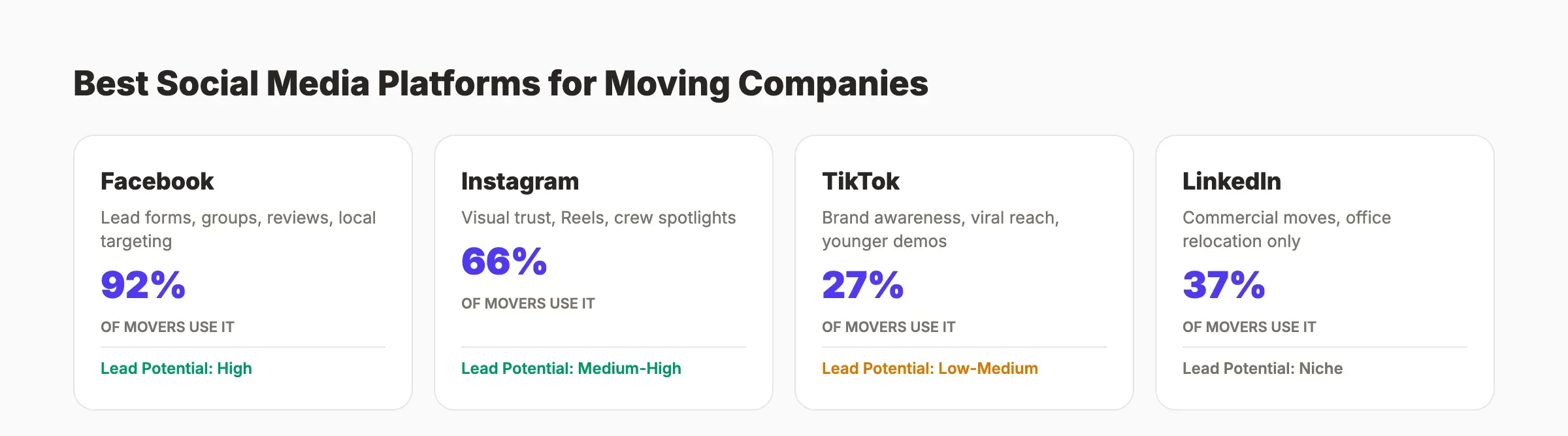
Rather than rank platforms by how many enquiries they supposedly produce, fit each one to the role it plays in a homeowner's research, the staff who will run it, and the funnel stage where it first becomes useful. If you want the commercial picture for movers as a whole, see theStacc for movers.
| Platform | Research role for movers | Content that fits | Staffing / time owner | Intake dependency | Earliest useful funnel stage | Stop condition |
|---|---|---|---|---|---|---|
| Local discovery, reviews, community questions | Reviews, crew photos, event and seasonal posts | Owner or office manager, a few hours per week | Needs a working estimate form or Messenger path | Qualified enquiry | No local enquiries or group questions over a full season | |
| Visual proof of crew, trucks, and process | Before-and-after clips, Reels, Stories, crew spotlights | A crew member who can film, plus one scheduler | Needs a bio link to estimate or call | Click and profile visit | No profile visits or saves after steady posting | |
| TikTok | Reach with younger renters and first-time movers | Short clips repurposed from Instagram | Same owner as Instagram, low extra load | Needs a clear bio link | Impression and reach | Effort crowds out Facebook and Instagram basics |
| Commercial and office relocation research | Office move case notes, commercial crew and process | Owner or sales lead, as commercial work exists | Needs a commercial enquiry path | Qualified enquiry (commercial) | No commercial relocations in scope | |
| X | Real-time local conversation and announcements | Service updates, storm or road-closure notes, replies | Owner, low and intermittent | Needs monitoring habit | Impression | No local audience or time to monitor replies |
Use social media automation tools to schedule and cross-post so one filming session feeds several profiles. If you use theStacc, the Social Media module covers scheduled posts and approvals across Instagram, Facebook, LinkedIn, and X; Local SEO covers Google Business Profile posts and review replies; Content SEO can research and draft supporting content. These are capabilities, not outcomes.
Not sure which two platforms fit your crew and season? We can walk through your current profiles, service area, and capacity and help you pick a realistic starting cadence. Sign up for free →
Content Types Movers Use
Truck photos alone rarely earn attention. Movers draw from a small set of repeatable content types: before-and-after loading clips, packing checklists, customer review screenshots, crew spotlights, unusual moves, seasonal reminders, light humor, and short how-to videos. Treat each type as a starting point to test, with a clear compliance gate for reviews and testimonials.
The core content types
Before-and-after loading clips. A time-lapse of a crew loading a full household and the empty home at the end proves competence in under a minute. Packing tips and checklists. Short posts such as "items your mover wishes you packed separately" are save-worthy and bring people back as their move date nears. Customer review screenshots. A real 5-star review with a caption about that specific move travels well; pair this with a system to earn more Google reviews.
Crew spotlights. Introduce coordinators, drivers, and crew leaders by name, with their consent, wrapping furniture or navigating a tight stairway. Unusual or difficult moves. A grand piano down four flights, a heavy safe, or an office moved over a weekend shows capability. Community and seasonal posts. Local events, holidays, and booking reminders tied to peak season keep you present. Light humor and short how-to videos. Relatable moving-day clips and quick tips work across Facebook, Instagram, and TikTok.
Content-idea bank mapped to moving job economics
Each angle below ties to why moving content earns attention and the gate that keeps it honest. The gates reference Google and FTC rules on reviews and endorsements, and the federal registration consumers are told to verify.
| Content angle | Why it earns attention | Claim / compliance gate |
|---|---|---|
| Crew loading a full household | Shows competence faster than copy | Show real jobs; do not stage a home and present it as a customer's |
| Piano, safe, or specialty items | Demonstrates capability on hard moves | Describe the job accurately; no exaggeration of weight or difficulty |
| USDOT number and insurance in profile | Reduces the effort to verify you | Present facts, not legal advice; FMCSA tells consumers to verify registration |
| Named crew spotlight | Humanizes the team behind the truck | Get crew consent; state roles accurately |
| Customer review screenshot | Third-party proof a homeowner trusts | Google and the FTC: real review, no incentive tied to sentiment |
| Customer testimonial video | The customer's own voice | FTC endorsement guides: disclose material connections and get permission |
| Local vs long-distance vs commercial | Matches how people actually search | Keep service area and scope accurate |
| Seasonal "book early" reminder | Timely nudge near peak weeks | No scarcity that is not real |
Present any frequency as a starting point to test against your own capacity and enquiry record, not as a rule that produces enquiries on its own.
| Content type | Platforms | Starting frequency to test | Compliance gate |
|---|---|---|---|
| Before-and-after clips | Instagram, Facebook, TikTok | A few per month | Real jobs, accurate depiction |
| Packing tips | All platforms | Weekly in peak season | Practical, no unsafe advice |
| Review screenshots | Facebook, Instagram | As genuine reviews arrive | GBP and FTC review rules |
| Crew spotlights | Instagram, Facebook | Weekly or biweekly | Crew consent, accurate roles |
| Unusual moves | TikTok, Instagram | As they happen | Accurate description |
| Seasonal reminders | Around peak booking windows | No false scarcity | |
| Light humor | Instagram, TikTok | Occasional | Never mocks customers |
| Short how-to videos | Instagram, TikTok, Facebook | Weekly in peak season | Accurate, safe instructions |
Building a Content Calendar for Peak Season and Beyond
A calendar turns random posting into a repeatable system that survives your busiest weeks. Moving demand peaks from May through September and cools from October through April, so cadence should flex with capacity rather than follow a fixed quota. Plan themes by month, schedule ahead, and define a pause condition for weeks when every truck is booked.
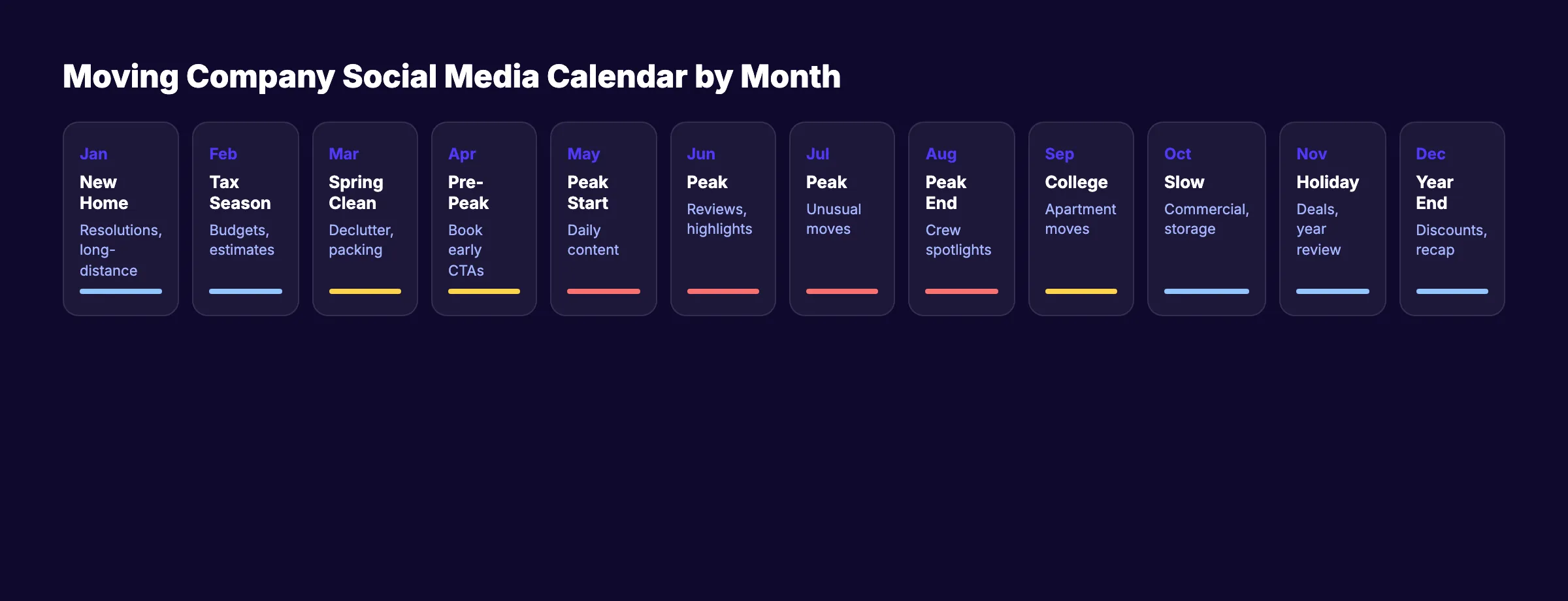
A content calendar is the tool that makes the cadence survive contact with a real schedule. The ranges below are starting points to test, bounded by how much your crew can film and your office can post, not by a promise that more posting produces more moves.
Seasonal cadence card
| Season | Demand pattern | Posting range to test | Content themes | Pause condition |
|---|---|---|---|---|
| Peak (May-Sep) | Highest residential demand; crews booked out | Three to five posts per week, capacity-bound | Reviews, job highlights, crew spotlights, booking reminders | Every truck is booked and quality would slip; protect service first |
| Off-season (Oct-Apr) | Lower residential demand; more planning | One to three posts per week, capacity-bound | Commercial moves, long-distance testimonials, storage, "book your summer move" | Posting would mean recycling weak content; hold for real material |
Content themes by month
| Month | Theme | Content focus |
|---|---|---|
| January | New year, new home | Resolution-themed, long-distance moves |
| February | Tax refund season | Planning and estimate reminders |
| March | Spring cleaning | Declutter before you move, packing tips |
| April | Pre-peak booking | Book-early reminders, crew hiring updates |
| May-June | Peak season launch | Reviews, job highlights, tips |
| July-August | Peak season height | Unusual moves, crew spotlights |
| September | Back-to-school moves | College moves, apartment relocations |
| October | Slow season starts | Commercial move content, storage |
| November-December | Holiday moves | Year-in-review, holiday planning |
Schedule posts in advance with social media automation tools so the calendar holds even when the week fills with moves.
Facebook, Instagram, and TikTok Execution
Mechanics matter more than volume. On Facebook, complete every profile field, enable reviews and Messenger, and show up in local groups without pitching. On Instagram, use Reels and Stories to show crews working. On TikTok, repurpose short clips for reach. Keep consent and accurate service-area claims attached to every post and message you publish.
Facebook page and groups
Fill out every field: address, phone, service area, hours, and your USDOT number where it applies. Add current photos, pin a strong review, and turn on a clear contact button. Local Facebook groups are a visibility channel, not a pitch floor: answer moving questions when they come up and let your profile do the rest. A Messenger auto-reply can ask for move date and zip codes so your office can respond with an accurate estimate.
Instagram Reels and Stories
Use Reels for short clips of crews in action and Stories for same-day updates such as a quick truck-cab clip or a pre-move photo. Save Highlights for Reviews, Crew, Packing Tips, and Big Moves so a new visitor can scan your proof fast. Film once and distribute everywhere with automation tools.
TikTok and repurposing
TikTok is a reach channel for movers, especially with younger renters and first-time movers. If you have the bandwidth, post clips you already made for Instagram rather than producing separate material. Learn how to repurpose content for social media so one shoot covers several profiles.
User-generated content, done cleanly
Ask customers to tag you in their moving-day posts and repost the ones you have permission to share. Do not condition a review or testimonial on a required positive sentiment or a discount; the FTC reviews rule and Google's review policies both prohibit incentivized or sentiment-conditioned reviews. Get permission for customer photos and disclose any material connection under the endorsement guides.
Paid Social for Movers
Paid social can extend reach during peak weeks, but it is not a vending machine for enquiries. Results depend on your own evidence window, your targeting, your offer, and consent under each platform's rules. Treat any budget as a test, record spend against booked moves in your CRM, and avoid borrowing cost figures from another market.
Running a first campaign
Keep the setup simple and measurable. Choose an objective that matches the action you want, target your real service area, set an age range that fits your customers, and keep any form short. Use a video of your crew at work rather than stock footage. Install the platform pixel so you can build a retargeting audience of people who visited your estimate page and did not submit.
- ✓ Target your actual service area, not a broad radius you cannot serve
- ✓ Keep the form to the few fields your office needs to quote
- ✓ Use real crew footage and accurate service claims
- ✓ Honor consent and each platform's advertising rules
- ✓ Record spend and booked moves in your own CRM before judging results
Reading paid results without borrowed benchmarks
There is no portable cost-per-lead or conversion figure that transfers from one market to another. Cost depends on your area, season, competition, offer, and how well your intake converts an enquiry into a booked job. Judge paid social over a declared acquisition window with enough booking lag, and compare it to your other channels using your own records rather than a published average.
Measuring Social Without Collapsing the Funnel
An impression is not a booking, and a click is not a lead. Measure each stage separately, from impression and click to call click, form submit, qualified enquiry, booked job, and completed job. Note whether social assisted or directly sourced the move, and resist collapsing reach into revenue or borrowing a portable cost-per-lead figure.
Google Analytics 4 documents lead events such as generate_lead, qualify_lead, working_lead, and close_convert_lead. As Google's event documentation makes clear, an event records the configured action on your site or app; a social click or form event does not, by itself, prove an offline booked or completed move. That link is made later, in your CRM and job records.
Measurement dictionary
| Stage | Definition | Source system | Owner | Timestamp | Attribution |
|---|---|---|---|---|---|
| Impression | A post or ad was shown | Platform analytics | Marketing | Time shown | Neither; awareness only |
| Click | A tap to your profile or site | Platform analytics, UTM tags | Marketing | Time of click | Neither until matched |
| Call click | A tap-to-call from a profile or ad | Platform or call tracking | Marketing / intake | Time of call | Direct or assisted after intake |
| Form submit | An estimate or contact form completed | Site analytics, form tool | Intake | Time submitted | Direct or assisted after review |
| Qualified enquiry | An enquiry that passes your written service and coverage rule | Intake / CRM source field | Intake owner | Time qualified | Direct or assisted |
| Booked job | A move confirmed on the schedule | CRM / job records | Operations with marketing | Time booked | Direct or assisted |
| Completed job | A move delivered and closed | Job records | Operations | Time completed | Direct or assisted |
Tag every link you share with UTM parameters and keep a "How did you hear about us?" field on the estimate form. Report monthly on the stages you can actually observe, and keep assisted credit separate from directly sourced moves.
Approved formulas, with every field
If you compute ratios, keep every field so the number cannot be read out of context. Do not publish a portable cost-per-lead, ROI, or engagement benchmark from these.
| Element | Social-attributed enquiry rate | Social-assisted booked-job rate | Cost per social-attributed booked job (paid only) |
|---|---|---|---|
| Numerator | Unique enquiries whose source field is a social channel and that pass the written service and coverage rule | Unique booked moves with a social touch anywhere in the recorded path | Direct paid-social spend attributable to the cohort |
| Denominator | All unique attributable enquiries in the same window | All unique booked moves in the same cohort | Unique booked moves attributed to that paid-social cohort |
| Evidence window | One declared 30-day window | 30-day booking cohort plus enough lag for the decision window | One declared 30-day acquisition cohort plus booking lag |
| Source system | Intake / CRM source field | Analytics path plus CRM and job records | Ad-platform invoice plus CRM and job records |
| Owner | Intake owner | Marketing owner with operations sign-off | Marketing owner with finance sign-off |
| Exclusions | Duplicates, spam, job applicants, vendors, out-of-area or out-of-service, unattributed | Direct-only bookings, unattributable, canceled before service | Organic and owner labor unless explicitly costed, unattributable or canceled jobs |
How to read any social-media claim you see elsewhere
Use this checklist before trusting a claim about movers and social media, including your own reports. The disposition tells you what to do when the backing is missing.
| Claim you might see | What to ask for before trusting it | Disposition |
|---|---|---|
| "X leads per month from social" | Named source, the window, the denominator, and the definition of a lead | verify-with-URL; otherwise remove |
| "Y% of movers use platform Z" | The survey source, sample, and date | verify-with-URL; otherwise rewrite-neutral |
| "Our posting delivered Z% return" | Numerator, denominator, evidence window, source system, and exclusions | rewrite-neutral to your own window |
| "More posts means more enquiries" | Causal evidence from your CRM over a declared window | remove as a promise |
Want a measurement setup you can actually trust? We can help you define stages, source fields, and a reporting window that fits how your office books moves. Sign up for free →
AI Search Note
AI search tools now surface summaries of local service pages, but the fundamentals for a mover are unchanged: clear services, accurate licensing details, and consistent profiles. For a full treatment of AI search and how generative engines reuse content, read our AI search optimization guide rather than duplicating that explanation here on this page.
Keep your service area, licensing, and contact details consistent across your site and profiles so any summary of your business stays accurate. For the deeper explanation of how AI search and generative engines select and quote sources, see the dedicated AI search optimization guide.
FAQ
These answers cover the questions moving owners ask most: which platforms deserve time, how cadence shifts by season, what to post beyond truck photos, the rules for reviews and testimonials, whether LinkedIn or TikTok fit residential movers, how to measure booked moves, and how to show licensing and insurance on profiles.
Most residential movers earn the clearest return on time from Facebook and Instagram, where homeowners research local providers and look for visual proof of crews and process. LinkedIn fits only when commercial relocations are part of the work. TikTok can add reach with younger renters if you have capacity. Match platforms to the jobs you actually sell.
Treat frequency as a starting point to test, not a rule. Many movers begin around three to five posts per week in peak season (May through September) and fewer in the off-season, then adjust to crew capacity. Consistency matters, but posting more does not by itself produce more enquiries.
Useful types include before-and-after loading clips, short packing checklists, customer review screenshots, crew spotlights, unusual or difficult moves such as pianos or safes, seasonal reminders, light moving-day humor, and brief how-to videos. Each works best when it proves competence or reduces a homeowner's uncertainty.
Yes, with conditions. Google permits asking genuine customers for reviews and prohibits incentivized or fake reviews, and the FTC bars conditioning a testimonial on a required positive sentiment and requires clear disclosure of any material connection. Screenshot real reviews, get permission for customer photos, and never trade a discount for praise.
For most residential-only movers, LinkedIn is optional and TikTok is a reach play, not a core channel. LinkedIn earns its time when office moves or employee relocations are in scope. TikTok can build awareness with younger renters if you can spare the effort, usually by repurposing short clips you already made for Instagram.
Track the stages separately instead of crediting social with a booking outright. Use UTM tags, a source field on your estimate form, and GA4 events such as generate_lead and qualify_lead to record configured actions, then match booked and completed moves in your CRM. Distinguish moves social directly sourced from those it only assisted.
No. More posting raises the chance of being seen, but enquiries depend on local demand, your service area, your offer, seasonality, and how well profiles answer a homeowner's doubts. Treat cadence as capacity-bound and judge it by qualified enquiries and booked moves over a declared window, not by post count alone.
List your legal business name, USDOT number for interstate household-goods moves, service area, phone, and insurance status in the bio or About section, and keep them consistent across profiles. The FMCSA tells consumers to verify a mover's registration, so making those details easy to find is itself a trust signal.
Pick the two platforms that fit your jobs and capacity, commit to a cadence you can sustain through peak season, and measure each stage on its own terms. That is how social media turns a moving crew into a name homeowners trust before they call.
Ready to turn this into a plan for your crew? We can help you choose platforms, set a seasonal cadence, and define measurement that fits how you book moves. Sign up for free →
Sources & references
- [1] Google Business Profile Help — Get reviews and review policies
- [2] FTC — Consumer Reviews and Testimonials Rule: Questions and Answers
- [3] FTC — Endorsement Guides
- [4] Google Analytics Help — Recommended events (generate_lead, qualify_lead, close_convert_lead)
- [5] FMCSA — Protect Your Move (verify a mover's registration)

Plan topics, review article drafts, and publish to a connected CMS.
Weekly local SEO teardowns
One practical email a week. Map Pack, GBP, AI Overviews. No fluff. Unsubscribe anytime.
Explore this topic: Social Media Marketing.