
Track AI Search Traffic in GA4 (Step-by-Step)
GA4 does not track AI traffic by default. Learn how to set up custom channels, regex filters, and explorations for ChatGPT and Perplexity. Updated April 2026.
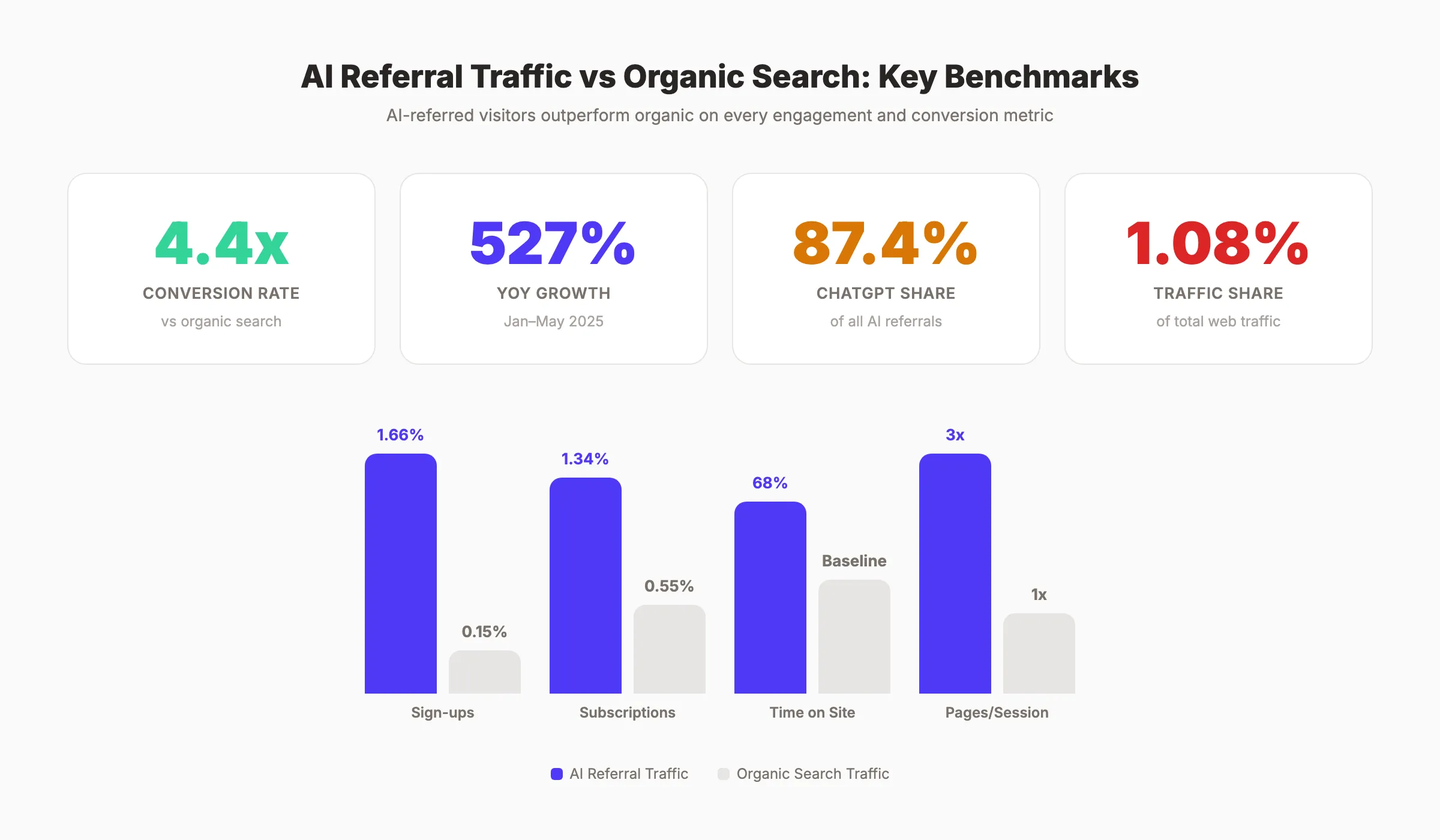
AI referral traffic grew 527% year-over-year between January and May 2025. AI-referred visitors convert at 4.4x the rate of traditional organic search. Yet GA4 does not automatically identify AI search traffic as a separate channel.
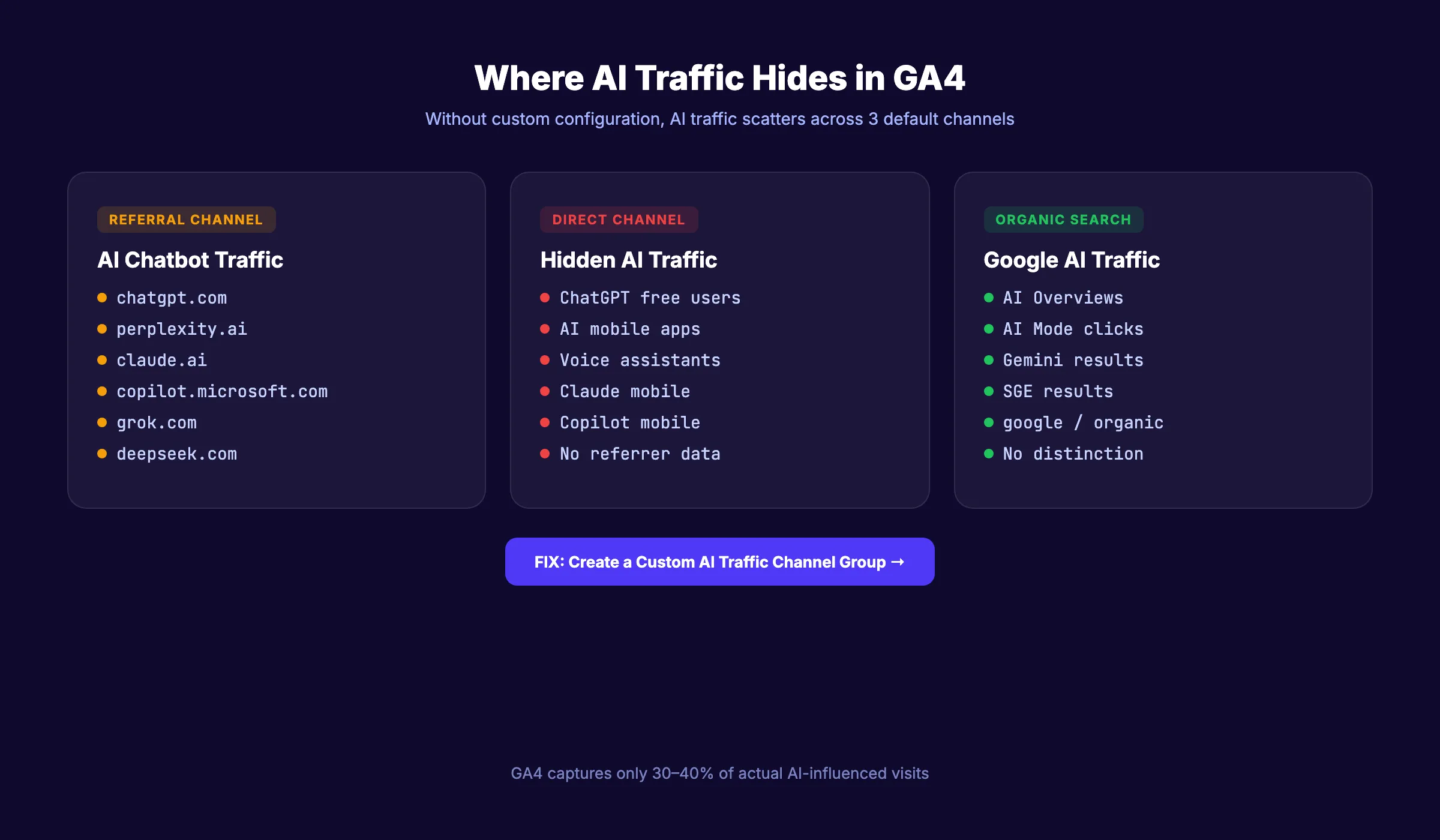
By default, traffic from ChatGPT, Perplexity, and Claude shows up as “Referral” in GA4. Traffic from Google AI Mode gets lumped into “Organic Search.” And traffic from AI mobile apps often appears as “Direct.” If you do not configure GA4 specifically for AI search traffic, you are blind to one of your fastest-growing channels.
This guide walks through the exact steps to track AI search traffic in GA4. You will set up custom channel groups, create regex filters for every major AI platform, build exploration reports, and connect GA4 data with Google Search Console AI Mode metrics.
We have published 3,500+ SEO articles across 70+ industries and track AI search traffic for every campaign. This is the process we use.
Here is what you will learn:
- How to find AI traffic that GA4 already records (but hides)
- How to create a custom “AI Traffic” channel group with regex filters
- The complete regex pattern covering 30+ AI platforms
- How to build exploration reports for AI traffic analysis
- How to connect GA4 with Google Search Console AI Mode data
- The limitations of GA4 tracking and how to fill the gaps
Overview: What You Need
Time required: 30 to 45 minutes for initial setup. 10 minutes per week for ongoing monitoring.
Difficulty: Intermediate (requires GA4 admin access)
What you need:
- GA4 property with admin or editor access
- Google Search Console linked to your GA4 property
- Basic understanding of regex (regular expressions)
- A list of AI platforms you want to track
Step 1: Find AI Traffic GA4 Already Records
GA4 already captures some AI referral traffic. It just does not label it as AI. Before building custom configurations, check what data you already have.
Specifically:
- Open GA4 and go to Reports > Acquisition > Traffic acquisition
- Change the primary dimension to Session source/medium
- In the search box above the table, type
chatgpt - Note the sessions, engaged sessions, and conversions
- Repeat the search for:
perplexity,claude,copilot,gemini,grok
Why this step matters: Most businesses discover they already have AI traffic they never noticed. Even a small number of sessions from ChatGPT or Perplexity validates that AI-referred visitors are reaching your site. This baseline tells you whether the full setup is worth the time.
Pro tip: Also search for openai (catches older ChatGPT referrals) and anthropic (catches some Claude traffic). Different AI platforms use different referrer domains across versions and updates.
The limitation of this approach is that it only finds exact source matches. It does not aggregate AI traffic into a single view or catch traffic from AI mobile apps that strip referrer data.
Record each AI source you find and its session count. This becomes your baseline for measuring growth after you complete the full setup. Most businesses discover they already have 50 to 500 AI-referred sessions per month that they never noticed because it was buried in generic “Referral” traffic. For broader context on what AI search means for your strategy, read our guide on how AI search is changing SEO.
If you find zero AI traffic, that does not mean AI models are not citing you. It means the traffic is hiding in Direct (mobile app users), Organic Search (Google AI Mode), or is zero-click (users read the AI answer without visiting your site). The full setup in the next steps will capture more of this hidden traffic.
Step 2: Create a Custom “AI Traffic” Channel Group
This is the most important step. A custom channel group tells GA4 to categorize all AI traffic under a single label instead of scattering it across Referral, Direct, and Organic.
Specifically:
- Go to GA4 Admin > Data settings > Channel groups
- Click Create new channel group
- Name it “Custom Channel Group (with AI)”
- Click Add new channel
- Name the channel “AI Traffic”
- Set the condition: Source matches regex (paste the regex from Step 3)
- Save the channel
- Drag the AI Traffic channel ABOVE the Referral channel in the priority list
Why this step matters: GA4 assigns traffic to the first matching channel in order. If Referral sits above AI Traffic, ChatGPT visits match Referral first and never reach your custom AI channel. The order determines whether your setup works.
After saving, apply the custom channel group in any traffic report by selecting it from the channel group dropdown. GA4 applies it retroactively to historical data.
For a full understanding of how GA4 works with your analytics setup, read our Google Analytics 4 setup guide.
Step 3: Add the Complete AI Platform Regex Pattern
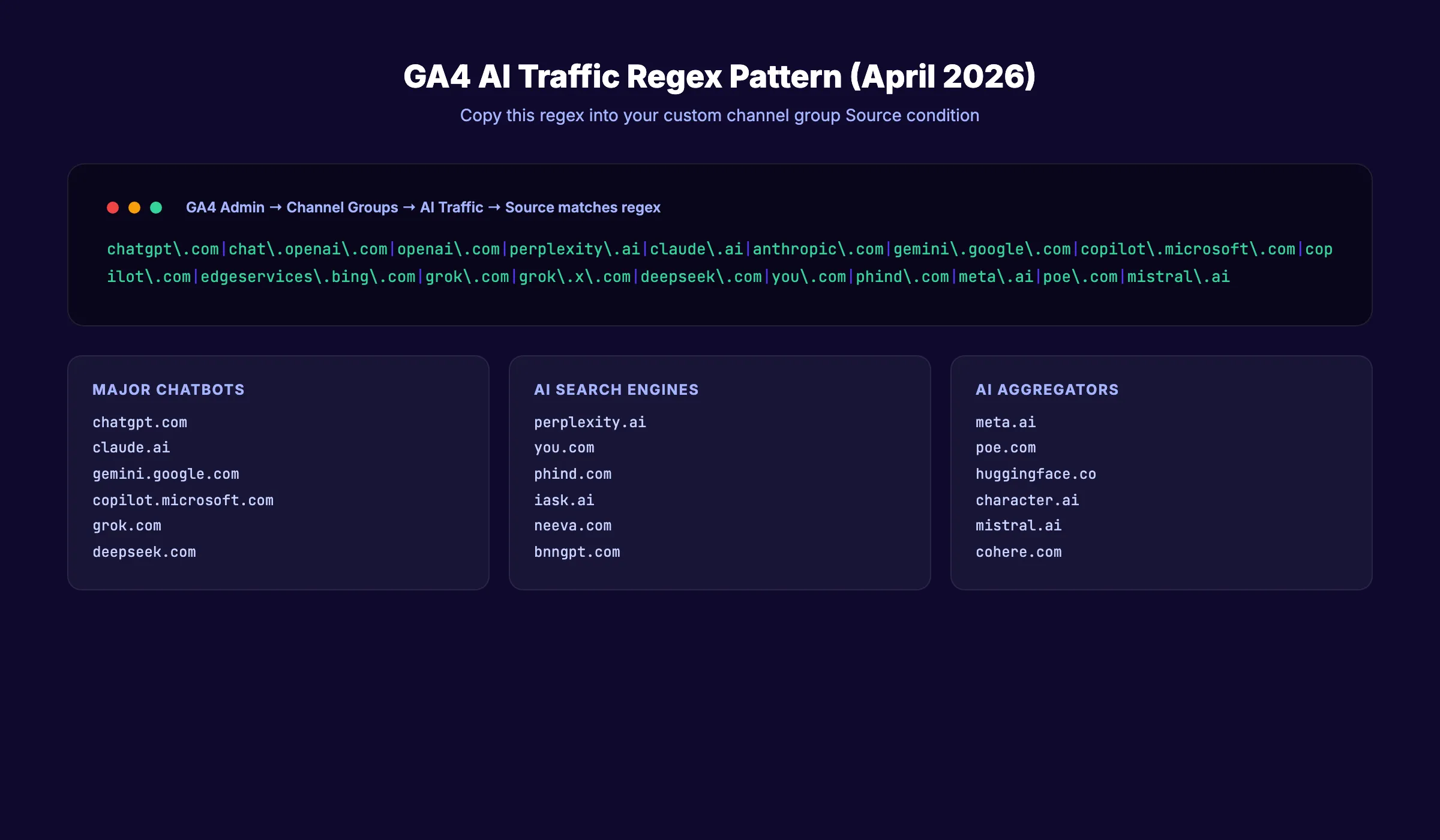
The regex pattern determines which traffic sources GA4 classifies as AI. Here is the pattern covering 30+ AI platforms as of April 2026.
The regex pattern:
chatgpt\.com|chat\.openai\.com|openai\.com|perplexity\.ai|claude\.ai|anthropic\.com|gemini\.google\.com|copilot\.microsoft\.com|copilot\.com|edgeservices\.bing\.com|grok\.com|grok\.x\.com|deepseek\.com|you\.com|phind\.com|neeva\.com|bing\.com/chat|iask\.ai|writesonic\.com|copy\.ai|character\.ai|meta\.ai|poe\.com|huggingface\.co|cohere\.com|mistral\.ai|inflection\.aiAI platform reference:
| Platform | Source Domain(s) | Notes |
|---|---|---|
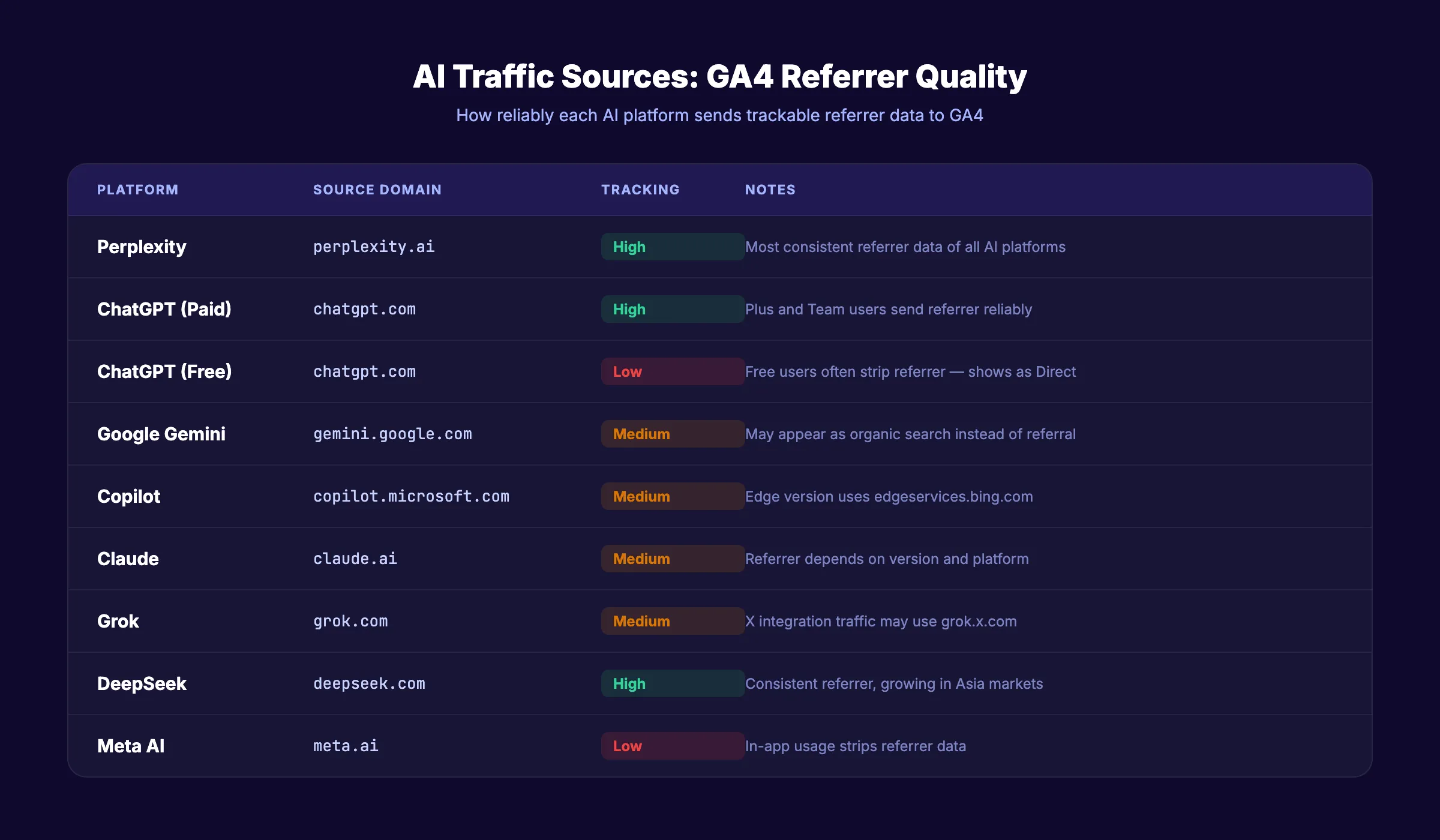
| ChatGPT | chatgpt.com, chat.openai.com | Free users often strip referrer |
| Perplexity | perplexity.ai | Consistent referrer data |
| Claude | claude.ai, anthropic.com | Referrer depends on version |
| Google Gemini | gemini.google.com | May also appear as organic |
| Copilot | copilot.microsoft.com, copilot.com | Edge browser version uses edgeservices.bing.com |
| Grok | grok.com, grok.x.com | X integration traffic |
| DeepSeek | deepseek.com | Growing in Asia markets |
| Meta AI | meta.ai | Facebook/Instagram integration |
| Poe | poe.com | Quora AI aggregator |
Why this step matters: An incomplete regex pattern misses AI traffic. A pattern from 2024 does not include Grok, DeepSeek, or Meta AI. Update this regex quarterly as new AI platforms launch and existing ones change their referral domains.
Important: GA4 regex is case-sensitive. If your source data shows both “ChatGPT” and “chatgpt,” include both variants or use a case-insensitive approach in your regex.
Stop writing. Start ranking. Stacc publishes 30 SEO articles per month for $99. Track the AI traffic your content generates. Start for $1 →
Step 4: Build an Exploration Report for AI Traffic Analysis
Standard GA4 reports show high-level data. Exploration reports let you analyze AI traffic in detail.
Specifically:
- Go to Explore > Create new exploration
- Choose Free form template
- Add these dimensions: Session source/medium, Page path, Landing page
- Add these metrics: Sessions, Engaged sessions, Average session duration, Conversions, Revenue
- Apply a segment: Create a new Session segment where Source matches your AI regex pattern
- Name the segment “AI Traffic Sources”
Why this step matters: The exploration report shows you exactly which pages AI traffic lands on, how long visitors stay, and whether they convert. The landing page dimension reveals which content AI platforms cite and link to. The conversion data proves the ROI of your AI visibility efforts.
Key analysis to run:
| Analysis | What It Reveals | GA4 Dimensions/Metrics |
|---|---|---|
| Top AI landing pages | Which content AI platforms cite most | Landing page + Sessions |
| AI traffic by source | Which AI platform sends the most traffic | Source/medium + Sessions |
| AI conversion rate | Whether AI visitors convert at higher rates | Source/medium + Conversions |
| AI engagement depth | How deeply AI visitors engage with your site | Source/medium + Pages per session |
| AI traffic trend | Whether AI traffic is growing or declining | Date + Sessions (with AI segment) |
Compare AI traffic behavior against organic search traffic. According to Microsoft Clarity research, AI-referred visitors spend 68% longer on sites and view 3x more pages per session. ChatGPT alone drives 87.4% of all AI referral traffic, so start your analysis there.
Building a Weekly AI Traffic Dashboard
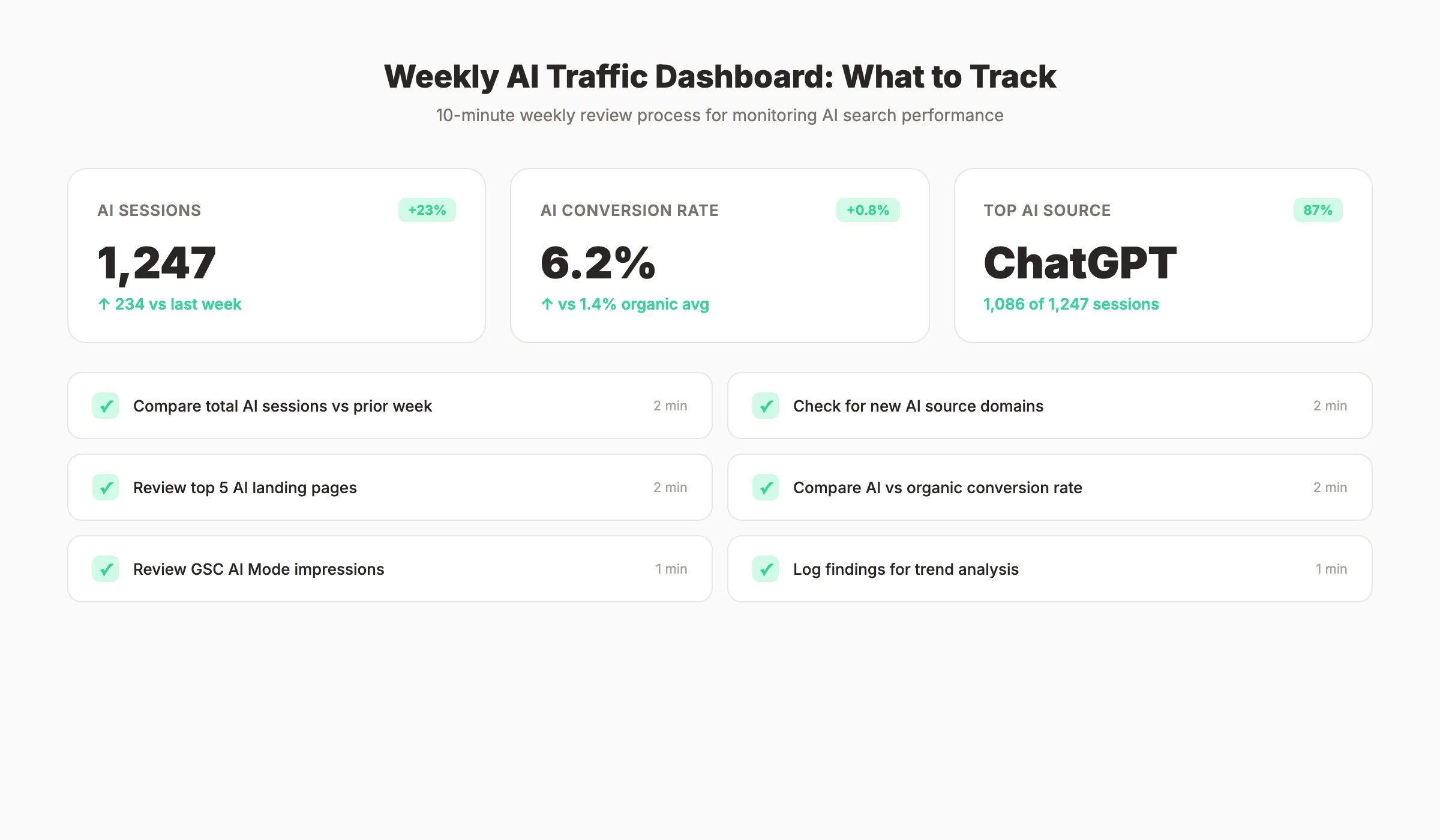
For ongoing monitoring, save your exploration report and check it weekly. Here is the weekly review process:
- Open your saved AI Traffic exploration
- Check total AI sessions versus the previous week
- Note any new AI sources that appeared (platforms change referrer domains)
- Review the top 5 AI landing pages for changes
- Check conversion rate from AI traffic versus your site average
- Document findings in a spreadsheet or reporting tool
The weekly review takes 10 minutes. Over time, the data reveals which content investments drive AI traffic and which do not. Pages that consistently appear as top AI landing pages should get priority for content updates and on-page optimization.
This data also feeds into your broader content marketing strategy. If AI platforms consistently cite your comparison pages but ignore your how-to guides, that signals what format AI engines prefer for your topic area. Publish more of what AI cites.
Step 5: Connect Google Search Console AI Mode Data
Google Search Console now separates AI Mode traffic from regular organic search. Connecting GSC to GA4 gives you the full picture.
Specifically:
- Open Google Search Console for your property
- Go to Performance > Search results
- Click Search Appearance filter
- Select AI Mode to see impressions and clicks from Google AI Mode specifically
- Compare AI Mode clicks against regular organic clicks for the same queries
Why this step matters: GA4 cannot distinguish Google AI Mode clicks from regular organic clicks. They both appear as “google / organic.” GSC is the only tool that separates them. Google added the AI Mode search appearance filter in June 2025. By reviewing both GA4 and GSC data together, you see the complete AI traffic picture.
Metrics available in GSC AI Mode:
| Metric | What It Shows |
|---|---|
| AI Mode impressions | How often your pages appear in AI Mode results |
| AI Mode clicks | How often users click through from AI Mode |
| AI Mode CTR | Click-through rate from AI Mode versus regular search |
| Top AI Mode queries | Which queries trigger your pages in AI Mode |
| Top AI Mode pages | Which pages appear most in AI Mode results |
For full instructions on GSC configuration, read our Google Search Console guide.
Step 6: Set Up Alerts for AI Traffic Changes
AI traffic patterns change rapidly. Model updates, new AI platform launches, and citation behavior shifts can swing your AI traffic 30 to 50% in a single week. Alerts catch these changes early.
Specifically:
- In GA4, go to the Home page
- Scroll to Insights at the bottom
- Click View all insights > Create
- Set up a custom insight: “Sessions from AI Traffic channel increased or decreased by more than 20% week-over-week”
- Enable email notifications
Why this step matters: Without alerts, you discover AI traffic drops weeks after they happen. With alerts, you catch changes within days and can investigate the cause. Common causes include GPT model updates that shift citation patterns, AI platform referrer domain changes, and content updates that affect your AI visibility.
Pro tip: Create separate alerts for each major AI platform (ChatGPT, Perplexity, Grok) so you can identify platform-specific changes rather than only seeing aggregate shifts.
Also create a positive alert for significant AI traffic increases. When a new piece of content starts earning AI citations, you want to know immediately so you can study what about that content attracted AI attention and replicate the pattern across other pages.
The combination of drop alerts and spike alerts gives you a complete early warning system for AI visibility changes. Investigate every alert within 48 hours. The cause is usually traceable to a specific content change, model update, or competitor action.
Step 7: Account for the Traffic GA4 Cannot Track
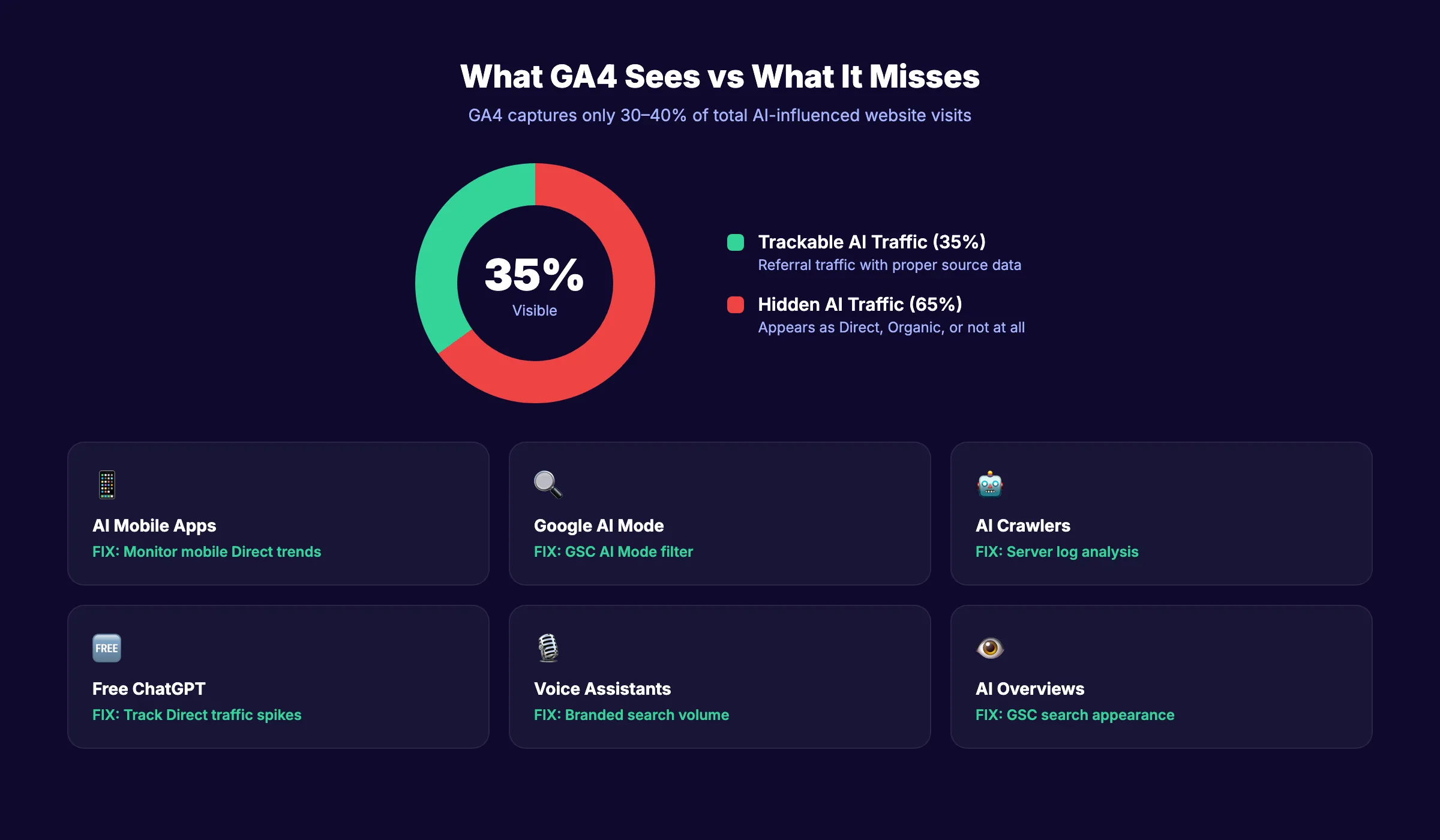
Even with perfect GA4 configuration, you see only a fraction of AI-influenced traffic. Industry estimates suggest visible AI referrals represent just 30 to 40% of actual AI-driven visits.
Specifically:
GA4 misses AI traffic in these scenarios:
| Scenario | Why GA4 Misses It | Workaround |
|---|---|---|
| Free ChatGPT users | No referrer data sent | Monitor direct traffic spikes |
| AI mobile apps | Referrer stripped by app | Compare mobile direct trends |
| Google AI Mode clicks | Categorized as google/organic | Use GSC AI Mode filter |
| AI Overviews clicks | Categorized as google/organic | Use GSC search appearance |
| AI crawlers reading content | Server-side requests, no JS execution | Check server logs for GPTBot, ClaudeBot |
| Voice assistant referrals | No referrer data | Monitor branded search volume changes |
Why this step matters: If you only measure what GA4 shows, you undercount AI traffic by 60 to 70%. The true impact of your AI visibility is much larger than what appears in analytics dashboards.
How to estimate total AI traffic:
- Take your visible GA4 AI referral sessions
- Multiply by 2.5 to 3x (industry estimate of visible vs total ratio)
- Add GSC AI Mode clicks (not captured in GA4 AI channel)
- The sum approximates your total AI-influenced traffic
For a deeper framework on measuring AI visibility beyond GA4, read our guides on AI search visibility tracking and LLM visibility. You can also check your AI citability score to understand how likely AI engines are to cite your content.
3,500+ blogs published. 92% average SEO score. Every article drives trackable AI traffic back to your site. Start for $1 →
Results: What to Expect
After completing the 7-step setup, here is what you gain:
- Week 1: Custom AI Traffic channel shows aggregated data across all AI platforms
- Week 2-4: Exploration reports reveal which content drives the most AI referrals
- Month 2: Trend data shows whether AI traffic is growing, flat, or declining
- Month 3+: Conversion data proves the ROI of AI visibility investments
Most businesses discover 3 things when they first set up AI tracking:
- They already have more AI traffic than expected (it was hiding in Referral and Direct)
- AI visitors convert at higher rates than organic visitors (4.4x on average)
- A small number of pages drive most AI traffic (the Pareto principle applies)
The third finding is the most actionable. Identify the 5 to 10 pages that drive 80% of your AI traffic. Optimize those pages for AI retrieval first. Then expand the pattern to your broader content library.
Connecting the Data to Business Decisions
The ultimate purpose of tracking AI search traffic is making better content decisions. Here is how the data translates to action:
| Data Finding | Business Decision |
|---|---|
| AI traffic growing month-over-month | Increase investment in AI-optimized content |
| Specific pages drive most AI referrals | Double down on that content format and topic |
| AI visitors convert at higher rates | Justify AI SEO budget with revenue data |
| One AI platform dominates your traffic | Prioritize optimization for that platform |
| AI traffic flat despite content publishing | Audit content structure for AI retrieval issues |
| Spike after a specific content update | Identify and replicate the optimization pattern |
Without measurement, AI search optimization is guesswork. With the GA4 setup described in this guide, every content decision is backed by data. You know which pages earn AI citations, which platforms send the most traffic, and whether those visitors generate revenue. For the latest benchmarks on AI referral traffic growth, see our AI search statistics roundup.
The businesses that track AI traffic make better decisions than those that guess. Start with the 7-step setup and let the data guide your strategy from there.
Rank everywhere. Do nothing. Blog SEO, Local SEO, and Social on autopilot. Build the AI traffic you can actually measure. Start for $1 →
FAQ
Does GA4 track AI traffic automatically?
No. GA4 categorizes most AI traffic as “Referral” without distinguishing it from other referral sources. Traffic from Google AI Mode appears as regular “Organic Search.” You must create a custom channel group with regex filters to separate AI traffic into its own channel.
Which AI platforms send the most trackable traffic?
Perplexity sends the most consistent referrer data. ChatGPT desktop sends referrer data for paid users but not always for free users. Claude and Copilot send referrer data variably. Google AI Mode traffic is identifiable only through Google Search Console, not through GA4 directly.
How much of my AI traffic is GA4 actually missing?
Industry estimates suggest GA4 captures 30 to 40% of total AI-influenced visits. The remainder hides in Direct traffic (mobile apps, free ChatGPT), Organic Search (Google AI Mode), and server-side interactions (AI crawlers). Multiply your visible AI sessions by 2.5 to 3x for a rough total estimate.
Should I track AI traffic separately from organic?
Yes. AI-referred visitors behave differently than organic visitors. They spend 68% longer on site, view 3x more pages, and convert at 4.4x the rate. Tracking them separately reveals the true value of your AI visibility efforts and justifies continued investment in generative engine optimization. Our AI citation readiness checklist covers 31 points to improve your AI visibility.
How often do I need to update the regex pattern?
Quarterly at minimum. New AI platforms launch regularly, and existing platforms change referral domains. Check for new sources by reviewing your full Referral traffic list monthly and adding any AI domains that appear.
Can I track AI traffic in GA4 retroactively?
Custom channel groups apply retroactively to historical data in GA4. Once you create the AI Traffic channel, you can analyze past AI referral patterns. Custom segments in exploration reports also work retroactively.
AI search traffic is growing faster than any other referral channel. The businesses that measure it accurately make better optimization decisions. Set up the 7-step tracking system above, monitor weekly, and use the data to guide your content strategy toward the pages and topics that AI platforms cite most. The setup takes 30 minutes. The insight it provides is permanent.
Related Tools & Resources
Free SEO Tools:
Best Lists:

Written by
Siddharth GangalSiddharth is the founder of theStacc and Arka360, and a graduate of IIT Mandi. He spent years watching great businesses lose organic traffic to competitors who simply published more. So he built a system to fix that. He writes about SEO, content at scale, and the tactics that actually move rankings.
30 SEO blog articles published every month
Keyword-optimized, scheduled, and live on your site. Automatically.
30-day trial · Cancel anytime
theStacc
Stop writing SEO content manually
30 blog articles, 30 GBP posts, and social media content. Published every month. Automatically.
Start Your $1 Trial$1 for 3 days · Cancel anytime