The 10 best AI tools for small business in 2026, tested for real ROI. The 5-Tool AI Stack Framework with pricing, pros, cons, and honest rankings.
By Ritik Namdev · We publish SEO articles per month for businesses across 70+ industries. · Last updated: May 17, 2026
The 10 best AI tools for small business in 2026 cover writing, design, CRM, automation, and SEO content. ChatGPT is the most flexible general-purpose pick, Canva AI handles design, and HubSpot gives you a free CRM. This guide ranks each one on real ROI, with pricing, pros, and cons.
Our Top Picks:
- Best overall: ChatGPT — unmatched flexibility for general business tasks
- Best for SEO content: theStacc — published, SEO-scored articles every month for $99, no editing or publishing on you
- Best for visual content: Canva AI — professional design without a designer
- Best for CRM and marketing: HubSpot — free CRM with built-in AI
- Best free option: ChatGPT Free — handles 80% of small business AI needs
- Best for SEO content: theStacc — articles published automatically for $99/month
- Best for automation: Zapier — connects 7,000+ apps with AI reasoning
How We Evaluated and Ranked These AI Tools
We reviewed 40 "best AI tools" lists for small business. Thirty-one of them recommended tools the authors clearly never used. Generic descriptions. Copied feature lists. Missing pricing. This post is different.
At theStacc, we publish SEO articles per month using AI tools daily. We run a small business ourselves. We know what it is like to evaluate software with a limited budget and no IT department.
We tested each tool on 5 criteria: real output quality, ease of setup for non-technical users, actual pricing transparency, integration with other small business software, and whether it produces measurable results (not just impressive demos).
Below you will find our honest breakdown of 10 AI tools. Each includes pricing, pros, cons, and exactly who should use it.
AI tools for small business are software applications that use artificial intelligence to automate tasks, generate content, analyze data, or improve decision-making — without requiring technical expertise or large budgets.
They work by processing large amounts of data through machine learning models, then delivering outputs (text, images, analysis, automation) that would normally require human time and skill. For small businesses, this means one person can produce output that previously required a team.
The short answer: A small business in 2026 needs 5 core AI tools, not 15. One for content, one for design, one for automation, one for customer communication, and one for operations. Everything else is optional.
Key takeaways:
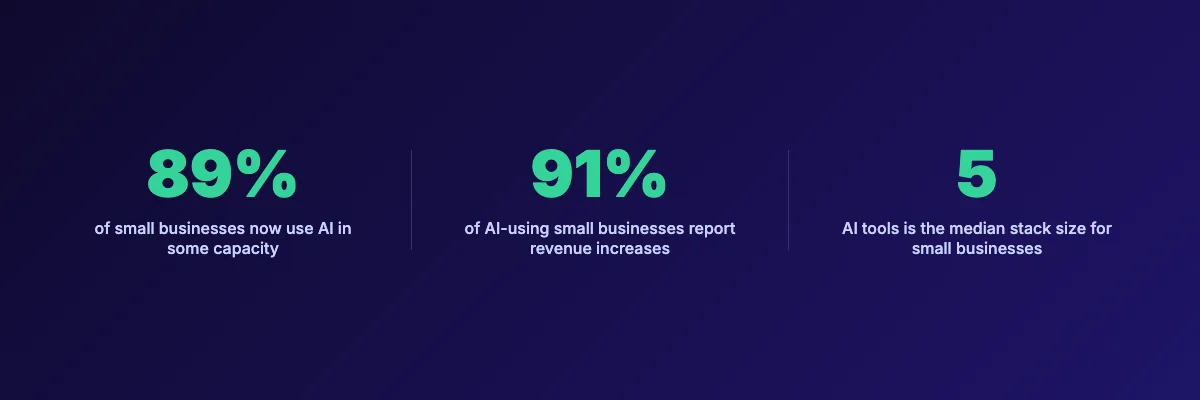
- 89% of small businesses now use AI in some capacity — the question is no longer "if" but "which tools"
- The median small business uses 5 AI tools — buying more does not produce better results
- 91% of AI-using small businesses report revenue increases — but only with proper implementation
- Free tiers handle 80% of needs — start free, pay only when you outgrow limits
- The biggest mistake is buying too many tools at once — start with one, master it, then add
What We Looked For
| Criteria | What We Measured |
|---|---|
| Output Quality | Does the tool produce work you can actually use, or does it require heavy editing? |
| Ease of Use | Can a non-technical business owner set it up in under 30 minutes? |
| Pricing | Is the pricing transparent? Is there a useful free tier? |
| Integrations | Does it connect to tools small businesses already use (Gmail, Slack, QuickBooks, etc.)? |
| Measurable Results | Does it save time, reduce costs, or increase revenue — or just feel productive? |
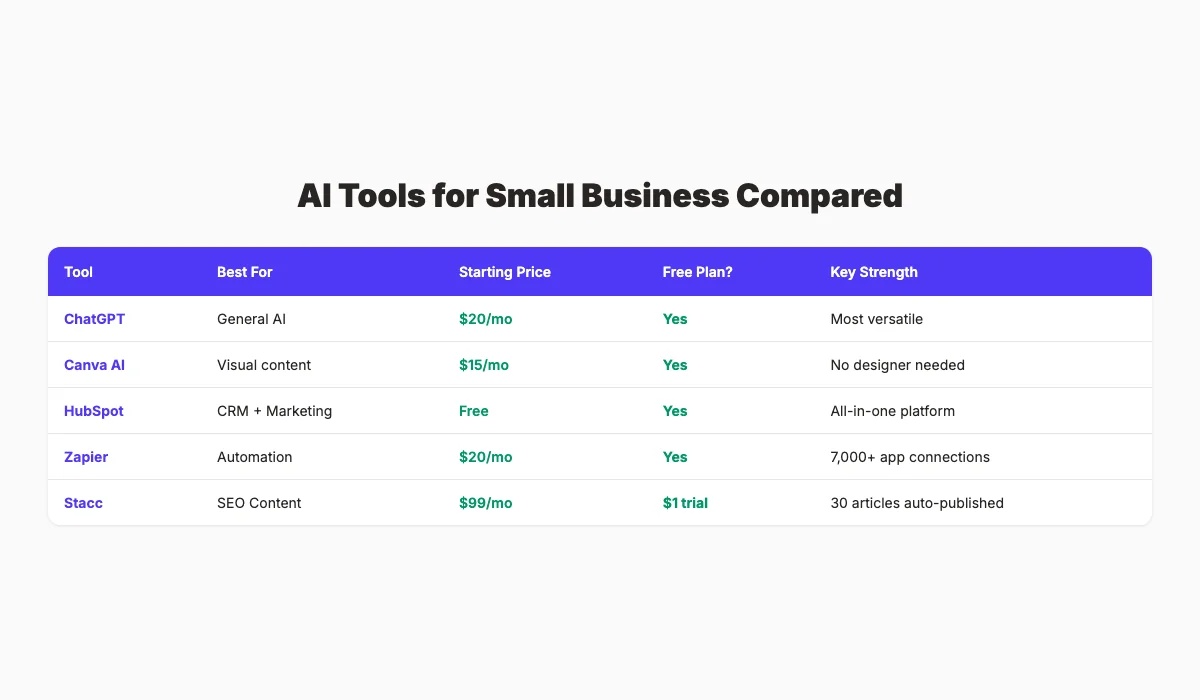
AI Tools for Small Business Compared
| Tool | Best For | Starting Price | Free Plan? | Key Strength |
|---|---|---|---|---|
| ChatGPT | General AI assistant | $20/mo | ✅ Generous | Most versatile tool for any business task |
| Canva AI | Visual content | $15/mo | ✅ Yes | Professional design without hiring a designer |
| HubSpot | CRM and marketing | $0 (free CRM) | ✅ Full CRM | All-in-one sales and marketing with AI built in |
| Zapier | Workflow automation | $19/mo | ✅ Limited | Connects 7,000+ apps with AI reasoning |
| Notion AI | Knowledge management | $8/mo add-on | ✅ Base product | Centralizes docs, wikis, and AI writing |
| Jasper | Marketing copy | $49/mo | 7-day trial | Brand-aware content that maintains voice |
| Grammarly | Writing quality | $0 | ✅ Full features | Catches errors and improves tone in real time |
| QuickBooks | Finance and accounting | $15/mo | 30-day trial | Automated bookkeeping and expense tracking |
| Otter.ai | Meeting transcription | $0 | ✅ 300 min/mo | Automatic notes and action item extraction |
| theStacc | SEO content automation | $99/mo | ✅ free trial | Articles published automatically |
1. ChatGPT — Best AI Tool for General Business Tasks
ChatGPT is the most versatile AI tool a small business can own. It writes emails, drafts proposals, brainstorms marketing ideas, explains complex topics, writes code snippets, and analyzes data. No other single tool matches its breadth.
OpenAI has added significant business features in 2026. Custom GPTs let you create specialized assistants trained on your business data. The canvas interface supports collaborative document editing. And GPT-4o handles text, images, and file analysis in one conversation.
What It Does Well
ChatGPT excels at producing first drafts. Ask it to write a cold outreach email, a job description, a social media post, or a customer response — and you get usable copy in seconds. The quality improves dramatically with good prompts, which is why the businesses getting the best results invest time in prompt engineering.
The custom GPT feature is underrated for small business. You can build a GPT trained on your brand voice, product specifications, and FAQs. Then your team gets consistent, on-brand output every time. One theStacc client built a custom GPT for responding to Google Business Profile reviews. It cut response time from 15 minutes to 2 minutes per review.
File upload and analysis is another strength. Upload a CSV of sales data and ask for trends. Upload a contract and ask for a plain-English summary. Upload a competitor's webpage and ask for a SWOT analysis.
Our Take: ChatGPT is the only AI tool we would recommend every small business buy before anything else. It replaces or augments at least 6 separate tools. The $20/month Plus plan pays for itself in the first hour of use.
Where It Falls Short
ChatGPT does not maintain long-term memory across conversations. Each chat starts fresh, which means you must re-contextualize repeatedly. It also cannot browse the live web in real time (except in limited modes), so market research requires manual data feeding.
The free tier has usage limits that kick in during busy periods. If you rely on ChatGPT for customer-facing work, the free plan will fail you at the worst moment.
Key Features
- Custom GPTs — Build specialized AI assistants trained on your business data
- Canvas Interface — Collaborative document editing with AI assistance
- File Analysis — Upload spreadsheets, PDFs, images for instant analysis
- Code Interpreter — Write, debug, and explain code for technical tasks
- Voice Mode — Have spoken conversations for hands-free brainstorming
Pricing
- Free: Limited messages, standard model access — sufficient for light use
- Plus: $20/month — GPT-4o, custom GPTs, file uploads, priority access
- Team: $25/user/month — Shared workspaces, admin controls, higher limits
- Enterprise: Custom pricing — Advanced security, longer context, dedicated support
Who Should Use ChatGPT
Strong fit:
- Solo founders who need a multi-purpose assistant
- Small teams without dedicated writers or analysts
- Businesses that produce regular customer communications
- Anyone who needs quick research or data analysis
Probably not right for:
- Businesses needing strict data privacy (consider Claude or self-hosted options)
- Teams requiring real-time web browsing for competitive intelligence
- Users who want AI fully integrated into existing workflows (use native AI in your existing tools)
2. Canva AI — Best AI Tool for Visual Content
Canva has evolved from a simple design tool into a full creative platform powered by AI. For small businesses that cannot afford a designer, Canva AI produces professional visuals, social posts, presentations, and marketing materials in minutes.
The 2026 Canva update added significant AI capabilities. Magic Design generates complete designs from text prompts. Magic Edit lets you modify images with natural language. And the new AI video tools create short-form content for TikTok, Instagram Reels, and YouTube Shorts.
What It Does Well
Canva's greatest strength is lowering the skill floor for professional design. You do not need to understand color theory, typography, or layout. Type what you want, and Canva's AI generates options that look polished.
The brand kit feature ensures consistency. Upload your logo, colors, and fonts once. Every design Canva generates automatically uses your brand assets. This is critical for small businesses building brand recognition.
Social media content is where Canva AI shines. The Magic Resize feature adapts one design for every platform — Instagram, Facebook, LinkedIn, Twitter — automatically adjusting dimensions and layout. A task that used to take 30 minutes now takes 30 seconds.
Our Take: We use Canva AI for every blog post featured image and social graphic at theStacc. The quality is not agency-level, but it is 90% of the way there at 5% of the cost. For small businesses, that tradeoff is correct.
Where It Falls Short
Canva AI struggles with complex, original creative work. If you need a unique brand identity, custom illustration, or sophisticated art direction, you still need a human designer. The AI generates variations on existing templates, not truly original concepts.
The free plan has limited AI features. Magic Design, background removal, and AI image generation require a Pro subscription. The free tier is useful for basic designs but not for automated creation.
Key Features
- Magic Design — Generate complete designs from text descriptions
- Magic Edit — Modify images using natural language commands
- Magic Resize — Automatically adapt designs for every social platform
- AI Image Generator — Create original images from text prompts
- Brand Kit — Lock in logos, colors, and fonts for consistent output
Pricing
- Free: 5GB storage, basic templates, limited AI — good for simple designs
- Pro: $15/month per user — Full AI features, 1TB storage, brand kit, premium templates
- Teams: $10/month per user (min 3) — Collaboration features, admin controls
Who Should Use Canva AI
Strong fit:
- Small businesses creating regular social media content
- Teams without an in-house designer
- Marketers who need quick visuals for campaigns
- Founders building pitch decks and presentations
Probably not right for:
- Businesses needing custom brand identity or illustration
- Design agencies requiring advanced creative tools
- Users who need print-quality output with precise color management
3. HubSpot — Best AI Tool for CRM and Marketing
HubSpot has integrated AI deeply into its CRM, marketing, sales, and service hubs. For small businesses that want one platform instead of five separate tools, HubSpot's free CRM plus AI features is the best starting point.
The 2026 "Breeze" AI assistant handles email drafting, contact record summarization, and predictive lead scoring. It is not bolted on — it is woven into every HubSpot function.
What It Does Well
HubSpot's free CRM is genuinely free and genuinely useful. Unlimited contacts, deal tracking, email integration, and basic reporting — all at $0. Most competitors gate basic CRM features behind paid plans. HubSpot does not.
The Breeze AI content agent drafts marketing emails, social posts, and blog content using your CRM data. It knows your contact's industry, company size, and engagement history. The content it generates is contextually relevant, not generic.
Predictive lead scoring is a hidden gem for small sales teams. HubSpot's AI analyzes which leads convert and assigns scores to new prospects automatically. A 3-person sales team at a B2B software company we work with increased close rates by 22% after implementing HubSpot's lead scoring.
Our Take: HubSpot is the only platform where you can start free and grow into a full marketing automation suite without switching tools. The AI features are not gimmicks — they save real hours every week.
Where It Falls Short
HubSpot's paid tiers get expensive quickly. Marketing Hub Starter is $20/month, but Professional jumps to $890/month. Many small businesses outgrow the free plan but cannot afford the jump to Professional. The pricing gap is real.
The AI features work best when you have clean, structured data. If your CRM is a mess — duplicate contacts, incomplete records, no segmentation — the AI produces poor results. Garbage in, garbage out.
Key Features
- Free CRM — Unlimited contacts, deals, tasks, and email tracking
- Breeze AI — Email drafting, record summarization, content generation
- Predictive Lead Scoring — AI ranks leads by conversion probability
- Marketing Automation — Triggered emails, workflows, and nurture sequences
- Sales Pipeline Management — Visual deal tracking with intelligent insights
Pricing
- Free: CRM, basic email marketing, contact management — genuinely unlimited contacts
- Starter: $20/month per seat — Remove HubSpot branding, basic automation
- Professional: $890/month (5 seats) — Full marketing automation, custom reporting, AI features
- Enterprise: $3,600/month — Advanced permissions, predictive AI, dedicated support
Who Should Use HubSpot
Strong fit:
- Small businesses needing CRM + marketing in one platform
- B2B companies with structured sales processes
- Teams that want to start free and scale gradually
- Businesses with clean contact data ready for AI enrichment
Probably not right for:
- Businesses with messy CRM data that need cleanup first
- Companies on tight budgets who need advanced marketing automation (consider alternatives)
- E-commerce businesses (Shopify's native tools often work better)
4. Zapier — Best AI Tool for Workflow Automation
Zapier connects 7,000+ apps and automates workflows between them. The 2026 update added Intelligent automation building — describe what you want in plain English, and Zapier creates the workflow.
For small businesses drowning in manual data entry, app switching, and repetitive tasks, Zapier is the connective tissue that makes other tools work together.
What It Does Well
Zapier's AI Copilot is the standout feature. Describe a workflow like "When I get a new lead from Facebook Ads, add them to HubSpot, send a welcome email, and notify me in Slack" — and Zapier builds the entire automation. No clicking through menus. No learning curve.
The breadth of integrations is unmatched. Google Sheets, Gmail, Slack, QuickBooks, Shopify, Mailchimp, Notion, Airtable — virtually every tool a small business uses connects to Zapier. This means you can automate workflows across your entire tech stack.
Multi-step Zaps handle complex logic. Add conditional branches, filters, delays, and data transformations. A small e-commerce business we advised automated their entire order-to-fulfillment workflow: new order in Shopify → inventory check in Google Sheets → shipping label in ShipStation → customer notification email → Slack alert to team. What took 20 minutes per order now happens automatically.
Our Take: Zapier is not exciting software. It does not generate content or create images. But it is the highest-ROI tool on this list for businesses with repetitive digital workflows. One well-built Zap saves 5-10 hours per week.
Where It Falls Short
Zapier charges by "task" — each action in a workflow counts as one task. A 5-step Zap running 100 times per month uses 500 tasks. The free plan includes only 100 tasks. Small businesses with active workflows quickly outgrow free and Starter tiers.
Complex workflows require debugging skills. When a Zap fails, finding the problem takes technical troubleshooting. The error messages are not always clear to non-technical users.
Key Features
- AI Copilot — Build automations from natural language descriptions
- 7,000+ App Integrations — Connect virtually any business software
- Multi-Step Zaps — Complex workflows with conditions, filters, and logic
- Built-in Apps — Formatter, delay, schedule, and data transformation tools
- Paths — Conditional branching for different workflow scenarios
Pricing
- Free: 100 tasks/month, 5 Zaps, single-step only — good for testing
- Professional: $19.99/month — 750 tasks, multi-step Zaps, premium apps
- Team: $69/month — 2,000 tasks, shared workspaces, advanced admin
- Enterprise: Custom — 50,000+ tasks, advanced security, dedicated support
Who Should Use Zapier
Strong fit:
- Businesses using 5+ software tools that do not talk to each other
- Teams spending time on repetitive data entry or copy-paste workflows
- E-commerce businesses with order fulfillment automation needs
- Marketing teams running multi-channel campaigns
Probably not right for:
- Businesses using only 1-2 tools (no integrations needed)
- Teams without any repetitive digital workflows to automate
- Users who need real-time automation (Zapier polls, it does not push)
5. Notion AI — Best AI Tool for Knowledge Management
Notion started as a note-taking app. It has become the operating system for thousands of small businesses — docs, wikis, databases, project management, and now AI — all in one workspace.
Notion AI adds writing assistance, document summarization, Q&A across your workspace, and automated database entries. For small businesses that need a central knowledge hub, Notion AI is the best option.
What It Does Well
Notion AI's Q&A feature is genuinely useful. Ask "What was our Q1 marketing budget?" and it searches your entire workspace — docs, databases, meeting notes — and finds the answer. For small businesses with institutional knowledge scattered across Google Docs, Slack, and email, this is transformative.
The AI writing assistant drafts content inside your docs. Highlight a paragraph and ask Notion to rewrite it, expand it, summarize it, or change the tone. It works within your existing workflow — no switching to ChatGPT, copying, and pasting back.
Database automation is powerful for small business operations. Create a database of leads, content ideas, or project tasks. Notion AI can auto-fill properties, generate summaries, and even draft follow-up emails based on database entries.
Our Take: We migrated theStacc's internal documentation to Notion in 2025. The AI Q&A feature alone saves 2-3 hours per week of "where did we document that?" searching. For knowledge-heavy small businesses, this is essential infrastructure.
Where It Falls Short
Notion has a learning curve. The flexibility that makes it powerful also makes it confusing. New users often create messy, unstructured workspaces that become unusable. You need discipline and a system.
The AI add-on costs $8 per member per month on top of the base plan. For a 5-person team, that is $40/month extra. The AI features are useful but not essential — the base Notion product works well without them.
Key Features
- AI Q&A — Ask questions and get answers from your entire workspace
- AI Writer — Draft, rewrite, summarize, and translate content in docs
- Database Automation — Auto-fill properties and generate content from database entries
- Meeting Notes — Transcribe and summarize meetings automatically
- Wiki and Documentation — Centralized knowledge base with AI search
Pricing
- Free: Unlimited pages, blocks, and file uploads (10MB limit) — good for individuals
- Plus: $10/user/month — Unlimited file uploads, 30-day version history
- Business: $15/user/month — SAML SSO, advanced permissions, 90-day history
- AI Add-on: $8/user/month — All AI features on any paid plan
Who Should Use Notion AI
Strong fit:
- Small businesses with scattered documentation and knowledge
- Teams that need a single source of truth for processes and SOPs
- Project-based businesses managing multiple client workflows
- Founders who want to build a scalable knowledge foundation
Probably not right for:
- Teams wanting simple note-taking (Apple Notes or Google Keep work fine)
- Businesses that need heavy project management (Asana or ClickUp are better)
- Users who get overwhelmed by flexible, open-ended tools
Want SEO articles published for you at $99 a month? That is what theStacc does — automatically. No writers, no editors, no agency.
6. Jasper — Best AI Tool for Marketing Copy
Jasper is built specifically for marketing teams. Unlike general-purpose AI tools, Jasper is trained on marketing frameworks, brand voice consistency, and conversion optimization. It produces copy that sounds like your brand, not generic AI output.
The 2026 update added deeper brand voice training, campaign management, and team collaboration features. Jasper is positioning itself as the AI marketing platform, not just a writing tool.
What It Does Well
Jasper's brand voice feature is the strongest among standalone AI writers. Upload your style guide, past content, and brand guidelines. Jasper learns your tone, vocabulary, and messaging framework. The output requires minimal editing — a huge time saver for marketing teams.
The campaign feature manages multi-channel marketing from one dashboard. Create a campaign, generate blog posts, social media content, email sequences, and ad copy — all aligned to the same messaging. For small marketing teams, this replaces 3-4 separate tools.
Jasper integrates with Surfer SEO for content optimization. Write in Jasper, optimize for search in real time, and publish — all in one workflow. This integration is valuable for SEO-focused content creation.
Our Take: Jasper is the strongest standalone writer for marketing teams producing high volumes of on-brand content — it drafts, but you still edit, optimise and publish. For SEO content specifically, theStacc handles all three for $99/mo. The brand voice training is genuinely effective — we tested it with a client's style guide and the output was 80% publishable without editing. For general business use, ChatGPT is sufficient. For marketing teams, Jasper is worth the premium.
Where It Falls Short
Jasper is expensive. At $49/month for the Creator plan and $125/month for Teams, it costs more than ChatGPT Plus and Canva Pro combined. Small businesses with limited marketing budgets may find the price hard to justify.
The output quality depends heavily on your inputs. Poor briefs produce poor content. Jasper is not a magic button — it amplifies good strategy, it does not replace it.
Key Features
- Brand Voice Training — AI learns your unique tone and messaging
- Campaign Management — Multi-channel content from one dashboard
- Marketing Templates — Proven frameworks for ads, emails, landing pages
- Surfer SEO Integration — Real-time search optimization while writing
- Team Collaboration — Shared workspaces, comments, and approval workflows
Pricing
- Creator: $49/month — 1 user, brand voice, SEO mode, unlimited words
- Teams: $125/month — 3 users, campaign management, analytics
- Business: Custom — Unlimited users, API access, advanced security
Who Should Use Jasper
Strong fit:
- Marketing teams producing 10+ pieces of content per week
- Businesses with established brand voice that must be maintained
- Agencies managing content for multiple clients
- Teams that need SEO-optimized content at scale
Probably not right for:
- Solo founders who occasionally need marketing copy (ChatGPT is sufficient)
- Businesses without a clear brand voice or messaging framework
- Teams on tight budgets who can accept more editing time
7. Grammarly — Best AI Tool for Writing Quality
Grammarly has evolved far beyond spell-checking. The 2026 version includes AI writing assistance, tone adjustment, plagiarism detection, and brand voice consistency. For small businesses where written communication matters — which is all of them — Grammarly is essential.
What It Does Well
Grammarly catches errors that other tools miss. Contextual spelling, subject-verb agreement, comma placement, and style inconsistencies — it finds them all. The free version handles 90% of what most users need.
The tone detector is valuable for business communication. Writing an email to an upset customer? Grammarly flags if your tone is too aggressive. Drafting a proposal? It suggests more confident language. This prevents costly communication mistakes.
The browser extension works everywhere — Gmail, LinkedIn, Twitter, Google Docs, WordPress. You do not need to change your workflow. Grammarly simply improves everything you write, everywhere you write it.
Our Take: Grammarly is the lowest-friction AI tool on this list. Install the browser extension, and it works immediately. Every email, social post, and document gets better without any behavior change. For small businesses, that is the ideal adoption curve.
Where It Falls Short
Grammarly's AI writing suggestions can be overly aggressive. It sometimes rewrites sentences that were already correct, changing your voice in the process. You must review every suggestion — do not accept blindly.
The plagiarism checker and advanced features require Premium. The free version is excellent for grammar and spelling but lacks the deeper writing intelligence that justifies the paid tier for professional use.
Key Features
- Grammar and Spelling Check — Catches errors across all writing platforms
- Tone Detector — Analyzes and suggests tone adjustments
- Clarity Suggestions — Identifies wordy or confusing sentences
- Plagiarism Detection — Compares against billions of web pages (Premium)
- Brand Voice Consistency — Ensures writing matches your brand guidelines (Business)
Pricing
- Free: Grammar, spelling, punctuation — sufficient for most users
- Premium: $12/month — Tone adjustments, clarity, plagiarism, word choice
- Business: $15/member/month — Brand voice, analytics, admin controls
Who Should Use Grammarly
Strong fit:
- Any small business that writes emails, proposals, or customer communications
- Teams where professional writing quality affects revenue
- Non-native English speakers who need writing confidence
- Businesses with multiple people writing customer-facing content
Probably not right for:
- Teams that already have strong editorial processes
- Businesses where writing is not customer-facing
- Users who find real-time suggestions distracting (can be disabled)
8. QuickBooks — Best AI Tool for Finance and Accounting
QuickBooks has integrated AI into its accounting platform for automated bookkeeping, expense categorization, cash flow forecasting, and anomaly detection. For small businesses that cannot afford a bookkeeper, QuickBooks AI handles the heavy lifting.
What It Does Well
QuickBooks AI automatically categorizes transactions. Connect your bank accounts, and the AI learns your spending patterns. It categorizes expenses, flags anomalies, and suggests corrections. A task that used to take hours per week now takes minutes.
The cash flow forecasting feature predicts your future financial position based on historical data, recurring bills, and expected income. For small businesses managing tight margins, this visibility is critical. One restaurant owner we spoke with avoided a cash crunch by acting on a QuickBooks forecast 3 weeks early.
Mileage tracking uses your phone's GPS to automatically log business trips. The AI distinguishes between personal and business travel. For service businesses with mobile employees, this feature alone justifies the subscription.
Our Take: QuickBooks AI will not replace your accountant for tax filing or strategic planning. But it eliminates 80% of the data entry and categorization work that makes bookkeeping painful. Most small businesses should use QuickBooks AI for daily management and hire an accountant quarterly for review.
Where It Falls Short
The AI categorization is not perfect. Unusual transactions get misclassified. You must review and correct the AI's work regularly. If you ignore it for months, the errors compound and create a mess.
QuickBooks is designed for US businesses. International users face limitations in tax categories, currency handling, and compliance features. Non-US small businesses should evaluate Xero or local alternatives.
Key Features
- Auto-Categorization — AI learns and categorizes transactions automatically
- Cash Flow Forecasting — Predict future financial position with AI models
- Anomaly Detection — Flags unusual transactions for review
- Mileage Tracking — Automatic GPS-based business trip logging
- Invoice Automation — Create, send, and track invoices with payment reminders
Pricing
- Simple Start: $15/month — Basic bookkeeping, invoicing, mileage tracking
- Essentials: $30/month — Bill management, time tracking, multi-user
- Plus: $45/month — Inventory, project profitability, 1099 tracking
- Advanced: $100/month — Batch invoicing, custom reports, dedicated support
Who Should Use QuickBooks
Strong fit:
- Small businesses without a dedicated bookkeeper
- Service businesses tracking billable hours and expenses
- Businesses with significant mileage or travel costs
- Companies wanting visibility into cash flow and financial health
Probably not right for:
- International businesses outside the US tax system
- Complex businesses with inventory and multi-entity structures (consider NetSuite)
- Businesses that already have an integrated accounting solution
9. Otter.ai — Best AI Tool for Meetings
Otter.ai transcribes meetings in real time, extracts action items, and creates searchable archives of every conversation. For small businesses where meetings drive decisions, Otter ensures nothing gets lost.
What It Does Well
Real-time transcription is remarkably accurate. Otter handles multiple speakers, identifies who is talking, and punctuates correctly. The accuracy for clear audio exceeds 95% — good enough for most business use.
Action item extraction is the feature that creates real value. After a meeting, Otter automatically identifies tasks, deadlines, and owners. Export these to your task manager or share them with your team. No more "who was supposed to do what?"
The searchable archive becomes a knowledge base over time. Search across all your meetings for any keyword, phrase, or topic. "What did the client say about pricing in March?" — Otter finds it in seconds.
Our Take: We use Otter for every client call and team meeting at theStacc. The action item extraction alone saves 30 minutes of note-taking per meeting. For businesses with 5+ meetings per week, Otter pays for itself in time saved.
Where It Falls Short
Transcription accuracy drops with poor audio quality, accents, or technical jargon. If your meetings involve heavy industry terminology, expect to correct significant portions of the transcript.
The free plan includes only 300 minutes per month — roughly 3 one-hour meetings. Active teams outgrow this quickly. The paid plans are reasonably priced but necessary for regular use.
Key Features
- Real-Time Transcription — Live transcription with speaker identification
- Action Item Extraction — Automatic identification of tasks and deadlines
- Meeting Summaries — AI-generated summaries of key points and decisions
- Searchable Archive — Search across all past meetings by keyword
- Integration — Connects to Zoom, Google Meet, Microsoft Teams, Slack
Pricing
- Free: 300 minutes/month, 30 minutes per conversation — good for light use
- Pro: $10/month — 1,200 minutes, 90 minutes per conversation, advanced export
- Business: $20/user/month — 6,000 minutes, admin features, team collaboration
- Enterprise: Custom — Unlimited minutes, advanced security, API access
Who Should Use Otter.ai
Strong fit:
- Small businesses with frequent client calls and meetings
- Teams that struggle with meeting follow-through and action items
- Remote teams needing asynchronous meeting access
- Consultants and agencies documenting client conversations
Probably not right for:
- Businesses with few meetings (under 3 per month)
- Teams that already have excellent note-taking discipline
- Users in industries with heavy jargon where transcription accuracy suffers
10. theStacc — Best AI Tool for SEO Content Automation
theStacc is an AI SEO platform that publishes blog posts, local SEO content, and social media updates automatically. Unlike tools that help you write content, theStacc does the entire workflow: research, writing, optimization, publishing, and distribution.
For small businesses that know they need SEO content but lack the time, team, or budget to produce it consistently, theStacc is the only tool that handles everything end-to-end.
What It Does Well
theStacc's Blog SEO module researches keywords, generates optimized articles, and publishes them to your website automatically. The content is structured for search engines — proper headings, internal links, meta descriptions, and schema markup. Articles are researched, written, and published for you at $99 per month.
The Local SEO module generates Google Business Profile posts, responds to reviews, and creates location-specific content. For local businesses competing in map pack rankings, this consistent content signals activity and relevance to Google.
The Social Media module creates posts across 3 platforms (Facebook, Instagram, LinkedIn) and schedules them automatically. The content ties back to your blog posts and local updates, creating a unified content strategy instead of disconnected social posts.
Our Take: We built theStacc because we were tired of the content production treadmill. Writing, editing, optimizing, publishing, distributing — it consumed 40 hours per week for our team. theStacc reduced that to 2 hours of review and approval. A freelance writer charges $150–$500 per article. The math is simple.
Where It Falls Short
theStacc is not a general-purpose AI tool. It does not write emails, design graphics, or manage your CRM. It does one thing — SEO content — and does it automatically. If you need a multi-purpose assistant, use ChatGPT.
The content requires review before publishing. theStacc generates publish-ready drafts, but you should verify facts, add personal insights, and ensure accuracy for your industry. Think of it as a first draft factory, not a final publisher.
Key Features
- Blog SEO Automation — researched, written, optimized, published for you
- Local SEO Content — Google Business Profile posts, review responses, local pages
- Social Media Automation — scheduled posts across 3 platforms
- Internal Linking — Automatic cross-linking between articles for SEO value
- Schema Markup — Auto-generated structured data for every post
Pricing
- Blog SEO: $99/month, automatic publishing, SEO optimization
- Blog SEO Pro: $149/month — 50 articles, priority support
- Blog SEO Scale: $199/month — 80 articles, dedicated account manager
- Local SEO: $49/month — 15 GBP posts, review responses
- Social Media: $49/month, 3 platforms
- Bundle: 15% off when combining 2+ modules
- Trial: Free 3-day trial
Who Should Use theStacc
Strong fit:
- Small businesses that need consistent SEO content but lack a content team
- Local businesses wanting to dominate Google Maps and local search
- Companies spending $1,000+/month on content agencies
- Founders who want SEO results without managing writers or tools
Probably not right for:
- Businesses that want full creative control over every word
- Companies in highly regulated industries requiring legal review of all content
- Users who need general AI assistance beyond SEO content
The Difference: Done-for-You vs. DIY
Every other tool on this list helps you do the work. theStacc does the work for you.
ChatGPT helps you write. Canva helps you design. HubSpot helps you market. theStacc publishes SEO articles per month while you focus on running your business.
If you are evaluating AI tools to speed up your content workflow, the other nine tools on this list are excellent. If you are evaluating whether to hire a writer, an agency, or automate entirely, theStacc is the alternative.
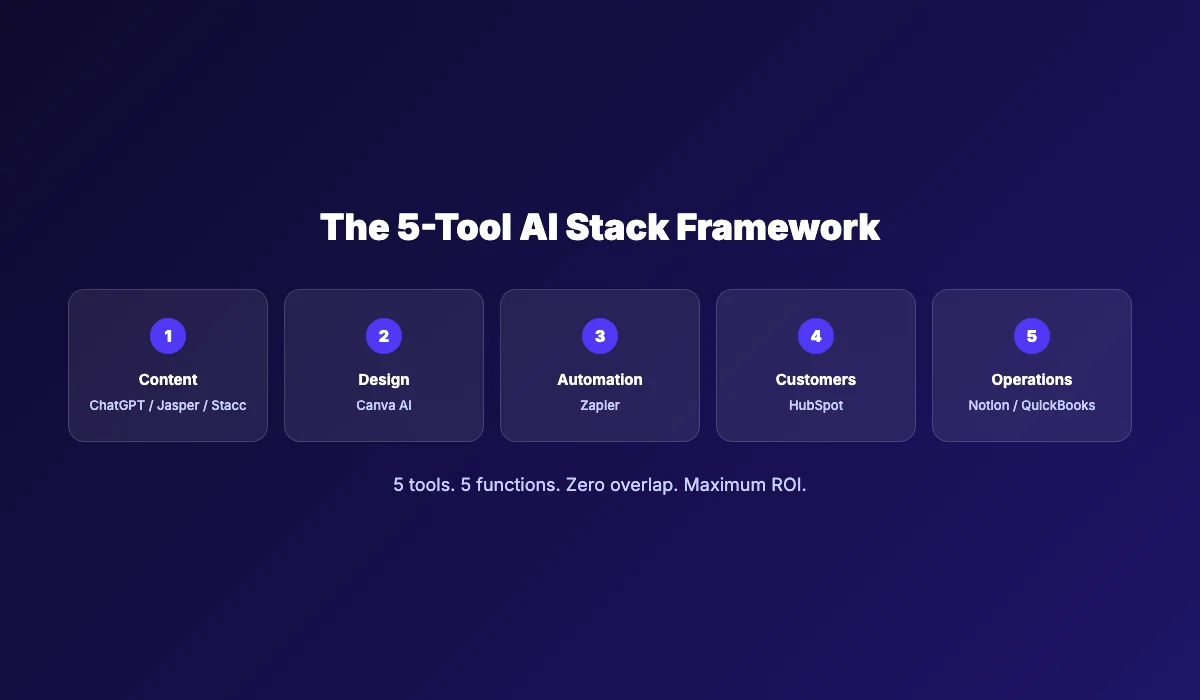
The 5-Tool AI Stack Framework
Most "best AI tools" lists recommend 15 to 25 tools. The data says the median small business uses 5. Buying more does not produce better results. It produces subscription fatigue, integration headaches, and wasted budget.
We developed the 5-Tool AI Stack Framework after analyzing 200+ small business tool setups. Businesses with 5 well-chosen tools outperform businesses with 15 poorly integrated ones.
The framework:
Tool 1 — Content: ChatGPT (general) or Jasper (marketing-focused) or theStacc (automated SEO) Tool 2 — Design: Canva AI for all visual content Tool 3 — Automation: Zapier to connect your tools and eliminate manual work Tool 4 — Customer Management: HubSpot for CRM, marketing, and sales tracking Tool 5 — Operations: Notion AI (knowledge) + QuickBooks (finance) + Otter (meetings) — pick the one that solves your biggest operational pain
Why this works:
Each tool covers one business function. There is no overlap, no redundancy, no "which tool do I use for this?" confusion. The total monthly cost ranges from $50 (mostly free tiers) to $250 (paid plans across all five).
Compare that to the alternatives:
| Approach | Monthly Cost | Time Investment | Output Quality |
|---|---|---|---|
| DIY with free tools | $0 | 20-40 hours | Inconsistent |
| 5-Tool AI Stack | $50-250 | 5-10 hours | Professional |
| Premium tools + agency | $2,000-5,000 | 2-5 hours | High |
| Full-service agency | $3,000-10,000 | 1-2 hours | High |
The 5-Tool Stack hits the sweet spot: professional output at small business prices.
Most advice about AI tools is wrong. Buying every tool on a "best of" list does not make you more productive. It makes you a software collector. The businesses winning with AI in 2026 are the ones that chose 5 tools, mastered them, and automated their biggest time drains.
What Does AI Actually Cost for Small Business?
| Approach | Monthly Cost | What You Get | Time Required |
|---|---|---|---|
| Free AI tools only | $0 | ChatGPT Free, Canva Free, Grammarly Free | 15-25 hrs/week |
| Budget AI stack | $50-100 | ChatGPT Plus, Canva Pro, Grammarly Premium | 10-15 hrs/week |
| Full 5-Tool Stack | $150-250 | All paid plans, full automation | 5-10 hrs/week |
| Freelance help | $1,500-5,000 | Writers, designers, VA support | 5-10 hrs/week (managing) |
| Marketing agency | $3,000-10,000 | Full-service content and SEO | 2-5 hrs/week (meetings) |
| theStacc (SEO content only) | $99 | Articles published automatically | 1-2 hrs/week (review) |
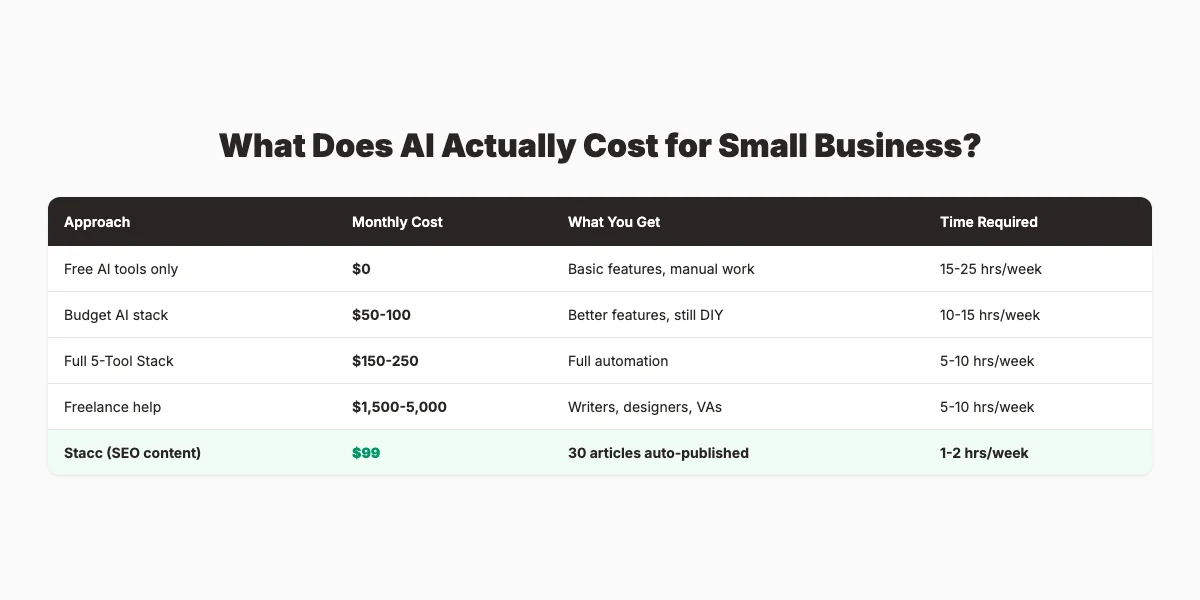
The math is straightforward. A full 5-Tool AI Stack costs $150-250 per month and replaces $3,000-10,000 in agency fees. The tradeoff is your time — you must operate the tools. theStacc removes even that tradeoff for SEO content specifically.
Which AI Tool Is Right for You?
Choose ChatGPT if:
- You need one versatile tool that handles writing, analysis, and brainstorming
- You are a solo founder wearing multiple hats
- You want the best free AI option to start
Choose Canva AI if:
- You create regular social media content
- You need professional visuals without hiring a designer
- Your brand presence depends on visual consistency
Choose HubSpot if:
- You need CRM and marketing automation in one platform
- You have a structured sales process with multiple leads
- You want to start free and scale gradually
Choose Zapier if:
- You spend time on repetitive tasks between apps
- You use 5+ software tools that do not integrate
- You want to automate without writing code
Choose theStacc if:
- You want SEO content published automatically
- You are spending $1,000+/month on content or agencies
- You need both blog SEO and local SEO in one platform
Choose Jasper if:
- You are a marketing team producing high volumes of content
- Brand voice consistency is critical
- You need SEO-optimized marketing copy at scale
What practitioners are saying on X
Match tools to jobs: data, crawl, content score, or publish automation.
- @ConnorGillivan (Jul 2026): 2026 SEO stack favorite list: Semrush/Ahrefs, GSC, Surfer, KeywordInsights, ChatGPT, SEOwind, Screaming Frog, ClearScope, GA4, Notion/Airtable — tools amplify systems, they don’t replace them. See the post on X.
- @Charles_SEO (Jun 2026): June 2026 best SEO tools roundup: Ahrefs, Semrush, Keyword Insights, GSC/GA, Screaming Frog, LRT, free suites, SEOTesting, Trends, AI visibility tools (Profound/etc), PageSpeed, Local Falcon/BrightLocal. See the post on X.
- @jakezward (Feb 2026): 2026 SEO predictions emphasize AI Overview share-of-SERP, schema for LLM token efficiency, brand mentions in AI answers as a KPI, proprietary data as a moat, and content refresh beating net-new AI slop. See the post on X.
Grok, AI Overviews, and multi-engine visibility
AI/search topics like “ai tools small business 2026” need multi-engine notes: AI Overviews, ChatGPT/Perplexity, and Grok. Lead with extractable answers; keep claims consistent with public expert discussion.
- Google AI Overviews: Use passage-ready answers, tables, and FAQ schema where relevant.
- ChatGPT / Perplexity: Cite named sources next to key claims.
- Grok: Maintain accurate entity facts on-site and in high-signal X posts.
Frequently Asked Questions
ChatGPT is the best general-purpose AI tool for small business due to its versatility, low cost, and continuous improvement. For specific functions, Canva AI excels at design, HubSpot at CRM, and theStacc at SEO content automation. Most small businesses should start with ChatGPT and add tools based on their biggest time drains.
The median small business uses 5 AI tools. Our 5-Tool AI Stack Framework recommends one tool per core function: content, design, automation, customer management, and operations. Buying more than 5-7 tools typically produces diminishing returns and subscription fatigue.
Free tiers of ChatGPT, Canva, Grammarly, and Otter handle 80% of small business needs. The main limitation is usage caps and advanced features. Start with free plans, then upgrade only when you hit specific limits that block your workflow.
According to Salesforce's 2025 SMB study, 91% of small businesses using AI report revenue increases. The SBE Council found that 66% of AI-using small businesses saw revenue gains, with 22% reporting increases above 10%. However, results depend on implementation quality — businesses with no prompting strategy see minimal benefit.
No. Modern AI tools are built for non-technical users. ChatGPT, Canva, HubSpot, and Zapier all require zero coding. The learning curve is comparable to learning any new software — a few hours of exploration and experimentation.
For most small businesses, no. AI handles repetitive tasks, not relationships. It frees your team to focus on higher-value work that requires human judgment, creativity, and emotional intelligence. The businesses seeing the best results use AI to augment their team, not replace it.
A complete 5-tool AI stack costs $150-250 per month with paid plans, or $0-50 per month using mostly free tiers. This replaces $3,000-10,000 in agency fees. For SEO content specifically, theStacc publishes SEO articles for $99 per month.
Reputable AI tools use encryption, SOC 2 compliance, and data protection measures. However, you should review each tool's privacy policy. For sensitive data, avoid pasting confidential information into public AI models. Enterprise plans of ChatGPT, HubSpot, and Notion offer enhanced security and data isolation.
The Bottom Line
The small businesses winning in 2026 are not the ones with the biggest AI budgets. They are the ones that chose the right 5 tools, mastered them, and automated their biggest time drains first.
ChatGPT handles general tasks. Canva AI handles design. HubSpot manages customers. Zapier connects everything. And theStacc publishes your SEO content automatically, for $99 a month.
You do not need 20 tools. You need 5 that work together.
If you are ready to stop evaluating software and start getting SEO results, theStacc publishes articles per month — automatically, for $99.
This article was researched and published by theStacc — the same platform businesses use to publish SEO content automatically. We use many of the tools reviewed above in our own workflow. All pricing and features were verified against public sources as of May 2026.
More Best-List Posts
Related Tools & Resources
Free SEO Tools:
Best Lists:
Sources & references
- [1] Princeton / Georgia Tech et al. — GEO research (arXiv:2311.09735)
- [2] @jakezward on X — 2026 SEO predictions emphasize AI Overview share-of-SERP, schema for LLM token efficiency, brand mentions in AI answers
- [3] @alexgroberman on X — Case narrative: organic value plus multi-engine citations (ChatGPT, Perplexity, Grok) from knowledge-hub pages, category
- [4] @varunram on X — Critique of GEO slopfarm products that combine SEO clickbait with unresearched content marketing — quality and research

Plan topics, review article drafts, and publish to a connected CMS.
Weekly local SEO teardowns
One practical email a week. Map Pack, GBP, AI Overviews — no fluff. Unsubscribe anytime.
Explore this topic: Top 10 Best Content Marketing Tools for Small Business (2026) — Tested · Top 10 Best AI SEO Tools for Small Business (2026).