
Nextdoor for Business (2026): Setup, Ads, Costs & Local Marketing Guide
Complete Nextdoor for business guide: free page setup, Local Deals vs paid ads, real CPC/CPM costs, how to get recommendations, and mistakes that get businesses banned.
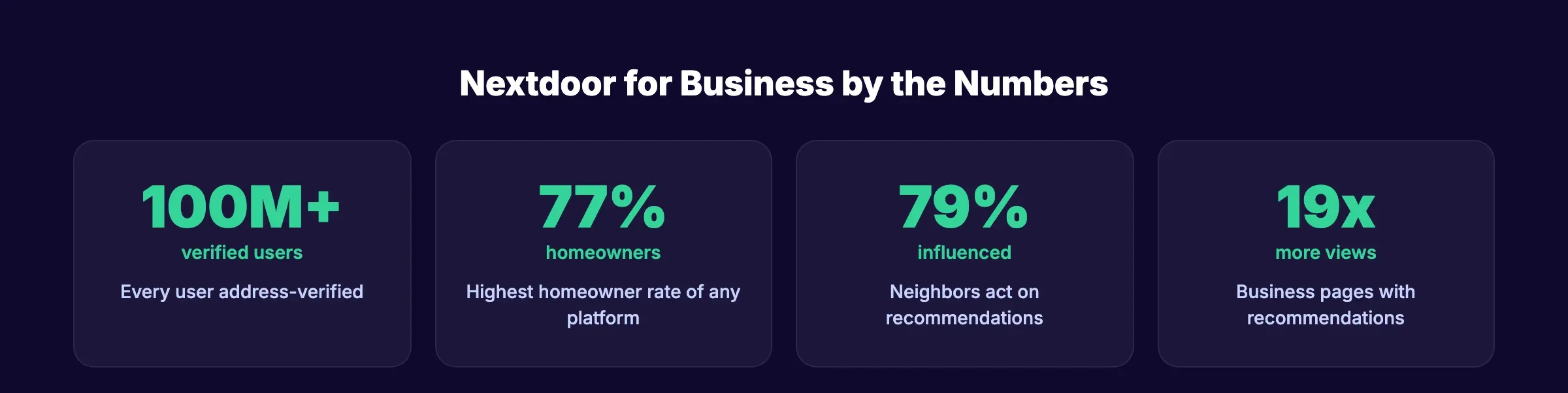
Nextdoor for business reaches an audience no other platform can match. Every user is verified by home address. 77% are homeowners. And 40% use the app specifically for local business recommendations. When a neighbor asks “anyone know a good plumber?” and your business appears in the responses, that lead converts at a higher rate than any Facebook ad.
100 million verified users. 260,000 neighborhoods. 1 in 3 U.S. households on the platform. 72% to 79% of neighbors are influenced by a recommendation they see on Nextdoor. Those numbers make it the most trusted local marketing channel available to small businesses.
This guide covers how to set up your business page, what to post, how Nextdoor ads work, what they cost, and how to turn neighbor recommendations into booked appointments.
We have published 3,500+ SEO articles across 70+ industries, including local service businesses that use Nextdoor as a primary lead channel.
Here is what you will learn:
- How to claim and optimize your Nextdoor business page (free)
- The difference between free posts, Local Deals, and paid ads
- Real ad costs with CPC and CPM breakdowns
- How to earn recommendations that drive referrals
- Nextdoor vs Facebook for local marketing
- Common mistakes that get businesses flagged or banned
Setting Up Your Nextdoor Business Page
Claiming your business page on Nextdoor is free. Every local business should do this regardless of whether you plan to advertise.
How to Claim Your Page
- Go to business.nextdoor.com and click “Claim your free Business Page”
- Search for your business name and address
- If your business appears, claim it. If not, create a new listing
- Verify your identity (phone, email, or document upload)
- Complete your profile
Optimize Every Field
Business pages with a logo get 7x more views. Pages with a photo gallery get 2.6x more views. Pages with recommendations get up to 19x more page views.
- Business name (exact legal name)
- Logo (square, high-resolution)
- Cover photo (shows your work, team, or storefront)
- Business category (select the most specific option)
- Description (what you do, where you serve, why neighbors choose you)
- Phone number
- Website URL
- Business hours
- Service area
- Photo gallery (5 to 10 photos of your work, team, or location)
A complete page signals legitimacy. Neighbors trust businesses that look established. An empty page with no logo or photos gets ignored.
For broader online presence guidance, see our post on building an online presence for local businesses. For Facebook-specific guidance, see our Facebook for local business guide.
Your SEO team. $99 per month. Social media management starts at $49 per month. 30 posts across 3 platforms. Start for $1 →
Free vs Paid: What Nextdoor Offers Businesses
Nextdoor gives businesses both free and paid options. Understanding the difference determines how you spend your time and budget.
Free Features
| Feature | Details |
|---|---|
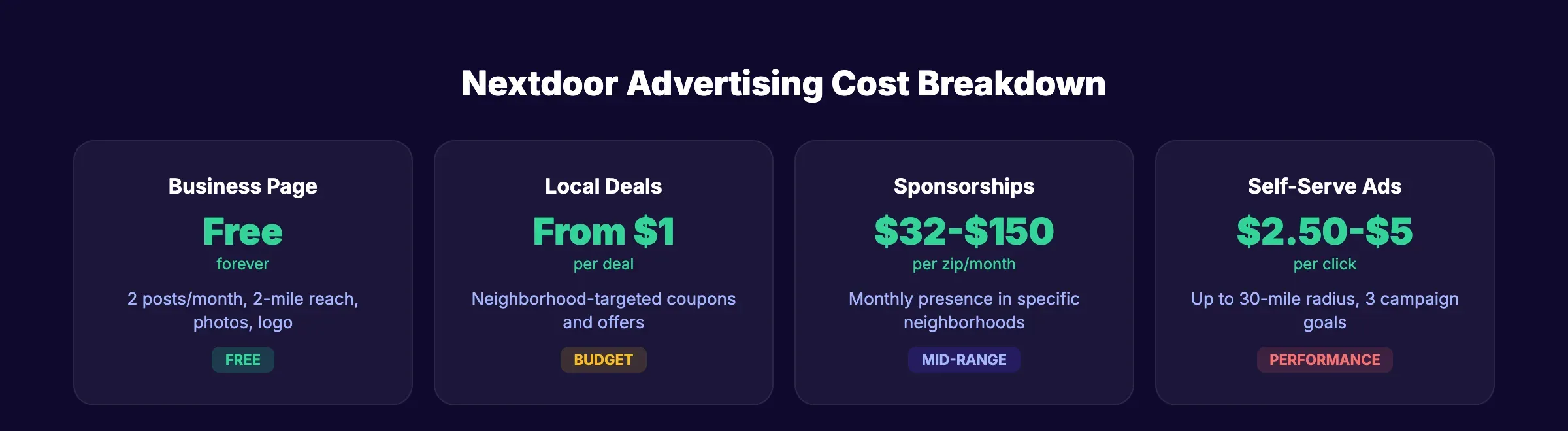
| Business Page | Free to claim and maintain |
| Business Posts | 2 free posts per calendar month |
| Post reach | All neighbors within 2 miles of your business |
| Recommendations | Neighbors can recommend your business for free |
| Photo gallery | Unlimited photos on your page |
Two free posts per month is limited. But those 2 posts reach every verified neighbor within 2 miles. For a business in a dense suburban area, that can mean 5,000 to 20,000 local homeowners per post. No other platform delivers that organic reach to a verified local audience for free.
Paid Advertising Options
| Ad Type | Cost | Reach | Best For |
|---|---|---|---|
| Local Deals | From $1 | Neighborhood-targeted | Promotions, discounts, seasonal offers |
| Neighborhood Sponsorships | $32-$150/month per zip code | Monthly presence in specific zip codes | Ongoing visibility in target areas |
| Self-Serve Ads (CPC) | $2.50-$5.00 per click | Up to 30-mile radius | Website traffic, lead generation |
| Self-Serve Ads (CPM) | ~$20 per 1,000 impressions | Up to 30-mile radius | Brand awareness |
The minimum ad spend can be as low as $1 per day. Most small businesses spend $100 to $500 per month on Nextdoor ads.
Nextdoor vs Facebook for Local Marketing
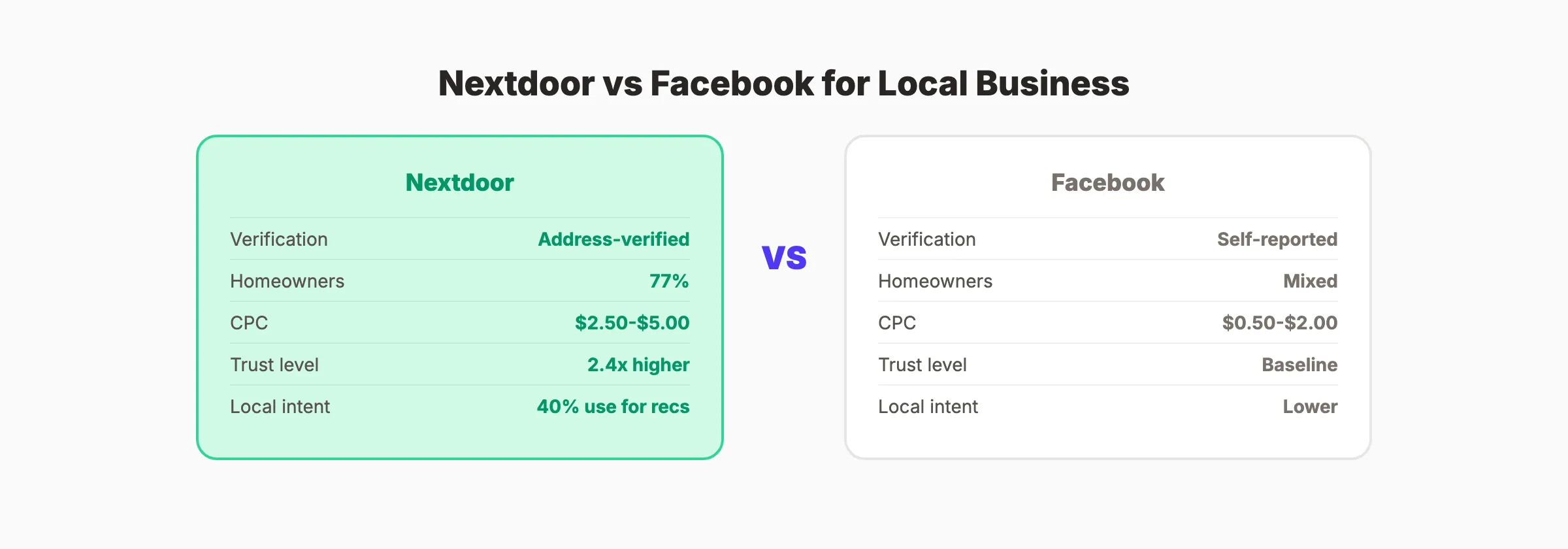
| Factor | Nextdoor | |
|---|---|---|
| User verification | Address-verified | Self-reported |
| Audience | 77% homeowners | Mixed |
| Average CPC | $2.50-$5.00 | $0.50-$2.00 |
| Organic reach | 2-mile radius (verified neighbors) | 2-5% of followers |
| Trust level | 2.4x more trusted than competitor average | Declining trust metrics |
| Local intent | 40% use for business recommendations | Lower local intent |
| Post frequency (free) | 2 per month | Unlimited |
| Ad targeting | Zip code, radius, neighborhood | Demographics, interests, behaviors |
| Best for | Home services, local retail, professionals | Broad local awareness, events, offers |
Nextdoor CPC is higher than Facebook. But the audience quality is also higher. Every user is a verified neighbor. Recommendations carry the weight of real-name endorsement. For home service businesses (plumbers, electricians, cleaners, landscapers), Nextdoor leads often close at 2x to 3x the rate of Facebook leads.
For a full platform comparison, see our guide on best social media platforms for local businesses.
3,500+ blogs published. 92% average SEO score. Every article passes a 40-point quality audit before it goes live. Start for $1 →
How to Earn Recommendations on Nextdoor
Recommendations are Nextdoor’s equivalent of Google reviews. They appear on your business page and in neighborhood feeds. Businesses with recommendations get up to 19x more page views than those without.
The Recommendation System
When a neighbor searches for “plumber” or asks “anyone know a good cleaner?” in the local feed, businesses with recommendations appear first. Recommendations stack. The more you have, the more visible your business becomes.
How to Get More Recommendations
1. Ask after every job. Send a text or email with a direct link to your Nextdoor business page. “If you are happy with the work, a recommendation on Nextdoor would mean a lot.”
2. Respond to “looking for” posts. When neighbors ask for service recommendations, you cannot respond directly as a business. But you can ask satisfied clients to respond on your behalf. Build a list of clients willing to vouch for you.
3. Deliver memorable service. Nextdoor recommendations are personal. Neighbors put their name and reputation behind the recommendation. Give them a reason to.
4. Share recommendations as posts. When you get a great recommendation, screenshot it and share it as one of your 2 monthly posts. Social proof drives more social proof.
For Google review strategies that complement Nextdoor, see our guide on getting more Google reviews.
What to Post on Nextdoor (2 Posts Per Month That Count)
With only 2 free posts per month, every post matters. Do not waste them on generic promotions. Each post should deliver value to the neighborhood.
High-Performing Post Types
| Post Type | Example | Why It Works |
|---|---|---|
| Seasonal tip | ”3 things every homeowner should check before winter” | Positions you as a local expert |
| Community offer | ”Free gutter inspection for [neighborhood] residents this week” | Drives immediate action |
| Before and after | Photo of your work in a recognizable local area | Visual proof builds trust |
| Local alert | ”Storm damage in [area] this week. We can help.” | Timely relevance |
Post Writing Rules for Nextdoor
- Lead with value. Help first. Sell second. A post that teaches something earns attention.
- Be specific about location. Mention neighborhood names, streets, or landmarks. Nextdoor is hyper-local.
- Use real photos. Your work, your team, your truck in front of a local house.
- Include a clear next step. “Message us for a free estimate” or “Call [number] to schedule.”
- Do not hard-sell. Nextdoor’s community guidelines penalize overtly promotional posts. Neighbors respond to helpful, not pushy.
For more content planning, see our social media content ideas guide.
Nextdoor Ads: Costs, Targeting, and Strategy
If 2 free posts per month are not enough, paid ads expand your reach from 2 miles to up to 30 miles.
Ad Setup Basics
Nextdoor offers 3 campaign goals:
- Increase website visits. Drives clicks to your website or booking page
- Promote a sale or discount. Local Deal format with a coupon-style offer
- Get more messages. Drives direct messages from interested neighbors
Budget Planning for Nextdoor Ads
| Business Size | Monthly Budget | Expected Results |
|---|---|---|
| Solo operator | $100-$200/month | 25-80 clicks at $2.50-$4.00 CPC |
| Small business (2-10 employees) | $200-$500/month | 50-200 clicks |
| Multi-location | $500-$1,500/month | 150-600 clicks across service areas |
What Makes Nextdoor Ads Work
The biggest advantage: intent quality. Nextdoor users searching for or reading about local services are homeowners with active needs. A click from Nextdoor is worth more than a click from Facebook because the audience is pre-qualified by location and homeownership.
The biggest disadvantage: inventory limits. Nextdoor caps how many businesses can advertise per zip code at one time. If your area is saturated, you may be locked out until a competitor pauses their campaign.
Ad Creative That Works on Nextdoor
Nextdoor is not Instagram. Polished ad creative underperforms on this platform. Neighbors respond to authenticity.
What works:
- Real photos of your work in recognizable local settings
- Before-and-after images of completed jobs
- Team photos (neighbors want to see who they are hiring)
- Simple, conversational headlines (“Your neighbor’s go-to plumber since 2018”)
What does not work:
- Stock photography (neighbors spot it instantly)
- Aggressive discount language (“ACT NOW! 75% OFF!”)
- Generic branding without local references
- Overly long ad copy (keep it under 100 words)
Include a clear CTA in every ad. “Message us for a free estimate” or “Visit our website to book” perform better than “Learn More.”
For more on writing effective social media copy, see our guide on writing posts that drive engagement.
Common Mistakes That Get Businesses Flagged
Nextdoor’s community guidelines are strict. Volunteer moderators enforce them. Breaking the rules can get your posts removed or your account suspended.
Mistakes to Avoid
1. Posting more than 2 times per month (organic). The limit is 2 free posts per calendar month. Exceeding this through workarounds (posting as a personal account, for example) risks a ban.
2. Self-promoting in comments. Responding to “looking for a plumber” posts with “Hire us!” violates community guidelines. Let your clients recommend you instead.
3. Aggressive sales language. “LIMITED TIME ONLY! 50% OFF! CALL NOW!” reads as spam on Nextdoor. Conversational, helpful language performs better and avoids flags.
4. Ignoring negative feedback. If a neighbor leaves a negative recommendation, respond professionally and take it offline. Do not argue publicly. See our guide on responding to negative reviews.
5. Incomplete business page. Pages without logos, photos, or descriptions look suspicious. Complete every field before posting.
6. Using a personal account for business promotion. Some owners post business content from their personal Nextdoor profile to get around the 2-post limit. This violates community guidelines. Use your business page for all commercial content.
7. Not verifying your business. Unverified pages have limited functionality and appear less trustworthy. Complete verification (phone, email, or document) before posting.
For broader local marketing strategies, see our local business marketing plan guide and our guide on marketing a small business without a team.
Rank everywhere. Do nothing. Blog SEO, Local SEO, and Social on autopilot. Stacc starts at $99 per month with a $1 trial. Start for $1 →
How Nextdoor Fits Into Your Local Marketing Mix
Nextdoor works best as one channel within a broader local marketing strategy. It does not replace Google, Facebook, or your website. It complements them.
The Local Marketing Stack
| Channel | Role | Priority |
|---|---|---|
| Google Business Profile | Search discovery, map pack, reviews | Essential |
| Website + Blog SEO | Organic traffic, authority building | Essential |
| Nextdoor | Neighbor trust, recommendations, hyper-local reach | High |
| Broad local awareness, community groups, events | High | |
| Visual content, brand building | Medium | |
| Retention, repeat business | Medium |
Nextdoor excels at the trust layer. A neighbor recommendation on Nextdoor carries more weight than a Facebook ad because real names and real addresses are attached. Use Nextdoor for trust and referrals. Use Google and your website for search discovery. Use Facebook and Instagram for awareness and visual content.
For GBP optimization, see our Google Business Profile guide. For SEO, see our local SEO guide. For social media strategy, see our guide on social media marketing for local businesses.
Measuring Nextdoor ROI
Track these metrics monthly to determine whether Nextdoor generates a positive return.
| Metric | Where to Find It | What It Measures |
|---|---|---|
| Page views | Nextdoor Business dashboard | How many neighbors see your page |
| Recommendations | Business page | Social proof and trust signals |
| Post impressions | Post analytics | How many neighbors see each post |
| Ad clicks | Ads Manager | Traffic driven from paid campaigns |
| Messages received | Nextdoor inbox | Direct inquiries from neighbors |
| Bookings attributed | ”How did you hear about us?” tracking | Actual revenue from Nextdoor leads |
The simplest ROI calculation: count the number of bookings that came from Nextdoor (ask every new client). Multiply by your average job value. Subtract your Nextdoor ad spend. If the number is positive, scale your budget.
FAQ
Is Nextdoor for business free?
Yes. Claiming a business page is free. You get 2 free posts per month that reach all neighbors within 2 miles. Paid advertising starts at $1 per day for Local Deals and $2.50 to $5.00 per click for self-serve ads. Most businesses start with the free page and add paid ads once they see organic traction.
How much does it cost to advertise on Nextdoor?
Local Deals start at $1. Neighborhood Sponsorships cost $32 to $150 per month per zip code. Self-serve CPC ads average $2.50 to $5.00 per click. CPM averages about $20 per 1,000 impressions. Most small businesses spend $100 to $500 per month. There are no long-term contracts.
Is Nextdoor advertising worth it for small businesses?
For home service businesses (plumbers, electricians, cleaners, landscapers), yes. The audience is 77% homeowners, all address-verified. CPC is higher than Facebook but lead quality is also higher. Businesses report 2x to 3x better close rates on Nextdoor leads compared to Facebook leads because of the trust factor.
How do I get more recommendations on Nextdoor?
Ask after every completed job. Send a direct link to your Nextdoor business page via text or email. Deliver memorable service that makes neighbors want to put their name behind a public recommendation. Build a list of satisfied clients who are willing to vouch for you when neighbors ask for referrals.
Can I post on Nextdoor as a business?
Yes, but with limits. You get 2 free business posts per calendar month. Each reaches neighbors within 2 miles. Paid ads let you post more frequently with broader reach (up to 30 miles). You cannot comment on recommendation threads as a business, but your existing clients can.
What is the difference between Nextdoor and Facebook for local marketing?
Nextdoor users are address-verified homeowners. Facebook users are self-reported. Nextdoor is 2.4x more trusted than competitor platforms for local recommendations. Facebook offers lower CPC ($0.50 to $2.00 vs $2.50 to $5.00) and unlimited organic posting. Use Nextdoor for trust and referrals. Use Facebook for broad awareness and event promotion.
Nextdoor is the only social platform where every user is a verified neighbor. That trust factor makes it the highest-converting local marketing channel for service businesses. Claim your page, earn recommendations, and let your neighbors do the selling for you.
Skip the agency. Keep the results. Stacc starts at $99 per month with a $1 trial. Social media from $49 per month. Start for $1 →

Written by
Siddharth GangalSiddharth is the founder of theStacc and Arka360, and a graduate of IIT Mandi. He spent years watching great businesses lose organic traffic to competitors who simply published more. So he built a system to fix that. He writes about SEO, content at scale, and the tactics that actually move rankings.
30 SEO blog articles published every month
Keyword-optimized, scheduled, and live on your site. Automatically.
30-day trial · Cancel anytime
theStacc
Stop writing SEO content manually
30 blog articles, 30 GBP posts, and social media content. Published every month. Automatically.
Start Your $1 Trial$1 for 3 days · Cancel anytime