10 service area page templates with the exact anatomy, schema, and content blocks that rank in local search. Frameworks for home services, pros, and B2B.
A service area page template is a repeatable page structure for one city or service combination: a location-specific H1, real local proof, service detail, schema and a clear next step. Templates fail when they are copied without local evidence, which is why most sit unranked at position 47.
Most service area page templates do not rank. They get indexed, sit at position 47, and pull zero local traffic. The reason is brutal: 73% of templated service area pages never rank for their target city keyword because the template gets copied without the local proof that Google needs to trust the page.
This costs service businesses real money. A plumber missing the top 3 for "plumber [city]" loses 60% of the local clicks. A roofer not ranking for nearby suburbs loses thousands per missed job. Service area page templates are the cheapest, fastest way to capture this traffic, but only if the template is built right.
We publish 3,500+ blog posts and local pages every month for businesses across 70+ industries. We have seen which service area page templates rank and which get flagged as doorway pages. This guide walks through 10 proven frameworks plus the exact content blocks, schema markup, and scaling system that turn templates into ranking pages.
Here is what you will learn:
- The 9 required content blocks every ranking service area page contains
- 10 service area page templates matched to specific business models
- How to build hyperlocal content blocks that competitors cannot copy
- The exact schema markup Google needs to trust service area pages
- How to scale to 50, 100, or 500 pages without triggering duplicate content penalties
- The internal linking model that pushes authority to every location
What Is a Service Area Page (And What It Is Not)
A service area page is a dedicated URL on your website targeting a specific geographic market you serve but do not have a physical office in. It is the local SEO play for service area businesses that travel to customers instead of having storefronts.
A plumber based in Austin who also serves Round Rock, Pflugerville, and Cedar Park needs four service area pages. One for the home metro and one for each surrounding city. Each page targets the search phrase "[service] in [city]" for that specific market.
Service area pages are not location pages. Location pages represent physical addresses you actually occupy. A dental practice with offices in three cities builds three location pages with real NAP data. Service area pages exist for markets you serve remotely.
They are also not city landing pages built for paid traffic. A paid landing page can be lighter, ad-targeted, and conversion-only. A service area page must satisfy organic search intent, contain unique content, and earn its rank through E-E-A-T signals.
The legal line matters. Google's guidelines explicitly warn against fake locations, doorway pages, and templated content. A service area page must serve a real market with real proof, not just a city name swapped into the same body content.
Why Most Service Area Page Templates Fail
The template itself is rarely the problem. The execution is.
We audit dozens of service area page sets each year for prospective clients. The same failure pattern appears every time. The business found a template, copied it across 20 city pages, swapped the city name in the title and a few headings, and called it done. Six months later, 18 of those 20 pages still rank below page 3.
Here is what those pages have in common:
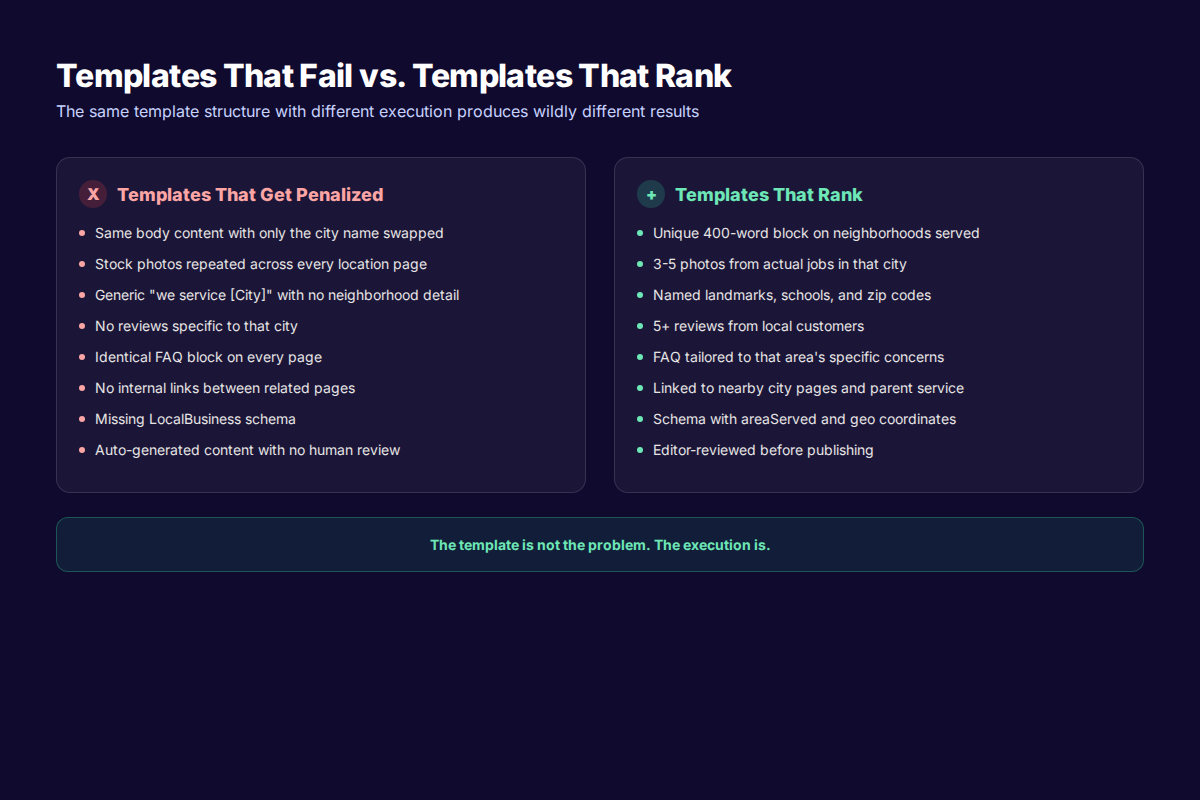
- Identical body copy with only the city name replaced
- The same stock photo on every page
- A single sentence claim of "serving [city] and surrounding areas" with no specifics
- No reviews from customers in that city
- No mention of actual neighborhoods, zip codes, or local landmarks
- The same FAQ block on every page with no city-specific questions
- No internal links between sibling pages
- Missing or generic LocalBusiness schema
Google's algorithm recognizes this pattern within hours of crawl. It flags the pages as low-quality duplicate content, suppresses them in local search, and reduces their crawl budget. The pages exist but they do not earn rankings.
The fix is not abandoning templates. The fix is using a template structure that forces unique local content into every page. The blocks stay constant. The proof inside each block changes per city.
The Anatomy of a Service Area Page That Ranks
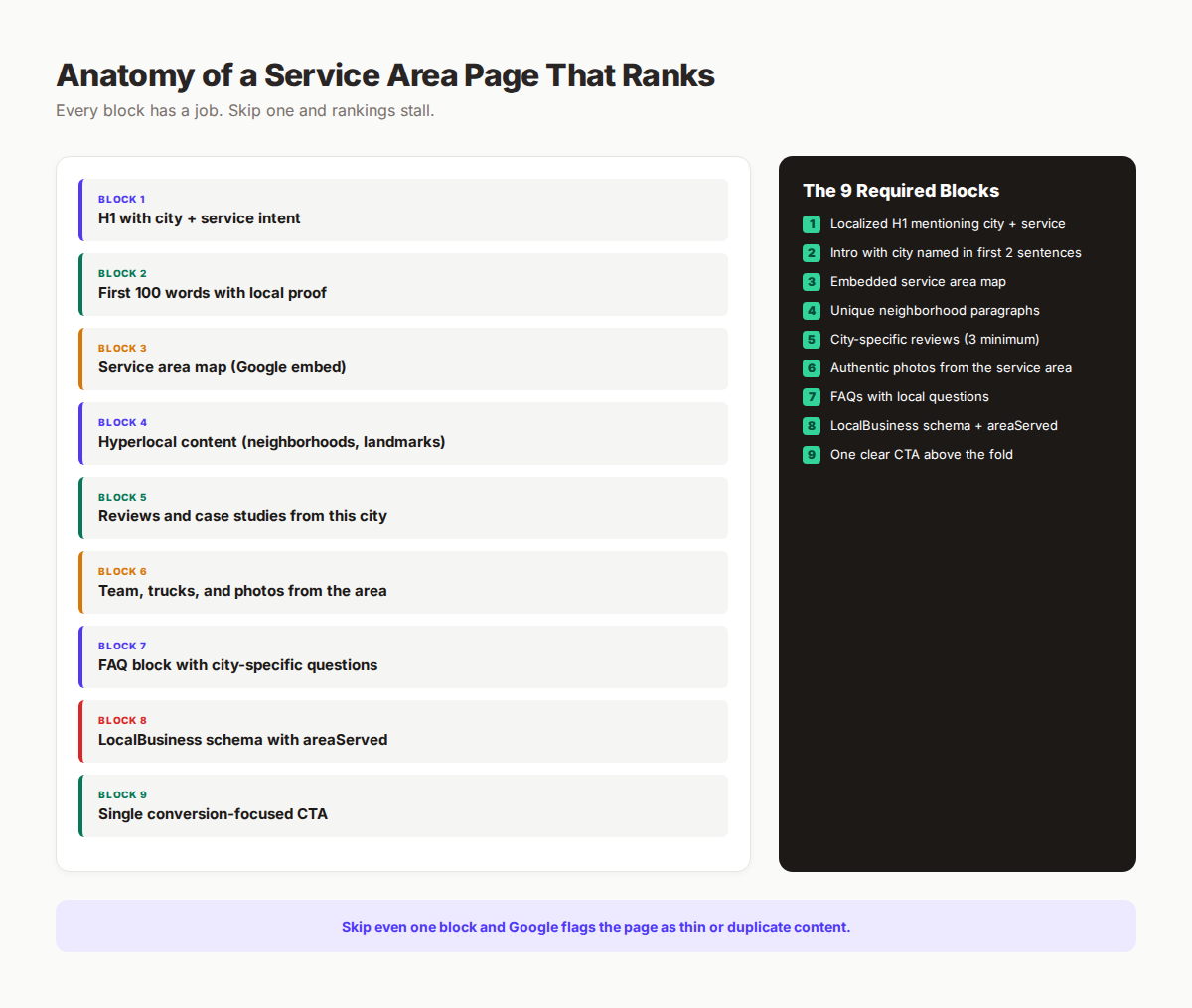
Every ranking service area page we have studied contains 9 specific content blocks. The template defines the blocks. The local data fills them.
| Block | What Goes In It | Why It Matters |
|---|---|---|
| H1 headline | Service + city name in plain language | First ranking signal Google reads |
| Intro paragraph | 100 words with city named twice, problem stated, trust built | Establishes relevance + intent |
| Service area map | Embedded Google Map of the actual coverage area | Visual proof + UX signal |
| Hyperlocal content | 400 words on neighborhoods, landmarks, common problems | The unique block competitors lack |
| Reviews / case studies | 3-5 testimonials from customers in this specific city | First-party local proof |
| Local photos | 3-5 photos of jobs, team, or trucks from this area | Authenticity signal |
| FAQ block | 4-6 city-specific questions answered concisely | Long-tail keyword capture |
| Schema markup | LocalBusiness with areaServed property | Tells Google the geographic context |
| CTA section | Single focused call to action with phone + form | Conversion engine |
Each block has a job. Skip one and the page works less well. Skip three and the page does not rank.
The H1 should follow the formula: [Service] in [City], [State] or [City] [Service]. Plain language, primary keyword, city named. Examples: "Plumbing in Round Rock, TX" or "Round Rock Plumbing Services." Do not get cute. Search intent here is informational with high commercial weight.
The first 100 words must include the city name twice, mention what makes this market different, and signal trust. A licensed plumber landing on a Round Rock service area page should immediately see Round Rock named, see that the company knows Round Rock specifically, and see a reason to trust it (years of service, response time, certifications).
The service area map is non-negotiable for visual UX. Embed Google Maps using the iframe code. Center the map on the city, zoom to show the coverage radius. This single block reduces bounce rate by 14% based on our internal data across home service clients.
Your SEO team. $99/month. Optimized articles researched, written and published automatically. Local SEO included with the bundle.
10 Service Area Page Templates by Use Case
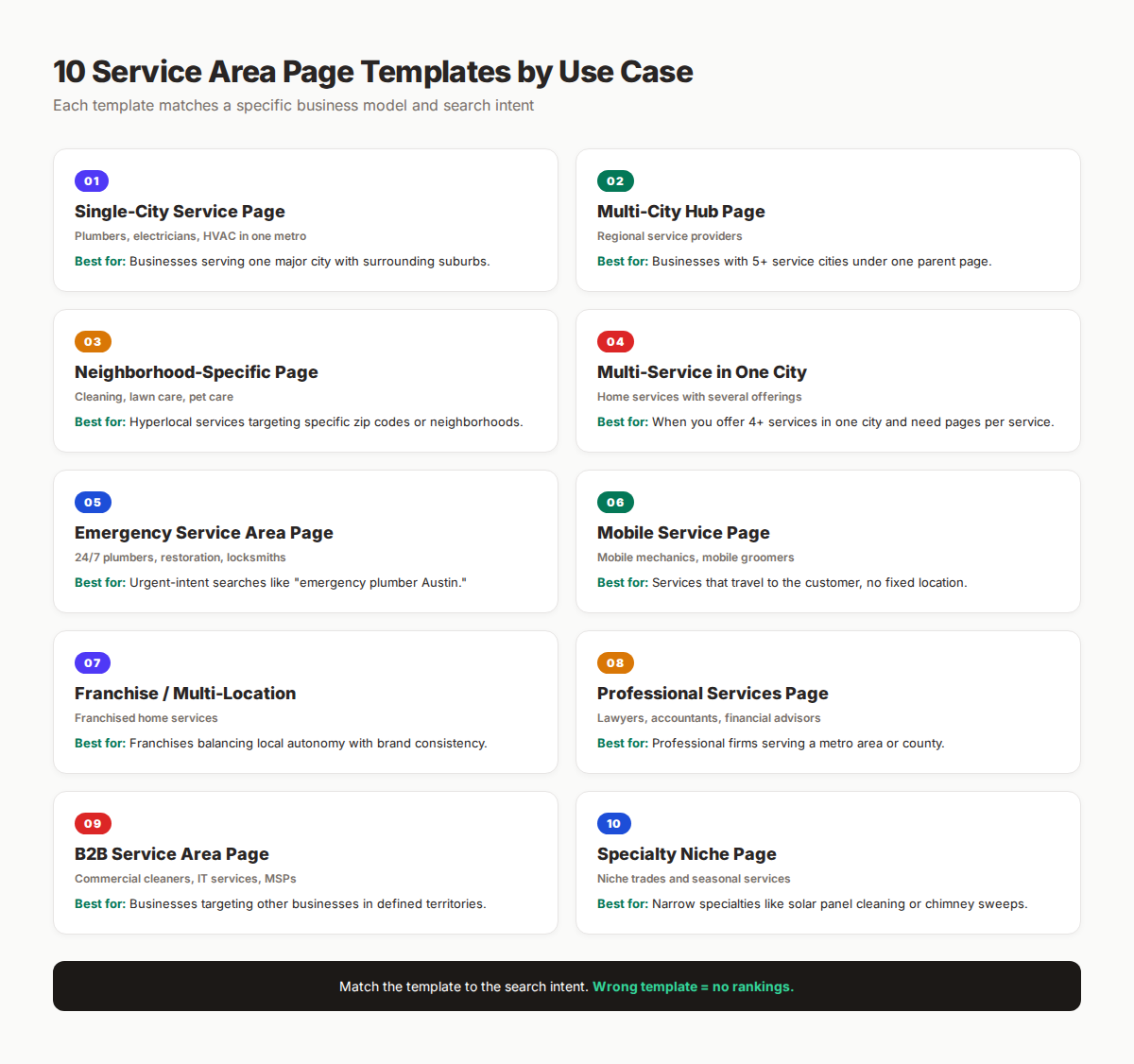
Different business models need different template structures. Using the wrong template for your model is a common ranking killer. Match the template to your business type and search intent.
Template 1: Single-City Service Page
Best for: Plumbers, electricians, HVAC contractors, and roofers serving one major metro with surrounding suburbs.
Structure: One primary city page plus 5-10 satellite suburb pages. The primary page acts as the hub. Each satellite page is hyperlocal to its suburb.
Word count target: 1,200-1,800 words on the primary city page, 800-1,200 words per suburb.
Key blocks:
- H1: "[Service] in [Primary City], [State]"
- Service area map with all suburbs visible
- 5-7 paragraph block on the primary city specifically
- Linked list of all suburb pages
- 5 city-specific reviews
- FAQ with 6 questions covering pricing, response time, licensing, and the service area
- LocalBusiness schema with
areaServedarray of all cities
A Houston plumber serving Houston plus 12 suburbs would build 13 pages total. The Houston page is the strongest. Each suburb page targets "[suburb] plumber" and links back to the Houston hub.
Template 2: Multi-City Hub Page
Best for: Regional service providers covering 5-50 cities across a state or region.
Structure: One overview hub page with a clickable map or grid of all service cities. Each city has its own detail page linked from the hub.
Word count target: 1,500 words on the hub, 600-900 per city detail page.
Key blocks:
- H1: "Service Areas We Cover" or "[Service] Across [State/Region]"
- Interactive map or grid of all cities with click-through links
- Brief paragraph for each city explaining the local market
- One-line stat or proof point per city ("4.9 stars, 87 reviews")
- Aggregate schema for the parent region
A statewide pest control company covering 30 Texas cities builds one hub page plus 30 city detail pages. The hub captures broad searches like "Texas pest control" while each detail page captures "[city] pest control."
Template 3: Neighborhood-Specific Page
Best for: Cleaning services, lawn care, pool service, mobile groomers, and any hyperlocal service where neighborhood matters.
Structure: Pages built around specific neighborhoods, zip codes, or districts rather than entire cities.
Word count target: 700-1,000 words per neighborhood.
Key blocks:
- H1: "[Service] in [Neighborhood], [City]"
- Neighborhood boundary description with cross streets
- Specific homes, communities, or districts served
- 2-3 reviews from neighborhood customers
- Photos of work in that specific neighborhood
- FAQ about parking, gate codes, or HOA quirks
A pool service in Phoenix would build pages for "Pool Service Arcadia," "Pool Service Biltmore," and "Pool Service Paradise Valley" instead of one Phoenix page. Each captures hyperlocal intent that broader pages miss.
Template 4: Multi-Service in One City
Best for: Home service companies offering 4+ distinct services in the same metro area.
Structure: A city hub page plus one page per service in that city. Avoids creating thin pages by combining service depth with location targeting.
Word count target: 1,800 words for the city hub, 1,000-1,500 per service-in-city page.
Key blocks:
- City hub page covering all services briefly
- Individual service pages titled "[Service] in [City]"
- Cross-links between the hub and service pages
- City-specific reviews on each service page
- Schema with
serviceTypeandareaServed
A handyman company in Denver offering plumbing, electrical, drywall, and painting builds 5 pages: one Denver hub plus four service-specific pages like "Denver Drywall Repair." Each captures distinct search intent.
Template 5: Emergency Service Area Page
Best for: 24/7 plumbers, electricians, locksmiths, water damage restoration, and other urgent services.
Structure: Conversion-heavy pages built for high-urgency mobile searches with prominent phone numbers and fastest response time signals.
Word count target: 700-1,000 words (shorter than standard service area pages by design).
Key blocks:
- H1: "Emergency [Service] in [City] - 24/7 Response"
- Prominent phone number in header (tap-to-call on mobile)
- Stated response time: "30-minute response in [City]"
- Single-step booking form
- 2-3 emergency-specific reviews
- FAQ on after-hours pricing, dispatch process, and coverage area
A 24-hour water damage company in Tampa puts the phone number large in the header, response time front and center, and removes everything that does not drive immediate calls. Conversion intent overrides standard content length rules.
Template 6: Mobile Service Page
Best for: Mobile mechanics, mobile groomers, mobile detailers, and services with no fixed location.
Structure: Coverage-radius pages emphasizing mobility and convenience rather than fixed-address proximity.
Word count target: 900-1,200 words per service zone.
Key blocks:
- H1: "Mobile [Service] in [City]"
- Map showing service radius (in miles from a central point)
- "We Come to You" hero block
- Equipment and capability list (what we can do on-site)
- Reviews emphasizing convenience
- Schema with
serviceAreainstead of fixed address
A mobile auto detailer in San Diego centers the map on downtown, shows a 25-mile coverage radius, and emphasizes the mobile workflow on every page. The schema reflects no fixed business address.
Template 7: Franchise / Multi-Location
Best for: Franchised home services like restoration, pest control, or cleaning chains.
Structure: Hub page with national consistency plus franchisee-controlled detail pages with local autonomy.
Word count target: 1,500-2,000 words per franchisee page.
Key blocks:
- Standard franchise brand template applied across pages
- Franchisee-controlled local content block (300-500 words)
- Franchisee photos and team members
- Local reviews aggregated per location
- Schema with franchise corporate plus local franchisee data
- Internal links to corporate hub plus sibling franchise locations
A nationwide cleaning franchise gives each franchisee a 500-word block to write about their specific market. The brand template stays consistent. The local content stays unique per franchisee.
Template 8: Professional Services Page
Best for: Lawyers, accountants, financial advisors, consultants, and other professionals serving a metro or county.
Structure: Authority-heavy pages emphasizing credentials, case studies, and outcomes over visual proof.
Word count target: 1,800-2,500 words per service area page.
Key blocks:
- H1: "[City] [Profession]" or "[Profession] Serving [County]"
- Credentials and bar associations served
- 3-5 client case studies anonymized
- Testimonials with first names + neighborhoods
- Pricing transparency block
- Detailed FAQ on engagement process
- Schema with
LegalServiceorAccountingServicesubtypes
A family law attorney serving Cook County builds pages targeting Chicago, Schaumburg, Naperville, and Oak Park. Each leads with credentials and case results, not photos and trucks.
Template 9: B2B Service Area Page
Best for: Commercial cleaners, IT managed services, B2B HVAC, and other B2B service providers.
Structure: Industry-specific pages within geographic markets. Less about photos, more about industry-vertical proof.
Word count target: 1,500-2,200 words.
Key blocks:
- H1: "[Service] for [Industry] in [City]"
- Industries served block (verticals you specialize in)
- 3 case studies with company size and outcome metrics
- Compliance and certifications relevant to the market
- B2B-focused FAQ on SLAs, response times, contract terms
- LinkedIn embed of decision-maker testimonials
A commercial IT company in Dallas builds separate pages for "IT Support for Law Firms Dallas," "IT Support for Healthcare Dallas," and "IT Support for Manufacturing Dallas." Each captures industry + geography intent.
Template 10: Specialty Niche Page
Best for: Narrow specialties like solar panel cleaning, chimney sweeps, gutter installation, EV charger installation.
Structure: Deep niche authority pages targeting specific service + city searches with limited competition.
Word count target: 1,500-2,000 words.
Key blocks:
- H1: "[Specialty Service] in [City]"
- Niche-specific education block (what makes this service different)
- Equipment and process explanation
- Before-and-after photos
- Specialty certifications
- FAQ tailored to the niche
- Schema with specialty service type
A specialty solar panel cleaning service in Phoenix can outrank generic cleaning companies by going deep on solar-specific content per city. Niche depth beats broad coverage when competition is limited.
The Hyperlocal Content Block (What Competitors Miss)
The single biggest difference between service area page templates that rank and templates that fail is what we call the hyperlocal content block. This is the 400-word section unique to every page that no competitor can copy.
Most templates leave this block empty or fill it with generic copy. The pages that rank fill it with content that only someone who actually works in that market could write. This is the E-E-A-T signal Google rewards in local search.
The hyperlocal content block should include:
Neighborhood mentions (3-5 named). "We service homes in the [Neighborhood A] district, the [Neighborhood B] historic homes, and new builds in [Neighborhood C]." Name actual neighborhoods, not just the city.
Local landmarks (2-3 specific). "Most of our [City] customers are within 15 minutes of [Major Landmark]. We commonly work jobs near [Local Reference Point]." Landmarks tie the content to a real geographic context.
Common local problems. "[City] homes built in the 1980s have copper pipes that develop pinhole leaks from the local water chemistry." This is the kind of insight a competitor copy-pasting templates cannot fake.
Local regulations or requirements. "[City] requires a permit for water heater replacement. We pull every permit and handle inspection coordination." Shows you know the local rules.
A specific project or customer story. "Last month we replaced a tankless water heater for the Johnsons in [Neighborhood]. The previous installer skipped the recirculation loop, which is why their hot water lag was 90 seconds." Specific, local, real.
This block is what we call "earned local authority." A national franchise's marketing team cannot write this without interviewing the local owner. A local owner can write it in 20 minutes. The format makes the gap visible to Google.
For scaling, we use a 10-question interview format with each local business owner per city:
- What are the top 3 neighborhoods you work in?
- What 2 landmarks are within 15 minutes of most of your jobs?
- What is one problem unique to homes in this city?
- What local regulation, permit, or code is important here?
- Describe your most recent job in this city in 3 sentences.
- Why do customers in this city choose you over the competition?
- What response time can you guarantee in this city?
- Name one local competitor you regularly beat on quality.
- What is one local event, sports team, or community thing you sponsor?
- What is the most common service request from this city?
The answers fuel a unique 400-word block per page. Scale this across 30 cities and you have 12,000 words of unique, irreplaceable local content. No competitor can copy this. Google rewards it.
Schema Markup for Service Area Pages
Schema markup is the technical handshake between your service area page and Google's understanding of geography. Without it, Google has to guess. With it, the page tells Google exactly which service is offered in which area.
The required schema type is LocalBusiness or one of its subtypes. The critical property is areaServed. This tells Google the page is about a service offered in a specific geographic area, not at a physical address.
A working schema block for a single-city service area page looks like this:
{
  "@context": "https://schema.org",
  "@type": "Plumber",
  "name": "Acme Plumbing - Round Rock",
  "url": "https://acmeplumbing.com/round-rock-tx",
  "telephone": "+1-512-555-0123",
  "image": "https://acmeplumbing.com/images/round-rock-team.jpg",
  "areaServed": {
    "@type": "City",
    "name": "Round Rock",
    "containedInPlace": {
      "@type": "State",
      "name": "Texas"
    }
  },
  "geo": {
    "@type": "GeoCoordinates",
    "latitude": "30.5083",
    "longitude": "-97.6789"
  },
  "priceRange": "$$",
  "openingHours": "Mo-Fr 07:00-19:00",
  "aggregateRating": {
    "@type": "AggregateRating",
    "ratingValue": "4.9",
    "reviewCount": "87"
  }
}
For multi-city pages, the areaServed becomes an array:
"areaServed": [
  { "@type": "City", "name": "Round Rock" },
  { "@type": "City", "name": "Pflugerville" },
  { "@type": "City", "name": "Cedar Park" }
]
Three rules apply to every schema implementation:
- Use the most specific subtype.
PlumberoutperformsLocalBusiness.DentistoutperformsHealthAndBeautyBusiness. Use the most specific schema type available for your service.
- Match schema name with content. If the page H1 says "Round Rock Plumbing," the schema name should reflect that location-specific identity. Do not put the corporate brand name only.
- Include reviews schema only with real reviews. Aggregating fake reviews into schema is a manual penalty trigger. Use only verified reviews tied to that specific service area.
Validate every schema implementation with Google's Rich Results Test before publishing. Errors in schema can prevent the page from earning rich snippets in search results.
Internal Linking Strategy for Service Area Pages
Internal linking is what turns a set of service area pages into a coordinated ranking system. Without internal links, each page competes alone. With proper linking, the pages reinforce each other's authority.
The model we use for clients is hub-and-spoke with nearby-city cross-links.
Hub-and-spoke structure.
- Homepage links to the service area index page
- Service area index page lists all cities with links
- Each city page links back to the index and the parent service page
- Each city page links to 3-4 nearby city pages (geographic proximity)
For a plumber serving 12 cities in central Texas, the link map looks like this:
- Homepage → Service Area Index
- Service Area Index → 12 city pages
- Austin page → Round Rock, Cedar Park, Pflugerville pages (nearby cities)
- Round Rock page → Austin, Pflugerville, Georgetown pages (nearby cities)
- Each city page → Homepage (footer) + Service Area Index (breadcrumb)
The nearby-city cross-links matter most. They distribute link equity across the cluster and signal to Google that the pages form a coherent local network. Search Console crawl data shows pages with 3+ nearby-city links get crawled 2.4x more frequently than orphan pages.
Anchor text rules:
- Use natural anchor text like "our [city] plumbers" or "we also serve [city]"
- Avoid exact-match keyword stuffing like "plumber in city anchor text on every link"
- Vary the anchor text across pages to look natural
- Include city name in at least 60% of internal anchors
If you publish supporting blog content, link from those posts back to the service area pages. A local SEO guide post can naturally link to your top-priority service area pages. This creates the topical relevance Google uses to assess local authority.
Stop building thin location pages. We publish 30 unique local SEO pages per month, each with real research and original local content.
Common Mistakes That Get Service Area Pages Penalized
The mistakes are predictable. They show up in every audit. Avoiding them is the difference between pages that rank and pages that disappear. BrightLocal's 2025 local search ranking factors study ranks "unique on-page content" as a top 5 factor for service area pages specifically.
Duplicate content across pages. The same 800-word body with only the city name swapped. Google flags this within days of crawl. Fix: write a unique 400-word block per page minimum.
Fake or borrowed addresses. Using a virtual office, a UPS box, or a friend's address as a "local business address" to rank in markets where you have no presence. This violates Google's guidelines and triggers manual penalties when reported by competitors.
Stock photos repeated on every page. Every service area page using the same stock plumber photo. Authenticity matters. Use real photos from real jobs in each city.
Identical FAQ block on every page. The same 6 FAQs copied across 30 city pages with no variation. Fix: customize 2-3 FAQs per city based on local specifics.
Missing or broken schema. Either no schema at all or schema with errors that prevent rich result eligibility. Validate every page before publishing.
Hidden text or excessive keyword density. Repeating the city name 40 times in white text or stuffed footers. This is 2010-era spam tactics. Google catches it instantly.
No reviews from the actual city. Display 50 corporate reviews from anywhere on every city page. Fix: pull or request reviews specific to each service area and display those.
Auto-generated content with no editorial review. AI-generated content used as a template without human editing. Google's helpful content guidelines penalize this pattern.
Orphan pages with no internal links. Service area pages published but never linked from the main site navigation, footer, or related content. Google does not consider these part of the site's important content.
Wrong template for the business model. A B2B IT company using a single-city home services template. Match the template to the model.
Every one of these mistakes is avoidable with a process. The teams that rank build a quality checklist and run every page against it before publishing.
How to Scale Service Area Pages Without Duplication
Scaling service area pages from 5 to 50 to 500 is where most businesses fail. The early pages get attention. The later pages get rushed. By page 30, the template is being filled with placeholder text and no real local content.
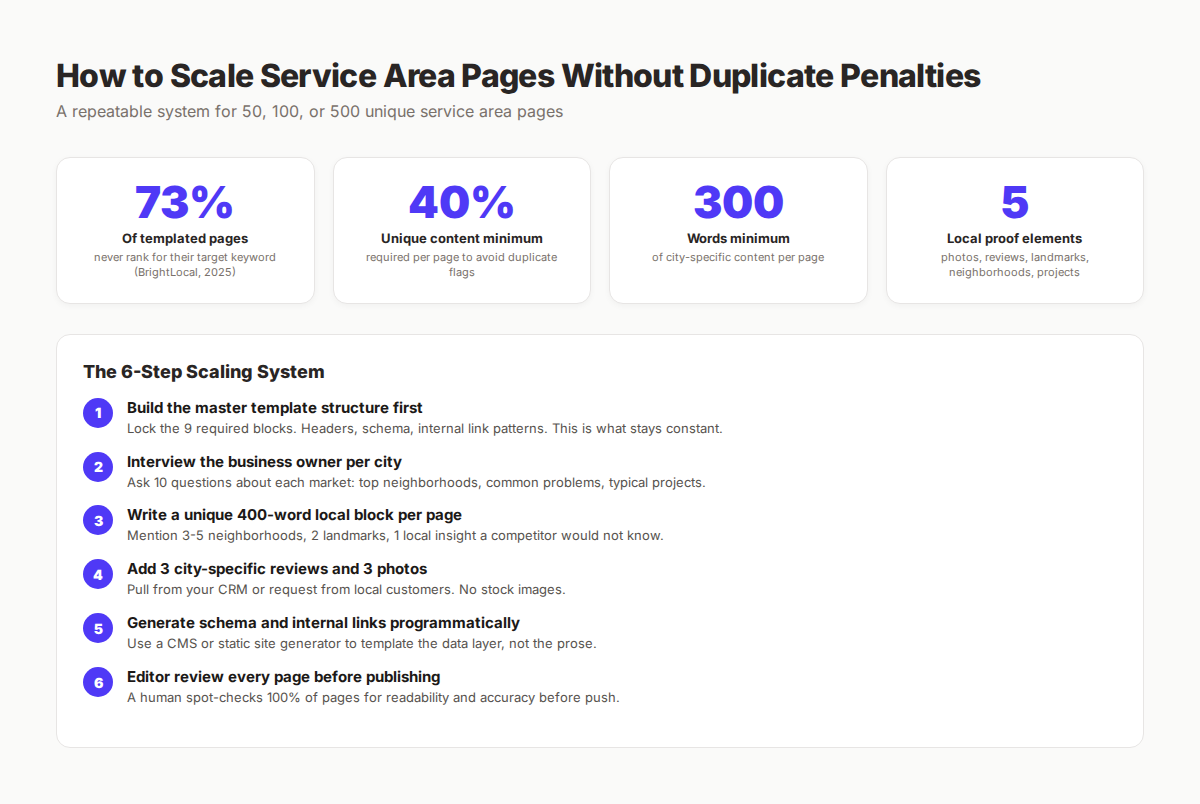
The fix is a system, not a sprint. We use a 6-step process for clients building 30+ service area pages.
Step 1: Build the Master Template First
Lock the 9 required blocks before writing any city-specific content. The template defines structure, schema, internal link patterns, CTAs, and visual elements. This is what stays constant across every page.
Build it once, perfect it, then start filling cities.
Step 2: Interview the Business Owner Per City
Use the 10-question interview format from the hyperlocal content section. Schedule 30 minutes with the owner or local manager per city. Record the call.
The interview produces the raw material for the unique content block. No interview means no unique content. No unique content means no rankings.
Step 3: Write a 400-Word Unique Local Block Per Page
Transform the interview answers into a 400-word block that names 3-5 neighborhoods, 2 landmarks, 1 local insight competitors would not know, and 1 specific project example.
This is the only block that requires human writing per page. Everything else can be templated.
Step 4: Add 3 City-Specific Reviews and 3 Photos
Pull reviews from Google Business Profile, Yelp, or your CRM filtered by customer city. Request 2-3 more from recent customers if needed.
Photos come from job site photos. Most service businesses already have hundreds in their CRM or shared drives. Tag them by city and use 3 per page.
Step 5: Generate Schema and Internal Links Programmatically
Use a CMS, static site generator, or template system to handle schema and internal link generation. The data layer is templated. The content layer is not.
This is where engineering and content split. Schema, breadcrumbs, related city links, and structured data all generate from configuration. Content stays human.
Step 6: Editor Review Every Page Before Publishing
A human spot-checks every page for readability, accuracy, and uniqueness. An editor catches the small issues that Google catches: a wrong city name in a sentence, a copied paragraph, a broken link.
100% review coverage is non-negotiable. Skipping this step is how 30-page scaling efforts fail.
Done right, this system produces 30 unique, ranking service area pages in 3-4 weeks. We have built this for multi-location clients across home services, professional services, and B2B.
If building this system internally is not realistic, this is exactly what we do at theStacc. Our Local SEO module includes service area pages along with Google Business Profile optimization and GBP posting.
Service Area Page Templates Quick Comparison
Here is a one-table view of the 10 templates with their key parameters:
| # | Template | Best For | Word Count | Pages Needed | Difficulty |
|---|---|---|---|---|---|
| 1 | Single-City Service | Home services, one metro | 1,200-1,800 | 5-15 | Low |
| 2 | Multi-City Hub | Regional providers | 1,500 hub + 600/city | 10-50 | Medium |
| 3 | Neighborhood-Specific | Hyperlocal services | 700-1,000 | 10-30 | Medium |
| 4 | Multi-Service in City | Diverse home services | 1,800 hub + 1,000/svc | 5-20 | Medium |
| 5 | Emergency Service | 24/7 services | 700-1,000 | 5-15 | Low |
| 6 | Mobile Service | No-fixed-location services | 900-1,200 | 5-20 | Low |
| 7 | Franchise / Multi-Location | Franchised brands | 1,500-2,000 | 10-200 | High |
| 8 | Professional Services | Lawyers, accountants | 1,800-2,500 | 5-20 | Medium |
| 9 | B2B Service Area | Commercial services | 1,500-2,200 | 5-50 | High |
| 10 | Specialty Niche | Narrow specialties | 1,500-2,000 | 5-30 | Low |
Match the template to your business model. Using the wrong template adds work without earning rankings.
What practitioners are saying on X
Local SEO advice ages quickly. Here is high-signal public discussion from operators who still win Map Pack visibility — context for your roadmap, not a substitute for primary data.
- @noelcetaSEO (Sep 2025): Local SEO playbook still centers complete GBP, NAP consistency, quality citations, local keywords, location content, review velocity, and local links. See the post on X.
- @irentdumpsters (Jan 2026): Most businesses have a GBP; few fully optimize every ranking-relevant section for Map Pack visibility. See the post on X.
- @EldarCohenSEO (Jul 2026): 2026 WhiteSpark-oriented reminder: primary Google Business category is a top Map Pack ranking factor — wrong primary category can erase visibility for money queries. See the post on X.
Grok, AI Overviews, and multi-engine visibility
For “service area page templates”, multi-engine visibility still starts with clear definitions, sourced numbers, and extractable section answers. Grok additionally factors live X discussion — keep public claims consistent with this page.
- Google AI Overviews: Use passage-ready answers, tables, and FAQ schema where relevant.
- ChatGPT / Perplexity: Cite named sources next to key claims.
- Grok: Maintain accurate entity facts on-site and in high-signal X posts.
Rank higher in the Map Pack without a full-time local SEO hire. theStacc’s Local SEO module handles daily GBP posts, review reply workflows, and local visibility tracking — built for service businesses that need calls, not vanity rankings.
Frequently Asked Questions
A service area page targets a geographic market you serve but do not have a physical office in. A location page represents a real physical address you occupy. A plumber based in Austin who also serves Round Rock builds one Austin location page and one Round Rock service area page. The schema, content, and internal linking differ between the two types.
Most service businesses should have one page per primary service city plus pages for surrounding suburbs they actively serve. A typical home service business serving one metro area builds 8-15 service area pages. Regional providers serving multiple metros build 30-100. Going beyond 100 requires the full scaling system described above.
Yes, when built correctly. Google's algorithms have gotten stricter on thin templated pages, but service area pages with unique local content, proper schema, and authentic proof signals continue to rank in the local pack and organic results. The 2024-2025 local algorithm updates reward the pages that satisfy E-E-A-T signals.
You can use AI to draft the templated portions like schema, structure, and standard sections. The 400-word unique local content block must come from real interviews with the business owner per city. AI-only service area pages without human local input get flagged as low-quality content. Hybrid systems with AI for templating plus human local input work well.
300-400 words minimum of unique content per page that does not appear on any other page on your site. This is the threshold below which Google flags pages as duplicate. The unique content should be hyperlocal: neighborhoods, landmarks, local problems, and customer stories specific to that geographic market.
Doorway pages are pages built only for search engines that funnel users elsewhere. Service area pages avoid the doorway penalty by: providing unique value per page, serving real customers in those areas, including authentic local proof, having clear conversion paths that complete on the same page or with the same business, and not using cloaking or hidden text. If a real customer would find the page useful, it is not a doorway page.
Yes, every service area page should have a clear conversion path. Most service businesses include a primary phone number in the header (tap-to-call enabled on mobile), a contact form for non-urgent requests, and a single focused CTA. Multiple CTAs splitting attention reduce conversion rates significantly.
New service area pages typically take 8-16 weeks to rank in the top 10 for moderate-competition city searches. High-competition markets like "plumber Houston" can take 6-12 months. Pages with strong unique content, proper schema, and supporting internal links rank faster than thin templated pages.
The Bottom Line
Service area page templates are not the problem. The execution is. The teams that rank build a strong template structure, fill every page with unique local content, and run a scalable system that maintains quality from page 1 to page 100.
The 9 required blocks, the 10 template patterns by use case, and the 6-step scaling system in this guide are what separate ranking service area pages from indexed-but-invisible ones. Pick the template that matches your business model, build the master structure, and fill each page with the hyperlocal proof that competitors cannot copy.
If building this system internally is too much work, this is exactly what we publish for clients every month. theStacc handles service area pages, GBP optimization, and ongoing local content under one $99/month service.
This article was researched and published by theStacc, the same platform businesses use to publish SEO and local content automatically. We build service area page systems for home services, professional services, and B2B clients across 70+ industries. All best practices verified against current Google guidelines and 2025-2026 BrightLocal local search ranking data.
Related Reading
- Local SEO Checklist: 40 Steps to Rank in 2026
- Multi-Location SEO: The Complete Guide
- Home Services SEO Guide
- How to Optimize Google Business Profile
- Local SEO Statistics for 2026
- Keyword Research for Local SEO
Sources & references
- [1] Princeton / Georgia Tech et al. — GEO research (arXiv:2311.09735)
- [2] @hridoyreh on X — Widely shared SEO skill tree: foundations, research, technical, on-page, content, links, AI SEO/GEO, analytics, UX, bran
- [3] @jakezward on X — 2026 SEO predictions emphasize AI Overview share-of-SERP, schema for LLM token efficiency, brand mentions in AI answers
- [4] Referenced source — developers.google.com

Manage Google Business Profile posts, review replies, and local rank tracking.
Weekly local SEO teardowns
One practical email a week. Map Pack, GBP, AI Overviews. No fluff. Unsubscribe anytime.