Build hundreds of multi-location programmatic pages that rank. Template architecture, data layers, quality gates, and phased rollout. Updated May 2026.
Multi-location programmatic pages are location-specific pages generated from a structured data source rather than a find-and-replace template. They survive core updates only when each page carries real, location-unique data underneath it. This guide covers the data layer, template architecture, quality gates, and a phased rollout.
Google's March 2026 core update wiped out 87% of average traffic for sites running scaled location pages with thin variation. Sites that survived shared one trait. Every page had a real data layer underneath, not a find-and-replace template.
Multi-location programmatic pages are how a single business ranks for "[service] in [city]" across 50, 500, or 5,000 markets. Done well, they capture 46% of all Google searches that carry local intent. Done badly, they trigger Google's Scaled Content Abuse policy and drag the whole domain down with them.
The gap between the two has never been wider. The teams winning in 2026 are not the ones generating the most pages. They are the ones building the strictest quality gates.
This guide covers the exact architecture, data inputs, template structure, and rollout protocol we use. We publish 3,500+ blog posts across 70+ industries with a 92% average SEO score. Our programmatic SEO approach survived the March 2026 update with zero traffic loss because every page passes a 5-gate uniqueness test before it ships.
Here is what you will learn:
- What multi-location programmatic pages are and when to build them
- Why the March 2026 update killed most location page strategies
- The template + data layer + quality gate architecture
- How to source enough local data to make every page genuinely unique
- The phased rollout that prevents indexing penalties
- Internal linking and schema patterns for multi-location sets
- The monitoring and pruning loop that keeps the system healthy
What Are Multi-Location Programmatic Pages
Multi-location programmatic pages are templated landing pages that target "[service] in [city]" search variations at scale. One template combined with a structured dataset generates dozens, hundreds, or thousands of pages. Each page targets a single city or service area.
The pattern is simple. You have a service that customers search for locally. Plumbing. Dental care. Wedding photography. SEO consulting. The same head term shows up across thousands of geographic modifiers. "Plumber in Austin." "Plumber in Dallas." "Plumber in Round Rock."
A traditional content team writes 50 unique location pages over six months. A programmatic system generates 500 unique location pages in a weekend. Both can rank. Only one scales.
The difference between this and standard multi-location SEO is the production system. Multi-location SEO covers the entire system: GBP profiles, citations, reviews, and content. Multi-location programmatic pages are the content layer specifically. They are how you produce the on-site assets that match every local query.
When Multi-Location Programmatic Pages Make Sense
Three conditions must be met simultaneously. Miss one and the approach fails.
| Condition | Why It Matters | Example |
|---|---|---|
| You serve 20+ distinct geographies | Below 20 locations, manual pages outperform | A 4-location dental group does not need this |
| You have unique local data per market | Without per-market data, pages cannot pass uniqueness gates | Local pricing, market notes, service variations, real customer examples |
| Search intent repeats across markets | All variations serve the same query intent with different specifics | "[Service] near me" maps to the same answer pattern in every city |
The 20-location floor is not arbitrary. Below that count, the engineering overhead of building the template, data layer, and quality gates costs more than just writing 20 unique pages.
What Multi-Location Programmatic Pages Are Not
They are not service area pages copied across cities with the city name swapped. That approach was already weak before March 2026. It is now algorithmically auto-pruned.
They are not AI-spun content. A model writing 500 generic paragraphs about plumbing in 500 cities produces 500 thin pages. The output looks fluent and ranks for nothing.
They are not a substitute for Google Business Profile optimization. Programmatic pages support local rankings. They do not replace the GBP infrastructure that drives map pack appearances.
Why Most Multi-Location Pages Fail in 2026
Google's March 2026 core update collapsed the gray zone between legitimate programmatic SEO and scaled content abuse. The numbers are stark.
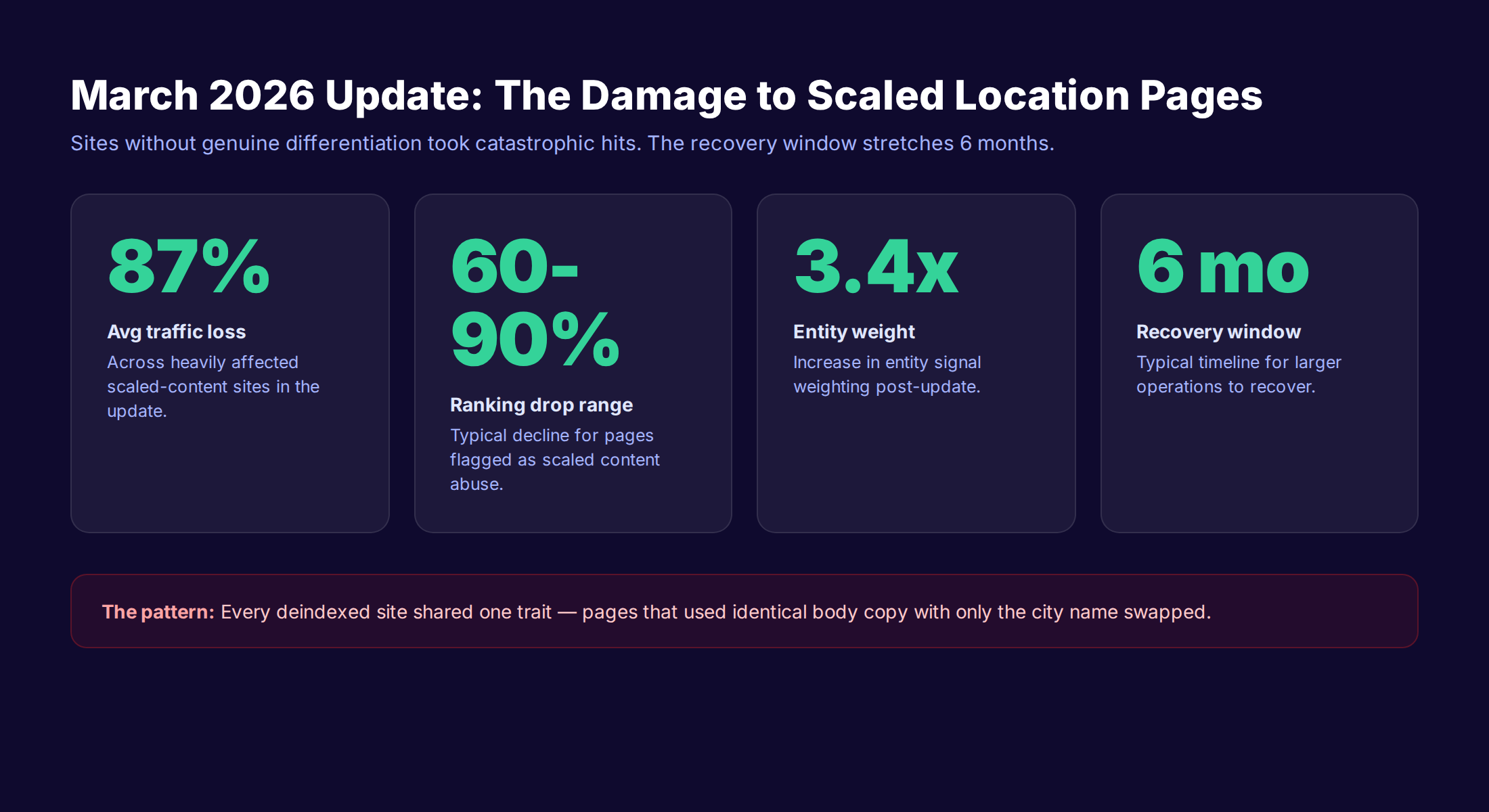
Sites running scaled location pages without genuine differentiation lost an average of 87% of organic traffic. The recovery window for larger operations stretched 3 to 6 months. The median ranking drop landed between 60% and 90% for hit pages.
Three failure patterns drove every single deindexing case.
Failure 1: Find-and-Replace Templates
The dominant failure pattern is also the most obvious. One paragraph about "plumbing services" with the city name swapped per page. Google's spam classifiers identify this pattern at scale. The signature is unmistakable. Identical sentence structures across thousands of URLs with one variable token replaced.
A page for "Plumber in Chicago" and a page for "Plumber in Miami" cannot share 95% of their body content. They must share less than 70%. The unique 30% is where the page earns its right to exist.
Failure 2: No Local Data Layer
The second failure is subtler. The pages have some unique sentences per city. The opening paragraph mentions the city. There is a fake "local testimonial" with a generic first name and last initial. The footer says "serving [city] since [year]."
That is not a data layer. That is decoration. A real data layer means population numbers, ZIP codes, neighborhoods, local market notes, regional pricing variations, real customer examples by city, and verifiable third-party data. Below 5 distinct local data points per page, the page is thin by 2026 standards.
Failure 3: Bulk Deployment Without Quality Gates
The third failure mode is operational, not editorial. Teams generate 500 pages, run a spot-check on 5 of them, and deploy the whole batch at once. The 495 unchecked pages contain broken merges, empty data blocks, repeated paragraphs, and orphan URLs.
Google indexes the batch in a 14-day window. The site profile shifts overnight from "200 quality pages" to "200 quality pages plus 500 thin pages." The site-wide quality signal drops. Even the original 200 pages lose rankings.
For a deeper look at how Google handles this category, see our guide to surviving the scaled content ban.
The Architecture: Template + Data + Quality Gates
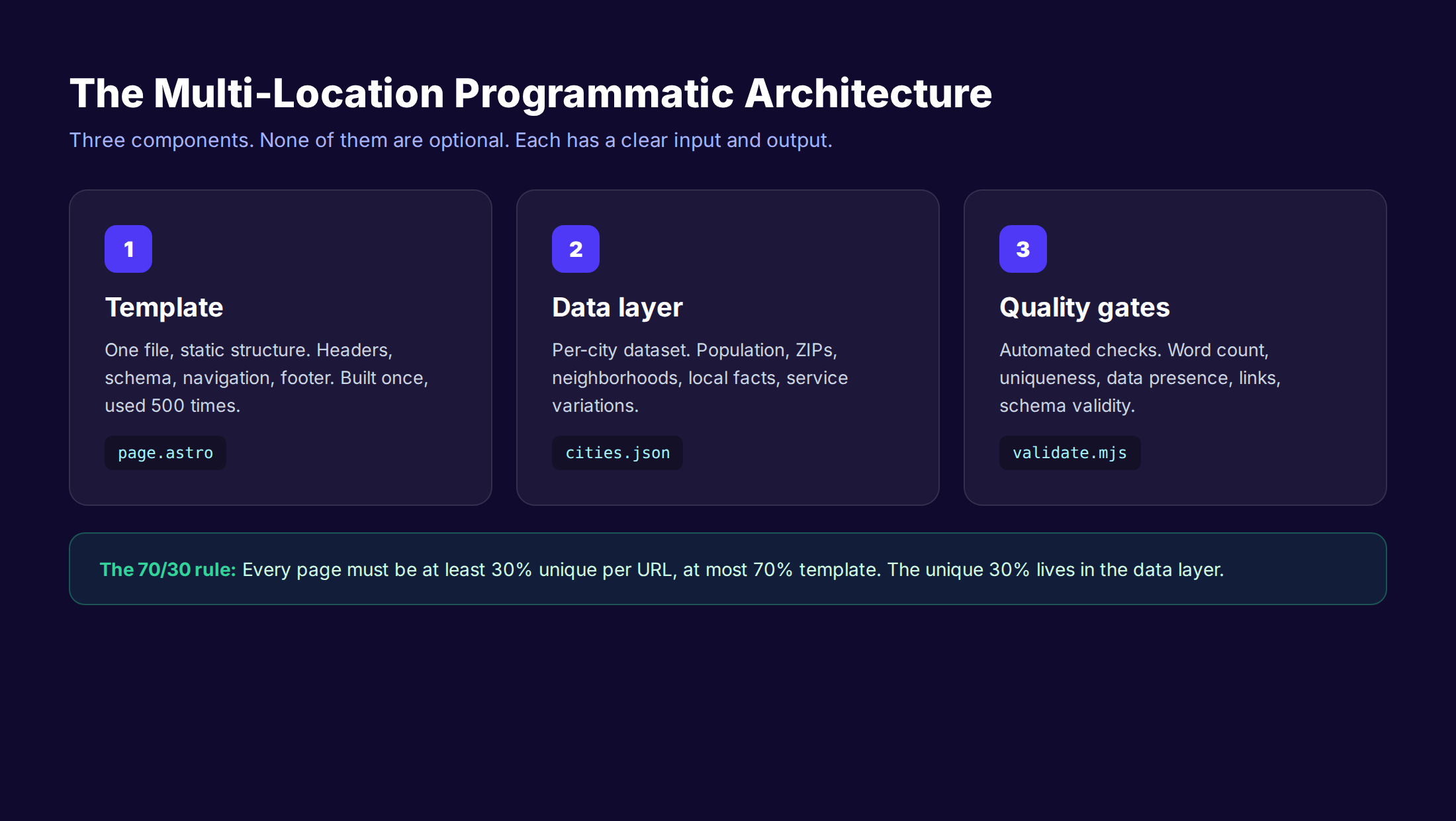
Every working multi-location programmatic system has three components. Each component has clear inputs and outputs. None of them are optional.
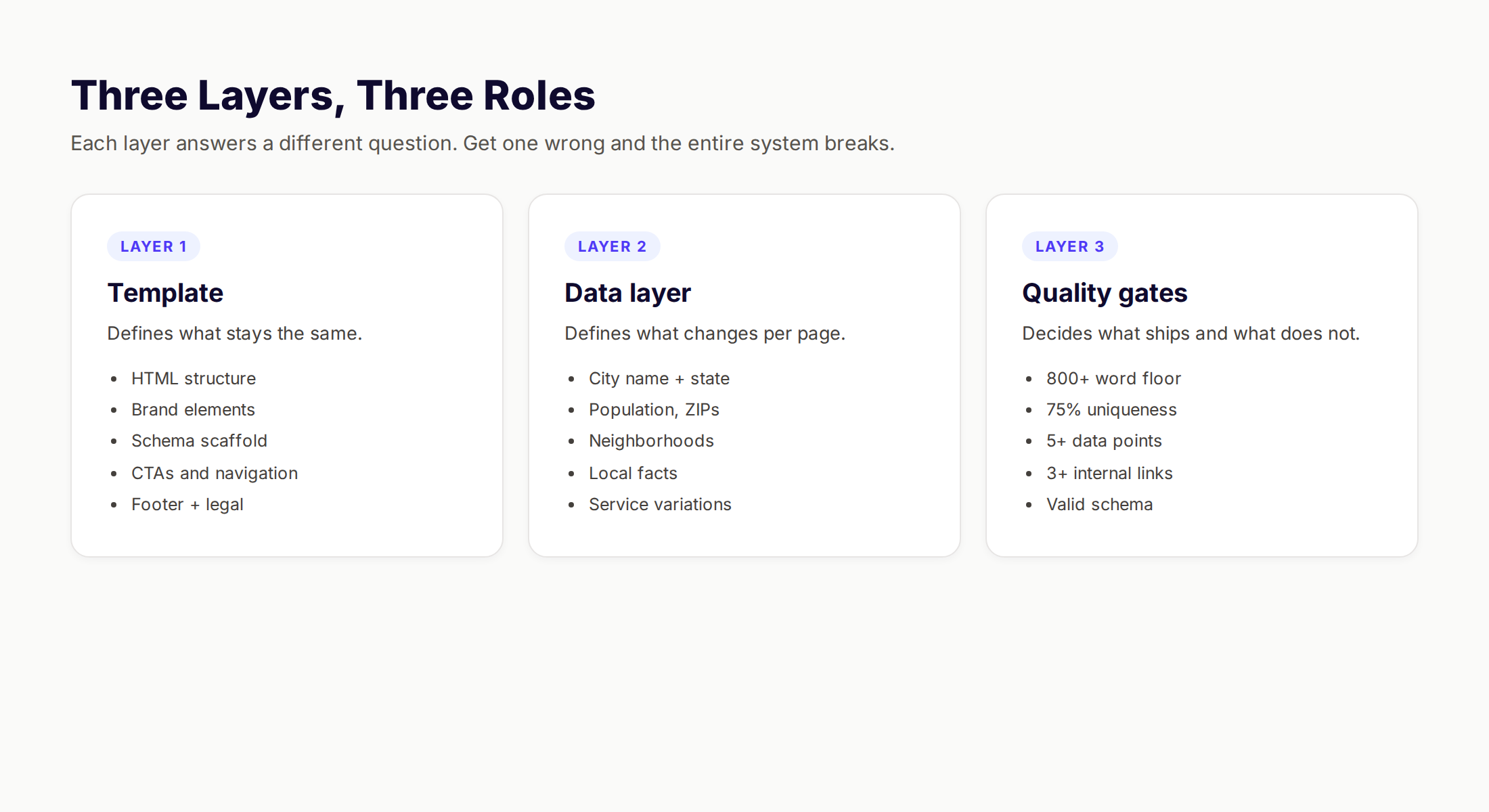
The template is the static structure. The data layer is the per-city information. The quality gates are the automated checks that decide whether a page deploys.
The Three Components in Plain Terms
Component 1: The template. One file that defines the page structure. Headers, body sections, schema markup, footer, internal links. Same for every page in the set. Built once, audited once, used 500 times.
Component 2: The data layer. A structured file (CSV, JSON, database) where each row is a city and each column is a data field. Population, ZIP codes, neighborhoods, service variations, local examples, pricing modifiers. This is the source of uniqueness.
Component 3: The quality gates. A scripted set of checks that every generated page must pass before it ships. Word count above floor. Uniqueness above threshold. Required data fields present. Internal links present. Schema valid.
The error most teams make is building Component 1 well, Component 2 poorly, and Component 3 not at all. The page set then deploys with template variation but no data substance and no enforcement layer. It looks fine until Google audits it.
The 70/30 Rule
A working multi-location programmatic page is at least 30% unique per URL and at most 70% template. The unique portion comes from the data layer. The template portion handles brand consistency, navigation, and schema.
Below 25% uniqueness, you trigger duplicate content classifiers. Above 75% template, you produce pages that read as boilerplate. The 70/30 ratio is the safe operating zone in 2026.
This applies to body content specifically. Header, footer, and navigation do not count toward the uniqueness calculation. Body content is the H1, the main copy, the data blocks, the FAQs, and the local proof sections.
Stop writing. Start ranking. theStacc plans, writes, and publishes SEO articles from $99 per month, including location pages, GBP posts, and editorial content.
Building the Data Layer
The data layer determines whether your pages survive. A weak data layer guarantees failure regardless of how good the template is. A strong data layer makes even an average template rank.
For every city or location in your set, source at least 5 unique data points. The more data fields you collect, the more uniqueness flexibility you have.
Required Data Fields per City
These are the non-negotiable inputs. Every page must have all of them.
- ✓ City name and state
- ✓ Population (current year)
- ✓ Primary ZIP codes (3-5)
- ✓ Top 3 neighborhoods or districts
- ✓ Nearest major highways or transit
- ✓ Local market characteristic (climate, industry, demographics)
- ✓ One verifiable local fact specific to your service
The local fact is the lever. For a plumbing business, this might be "Austin's hard water profile averages 14 grains per gallon, which is why most homes here need annual water heater flushes." For a dental clinic, it might be "Round Rock's pediatric demographics skew younger than the Texas average, with 28% of residents under 18."
That single fact, sourced from real local data, makes the page genuinely useful. It also makes the page algorithmically distinguishable from every other page in the set.
Strong Data Sources
The fastest way to fail at the data layer is to invent the data. Source from verifiable databases.
- US Census Bureau for demographics and population
- Local government open data portals for ZIP codes and districts
- Climate.gov for regional weather profiles
- BLS.gov for industry and employment patterns
- Your own customer database for real local examples
- GBP insights for actual local search patterns
The customer database is the most underused source. If you have served 500 customers across 50 cities, you have 50 cities worth of real examples. Real timelines. Real service variations. Real before-and-after data. That is uniqueness no competitor can copy.
Per-City Service Variation
The other underused lever is service variation. Your service does not look identical across markets. A roofing company in Phoenix handles different problems than a roofing company in Buffalo. Phoenix sees heat damage and UV degradation. Buffalo sees ice damming and snow load. Same service category, different per-market reality.
Capture this in your data layer. Add a "regional service emphasis" column. Use it to write 3-5 sentences per page about what makes your service different in this market. This block alone can account for 15-20% of your per-page uniqueness.
For more on building data-rich local content, see our local SEO guide.
Template Anatomy: Static and Dynamic Blocks
The template controls what stays consistent across all pages and what changes per page. Get this mix wrong and you either produce duplicate content or you lose brand consistency.
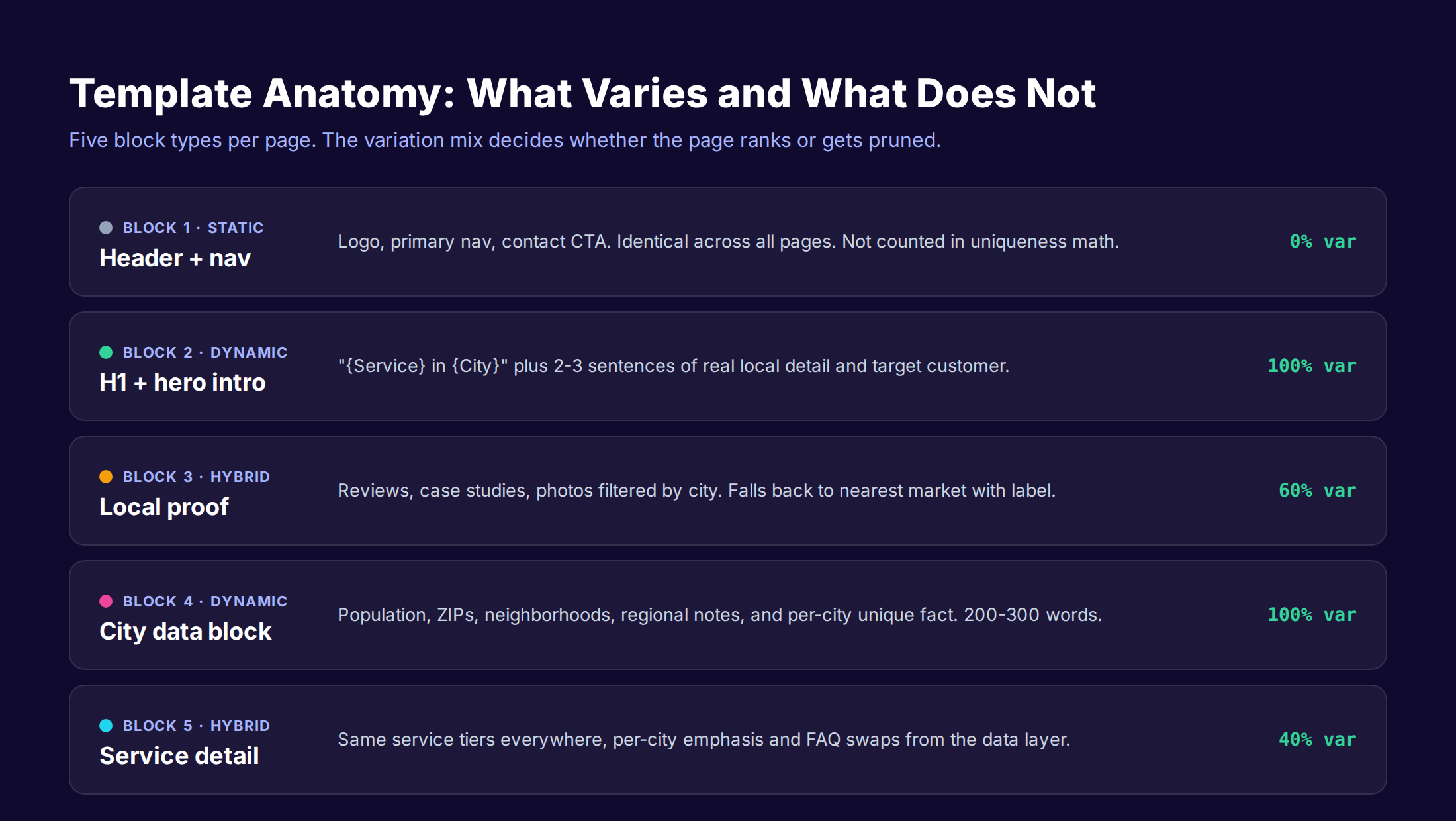
A working template has 5 block types. Each block has a specific variation profile.
Block 1: Header and Navigation (0% Variation)
Logo, primary navigation, contact CTA. Identical across all pages. This block has zero SEO impact on uniqueness because Google does not count navigation in the content uniqueness calculation. Build it once and stop touching it.
Block 2: H1 and Hero Intro (100% Variation)
The H1 follows the pattern "[Service] in [City], [State]" or similar. The hero intro is 2-3 sentences that include the city name, one specific local detail, and the primary value proposition. This block is fully dynamic.
A weak hero intro: "Looking for the best plumber in Dallas? You found us." A strong hero intro: "Dallas homes built before 1985 still use cast iron drain lines that corrode through within 60-80 years. We replace 12-14 of those lines every month, mostly in East Dallas and Oak Cliff." The second one carries information density. It tells a real story about the local market.
Block 3: Local Proof Section (60% Variation)
Reviews, case studies, or photos filtered by city or service area. When you have direct local proof for the city, use it. When you do not, fall back to the nearest geographic match and label it accordingly. "Our nearest project to [city] was in [nearby city], 22 miles north."
The fallback rule is critical. Faking a Dallas testimonial because you do not have one breaks trust and triggers review spam detection if you push it to GBP. Real proof from the nearest market, properly labeled, is honest and still serves the user.
Block 4: City Data Block (100% Variation)
This is where the data layer earns its keep. Population, ZIPs, neighborhoods, regional characteristics, and the per-city unique fact. Format it as a callout box, a small table, or a quick-facts list. Visual variety matters here because users skim location pages for orientation cues.
This block alone should account for 200-300 words of unique content per page. Multiplied across the page set, this is the single largest uniqueness lever.
Block 5: Service Detail (40% Variation)
Same service tiers and core descriptions across all pages, but with per-city service emphasis pulled from your data layer. Same pricing structure, but with regional modifiers if pricing varies by market. Same FAQ structure, but with 2-3 questions swapped for local concerns.
The 40% variation in this block is what separates legitimate scaling from copy-paste templates.
Template Block Variation Summary
| Block | Variation | Word Count | Primary Lever |
|---|---|---|---|
| Header + nav | 0% | n/a | None |
| H1 + hero | 100% | 80-120 | Local detail |
| Local proof | 60% | 150-250 | Filtered reviews |
| City data | 100% | 200-300 | Data layer |
| Service detail | 40% | 400-600 | Regional emphasis |
The cumulative uniqueness across these 5 blocks lands between 55% and 75% of body content. That clears the 30% minimum by a wide margin.
The Quality Gates Every Page Must Pass
Quality gates are automated checks that run on every generated page before it deploys. They are not optional. They are the difference between a system that compounds and a system that collapses.
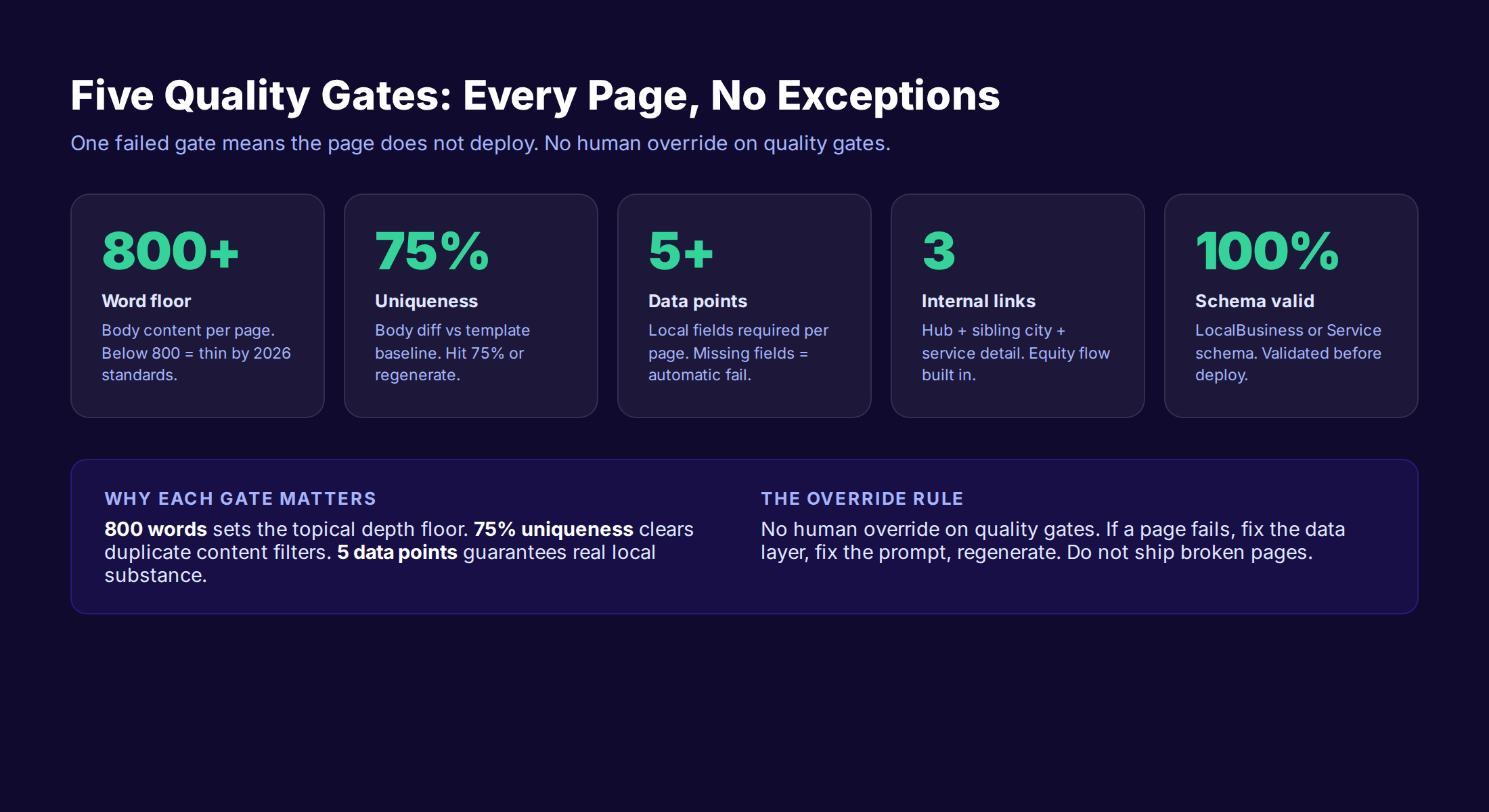
Every page must pass every gate. One failed gate means the page does not deploy. No human override.
Gate 1: Word Count Floor
Every page must contain at least 800 words of body content. Below that, the page is thin by 2026 standards regardless of how good the content is.
The floor exists because Google needs enough text per URL to assess topical relevance, intent match, and quality signals. Under 800 words on a transactional location page, the page reads as a stub.
Set the gate to 800 minimum, 1,200 ideal, 1,500 ceiling. Above 1,500 words you start padding without adding information, which is its own quality signal problem.
Gate 2: Body Uniqueness Threshold
Every page must hit 75% body uniqueness when compared to the template baseline. Run a simple diff. Strip the header, footer, navigation, and any block that is identical by design. Compare what remains across every pair of pages in the set.
If two pages are more than 25% similar in their body content, one of them fails. Regenerate it with different data inputs or stronger per-city variation. The gate is binary.
The 75% threshold is conservative. The 2026 algorithms appear to penalize around 70% similarity. Building to 75% gives you a safety margin.
Gate 3: Required Data Fields Present
Every page must have all required data fields populated. If a page is missing the population number, the ZIP codes, the neighborhood list, or the per-city unique fact, it fails. No partial pages ship.
This gate exists because automation breaks in invisible ways. A bad CSV row, a missing API response, a typo in a field name. Without an automated check, these failures show up as live pages with empty data blocks. Users see "Serving , Texas" with a missing city name. Google sees a broken page.
Gate 4: Internal Link Count
Every page must contain at least 3 internal links. One to the location hub. One to a sibling city (geographic neighbor). One to a service detail or supporting content piece.
The hub link consolidates topical authority. The sibling link distributes equity laterally. The service detail link drives users toward conversion. Without this internal linking layer, the pages are orphan content.
For more on building strong internal architecture, see our SEO strategy template.
Gate 5: Schema Validation
Every page must emit valid LocalBusiness or Service schema. The schema must include the business name, address (or service area), phone, and the specific service offered. Geographic coordinates are recommended when the page represents a physical location.
Run the schema through Google's Rich Results Test before deployment. Or use a CI-stage validator that fails the build if any page emits malformed schema.
This gate is technical. It has nothing to do with content quality. But missing or broken schema leaves rankings on the table because Google cannot confidently associate the page with its geographic context.
For technical implementation details, see our structured data guide and schema markup SEO guide.
Phased Rollout: 50 Pages at a Time
Deploying 500 location pages in a single push is the fastest way to destroy a site. The volume spike triggers Google's spam classifiers. The site profile shifts overnight. Indexing slows. Rankings drop.
The fix is phased rollout. Deploy 50 pages. Wait 14 days. Audit performance. Deploy the next 50.
Why 50 Pages Per Batch
The 50-page threshold is the inflection point. Below 50, Google treats the batch as normal site growth. Above 50, the volume starts to look like scaled publishing and gets scrutinized.
A 500-page site rollout across 10 batches of 50 takes 20 weeks at the conservative pace. That feels slow. It is also the only pace that consistently survives.
Teams that rush past this pace pay for it. The classic pattern is a 500-page deployment, an initial 30-day spike in impressions, a 60-day decline, and a year of trying to recover deindexed pages.
The 14-Day Audit Window
Between batches, run a structured audit. Track these metrics in Google Search Console.
- ✓ Index coverage of the new batch (target 90%+ indexed within 14 days)
- ✓ Impressions per page (target 50+ impressions within 14 days)
- ✓ Click-through rate by city (flag any city with 0% CTR)
- ✓ Average position per page (flag any page below position 30)
- ✓ Crawl errors or warnings on the new URLs
If 90% of the batch is indexed and at least 70% of pages have impressions, the system is working. Deploy the next batch.
If indexing stalls below 70% or pages are not getting impressions, stop. The problem is in the data layer, not the deployment. Fix the source before adding more pages.
Sitemap and Submission Strategy
For each batch, generate a fresh sitemap file containing only the new URLs. Submit it to Google Search Console as a new sitemap rather than updating the master sitemap.
This gives you per-batch indexing data. You can see which deployment cohort indexed well, which one had problems, and trace issues back to the specific data or template version used.
Maintain the master sitemap for all approved pages. Use the batch sitemaps as a deployment audit tool, not as a long-term URL inventory.
Multi-location SEO done for you. theStacc handles location pages, GBP posts, and review management across every branch — $49/month per module.
Internal Linking and Schema for Multi-Location Sets
Internal linking and schema are the two technical layers that turn a set of isolated location pages into a connected ranking system. Most teams treat them as afterthoughts. They are not.
The Hub and Spoke Pattern
Every multi-location programmatic page set needs a hub. The hub is a master page that lists all locations. It links to every location page. Every location page links back to it.
/locations/                          → Hub (lists all 500 cities)
/locations/austin/                   → Austin page
/locations/austin/plumbing/          → Austin plumbing detail
/locations/dallas/                   → Dallas page
/locations/dallas/plumbing/          → Dallas plumbing detail
The hub consolidates topical authority. When Google crawls the hub, it understands the scope of your geographic coverage. When external sites link to the hub, the authority flows out to every location page beneath it.
Without a hub, you have 500 floating pages. Google treats them as unrelated. The internal authority flow does not exist.
Sibling City Linking
Each location page should link to at least one sibling city. The sibling is a geographic neighbor. Austin links to Round Rock. Dallas links to Plano. Houston links to Sugar Land.
This sibling layer creates lateral authority flow. It mirrors how users actually search. Someone researching plumbers in Austin often also checks the suburbs. The internal link supports the user journey and the search engine's understanding of your service geography.
Limit sibling links to 1-3 per page. More than that dilutes the linking signal. The pattern should be deliberate, not exhaustive.
LocalBusiness Schema for Each Page
Every location page that represents a physical location needs LocalBusiness schema with the full NAP details. For more on getting this right, see our NAP consistency guide.
Every location page that represents a service area (no physical office) needs Service schema with serviceArea defined geographically. Include the GeoCircle or AdministrativeArea that describes the actual coverage zone.
Both schema types should include the specific service offered. A plumbing business should not just emit "LocalBusiness" with category "Home Services." It should emit "Plumber" with services listed (drain cleaning, water heater installation, etc).
The schema is what makes the page eligible for local pack appearance, knowledge panel features, and AI Overview citations. Without it, the page is invisible to the surfaces that drive 67% of local clicks.
For implementation guidance, see our GBP categories guide for the local business taxonomy and our schema markup for blog posts for the technical pattern.
Monitoring, Pruning, and Compounding
A working multi-location programmatic page set is not a launch project. It is an operational system that requires weekly attention. Set-and-forget is the failure pattern.
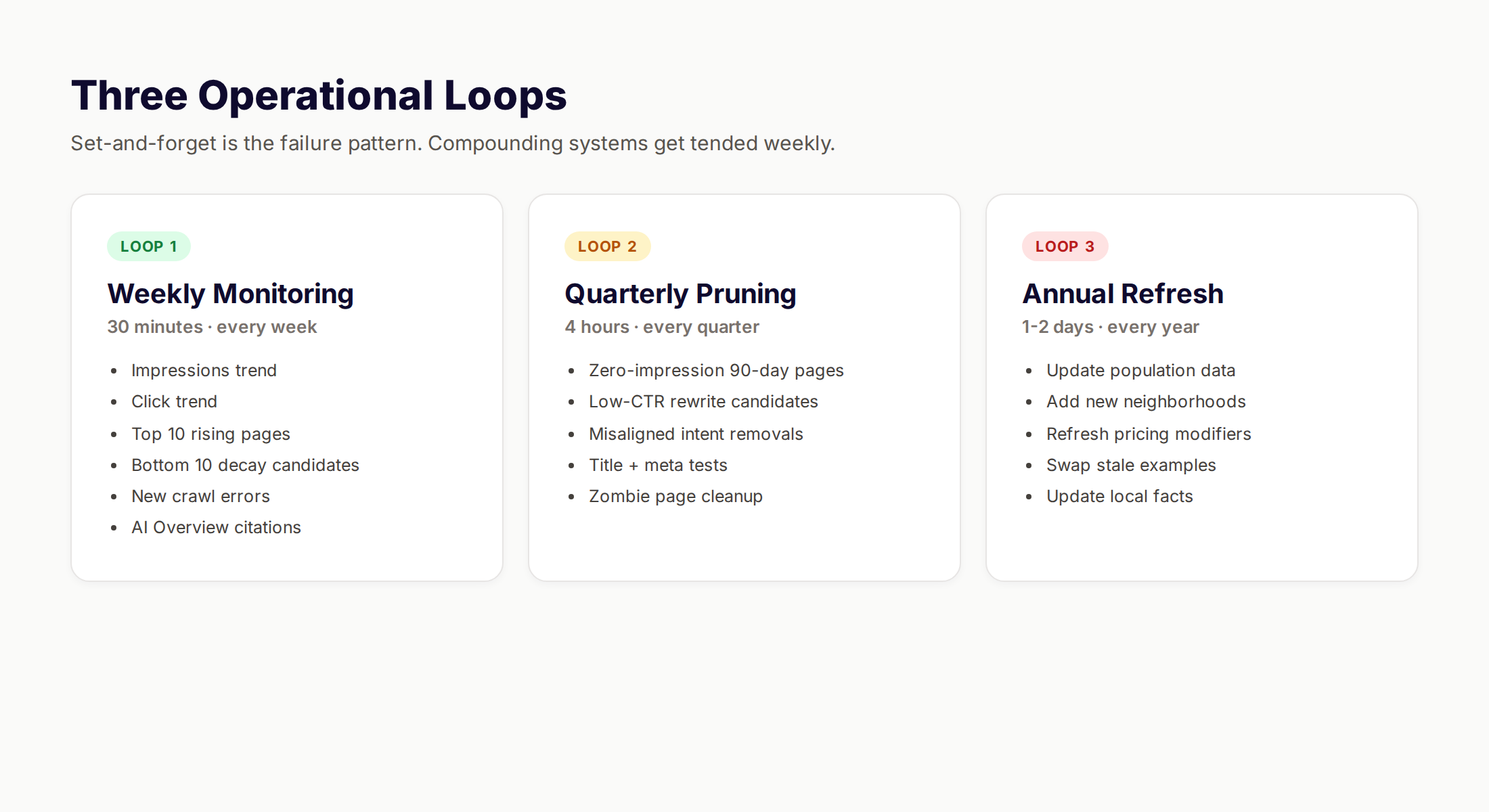
The system has three operational loops. Weekly monitoring. Quarterly pruning. Annual refresh.
Weekly Monitoring (30 minutes)
Every week, log into Google Search Console and run these checks.
- ✓ Total impressions trend across the page set
- ✓ Total clicks trend across the page set
- ✓ Top 10 pages by impressions (rising stars)
- ✓ Bottom 10 pages by impressions (decay candidates)
- ✓ New crawl errors or coverage warnings
- ✓ AI Overview appearances (track which pages get cited)
The goal is pattern detection, not detailed analysis. If impressions are rising overall, the system is working. If specific cities are decaying, flag them for the quarterly pruning review.
This is also where you spot opportunities. A city that suddenly gains impressions is a city worth investing in further. Add more local data. Expand the service detail. Move it from a generic page to a flagship local example.
Quarterly Pruning (4 hours)
Every quarter, pull the data for the full page set and run the pruning protocol.
Pages with zero impressions for 90+ days: Either rewrite (if the data layer can be improved) or noindex (if the city does not justify the page).
Pages with low CTR (under 1% at average position 10 or better): The title and meta description are not matching intent. Rewrite both. Test for 30 days.
Pages with high impressions but no clicks: The page is appearing in irrelevant queries. Audit the targeting. Either narrow the intent or remove the page.
The pruning protocol prevents zombie page accumulation. Zombies drag the site profile down even when they do nothing visibly wrong. Aggressive pruning keeps the average page quality high.
Annual Refresh
Once a year, refresh every page in the set. Update the data layer. Refresh population numbers. Add new neighborhoods if the city has grown. Update pricing modifiers if the market shifted. Replace stale customer examples with fresh ones.
The annual refresh is what makes multi-location programmatic pages compound. Google treats them as actively maintained, which is a positive quality signal. Competitors who deploy and walk away lose ground every year.
For benchmark data on local SEO performance, see our local SEO statistics roundup and the Sterling Sky 2026 local SEO report for industry-wide trends.
Tools and Production Stack
Building multi-location programmatic pages requires a small stack of tools. The good news is most of them are free or near-free at the volumes most businesses operate at.
| Tool | Role | Cost |
|---|---|---|
| Airtable or Google Sheets | Data layer storage | Free to $20/mo |
| Astro, Next.js, or Webflow | Page generation framework | $0 to $50/mo |
| Claude or GPT-4 | Per-city unique content blocks | $20-150/mo at 500 pages |
| Google Search Console | Monitoring and audit | Free |
| Screaming Frog | Quality gate automation | Free under 500 URLs |
| Schema.org validator | Schema validation gate | Free |
The total stack cost for a 500-page multi-location system lands around $100-200 per month. The dominant cost is the AI model usage for per-city content generation. Below 100 pages, the entire stack can run free.
What this stack does not cover is the editorial layer. The data sourcing, the local fact verification, the proof curation, the ongoing pruning. That is human work. Either yours or outsourced.
For a fully managed approach, theStacc plans, writes, and publishes location pages from $99 per month including data sourcing, content production, schema, and monitoring. We use the same architecture described in this guide because we tested every alternative and this one is what survives.
For tool selection guidance, see our roundup of the best free SEO tools and best free keyword research tools.
Common Mistakes (and the Fix for Each)
Even teams that understand the architecture make predictable mistakes during execution. These are the 5 most common, with the fix for each.
Mistake 1: Treating the Data Layer as an Afterthought
The team builds the template first, then scrambles to source data once they realize the pages need it. The data ends up thin, partially fake, or copy-pasted from competitors.
The fix: Build the data layer first. Spend 60% of your project time on data sourcing. The template is faster to build than the data is to source. Plan accordingly.
Mistake 2: Deploying Before Quality Gates Are Built
The team has the template, has the data, generates the pages, and pushes them live. They plan to "audit later." They never audit.
The fix: Quality gates are deployment-blocking, not deployment-following. Build them into your generation script before you generate the first page. Every page passes every gate or no pages ship.
Mistake 3: Underestimating Maintenance
The team launches 500 pages, declares victory, and moves to the next project. Six months later, traffic is flat, half the pages have zero impressions, and the team blames Google.
The fix: Budget 4 hours per month for monitoring and 1 day per quarter for pruning. Without this maintenance loop, the system decays.
Mistake 4: Ignoring the Hub Page
The team builds 500 individual location pages with no hub. Each page is technically optimized. Together they form a disconnected mass with no topical authority signal.
The fix: Build the hub page first. Link to every location from it. Link to it from every location. Treat the hub as the index that gives the whole set coherence.
Mistake 5: Using AI for the Wrong Layer
The team uses AI to generate the entire page. Every paragraph is model-written. The pages read as fluent but generic. They rank for nothing because nothing in them is genuinely local.
The fix: Use AI for narrow blocks where it adds value. The per-city paragraph that explains regional service emphasis based on your data layer. The FAQ rewriting that adapts to local concerns. Not the whole page. The data layer is the source of value, not the model.
For more on this distinction, see our guide on AI vs manual SEO.
What practitioners are saying on X
Local SEO advice ages quickly. Here is high-signal public discussion from operators who still win Map Pack visibility — context for your roadmap, not a substitute for primary data.
- @noelcetaSEO (Sep 2025): Local SEO playbook still centers complete GBP, NAP consistency, quality citations, local keywords, location content, review velocity, and local links. See the post on X.
- @irentdumpsters (Jan 2026): Most businesses have a GBP; few fully optimize every ranking-relevant section for Map Pack visibility. See the post on X.
- @EldarCohenSEO (Jul 2026): 2026 WhiteSpark-oriented reminder: primary Google Business category is a top Map Pack ranking factor — wrong primary category can erase visibility for money queries. See the post on X.
Grok, AI Overviews, and multi-engine visibility
For “multi location programmatic pages”, multi-engine visibility still starts with clear definitions, sourced numbers, and extractable section answers. Grok additionally factors live X discussion — keep public claims consistent with this page.
- Google AI Overviews: Use passage-ready answers, tables, and FAQ schema where relevant.
- ChatGPT / Perplexity: Cite named sources next to key claims.
- Grok: Maintain accurate entity facts on-site and in high-signal X posts.
Publish content built for Google and AI citations. theStacc’s Content SEO module ships SEO-scored articles structured for rankings and generative engines — including clearer entity pages models like Grok can quote.
Frequently Asked Questions
Twenty locations is the practical floor. Below that, the engineering overhead of building the template, data layer, and quality gates costs more than writing 20 unique pages manually. Above 20 locations, the production efficiency of templates outpaces manual writing. At 100+ locations, programmatic is the only sustainable approach.
Pages built without unique data, without quality gates, and deployed in bulk get penalized. Pages built with 30%+ per-page uniqueness, validated by automated gates, and deployed in phased batches do not. The penalty risk lives in execution quality, not in the programmatic approach itself.
Indexing typically happens within 14 days for properly built pages. Initial impressions appear within 30 days. Meaningful traffic (50+ clicks per page per month) typically lands at 90-180 days. Pages targeting low-competition geographies rank faster. Pages targeting major metros take longer.
Yes. GBP listings drive map pack and "near me" appearances. Location pages drive organic results and AI Overview citations. They cover different surfaces. Multi-location businesses that win both surfaces capture significantly more traffic than businesses that rely on GBP alone.
No. AI works for narrow content blocks where it operates against your data layer. Full-page AI generation produces fluent but generic content that fails the 30% uniqueness threshold. The data layer is the source of value. AI is one production tool among several.
Location pages represent physical offices or storefronts. Service area pages represent geographic coverage zones where you serve customers but do not have a physical location. Both can use the same programmatic architecture. The schema differs (LocalBusiness vs Service with serviceArea), and the local proof block is harder to populate for service area pages.
The hub and sibling linking pattern handles most of this. Each page targets a distinct geographic modifier ([service] in [specific city]) so they do not compete on the same query. For more on the technical pattern, see our guide on fixing keyword cannibalization.
The Bottom Line
Multi-location programmatic pages work in 2026 when they pass three filters. The template enforces brand and structure. The data layer makes every page genuinely unique. The quality gates prevent thin or broken pages from ever shipping.
Skip any one of these and the system fails. Build all three correctly and you compound. The same investment that produced 50 ranking pages this year produces 500 next year and 5,000 the year after that.
The teams winning this game in 2026 are not the ones with the biggest content budgets. They are the ones with the strictest quality gates and the most useful data layers.
Sources:
- Programmatic SEO After March 2026: Scaled Content Survival - Digital Applied
- Programmatic SEO 2026: Scalable SEO Strategies - Memorable.design
- Multi Location SEO Landing Page Templates - RankAI
- Google Helpful Content Guidelines
- The State of Local SEO in 2026 - Sterling Sky
Sources & references
- [1] Princeton / Georgia Tech et al. — GEO research (arXiv:2311.09735)
- [2] @hridoyreh on X — Widely shared SEO skill tree: foundations, research, technical, on-page, content, links, AI SEO/GEO, analytics, UX, bran
- [3] @jakezward on X — 2026 SEO predictions emphasize AI Overview share-of-SERP, schema for LLM token efficiency, brand mentions in AI answers
- [4] Referenced source — www.sterlingsky.ca

Manage Google Business Profile posts, review replies, and local rank tracking.
Weekly local SEO teardowns
One practical email a week. Map Pack, GBP, AI Overviews — no fluff. Unsubscribe anytime.