
YouTube SEO: The Complete Guide to Ranking Videos (2026)
Learn how to rank YouTube videos with keyword research, metadata, thumbnails, Shorts, and AI Overviews. Data from 1.6M videos. Updated 2026.
YouTube gets 3.5 billion searches every day. That makes it the second largest search engine on the planet, right behind Google. And with 2.85 billion monthly active users, the audience is already there.
The problem is competition. Over 500 hours of video get uploaded every single minute. Most of those videos get buried. A study of 1.6 million YouTube videos found that only a tiny fraction ever reach the top 3 results for any search query.
YouTube SEO is the process of optimizing your videos, metadata, and channel so that YouTube surfaces your content to the right audience. It works. 78% of successful creators prioritize YouTube SEO as a core growth strategy. Yet only 34% implement it systematically.
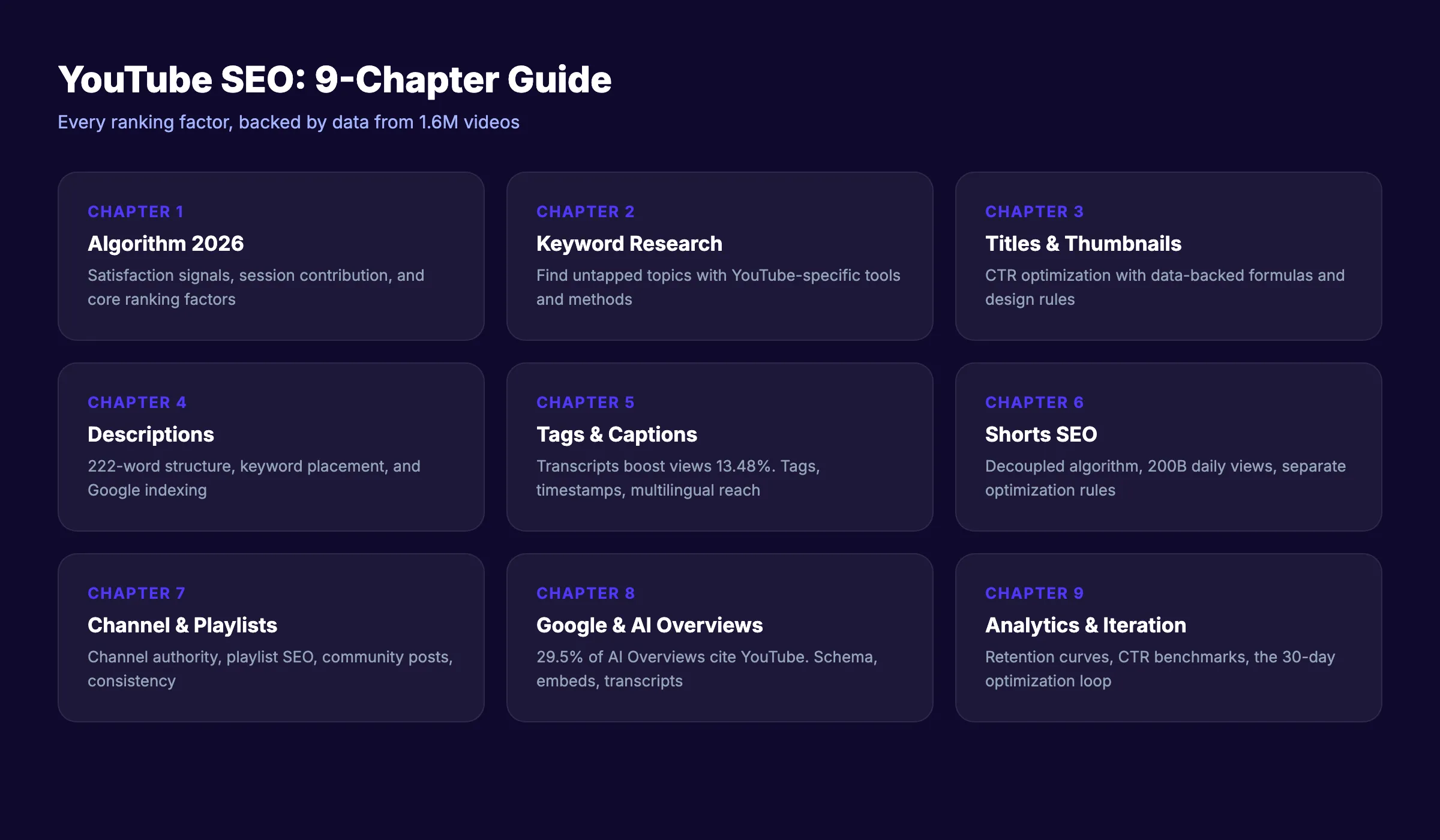
This guide breaks YouTube SEO into 9 chapters. Each covers a specific ranking factor with data, examples, and steps you can apply immediately. We have published 3,500+ SEO articles across 70+ industries. This guide covers everything we know about getting videos found.
Here is what you will learn:
- How the YouTube algorithm decides which videos to show in 2026
- How to find keywords with high search volume and low competition
- The metadata elements that directly impact rankings
- Why thumbnails and titles control your click-through rate
- How to optimize YouTube Shorts separately from long-form content
- How to get your videos cited in Google AI Overviews
- The analytics signals that tell you what to fix
Chapter 1: How the YouTube Algorithm Works in 2026
The YouTube algorithm is not one system. It is several recommendation engines working across different surfaces: search results, suggested videos, the Browse feed, Shorts feed, and notifications.
For YouTube SEO, the search algorithm matters most. Here is how it ranks videos for a given query.
Satisfaction Over Watch Time
YouTube shifted its primary signal from raw watch time to viewer satisfaction in 2025. This means a video that 90% of viewers watch to completion and rate positively outranks a longer video with 40% retention.
The algorithm measures satisfaction through:
- Audience retention curves. Do viewers stay through the entire video?
- Like-to-view ratio. Higher ratios signal quality content
- Survey responses. YouTube samples viewers with “Was this video worth your time?” prompts
- Reduced negative signals. Fewer “not interested” clicks, fewer removed-from-history actions
Session Contribution
Videos that lead viewers to watch more content on YouTube get a ranking boost. This is called session contribution. If your video sends viewers down a rabbit hole of related content, the algorithm rewards that behavior.
This is why end screens, cards, and playlists matter. They keep viewers on the platform.
The Core Ranking Factors
Based on multiple ranking studies and YouTube’s own documentation, here are the factors in priority order:
| Factor | Weight | What It Means |
|---|---|---|
| Viewer satisfaction | Very High | Retention + positive feedback signals |
| Watch time | High | Total and percentage-based retention |
| Click-through rate | High | % of impressions that result in clicks |
| Engagement | Medium | Likes, comments, shares, subscribes |
| Metadata relevance | Medium | Title, description, tags match query |
| Channel authority | Medium | Subscriber count, upload consistency, channel age |
| Video freshness | Low-Medium | Newer videos get a temporary boost |
One critical finding from the SEJ study of 1.6 million videos: only 6% of top-3 videos used exact-match keywords in their titles. 75% used related or semantic keywords. The algorithm understands context, not just exact phrases.
Stop guessing what YouTube wants. Stacc publishes 30 SEO-optimized articles per month that drive traffic to your videos and website simultaneously. Start for $1 →
Chapter 2: YouTube Keyword Research
Every successful YouTube video starts with a keyword that people actually search for. Guessing topics leads to videos with 12 views. Research leads to videos that rank.
Where to Find YouTube Keywords
YouTube’s search engine has its own keyword ecosystem. A term that gets 50,000 monthly searches on Google might get 500 on YouTube, and vice versa.
YouTube Search Suggest. Type your topic into the YouTube search bar. The autocomplete suggestions are real search queries ordered by popularity. Add letters after your keyword to see more variations. “YouTube SEO a…” “YouTube SEO b…” and so on.
YouTube Studio Research Tab. If you have a YouTube channel, Studio’s Research tab shows what your audience searches for. It also flags search gaps where demand exists but few videos cover the topic.
Competitor Video Tags. View the page source of any YouTube video. Search for “keywords” in the source code. You will find the exact tags the creator used. Tools like vidIQ and TubeBuddy make this faster.
Google Trends (YouTube filter). Google Trends lets you filter by “YouTube Search” instead of “Web Search.” This shows trending topics and seasonal patterns specific to YouTube.
How to Evaluate Keywords
Not every keyword is worth a video. Evaluate based on three criteria:
| Criteria | What to Check | Target |
|---|---|---|
| Search volume | Monthly searches on YouTube | 1,000+ for broad topics, 100+ for niche |
| Competition | Number of videos with optimized titles | Fewer is better |
| Commercial intent | Does the searcher want to buy something? | Higher intent = higher value |
The sweet spot: Keywords with decent volume where the top results have low view counts, poor thumbnails, or outdated content. These signal an opportunity to outrank with a better video.
Keyword Mapping
Create a spreadsheet with three columns: primary keyword, secondary keywords, and video title draft. Map one primary keyword per video. Include 3 to 5 secondary keywords that you will weave into the description and tags.
Example:
| Primary Keyword | Secondary Keywords | Title Draft |
|---|---|---|
| youtube seo | youtube ranking factors, video optimization, youtube algorithm | YouTube SEO: 9 Steps to Rank Any Video |
| youtube thumbnail tips | custom thumbnails, youtube ctr, thumbnail design | YouTube Thumbnails That Get Clicks (Data-Backed) |
For a deeper breakdown of keyword research methods, see our SEO for beginners guide which covers the fundamentals that apply across Google and YouTube.
Chapter 3: Optimizing Titles and Thumbnails
Titles and thumbnails work together. The algorithm measures click-through rate from impressions. A high CTR tells YouTube that your video matches what searchers want. A low CTR buries it.
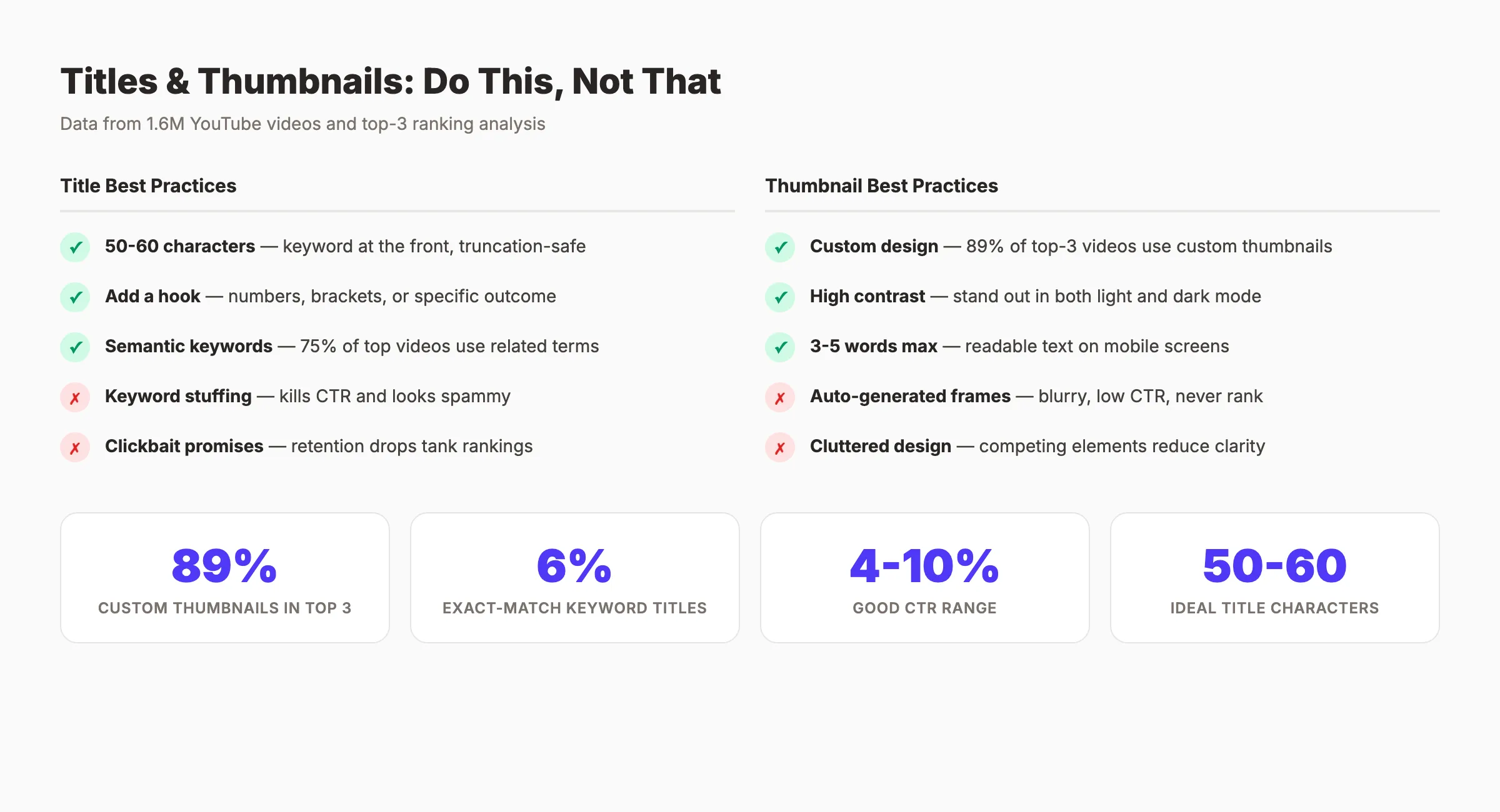
Title Optimization Rules
The Semrush YouTube SEO study found that title similarity with the search keyword is the #1 ranking parameter. That does not mean keyword stuffing. It means placing your primary keyword naturally at the front of the title.
Title guidelines:
- 50 to 60 characters. Titles get truncated beyond this on mobile
- Keyword at the front , “YouTube SEO: How to Rank Videos” not “How to Rank Videos with YouTube SEO Tips and Tricks”
- Add a hook. Numbers, brackets, or a specific outcome. “YouTube SEO: 9 Steps to Page 1” outperforms “YouTube SEO Guide”
- Avoid clickbait. If the video does not deliver what the title promises, retention drops and rankings fall
Title formulas that work:
- [Keyword]: [Number] [Steps/Tips/Ways] to [Outcome]
- [Keyword] for [Audience] ([Year])
- How to [Achieve Outcome] with [Keyword]
- [Keyword]: What Actually Works in [Year]
Thumbnail Best Practices
The same 1.6 million video study found that 89% of top-3 results use custom thumbnails. Default auto-generated thumbnails almost never rank.
Technical specs:
- Resolution: 1280 x 720 pixels minimum
- Aspect ratio: 16:9
- File size: Under 2 MB
- Format: JPG, GIF, or PNG
Design principles:
- One clear focal point. A face, a product, or a text overlay. Not all three competing for attention.
- High contrast colors. Stand out against YouTube’s white and dark mode backgrounds
- Readable text , 3 to 5 words maximum. Must be legible on a phone screen.
- Facial expressions. Thumbnails with expressive faces consistently outperform those without
- Brand consistency. Use a consistent color scheme and layout so returning viewers recognize your content
A/B test thumbnails using YouTube’s built-in thumbnail test feature. Change one element at a time: text, background color, or facial expression. Track CTR changes over 7 days.
Chapter 4: Writing Descriptions That Rank
YouTube descriptions are neglected by most creators. The average description among top-ranking videos is 222 words. Over 50% of #1 ranked videos have 50+ words in their descriptions. Many have 200 to 350 words.
Description Structure
The first 150 characters appear above the “Show more” fold. This is prime real estate. Your primary keyword and a compelling reason to watch must go here.
Recommended structure:
Line 1-2 (above the fold): Primary keyword + what the viewer will learn. This must hook the reader.
Lines 3-10 (expanded view): Detailed summary of the video content. Include primary and secondary keywords naturally. This is what YouTube and Google index.
Timestamps section: List every chapter with a timestamp. YouTube converts these into clickable chapters.
Links section: Your website, related videos, social profiles, and any tools or resources mentioned.
Lines 15+: Hashtags (3 maximum), standard disclaimers, and boilerplate channel description.
Description Template
[1-2 sentences with primary keyword describing what the video covers]

In this video, you will learn:
- [Takeaway 1]
- [Takeaway 2]
- [Takeaway 3]
- [Takeaway 4]

TIMESTAMPS
0:00 Introduction
1:23 [Chapter 2 Title]
4:56 [Chapter 3 Title]
...

RESOURCES MENTIONED
- [Tool/Resource Name]: [URL]
- [Tool/Resource Name]: [URL]

RELATED VIDEOS
- [Video Title]: [URL]
- [Video Title]: [URL]

CONNECT
Website: [URL]
LinkedIn: [URL]

#YouTubeSEO #VideoMarketing #[TopicHashtag]
Keywords in Descriptions
Place your primary keyword in the first 25 words. Weave secondary keywords throughout the body. Do not repeat the same keyword more than 3 times. YouTube penalizes keyword stuffing with reduced visibility.
Descriptions also influence how your video appears in Google search results. Google indexes YouTube descriptions and uses them to generate featured snippets. A well-written description serves double SEO duty.
If you want a deeper look at how content marketing drives results for small businesses, our guide covers the full strategy.
Your SEO team. $99 per month. 30 optimized articles, published automatically. Blog SEO, Local SEO, and Social on autopilot. Start for $1 →
Chapter 5: Tags, Captions, and Timestamps
Three metadata elements that most creators either skip or handle poorly: tags, captions, and timestamps. Each one contributes to how YouTube understands and ranks your content.
Tags: Still Relevant, But Not Critical
Tags used to be a primary ranking factor. In 2026, they are a secondary signal. YouTube uses them to understand context when the title and description are ambiguous.
Tag guidelines:
- Use 8 to 15 tags per video
- First tag should be your exact primary keyword
- Include 2 to 3 broad category tags and 5 to 10 specific long-tail variations
- Include common misspellings of your topic
- Do not use misleading tags. YouTube can de-rank or remove videos with deceptive metadata.
The SEJ study found that top-ranking videos average 13 tags. That is the sweet spot. More than 20 tags dilute the signal.
Captions and Transcripts
This is where most creators leave rankings on the table. 94% of top-3 YouTube videos include full transcripts. 93.7% feature closed captions.
Captions boost views by 13.48% in the first 2 weeks and 7.32% overall. The reason: YouTube reads caption files to understand video content. Auto-generated captions are roughly 80% accurate. Uploading a corrected SRT file gives YouTube a perfect transcript to index.
How to add captions:
- Upload your video to YouTube Studio
- Go to Subtitles in the left menu
- Click “Add Language” and select your language
- Choose “Upload file” and upload your SRT file
- Review the timing and fix any sync issues
If you do not have an SRT file, use YouTube’s auto-generated captions as a starting point. Download them, correct errors, and re-upload.
Multilingual captions expand your reach. Translating captions into 5+ languages opens your video to non-English audiences. YouTube serves your video in those language markets automatically.
Timestamps and Chapters
63% of top-ranking videos include timestamps. When you add timestamps in the description, YouTube converts them into clickable chapters that appear in the progress bar.
Timestamp format:
0:00 Introduction
1:15 What is YouTube SEO
3:42 Keyword Research Process
6:08 Optimizing Metadata
The first timestamp must be 0:00. Each chapter needs a minimum of 10 seconds. Include at least 3 chapters for the feature to activate.
Timestamps also power Google’s Key Moments feature, which shows specific video segments in Google search results. This means your video can appear multiple times on a single SERP, each linking to a different chapter.
Chapter 6: YouTube Shorts SEO
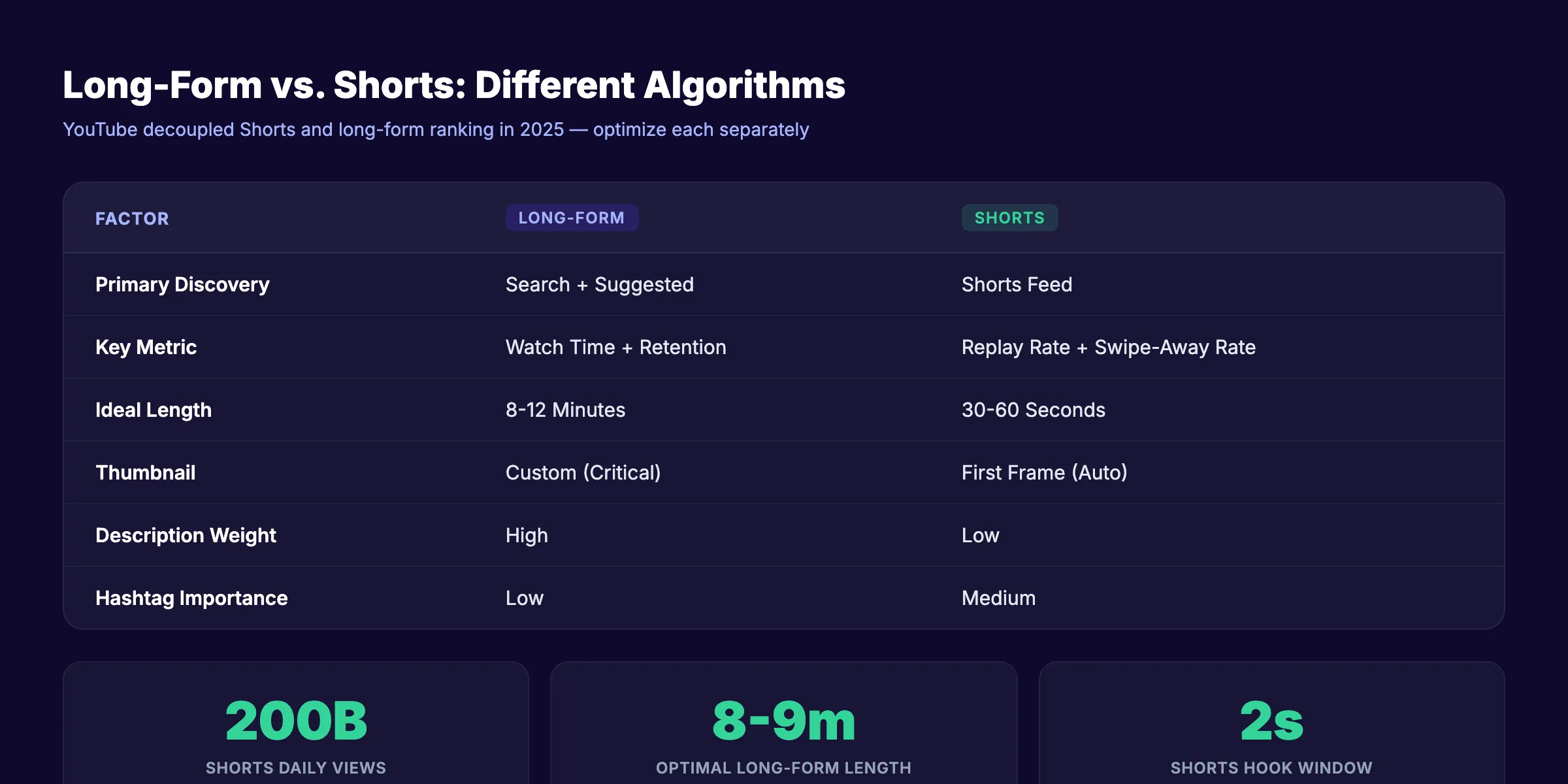
YouTube Shorts generated 200 billion daily views in June 2025, up from 70 billion the prior year. The Shorts algorithm is now fully decoupled from the long-form algorithm. That means optimizing Shorts requires its own strategy.
How the Shorts Algorithm Differs
Long-form videos rank primarily through search and suggested videos. Shorts rank primarily through the Shorts feed, which works like a recommendation engine similar to TikTok’s For You page.
| Factor | Long-Form | Shorts |
|---|---|---|
| Primary discovery | Search + Suggested | Shorts feed |
| Key metric | Watch time + Retention | Replay rate + Swipe-away rate |
| Ideal length | 8-12 minutes | 30-60 seconds |
| Thumbnail | Custom (critical) | First frame (auto-selected) |
| Description weight | High | Low |
| Hashtag importance | Low | Medium |
Shorts Optimization Checklist
- Hook in the first 2 seconds. The swipe-away rate in the first 3 seconds determines whether YouTube pushes your Short to more viewers.
- Vertical format only. 9:16 aspect ratio, 1080 x 1920 resolution.
- Loop potential. Shorts that loop cleanly get replayed, and replay rate is a primary ranking signal.
- Text overlays. Many viewers watch without sound. On-screen text ensures your message lands.
- Trending audio. Using popular sounds increases discoverability through audio search.
- 3 hashtags maximum. Include
#Shortsplus 2 topic-relevant hashtags. - Post at peak hours. Check YouTube Analytics for when your audience is active.
Using Shorts to Boost Long-Form SEO
The smartest creators use Shorts as a promotional tool. Take a compelling 30-second clip from a long-form video. Post it as a Short with a pinned comment linking to the full video. This drives traffic from the Shorts feed to your long-form content, boosting its watch time and ranking signals.
This strategy works because Shorts reach different audiences than search. Your long-form video might rank for 500 keyword searches per day. A Short can reach 50,000 or 500,000 viewers in the Shorts feed who never would have searched for your topic.
Chapter 7: Playlist and Channel Optimization
Individual video optimization gets you rankings. Channel-level optimization keeps you there. YouTube rewards channels that demonstrate topical authority, consistent publishing, and organized content libraries.
Playlist SEO
Playlists are an underused ranking tool. A playlist can rank independently in YouTube search, giving you an extra slot on the results page. They also increase session duration because videos auto-play sequentially.
Playlist optimization rules:
- Keyword-rich titles , “YouTube SEO Tutorial for Beginners” not “My SEO Videos”
- Descriptive descriptions , 100 to 200 words with relevant keywords
- Logical ordering. Put your best-performing video first. It sets the hook.
- 10 to 20 videos per playlist. Enough depth to signal authority. Not so many that the topic becomes diluted.
- Cross-link playlists. Mention playlists in video descriptions and end screens
Channel-Level SEO
The 1.6 million video study found that the median channel age for top-3 results is 111 months, and the median subscriber count is 520,000. Channel authority matters. Here is how to build it.
Channel name and handle: Include your primary topic or niche if possible. A channel named “SEO with [Name]” ranks better for SEO queries than “[Name] Productions.”
Channel description: 300 to 500 words. Front-load with your primary keyword. Explain what your channel covers, who it is for, and what viewers will learn. Include a publishing schedule.
Channel keywords: YouTube allows you to set channel-level keywords in Settings > Channel > Basic Info. Use 5 to 10 keywords that describe your channel’s overall topic.
Consistent publishing: The algorithm favors channels that upload on a predictable schedule. 1 to 2 videos per week is the standard for growing channels. The key is consistency over volume.
Content format diversity: YouTube rewards channels that produce multiple content types. Long-form videos, Shorts, live streams, and community posts all send different signals. Channels with at least 3 format types demonstrate deeper engagement.
Community Posts as Ranking Signals
Community posts (polls, images, text updates) do not rank in search. But they do increase subscriber engagement, which feeds back into how YouTube ranks your videos. A highly engaged subscriber base that clicks, comments, and watches immediately after upload sends strong signals.
Post 2 to 3 community updates per week between video uploads. Use polls to crowdsource future video topics. Share behind-the-scenes content. These keep your channel active in subscribers’ Browse feeds.
3,500+ blogs published. 92% average SEO score. See what Stacc can do for your site. Start for $1 →
Chapter 8: YouTube SEO for Google and AI Overviews
YouTube videos do not just rank on YouTube. They appear in Google search results, Google Images, Google Discover, and increasingly in AI Overviews. Optimizing for this cross-platform visibility doubles your search footprint.
YouTube Videos in Google Search
Google gives YouTube videos preferential treatment in search results. Video carousels, featured snippets with video, and dedicated video tabs all pull from YouTube. A video ranking on page 1 of YouTube can simultaneously appear on page 1 of Google.
How to maximize Google visibility:
- Embed videos on your website. Google indexes both the YouTube page and the page where the video is embedded. This creates two ranking opportunities for the same content.
- Add VideoObject schema markup to the embedding page. This tells Google the video’s title, description, thumbnail URL, upload date, and duration. Google’s video SEO documentation explains the required structured data fields.
- Optimize the page around the video. Write 500+ words of supporting text content on the page. Include a transcript. This gives Google more context to rank the page.
- Use timestamps. Google’s Key Moments feature pulls timestamps from YouTube descriptions and displays individual chapters as separate search results.
AI Overviews and YouTube
This is the biggest shift in YouTube SEO for 2026. Research from Search Engine Land found that up to 29.5% of Google AI Overviews cite YouTube videos. That is a 200x advantage over Vimeo, which appears in only 0.1% of AI Overviews.
YouTube videos appear in AI Overviews because:
- Google owns YouTube and trusts its content signals
- Video transcripts provide structured, citable information
- Timestamps create discrete, quotable segments
- High engagement metrics serve as quality signals
How to optimize for AI Overview citations:
- Clear, structured transcripts. AI systems parse transcripts for quotable statements. Speak in clear, direct sentences.
- Answer specific questions within the video. Structure your content around “What is…”, “How to…”, and “Why does…” formats.
- Use timestamps to segment answers. Each chapter should answer one distinct question. This makes it easy for AI systems to cite a specific segment.
- Repeat key definitions clearly. When defining a term, state it plainly: “YouTube SEO is the process of optimizing videos to rank higher in YouTube and Google search results.” That exact phrasing is what AI models quote.
If you want to understand how AI search is changing SEO strategy, our article on SEO trends for 2026 covers the broader picture.
For businesses tracking search performance across platforms, our SEO reporting guide covers the metrics that matter.
Chapter 9: Measuring and Improving YouTube SEO
Publishing an optimized video is the starting point. The real gains come from analyzing performance data and iterating.
YouTube Analytics Dashboard
YouTube Studio provides four critical reports for SEO:
Reach. Shows impressions, CTR, traffic sources, and top search terms. This tells you which keywords drive views and whether your thumbnails convert.
Engagement. Shows watch time, average view duration, and retention curves. The retention curve is the single most important chart. It shows exactly where viewers drop off.
Audience. Shows returning vs. new viewers, subscriber growth, and when your audience is online. Use this to schedule uploads at peak times.
Revenue (if monetized). Shows which videos generate the most ad revenue. High-revenue videos often correlate with high watch time and commercial-intent keywords.
The Metrics That Matter Most
| Metric | Good Benchmark | Why It Matters |
|---|---|---|
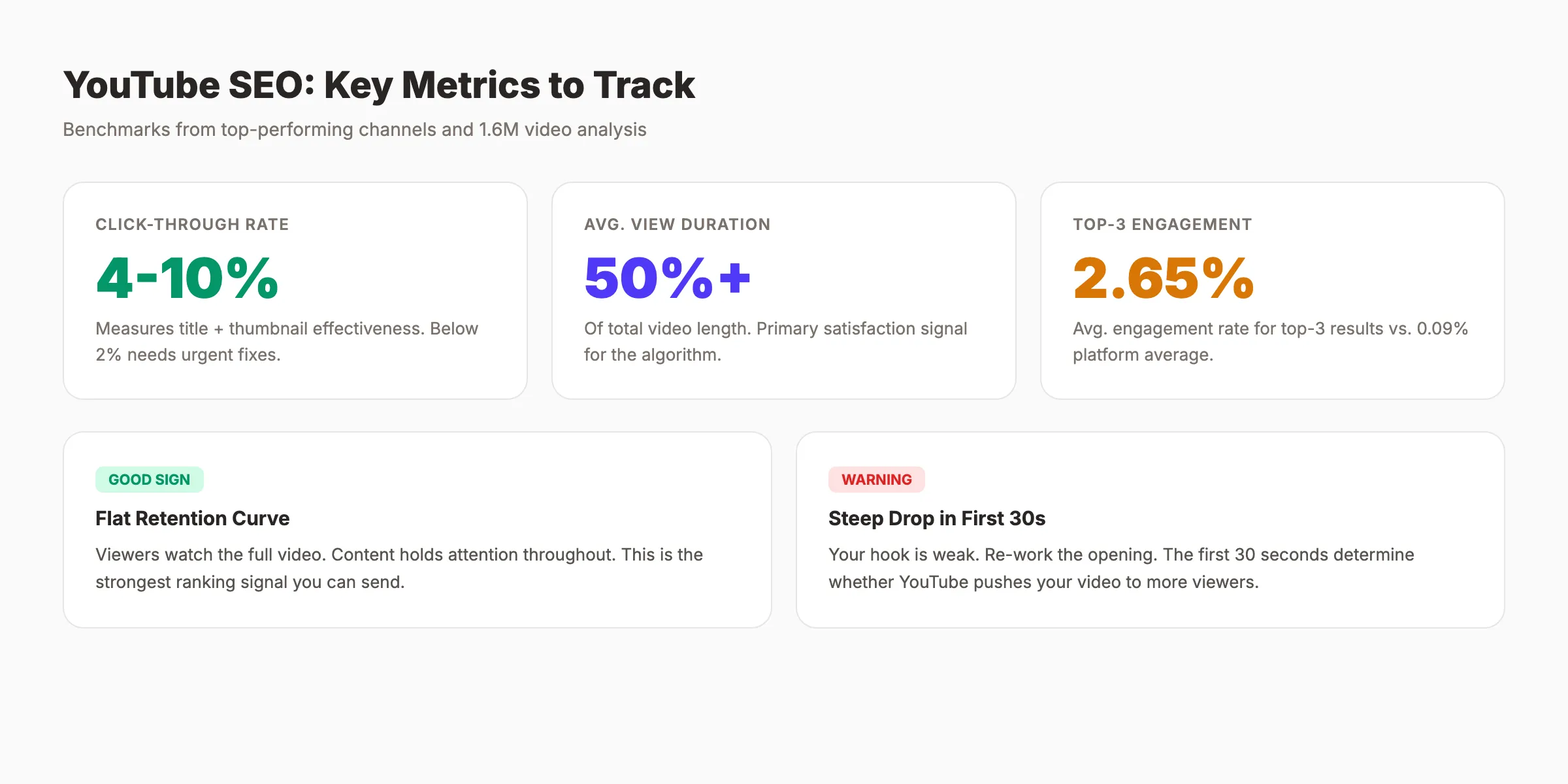
| Click-through rate | 4-10% | Measures title + thumbnail effectiveness |
| Average view duration | 50%+ of video length | Primary satisfaction signal |
| Audience retention | Flat curve (no steep drops) | Shows content holds attention |
| Impressions | Growing month-over-month | Signals YouTube is recommending you |
| Subscriber conversion | 1-3% of viewers | Measures long-term value |
How to Read Retention Curves
The retention curve tells a story. Here is how to read it:
- Steep drop in first 30 seconds. Your hook is weak. Re-work your opening.
- Gradual decline. Normal. Most videos lose viewers over time.
- Spike in the middle. Viewers are replaying a specific section. Double down on that content type.
- Sharp drop at a specific point. Something lost their attention. Check what you said or showed at that timestamp.
- Flat line. Ideal. Viewers are watching the full video.
The Optimization Loop
After publishing, follow this cycle every 30 days:
- Check search terms in the Reach report. Are viewers finding you for your target keyword?
- Review CTR for each video. Below 4%? Test a new thumbnail.
- Analyze retention curves for your top 10 videos. Identify patterns in where viewers drop off.
- Compare new videos to older ones. Is your average view duration increasing or decreasing?
- Update old descriptions. Add new timestamps, update links, and refresh keywords based on what your analytics show people actually search for.
This is where SEO competitor analysis principles apply. Study what your top-performing competitors do differently. Check their posting frequency, title patterns, thumbnail styles, and description formats. Identify gaps you can fill.
Common YouTube SEO Mistakes
Before you start optimizing, know what to avoid. These are the errors that waste the most time and hurt rankings.
Publishing without keyword research. Every video should target a specific search query. “I felt like making a video about this” is not a strategy.
Relying on auto-generated captions. They are roughly 80% accurate. That 20% error rate means YouTube misunderstands your content. Upload corrected SRT files.
Ignoring thumbnails. Auto-generated thumbnails are a blurry frame from your video. Custom thumbnails with clear text and high contrast get 2 to 3 times more clicks.
Writing one-line descriptions. The average top-ranking description is 222 words. A description that says “Check out my new video!” wastes a ranking opportunity.
Keyword stuffing titles. “YouTube SEO YouTube Ranking YouTube Tips YouTube Guide 2026” kills CTR and looks spammy. Use the keyword once, naturally.
Ignoring Shorts. With 200 billion daily views, Shorts reach audiences that long-form content cannot. Treat Shorts as a separate content strategy with its own optimization rules.
Never checking Analytics. Publishing without reviewing performance data is like driving with your eyes closed. The data tells you exactly what to fix.
For a broader checklist of common technical SEO mistakes to avoid, our guide covers the full picture.
YouTube SEO Tools
You do not need expensive software. But the right tools save hours of manual research.
| Tool | Best For | Price |
|---|---|---|
| YouTube Studio | Analytics, Research tab, A/B thumbnails | Free |
| vidIQ | Keyword scores, competitor tags, trend alerts | Free + paid plans |
| TubeBuddy | Bulk processing, SEO checklists, A/B testing | Free + paid plans |
| Google Trends | Trending topics, seasonal patterns, YouTube filter | Free |
| Semrush | Cross-platform keyword research, competitor analysis | Paid |
| Ahrefs | YouTube keyword explorer, backlink analysis | Paid |
| Canva | Custom thumbnail design | Free + paid |
| Descript | Transcript editing, caption generation | Free + paid |
If you are evaluating tools for your broader SEO strategy, our guide on how to choose an SEO tool breaks down what to look for.
Rank everywhere. Do nothing. Blog SEO, Local SEO, and Social on autopilot. Stacc starts at $99/mo with a $1 SEO trial. Start for $1 →
FAQ
Does YouTube SEO actually work?
Yes. 35% of all YouTube traffic comes from search queries. Videos optimized with the right keywords, descriptions, and captions consistently outrank unoptimized ones. The data from 1.6 million videos confirms that metadata, transcripts, and engagement signals directly correlate with higher rankings.
How long does it take for YouTube SEO to work?
Most videos see initial ranking movement within 2 to 4 weeks. The median age of a top-3 YouTube video is 29 months. Older videos accumulate watch time and engagement over time. Treat YouTube SEO as a compounding strategy, not a quick fix.
Do YouTube tags still matter in 2026?
Tags are a secondary signal. They help YouTube understand your content when the title and description are ambiguous. Use 8 to 15 relevant tags, but focus your optimization energy on titles, descriptions, and captions first.
What is a good click-through rate on YouTube?
Most channels average 2 to 5% CTR. Top-performing videos reach 8 to 10%. Anything below 2% means your titles and thumbnails need work. Test new thumbnails before changing anything else.
Is YouTube SEO different from Google SEO?
The principles overlap but the ranking factors differ. Google ranks web pages based on backlinks, content quality, and technical signals. YouTube ranks videos based on watch time, CTR, engagement, and viewer satisfaction. The key difference: YouTube measures how viewers interact with your video in real time, not just how your page is structured.
How do I get my YouTube videos into Google AI Overviews?
Up to 29.5% of AI Overviews cite YouTube content. To increase your chances: upload accurate transcripts, use timestamps for discrete chapters, answer specific questions clearly within the video, and embed videos on pages with supporting text content and VideoObject schema markup.
YouTube SEO rewards patience and consistency. Every video you optimize compounds your channel authority. The algorithm favors creators who publish regularly, engage their audience, and refine their approach based on data.
Start with keyword research. Optimize your next video using the checklist in this guide. Check your analytics after 30 days. Then do it again. That is the entire system.

Written by
Siddharth GangalSiddharth is the founder of theStacc and Arka360, and a graduate of IIT Mandi. He spent years watching great businesses lose organic traffic to competitors who simply published more. So he built a system to fix that. He writes about SEO, content at scale, and the tactics that actually move rankings.
30 SEO blog articles published every month
Keyword-optimized, scheduled, and live on your site. Automatically.
30-day trial · Cancel anytime
theStacc
Stop writing SEO content manually
30 blog articles, 30 GBP posts, and social media content. Published every month. Automatically.
Start Your $1 Trial$1 for 3 days · Cancel anytime