
Google Business Profile Setup (2026): Complete Optimization Guide
Google Business Profile setup and optimization guide: categories, photos, reviews, posts, Q&A, and the 32% ranking factor that determines local pack position.
Your Google Business Profile is the single most important ranking factor for local search. It accounts for 32% of local pack ranking influence, according to the 2026 Whitespark Local Search Ranking Factors survey. 8 of the top 10 local ranking signals come directly from your profile.
Yet more than half of local businesses have not claimed or optimized their listing. That means free traffic, calls, and direction requests going to competitors who did the work.
This Google My Business guide (now officially called Google Business Profile) covers everything: setup, verification, optimization, ranking factors, reviews, posts, photos, and the 2026 changes that affect how your business appears in local search and AI Overviews.
We manage local SEO across 70+ industries. The optimization strategies in this guide come from real data across thousands of business profiles.
Here is what you will learn:
- How to set up and verify your Google Business Profile step by step
- The 8 optimization factors that directly influence local rankings
- How reviews, photos, and posts affect your visibility
- The 2026 ranking factor weights from Whitespark research
- Common mistakes that suppress your profile in search results
- How to measure and track your GBP performance
Chapter 1: What Is Google Business Profile?
Google Business Profile (GBP) is the free listing that appears when someone searches for your business on Google Search or Google Maps. It displays your business name, address, phone number, hours, reviews, photos, and other details.
Google renamed “Google My Business” to “Google Business Profile” in 2021. The platform, features, and management interface remain the same. Most people still search for “Google My Business,” which is why both terms appear in this guide.
Why GBP Matters for Local Businesses
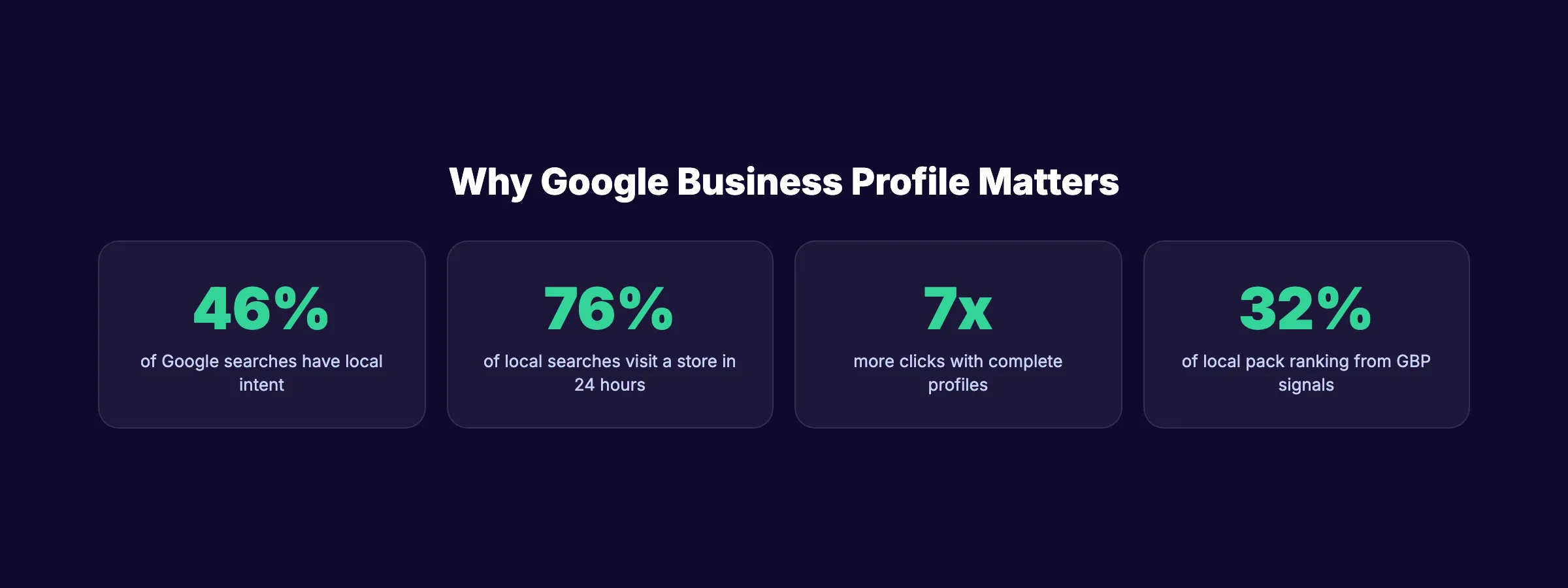
46% of all Google searches have local intent. That is nearly half of every search on the planet looking for something nearby. Google’s own data confirms this.
76% of local searches result in a store visit within 24 hours. People searching for local businesses are not browsing. They are ready to act. GBP puts your business in front of those high-intent searchers.
Profiles with complete information receive 7x more clicks than incomplete profiles. Customers are 2.7x more likely to trust a business with a complete GBP. These numbers come directly from Google.
For a deeper look at all local ranking signals, see our local SEO guide.
Chapter 2: How to Set Up Your Google Business Profile
Setting up a GBP takes 15-20 minutes. Verification takes 1-14 days depending on the method.
Step-by-Step Setup
Step 1: Go to Google Business Profile. Visit business.google.com and sign in with a Google account. Use a company email, not a personal Gmail. You can transfer ownership later, but starting with a business account avoids access problems.
Step 2: Search for your business. Google may already have a listing for your business based on public records. If it appears, claim it. If not, click “Add your business to Google.”
Step 3: Enter your business name. Use your real business name exactly as it appears on your signage, business cards, and legal documents. Do not add keywords to your name. “Joe’s Plumbing” is correct. “Joe’s Plumbing - Best Plumber in Denver CO” violates Google’s guidelines and risks suspension.
Step 4: Select your business category. Choose your primary category carefully. The primary category is the single strongest individual ranking factor for local search. Pick the most specific option available. “Personal Injury Attorney” outperforms “Attorney” or “Law Firm.”
Step 5: Add your location. Storefront businesses enter their street address. Service-area businesses (plumbers, electricians, cleaners) select the areas they serve without displaying an address.
Step 6: Add contact information. Enter your phone number and website URL. Use a local phone number, not a toll-free number. Local numbers signal geographic relevance.
Step 7: Verify your business. Google offers several verification methods:
| Method | Timeline | Availability |
|---|---|---|
| Video verification | 1-3 days | Most common for new businesses |
| Phone call or text | Instant to 1 day | Available for some businesses |
| Email verification | 1-3 days | Available for some businesses |
| Postcard | 5-14 days | Fallback option |
Video verification requires you to record a short video showing your business location, signage, and address. It has become the default method for most new profiles in 2026.
Rank everywhere. Do nothing. Stacc handles Local SEO with 30 GBP posts per month for $49. Blog SEO starts at $99. Start for $1 →
Chapter 3: The 8 Optimization Factors That Drive Rankings
Google ranks local businesses based on 3 core signals: relevance, distance, and prominence. Here is how to optimize each one.
1. Primary Business Category
Your primary category tells Google what your business does. It is the strongest single ranking signal in local search.
Choose the most specific category available. Google offers over 4,000 categories. “Thai Restaurant” ranks better for Thai food searches than “Restaurant.” “Emergency Plumber” ranks better than “Plumber” for urgent queries.
Add secondary categories for additional services. A dentist might use “Dentist” as primary with “Cosmetic Dentist,” “Pediatric Dentist,” and “Emergency Dental Service” as secondary categories.
2. Business Name and NAP Consistency
Your business name, address, and phone number (NAP) must match exactly across your GBP, website, and all online directories. Inconsistencies confuse Google and reduce ranking confidence.
Check your NAP consistency across the top 50 citation sources. Fix any discrepancies before optimizing other factors.
3. Complete Profile Information
Fill out every field Google offers. Complete profiles receive 7x more clicks. That includes:
- Business description (750 characters, include your city and services)
- Business hours (including special hours for holidays)
- Service list with descriptions
- Products with photos and prices
- Attributes (wheelchair accessible, free Wi-Fi, etc.)
- Appointment/booking links
- Menu link (for restaurants)
4. Reviews: Quantity, Quality, Recency, and Responses
Review signals account for 16% of local pack rankings. The Google reviews guide covers the full strategy, but here are the key numbers:
- Businesses in the top 3 local results average 250+ reviews
- 97% of consumers read reviews when browsing locally
- 68% of consumers only use businesses with 4+ stars
- Responding to 32% of reviews increases conversion rates by 80%
Review recency matters more than total count. A steady flow of 4-5 reviews per week outperforms a burst of 50 reviews followed by months of silence.
5. Google Business Profile Photos
Photos directly affect engagement and rankings.
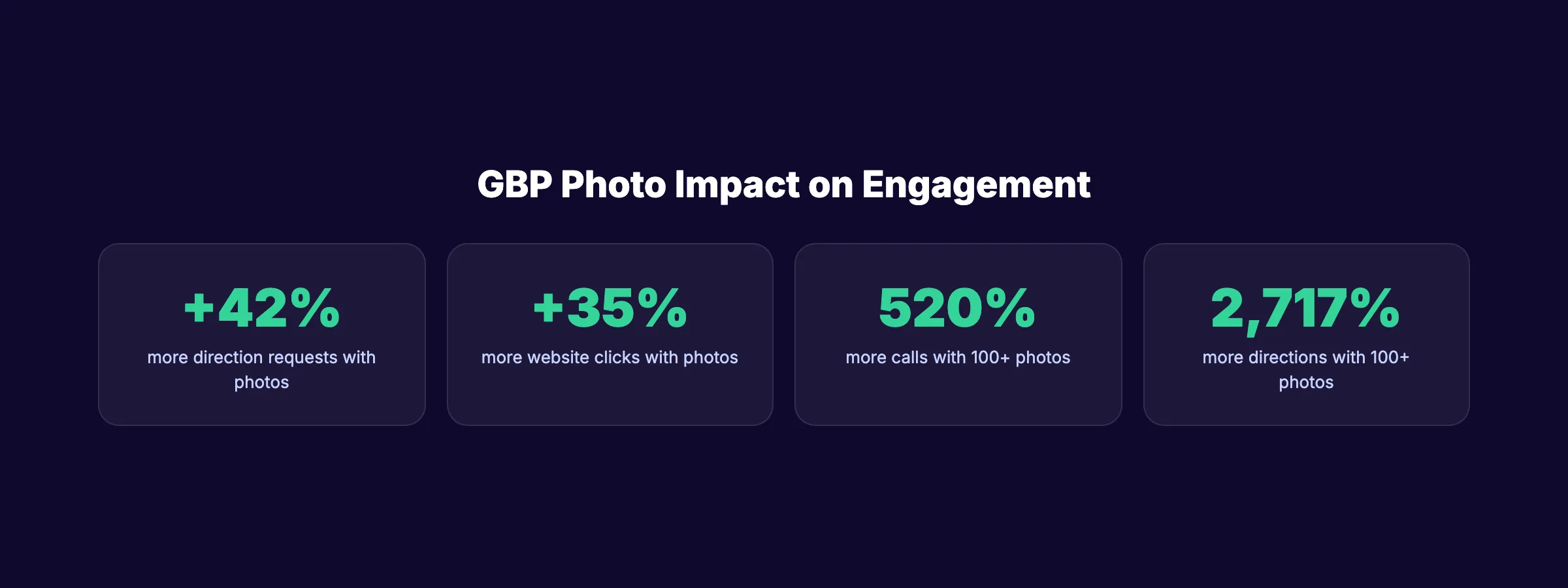
| Metric | Impact of Photos |
|---|---|
| Direction requests | 42% more with photos |
| Website clicks | 35% more with photos |
| Calls (100+ photos) | 520% more than average |
| Direction requests (100+ photos) | 2,717% more than average |
| Profile views | 30-50% more with photos |
Top-ranking businesses maintain 250+ profile images. The average business has only 26 photos.
Upload photos of your storefront, interior, team, products, and completed work. Use original photos, not stock images. Add new photos weekly. Google rewards profiles with fresh visual content.
For detailed optimization, see our GBP photos guide.
6. Google Business Profile Posts
GBP posts appear on your profile in Google Search and Maps. Only 40% of businesses use this feature. That is an advantage for those who do.
Businesses posting weekly see 28% higher visibility than inactive profiles. Posts focusing on events or special offers perform 2x better than general updates.
Post types include:
- Updates: News, announcements, tips
- Offers: Discounts, promotions with expiration dates
- Events: Upcoming events with dates and details
Each post should include an image, 150-300 words of text, and a call-to-action button. Our Google Posts guide covers the content strategy in detail.
7. Services and Products
Add every service you offer with descriptions and pricing. Google uses service data to match your business with relevant searches.
Be specific. “Residential AC Repair” is better than “HVAC Services.” “Family Portrait Photography” is better than “Photography.” The GBP services guide walks through best practices for service descriptions.
8. Website and On-Page Signals
Your website and GBP work as a unified entity. A strong GBP cannot compensate for a weak website. On-page signals account for 19% of local pack rankings.
Ensure your website includes:
- Your city and service keywords in title tags and H1s
- A dedicated page for each service area
- Structured data markup (local business schema)
- Mobile-responsive design
- Fast load times (under 3 seconds)
Your SEO team. $99 per month. 30 optimized articles, published automatically. Local SEO add-on for $49/mo. Start for $1 →
Chapter 4: Google Reviews Strategy
Reviews are the third-largest ranking factor. They also drive conversion directly.
The Numbers That Matter
BrightLocal’s 2026 Local Consumer Review Survey reveals how consumer review behavior has shifted:
- 41% of consumers “always” read reviews when searching locally (up from 29% in 2025)
- 68% require 4+ stars before considering a business (up from 55% in 2025)
- 31% now require 4.5+ stars (up from 17% in 2025)
- 62% avoid businesses with incorrect online information
The bar is rising every year. A 4.0-star rating that was acceptable in 2024 now filters your business out for 31% of potential customers.
How to Get More Reviews
The best review generation strategy is simple: ask every satisfied customer.
- Ask in person at the point of service
- Send a follow-up text or email within 24 hours
- Use a direct review link (found in your GBP dashboard under “Ask for reviews”)
- Use a review QR code in your physical location
Do not offer incentives for reviews. Google prohibits this and will remove incentivized reviews.
How to Respond to Reviews
Respond to every review. Positive and negative. Businesses that respond to reviews see higher conversion rates and send positive signals to Google.
For positive reviews: thank the customer by name and mention the specific service. For negative reviews: respond professionally, acknowledge the concern, and offer to resolve it offline. Our guide on responding to negative Google reviews includes templates and frameworks.
Use the review response generator for quick, professional responses.
Chapter 5: Local Search Ranking Factors (2026 Data)
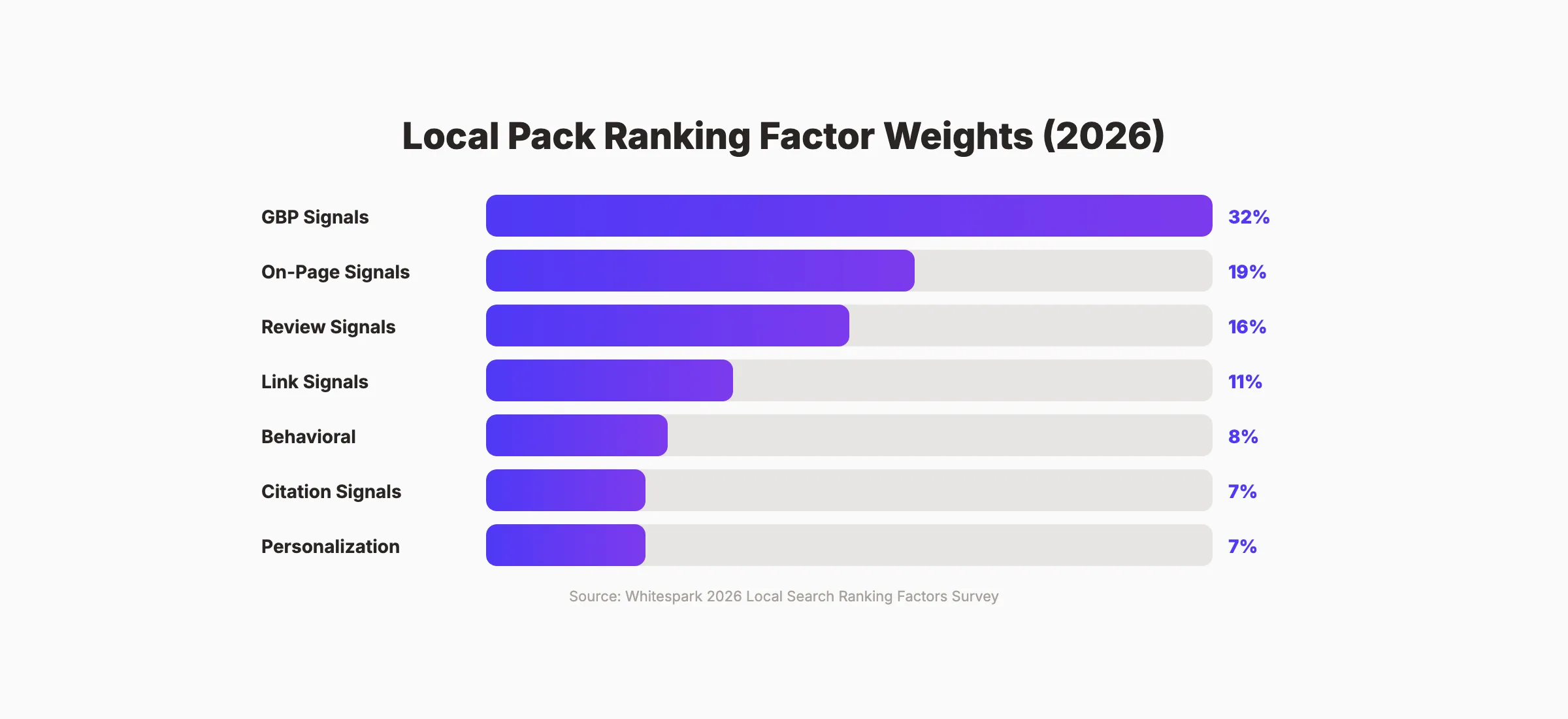
The Whitespark Local Search Ranking Factors survey is the most authoritative annual study on what drives local rankings. Here are the 2026 weights.
| Factor Category | Local Pack Weight | Localized Organic Weight |
|---|---|---|
| GBP Signals | 32% | 9% |
| On-Page Signals | 19% | 36% |
| Review Signals | 16% | 6% |
| Link Signals | 11% | 26% |
| Behavioral Signals | 8% | 7% |
| Citation Signals | 7% | 6% |
| Personalization | 7% | 10% |
What Changed in 2026
GBP signals gained 15% more influence compared to 2023. Google now weights profile completeness, category accuracy, and behavioral engagement (clicks, calls, directions) more heavily.
Behavioral signals are the fastest-growing factor. How users interact with your listing directly affects rankings. More clicks, calls, and direction requests signal to Google that your business is relevant and trustworthy.
AI Overviews now pull from GBP data. Google’s AI summaries use your business description, reviews, and Q&A responses to generate answers about your business. Optimizing these fields affects not just local pack placement but AI-generated recommendations.
45% of consumers now use ChatGPT or similar AI tools for local business recommendations. Your GBP data feeds these systems through Google’s API. A complete, accurate profile ensures AI tools recommend your business correctly.
For the full breakdown of local ranking signals, see our local SEO ranking factors guide.
Chapter 6: Common Google Business Profile Mistakes
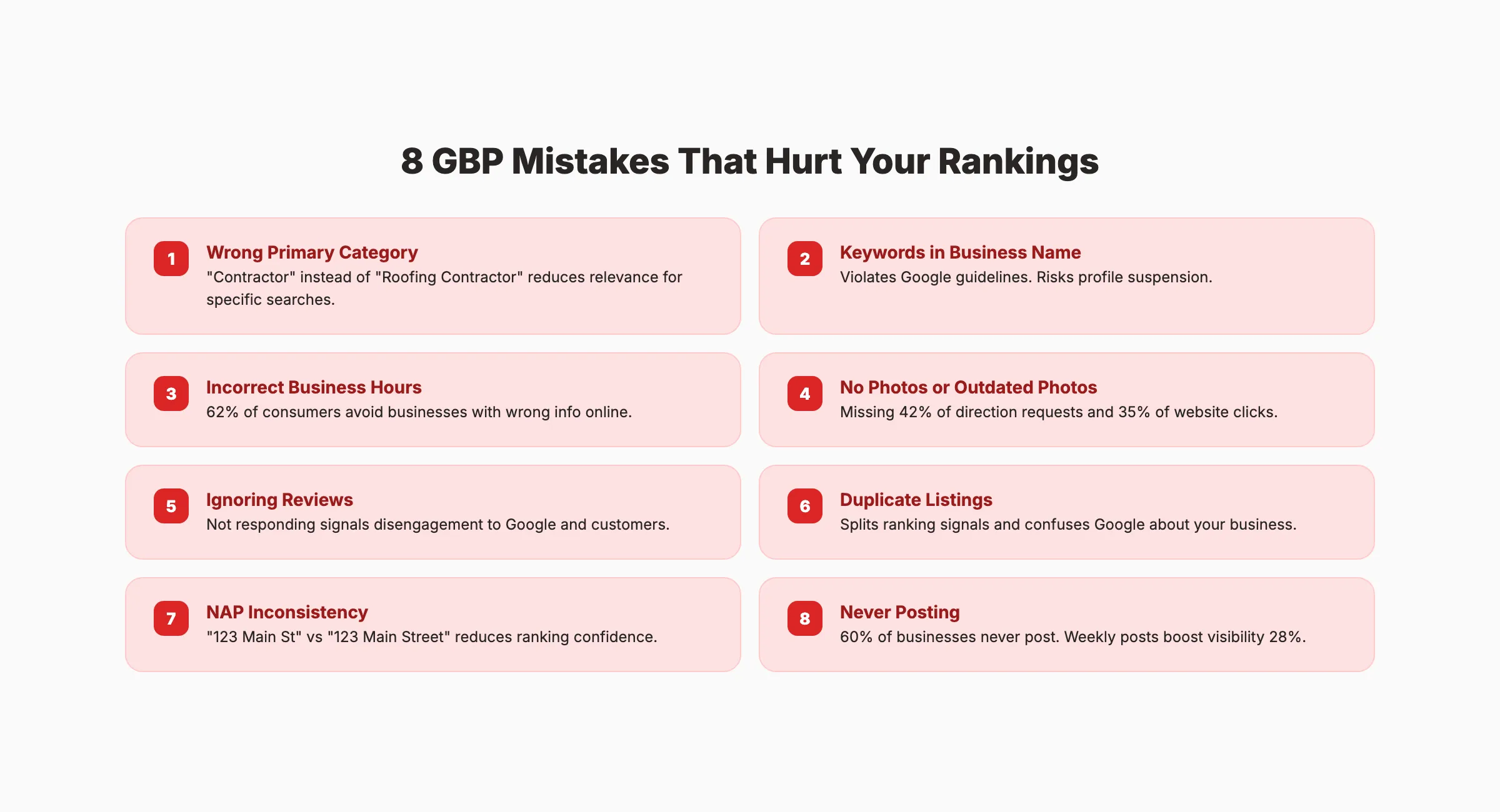
These mistakes actively hurt your rankings. Fixing them is often the fastest way to improve visibility.
Mistake 1: Wrong Primary Category
Choosing a broad category like “Contractor” instead of “Roofing Contractor” reduces relevance for specific searches. Your primary category must match your core service exactly.
Mistake 2: Keywords in Business Name
Adding keywords to your business name (“Best Dentist Denver - Smith Dental”) violates Google’s naming guidelines. It risks profile suspension. Use your legal business name only.
Mistake 3: Ignoring Business Hours
Incorrect hours frustrate customers and damage trust. 62% of consumers avoid businesses with inaccurate online information. Update regular hours, holiday hours, and temporary changes immediately.
Mistake 4: No Photos or Outdated Photos
Profiles without photos miss 42% of direction requests and 35% of website clicks. Upload 5+ new photos monthly. Delete blurry, outdated, or irrelevant images.
Mistake 5: Not Responding to Reviews
Ignoring reviews signals disengagement. Respond to every review within 48 hours. Even a brief “Thank you” on positive reviews makes a measurable difference.
Mistake 6: Duplicate Listings
Multiple listings for the same location split ranking signals and confuse Google. Search for your business on Google Maps and merge or remove any duplicates.
Mistake 7: NAP Inconsistency
If your address appears as “123 Main St” on your website and “123 Main Street” on GBP, Google treats these as potentially different businesses. Standardize your NAP format everywhere.
Mistake 8: Never Posting
60% of businesses never post on GBP. Weekly posts increase visibility by 28%. Post at least once per week with an image and a clear call to action.
For a full audit process, see our local SEO audit guide.
3,500+ blogs published. 92% average SEO score. Stacc handles Blog SEO and Local SEO so you do not have to. Start for $1 →
Chapter 7: Measuring Google Business Profile Performance
GBP provides built-in analytics. Track these metrics monthly to measure optimization impact.
5 Metrics That Matter
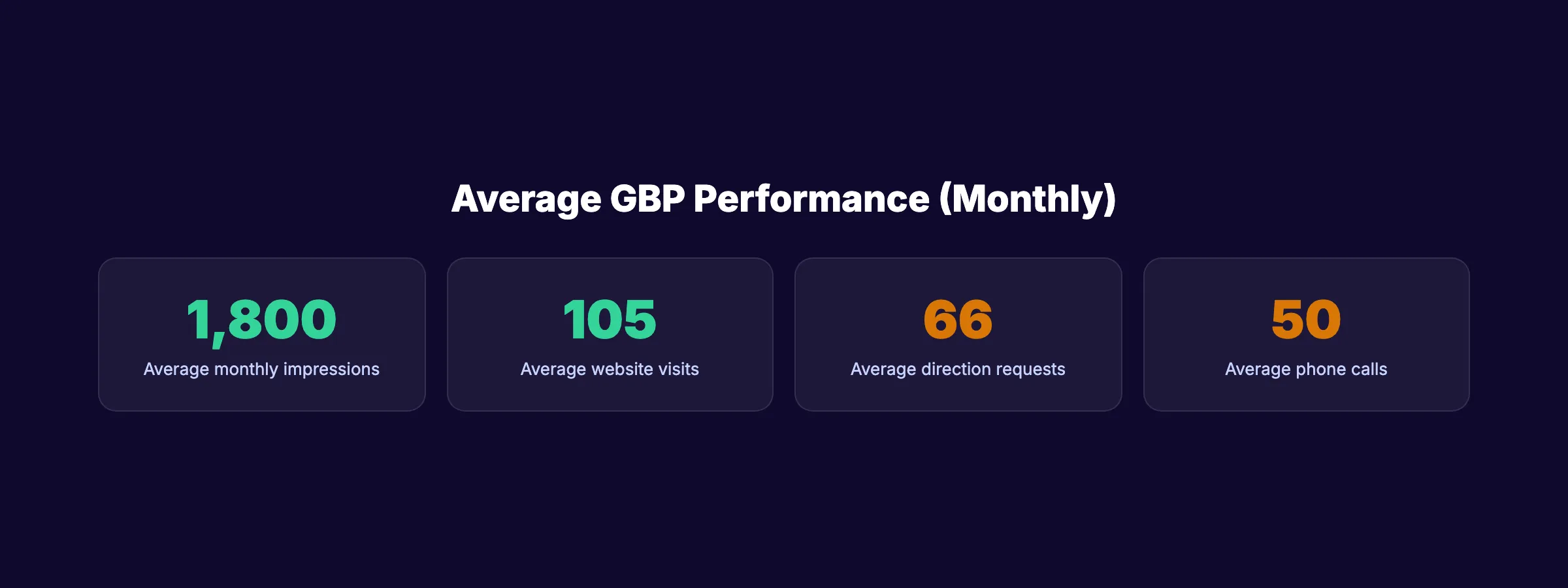
1. Search Impressions. How often your profile appears in search results and Maps. The average GBP earns ~1,800 monthly impressions. Track trends, not absolute numbers.
2. Website Clicks. The average profile drives 105 monthly website visits. A completed, optimized profile should exceed this benchmark.
3. Direction Requests. 66 monthly direction requests is the average. Businesses with 100+ photos see 2,717% more direction requests.
4. Phone Calls. 90% of weekday business calls from GBP profiles come during business hours. Track call volume weekly. If calls drop, check for profile issues.
5. Review Velocity. Track new reviews per week. A steady cadence of 4-5 reviews per week is more valuable than sporadic bursts.
Connecting GBP to Revenue
Use UTM parameters on your GBP website link to track traffic in Google Analytics. Create a dedicated landing page for GBP visitors to isolate conversion data.
For businesses that want GBP management handled automatically, marketing automation for local business covers the full workflow including automated posting, review monitoring, and performance tracking.
Chapter 8: Service-Area Businesses vs Storefronts
GBP optimization differs based on your business type.
Storefront Businesses
Storefront businesses (restaurants, retail shops, dental offices) display their physical address. Optimization focuses on:
- Accurate address and map pin placement
- Interior and exterior photos
- Walk-in hours
- Parking information
- Accessibility attributes
Service-Area Businesses (SABs)
Service-area businesses (plumbers, electricians, house cleaners) serve customers at their locations. SABs hide their address and define service areas instead.
Key differences for SABs:
- Define service areas by city, county, or zip code (up to 20 areas)
- Do not display a physical address
- Create service area pages on your website for each market
- Use the service area to influence which searches trigger your listing
SABs face additional ranking challenges because Google cannot pin them to a specific location. Building strong reviews, citations, and on-page content for each service area compensates for the missing address signal.
Skip the agency. Keep the results. Stacc starts at $49/mo for Local SEO with a $1 trial. Start for $1 →
Google Business Profile Optimization Checklist (2026)
Use this checklist to audit your profile. Work through each group in order — setup basics first, then content, then engagement.
Setup Basics
- Claim and verify your listing through Google Business Profile Manager
- Add a specific primary category (e.g. “Emergency Plumber” not “Plumber”)
- Add 2–4 relevant secondary categories
- Complete your business description (750 characters, include your city and core services)
- Confirm NAP (name, address, phone) matches your website exactly
- Add your website URL and appointment booking link
- Set business hours including holiday hours
Photos and Media
- Upload a cover photo (1080 x 608 px minimum, no text overlays)
- Upload your business logo
- Add exterior photos showing your storefront or service vehicles
- Add interior photos for location-based businesses
- Add photos of your work, products, or team
- Schedule quarterly photo updates to keep the profile visually fresh
Posts and Updates
- Post 2–3 times per week using Update, Offer, or Event post types
- Include an image with every post
- Include a CTA button on every post (Book, Call, Learn More, etc.)
- Use Offer posts for promotions with a clear expiration date
- Use Event posts for anything with a specific date and time
Reviews
- Set up a review request process (ask every satisfied customer)
- Respond to every review within 48 hours — positive and negative
- Set up review request automation or text follow-up for new customers
- Never incentivize reviews (Google removes them and may suspend the profile)
Q&A
- Seed your own Q&A section with 5–10 common customer questions
- Answer every existing question on the profile
- Monitor Q&A weekly — anyone can answer, and incorrect answers need correction
Services and Products
- Fill in every service you offer with a description and price range
- Add products with photos and prices where applicable
- Keep service descriptions specific (“Residential Roof Replacement” not “Roofing”)
Attributes
- Add all applicable accessibility attributes (wheelchair access, accessible parking, etc.)
- Add payment method attributes
- Add any relevant health, safety, or amenity attributes your category supports
Best Tools for Managing Google Business Profile
Most businesses manage their GBP through one of these tools. The right choice depends on your volume and whether you need agency-level reporting or simple automation.
thestacc handles automated GBP posting, review monitoring, and rank tracking as part of its Local SEO module. You get 30 optimized posts per month published directly to your profile without logging in or writing copy. It is built for businesses that want their local presence managed without a dedicated team. Plans start at $49/mo.
Google Business Profile directly (free) is sufficient for businesses with a single location and the time to manage it manually. The native dashboard gives you access to all posting, review response, Q&A, and analytics features at no cost. The limitation is that everything is manual and notifications require you to check the dashboard or enable email alerts.
BrightLocal ($29–$79/mo) is designed for agencies and multi-location businesses. It centralizes GBP management, citation building, rank tracking, and reporting across multiple clients and locations in one platform. The white-label reporting makes it the standard tool for local SEO agencies.
Whitespark specializes in citation management and local rank tracking. It is particularly useful for identifying citation gaps across directories and fixing NAP inconsistencies that suppress local rankings. Its citation finder identifies the top citation sources in any niche or geography.
Semrush Local (part of Semrush plans) covers listing management, review monitoring, and local rank tracking within Semrush’s broader SEO platform. It is best suited for enterprises already using Semrush for organic and paid search, where consolidating tools in one dashboard has operational value.
FAQ
Is Google My Business the same as Google Business Profile?
Yes. Google rebranded “Google My Business” as “Google Business Profile” in 2021. The underlying platform, features, and management interface remained the same. Most people still search for “Google My Business,” which is why both terms appear in this guide, but the official name is now Google Business Profile.
How do I optimize my Google Business Profile for local SEO?
Start with your primary category — it is the single strongest ranking signal. Then complete every profile field, upload 25+ photos, respond to every review within 48 hours, and post 2–3 times per week. Ensure your business name, address, and phone number match your website exactly. These steps address the top ranking signals that account for the largest share of local pack placement.
How often should I post on Google Business Profile?
Post 2–3 times per week. Businesses posting weekly see measurably higher visibility in Maps results compared to inactive profiles. Use a mix of Update, Offer, and Event post types. Each post should include an image and a call-to-action. Offer and Event posts consistently drive higher engagement than plain Update posts.
Do Google Business Profile reviews affect rankings?
Yes. Review signals account for approximately 16% of local pack ranking influence according to Whitespark’s annual ranking factors survey. The signals Google measures include total review count, average star rating, review recency, and whether the business responds to reviews. A steady flow of new reviews matters more than a large historical count with recent inactivity.
What is the most important part of a Google Business Profile?
Your primary category is the most impactful single field. It is the strongest individual ranking signal for local search. Choose the most specific category available — “Thai Restaurant” outperforms “Restaurant,” and “Personal Injury Attorney” outperforms “Attorney.” After category, NAP consistency, review velocity, and posting cadence drive the most ranking influence.
Google Business Profile is the highest-ROI local marketing channel available. It is free. It drives calls, visits, and revenue. And most of your competitors have not optimized theirs. Complete the checklist in this guide, maintain a weekly posting cadence, and build a steady flow of reviews. The businesses that treat GBP as a core marketing channel will dominate local search in 2026 and beyond.

Written by
Siddharth GangalSiddharth is the founder of theStacc and Arka360, and a graduate of IIT Mandi. He spent years watching great businesses lose organic traffic to competitors who simply published more. So he built a system to fix that. He writes about SEO, content at scale, and the tactics that actually move rankings.
Automate your Google Business Profile content
30 GBP posts, local SEO articles, and review responses. Published every month automatically.
30-day trial · Cancel anytime
theStacc
Stop writing SEO content manually
30 blog articles, 30 GBP posts, and social media content. Published every month. Automatically.
Try for free$1 for 3 days · Cancel anytime