
Service Area Pages SEO (2026): Strategies, Tactics & Examples
Practical service area pages seo strategies for 2026: step-by-step tactics, real examples, and tools to improve rankings and drive organic traffic.
Service Area Pages SEO: The Complete Guide
You serve 12 cities but only have one office. Your website has one generic “Services” page. Potential customers in those other 11 cities never find you because Google does not know you serve their area.
That gap costs service area businesses thousands of leads every year. Without dedicated service area pages, you are invisible in local search results for every city beyond your headquarters.
This guide covers everything about service area pages SEO. You will learn how to structure, write, and optimize these pages so they rank in local search without triggering Google doorway page penalties.
We publish 3,500+ blog posts across 70+ industries and have seen firsthand how local service businesses gain organic visibility through well-built service area pages.
Here is what you will learn:
- What service area pages are and how they differ from location pages
- The exact URL structure and on-page elements every page needs
- How to write unique content that avoids duplicate content penalties
- Schema markup code for LocalBusiness and areaServed properties
- Internal linking strategy to connect your service area pages
- Common mistakes that get pages flagged as doorway pages
- How many pages to create and how to measure performance
Chapter 1: What Are Service Area Pages and Why They Matter {#ch1}
Service area pages are dedicated landing pages for geographic areas where your business provides services but does not have a physical office. A plumber based in Sacramento who also serves Elk Grove, Roseville, and Folsom needs a separate page for each of those cities.
These pages serve one purpose: rank in local organic search for “[service] in [city]” queries.
Service Area Businesses Defined
Google defines a service area business (SAB) as any company that travels to customers rather than receiving them at a storefront. Plumbers, HVAC technicians, electricians, movers, pest control companies, and mobile pet groomers all fall into this category.
SABs face a unique local SEO challenge. Without a physical address in each city, they lack the strongest local ranking signal. Service area pages fill that gap by creating dedicated, indexable content for each target location.
Why These Pages Drive Local Rankings
Google processes billions of local queries daily. According to BrightLocal research, 98% of consumers use the internet to find local businesses. Without a page targeting “HVAC repair in Roseville,” your business simply will not appear for that search.
Service area pages create 3 ranking advantages:
- Geographic relevance. Each page sends a clear signal about where you operate.
- Keyword targeting. You can optimize each page for city-specific search terms.
- Topical authority. Multiple related pages strengthen your site for local queries.
One dermatology practice in Florida grew from 35 to 1,350 daily clicks after building optimized service area pages. Their monthly leads jumped from 670 to 1,920.
Chapter 2: Service Area Pages vs Location Pages {#ch2}
Many business owners confuse service area pages with location pages. They serve different purposes and require different content strategies.
The Core Difference
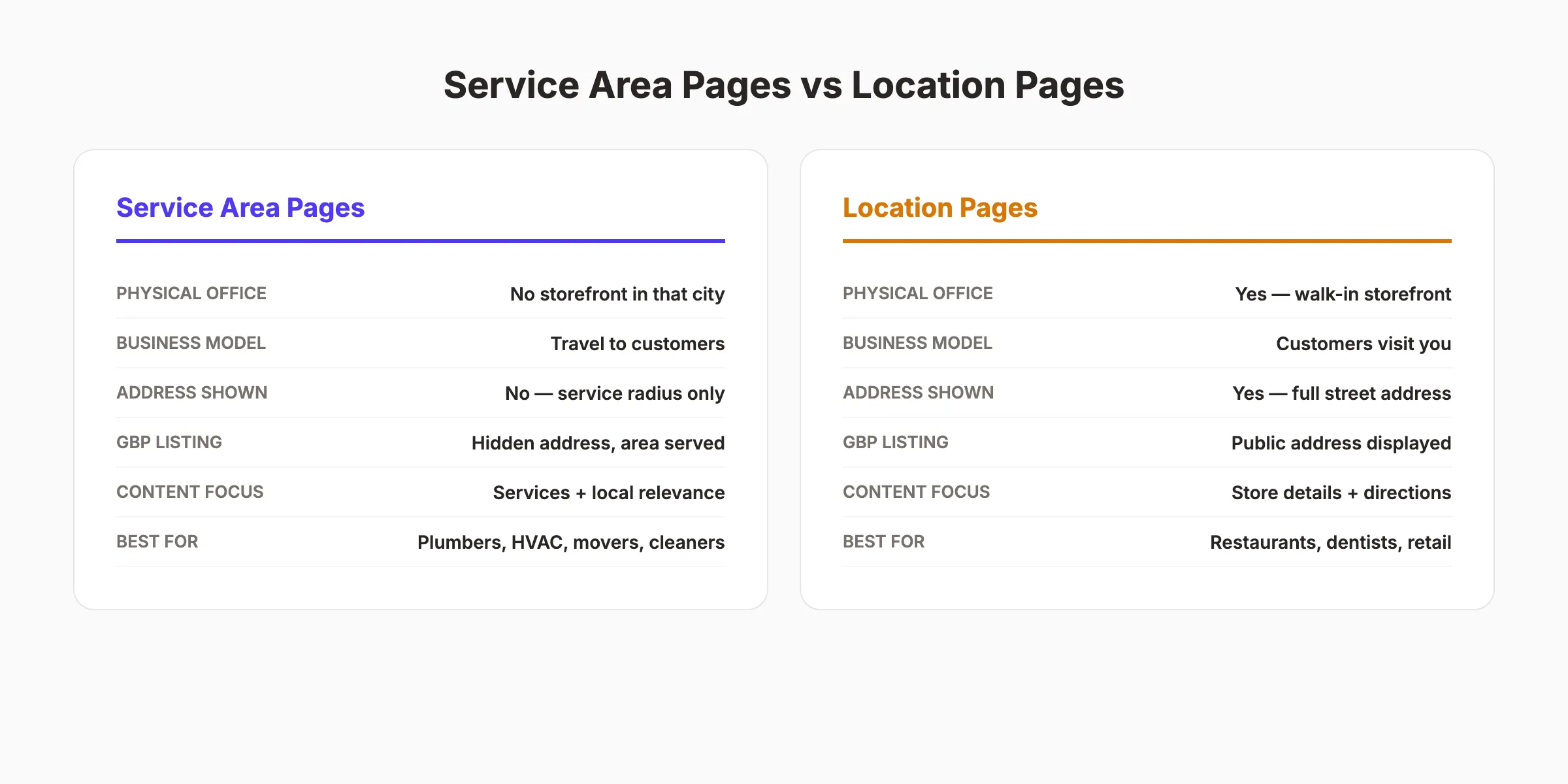
A location page represents a physical storefront. A service area page represents a geographic market you serve without an office there. This distinction affects everything from your Google Business Profile settings to your on-page content.
A dentist with 3 offices needs 3 location pages. A plumber with 1 office serving 10 cities needs 1 location page and 9 service area pages.
Content Implications
Location pages include full NAP details (name, address, phone), office hours, parking information, and driving directions. Service area pages cannot include a physical address for that city because you do not have one there.
Instead, service area pages focus on:
- Services available in that specific area
- Local conditions affecting those services
- Customer testimonials from that area
- Response time and availability for that city
- Area-specific pricing or service details
GBP Configuration
Google Business Profile handles these differently. Location-based businesses display their street address publicly. Service area businesses hide their address and show a service radius instead.
Your Google Maps ranking factors still apply. Proximity, relevance, and prominence determine your position in the local pack. Service area pages strengthen the relevance signal for each city you target.
Rank in every city you serve without building new offices. Stacc publishes local SEO content that drives organic visibility across your entire service area. Start for $1 →
Chapter 3: How to Structure Service Area Page URLs {#ch3}
URL structure affects crawlability, user experience, and keyword signals. Choose the right pattern before building any pages.
Recommended URL Patterns
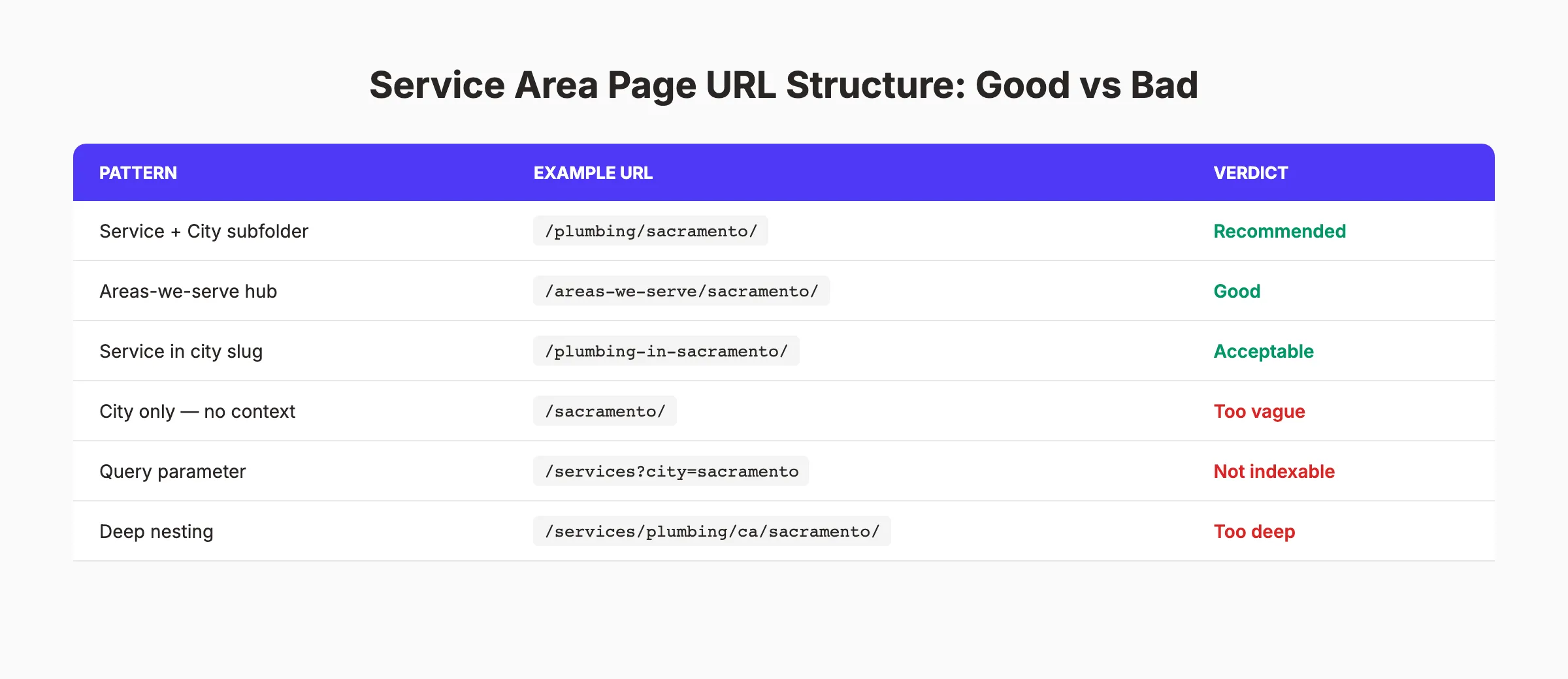
The best URL structures for service area pages follow one of these patterns:
| Pattern | Example | Best For |
|---|---|---|
| Service + city subfolder | /plumbing/sacramento/ | Single-service businesses |
| Areas-we-serve hub | /areas-we-serve/sacramento/ | Multi-service businesses |
| Service-in-city slug | /plumbing-in-sacramento/ | Flat site architectures |
All 3 patterns work. The key is consistency. Pick one pattern and use it across every service area page.
URL Patterns to Avoid
Some URL structures hurt your rankings or create indexing problems:
- City-only slugs like
/sacramento/. Too vague for search engines - Query parameters like
/services?city=sacramento. Often not indexed - Deep nesting like
/services/plumbing/california/sacramento/. Dilutes page authority - State abbreviations like
/plumbing/ca/sac/. Confusing for users and crawlers
Building an Areas-We-Serve Hub
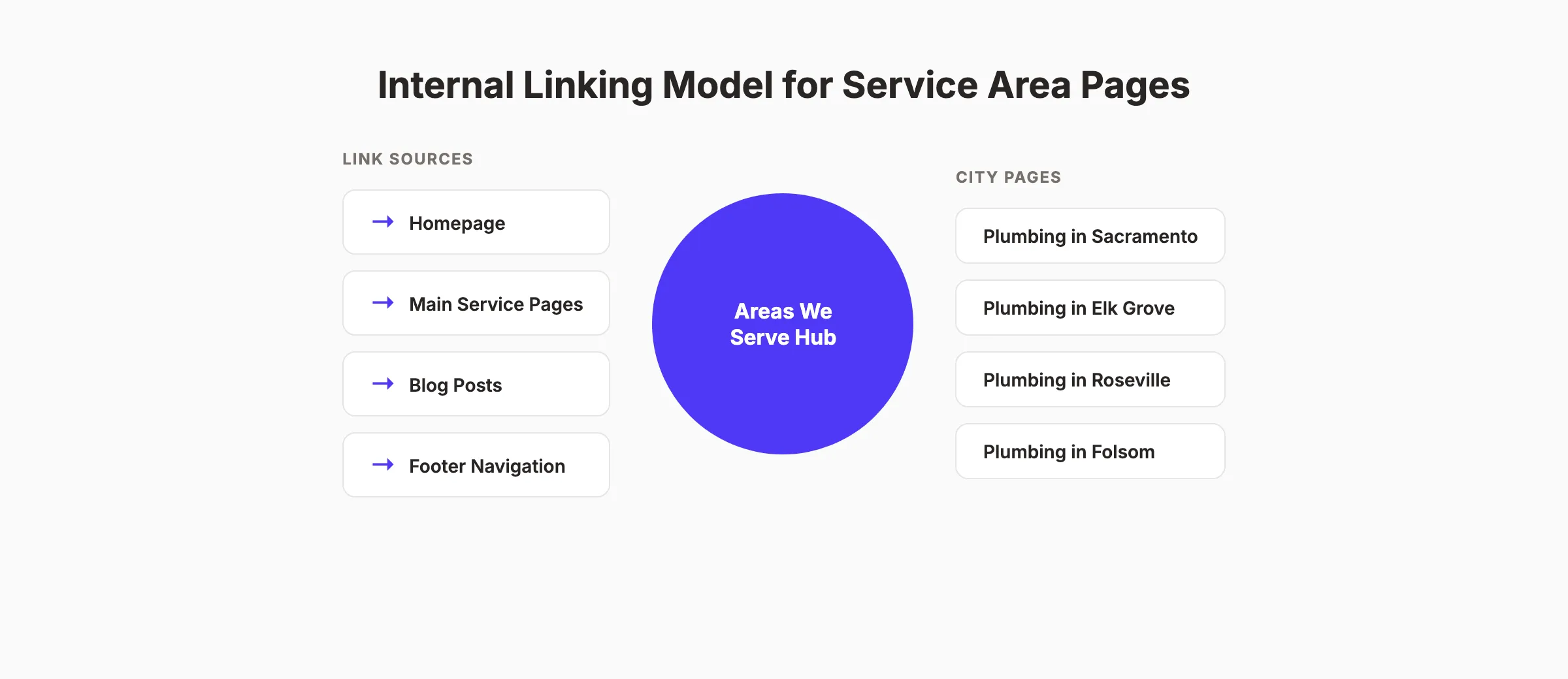
An “Areas We Serve” hub page acts as a parent page that links to every individual city page. This creates a clean site architecture that search engines can crawl efficiently.
Your hub page should include:
- A brief description of your total service area
- An embedded map showing all covered cities
- Links to every individual service area page
- Your primary phone number and contact form
This hub model mirrors the internal linking strategy that works for topic clusters. The hub distributes page authority to each city page while giving users a central navigation point.
Your URL structure should keep service area pages within 3 clicks of the homepage. Deeper pages get crawled less frequently and accumulate less authority.
Chapter 4: On-Page SEO for Service Area Pages {#ch4}
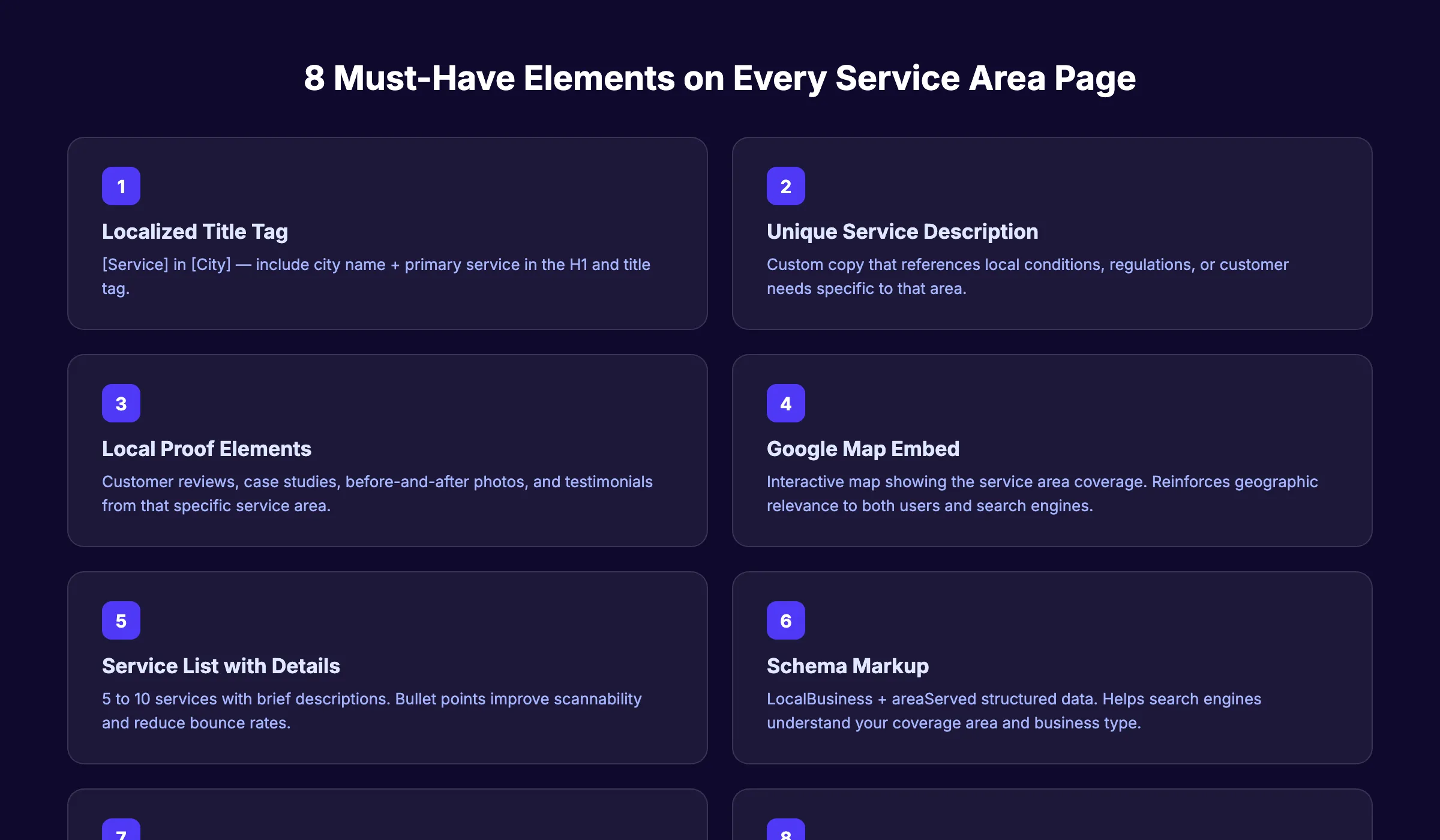
Every service area page needs 8 specific elements to rank. Missing even 1 weakens the page.
Title Tag and Meta Description
Follow this formula for every service area page title tag:
[Primary Service] in [City, State] | [Business Name]Example: Emergency Plumbing in Sacramento, CA | Ace Plumbing Co
Keep titles under 60 characters. Place the city name and primary service in the first half.
For meta descriptions, use 145 to 155 characters:
Need [service] in [city]? [Business name] provides [key benefit].
[Unique selling point]. Call today for a free estimate.
H1 and Heading Structure
Your H1 should match the title tag pattern: “[Service] in [City].” Use H2s for major sections and H3s for subtopics within each section.
A strong heading structure for a plumbing service area page:
- H1: Emergency Plumbing in Sacramento, CA
- H2: Our Plumbing Services in Sacramento
- H2: Why Sacramento Homeowners Choose Ace Plumbing
- H2: Sacramento Plumbing FAQs
- H2: Service Areas Near Sacramento
Local Content Elements
Each page must include content specific to that city. Generic descriptions that work for any location will not rank.
Include these local elements:
- Climate and weather references. “Sacramento summers reach 100 degrees, making water heater maintenance critical.”
- Local regulations. “Sacramento County requires backflow prevention testing every 12 months.”
- Neighborhood mentions. “We serve East Sacramento, Land Park, Natomas, and Midtown.”
- Response time. “Our team reaches most Sacramento locations within 45 minutes.”
Customer Reviews and Social Proof
Embed 2 to 3 reviews from customers in that specific city. If you do not have city-specific reviews yet, start asking customers for reviews and tag them by location.
Reviews on your service area pages accomplish 2 things. They provide unique content that differentiates the page. They also build trust with visitors from that area who want proof you actually serve their city.
Google Map Embed
Add an embedded Google Map showing your service coverage area. This reinforces geographic relevance for both users and search engines.
Use the Google Maps Embed API or a simple iframe with your service area highlighted. Do not pin an address you do not have. Instead, center the map on the city you serve.
Chapter 5: Writing Unique Content That Avoids Penalties {#ch5}
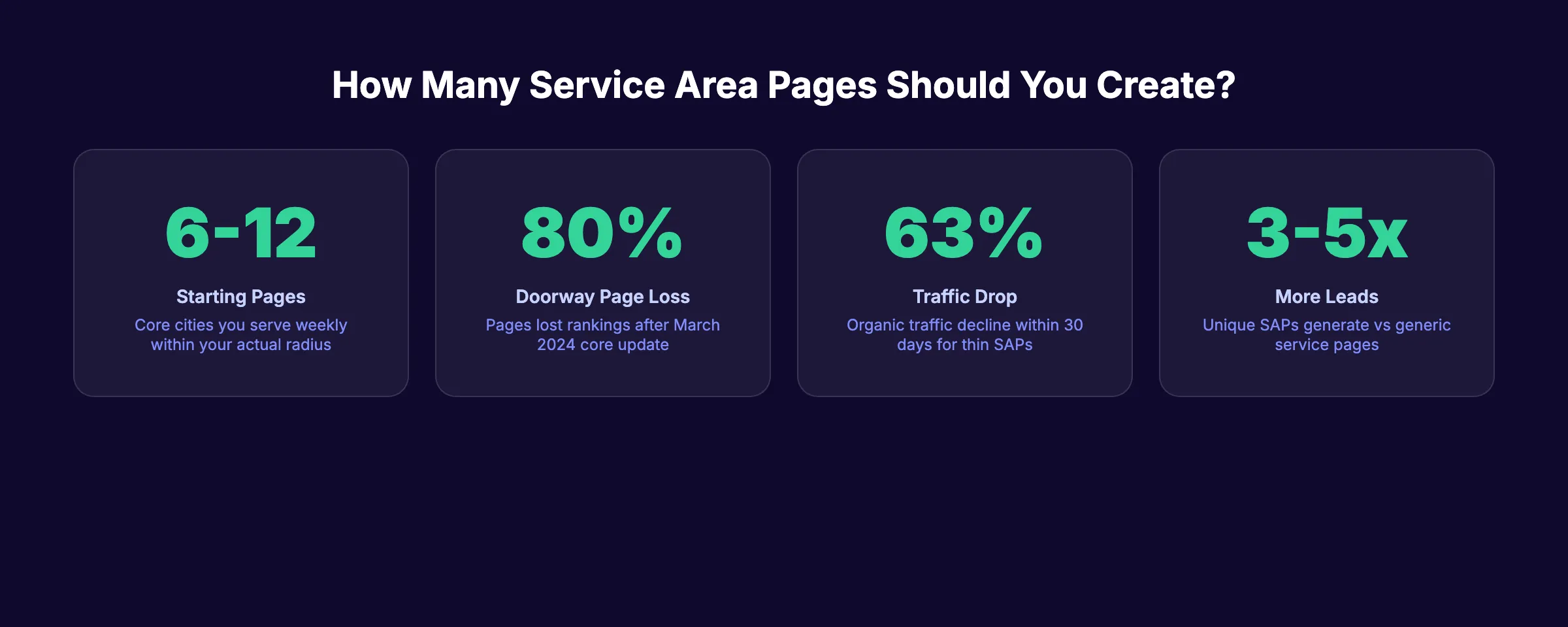
The biggest risk with service area pages is creating thin or duplicate content. Google has penalized this practice aggressively since the March 2024 core update, which caused over 80% of doorway pages to lose rankings.
What Makes a Doorway Page
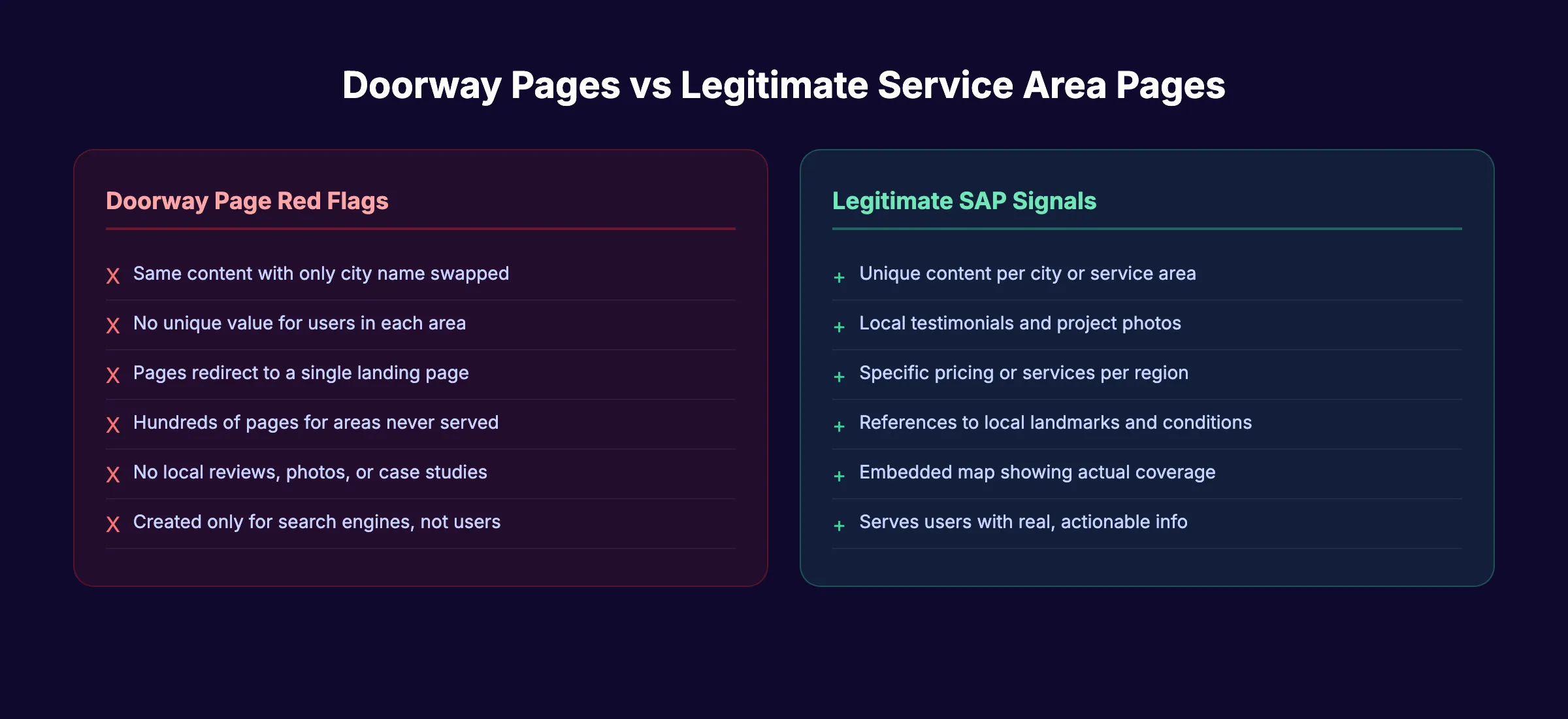
Google defines doorway pages as low-quality pages created only to rank for specific search queries. They funnel users to a single destination without providing unique value.
The classic example: creating 50 city pages with identical content where only the city name changes. Google has explicitly warned against this since 2008 and reinforced the policy in 2015.
The 60% Unique Content Rule
At least 60% of every service area page should be unique to that city. The remaining 40% can include standardized service descriptions and company information.
Unique content sources include:
- Local project case studies. “Last month, we replaced a 40-year-old sewer line in the Tahoe Park neighborhood.”
- Area-specific pricing. “Sacramento drain cleaning starts at $149. Prices vary by neighborhood accessibility.”
- Local staff profiles. “Mike, our Sacramento lead technician, has 15 years of experience in the area.”
- City-specific FAQs. “Do I need a permit for plumbing work in Sacramento? Yes, the City of Sacramento requires permits for…”
Content Template Strategy
Create a template with fixed sections and variable sections:
Fixed sections (40%):
- Company overview (2 to 3 sentences)
- Service list with brief descriptions
- Warranty and guarantee information
- Contact form and phone number
Variable sections (60%):
- City-specific introduction (100 to 150 words)
- Local conditions and regulations (100 to 150 words)
- Area-specific testimonials (2 to 3 reviews)
- Local project examples (1 to 2 case studies)
- City-specific FAQ (3 to 5 questions)
- Neighborhood list with brief descriptions
Publish unique local content at scale. Stacc creates city-specific blog posts and service pages that build local authority without duplicate content penalties. Start for $1 →
First-Party Data Differentiation
The strongest content comes from your own business data. Include information competitors cannot replicate:
- Average response times by city
- Number of jobs completed in that area
- Common service requests specific to that neighborhood
- Pricing ranges based on actual invoices
- Before-and-after photos from local projects
This approach aligns with how Google evaluates E-E-A-T signals. First-hand experience demonstrated through real project data scores higher than generic content.
Chapter 6: Schema Markup for Service Area Businesses {#ch6}
Schema markup helps search engines understand your business type, location, and service areas. It is especially important for service area businesses that do not have a physical address in every city they serve.
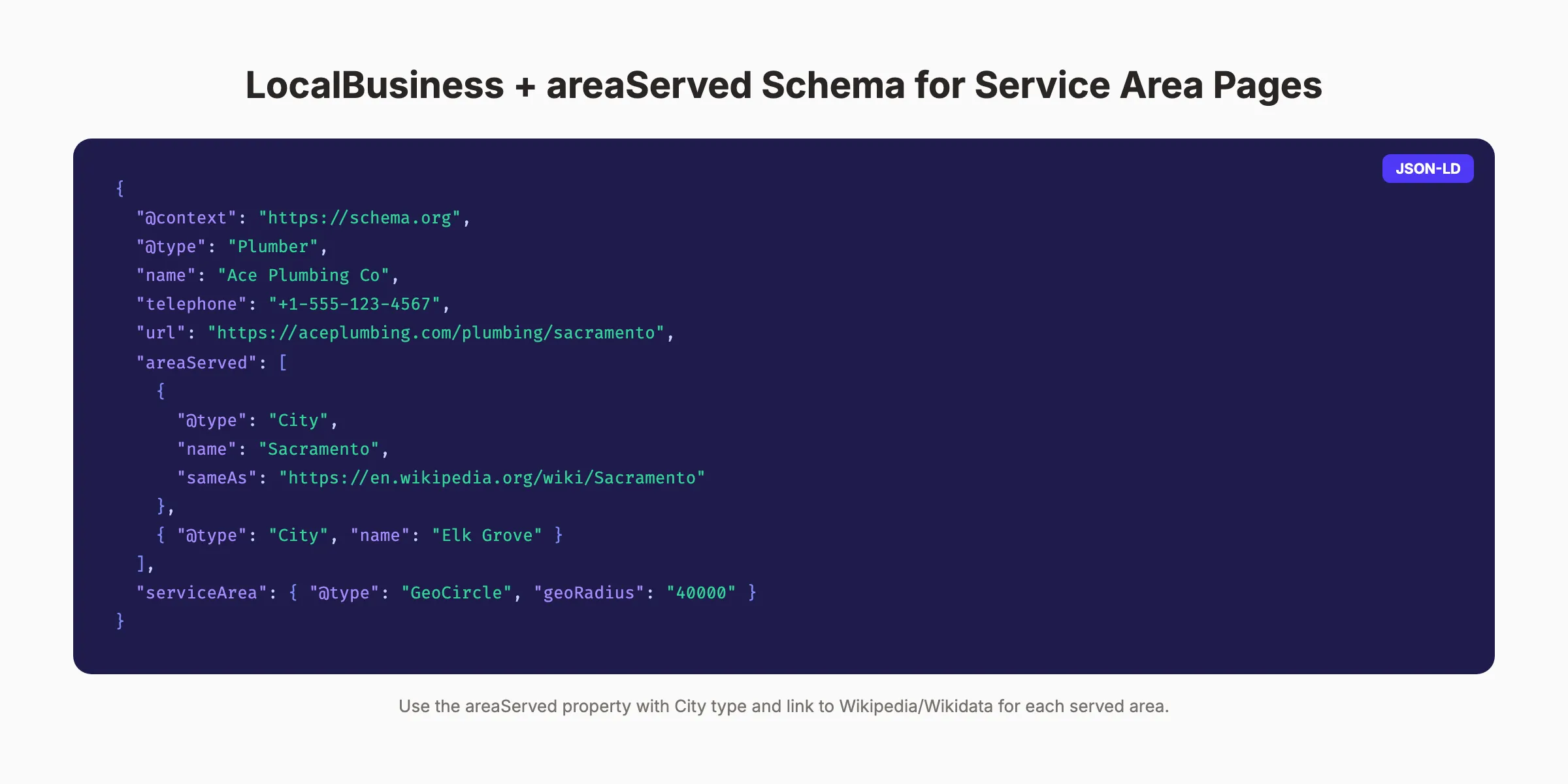
LocalBusiness Schema with areaServed
The areaServed property on Schema.org specifies the geographic areas where you provide services. Combine it with LocalBusiness (or a more specific subtype) for maximum clarity.
Here is a complete JSON-LD example:
{
  "@context": "https://schema.org",
  "@type": "Plumber",
  "name": "Ace Plumbing Co",
  "telephone": "+1-555-123-4567",
  "url": "https://aceplumbing.com/plumbing/sacramento",
  "image": "https://aceplumbing.com/images/team-sacramento.jpg",
  "priceRange": "$$",
  "areaServed": [
    {
      "@type": "City",
      "name": "Sacramento",
      "sameAs": "https://en.wikipedia.org/wiki/Sacramento,_California"
    },
    {
      "@type": "City",
      "name": "Elk Grove",
      "sameAs": "https://en.wikipedia.org/wiki/Elk_Grove,_California"
    }
  ],
  "address": {
    "@type": "PostalAddress",
    "streetAddress": "123 Main St",
    "addressLocality": "Sacramento",
    "addressRegion": "CA",
    "postalCode": "95814"
  },
  "geo": {
    "@type": "GeoCoordinates",
    "latitude": "38.5816",
    "longitude": "-121.4944"
  },
  "openingHoursSpecification": {
    "@type": "OpeningHoursSpecification",
    "dayOfWeek": ["Monday","Tuesday","Wednesday","Thursday","Friday"],
    "opens": "08:00",
    "closes": "18:00"
  }
}
Key Schema Properties for SABs
| Property | Purpose | Value Type |
|---|---|---|
@type | Specific business category | Plumber, Electrician, etc. |
areaServed | Cities or regions served | City, State, or GeoCircle |
serviceArea | Broader service coverage | GeoCircle with radius |
address | Home office address only | PostalAddress object |
sameAs | Wikipedia or Wikidata link | URL for each served city |
hasOfferCatalog | Services offered | OfferCatalog object |
Using GeoCircle for Radius-Based Coverage
If your service area is defined by a radius rather than specific cities, use the GeoCircle type:
{
  "serviceArea": {
    "@type": "GeoCircle",
    "geoMidpoint": {
      "@type": "GeoCoordinates",
      "latitude": "38.5816",
      "longitude": "-121.4944"
    },
    "geoRadius": "40000"
  }
}
The geoRadius value is in meters. 40,000 meters equals roughly 25 miles.
Validating Your Schema
Use Google Rich Results Test to validate your markup. Check for errors and warnings before deploying. Also review your structured data in Google Search Console under the Enhancements section for ongoing monitoring.
Chapter 7: Internal Linking Strategy for Service Area Pages {#ch7}
Service area pages without internal links are orphan pages. Search engines crawl them less frequently and assign them less authority. A strong internal linking plan is non-negotiable.
The Hub-and-Spoke Model
Build your service area pages using a hub-and-spoke architecture:
- Hub: “Areas We Serve” page that links to every city page
- Spokes: Individual city pages that link back to the hub and to each other
The hub page sits in your main navigation or footer. Every city page links back to the hub and to 2 to 3 related city pages (nearby cities).
Link Sources for Service Area Pages
Your service area pages should receive links from multiple areas of your site:
- Homepage (in an “Areas We Serve” section)
- Main service pages (link to city-specific versions)
- Blog posts (when mentioning specific cities or areas)
- Footer navigation (link to hub page)
- Contact page (reference service areas)
Cross-Linking Between City Pages
Each city page should link to 2 to 3 nearby city pages. A Sacramento page links to Elk Grove and Roseville. An Elk Grove page links back to Sacramento and to Folsom.
This cross-linking pattern signals to Google that these pages are related and that your business genuinely operates across the region. It also helps users discover that you serve neighboring areas.
Blog Content That Supports SAPs
Create blog posts that naturally link to your service area pages. Topics that work well:
- “Common [service] problems in [region]”
- “How [local condition] affects [service] in [area]”
- “Seasonal [service] tips for [city] homeowners”
Each post links to the relevant service area page with descriptive anchor text like “our plumbing services in Sacramento” rather than generic “click here” links.
This approach mirrors how building online presence for local businesses works. Every piece of content reinforces your local relevance signals.
Build local authority with consistent content. Stacc publishes SEO-optimized blog posts that support your service area pages and drive organic traffic month after month. Start for $1 →
Chapter 8: How Many Service Area Pages to Create {#ch8}
More pages do not always mean better results. Quality matters far more than quantity for service area pages SEO.
Start Conservative
Begin with 6 to 12 service area pages covering cities you serve weekly within a reasonable drive from your base. These are cities where you have real customers, completed projects, and testimonials to feature.
Expanding too fast with thin content risks a doorway page penalty. It is better to rank well in 8 cities than to have 50 pages that rank nowhere.
Expansion Criteria
Add new service area pages when you can answer “yes” to all 3 questions:
- Do you actively serve customers in this city?
- Can you write at least 60% unique content for this page?
- Do you have reviews, photos, or case studies from this area?
If you cannot meet all 3 criteria, do not create the page yet. Focus on building local proof elements first, then create the page.
Service-Specific vs City-Specific Pages
You have 2 expansion options:
| Strategy | Structure | Best For |
|---|---|---|
| City-first | One page per city covering all services | Businesses with 1 to 3 core services |
| Service-first | One page per service per city | Businesses with 5 or more distinct services |
A plumber offering drain cleaning, water heater repair, and sewer line replacement in Sacramento might create 3 separate pages. A general handyman offering 1 core service might create 1 page per city.
The service-first approach creates more pages but allows deeper keyword targeting. The city-first approach is simpler to manage and reduces duplicate content risk.
Scaling with a Local SEO checklist
Use a systematic approach when scaling:
- Audit each existing page for unique content percentage
- Check Google Search Console for indexing issues
- Verify no pages are flagged as duplicate content
- Confirm each page has at least 2 local reviews
- Ensure every page is linked from the hub page
Chapter 9: Measuring Service Area Page Performance {#ch9}
Track specific metrics for each service area page to identify what works and where to improve.
Google Search Console Metrics
Google Search Console provides the most direct data on service area page performance. Monitor these metrics for each page:
- Impressions: How often the page appears in search results
- Clicks: How many users visit from search
- Average position: Where the page ranks for target queries
- Click-through rate: Percentage of impressions that convert to clicks
Filter by page URL to isolate individual service area pages. Compare performance across cities to identify top performers and underperformers.
GA4 Engagement Metrics
Google Analytics 4 reveals how users interact with your service area pages after landing:
- Engagement rate: Percentage of sessions lasting longer than 10 seconds
- Conversions: Form submissions, phone calls, and chat initiations per page
- Scroll depth: How far users read before leaving
- Exit rate: Percentage of sessions ending on that page
Low engagement rates signal thin content. High exit rates without conversions suggest the page lacks a clear call to action.
Local Rank Tracking
Track rankings for “[service] in [city]” keywords across all your service area pages. Tools like BrightLocal, Semrush, and Ahrefs can automate this tracking.
Monitor ranking changes after content updates. Pages with fresh reviews, new case studies, and updated local information tend to hold positions better than static pages.
Monthly Review Cadence
Review service area page performance monthly. Update content quarterly at minimum. Add new reviews as they come in. Refresh local statistics and project examples annually.
Pages that receive regular updates maintain rankings better than pages published and forgotten. This aligns with the content refresh strategy that keeps all your content competitive.
Chapter 10: Common Mistakes That Kill Service Area Page Rankings {#ch10}
Avoid these 7 mistakes that cause service area pages to fail or trigger penalties.
Mistake 1: Copy-Paste Content
Swapping city names in otherwise identical pages is the fastest path to a doorway page penalty. After the March 2024 core update, 80% of doorway pages lost rankings. A 63% drop in organic traffic followed within 30 days for affected sites.
Mistake 2: Creating Pages for Areas You Do Not Serve
Only create pages for cities where you have actual customers. Google can detect when a business claims to serve an area but has no real local signals there. No reviews, no citations, no local backlinks means no credibility.
Mistake 3: Missing Internal Links
Orphan service area pages with no internal links get crawled infrequently and accumulate zero authority. Every page must connect to your hub, your main service pages, and at least 2 related city pages.
Mistake 4: No Schema Markup
Without LocalBusiness schema and areaServed properties, search engines rely entirely on page content to determine your service area. Schema markup provides explicit, machine-readable signals that strengthen your local relevance.
Mistake 5: Keyword Stuffing
Repeating “[city] plumber” 30 times on a single page hurts more than it helps. Keyword density above 2 to 3% triggers over-optimization filters. Write naturally and use variations like “plumbing services in Sacramento” and “Sacramento plumbing company.”
Mistake 6: Ignoring Mobile Optimization
Most local searches happen on mobile devices. Service area pages must load fast, display correctly, and make phone numbers tappable on all screen sizes. Test every page using Google PageSpeed Insights.
Mistake 7: No Clear Call to Action
Every service area page needs a prominent, city-specific CTA. “Request a Free Estimate in Sacramento” converts better than a generic “Contact Us” button. Include the CTA above the fold and repeat it at the bottom of the page.
A complete local SEO audit can identify which of these issues affect your current service area pages.
Frequently Asked Questions
How many service area pages should a local business create?
Start with 6 to 12 pages for cities you actively serve every week. Only expand when you have unique content, customer reviews, and real project data for each new city. Quality matters more than quantity. Thin pages with swapped city names will trigger penalties rather than drive rankings.
Are service area pages the same as doorway pages?
No, but they can become doorway pages if done incorrectly. Legitimate service area pages provide unique, helpful content for users in each city. Doorway pages use identical content with only the city name changed. Google has penalized the doorway page approach since 2008. The key difference is whether each page delivers genuine value to local users.
What schema markup should service area businesses use?
Use LocalBusiness schema (or a specific subtype like Plumber or Electrician) with the areaServed property. Set the areaServed value to a City type with a sameAs link to the Wikipedia page for that city. Add the serviceArea property with a GeoCircle type if your coverage area is defined by a radius from your base location.
Do service area pages help with Google Maps rankings?
Service area pages primarily help with organic search rankings, not the Google Maps local pack directly. However, they strengthen overall domain relevance for local queries. Your Google Business Profile settings, reviews, and citation consistency have a stronger direct impact on Maps rankings. The 2 strategies work together when combined with a solid local SEO guide approach.
How often should I update service area pages?
Update service area pages at least quarterly. Add new customer reviews as they arrive. Refresh project examples and local statistics annually. Update pricing information whenever rates change. Google favors pages with fresh, accurate content over static pages that never change.
Can I create service area pages without a Google Business Profile?
Yes. Service area pages live on your website and rank in organic search independently of your Google Business Profile. However, having both a GBP listing and service area pages creates stronger local signals. The website pages and GBP listing reinforce each other to improve visibility across all local search results.
Service area pages give local businesses the organic visibility they need in every city they serve. Start with your strongest markets, write genuinely unique content, add proper schema markup, and build internal links that connect every page. Then measure, refine, and expand.
Get local SEO content published on autopilot. Stacc handles blog posts, local content, and GBP updates so you can focus on running your business. Start for $1 →
Related Tools & Resources
Free SEO Tools:
Best Lists:

Written by
Siddharth GangalSiddharth is the founder of theStacc and Arka360, and a graduate of IIT Mandi. He spent years watching great businesses lose organic traffic to competitors who simply published more. So he built a system to fix that. He writes about SEO, content at scale, and the tactics that actually move rankings.
Automate your Google Business Profile content
30 GBP posts, local SEO articles, and review responses. Published every month automatically.
30-day trial · Cancel anytime
theStacc
Stop writing SEO content manually
30 blog articles, 30 GBP posts, and social media content. Published every month. Automatically.
Try for free$1 for 3 days · Cancel anytime