Use this on-page SEO template to optimize every page. Includes a 20-point checklist, workflow, and AI search fields.
An on-page SEO template is a checklist that fixes every element you optimize before a page publishes: title, meta description, URL, headings, keyword placement, internal links, images and schema. This one is a 20-point checklist plus a three-stage workflow, with the extra AI search fields most templates leave out.
Stacc publishes 3,500+ blogs across 70+ industries every month. We have seen the same pattern: businesses that use a structured template publish faster, rank higher, and spend less time on rewrites. Businesses that do not use one miss critical elements and watch their content underperform.
This guide gives you a complete on-page SEO template you can copy into your workflow today. You will learn what fields to include, how to use them, and how to adapt the template for AI search engines.
Here is what you will learn:
- The exact fields every on-page SEO template needs
- A 20-point checklist you can run before every publish
- How to build the template into a 3-stage workflow
- AI search fields most templates miss
- How to track freshness and keep pages ranking long-term
What an On-Page SEO Template Includes
An on-page SEO template is a structured document that lists every element you need to optimize before a page goes live. It covers HTML tags, content structure, keyword placement, links, images, and technical signals.
The template serves as a quality gate. Writers use it during drafting. Editors use it during review. SEO managers use it during audits. Without it, teams rely on memory, and memory fails under pressure.
A complete template has three layers. The first layer covers metadata: title tags, meta descriptions, URL slugs, and canonical tags. The second layer covers content structure: headings, keyword placement, internal links, and image optimization. The third layer covers technical signals: schema markup, Core Web Vitals, mobile readiness, and indexability.
Most free templates online cover only the first two layers. They skip technical signals, AI search optimization, and content freshness tracking. This guide includes all three.

| Template Layer | Elements Covered | Who Uses It |
|---|---|---|
| Metadata | Title tag, meta description, URL, canonical | Writer + Editor |
| Content Structure | Headings, keywords, links, images | Writer + Editor |
| Technical Signals | Schema, speed, mobile, indexability | SEO Manager + Developer |
| AI Search Fields | Summary blocks, FAQ schema, entity coverage | SEO Manager + Writer |
| Freshness Tracking | Last updated, review trigger, change log | Content Manager |
The best templates are not static documents. They are living systems that evolve as search engines change. Google added AI Overviews to 47% of searches in 2025. That change alone required new fields in every template we use.
Stop guessing what to optimize. Stacc publishes 3,500+ blogs monthly using the exact template in this guide. Our average SEO score is 92%.
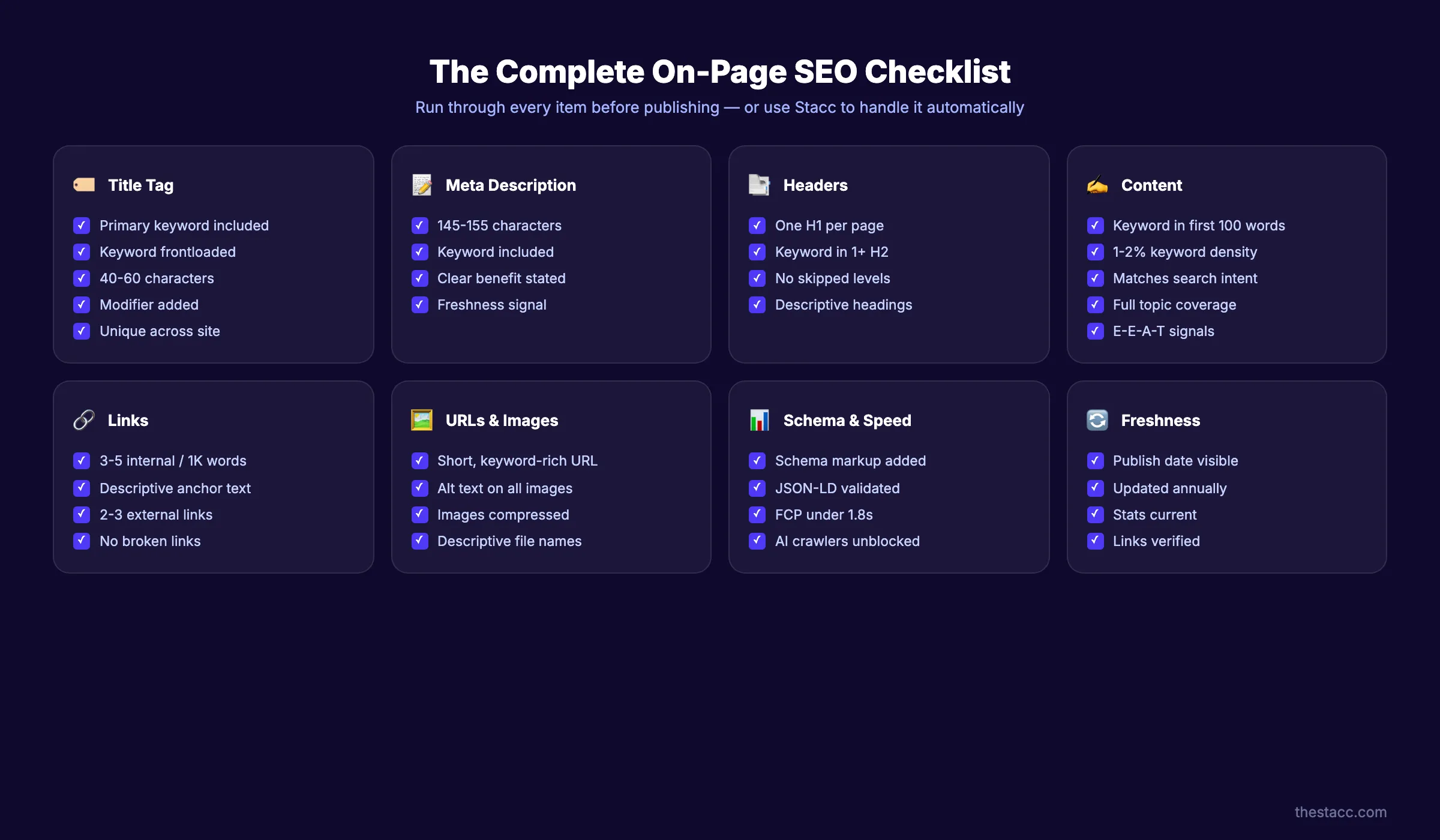
The 20-Point On-Page SEO Checklist
This checklist covers every element in the template. Run through it before you publish any page. Each item includes the standard to meet and why it matters.
1. Primary Keyword Selected
Choose one primary keyword per page. The keyword must match the search intent of the page. Informational pages target question-based keywords. Commercial pages target comparison keywords. Transactional pages target purchase-intent keywords.
Use a keyword research tool to confirm search volume and difficulty. The primary keyword belongs in the title tag, H1, first 100 words, at least one H2, and one image alt text.
If you publish content at scale, consider using a content brief generator to standardize keyword research across your team. A brief locks in the primary keyword, secondary keywords, and search intent before any writing begins.
2. Search Intent Confirmed
Search intent falls into four categories: informational, commercial, transactional, and navigational. Match your page format to the intent. A how-to guide serves informational intent. A product comparison serves commercial intent. A checkout page serves transactional intent.
Google's AI Overviews pull answers from pages that match intent precisely. A mismatch sends the wrong signal and hurts rankings.
3. Title Tag Optimized
The title tag must stay under 60 characters. Place the primary keyword within the first 3 words. Add a benefit or modifier after the keyword. End with your brand name separated by a pipe.
Good: On-Page SEO Template: 20-Point Checklist 2026 | theStacc
Bad: The Ultimate Guide to Everything You Need to Know About On-Page SEO Templates and Checklists for Better Rankings
4. Meta Description Written
Write a meta description between 145 and 155 characters. Include the primary keyword naturally. Add a clear benefit and a soft call to action. Treat it like ad copy, not a summary.
Google rewrites meta descriptions for 70% of queries. A well-written description still improves click-through rate when it does appear.
You can test your meta tags before publishing with a dedicated meta tag analyzer. This tool shows exactly how your title and description will render in search results.
5. URL Slug Cleaned
The URL slug should be short, descriptive, and lowercase. Use hyphens to separate words. Remove stop words like "and," "the," and "of." Include the primary keyword.
Good: /on-page-seo-template/
Bad: /blog/2026/05/27/the-ultimate-guide-to-on-page-seo-templates-and-checklists.html
6. Single H1 Tag
Every page needs exactly one H1 tag. The H1 should match the title tag intent but does not need to match it word for word. Include the primary keyword in the H1.
Multiple H1 tags confuse search engines about the page topic. Zero H1 tags leave the page without a clear subject.
7. Heading Hierarchy Structured
Use H2 tags for major sections and H3 tags for subsections. Do not skip levels. A reader skimming only the headings should understand the full argument of the page.
AI search engines extract answers directly from headings. A clear hierarchy helps them understand what each section covers.
| Heading Level | Purpose | Keyword Use |
|---|---|---|
| H1 | Page topic (one only) | Primary keyword |
| H2 | Major sections | Secondary keyword or variation |
| H3 | Supporting details | Semantic variation or question form |
| H4 | Specific points | Natural language, no forced keywords |
8. Primary Keyword in First 100 Words
Place the primary keyword within the first 100 words of the body content. This confirms the page topic to search engines immediately. Do not force it. The placement should feel natural.
9. Keyword Placement Checked
Beyond the first 100 words, use the primary keyword naturally throughout the content. Aim for 1 to 2 mentions per 500 words. Use semantic variations and related terms instead of repeating the exact keyword.
Semantic keywords for "on-page SEO template" include: page optimization checklist, on-site SEO framework, content optimization guide, and HTML SEO standards. Tools like our on-page SEO checker can scan your draft and flag missing semantic terms before you publish.
10. Internal Links Added
Add at least 3 internal links per 1,000 words. Link to related pages using descriptive anchor text. The anchor text should describe what the linked page covers.
Before writing, decide which landing page the post will support. Every piece of content should strengthen a target page through internal links.
For larger sites, an internal link suggester can automate this step. It scans your content library and recommends the best pages to link based on topic relevance and anchor text opportunities.
11. External Sources Cited
Include 2 to 3 external links to authoritative sources per post. Link to specific pages with data, not homepages. Cite research from Ahrefs, Semrush, Google, HubSpot, or academic institutions.
External links build trust. They show search engines that your content connects to the broader web of knowledge. According to a 2023 study by Reboot Online, pages with outbound links to authoritative domains outranked pages without them in 76% of test cases.
12. Images Optimized
Every image needs a descriptive file name, compressed file size, and alt text that describes the image contextually. Use WebP format when possible. Keep images under 100KB.
Alt text serves two purposes. It helps visually impaired users understand the image. It gives search engines context about what the image shows.
| Image Element | Standard |
|---|---|
| File name | Descriptive, keyword-relevant |
| Alt text | Concise description, natural keyword inclusion |
| Format | WebP preferred, JPEG acceptable |
| Size | Under 100KB when possible |
| Dimensions | Specified to prevent layout shift |
13. Schema Markup Added
Add structured data that matches the page type. Blog posts use Article schema. FAQ sections use FAQPage schema. Step-by-step guides use HowTo schema. Product pages use Product schema.
Schema markup helps search engines understand your content. It also makes your pages eligible for rich results in search.
| Page Type | Recommended Schema |
|---|---|
| Blog post | Article, BlogPosting |
| FAQ page | FAQPage |
| How-to guide | HowTo |
| Product page | Product, AggregateRating |
| Local business | LocalBusiness |
| Software tool | SoftwareApplication |
14. Core Web Vitals Met
Check that your page meets Google's Core Web Vitals standards. Largest Contentful Paint should be under 2.5 seconds. Interaction to Next Paint should be under 200 milliseconds. Cumulative Layout Shift should be under 0.1.
Slow pages rank lower. Users abandon pages that take more than 3 seconds to load.
According to Google's own research, as page load time increases from 1 second to 3 seconds, the probability of bounce increases by 32%. At 5 seconds, that probability jumps to 90%.
15. Mobile Readiness Confirmed
Test your page on mobile devices. The mobile rendered HTML should match the desktop content and heading structure. Buttons should be tappable. Text should be readable without zooming.
Google uses mobile-first indexing. The mobile version of your page is what Google evaluates. Over 62% of global web traffic now comes from mobile devices. A page that looks perfect on desktop but breaks on mobile will not rank well.
16. Canonical Tag Set
Set a canonical tag on every page. The canonical tag tells search engines which version of a page is the authoritative one. This prevents duplicate content issues.
If your page has parameters, trailing slashes, or print versions, the canonical tag should point to the clean URL.
17. Open Graph Tags Added
Add Open Graph tags for social sharing. Include og:title, og:description, og:image, and og:url. These tags control how your page appears when shared on LinkedIn, Facebook, and other platforms.
Social signals are not a direct ranking factor. They drive traffic, which indirectly supports rankings.
18. Call to Action Included
Include at least one clear call to action on every page. The CTA should match the page intent. Informational pages can link to related guides. Commercial pages can link to pricing or demos.
Place CTAs at natural break points. Do not interrupt the reading flow.
19. Content Freshness Tracked
Add a "last updated" date to every page. Set a review trigger based on the topic. Fast-moving topics need quarterly reviews. Evergreen topics need annual reviews.
HubSpot found that updating old posts increased organic search views by 106% per optimized post. The posts that saw the biggest gains were those that added new statistics, refreshed examples, and expanded thin sections.
20. Final QA Complete
Run a final quality check before publishing. Check grammar, spelling, link functionality, image rendering, and mobile display. Confirm that the primary keyword appears in the title, H1, first 100 words, and at least one H2.
Publish faster with a built-in checklist. theStacc's content system runs every page through a 20-point optimization check before it goes live. No missed fields. No rewrites. See how it works →
How to Build the Template Into Your Workflow
A template only works if your team uses it consistently. Build it into a 3-stage workflow: before writing, during writing, and before publishing.

Stage 1: Before Writing
Fill out the metadata layer of the template before you write a single word. This forces you to define the target keyword, search intent, and page structure upfront.
- Enter the primary keyword and 2 to 4 secondary keywords
- Confirm search intent and match it to page format
- Draft the title tag and meta description
- Plan the H2 and H3 structure
- Identify internal links to include
- List external sources to cite
This stage takes 10 to 15 minutes. It saves hours of rewriting later.
Stage 2: During Writing
Use the content structure layer as a guide while drafting. Check off each element as you complete it.
- Write the H1 and opening paragraph with the primary keyword
- Follow the planned H2 and H3 structure
- Add internal links at natural points in the text
- Insert images with optimized file names and alt text
- Cite external sources with descriptive anchor text
- Write a conclusion that includes a CTA
Keep the template open in a separate tab. Reference it as you write.
Stage 3: Before Publishing
Run the full 20-point checklist. This is your quality gate. Nothing publishes without a complete check.
- Verify title tag length and keyword placement
- Confirm meta description length and CTA
- Check URL slug format
- Validate heading hierarchy
- Test all internal and external links
- Confirm image alt text and file sizes
- Check schema markup with Google's Rich Results Test
- Run Core Web Vitals with PageSpeed Insights
- Test mobile display
- Confirm canonical tag
Assign this stage to an editor or SEO manager. The writer should not be the only person checking their own work.
| Stage | Time Required | Who Owns It | Output |
|---|---|---|---|
| Before Writing | 10–15 minutes | Writer | Filled template metadata |
| During Writing | Ongoing | Writer | Draft with all elements |
| Before Publishing | 15–20 minutes | Editor/SEO Manager | Published, optimized page |
AI Search Fields Most Templates Miss
Traditional on-page SEO templates were built for Google as it existed in 2020. Search has changed. AI Overviews now appear on 47% of searches. ChatGPT, Perplexity, and Claude answer questions directly without sending users to websites.
Your template needs new fields to compete in this environment.

Summary Answer Block
Add a 40 to 60 word standalone answer near the top of every page. This block should answer the page's core question without requiring the reader to scroll.
AI search engines extract these blocks as citations. Content with clear summary blocks receives 67% more AI citations.
FAQ Schema with Real Questions
Add an FAQ section with 4 to 6 questions sourced from real People Also Ask boxes. Format the questions exactly as users type them. Answer each in 40 to 80 words.
Apply FAQPage schema to this section. Google pulls FAQ content directly into search results.
Entity Coverage Notes
Track which entities your content covers. Entities are people, places, organizations, and concepts that search engines understand as distinct things. A page about on-page SEO should mention related entities like Google Search Console, schema markup, and Core Web Vitals.
Entity coverage helps search engines place your content in the right knowledge graph.
Source Citations
Cite sources by name in the body text. Write "According to Ahrefs..." or "HubSpot found that..." instead of burying the source in a footnote.
AI search engines favor content with clear, named citations. It signals expertise and trustworthiness.
Conversational Headings
Structure your H2 and H3 headings as questions when appropriate. Users speak to voice assistants and AI chatbots in full sentences. A heading like "How do I use an on-page SEO template?" matches how people actually search.
This approach also improves your chances of appearing in People Also Ask boxes. Google groups related questions together. Each question you answer is another opportunity to appear in search results.
| AI Search Field | What to Add | Why It Matters |
|---|---|---|
| Summary answer block | 40–60 word direct answer near top | AI engines extract as citations |
| FAQ schema | Real PAA questions with short answers | Appears in rich results |
| Entity coverage | Related topics, tools, and concepts | Knowledge graph placement |
| Named citations | "According to [source]..." in body | Trust signal for AI engines |
| Conversational headings | Question-form H2s and H3s | Matches voice and AI queries |
How to Track Content Freshness
Fresh content ranks better. Google prioritizes recently updated pages for time-sensitive queries. Even evergreen topics benefit from periodic refreshes.
Your template should include a freshness tracking system.

Set Review Triggers
Assign a review frequency to every page. Fast-moving topics like SEO best practices need quarterly reviews. Stable topics like historical guides need annual reviews.
| Topic Type | Review Frequency | Example |
|---|---|---|
| Fast-moving | Quarterly | SEO best practices, tool reviews |
| Moderate | Every 6 months | Industry guides, process tutorials |
| Evergreen | Annually | Definitions, historical overviews |
| Time-sensitive | Update immediately | Statistics, pricing, regulations |
Track Changes
Keep a change log for each page. Record what you updated, when you updated it, and why. This helps you measure the impact of updates on rankings and traffic.
Automate Alerts
Set Google Alerts for your target keywords. When new research or major updates appear, review your content and add the new information.
Measuring the Impact of Updates
Track rankings and traffic before and after each update. Use Google Search Console to monitor impression changes. Use your analytics platform to track click-through rate and time on page.
If an update does not improve performance within 30 days, review your changes. Did you address the right elements? Did you add enough depth? Did you target the right keywords?
Update impact follows a pattern. Metadata changes show results in 1 to 2 weeks. Content expansions show results in 3 to 4 weeks. Internal link restructuring shows results in 4 to 6 weeks.
Fresh content ranks higher. theStacc updates client content on a scheduled cadence. Our system tracks what needs refresh and when. Start publishing →
Common Template Mistakes
Even good templates fail when teams misuse them. Watch for these common mistakes.
Treating the Template as a One-Time Task
Some teams run the checklist once and never return to it. On-page SEO is not a one-time task. It is an ongoing process. Revisit the template every time you update a page.
Forcing Keywords Into Every Field
Keyword stuffing hurts rankings. The primary keyword should appear naturally. If a field does not fit the keyword, leave it out. Semantic variations are more valuable than forced exact matches.
Ignoring Technical Checks
Writers often skip technical checks like Core Web Vitals and schema validation. These checks matter. Assign them to a technical team member or use automated tools.
Skipping the Before-Writing Stage
The most common mistake is starting to write before filling out the template. This leads to mismatched intent, missing keywords, and rewrites.
Using the Template for Existing Content
The template works for published pages too. Run the checklist on any live page. Score each element as pass, partial, or fail. Prioritize fixes by impact.
Title tags and meta descriptions deliver the fastest ranking improvements. Internal links boost authority distribution immediately. Schema markup makes pages eligible for rich results within days.
Set a monthly audit cadence for your top 20 pages. These pages drive the most traffic. Small improvements compound quickly.
| Mistake | Impact | Fix |
|---|---|---|
| One-time use | Content becomes outdated | Schedule quarterly reviews |
| Keyword stuffing | Ranking penalties | Use semantic variations |
| Skipping technical checks | Poor user experience | Assign to technical owner |
| No pre-writing plan | Rewrites and delays | Make Stage 1 mandatory |
What practitioners are saying on X
AI search advice ages quickly. Here is high-signal public discussion from SEO and growth operators — context for your roadmap, not a substitute for primary data.
- @hridoyreh (Mar 2026): Widely shared SEO skill tree: foundations, research, technical, on-page, content, links, AI SEO/GEO, analytics, UX, brand, programmatic — useful map for stats and how-to posts. See the post on X.
- @jakezward (Feb 2026): 2026 SEO predictions emphasize AI Overview share-of-SERP, schema for LLM token efficiency, brand mentions in AI answers as a KPI, proprietary data as a moat, and content refresh beating net-new AI slop. See the post on X.
Grok, AI Overviews, and multi-engine visibility
For “on page seo template”, multi-engine visibility still starts with clear definitions, sourced numbers, and extractable section answers. Grok additionally factors live X discussion — keep public claims consistent with this page.
- Google AI Overviews: Use passage-ready answers, tables, and FAQ schema where relevant.
- ChatGPT / Perplexity: Cite named sources next to key claims.
- Grok: Maintain accurate entity facts on-site and in high-signal X posts.
Publish content built for Google and AI citations. theStacc’s Content SEO module ships SEO-scored articles structured for rankings and generative engines — including clearer entity pages models like Grok can quote.
Frequently Asked Questions
An on-page SEO template should include metadata fields (title, description, URL), content structure fields (headings, keywords, links, images), technical fields (schema, speed, mobile), and AI search fields (summary blocks, FAQ schema, entity coverage). The best templates also include freshness tracking.
Use the template in three stages. Before writing, fill out metadata and plan structure. During writing, check off content elements as you complete them. Before publishing, run the full checklist to verify every field.
On-page SEO covers elements you control on your own website: content, HTML tags, images, and internal links. Off-page SEO covers external signals: backlinks, social mentions, and brand reputation. This template focuses on on-page elements.
Review fast-moving topics quarterly. Review moderate topics every 6 months. Review evergreen topics annually. Update time-sensitive content immediately when changes occur.
Yes. On-page SEO remains a foundational ranking factor. Google's March 2024 Core Update intensified focus on content quality, E-E-A-T signals, and user experience. The fundamentals matter more now, not less.
The most important factors are search intent alignment, title tag optimization, content quality and depth, internal linking structure, page speed, mobile readiness, and schema markup. These elements have the highest correlation with rankings.
Yes. Run the checklist on any published page. Identify missing elements. Prioritize fixes by impact. Title tags, meta descriptions, and internal links usually deliver the fastest improvements.
Conclusion
An on-page SEO template turns optimization from guesswork into a repeatable system. The 20-point checklist in this guide covers every element that matters in 2026: metadata, content structure, technical signals, and AI search fields.
Build the template into a 3-stage workflow. Use it before writing, during writing, and before publishing. Track freshness. Avoid common mistakes like keyword stuffing and skipped technical checks.
The teams that rank consistently are not the ones with the most SEO knowledge. They are the ones with the most consistent process.
If you want to see how a professional content system handles every step in this template, explore our content SEO module. It covers research, writing, optimization, and publishing in one integrated workflow.
Turn this template into a publishing system. theStacc handles the entire workflow: research, writing, optimization, and publishing. You get optimized content without building the process yourself.
Sources & references
- [1] Princeton / Georgia Tech et al. — GEO research (arXiv:2311.09735)
- [2] @hridoyreh on X — Widely shared SEO skill tree: foundations, research, technical, on-page, content, links, AI SEO/GEO, analytics, UX, bran
- [3] @jakezward on X — 2026 SEO predictions emphasize AI Overview share-of-SERP, schema for LLM token efficiency, brand mentions in AI answers

Plan topics, review article drafts, and publish to a connected CMS.
Weekly local SEO teardowns
One practical email a week. Map Pack, GBP, AI Overviews — no fluff. Unsubscribe anytime.