How to respond to Google reviews. Positive and negative. Includes templates, a 5-step framework, and SEO impact data. Updated March 2026.
Short answer: 88% of consumers prefer businesses that respond to all their Google reviews, and only 47% would use a business that never responds. Responding takes about two minutes per review, builds trust with future customers, and supports local pack visibility. This guide gives a five-step framework and templates.
88% of consumers prefer businesses that respond to all their Google reviews. Only 47% would use a business that never responds. That gap represents lost revenue every single day for businesses that ignore their reviews.
Responding to Google reviews is one of the highest-ROI activities in local SEO. It takes 2 minutes per review. It builds trust with future customers. It directly impacts your local pack rankings. And most businesses still do not do it consistently.
This guide covers how to respond to every type of Google review. Positive, negative, fake, and everything in between. Every section includes templates you can customize and use today.
We publish 3,500+ blog posts across 70+ industries with a 92% average SEO score. The review response strategies below come from managing hundreds of local business profiles.
Here is what you will learn:
- Why review responses directly impact your local SEO rankings
- The 5-step framework for responding to any review
- Templates for positive reviews (4-5 stars)
- Templates for negative reviews (1-3 stars)
- How to handle fake or spam reviews
- Common mistakes that hurt your reputation
Why Responding to Google Reviews Affects Rankings
Review responses are not just good customer service. They are a ranking signal.
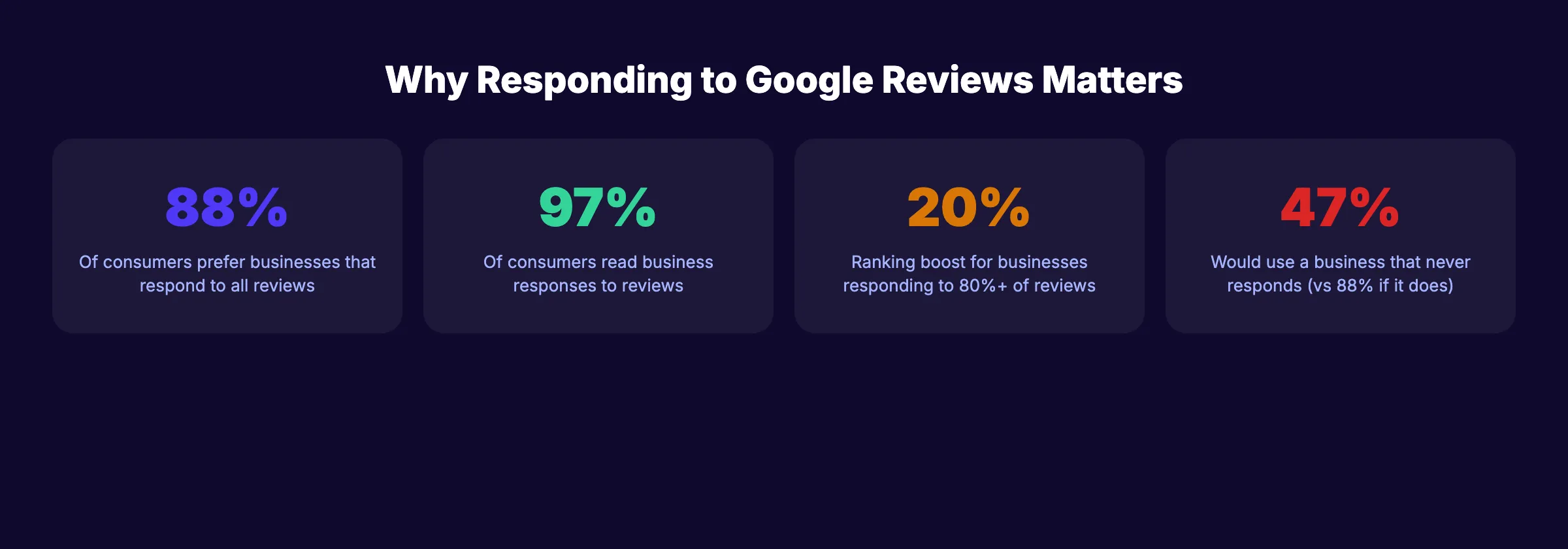
The Data
- 88% of consumers prefer businesses that respond to all reviews, positive and negative. (BrightLocal, 2026)
- 97% of consumers read business responses to reviews before choosing a provider.
- Businesses responding to 80%+ of reviews see a 10% to 20% ranking boost in the local pack.
- Review signals account for 20% of local pack ranking factors. Responses are part of that signal.
- The average response rate rose from 63% in 2023 to 73% in 2024. It continues climbing. Non-responders fall further behind.
How Responses Help SEO
Every review response creates new text content on your Google Business Profile. Google indexes this content and factors it into relevance analysis. A response mentioning "roof replacement in Austin" adds keyword relevance to your profile for that search term.
Active response history signals to Google that your business is engaged and current. Engagement contributes to your prominence score, one of the 3 core local ranking factors.
The Trust Factor
97% of consumers read your responses. A thoughtful reply to a negative review shows future customers that you take problems seriously. A warm reply to a positive review shows you appreciate your clients. Both behaviors build trust before the prospect ever contacts you.
Your SEO team. $99/month. 30 optimized articles published automatically. GBP management included with Local SEO.
The 5-Step Framework for Responding to Any Review
Use this framework for every review. Adapt the tone based on whether the review is positive or negative.
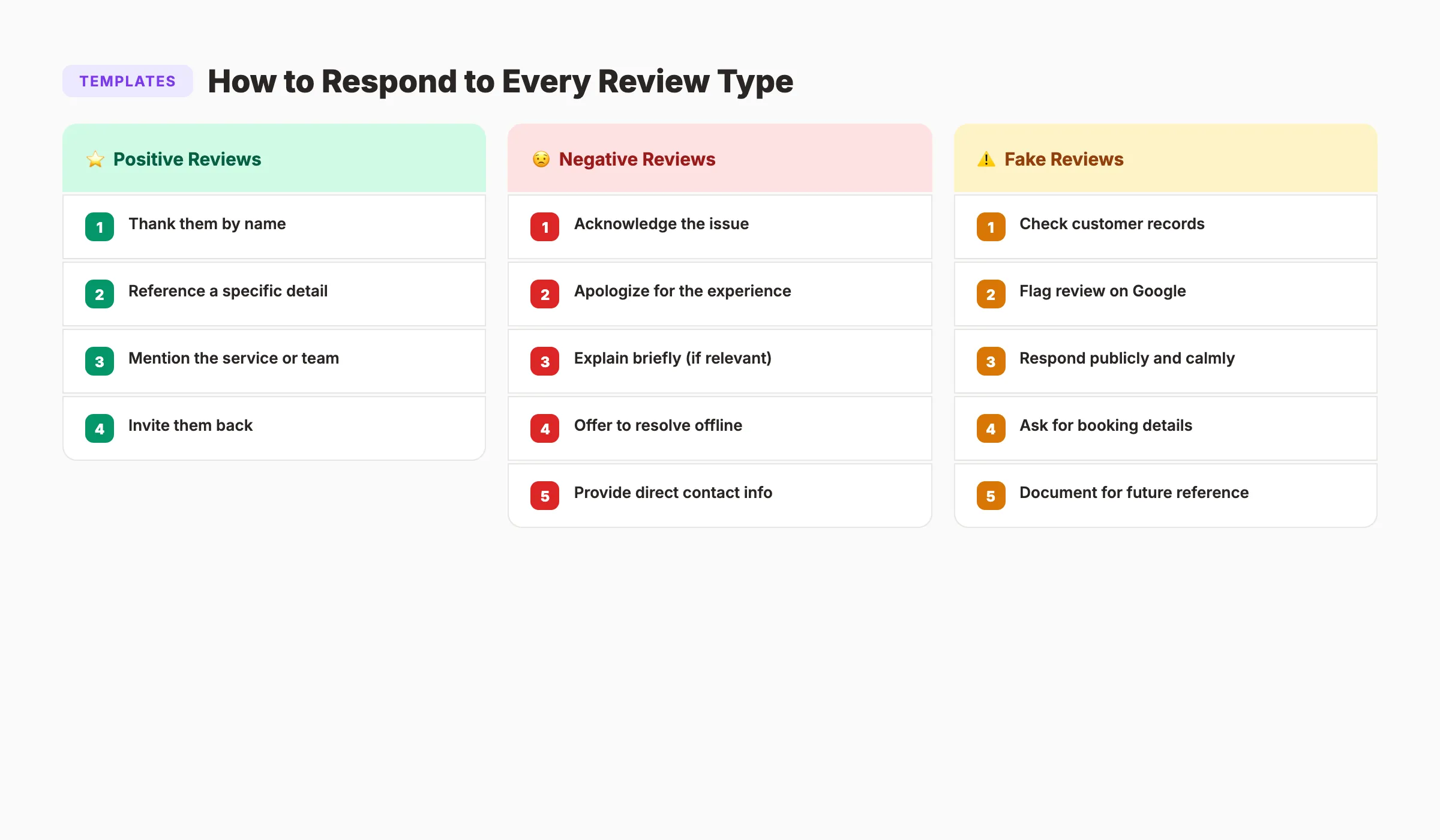
For Positive Reviews (4-5 Stars)
- Thank the reviewer by name. "Thank you, Sarah" is warmer than "Thank you for your review."
- Reference something specific. Mention the service or experience they highlighted.
- Reinforce the positive. Confirm that their experience reflects your standard.
- Invite them back. Mention another service or encourage a return visit.
- Sign with your name and role. ", Mike, Owner" adds a personal touch.
For Negative Reviews (1-3 Stars)
- Acknowledge and apologize. "We are sorry to hear about your experience" shows empathy.
- Address the specific concern. Do not respond with generic language. Reference what went wrong.
- Explain what you are doing to fix it. Show that you take the feedback seriously.
- Move the conversation offline. Provide a phone number or email for direct follow-up.
- Sign with your name. Accountability builds trust.
Response Timing
Respond within 24 hours. 53% of consumers expect a response within a week. Faster is better. A response within 2 hours signals exceptional customer service. After 7 days, the window for making an impression closes.
Responding to Positive Reviews: Templates
Positive reviews deserve more than "Thanks!" A personalized response shows the reviewer (and every future customer reading it) that you value the relationship.
Template 1: Standard 5-Star Review
Review: "Great service! The team was friendly and professional."
Response: "Thank you so much, [Name]. We are glad the team delivered a great experience for you. Friendly and professional is exactly what we aim for on every job. If you ever need anything in the future, do not hesitate to reach out. We appreciate your trust. [Your Name], [Role]"
Template 2: Review Mentioning a Specific Service
Review: "They did an amazing job on our kitchen lighting. The electrician was on time and cleaned up after."
Response: "Thank you, [Name]. Kitchen lighting projects are one of our favorites because the transformation is so visible. We are happy to hear that [Electrician Name] was punctual and left everything clean. That is our standard on every job. If you are ever considering outdoor lighting or any other electrical work, we would love to help. [Your Name], [Role]"
Template 3: Review Mentioning Value or Pricing
Review: "Fair pricing and honest work. No upselling."
Response: "We really appreciate that, [Name]. Honest pricing without upselling is something we take pride in. We want every customer to feel confident they are getting exactly what they need. Thank you for choosing us. [Your Name], [Role]"
Template 4: Short and Warm
Review: "Highly recommend!"
Response: "Thank you, [Name]. Recommendations like yours mean the world to our team. We look forward to working with you again. [Your Name], [Role]"
What to Avoid in Positive Responses
- Generic copy-paste replies. Using the exact same response for every review looks lazy. Readers notice.
- Asking for more reviews in the response. This violates Google's review policies.
- Over-promoting. "Thanks! By the way, we also offer plumbing, HVAC, and roofing" feels like a sales pitch.
Responding to Negative Reviews: Templates
Negative reviews feel personal. They are not. Every business gets them. How you respond determines whether the review damages your reputation or strengthens it.
Template 1: Legitimate Complaint About Service Quality
Review: "The work was sloppy and I had to call them back to fix it."
Response: "[Name], we are sorry to hear about your experience. Sloppy work is not our standard, and we take this feedback seriously. We would like to understand what happened and make it right. Please call us at [phone] or email [email] so we can discuss this directly. We want to resolve this for you. [Your Name], [Role]"
Template 2: Complaint About Wait Times or Scheduling
Review: "Waited 3 hours past my appointment time. No communication."
Response: "[Name], we apologize for the scheduling delay and the lack of communication. You deserved a heads-up, and we failed on that. We have addressed this with our team to prevent it from happening again. We would appreciate the chance to make this right. Please reach out to us at [phone]. [Your Name], [Role]"
Template 3: Complaint About Pricing
Review: "Way overpriced for what they did. Would not recommend."
Response: "[Name], thank you for sharing your feedback. We understand that pricing is a major factor. Our rates reflect the quality of materials, licensed technicians, and warranty we provide on every job. If you would like to discuss your invoice in more detail, please call us at [phone]. We are happy to walk through the breakdown. [Your Name], [Role]"
Template 4: Angry or Emotional Review
Review: "Worst experience ever. These people are scammers."
Response: "[Name], we are sorry you feel this way. That is not the experience we want any customer to have. We take every complaint seriously and want to understand what went wrong. Please contact us at [phone] or [email] so we can review your situation and find a resolution. [Your Name], [Role]"
The Golden Rules for Negative Responses
- Never argue. Public disputes make you look worse, even if you are right.
- Never blame the customer. "Well, you did not follow our instructions" turns the reader against you.
- Never respond emotionally. Wait 1 hour before typing. Anger fades. The response stays forever.
- Always offer to take it offline. Complex issues belong in a phone call, not a public thread.
- Keep it under 150 words. Long defensive responses look worse than short empathetic ones.
3,500+ blogs published. Every article is SEO-scored before publish. See what theStacc can do for your local business.
Responding to Fake or Spam Reviews
Fake reviews appear on nearly every business profile eventually. A 1-star review from someone who was never a customer feels infuriating. Here is how to handle it.
How to Identify Fake Reviews
- The reviewer has no profile photo and no other reviews
- The review describes a service you do not offer
- The reviewer was never in your customer database
- The review uses vague language with no specific details
- Multiple fake reviews appear within a short time frame
Step 1: Flag the Review for Removal
Report the review through your Google Business Profile dashboard. Select the reason (spam, conflict of interest, off-topic). Google reviews the report within 7 to 14 days. Not all flagged reviews get removed. Google errs on the side of keeping reviews up.
Step 2: Respond Publicly (Even While Flagged)
Do not wait for Google to remove the review. Respond immediately so future readers see your side.
Template for a Fake Review:
"We appreciate all feedback, but we do not have any record of serving a customer matching your description. We take every review seriously and want to resolve any genuine concerns. If you are a customer of ours, please contact us at [phone] so we can look into this. [Your Name], [Role]"
This response accomplishes 3 things: it questions the review's legitimacy without being accusatory, invites genuine resolution, and shows future readers that you investigate complaints.
Step 3: Escalate if Necessary
If Google does not remove a clearly fake review, you can escalate through Google Business Profile support or submit a legal removal request for reviews that contain defamatory statements.
How to Respond to Google Reviews: Do's and Don'ts
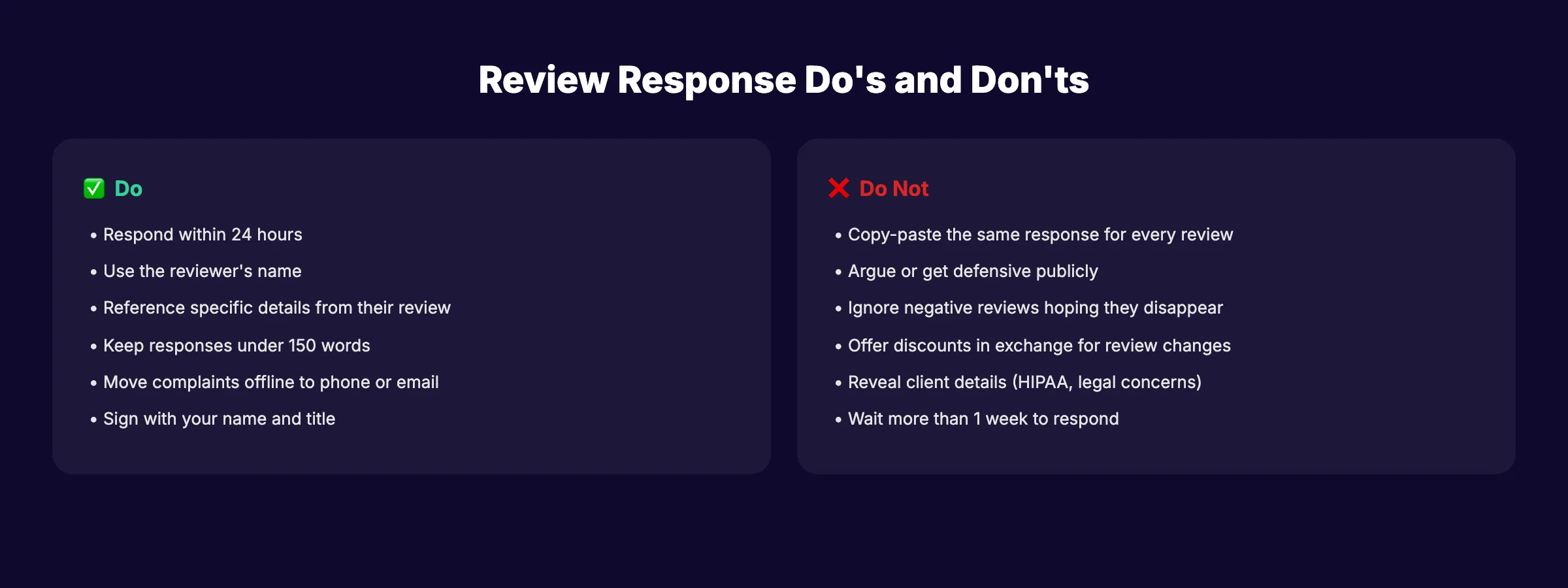
Do
- ✓ Respond to every review within 24 hours
- ✓ Use the reviewer's first name
- ✓ Reference specific details from their review
- ✓ Keep responses under 150 words
- ✓ Move complaints offline to phone or email
- ✓ Sign with your name and title
- ✓ Include natural keywords when relevant (city, service type)
- ✓ Vary your response wording across reviews
- ✓ Thank positive reviewers genuinely
- ✓ Apologize first in negative responses
Do Not
- ✓ Copy-paste identical responses for every review
- ✓ Argue or get defensive publicly
- ✓ Ignore negative reviews and hope they disappear
- ✓ Offer discounts or incentives for review changes
- ✓ Reveal private client information (HIPAA, legal, financial)
- ✓ Wait longer than 7 days to respond
- ✓ Use the response to promote unrelated services
- ✓ Ask the reviewer to leave another review elsewhere
- ✓ Blame the customer for the problem
- ✓ Write responses longer than 200 words
Using Review Responses for SEO
Every response adds indexed content to your Google Business Profile. Smart responses include natural keyword mentions that boost your profile's relevance for local searches.
How to Add Keywords Naturally
Bad (keyword stuffing): "Thank you for choosing our Austin roofing company. We are the best roofing company in Austin TX for roof replacement Austin and roof repair Austin."
Good (natural mention): "Thank you, Sarah. We are glad the roof replacement went smoothly. Your home in Cedar Park looks great with the new architectural shingles. We appreciate your trust."
The second response includes "roof replacement," "Cedar Park" (a service area), and "architectural shingles" (a service detail) without feeling forced.
Response Length and SEO
Research shows that top-ranking businesses write review responses averaging 140+ words. Businesses in lower positions average around 100 words. Longer, more detailed responses provide more indexed content and signal higher engagement to Google.
You do not need to write 140 words for every response. But aim for 50 to 100 words on average. A 10-word "Thanks for the review!" adds minimal SEO value.
For more on generating reviews to respond to, see our guide on getting more Google reviews. For automating your responses, try our review response generator.
Rank everywhere. Do nothing. Blog SEO, Local SEO, and Social on autopilot. theStacc starts at $49/mo.
How to Set Up a Review Response System
Responding to every review within 24 hours requires a system. Here is how to build one.
Step 1: Enable Notifications
Turn on Google Business Profile notifications for new reviews. Set email and mobile push notifications. Do not rely on checking the dashboard manually.
Step 2: Assign Ownership
Decide who responds. Options:
| Who | Best For | Response Time |
|---|---|---|
| Business owner | Solo businesses | Within 24 hours |
| Office manager | Small teams | Same business day |
| Dedicated team member | Multi-location businesses | Within 4 hours |
| Review management tool | High-volume businesses | Within 1 hour |
Step 3: Create a Response Template Library
Build a library of 10 to 15 response templates covering:
- 5-star reviews (3 to 4 variations)
- 4-star reviews (2 to 3 variations)
- 3-star reviews (2 to 3 variations)
- 1-2 star reviews (3 to 4 variations)
- Fake or spam reviews (1 to 2 templates)
Customize each template for the specific review. Never paste templates word for word.
Step 4: Track Your Response Rate
Monitor these metrics monthly:
- Response rate: Target 100%. Every review gets a response.
- Average response time: Target under 24 hours.
- Review sentiment trend: Track whether new reviews are trending positive or negative.
- Review volume: Target 2 to 4 new reviews per month minimum.
For tools to manage review responses across locations, see our list of review management tools.
Industry-Specific Response Considerations
Different industries face unique review response challenges.
Healthcare (Dentists, Therapists, Chiropractors)
HIPAA regulations prevent you from confirming whether someone is a patient. Never reference appointment dates, treatments, or diagnoses in a public response. Keep responses general: "We take patient satisfaction seriously. Please contact our office so we can discuss your experience privately."
Legal Services
Attorney-client privilege applies even in review responses. Never reference case details, outcomes, or confirm the reviewer was a client. Acknowledge the feedback and invite direct contact.
Home Services (Plumbing, Electrical, HVAC)
Project details are fair game with permission. Reference the type of work, timeline, and location (city or neighborhood). These details add local keyword relevance to your profile.
Restaurants and Retail
Speed matters more here. Diners expect responses within hours, not days. Address food quality, service speed, and atmosphere concerns specifically. Offer to make the next visit better rather than offering refunds publicly.
What practitioners are saying on X
AI search advice ages quickly. Here is high-signal public discussion from SEO and growth operators — context for your roadmap, not a substitute for primary data.
- @noelcetaSEO (Sep 2025): Local SEO playbook still centers complete GBP, NAP consistency, quality citations, local keywords, location content, review velocity, and local links. See the post on X.
- @irentdumpsters (Jan 2026): Most businesses have a GBP; few fully optimize every ranking-relevant section for Map Pack visibility. See the post on X.
- @EldarCohenSEO (Jul 2026): 2026 WhiteSpark-oriented reminder: primary Google Business category is a top Map Pack ranking factor — wrong primary category can erase visibility for money queries. See the post on X.
Grok, AI Overviews, and multi-engine visibility
Local topics like “respond google reviews” get cited when GBP, NAP, reviews, and service-area steps are concrete. Grok mixes those web facts with Map Pack operator advice circulating on X.
- Google AI Overviews: Use passage-ready answers, tables, and FAQ schema where relevant.
- ChatGPT / Perplexity: Cite named sources next to key claims.
- Grok: Maintain accurate entity facts on-site and in high-signal X posts.
Rank higher in the Map Pack without a full-time local SEO hire. theStacc’s Local SEO module handles daily GBP posts, review reply workflows, and local visibility tracking — built for service businesses that need calls, not vanity rankings.
FAQ
Yes. Respond to every single review, positive and negative. 88% of consumers prefer businesses that respond to all reviews. Businesses responding to 80%+ of reviews see a measurable ranking boost. The time investment is 2 minutes per review. The ROI is significant.
Respond within 24 hours. 53% of consumers expect a response within a week, but faster is always better. A response within 2 hours signals exceptional service. After 7 days, the opportunity to make an impression on the reviewer and future readers diminishes significantly.
Yes. Review responses add indexed text content to your Google Business Profile. Google factors this content into relevance analysis. Businesses that respond to 80%+ of reviews see a 10% to 20% ranking boost. Response length and keyword relevance both contribute to the SEO benefit.
Flag the review for removal through your GBP dashboard. While waiting for Google to review it, respond publicly. State that you have no record of the customer, invite genuine customers to contact you directly, and keep the tone professional. Never accuse the reviewer of lying.
Never offer incentives or discounts in exchange for changing a review. This violates Google's policies. You can politely ask a customer to update their review after you resolve the issue, but the request must be genuine and without conditions. Focus on fixing the problem first.
Aim for 50 to 100 words on average. Research shows top-ranking businesses average 140+ words in their responses, but quality matters more than length. Every response should include the reviewer's name, a reference to their specific experience, and a sign-off with your name. Avoid generic 10-word replies.
Every review sitting unanswered is a missed opportunity. 97% of future customers will read your response. A 2-minute reply builds trust, boosts rankings, and shows the world how you treat the people who chose your business. Respond to every review. Do it within 24 hours. Make it personal. The compound effect on your reputation and rankings is measurable.
Related Tools & Resources
Free SEO Tools:
Best Lists:
Sources & references
- [1] Princeton / Georgia Tech et al. — GEO research (arXiv:2311.09735)
- [2] @noelcetaSEO on X — Local SEO playbook still centers complete GBP, NAP consistency, quality citations, local keywords, location content, rev
- [3] @irentdumpsters on X — Most businesses have a GBP; few fully optimize every ranking-relevant section for Map Pack visibility.
- [4] @EldarCohenSEO on X — 2026 WhiteSpark-oriented reminder: primary Google Business category is a top Map Pack ranking factor — wrong primary cat
- [5] Referenced source — www.brightlocal.com

Rank in the Map Pack, collect reviews, and keep every location active — on autopilot.
Weekly local SEO teardowns
One practical email a week. Map Pack, GBP, AI Overviews — no fluff. Unsubscribe anytime.