Learn how to implement schema markup that AI agents actually read. Covers JSON-LD, entity linking, and the 6 schema types that drive citations in 2026.
Short answer: AI agents do not read websites the way people do. They scan for structured signals and explicit entity relationships, which is why well-ranked pages still go uncited by ChatGPT, Perplexity and AI Overviews. This guide covers JSON-LD, entity linking and the six schema types that drive citations.
Your content ranks on page one. ChatGPT never cites it. Perplexity never surfaces your brand. Google AI Overviews skip your page entirely.
That is the reality for most websites in 2026. The problem is not your content quality. It is that AI agents do not read websites the way humans do. They scan for structured signals. They look for explicit entity relationships. They need machine-readable meaning, not clever copy.
Pages with complete schema markup are 2.5 times more likely to appear in AI-generated answers. Sites with thorough structured data see up to 40 percent more AI Overview appearances. Yet only 12.4 percent of websites use structured data at all. That gap is your opportunity.
We publish 3,500+ blog posts across 70+ industries and track every AI citation pattern. This guide covers the exact schema markup that AI agents read, how to implement it, and the common mistakes that block your content from being cited.
Here is what you will learn:
- How AI agents process schema markup differently from traditional search crawlers
- The 6 schema types that drive the most AI citations in 2026
- Step-by-step JSON-LD implementation for each schema type
- How entity linking prevents AI hallucinations about your brand
- The validation workflow that catches schema errors before AI agents see them
- Common mistakes that cause AI systems to ignore your structured data
Table of Contents
- How AI Agents Read Schema Markup
- The 6 Schema Types That Drive AI Citations
- Step 1: Implement Organization Schema With Entity Linking
- Step 2: Add Article and Author Schema for Credibility
- Step 3: Mark Up FAQ Content for Conversational Queries
- Step 4: Use HowTo Schema for Procedural Content
- Step 5: Add Product Schema for Commercial Pages
- Step 6: Implement Speakable Schema for Voice Search
- How to Validate Schema for AI Crawlers
- 6 Schema Mistakes That Block AI Citations
- FAQ
How AI Agents Read Schema Markup
AI agents do not browse your site like a human. They do not read paragraphs from top to bottom, admire your design, or follow your navigation menu. They scan for structured signals that tell them what your page contains, who created it, and whether it is trustworthy enough to cite.
The mechanism is indirect. AI engines do not parse JSON-LD in real time as they generate answers. Instead, they rely on search engine index enrichment. Google and Bing process your schema markup, validate it, and feed the structured data into their Knowledge Graphs and entity indexes. When ChatGPT, Perplexity, or Google AI Overviews generate a response, they query these enriched indexes to find sources.
This means schema markup functions as an API between your website and every AI system that reads it. You are not writing code for one search engine. You are creating a machine-readable data layer that feeds Google AI Overviews, ChatGPT Search, Perplexity, Gemini, Bing Copilot, and every emerging AI platform.
Why JSON-LD Is the Only Format That Matters
JSON-LD is the standard all major AI engines rely on to extract structured signals from your pages. It lives in a separate script block in the document head, completely independent of your HTML structure. You can add, update, or remove it without touching visual content.
Microdata and RDFa embed schema inside HTML tags. This creates parsing conflicts when AI engines process rich text. JSON-LD avoids these conflicts by keeping markup separate from content, giving AI systems a clean, unambiguous signal layer.
Google has recommended JSON-LD since 2015. Bing, Yahoo, and Yandex all support it. In 2026, every AI citation pipeline is built on JSON-LD. If your schema is in Microdata or RDFa, convert it. The migration takes minutes per page and eliminates an entire category of parsing errors.
The Citation Pipeline
Understanding how schema leads to citations helps you prioritize which types to implement first.
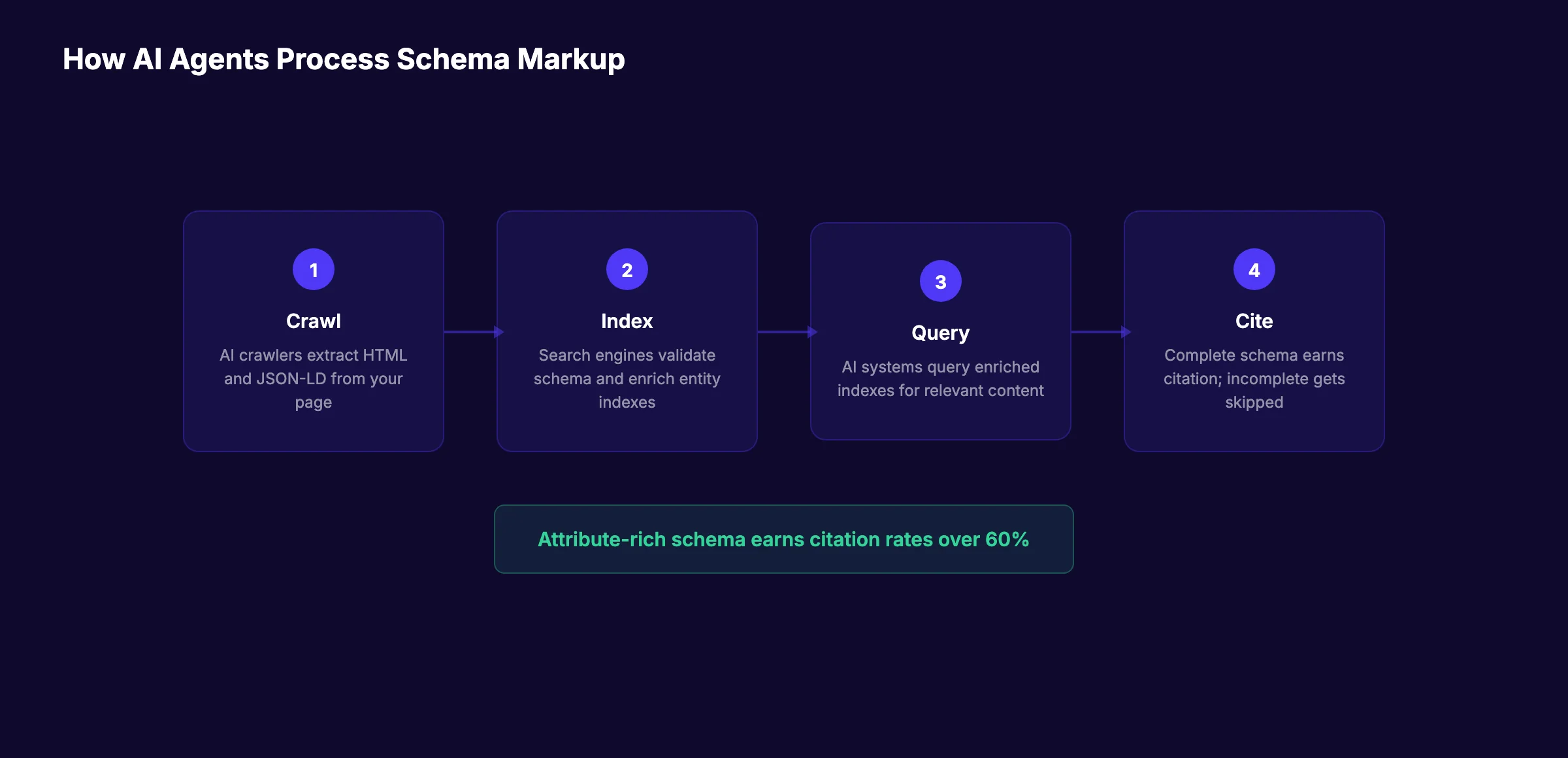
Step 1: Crawl. AI crawlers like GPTBot, PerplexityBot, and Googlebot visit your page and extract the HTML. If your schema is rendered client-side by JavaScript, crawlers may never see it. For a complete list of which AI crawlers can access your site, read our AI crawlers guide.
Step 2: Index enrichment. Search engines validate your schema against Schema.org definitions. Valid schema gets added to the entity index. Invalid or incomplete schema gets discarded.
Step 3: Query matching. When a user asks ChatGPT or Perplexity a question, the AI queries the enriched index for relevant entities and content types. FAQPage schema matches conversational queries. HowTo schema matches procedural questions. Article schema matches informational queries.
Step 4: Citation selection. The AI ranks candidate sources by relevance, authority, and schema completeness. Pages with attribute-rich schema earn citation rates over 60 percent. Pages with minimal or incomplete schema underperform pages with no schema at all.
A 2026 empirical study of 730 AI citations found that generic, partially-filled schema produces an 18-percentage-point citation penalty compared to having no schema at all. The reasoning is straightforward: AI engines interpret incomplete schema as a mismatch between what you claim and what you deliver.
The 6 Schema Types That Drive AI Citations
Not all schema types carry equal weight for AI visibility. Six types matter most in 2026. Each serves a distinct purpose in the citation pipeline.
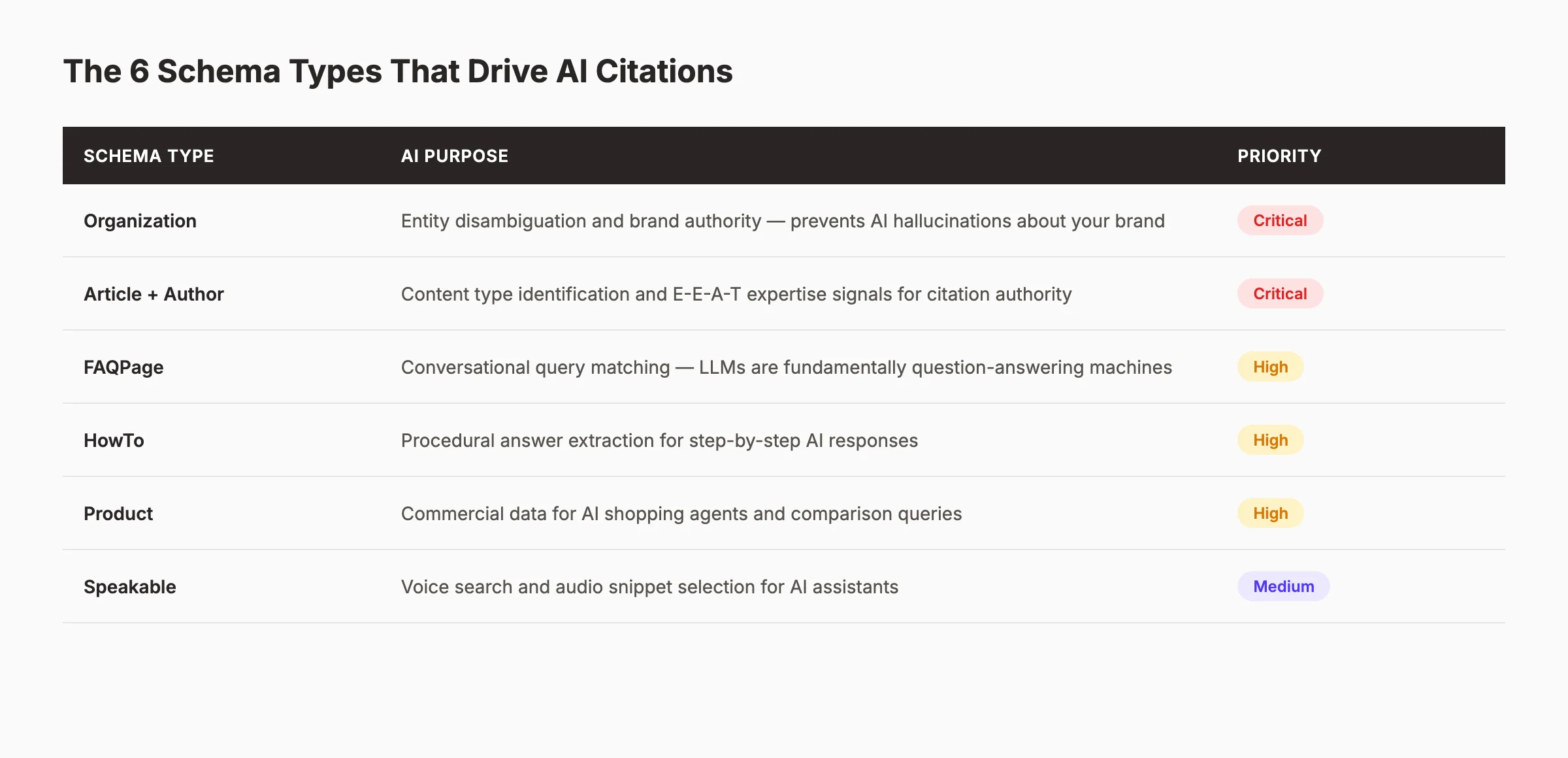
| Schema Type | AI Purpose | Priority |
|---|---|---|
| Organization | Entity disambiguation and brand authority | Critical |
| Article + Author | Content type identification and E-E-A-T signals | Critical |
| FAQPage | Conversational query matching | High |
| HowTo | Procedural answer extraction | High |
| Product | Commercial data for shopping queries | Medium-High |
| Speakable | Voice search and audio snippet selection | Medium |
Organization schema is the foundation. Without it, AI agents cannot confidently attribute your content to your brand. Article and Author schema encode expertise signals that AI models use to weight the authority behind a cited claim. FAQPage and HowTo schema match the question-answering format that dominates AI interactions. Product schema feeds commercial queries. Speakable schema prepares your content for voice-first AI assistants.
The rest of this guide walks through implementing each type with working JSON-LD examples. For a broader overview of structured data's role in AI search, see our structured data for AI search guide.
Step 1: Implement Organization Schema With Entity Linking
Organization schema is the single most important schema type for AI visibility. It tells AI agents who you are, what you do, and where to find authoritative information about your brand. Without it, AI systems guess. When they guess wrong, your brand gets misrepresented or ignored.
A Wells Fargo branch was incorrectly reported as closed for several months because AI systems lacked an authoritative entity reference. After implementing Organization schema with proper entity linking, the correction appeared within weeks. This is not a visibility problem. It is a brand accuracy problem.
The Basic Organization Schema
Start with the core properties every Organization schema needs:
{
  "@context": "https://schema.org",
  "@type": "Organization",
  "@id": "https://yourdomain.com/#organization",
  "name": "Your Company Name",
  "url": "https://yourdomain.com",
  "logo": {
    "@type": "ImageObject",
    "url": "https://yourdomain.com/logo.png",
    "width": 512,
    "height": 512
  },
  "description": "A concise description of what your company does",
  "sameAs": [
    "https://www.linkedin.com/company/yourcompany",
    "https://twitter.com/yourcompany",
    "https://www.facebook.com/yourcompany"
  ]
}
Place this in a script tag in the head of every page on your site. The @id property is critical. It creates a persistent identifier that AI systems use to consolidate information about your brand across multiple pages and external sources.
Entity Linking: The Critical Addition
Basic Organization schema is not enough. AI agents need to disambiguate your brand from every other entity that shares your name. Entity linking connects your Organization schema to authoritative external identifiers.
Add these properties to your Organization schema:
{
  "@context": "https://schema.org",
  "@type": "Organization",
  "@id": "https://yourdomain.com/#organization",
  "name": "Your Company Name",
  "url": "https://yourdomain.com",
  "sameAs": [
    "https://www.wikidata.org/entity/Q12345678",
    "https://www.crunchbase.com/organization/your-company",
    "https://www.linkedin.com/company/yourcompany",
    "https://www.g2.com/products/your-company"
  ],
  "knowsAbout": [
    "https://www.wikidata.org/entity/Q12345",
    "https://www.wikidata.org/entity/Q67890"
  ]
}
The sameAs array should include:
- Wikidata entry — the most authoritative identifier for entity disambiguation
- Crunchbase profile — for business and startup credibility
- LinkedIn company page — for professional entity verification
- Industry directories — G2, Capterra, or niche-specific directories
The knowsAbout array links your organization to specific topics using Wikidata entity IDs. This tells AI systems what subjects your brand has authority on, improving topical relevance for related queries.
Why this step matters: Without entity linking, AI agents cannot distinguish your brand from similarly named competitors or unrelated entities. This leads to hallucinations, misattributions, and missed citations. Entity linking transforms your Organization schema from a basic business card into an authoritative knowledge graph node. For more on building brand authority for AI search, see our brand entity SEO guide.
Step 2: Add Article and Author Schema for Credibility
AI agents evaluate the credibility of content before citing it. They look for authorship signals, publication dates, and expertise markers. Article schema combined with Author Person schema encodes these signals in a format AI systems can process without ambiguity.
Article Schema Structure
Every blog post, guide, and article should include Article schema:
{
  "@context": "https://schema.org",
  "@type": "Article",
  "@id": "https://yourdomain.com/blog/post-slug/#article",
  "headline": "Schema Markup for AI Agents: An Implementation Guide",
  "description": "Learn how to implement schema markup that AI agents actually read. Covers JSON-LD, entity linking, and the 6 schema types that drive citations in 2026.",
  "image": "https://yourdomain.com/images/featured-image.webp",
  "datePublished": "2026-07-10",
  "dateModified": "2026-06-28",
  "author": {
    "@id": "https://yourdomain.com/authors/sarah-chen/#person"
  },
  "publisher": {
    "@id": "https://yourdomain.com/#organization"
  },
  "mainEntityOfPage": {
    "@type": "WebPage",
    "@id": "https://yourdomain.com/blog/post-slug/"
  }
}
Key properties to include:
- headline — the exact title of your article
- datePublished and dateModified — ISO 8601 format with timezone
- author — a reference to a Person entity, not just a name string
- publisher — a reference back to your Organization schema
- mainEntityOfPage — links the article to its canonical URL
Author Person Schema
The author must be a full Person entity, not a text string. Inline "author": "Jane Smith" fails because there is no entity for AI systems to consolidate.
{
  "@context": "https://schema.org",
  "@type": "Person",
  "@id": "https://yourdomain.com/authors/sarah-chen/#person",
  "name": "Sarah Chen",
  "jobTitle": "Senior SEO Strategist",
  "description": "Schema markup and structured data specialist with 8 years of experience in technical SEO and AI search optimization.",
  "url": "https://yourdomain.com/authors/sarah-chen/",
  "image": "https://yourdomain.com/images/authors/sarah-chen.webp",
  "sameAs": [
    "https://www.linkedin.com/in/sarahchen",
    "https://twitter.com/sarahchen"
  ],
  "knowsAbout": [
    "https://www.wikidata.org/entity/Q180745",
    "https://www.wikidata.org/entity/Q638608",
    "https://www.wikidata.org/entity/Q1135163"
  ]
}
The knowsAbout array is where you encode expertise. Use Wikidata entity IDs for topics the author writes about. For an SEO strategist, this might include search engine optimization, structured data, and content marketing. For a medical writer, it might include specific conditions, treatments, and medical specialties.
Why this step matters: AI models use author entity signals to weight the expertise behind a cited claim. A Person node with a stable @id, dedicated profile URL, and knowsAbout declarations is the E-E-A-T-encoded entity that AI citation algorithms evaluate. Without it, your content lacks the authorship verification that separates authoritative sources from anonymous content. For more on building digital authority, read our guide on digital authority and AI trust.
What practitioners are saying on X
AI search advice ages quickly. Here is high-signal public discussion from SEO and growth operators — context for your roadmap, not a substitute for primary data.
- @hridoyreh (Mar 2026): Widely shared SEO skill tree: foundations, research, technical, on-page, content, links, AI SEO/GEO, analytics, UX, brand, programmatic — useful map for stats and how-to posts. See the post on X.
- @jakezward (Feb 2026): 2026 SEO predictions emphasize AI Overview share-of-SERP, schema for LLM token efficiency, brand mentions in AI answers as a KPI, proprietary data as a moat, and content refresh beating net-new AI slop. See the post on X.
- @alexgroberman (Jul 2026): Case narrative: organic value plus multi-engine citations (ChatGPT, Perplexity, Grok) from knowledge-hub pages, category authority links, commercial intent content, and tight internal linking — not thin product copy. See the post on X.
Grok, AI Overviews, and multi-engine visibility
Analytics and SEO setup pages should keep entity names and steps extractable for AI Overviews, ChatGPT, Perplexity, and Grok.
- Google AI Overviews: Use passage-ready answers, tables, and FAQ schema where relevant.
- ChatGPT / Perplexity: Cite named sources next to key claims.
- Grok: Maintain accurate entity facts on-site and in high-signal X posts.
Publish content built for Google and AI citations. theStacc Content SEO ships SEO-scored articles structured for rankings and generative engines.
Step 3: Mark Up FAQ Content for Conversational Queries
FAQPage schema is the highest-use schema type for AI citations because large language models are fundamentally question-answering machines. When a user asks ChatGPT or Perplexity a question, FAQPage schema gives the AI a direct mapping between the query and your answer.
Google restricted FAQ rich results in traditional SERPs in 2023. AI engines still rely on FAQPage schema heavily. Pages with FAQPage schema reach citation rates up to 2.7 times higher than pages without it.
FAQPage Schema Structure
```json { "@context": "https://schema.org", "@type": "FAQPage", "mainEntity": [ { "@type": "Question", "name": "What is schema markup for AI agents?", "acceptedAnswer": { "@type": "Answer", "text": "Schema markup for AI agents is structured data added to web pages that helps artificial intelligence systems understand, classify, and cite content accurately. It uses JSON-LD format to encode entities, relationships, and content types in a machine-readable format." } }, { "@type": "Question", "name": "Does schema markup improve AI search visibility?", "acceptedAnswer": { "@type": "Answer", "text": "Yes. Pages with complete schema markup are 2.5 times more likely to appear in AI-generated answers. Sites with thorough structured data see up to 40 percent more AI Overview appearances compared to sites without schema." } } ] } ```
Best Practices for FAQPage Schema
Each question-answer pair must be visible on the page. Hidden FAQ content violates Google's guidelines and can trigger manual actions. The text property in each Answer should be a complete, self-contained response. Do not truncate answers or use placeholder text.
Write questions in natural language, the way people actually ask them. "What is schema markup?" outperforms "Schema Markup Definition" in conversational AI queries. Include 3 to 8 question-answer pairs per page. More than 8 dilutes focus. Fewer than 3 does not provide enough signal.
Match your FAQ questions to the questions people ask in AI search. Review your search console data for query patterns. Look at the "People Also Ask" boxes in Google for your target keywords. These are the exact questions AI systems are trained to answer.
Why this step matters: FAQPage schema creates a direct pipeline between conversational queries and your content. When someone asks an AI assistant a question that matches your FAQ, the AI can extract your exact answer with confidence. Without FAQPage schema, the AI must infer the question-answer structure from unstructured text, which increases the chance of misinterpretation or omission.
Stop writing. Start ranking. theStacc publishes 30 SEO articles per month with proper structured data and FAQPage schema. Automatically.
Step 4: Use HowTo Schema for Procedural Content
HowTo schema marks up step-by-step instructions in a format AI systems can parse, reorder, and cite as numbered procedures. It is essential for guides, tutorials, recipes, and any content that teaches a process.
HowTo Schema Structure
{
  "@context": "https://schema.org",
  "@type": "HowTo",
  "name": "How to Implement Schema Markup for AI Agents",
  "description": "A step-by-step guide to adding structured data that AI search engines can read and cite.",
  "totalTime": "PT45M",
  "supply": [
    {
      "@type": "HowToSupply",
      "name": "Access to your website's HTML or CMS"
    },
    {
      "@type": "HowToSupply",
      "name": "Schema.org validator"
    }
  ],
  "tool": [
    {
      "@type": "HowToTool",
      "name": "Google Rich Results Test"
    },
    {
      "@type": "HowToTool",
      "name": "Schema markup generator"
    }
  ],
  "step": [
    {
      "@type": "HowToStep",
      "name": "Add Organization schema with entity linking",
      "text": "Create a JSON-LD Organization block in your page head. Include name, URL, logo, sameAs links to authoritative profiles, and knowsAbout topics using Wikidata IDs.",
      "url": "https://yourdomain.com/blog/schema-markup-ai-agents/#step-1"
    },
    {
      "@type": "HowToStep",
      "name": "Implement Article and Author schema",
      "text": "Add Article schema to every blog post with headline, publication dates, and references to full Person entities for authors. Include publisher reference back to Organization schema.",
      "url": "https://yourdomain.com/blog/schema-markup-ai-agents/#step-2"
    }
  ]
}
HowTo Schema Best Practices
Include totalTime using ISO 8601 duration format. List required supplies and tools. Each step needs a name, text, and optional url linking to the section anchor on your page.
The text property should be a complete description of the step, not just a title. AI systems use this text to generate procedural answers. A step with only a name provides no usable content for citation.
Link each step to its corresponding section using the url property. This creates a bidirectional relationship between the schema and the visible content, reinforcing the connection for AI crawlers.
Why this step matters: HowTo schema enables AI systems to extract your procedural content as numbered steps. When a user asks "How do I add schema markup to my website?" an AI assistant can cite your exact steps in order. Without HowTo schema, the AI must parse unstructured text to identify steps, which leads to skipped steps, incorrect ordering, or omission of your content entirely. For more on optimizing procedural content for AI search, see our AI overview optimization guide.
Step 5: Add Product Schema for Commercial Pages
Product schema feeds commercial data into AI shopping agents and comparison tools. When someone asks an AI assistant to compare products or find the best option in a category, Product schema determines whether your offerings appear in the response.
Product Schema Structure
{
  "@context": "https://schema.org",
  "@type": "Product",
  "@id": "https://yourdomain.com/products/seo-tool/#product",
  "name": "theStacc SEO Platform",
  "image": [
    "https://yourdomain.com/images/product-1.webp",
    "https://yourdomain.com/images/product-2.webp"
  ],
  "description": "Automated SEO content platform that publishes optimized blog posts with structured data.",
  "sku": "STACC-SEO-001",
  "brand": {
    "@type": "Brand",
    "name": "theStacc"
  },
  "aggregateRating": {
    "@type": "AggregateRating",
    "ratingValue": "4.8",
    "reviewCount": "127"
  },
  "offers": {
    "@type": "Offer",
    "url": "https://yourdomain.com/pricing/",
    "priceCurrency": "USD",
    "price": "149.00",
    "availability": "https://schema.org/InStock",
    "priceValidUntil": "2026-12-31"
  }
}
Product Schema Essentials
Always include AggregateRating and Offers. These are the properties AI shopping agents rely on most. Without price and availability data, your product cannot appear in AI-generated comparison tables or "best of" recommendations.
Include multiple images in the image array. AI systems use product images for visual search and shopping features. Use high-resolution images with descriptive file names.
The sku property creates a persistent product identifier. This helps AI systems consolidate product information across multiple pages and external sources, reducing the chance of duplicate or conflicting data.
Why this step matters: Perplexity's "Buy with Pro" module uses schema to filter and rank product listings. Pages missing price or product type definitions are deprioritized. ChatGPT sources ecommerce data through OpenAI's GPTBot and Bing's structured data index. Product recommendations in AI-generated responses are composed using schema fields embedded in source code, not through manual curation. Without Product schema, your commercial pages are invisible to AI shopping agents.
Step 6: Implement Speakable Schema for Voice Search
Speakable schema identifies sections of your content that are optimized for audio playback. As voice-first AI assistants like Siri, Alexa, and Google Assistant become primary search interfaces, Speakable schema ensures your content gets selected for spoken answers.
Speakable Schema Structure
{
  "@context": "https://schema.org",
  "@type": "WebPage",
  "@id": "https://yourdomain.com/blog/post-slug/#webpage",
  "speakable": {
    "@type": "SpeakableSpecification",
    "cssSelector": [".speakable-intro", ".speakable-summary"]
  }
}
Add CSS classes to the HTML elements you want marked as speakable:
<p class="speakable-intro">
  Schema markup is structured data that helps AI agents understand and cite your content.
  This guide covers the six schema types that drive the most AI citations in 2026.
</p>
Speakable Best Practices
Mark 1 to 3 concise sections per page. Each speakable section should be 1 to 2 sentences, written in natural spoken language. Avoid lists, tables, and code blocks in speakable sections. These do not translate well to audio.
Write speakable content as if you are explaining the topic to someone over the phone. Use contractions in spoken content even if your written style avoids them. Spoken language is more casual than written language.
Why this step matters: Voice search is growing faster than text search. AI assistants read speakable content aloud when users ask questions. Without Speakable schema, your content is not eligible for voice search citations. This is a emerging channel where early adopters gain disproportionate visibility. For a broader look at GEO strategies across all AI platforms, read our cross-platform GEO guide.
How to Validate Schema for AI Crawlers
Schema that contains errors is worse than no schema at all. A validation workflow catches problems before AI agents see them.
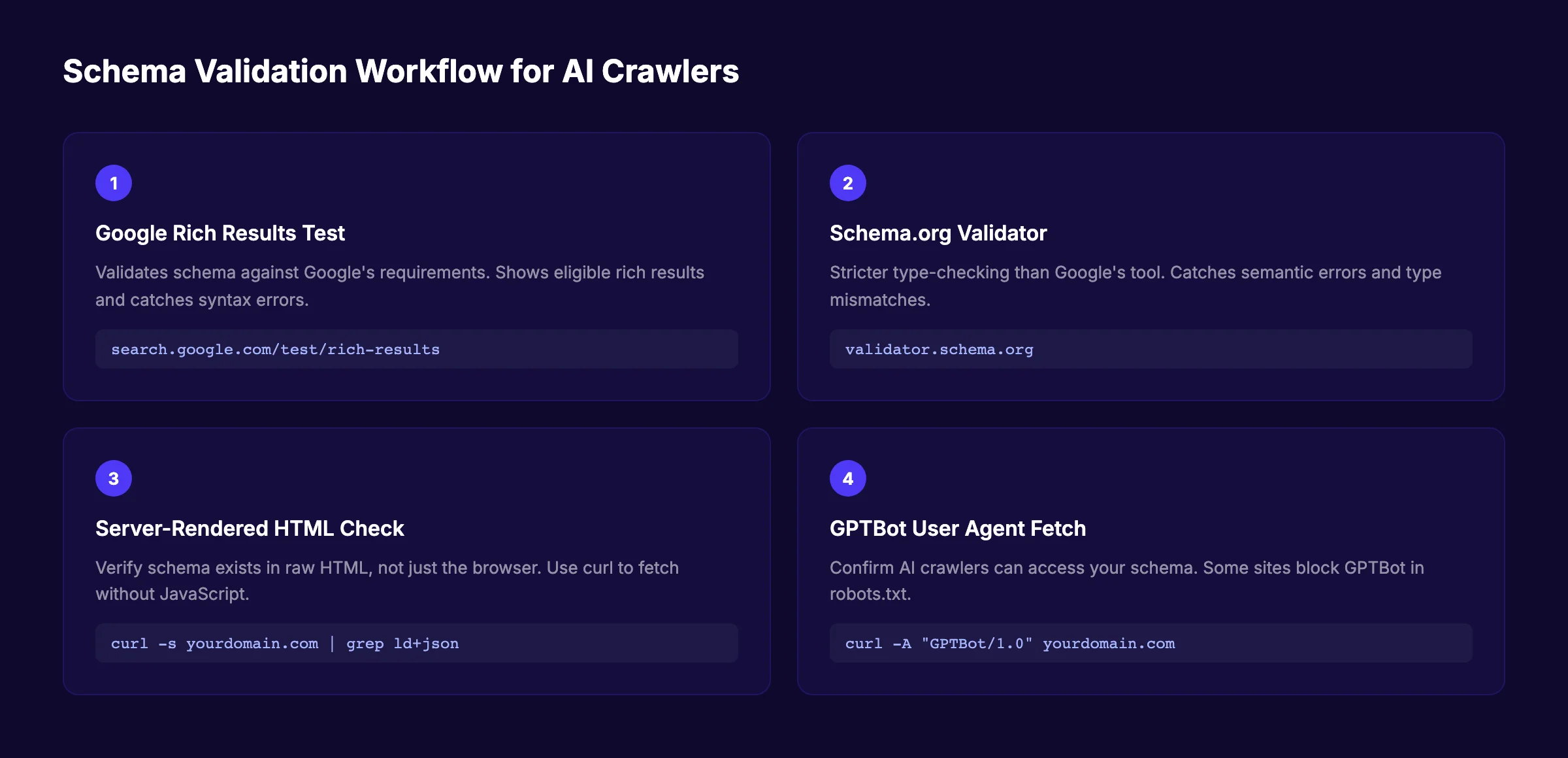
Step 1: Google's Rich Results Test
Run every page through Google's Rich Results Test. This tool validates schema against Google's specific requirements and shows which rich results your page is eligible for. It catches syntax errors, missing required properties, and type mismatches.
Step 2: Schema.org Validator
Run the same markup through the Schema.org validator for stricter type-checking. Google's validator is lenient about some issues that Schema.org flags. The Schema.org validator catches semantic errors that Google's tool might miss.
Step 3: Server-Rendered HTML Check
This is the most important step and the one most websites skip. Use curl or a headless browser to fetch your page without JavaScript execution. Verify that the JSON-LD script tag appears in the raw HTML response.
curl -s https://yourdomain.com/blog/post-slug/ | grep -o 'application/ld+json'If the grep returns nothing, your schema is rendered client-side. AI crawlers will never see it. Fix this by server-rendering the schema or using a static site generator that includes JSON-LD in the initial HTML.
Single-page applications and partially hydrated React sites routinely render perfect schema in the browser and serve nothing to crawlers. If your content does not survive a curl request, AI agents will never see it. For a complete technical SEO audit that catches these issues, use our technical SEO checklist.
Step 4: GPTBot Fetch Test
Confirm your schema is visible to AI-specific crawlers. Fetch your page using ChatGPT's GPTBot user agent:
curl -A "Mozilla/5.0 AppleWebKit/537.36 (KHTML, like Gecko; compatible; GPTBot/1.0; +https://openai.com/gptbot)" \
  -s https://yourdomain.com/blog/post-slug/ | grep -o 'application/ld+json'
Some sites block AI crawlers in robots.txt. If you want AI citations, verify that GPTBot, PerplexityBot, and other AI crawlers can access your pages and schema.
6 Schema Mistakes That Block AI Citations
Even experienced SEO professionals make these errors. Each one reduces or eliminates your chances of being cited by AI systems.
Mistake 1: Client-Side Rendered Schema
Schema added by JavaScript after page load is invisible to most AI crawlers. If your schema only appears in the browser's developer tools and not in the raw HTML response, fix your rendering pipeline immediately.
Fix: Server-render all JSON-LD schema. Use static site generation, server-side rendering, or edge functions to inject schema into the initial HTML response.
Mistake 2: Incomplete or Generic Schema
A Product schema with only the name filled in is a false signal. A 2026 study found that generic, partially-filled schema produces an 18-percentage-point citation penalty compared to no schema at all.
Fix: Fill every relevant property for each schema type. Empty optional fields are fine. Partially filled required fields are not. If you cannot complete a schema type properly, remove it until you can.
Mistake 3: Schema-Content Mismatch
AI agents deprioritize content where schema data contradicts visible page content. If your FAQPage schema says your price is $99 but your page shows $149, the AI flags the inconsistency.
Fix: Audit schema against visible content quarterly. Update schema immediately when page content changes. Use automated testing to catch mismatches before deployment.
Mistake 4: Missing Entity References
Using text strings instead of entity references for authors, publishers, and organizations breaks the knowledge graph connections that AI systems rely on.
Fix: Always use @id references for related entities. Never inline a name string where an entity reference is expected. Create dedicated Person and Organization pages with their own schema.
Mistake 5: Outdated Schema Types
Schema.org evolves continuously. Using deprecated types or properties reduces validity. The MedicalWebPage type was replaced by more specific health types. Some properties have been superseded by newer alternatives.
Fix: Review the Schema.org changelog annually. Update your schema implementation to use current types and properties. Subscribe to the Schema.org releases mailing list for updates.
Mistake 6: No Schema on Key Pages
Homepages, about pages, and contact pages often lack schema entirely. These are the pages AI systems check first when evaluating brand authority.
Fix: Add Organization schema to your homepage. Add LocalBusiness schema to your contact page. Add AboutPage schema to your about page. Every page on your site should have at least one schema type. For local businesses, our local business schema for AI search guide covers location-specific structured data in detail.
FAQ
What is schema markup for AI agents?
Schema markup for AI agents is structured data added to web pages that helps artificial intelligence systems understand, classify, and cite content accurately. It uses JSON-LD format to encode entities, relationships, and content types in a machine-readable format that AI search engines like ChatGPT, Perplexity, and Google AI Overviews can process.
Does schema markup improve AI search visibility?
Yes. Pages with complete schema markup are 2.5 times more likely to appear in AI-generated answers. Sites with thorough structured data see up to 40 percent more AI Overview appearances. SE Ranking found that 65 percent of pages cited by Google AI Mode and 71 percent cited by ChatGPT include structured data.
Which schema types matter most for AI citations in 2026?
The six most important schema types are Organization (with entity linking), Article (with Author Person entities), FAQPage, HowTo, Product, and Speakable. Organization schema prevents brand hallucinations. Article and Author schema encode expertise signals. FAQPage and HowTo schema match conversational queries. Product schema feeds commercial AI agents. Speakable schema enables voice search citations.
Is JSON-LD better than Microdata for AI search?
Yes. JSON-LD is the preferred format for all major AI engines. It lives in a separate script block, independent of HTML structure, giving AI systems a clean, unambiguous signal layer. Microdata and RDFa embed schema inside HTML tags, creating parsing conflicts when AI engines process rich text.
How do I validate schema markup for AI crawlers?
Use a four-step validation workflow: (1) Google's Rich Results Test for syntax and eligibility, (2) Schema.org validator for semantic accuracy, (3) a server-rendered HTML check using curl to confirm schema exists in the raw response, and (4) a GPTBot user agent fetch to verify AI crawlers can access your schema.
Can incomplete schema hurt my AI visibility?
Yes. A 2026 empirical study of 730 AI citations found that generic, partially-filled schema produces an 18-percentage-point citation penalty compared to having no schema at all. AI engines interpret incomplete schema as a mismatch between what you claim and what you deliver. Either implement schema completely or do not implement it at all.
What to Expect After Implementation
After completing the steps in this guide, you should expect:
- Immediate: Valid schema on every key page, confirmed by the validation workflow
- 30 to 60 days: Improved appearance in Google AI Overviews for targeted queries
- 60 to 90 days: Increased brand citations in ChatGPT and Perplexity responses
- Ongoing: Higher citation rates as AI systems consolidate your entity data into their knowledge graphs
Schema markup is not a one-time task. As your content changes, your schema must change with it. Set a quarterly audit reminder. Review schema accuracy after every major content update. Keep your entity links current as your brand presence grows across platforms.
The websites that dominate AI search in 2026 are not the ones with the most content. They are the ones with the most machine-readable content. Schema markup is the layer that makes your expertise accessible to AI systems. Implement it completely, validate it rigorously, and maintain it consistently.
Which schema type will you implement first — Organization with entity linking, Article with Author schema, or FAQPage for conversational queries? Start with Organization schema. Everything else builds on it.
Start publishing AI-optimized content with theStacc →
Related Tools & Resources
Free SEO Tools:
Best Lists:
Sources & references

Plan topics, review article drafts, and publish to a connected CMS.
Weekly local SEO teardowns
One practical email a week. Map Pack, GBP, AI Overviews. No fluff. Unsubscribe anytime.
Explore this topic: Schema Markup / Structured Data.