Write content briefs that produce first-draft-ready articles. 7 steps, a free template, and a grading checklist. Less than 15% revision rate.
A content brief template saves you from the most expensive mistake in content marketing. You assign a topic, the writer delivers something unusable, and the revision cycle starts. Two rounds later, you have wasted 6 hours and still do not have a publishable article.
The problem is not the writer. The problem is the brief.
According to Compose.ly, less than 15% of content requires revisions when detailed briefs are used. Without a brief, that number flips. Most articles need 2 to 3 revision rounds before they are ready to publish.
We have published 3,500+ blogs across 70+ industries. Every article starts with a structured content brief. The brief is the single document that determines whether the writer produces a first-draft-ready article or a rewrite.
Here is what you will learn:
- The 7 steps to write a content brief that eliminates revision cycles
- What to include (and what to leave out) for each brief section
- A free content brief template you can copy and use today
- How to grade your brief before sending it to a writer
- How to adapt briefs for AI-assisted writing workflows
Time required: 20 to 30 minutes per brief Difficulty: Beginner What you need: Access to Google Search, a keyword research tool (free works), and the template below
What Is a Content Brief?
A content brief is a document that tells a writer exactly what to create. It covers the target keyword, audience, structure, word count, links to include, and the goal of the piece.
A good brief answers every question the writer would ask before starting. A bad brief leaves gaps that the writer fills with guesses. Those guesses create revisions.
Content briefs are not creative briefs. A creative brief covers brand campaigns, visual identity, and messaging direction. A content brief is tactical. It covers one article, one keyword, one search intent.
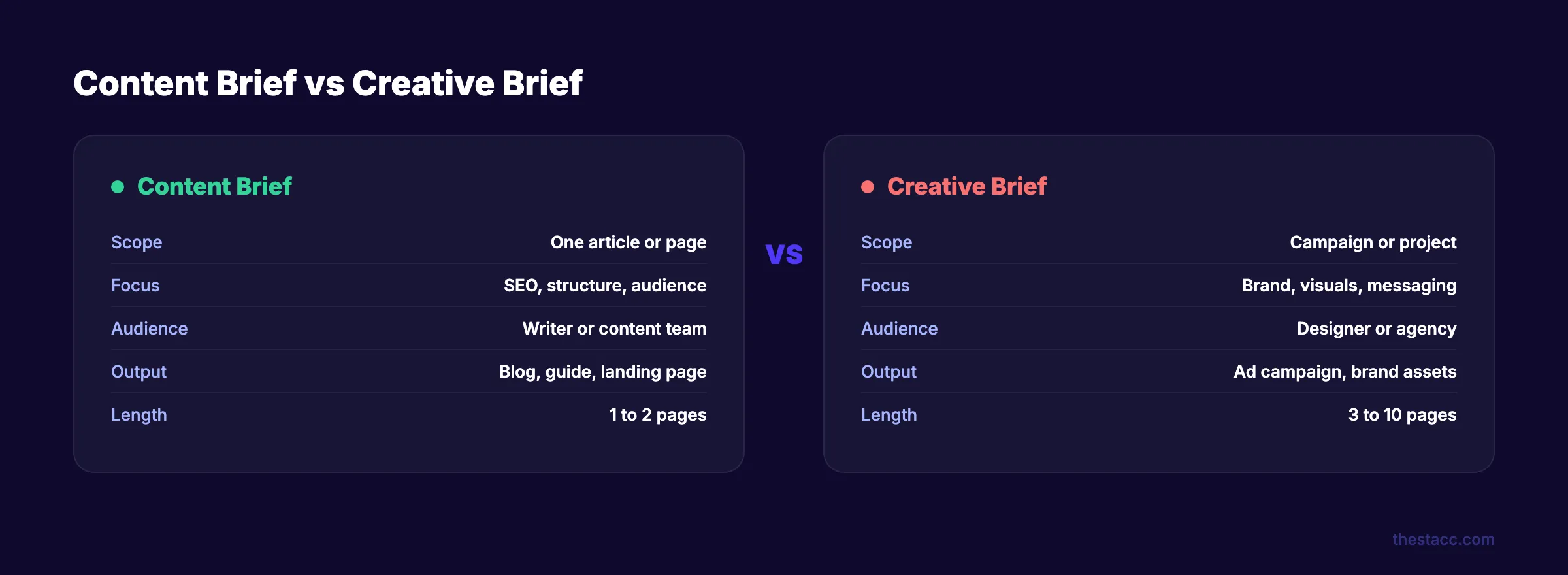
Here is the difference:
| Element | Content Brief | Creative Brief |
|---|---|---|
| Scope | One article or page | Campaign or project |
| Focus | SEO, structure, audience | Brand, visuals, messaging |
| Audience | Writer or content team | Designer or agency |
| Output | Blog post, guide, landing page | Ad campaign, brand assets |
| Length | 1 to 2 pages | 3 to 10 pages |
Every content marketing strategy depends on briefs. Without them, you are managing writers through email threads and Slack messages. That does not scale.
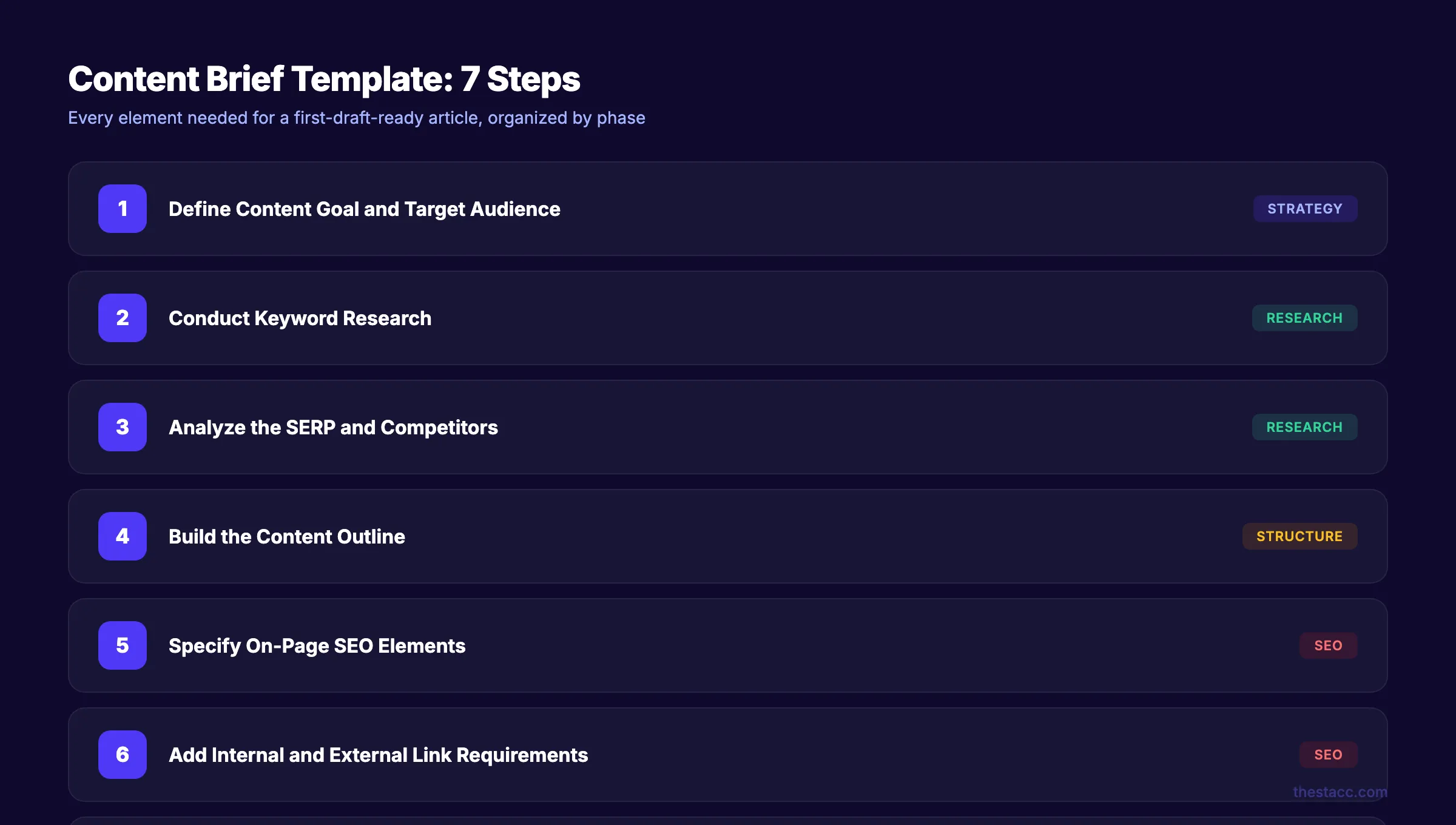
Step 1: Define the Content Goal and Target Audience
Every brief starts with two questions. What should this article accomplish? Who is it for?
Define the content goal. Pick one primary goal per article. Not three. One.
Common content goals:
- Organic traffic. Rank for a target keyword and drive new visitors
- Lead generation. Convert readers into email subscribers or trial signups
- Product education. Explain how a feature works to existing users
- Link building. Create a resource other sites will reference and link to
- Brand authority. Establish expertise on a topic within your niche
Define the target audience. Generic audience descriptions produce generic content. "Marketing professionals" tells the writer nothing. Be specific.
Good audience definition:
Marketing managers at B2B SaaS companies (50 to 200 employees) who manage content production without a dedicated SEO team. They know basic SEO but do not have time to do keyword research or SERP analysis for every article.
Bad audience definition:
People interested in content marketing.
Include the buyer persona name if your team uses them. Mention the funnel stage. A top-of-funnel awareness article reads differently than a bottom-of-funnel comparison page.
| Funnel Stage | Content Type | Tone |
|---|---|---|
| Top (Awareness) | What-is guides, stat roundups, beginner tutorials | Educational, broad |
| Middle (Consideration) | How-to guides, templates, checklists | Practical, specific |
| Bottom (Decision) | Comparisons, reviews, case studies | Persuasive, evidence-heavy |
Why this step matters: A writer who knows the goal writes a different article than one who does not. "Drive organic traffic for B2B SaaS marketers" produces a keyword-focused, search-intent-matched piece. "Write about content briefs" produces a generic essay.
Step 2: Conduct Keyword Research
The brief must include a primary keyword and 3 to 5 secondary keywords. Do not leave keyword selection to the writer. That decision belongs to the strategist.
Primary keyword: The exact phrase you want this article to rank for. One per brief. Check that it has search volume and matches the content format you are planning.
Secondary keywords: Related terms and long-tail variations that should appear naturally in the article. These help the article rank for multiple queries.
Where to find keywords:
- Google's "People Also Ask" section for your primary keyword
- Google's "Related searches" at the bottom of the SERP
- Free tools like Google Keyword Planner or Ubersuggest
- Paid tools like Ahrefs, Semrush, or keyword research tools
Include in your brief:
- ✓ Primary keyword with monthly search volume
- ✓ 3 to 5 secondary keywords
- ✓ Search intent (informational, commercial, transactional, navigational)
- ✓ Keyword difficulty score (if available)
Why this step matters: Search intent determines the entire structure of the article. If the keyword has informational intent, the article should educate. If it has commercial intent, the article should compare options. Getting this wrong means the article will never rank, regardless of quality.
Pro tip: Search the primary keyword yourself. Look at the top 5 results. If they are all listicles, do not write a narrative essay. Match the format that Google already rewards.
Step 3: Analyze the SERP and Competitors
This is the step most content briefs skip. It is also the step that matters most.
Open Google. Search your primary keyword. Study the top 5 ranking pages. This takes 15 to 20 minutes and prevents the most common content failures.
For each top-ranking page, document:
- Title and meta description format
- H2 and H3 heading structure
- Estimated word count
- Types of media (tables, images, videos, infographics)
- Unique angles or frameworks
- What they cover well
- What they miss entirely
The gaps are your opportunity. If every competitor covers 10 elements of a content brief but none mentions post-publication KPIs, that is your differentiator.
Include in your brief:
- ✓ Links to top 3 competitor articles
- ✓ Average word count of top 5 results
- ✓ Content format that dominates the SERP (listicle, guide, template, etc.)
- ✓ 2 to 3 content gaps competitors miss
- ✓ Featured snippet format (paragraph, list, or table)
This analysis also informs your blog post outline. The heading structure of top-ranking pages shows you what Google considers a complete answer.
Why this step matters: Writing without SERP analysis is guessing. You are asking a writer to outrank pages they have never seen. According to Semrush's SEO content brief guide, persona-based content targeting led to a 100% increase in page views and a 171% spike in marketing ROI.
Skip the content ops headache. theStacc publishes 30 SEO-optimized articles per month. No briefs, no writers, no revisions.
Step 4: Build the Content Outline
The outline is the skeleton of the article. It defines every H2 and H3 heading, the key points under each section, and the flow from introduction to conclusion.
Do not write "Introduction" and "Conclusion" as headings. Every heading should be descriptive and keyword-relevant.
Outline structure to include in the brief:
H2: [Descriptive Section Title]
  - Key point 1
  - Key point 2
  - [TABLE: comparison of X vs Y]
  H3: [Subsection if needed]
    - Supporting detail
    - [STAT: specific data point to include]

H2: [Next Section Title]
  - Key point 1
  - [IMAGE: describe what visual is needed]
  - Key point 2
Rules for the outline:
- Every H2 should be unique and scannable
- H3s sit under H2s. Never skip heading levels
- Include specific data points, stats, or examples the writer should find
- Note where tables, images, or callouts belong
- Include People Also Ask questions as H2 or H3 headings
A good outline has 6 to 10 H2 sections for a guide. Each H2 should have 2 to 4 key points underneath. This gives the writer enough structure to work efficiently without micro-managing every sentence.
Why this step matters: An outline reduces writing time by 30 to 40%. The writer does not need to decide what comes first, what to cover, or how deep to go. Those decisions are already made. It also ensures consistent blog post structure for SEO across your entire content library.
Pro tip: Include word count ranges per section, not just total word count. "This article should be 3,000 words" is less useful than "Introduction: 200 words, each H2: 300 to 400 words, FAQ: 150 words."
Step 5: Specify On-Page SEO Elements
These are the tactical elements that most writers miss unless you spell them out. Include every one of these in your brief.
Title tag:
- Under 60 characters
- Primary keyword near the front
- Include a power word or number
- Example: "How to Write a Content Brief in 7 Steps (Template)"
Meta description:
- 145 to 155 characters
- Include primary keyword
- Include a benefit or proof point
- Example: "Write content briefs that produce first-draft-ready articles. 7 steps, a free template, and a grading checklist."
Learn more in our guide to writing meta descriptions that drive clicks.
URL slug:
- Lowercase, hyphenated, no stop words
- Match the primary keyword
- Example:
/blog/content-brief-template
Word count range:
- Provide a range, not a fixed number
- Base the range on competitor analysis from Step 3
- Example: "2,500 to 3,500 words"
Content format:
- Step-by-step guide, listicle, comparison, how-to, ultimate guide
- Match the format that dominates the SERP
Include in your brief:
- ✓ Title tag (under 60 characters)
- ✓ Meta description (145 to 155 characters)
- ✓ URL slug
- ✓ Word count range
- ✓ Content format
- ✓ Primary keyword placement: title, first 100 words, at least 1 H2, meta description
- ✓ Schema markup type if applicable (HowTo, FAQ, Article)
Why this step matters: These elements directly affect whether the article ranks. A writer who does not know the target word count will under-deliver or over-deliver. A writer who does not know the title tag format will write a headline that gets truncated in search results. On-page SEO starts in the brief.
Step 6: Add Internal and External Link Requirements
Links are not an afterthought. They belong in the brief.
Internal links:
Specify exactly which pages the writer should link to and suggest anchor text. Do not leave this to chance. Internal links build topical authority and keep readers on your site.
| Target Page | Suggested Anchor Text | Section Placement |
|---|---|---|
| /blog/keyword-research-guide | "keyword research process" | Step 2: Keywords |
| /blog/seo-content-writing | "SEO content writing" | Introduction |
| /glossary/search-intent | "search intent" | Step 2: Keywords |
Include 3 to 5 internal links per 1,000 words. Only link to pages that exist. Verify every URL before including it in the brief. Our guide to internal linking for blog posts covers the full strategy.
External links:
Provide 3 to 5 authoritative sources the writer can reference. Include the specific URL and what claim or stat it supports.
| Source | URL | Use For |
|---|---|---|
| Semrush study | semrush.com/blog/content-brief/ | Persona-based content ROI stat |
| HubSpot blog | blog.hubspot.com/marketing/content-brief | Template comparison |
Prioritize sources from Google, Ahrefs, Semrush, Moz, HubSpot, and industry research. Avoid linking to direct competitors.
Why this step matters: Writers who do not receive link targets either skip internal links entirely or link to random pages. Both hurt your SEO. Specifying links in the brief builds topic clusters intentionally, not by accident.
Step 7: Include Visual, CTA, and Brand Requirements
The final step covers everything outside the body text. These details prevent the most frustrating revision requests.
Visual requirements:
- Number of images needed (minimum 1 per 500 words)
- Types of visuals: screenshots, data charts, comparison tables, infographics
- Alt text requirements (descriptive, keyword-inclusive, under 125 characters)
- Image source: original, stock, tool-generated, or screenshots
- Check our guide on blog image optimization for SEO for best practices
Call-to-action (CTA):
- What the CTA promotes (free trial, newsletter, demo, download)
- CTA placement (after section 3, before FAQ, end of article)
- CTA format (inline text link, blockquote callout, button)
Brand voice and tone:
- Link to your brand voice guide
- List 3 to 5 words or phrases to avoid
- Note the tone (educational, conversational, authoritative, casual)
- Include any content writing rules the writer must follow
FAQ section:
- Include 4 to 6 questions from People Also Ask or Reddit
- The writer should answer each in 2 to 4 sentences
- FAQs improve featured snippet eligibility and AI citation rates
Why this step matters: Visual and CTA requirements generate the most revision requests when left unspecified. A writer who does not know about your brand voice will write in their own voice. A writer who does not know the CTA will end the article with a generic closing paragraph.
3,500+ blogs published. Every article is SEO-scored before publish. Every article starts with a brief. Every brief follows this process.
Content Brief Template (Copy and Use)
Here is the complete template with every element from the 7 steps above. Copy this for your next article assignment.
| Section | What to Include |
|---|---|
| Content Goal | Primary objective (traffic, leads, authority, links) |
| Target Audience | Specific persona, role, company size, knowledge level |
| Funnel Stage | TOFU / MOFU / BOFU |
| Primary Keyword | Exact phrase + search volume + intent |
| Secondary Keywords | 3 to 5 related terms |
| Competitor Analysis | Links to top 3 ranking pages + gaps identified |
| Content Outline | All H2/H3 headings with key points per section |
| Title Tag | Under 60 characters, keyword-first |
| Meta Description | 145 to 155 characters with keyword + benefit |
| URL Slug | Lowercase, hyphenated, keyword-based |
| Word Count Range | Based on competitor analysis |
| Internal Links | Specific URLs + suggested anchor text |
| External Links | Source URLs + what stat/claim they support |
| Visual Requirements | Number, type, alt text guidelines |
| CTA | What it promotes, where it goes, format |
| Brand Voice Notes | Tone, banned words, style rules |
| FAQ Questions | 4 to 6 questions from PAA or community forums |
| Deadline | Due date + review timeline |
Content Brief Grading Checklist
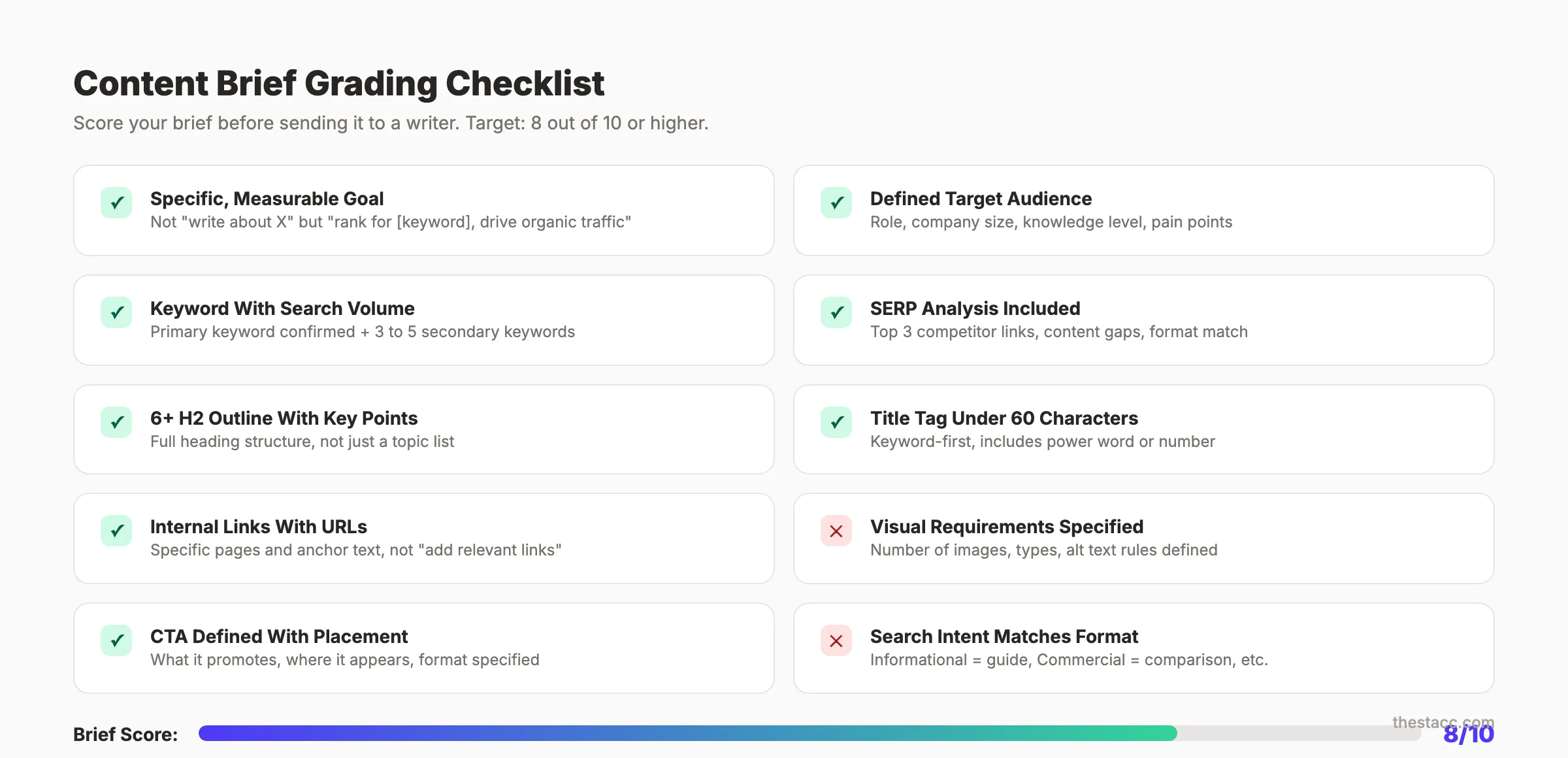
Before sending the brief to a writer, score it against this checklist. A brief that scores below 7 out of 10 will likely produce revision-heavy content.
- ✓ Goal is specific and measurable (not "write about X")
- ✓ Audience is defined beyond a job title
- ✓ Primary keyword has confirmed search volume
- ✓ Search intent matches the content format
- ✓ SERP analysis is included with competitor links
- ✓ Outline has 6+ H2 sections with key points
- ✓ Title tag is under 60 characters with the keyword
- ✓ Internal links are specified with URLs (not "add relevant links")
- ✓ Visual requirements state the number and type of images
- ✓ CTA is defined with placement and format
Score 8 or above before sending. Every unchecked item increases the odds of a revision cycle.
How to Adapt Briefs for AI Writing Workflows
If you use AI tools to draft content, your brief format changes slightly. AI writers need more structure and less context than human writers.
What to add for AI workflows:
- Exact heading structure (AI follows outlines literally)
- Specific examples and data points to include (AI will not research independently)
- Output format instructions (markdown, HTML, plain text)
- Banned phrases and words list (AI defaults to generic phrasing)
- Desired sentence length and paragraph limits
What to remove:
- Background context about your company (AI does not retain it between sessions)
- Subjective tone descriptions ("write like a friendly expert")
- Open-ended instructions ("add relevant examples")
Our guide on how to use AI to write blog posts covers the full workflow. The brief is the input that determines AI output quality. A vague brief produces vague AI content.
For teams that want to skip the brief-writing process entirely, content autopilot tools handle research, outlining, and writing in one workflow.
Results: What to Expect
After implementing this content brief template:
- Immediate: Writers spend less time asking clarification questions. First drafts arrive closer to publishable quality.
- Within 2 weeks: Revision cycles drop from 2 to 3 rounds to 0 to 1 round per article.
- Within 30 days: Content production speed increases. You publish more articles with the same team.
- Within 90 days: Articles written from structured briefs start ranking. You see which brief elements correlate with better performance.
The brief takes 20 to 30 minutes to create. It saves 2 to 4 hours per article in revisions and back-and-forth. That math works at any scale.
Rank everywhere. Do nothing. theStacc handles research, writing, and publishing. 30 articles per month, $99.
What practitioners are saying on X
AI search advice ages quickly. Here is high-signal public discussion from SEO and growth operators — context for your roadmap, not a substitute for primary data.
- @varunram (Jul 2026): Critique of GEO slopfarm products that combine SEO clickbait with unresearched content marketing — quality and research still separate winners from farms. See the post on X.
- @jakezward (Feb 2026): 2026 SEO predictions emphasize AI Overview share-of-SERP, schema for LLM token efficiency, brand mentions in AI answers as a KPI, proprietary data as a moat, and content refresh beating net-new AI slop. See the post on X.
- @HlynurStefDev (Jul 2026): Public case: niche site traffic jumped from ~18 to 4,162 Google visits/month after focused technical/on-page SEO work (GSC screenshots claimed) — reminds that fundamentals still move numbers. See the post on X.
Grok, AI Overviews, and multi-engine visibility
Content topics like “content brief template” get AI citations when process steps, quality bars, and examples are concrete. Operator consensus on X is clear: research-backed pages beat unedited bulk generation — reflect that honestly.
- Google AI Overviews: Use passage-ready answers, tables, and FAQ schema where relevant.
- ChatGPT / Perplexity: Cite named sources next to key claims.
- Grok: Maintain accurate entity facts on-site and in high-signal X posts.
Publish content built for Google and AI citations. theStacc’s Content SEO module ships SEO-scored articles structured for rankings and generative engines — including clearer entity pages models like Grok can quote.
FAQ
A content brief is a document that provides a writer with everything they need to produce a specific piece of content. It includes the target keyword, audience, outline, on-page SEO requirements, links, and visual needs. A good brief eliminates guesswork and reduces revision cycles.
One to two pages. Long enough to cover every element in the template above. Short enough that the writer actually reads it. If your brief exceeds 3 pages, you are over-briefing. Focus on structure and requirements, not style guidance the writer already knows.
A content brief covers one article or page. It is tactical and SEO-focused. A creative brief covers a campaign or project. It is strategic and brand-focused. Content briefs go to writers. Creative briefs go to designers and agencies.
Follow the 7 steps in this guide. The SEO-specific elements are keyword research (Step 2), SERP analysis (Step 3), and on-page SEO specifications (Step 5). These three steps ensure the article targets the right keyword, matches the ranking format, and includes all technical SEO requirements.
Yes. Tools like Frase, Surfer SEO, and Content Harmony generate briefs from a keyword input. They pull SERP data, suggest headings, and recommend word counts. However, automated briefs still need human review for audience context, brand voice, and strategic alignment. The best content optimization tools handle the research portions.
Do not include subjective instructions like "make it engaging" or "write something viral." Do not specify exact keyword density percentages. Do not include more than 10 secondary keywords. Do not write paragraphs of background context the writer will skip. Keep the brief actionable and scannable.
Content briefs are not paperwork. They are the single document that determines whether your content operation produces publishable articles or revision nightmares. Use the 7-step process, grade every brief before sending it, and watch your first-draft quality improve within weeks.
Related Tools & Resources
Free SEO Tools:
Best Lists:
Sources & references
- [1] Princeton / Georgia Tech et al. — GEO research (arXiv:2311.09735)
- [2] @varunram on X — Critique of GEO slopfarm products that combine SEO clickbait with unresearched content marketing — quality and research
- [3] @jakezward on X — 2026 SEO predictions emphasize AI Overview share-of-SERP, schema for LLM token efficiency, brand mentions in AI answers
- [4] @HlynurStefDev on X — Public case: niche site traffic jumped from ~18 to 4,162 Google visits/month after focused technical/on-page SEO work (G
- [5] Referenced source — www.compose.ly

Plan topics, review article drafts, and publish to a connected CMS.
Weekly local SEO teardowns
One practical email a week. Map Pack, GBP, AI Overviews — no fluff. Unsubscribe anytime.
Explore this topic: Content Brief.