
Google Knowledge Panel (2026): Strategies, Tactics & Examples
Step-by-step knowledge panel guide guide for 2026: proven tactics, real examples, common mistakes to avoid, and implementation tips.
A Google Knowledge Panel is the information box that appears on the right side of search results when someone searches for your brand name. It displays your logo, description, social links, and key facts. It is the single most visible trust signal on Google.
Most businesses do not have a Knowledge Panel. Google generates them automatically based on what its Knowledge Graph understands about an entity. You cannot request one directly. But you can build the conditions that make Google create one for you.
The process takes 3 to 12 months depending on your existing online presence. Businesses and individuals that follow the right steps earn a Knowledge Panel. Those that skip the fundamentals wait indefinitely.
We have published 3,500+ blog posts across 70+ industries. This guide covers exactly how to earn, claim, and optimize a Google Knowledge Panel for your business or personal brand.
Here is what you will learn:
- What a Google Knowledge Panel is and how Google creates them
- The exact requirements for earning a Knowledge Panel
- How to build your entity presence for the Knowledge Graph
- Step-by-step process for claiming and verifying your panel
- How to optimize your panel with schema markup and Wikidata
- Common mistakes that prevent Knowledge Panels from appearing
What Is a Google Knowledge Panel
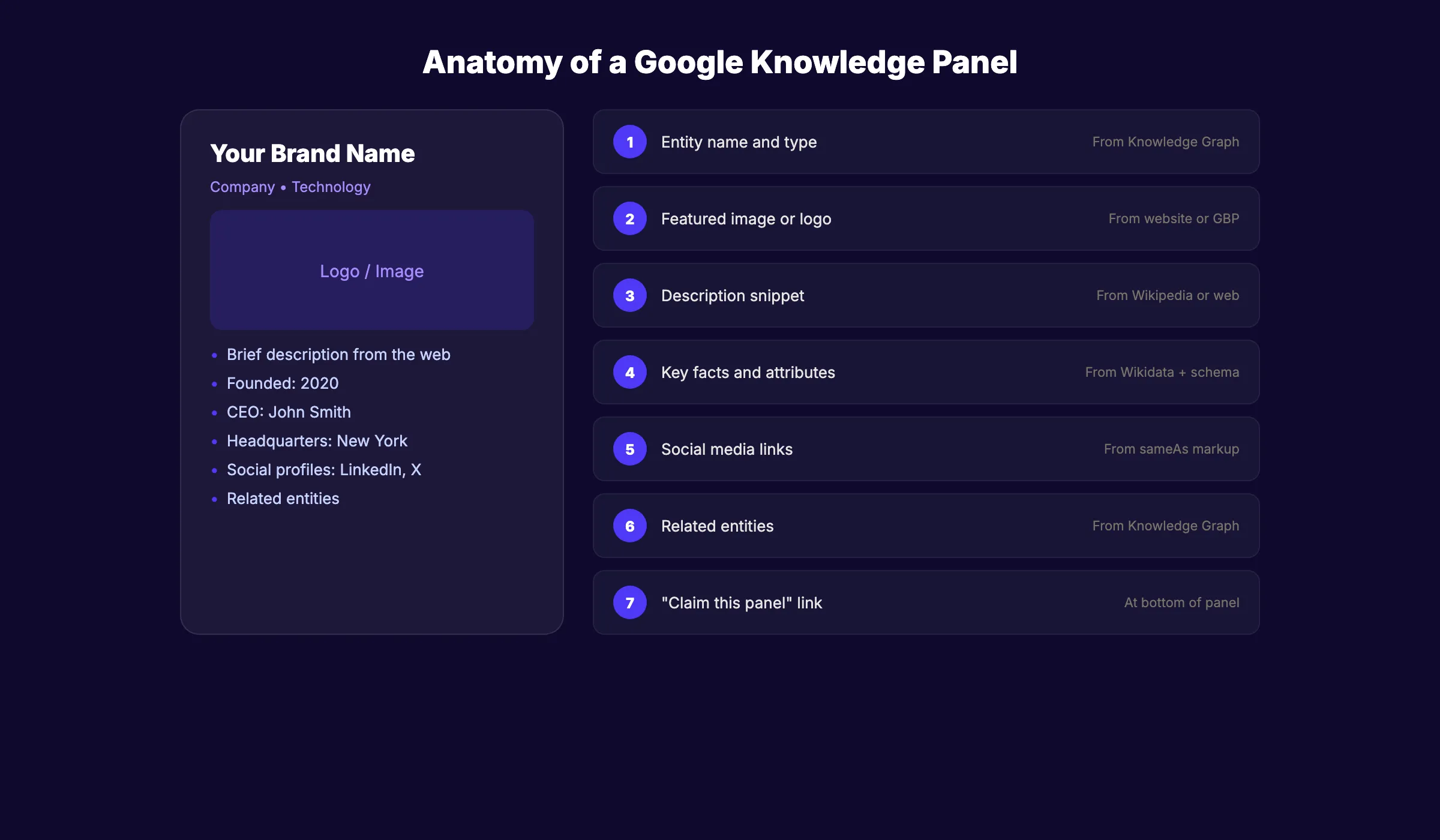
A Knowledge Panel is an information box that appears in Google search results when someone searches for a recognized entity. Entities include people, businesses, organizations, places, and things.
What Knowledge Panels Display
A typical Knowledge Panel includes:
- Entity name and type (person, business, organization)
- Brief description sourced from the web
- Logo or profile image
- Key facts (founding date, location, CEO, industry)
- Social media profile links
- Website URL
- Related entities (“People also search for”)
- Reviews and ratings (for businesses)
How Google Creates Knowledge Panels
Google’s Knowledge Graph is a database of entities and the relationships between them. Google populates the Knowledge Graph from multiple sources: Wikipedia, Wikidata, official websites, news articles, government databases, and structured data on web pages.
Knowledge Panels appear automatically when Google has enough information to confidently identify an entity. You cannot submit a request. Google decides based on available data.
Knowledge Panel vs Knowledge Card vs Featured Snippet
| Feature | Knowledge Panel | Knowledge Card | Featured Snippet |
|---|---|---|---|
| Location | Right side of results | Top of results | Top of results |
| Trigger | Entity search | Fact-based query | Question-based query |
| Source | Knowledge Graph | Knowledge Graph | Web page content |
| Example | ”Apple Inc" | "Height of Eiffel Tower" | "How to write meta tags” |
Knowledge Panels are entity-specific. They appear when someone searches for your brand, name, or organization. Featured snippets appear for question-based queries.
Stop writing. Start ranking. Stacc publishes 30 SEO articles per month for your business, automatically. Start for $1 →
Requirements for Earning a Knowledge Panel
Google does not publish an official checklist. But the requirements are well understood from years of analysis and Google’s own documentation.
The Core Requirement: Notability
Google must recognize your entity as notable. Notability means independent, reliable sources write about you. Press releases and self-published content do not count. Coverage from news outlets, industry publications, and authoritative websites does.
The rough threshold: 7 or more significant articles on high-authority, Google News-approved sites (DA 80+) dramatically improve your chances.
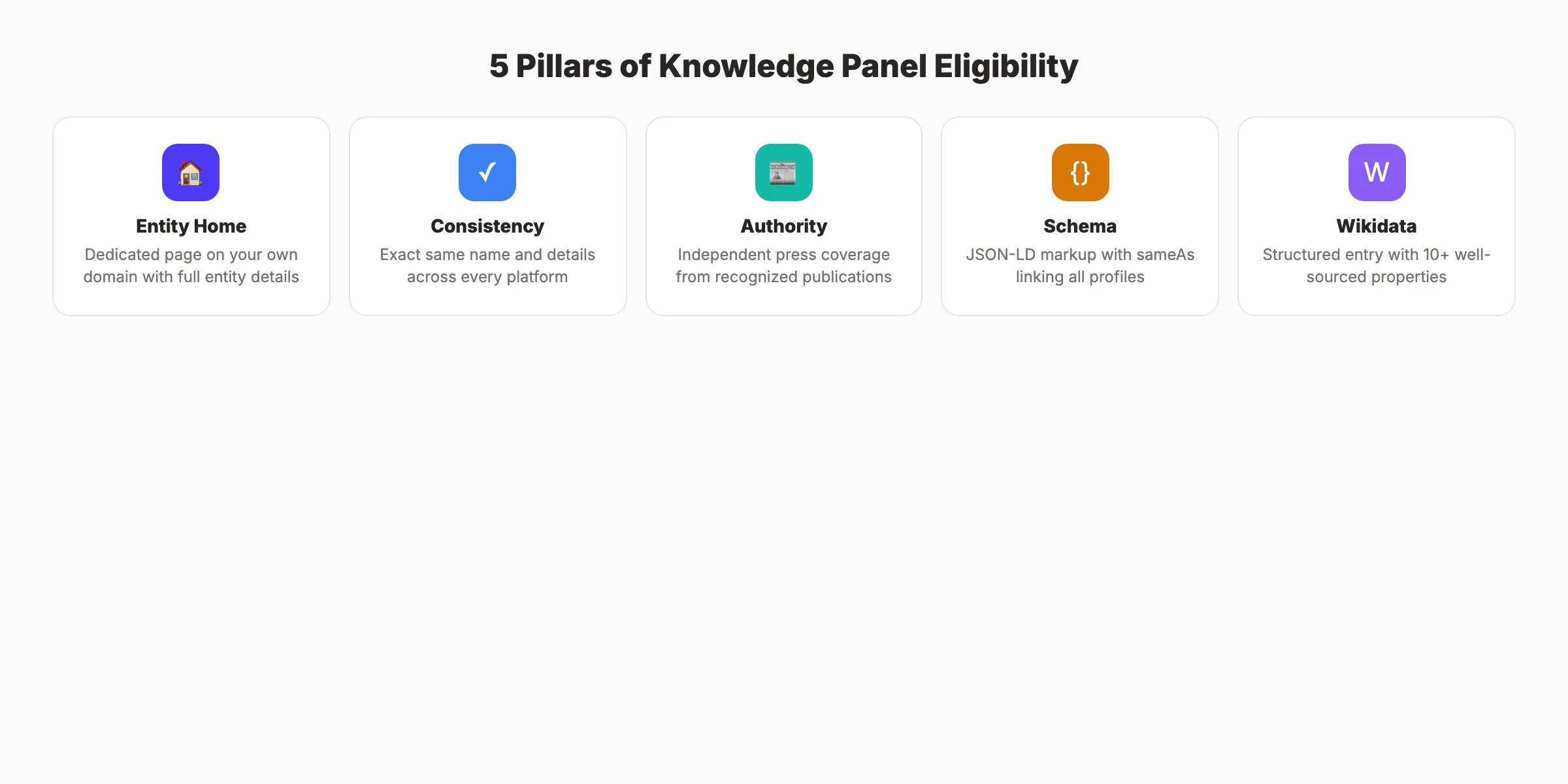
The 5 Pillars of Knowledge Panel Eligibility
1. Entity Home. A dedicated page about the entity on a domain you control. For a business, this is your About page or homepage. For a person, a personal website or detailed bio page.
2. Consistent Information. Your name, description, and key details must match across every platform. If LinkedIn says “CEO” and your website says “Founder,” Google calls this “data friction.” Consistency builds trust.
3. Authoritative Coverage. Independent articles from recognized publications that mention your entity. Google News sources carry the most weight.
4. Structured Data. Schema markup on your website that tells Google exactly what your entity is and how it connects to other entities.
5. Wikidata Entry. A structured data entry on Wikidata.org that provides machine-readable information about your entity. You do not need a Wikipedia page, but Wikidata is essential.
Timeline Expectations
| Phase | Timeline | What Happens |
|---|---|---|
| Foundation | Month 1-3 | Google indexes your structured data and citations |
| Recognition | Month 3-6 | Entity recognition develops if requirements are met |
| Panel Appearance | Month 6-12 | Panel may appear for clearly notable entities |
Established brands with strong online presence may see panels in 1 to 3 months. New entities typically wait 6 to 12 months.
How to Build Your Entity Presence
Building an entity presence means creating consistent, verifiable information across multiple platforms that Google trusts.
Step 1: Create Your Entity Home
Your entity home is the single most important page. It should include:
- Full legal business name or personal name
- Clear description of what the entity is
- Founding date or birth date
- Location and contact information
- Key people associated with the entity
- Social media profile links
- High-quality logo or headshot image
Add Organization schema or Person schema with sameAs properties linking to all your official profiles.
Step 2: Claim and Optimize All Profiles
Create or claim profiles on every major platform:
- Google Business Profile (for businesses)
- LinkedIn (personal and company pages)
- Wikipedia (if notable enough for an article)
- Wikidata (essential, does not require Wikipedia notability)
- Crunchbase (for businesses)
- Facebook business page
- X (Twitter) profile
- YouTube channel
- Apple Maps (for businesses with locations)
- Industry-specific directories
Every profile must use the exact same name, description, and key details. Consistency is non-negotiable.
Step 3: Create a Wikidata Entry
Wikidata is the structured data backbone of the Knowledge Graph. Creating an entry is free and does not require the notability standards of Wikipedia.
- Go to wikidata.org and create an account
- Click “Create a new item”
- Add your entity label (name), description, and aliases
- Add properties: official website, social media links, founding date, location, industry
- Add references for each claim (links to sources that verify the information)
The more complete and well-sourced your Wikidata entry, the more useful it is for Google.
Step 4: Earn Authoritative Coverage
Publish-worthy coverage comes from:
- Industry publications and trade magazines
- News outlets indexed in Google News
- Interviews on established podcasts and media
- Conference speaking appearances with published recordings
- Guest articles on high-authority sites (DA 60+)
Press releases alone do not create Knowledge Panels. Independent editorial coverage does. See our digital PR guide for outreach strategies.
Step 5: Implement Schema Markup
Add JSON-LD structured data to your entity home page. The sameAs property is the most important element. It tells Google that your website, Wikipedia, Wikidata, LinkedIn, and other profiles all represent the same entity.
Example Organization schema properties to include:
name. Official entity nameurl. Official websitelogo. URL of your logo imagesameAs. Array of all official profile URLsfoundingDate. When the entity was establishedfounder. Person who founded the organizationaddress. Physical locationdescription. Brief entity description
Use our schema markup generator to create the code. Validate with Google’s Rich Results Test.
Your SEO team. $99 per month. 30 optimized articles, published automatically. No writers. No agencies. Start for $1 →
How to Claim and Verify Your Knowledge Panel
Once your Knowledge Panel appears, claiming it gives you the ability to suggest edits and add information.
Finding the Claim Option
Search for your entity name on Google. If a Knowledge Panel appears, scroll to the bottom. Look for a link that says “Claim this knowledge panel” or “Are you the official representative?”
Verification Methods
Google offers several verification options:
| Method | Best For | Requirements |
|---|---|---|
| Google Search Console | Businesses with websites | Verified GSC account on official domain |
| YouTube channel | Content creators | Ownership of an official YouTube channel |
| Social media accounts | Public figures | Verified Twitter/X or Facebook account |
| Government ID | Individuals | Photo of yourself holding government-issued ID |
| Official documentation | Organizations | Document proving your role (incorporation papers, etc.) |
The fastest method: If your official website domain is verified in Google Search Console and you are signed into the same Google account, verification is often instant.
What Claiming Lets You Do
After verification, you can:
- Suggest edits to the description
- Suggest a featured image
- Add social media profile links
- Flag incorrect information for correction
- View Knowledge Panel analytics
You suggest changes. Google approves or rejects them. You do not have full editorial control.
How to Optimize Your Knowledge Panel
An existing Knowledge Panel can be improved. Optimization makes the panel more complete, accurate, and visually appealing.
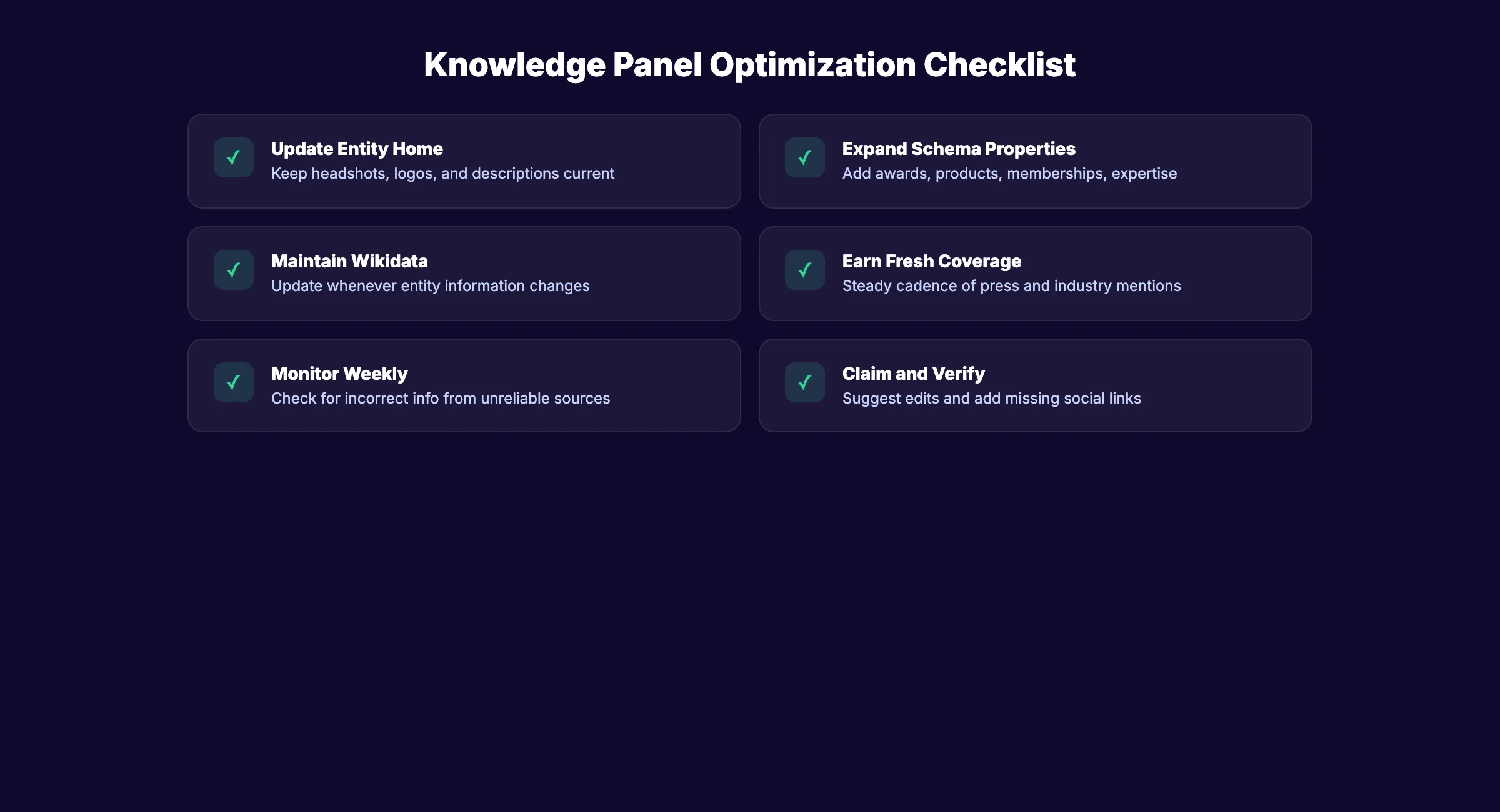
Update Your Entity Home
The information on your entity home page feeds the Knowledge Panel. Keep it current:
- Update headshots and logos annually
- Revise descriptions when your business evolves
- Add new social media profiles as you create them
- Update key facts (leadership changes, new locations, milestones)
Strengthen Schema Markup
Expand your structured data beyond the basics:
- Add
hasOfferCatalogfor products and services - Include
awardfor any recognition received - Add
alumnifor educational institutions - Include
memberOffor industry associations - Use
knowsAboutfor areas of expertise (Person schema)
The more properties you populate with accurate data, the richer your Knowledge Panel becomes.
Maintain Wikidata
Update your Wikidata entry whenever your entity information changes. Add new properties as they become relevant. Wikidata entries with 20 or more well-sourced properties perform better than minimal entries.
Build Ongoing Coverage
Knowledge Panels reflect current information. Fresh coverage keeps the panel active and updated. A steady cadence of news mentions, content publishing, and industry appearances signals ongoing relevance.
Monitor Panel Changes
Check your Knowledge Panel weekly. Google updates panel information automatically. Incorrect information can appear from unreliable sources. Catching and correcting errors quickly prevents misinformation from persisting.
Common Mistakes That Prevent Knowledge Panels
Inconsistent Information
Different names, titles, or descriptions across platforms confuse Google. If Google cannot reconcile conflicting data, it does not create a panel. Audit every profile and page for exact consistency.
Self-Published Sources Only
Google ignores self-published content (your own blog, press releases, paid placements) as evidence of notability. The Knowledge Graph requires independent, editorial sources.
Missing Wikidata Entry
Many businesses create Wikipedia pages but skip Wikidata. Wikidata is more important for the Knowledge Graph than Wikipedia. A well-structured Wikidata entry without a Wikipedia page can still trigger a Knowledge Panel.
No Schema Markup
Without structured data, Google guesses what your entity is. With schema markup, Google knows for certain. The sameAs property alone connects all your online profiles into a single entity.
Expecting Instant Results
Knowledge Panels take months to appear. Businesses that implement the 5 pillars and then wait 2 weeks before concluding “it does not work” give up too early. The minimum timeline is 3 months for established brands and 6 to 12 months for newer entities.
Ignoring the Knowledge Panel After It Appears
Unclaimed panels display whatever Google finds. Incorrect information, outdated photos, and missing social links persist until someone claims and corrects them.
3,500+ blogs published. 92% average SEO score. See what Stacc can do for your site. Start for $1 →
Knowledge Panels for Local Businesses
Local businesses benefit from Knowledge Panels differently than national brands. The panel reinforces local trust and connects to your Google Business Profile.
How Local Knowledge Panels Differ
Local business Knowledge Panels pull data from your GBP, website, and local directories. They display:
- Business hours and address
- Phone number and website
- Google reviews and star rating
- Photos from your GBP
- Popular times and busy hours
- Questions and answers
Local Entity Building Strategy
For local businesses, the entity building process focuses on:
NAP Consistency. Your business name, address, and phone number must match exactly across your website, GBP, Yelp, Apple Maps, Facebook, and every other directory. Use the local SEO checklist to audit your listings.
Local Schema Markup. Add LocalBusiness schema to your website with your address, hours, services, and geo-coordinates. The sameAs property should link to your GBP, Yelp, and other directory profiles.
Local Press Coverage. Local news outlets, chamber of commerce features, and community publications build local entity recognition. A feature in your city newspaper carries more weight for a local Knowledge Panel than a mention in a national publication.
Review Volume and Quality. Google reviews factor into local Knowledge Panel prominence. Businesses with 50 or more reviews at 4.0 stars or above see stronger panel visibility.
Knowledge Panels and AI Search
Knowledge Panels matter more in 2026 than ever because of how AI search engines use entity data.
Entity Recognition in AI Overviews
Google AI Overviews pull information from the Knowledge Graph. Entities with strong Knowledge Graph presence appear more frequently in AI-generated summaries. A Knowledge Panel signals that Google recognizes your entity, which increases visibility in AI search results.
AI Citation Signals
ChatGPT, Perplexity, and other AI search tools also reference Knowledge Graph data. A strong entity presence makes your brand more likely to be cited in AI responses. See our guide on getting cited in AI search.
The Entity SEO Advantage
Entity SEO is the practice of building your brand as a recognized entity in the Knowledge Graph. Businesses with strong entity recognition rank better for branded queries, appear in AI search results more often, and receive richer SERP features.
The Knowledge Panel is proof that Google recognizes your entity. Every other entity SEO benefit flows from that recognition.
How to Track Entity Recognition
Monitor your entity status using these signals:
- Search your brand name. Does a Knowledge Panel appear? How complete is it?
- Check Google’s Knowledge Graph API. Query your entity name. A result confirms Knowledge Graph inclusion.
- Monitor AI search mentions. Search your brand in ChatGPT and Perplexity. Entity recognition in Google correlates with AI citation frequency.
- Track branded search volume. Growing branded searches indicate increasing entity recognition. Google Search Console shows branded query data.
Entity recognition compounds over time. Each new citation, press mention, and consistent data point strengthens your position in the Knowledge Graph. The businesses that invest in entity SEO today build an advantage that competitors cannot replicate quickly.
FAQ
How do I get a Google Knowledge Panel for my business?
Build a strong entity home page with schema markup, create consistent profiles across all major platforms, earn independent press coverage from authoritative sources, create a Wikidata entry, and wait 3 to 12 months. You cannot request a panel directly. Google creates them automatically when the conditions are met.
Do I need a Wikipedia page to get a Knowledge Panel?
No. Wikidata is more important than Wikipedia for Knowledge Panel creation. Many entities earn Knowledge Panels without Wikipedia pages. A well-structured Wikidata entry with verified properties is sufficient in most cases.
How long does it take to get a Knowledge Panel?
Established brands with strong online presence may see panels in 1 to 3 months. Newer entities typically wait 6 to 12 months. The timeline depends on the strength and consistency of your entity signals across the web.
Can I edit my Google Knowledge Panel?
You can suggest edits after claiming and verifying your panel. Google reviews all suggested changes and approves or rejects them. You do not have direct editorial control, but most factual corrections and image updates are approved.
What is the difference between a Knowledge Panel and a Google Business Profile?
A Google Business Profile is a local listing that appears for location-based searches. A Knowledge Panel is an entity information box that appears for branded searches. Businesses can have both. GBP focuses on local SEO. Knowledge Panels focus on brand recognition.
Why did my Knowledge Panel disappear?
Knowledge Panels can disappear if Google loses confidence in your entity data. Common causes include conflicting information across platforms, removal of key sources that supported the panel, or changes to Google’s Knowledge Graph algorithms. Re-establish consistency and coverage to recover the panel.
Knowledge Panel Checklist
Before you start the process, verify you have these foundations in place:
- Official website with a dedicated About or Entity page
- Organization or Person schema markup with
sameAsproperties - Wikidata entry with 10+ well-sourced properties
- Consistent name and description across all platforms
- At least 5 independent editorial mentions from authoritative sources
- Claimed and verified Google Business Profile (for businesses)
- Active social media profiles linked from your website
- High-quality logo or headshot in square format
Every item on this list increases the probability of earning a Knowledge Panel. Missing 2 or more items significantly reduces your chances.
A Google Knowledge Panel is the most powerful brand signal in search. It proves Google recognizes your entity. That recognition flows into rankings, AI search citations, and customer trust. Build the foundation now. The businesses that invest in entity SEO today will own the search results of tomorrow.

Written by
Siddharth GangalSiddharth is the founder of theStacc and Arka360, and a graduate of IIT Mandi. He spent years watching great businesses lose organic traffic to competitors who simply published more. So he built a system to fix that. He writes about SEO, content at scale, and the tactics that actually move rankings.
30 SEO blog articles published every month
Keyword-optimized, scheduled, and live on your site. Automatically.
30-day trial · Cancel anytime
theStacc
Stop writing SEO content manually
30 blog articles, 30 GBP posts, and social media content. Published every month. Automatically.
Try for free$1 for 3 days · Cancel anytime