
Content Calendar Template (2026): Strategies, Tactics & Examples
Practical seo content calendar template strategies for 2026: step-by-step tactics, real examples, and tools to improve rankings and drive organic traffic.
You know you need to publish more content. But every Monday starts the same way. You stare at a blank screen, scramble for a topic, and publish something random that does not move the needle.
That cycle costs you rankings, traffic, and revenue. Businesses that publish 16 or more blog posts per month generate 4.5 times more leads than those publishing 4 or fewer. The gap between “we should blog more” and “we rank on page 1” is almost always a content calendar template.
This guide gives you 6 copy-ready templates you can start using today. No theory. No fluff. Just fill-in-the-blank frameworks for blogs, social media, and SEO content.
We publish 3,500+ blog posts across 70+ industries every month. These are the exact calendar structures we use internally and recommend to every client.
Here is what you will learn:
- The 9 fields every content calendar template needs
- A monthly blog content calendar you can copy right now
- A weekly publishing schedule for teams that ship fast
- A quarterly SEO content plan tied to keyword clusters
- Templates customized for 5 business types (B2B, local, e-commerce, SaaS, agency)
- How to fill your calendar with the right topics every single month
- The best tools to manage your calendar at scale
Why You Need a Content Calendar Template
Random publishing does not build rankings. Google rewards topical consistency, and consistency requires a system.
A content calendar template is that system. It maps every piece of content to a date, a keyword, an owner, and a goal before anyone starts writing.
Publishing Consistency Drives Results
B2B companies that publish 9 or more blog posts per month see a 35.8% increase in yearly Google traffic. Companies posting 1 to 4 times per month see only 16.5%.
The difference is not talent. It is planning.
A content marketing strategy without a calendar is a wish list. A calendar turns that wish list into a production schedule with deadlines, assignments, and accountability.
What a Template Solves
Most content teams fail at 1 of 3 points: topic selection, scheduling, or follow-through. A content calendar template removes all 3 bottlenecks.
| Problem | Without a Calendar | With a Calendar |
|---|---|---|
| Topic selection | Random brainstorms each week | 90 days of topics pre-planned |
| Missed deadlines | Posts ship “when they are ready” | Fixed publish dates with buffers |
| Keyword gaps | Duplicate topics, no cluster strategy | Every post mapped to a keyword |
| Team confusion | ”Who is writing what?” emails | Owner and status visible at a glance |
| Content decay | Old posts forgotten | Refresh dates scheduled in advance |
Calendar vs. Editorial Calendar vs. Content Plan
These terms overlap, but each has a specific role.
A content calendar is the master schedule. It shows what publishes, when, and where.
An editorial calendar adds production stages. It tracks drafting, editing, review, and approval for each piece.
A content plan sits above both. It defines your topical authority strategy, keyword targets, and content types for the quarter or year.
The templates in this guide cover all 3 levels.
The 9 Fields Every Template Needs
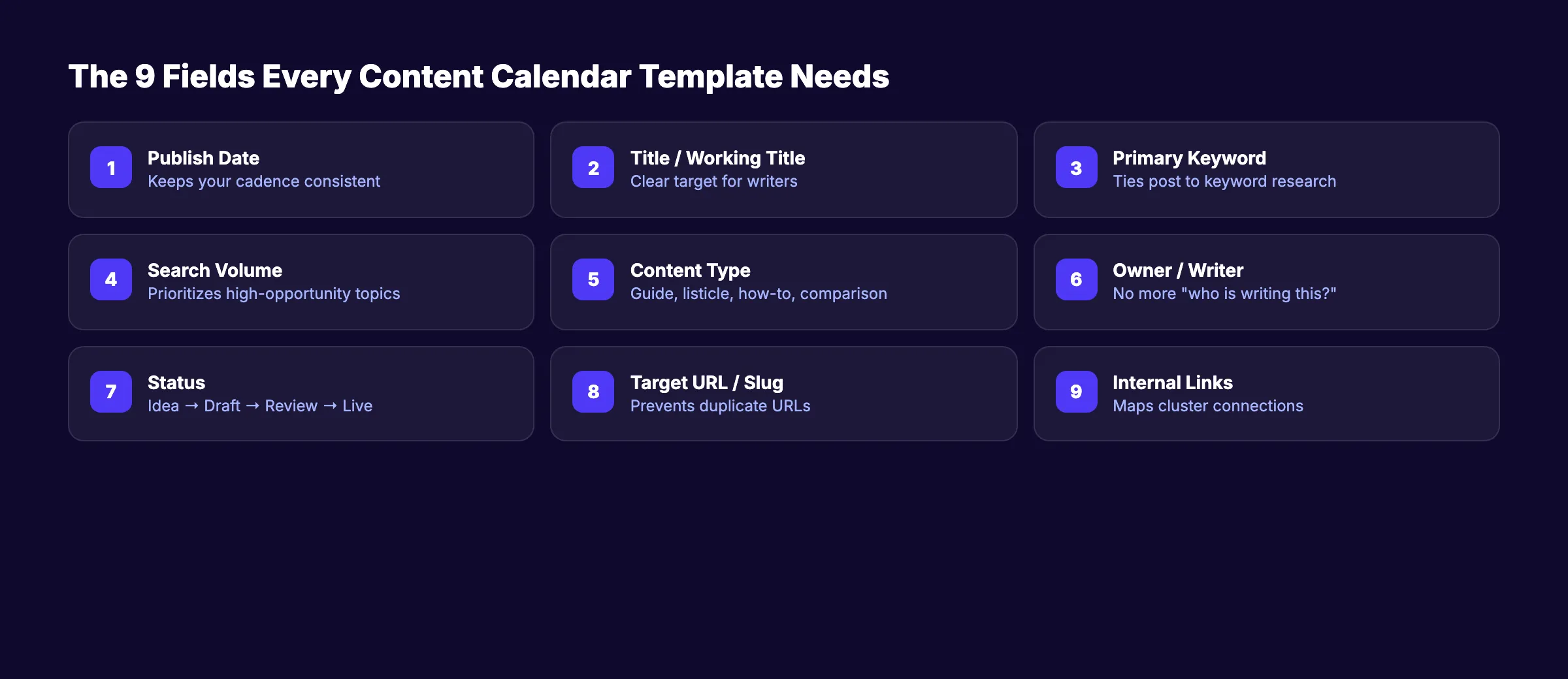
Not all calendar fields matter equally. These 9 are non-negotiable.
Skip any of them and you will lose context, miss deadlines, or publish content that does not rank.
Core Fields
| # | Field | Why It Matters | Example |
|---|---|---|---|
| 1 | Publish Date | Keeps your cadence consistent | 2026-04-07 |
| 2 | Title / Working Title | Gives writers a clear target | ”How to Fix Content Decay in 30 Minutes” |
| 3 | Primary Keyword | Ties every post to keyword research | ”content decay fix” |
| 4 | Search Volume | Prioritizes high-opportunity topics | 1,200/mo |
| 5 | Content Type | Blog post, guide, listicle, comparison | How-to guide |
| 6 | Owner / Writer | Eliminates “I thought you were doing it” | Sarah M. |
| 7 | Status | Tracks progress without status meetings | Draft → Review → Scheduled → Live |
| 8 | Target URL / Slug | Prevents duplicate URLs and broken links | /blog/content-decay-fix |
| 9 | Internal Links | Maps cluster connections before publishing | Links to: /blog/update-old-blog-posts, /blog/how-to-content-audit |
Optional But Valuable Fields
These fields add depth for teams managing more than 8 posts per month:
- Secondary Keywords , 2 to 3 related terms per post
- Word Count Target. Aligns with blog post length best practices
- Content Cluster / Pillar. Groups posts under a topical map
- CTA Type. Trial signup, lead magnet, demo request
- Promotion Channel. Email, social, paid, newsletter
- Refresh Date. When to update old blog posts
Include these in your template from day 1. Adding them later means backfilling dozens of rows.
Template 1: Monthly Blog Content Calendar
This is the most common format. It works for businesses publishing 4 to 30 blog posts per month.
Copy this table into Google Sheets, Notion, or Airtable. Fill in your own topics and dates.
Blank Monthly Template
| Publish Date | Title | Primary Keyword | Search Vol | Type | Owner | Status | Slug | Cluster |
|---|---|---|---|---|---|---|---|---|
| Idea | ||||||||
| Idea | ||||||||
| Idea | ||||||||
| Idea |
Example: April 2026 Blog Calendar (B2B SaaS)
| Publish Date | Title | Primary Keyword | Search Vol | Type | Owner | Status | Slug | Cluster |
|---|---|---|---|---|---|---|---|---|
| Apr 1 | How to Run an SEO Content Audit | content audit SEO | 1,900 | How-to | Jamie | Scheduled | /blog/seo-content-audit | Content Ops |
| Apr 4 | 9 Blog Automation Tools That Save 10 Hours a Week | blog automation tools | 880 | Listicle | Priya | In Review | /blog/blog-automation-tools | Content Ops |
| Apr 8 | Topical Authority: The Complete Guide | topical authority | 2,400 | Guide | Jamie | Draft | /blog/topical-authority-guide | SEO Strategy |
| Apr 11 | How Long Does SEO Take? (Real Data) | how long does SEO take | 3,100 | Data post | Alex | Idea | /blog/how-long-seo-takes | SEO Strategy |
| Apr 15 | Internal Linking for Blog Posts | internal linking blog | 1,600 | How-to | Priya | Idea | /blog/internal-linking | On-Page SEO |
| Apr 18 | Blog Post Structure That Ranks | blog post structure | 1,300 | How-to | Jamie | Idea | /blog/blog-post-structure | Content Ops |
| Apr 22 | AI Blog Writing: What Works in 2026 | AI blog writing | 2,100 | Guide | Alex | Idea | /blog/ai-blog-writing | Content Ops |
| Apr 25 | How Many Blog Posts Do You Need to Rank? | how many blog posts to rank | 720 | Data post | Priya | Idea | /blog/blog-posts-to-rank | SEO Strategy |
| Apr 29 | Content Marketing ROI: How to Measure It | content marketing ROI | 1,400 | How-to | Jamie | Idea | /blog/content-marketing-roi | Content Ops |
Notice the pattern. Each post maps to a keyword cluster. The calendar alternates content types to keep the blog varied.
Status Workflow
Use these 6 statuses across every template:
| Status | Definition | Who Owns It |
|---|---|---|
| Idea | Topic approved, not yet assigned | Content lead |
| Assigned | Writer has the brief | Writer |
| Draft | First draft complete | Writer |
| In Review | Editor reviewing | Editor |
| Scheduled | Approved and queued | Publisher |
| Live | Published on site | , |
Stop building calendars manually. Stacc publishes 30 SEO-optimized blog posts per month on autopilot. Start for $1 →
Template 2: Weekly Publishing Schedule
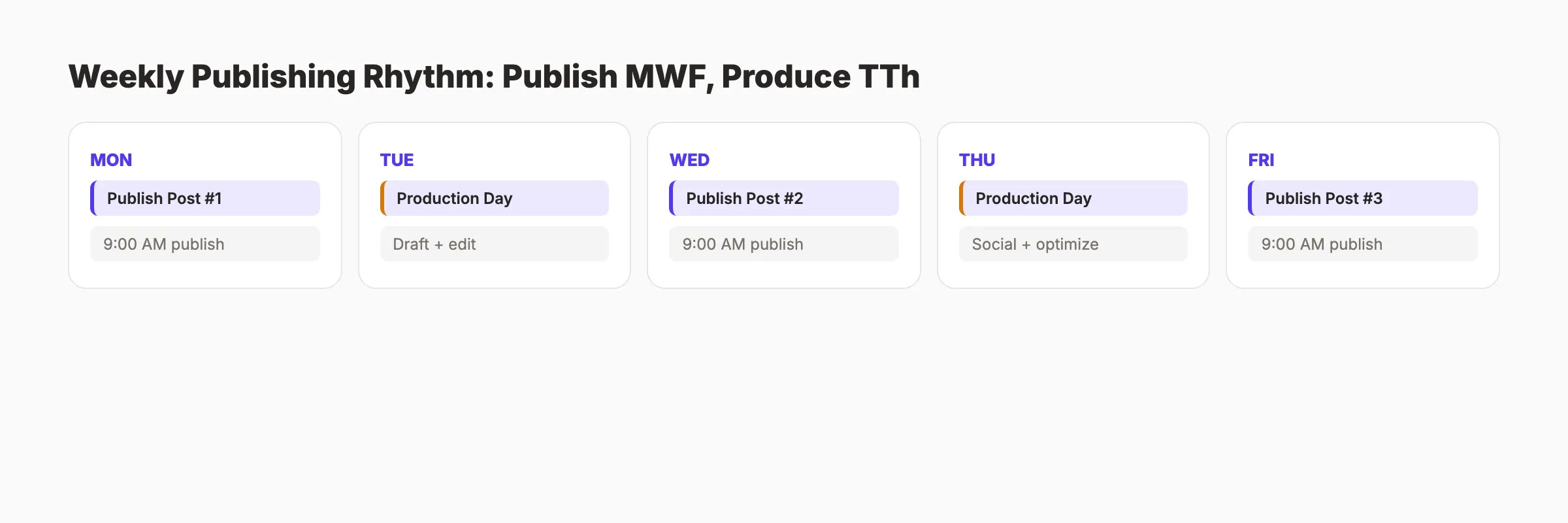
Teams publishing 8 or more posts per month benefit from a weekly view. It shows the production pipeline at a glance.
Blank Weekly Template
| Day | Post Title | Keyword | Status | Writer | Editor | Publish Time |
|---|---|---|---|---|---|---|
| Monday | 9:00 AM | |||||
| Tuesday | ||||||
| Wednesday | 9:00 AM | |||||
| Thursday | ||||||
| Friday | 9:00 AM |
Example: Week of April 6, 2026
| Day | Post Title | Keyword | Status | Writer | Editor | Publish Time |
|---|---|---|---|---|---|---|
| Mon | How to Write SEO Blog Posts That Rank | write SEO blog posts | Scheduled | Jamie | Alex | 9:00 AM |
| Tue | [Refresh] Update: Best Free SEO Tools | best free SEO tools | In Review | Priya | Alex | , |
| Wed | Blog Frequency Study: How Often Should You Post? | blog frequency | Scheduled | Alex | Jamie | 9:00 AM |
| Thu | [Social only] Repurpose Wednesday’s post | , | Draft | Priya | , | 12:00 PM |
| Fri | SEO Content Writing: A Practical Guide | SEO content writing | Scheduled | Jamie | Priya | 9:00 AM |
Weekly Rhythm Tips
Publish on Monday, Wednesday, and Friday for maximum indexing spread. Google processes new content faster when it arrives at predictable intervals.
Use Tuesday and Thursday for production work. Drafting, editing, optimizing content for SEO, and scheduling social promotion.
Reserve 1 slot per week for content refreshes. Content decay is real. Pages lose 30% of their traffic within 12 months without updates.
Template 3: Quarterly SEO Content Plan
A quarterly plan zooms out from individual posts. It maps your entire keyword strategy across 13 weeks.
This is where you connect individual blog posts to topical authority clusters and pillar pages.
Example: Q2 2026 SEO Content Plan
| Month | Week | Cluster | Post Title | Keyword | Type | Priority |
|---|---|---|---|---|---|---|
| Apr | W1 | Content Ops | How to Run a Content Audit | content audit | How-to | High |
| Apr | W2 | Content Ops | Content Calendar Template Guide | content calendar template | Guide | High |
| Apr | W3 | SEO Strategy | Build Topical Authority in 90 Days | topical authority | Guide | High |
| Apr | W4 | SEO Strategy | How Long Does SEO Take? | how long SEO takes | Data | Medium |
| May | W5 | Content Ops | Scale Blog Content With AI | scale blog content AI | How-to | High |
| May | W6 | On-Page SEO | Internal Linking for Blog Posts | internal linking | How-to | High |
| May | W7 | Content Ops | Measure Content Marketing ROI | content marketing ROI | How-to | Medium |
| May | W8 | SEO Strategy | Keyword Research for Blog Posts | keyword research blog | Guide | High |
| Jun | W9 | Content Ops | Blog Post Length: What the Data Says | blog post length SEO | Data | Medium |
| Jun | W10 | On-Page SEO | Blog Post Structure That Ranks | blog post structure | How-to | Medium |
| Jun | W11 | Content Ops | Repurpose Blog Content for Social Media | repurpose blog social | How-to | Low |
| Jun | W12 | SEO Strategy | How Many Blog Posts to Rank? | blog posts to rank | Data | Medium |
| Jun | W13 | Content Ops | [Refresh] Content Marketing Strategy | content marketing strategy | Refresh | Medium |
How to Use the Quarterly Plan
Start by identifying 3 to 4 keyword clusters for the quarter. Map each cluster to a pillar page.
Then assign 3 to 5 supporting posts per cluster. Each supporting post links to its pillar and to at least 2 other posts in the cluster. This builds the internal linking structure that Google uses to understand your site architecture.
Alternate cluster focus week by week. Do not publish 4 “Content Ops” posts in a row and then ignore “SEO Strategy” for a month.
Building a quarterly plan from scratch takes 8 to 12 hours. Stacc handles topic research, keyword mapping, and publishing for you. Start for $1 →
Template 4: Social Media Content Calendar
Blog content and social content should feed each other. Every blog post deserves at least 3 social posts promoting it across platforms.
Use this template to plan social promotion alongside your blog calendar. Learn more about how to repurpose blog content for social media.
Example: Social Promotion for 1 Blog Post
| Date | Platform | Content Type | Copy / Hook | Link | Status |
|---|---|---|---|---|---|
| Apr 1 | Text post | ”We analyzed 500 content calendars. The ones that worked had these 9 fields…” | /blog/seo-content-calendar-template | Scheduled | |
| Apr 1 | X | Thread (3 tweets) | “Most content calendars fail. Here is why (thread):“ | /blog/seo-content-calendar-template | Scheduled |
| Apr 3 | Carousel | 9 slides: 1 field per slide with icon | Link in bio | Draft | |
| Apr 5 | Poll | ”How far ahead do you plan your blog content? A) 1 week B) 1 month C) 1 quarter D) I do not plan” | , | Idea | |
| Apr 7 | X | Quote graphic | Stat: “16+ posts/month = 4.5x more leads” | /blog/seo-content-calendar-template | Idea |
Social Cadence Rule
Promote each blog post at least 3 times in the first 7 days. Then reshare once per month for 3 months.
Most teams promote a post once and forget it. That wastes 90% of its social reach potential.
Template 5: Content Calendar by Business Type
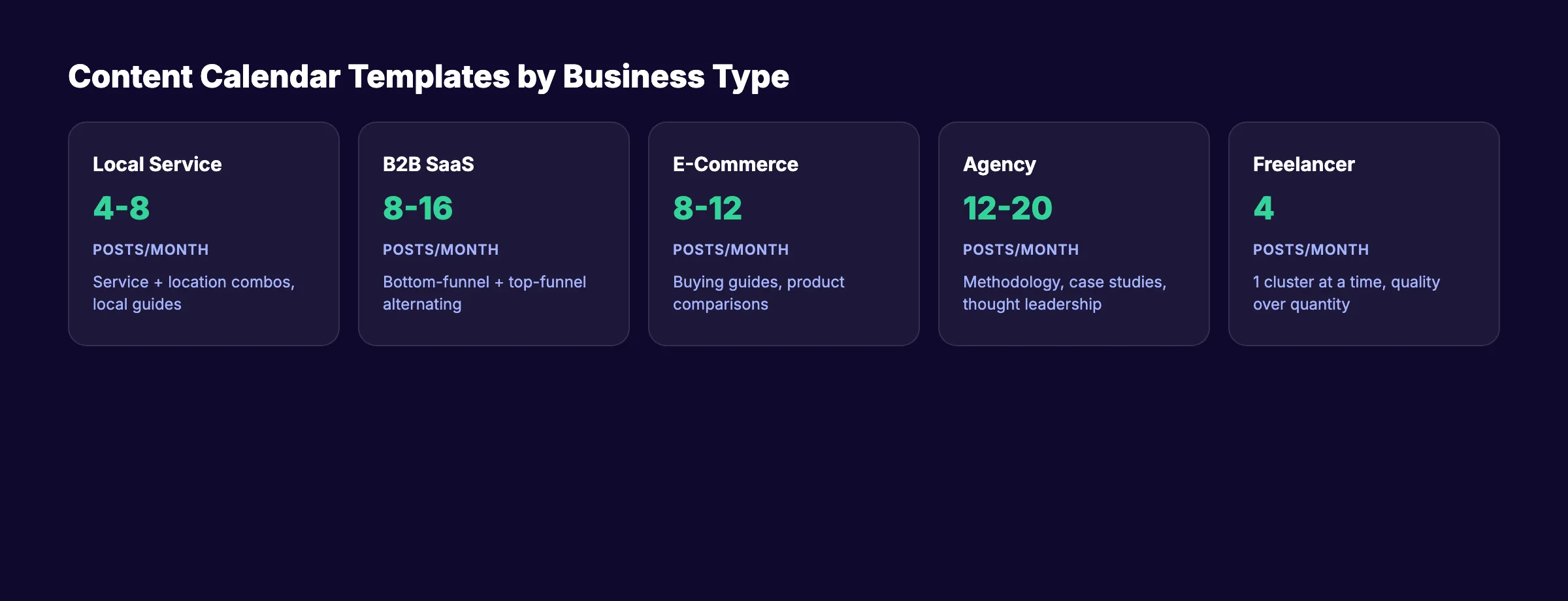
A SaaS company and a local plumber should not use the same calendar. Their audiences, keywords, and content types differ completely.
Local Service Business (Dentist, Plumber, HVAC, Lawyer)
Local businesses need a mix of local SEO content and service-area pages.
| Week | Post Title | Keyword | Type | Goal |
|---|---|---|---|---|
| W1 | How to Choose a Dentist in [City] | dentist in [city] | Local guide | Local rankings |
| W2 | 7 Signs You Need a Root Canal | signs need root canal | Educational | Organic traffic |
| W3 | Emergency Dental Services: What to Expect | emergency dentist [city] | Service page | Local rankings |
| W4 | Dental Implants vs. Bridges: Cost Comparison | dental implants vs bridges | Comparison | Organic traffic |
Publishing pace: 4 to 8 posts per month. Focus on service + location combinations.
B2B SaaS Company
SaaS companies should build topical authority around their product category.
| Week | Post Title | Keyword | Type | Goal |
|---|---|---|---|---|
| W1 | Best CRM Software for Small Teams | best CRM small teams | Listicle | Bottom-funnel traffic |
| W2 | CRM vs. Spreadsheet: When to Upgrade | CRM vs spreadsheet | Comparison | Mid-funnel |
| W3 | How to Improve Sales Pipeline Visibility | sales pipeline visibility | How-to | Top-funnel |
| W4 | CRM Implementation Checklist (Free Template) | CRM implementation checklist | Template | Lead magnet |
Publishing pace: 8 to 16 posts per month. Alternate between bottom-funnel and top-funnel content.
E-Commerce Brand
E-commerce blogs should target product-adjacent keywords and buying guides.
| Week | Post Title | Keyword | Type | Goal |
|---|---|---|---|---|
| W1 | Best Running Shoes for Flat Feet (2026) | running shoes flat feet | Listicle | Product traffic |
| W2 | How to Choose the Right Running Shoe Size | running shoe sizing guide | How-to | Top-funnel |
| W3 | Trail Running vs. Road Running: Gear Differences | trail vs road running shoes | Comparison | Mid-funnel |
| W4 | 5 Signs You Need New Running Shoes | when to replace running shoes | Educational | Organic traffic |
Publishing pace: 8 to 12 posts per month. Focus on commercial and informational intent mix.
Marketing Agency
Agencies use content to attract clients and prove expertise.
| Week | Post Title | Keyword | Type | Goal |
|---|---|---|---|---|
| W1 | How to Hire an SEO Agency (Without Getting Burned) | hire SEO agency | How-to | Bottom-funnel |
| W2 | SEO Audit Checklist: 27 Points We Check | SEO audit checklist | Checklist | Lead magnet |
| W3 | How Long Does SEO Take? Real Client Data | how long SEO takes | Data post | Trust-building |
| W4 | Content Marketing ROI: How to Report It | content marketing ROI reporting | How-to | Mid-funnel |
Publishing pace: 12 to 20 posts per month. Showcase methodology and results.
Freelancer or Solo Creator
Solo creators need maximum output from minimum effort. Focus on 1 cluster at a time.
| Week | Post Title | Keyword | Type | Goal |
|---|---|---|---|---|
| W1 | How to Start a Blog for Organic Traffic | start blog organic traffic | Guide | Top-funnel |
| W2 | Blog SEO for Beginners: What to Do First | blog SEO beginners | How-to | Top-funnel |
| W3 | How to Write Blog Posts That Rank | write SEO blog posts | How-to | Mid-funnel |
| W4 | [Refresh] Update: Month 1 Traffic Report | , | Update | Audience trust |
Publishing pace: 4 posts per month minimum. Quality over quantity at this stage.
No time to fill out templates? Stacc writes, optimizes, and publishes your entire blog for $99 per month. Start for $1 →
How to Fill Your Calendar With the Right Topics
A blank calendar is useless. The hard part is choosing the right topics for each slot.
Here is a repeatable process that takes under 2 hours per quarter.
Step 1: Start With Keyword Research
Use keyword research to find terms your audience actually searches for. Target keywords with 100 to 5,000 monthly searches and low to medium difficulty.
Build a master keyword list of 50 to 100 terms. Sort by search volume and search intent. Group them into 3 to 5 clusters.
Step 2: Map Keywords to Content Types
Not every keyword deserves the same format.
| Search Intent | Best Content Type | Example Keyword |
|---|---|---|
| Informational | How-to guide, explainer | ”what is topical authority” |
| Commercial | Comparison, listicle | ”best editorial calendar tools” |
| Transactional | Landing page, pricing page | ”SEO service pricing” |
| Navigational | Brand page | ”[brand name] reviews” |
Match each keyword to the right format. Then slot it into your calendar.
Step 3: Balance Your Content Mix
Aim for this distribution each month:
| Content Type | % of Calendar | Purpose |
|---|---|---|
| How-to guides | 40% | Drive organic traffic |
| Listicles and comparisons | 25% | Capture commercial intent |
| Data posts and case studies | 15% | Build authority and backlinks |
| Refreshes and updates | 10% | Combat content decay |
| Thought leadership | 10% | Brand differentiation |
Step 4: Use the Content Compound Effect
Every article you publish builds on the last. Post 1 ranks for 1 keyword. Post 10 supports a cluster. Post 30 creates topical authority that lifts every page on your site.
This is why how many blog posts you need to rank matters more than any single article.
Plan your calendar in clusters, not random topics. A cluster of 8 related posts outperforms 8 unrelated posts every time.
Step 5: Schedule Refreshes
Add a “Refresh” column to your calendar. Flag any post older than 6 months for review.
Updating old blog posts recovers lost traffic faster than writing new content. Run a content audit quarterly to identify which posts need updates.
Tools to Manage Your Content Calendar
You do not need expensive software. A spreadsheet works for teams publishing under 20 posts per month.
Free and Low-Cost Options
| Tool | Best For | Price | Format |
|---|---|---|---|
| Google Sheets | Small teams, solo creators | Free | Spreadsheet |
| Notion | Teams that want a database view | Free / $10 per month | Database |
| Airtable | Visual calendar + database hybrid | Free / $20 per month | Database |
| Trello | Card-based visual workflow | Free / $5 per month | Kanban |
Mid-Range Tools
| Tool | Best For | Price | Key Feature |
|---|---|---|---|
| CoSchedule | Marketing teams | $29 per month | Drag-and-drop calendar |
| Monday.com | Cross-functional teams | $9 per seat per month | Automations |
| Asana | Project-heavy teams | Free / $11 per seat per month | Timeline view |
For a deeper comparison, see our guide to editorial calendar tools.
The Automation Option
If your goal is SEO traffic and you do not want to manage a calendar at all, content automation platforms handle topic research, writing, optimization, and publishing.
Stacc publishes 30 SEO-optimized blog posts per month without you touching a spreadsheet. You can also automate your SEO workflow to reclaim 10 or more hours each week.
Your calendar is only as good as your execution. Let Stacc handle both. 30 blog posts per month, published and optimized. Start for $1 →
FAQ
What is a content calendar template?
A content calendar template is a pre-built framework for scheduling blog posts, social media content, and other marketing assets. It includes fields for publish dates, keywords, content types, owners, and status tracking. The goal is to replace ad-hoc publishing with a repeatable system that drives consistent organic traffic.
How far in advance should I plan my content calendar?
Plan 1 quarter (13 weeks) in advance for blog content. Plan 1 month ahead for social media. This gives you enough runway to do proper keyword research, write quality content, and build internal links between posts.
What is the difference between a content calendar and an editorial calendar?
A content calendar shows what publishes and when. An editorial calendar adds production stages: drafting, editing, approval, and scheduling. For most small businesses, one combined template works fine. Larger teams with dedicated editors benefit from separating the 2 views.
How many blog posts should I publish per month?
The minimum for measurable SEO results is 4 posts per month. But data shows that 8 to 16 posts per month is the sweet spot for most businesses. Companies publishing 16 or more posts per month see 3.5 times more traffic than those publishing 4 or fewer.
Can I use a free spreadsheet instead of paid software?
Yes. Google Sheets handles content calendars perfectly for teams publishing up to 20 posts per month. Copy any of the templates above into a new sheet. Add conditional formatting for status columns. That is all you need to get started.
What should I do if I cannot fill my content calendar every month?
Start with 4 posts per month and build from there. Focus on 1 keyword cluster at a time. If time is the bottleneck, consider AI blog writing tools or a done-for-you SEO service that handles the entire pipeline.
Start Planning. Start Ranking.
A content calendar template turns scattered publishing into a growth engine. Pick the template that matches your business type. Fill it with keyword-researched topics. Publish on a fixed schedule.
The businesses that win at SEO in 2026 are not the ones with the biggest budgets. They are the ones that show up consistently. Your calendar is the system that makes consistency automatic.
Related Tools & Resources
Free SEO Tools:
Best Lists:

Written by
Siddharth GangalSiddharth is the founder of theStacc and Arka360, and a graduate of IIT Mandi. He spent years watching great businesses lose organic traffic to competitors who simply published more. So he built a system to fix that. He writes about SEO, content at scale, and the tactics that actually move rankings.
30 SEO blog articles published every month
Keyword-optimized, scheduled, and live on your site. Automatically.
30-day trial · Cancel anytime
theStacc
Stop writing SEO content manually
30 blog articles, 30 GBP posts, and social media content. Published every month. Automatically.
Try for free$1 for 3 days · Cancel anytime