
SEO for Blogs: The Definitive Guide (2026)
Master SEO for blogs with this 8-chapter guide. Covers keyword research, on-page optimization, content structure, link building, and AI search. Updated March 2026.
Siddharth Gangal • 2026-03-29 • Content Strategy
In This Article
Most blogs get zero traffic. Not a little traffic — zero. 96.55% of indexed pages receive no organic visits from Google. That includes pages that took hours to write.
The reason is almost always the same. The content exists. The SEO does not.
Publishing without SEO is like opening a store with no sign, no address, and no street. You built something. Nobody can find it. Months of writing produce nothing. The tab stays open. The analytics stay flat.
SEO for blogs is the system that changes that. It connects your content to the searches people are already performing. It turns a publishing schedule into a compounding asset that grows over time.
We have published 3,500+ blogs across 70+ industries. We know what separates the posts that rank from the posts that disappear. This guide covers everything.
Here is what you will learn:
- What blog SEO means in 2026 and how the rules have changed
- How to do keyword research for blog posts that actually drives traffic
- On-page optimization techniques that move rankings
- Content structure frameworks that win featured snippets
- Internal linking strategy for building topical authority
- Publishing frequency and content velocity
- How to measure blog SEO performance and ROI
- How to optimize for AI search engines in 2026
Chapter 1: What SEO for Blogs Means in 2026
SEO for blogs is the practice of optimizing blog content so it ranks in search engines and earns organic traffic. It covers keyword targeting, on-page signals, content structure, internal links, and authority building.
Blogs remain one of the most powerful SEO assets a website can have. Websites with active blogs earn 97% more inbound links than those without. More links mean more authority. More authority means higher rankings across your entire domain.
That effect compounds. Each post you publish is another page that can rank, attract links, and pass authority to the rest of your site. A blog is not a marketing channel. It is an infrastructure investment.
How Blog SEO Has Changed
Three forces have reshaped blog SEO since 2023.
AI search now answers many queries directly. 58-60% of Google searches in 2025 result in zero clicks. AI Overviews, Perplexity, and ChatGPT surface answers before users ever reach your site. Blog SEO now requires optimizing for citation in AI results, not just blue links.
E-E-A-T (Experience, Expertise, Authoritativeness, Trustworthiness) has become a hard ranking signal. Google evaluates who wrote your content, what credentials they hold, and whether your site demonstrates genuine expertise. Author bios, citations, and original data all matter now.
Search intent precision has tightened. Google has become very good at understanding what searchers want. A post optimized for the right keyword but the wrong intent will not rank, regardless of quality.
Blogs vs. Landing Pages for SEO
Landing pages target high-intent, transactional keywords. Blog posts target informational and commercial-investigation keywords. Both matter. They serve different stages of the buying journey.
The blog does the trust-building work. It brings in top-of-funnel readers, establishes expertise, and earns the backlinks that lift the entire domain — including your landing pages.
Chapter 2: Keyword Research for Blog Posts
Keyword research determines whether your post has an audience before you write a single word. Skipping it is the single biggest reason blog posts fail.
The goal is finding topics that real people search for, that you can realistically rank for, and that match what you offer. All 3 criteria must be true.
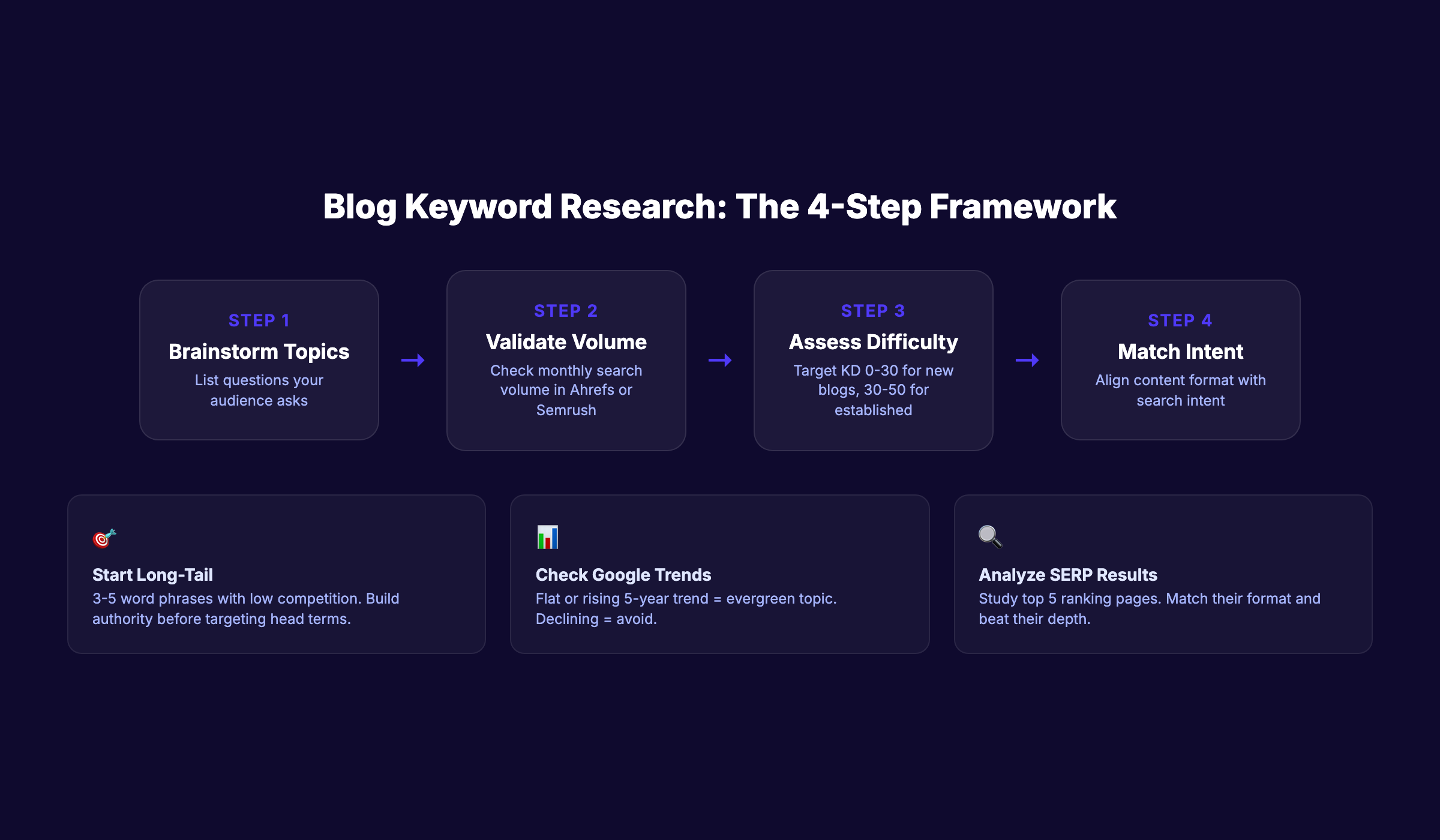
Long-Tail vs. Head Terms for Blogs
Head terms are short, high-volume keywords. “SEO” has millions of monthly searches. It also has Domain Rating 90+ competitors dominating every result. New and mid-authority sites cannot compete there.
Long-tail keywords are 3-5 word phrases with lower volume and lower competition. “SEO for service business blogs” has far fewer searches but is winnable. Long-tail posts build authority. That authority eventually lets you compete for harder terms.
Start long-tail. Build authority. Work up the keyword difficulty ladder.
Search Intent Alignment
Every keyword has an intent. Search intent falls into 4 categories:
- Informational — the user wants to learn something (“what is blog SEO”)
- Commercial — the user is researching before buying (“best blog SEO tools”)
- Transactional — the user is ready to act (“buy blog SEO service”)
- Navigational — the user wants a specific site (“Ahrefs blog SEO guide”)
Blog posts work best for informational and commercial-investigation intent. Writing a transactional post for an informational keyword confuses users and confuses Google. Read the search intent guide before targeting any keyword.
Keyword Difficulty Assessment
Keyword difficulty (KD) scores estimate how hard it is to rank for a term. A KD of 0-20 is achievable for new blogs. KD 20-40 requires some authority. KD 40+ demands a strong backlink profile.
Do not chase high-KD keywords early. You will not rank, and you will not learn. Win easy keywords first. Build a track record. Expand.
Keyword Research Tools
Three tools cover most keyword research needs:
- Google Search Console — shows what your existing pages already rank for. Free and essential.
- Ahrefs — the deepest keyword database with accurate difficulty scores.
- Semrush — strong for competitive research and gap analysis.
| Keyword Type | Example | Best For |
|---|---|---|
| Head term | ”blog SEO” | High-authority sites |
| Long-tail | ”blog SEO checklist for beginners” | New and mid-authority sites |
| Question keyword | ”how often should I post for SEO” | Featured snippets |
| Comparison keyword | ”Ahrefs vs Semrush for blog SEO” | Commercial-investigation content |
| Local + blog | ”blog SEO for London businesses” | Service area businesses |
Chapter 3: On-Page SEO for Blog Posts
On-page SEO covers every optimization you make within the post itself. It tells Google what the post is about, signals quality, and improves how users engage with the content. A strong on-page foundation is non-negotiable for ranking.
Read the full on-page SEO guide for a deep dive. This chapter covers the essentials for blog posts specifically.
Title Tag Optimization
The title tag is the single most important on-page element. Place your primary keyword near the front. Keep it under 60 characters. Make it specific enough to stand out in search results.
Bad: “A Complete Guide to SEO Things for Your Blog Content” Good: “SEO for Blogs: The Definitive Guide (2026)”
Your blog headlines guide has templates for high-CTR titles. Use the free headline analyzer to score your titles before publishing.
Meta Description Writing
The meta description does not directly affect rankings. It affects click-through rate, which indirectly affects rankings. Write meta descriptions that tell the reader exactly what they will get. Include the keyword. Keep it under 155 characters. End with a soft call to action.
The meta tag analyzer checks your meta tags before you publish.
URL Slug Best Practices
URLs should be short, keyword-focused, and human-readable. Remove stop words (a, the, and, for). Use hyphens, not underscores. Never include dates in blog post URLs — they make content look dated and complicate future updates.
Good: /blog/seo-for-blogs
Bad: /blog/2026/03/29/complete-guide-to-seo-for-your-blog-content-updated
Header Hierarchy
Headers (H1, H2, H3) give your content structure. Use one H1 per page — it is your post title. Use H2s for main sections. Use H3s for subsections within an H2. Include the primary keyword in your H1. Include variations and related terms in H2s.
Keyword Placement
Place your primary keyword in:
- The first 100 words of the post
- At least one H2
- The title tag
- The meta description
- The URL slug
- At least one image alt tag
Do not stuff. Write for humans first. Use the keyword where it reads naturally.
Image Optimization
Every image needs an alt tag that describes the image and includes a relevant keyword where natural. Compress images before uploading — large images slow load times and hurt rankings. Name image files descriptively: seo-for-blogs-checklist.png not image-003.png.
Read the full blog image optimization guide for technical compression standards.
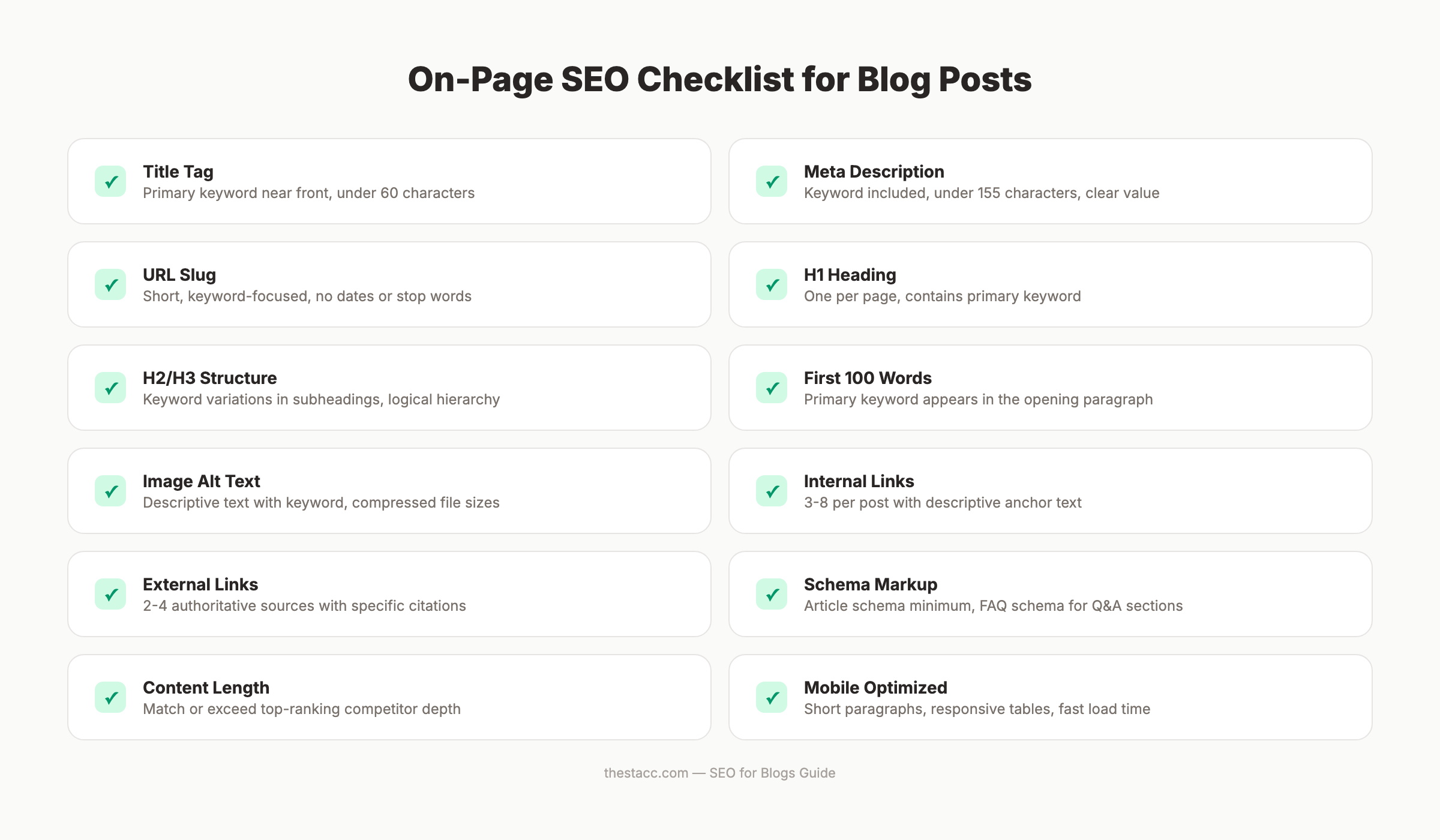
On-Page SEO Checklist
| Element | Best Practice |
|---|---|
| Title tag | Keyword first, under 60 characters |
| Meta description | Keyword included, under 155 characters |
| URL slug | Short, keyword-focused, no dates |
| H1 | One per page, contains primary keyword |
| H2s | Contains keyword variations and related terms |
| First paragraph | Primary keyword in first 100 words |
| Images | Descriptive alt text, compressed files, keyword file names |
| Internal links | 3-8 per post, relevant anchor text |
| Schema markup | Article schema minimum (schema markup for blog posts) |
| Word count | Matches or exceeds top-ranking competitors |
Run your post through the on-page SEO checker before publishing to catch gaps.
Stop writing. Start ranking. Stacc publishes 30 SEO articles per month for $99. Start for $1 →
Chapter 4: Blog Content Structure That Ranks
Good structure makes content easier to read and easier for Google to interpret. These two goals align almost perfectly. What helps users also helps rankings.
Read the dedicated blog post structure guide for full frameworks. This chapter covers the core principles.
Opening Hook Frameworks
You have 3 seconds to keep a reader on the page. Your opening must deliver a clear promise, establish relevance, and create momentum. Three hooks that work:
- The painful truth — Start with a stat or fact that surfaces the problem
- The direct answer — Lead with the conclusion, then explain why
- The bold claim — Make a specific, defensible statement that demands explanation
Avoid lengthy introductions that explain what the post is about to cover. Start in the middle of the action.
H2/H3 Structure for Scannability
Most users scan before they read. Headers are the scan path. Write H2s that communicate value on their own. A reader who only reads your H2s should understand the entire argument.
Each H2 section needs a minimum of 2-3 paragraphs. Thin sections signal low quality to Google and fail to satisfy user intent.
Paragraph and Sentence Length Rules
Keep sentences under 20 words. Keep paragraphs to 3 sentences maximum. Single-sentence paragraphs are acceptable and often preferable. White space is not wasted space — it makes content scannable on mobile, where 62%+ of web traffic originates.
Tables, Lists, and Visual Elements
Structured elements do two things. They improve readability for users. They signal content organization to Google and increase featured snippet eligibility.
Use tables for comparisons. Use numbered lists for steps. Use bullet lists for features, options, or attributes without a clear sequence. Do not use lists just to break up text — every element in a list should genuinely belong there.
Featured Snippet Optimization
Featured snippets appear above the standard results. They drive clicks even in a zero-click world. Winning a snippet for a question keyword places your content at the top of the page.
To optimize for snippets: answer the question directly in 40-60 words, use the question as a header, and follow the answer with supporting detail. Read the get featured snippets guide for exact formatting templates.
Content Length Recommendations
Longer is not always better. The right length is whatever it takes to fully answer the searcher’s question. Check the top-ranking pages for your target keyword. Match or exceed their depth on topics that matter. Do not pad with filler.
Informational guides typically rank at 2,000-5,000 words. How-to posts often rank at 1,200-2,000 words. List posts scale with list length. See the blog post length analysis for data by content type.
Chapter 5: Internal Linking Strategy for Blogs
Internal linking is one of the most underused SEO tactics in blogging. It passes authority between pages, helps Google understand your site structure, and keeps readers engaged longer.
Every internal link is a vote. You tell Google: “This other page matters. It is relevant here.” Done at scale, internal linking builds a web of authority that lifts your entire site.
Topic Clusters and Pillar Pages
The strongest blog SEO architecture uses topic clusters. A pillar page covers a broad topic at high depth. Cluster posts cover specific subtopics in detail. Every cluster post links back to the pillar. The pillar links out to key cluster posts.
This structure tells Google you own a topic. It is the fastest path to topical authority. Read the build topical authority guide and the content cluster breakdown for full architecture blueprints.
Anchor Text Best Practices
Anchor text is the clickable text in a link. Use descriptive anchor text that tells the reader and Google what the destination page is about. “Click here” and “read more” are wasted opportunities.
Good: “the internal linking strategy for blogs” Bad: “click here to read more about this topic”
Vary your anchor text naturally. Do not use the exact same phrase every time you link to a page.
How Many Internal Links Per Post
3-8 internal links per post is the standard range. Long-form guides (4,000+ words) can support more. Short posts (under 1,000 words) should stay closer to 3. The key is relevance — every link must make sense in context.
Common Internal Linking Mistakes
| Mistake | Why It Hurts |
|---|---|
| Generic anchor text (“click here”) | Gives Google no context about the destination |
| Linking to the homepage from every post | Wastes link equity on a page that does not need it |
| No links to new posts | New pages get no authority and take longer to rank |
| Broken internal links | Damages crawlability and user experience |
| Over-linking (20+ links in a short post) | Dilutes the value passed to any single link |
| Never updating internal links | Old posts miss opportunities to link to new content |
Chapter 6: Publishing Frequency and Content Velocity
How often you publish matters. It does not just matter a little — it determines how fast your blog compounds authority, how much of your topic you own, and how quickly Google trusts your site as a serious publisher.
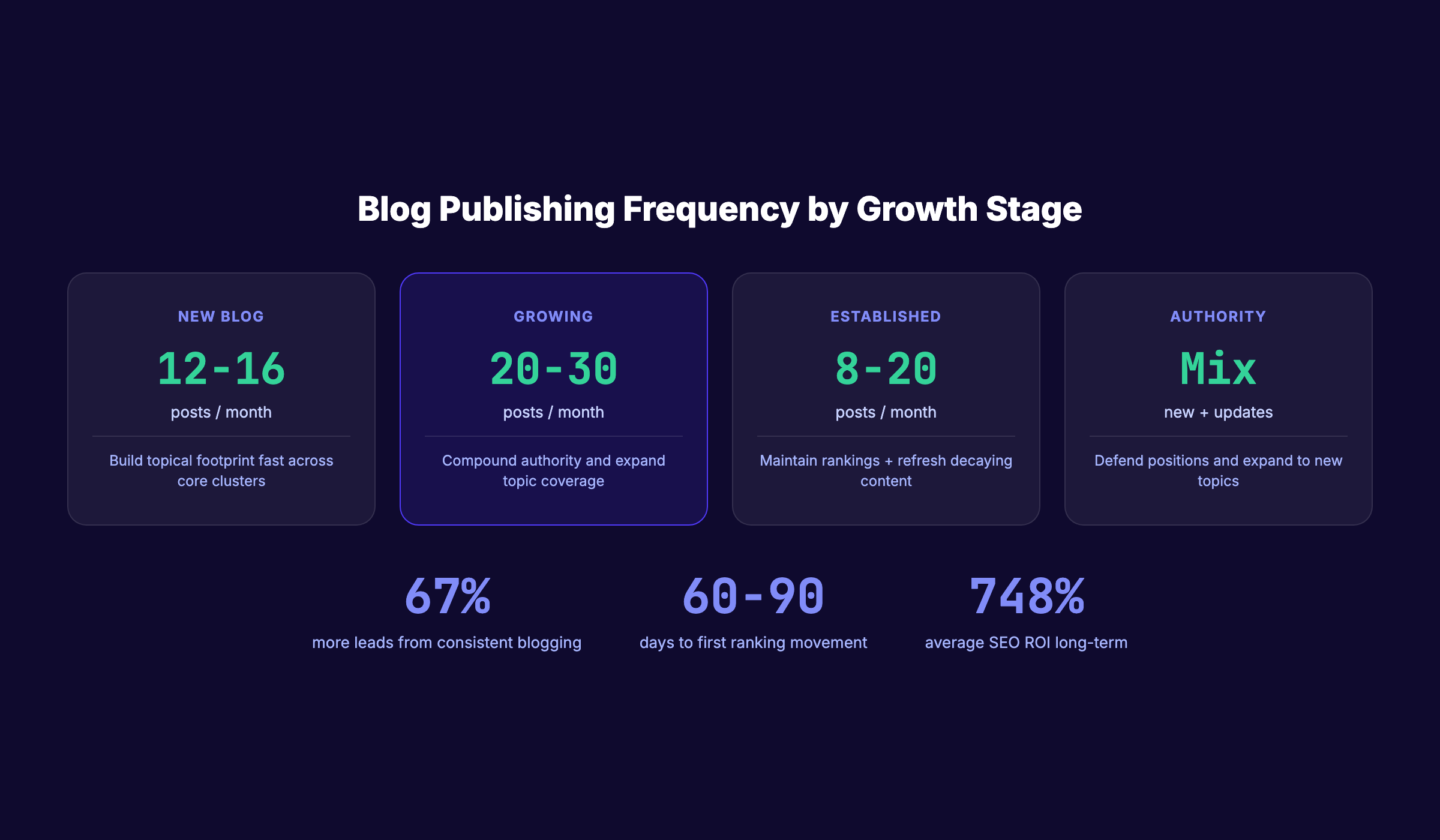
67% more leads go to businesses that blog consistently compared to those that do not. That gap widens at higher publishing frequencies.
The Content Compound Effect
Each post you publish does 3 things: it targets a keyword, it builds internal linking opportunities, and it signals publishing consistency to Google. The third effect is underrated.
Google rewards sites that publish regularly. Crawl frequency increases. New pages index faster. Authority builds faster. The gap between a site publishing 4 posts per month and one publishing 30 posts per month is not linear — it is exponential over 12 months.
This is why a content calendar is not optional. It is the infrastructure for compounding.
Quality vs. Quantity
Both matter. Low-quality content at high volume produces thin pages that can trigger quality signals. High-quality content at low volume produces slow growth. The goal is high-quality content at high volume.
That balance is what a service like Stacc is built for. See how to scale blog content without sacrificing quality.
Publishing Cadence by Blog Maturity
| Blog Stage | Age | Recommended Frequency | Goal |
|---|---|---|---|
| New blog | 0-6 months | 12-16 posts/month | Establish topical footprint fast |
| Growing blog | 6-18 months | 20-30 posts/month | Compound authority across clusters |
| Established blog | 18+ months | 8-20 new + regular updates | Maintain rankings, refresh decaying content |
| Authority blog | 3+ years | Mix of new and updates | Defend positions, expand to new topics |
The 60-90 Day Ranking Timeline
Most blog posts do not rank immediately. Google indexes them quickly. Rankings establish themselves over 60-90 days as the page collects impressions, earns clicks, and receives (or does not receive) external links.
Do not judge a post’s performance at 2 weeks. Evaluate at 90 days. Posts that plateau after 90 days need optimization. Posts still climbing at 90 days need internal links and promotion to accelerate further. Learn how many blog posts to rank for competitive terms.
Your SEO team. $99 per month. 30 optimized articles, published automatically. Start for $1 →
Chapter 7: Measuring Blog SEO Performance
Publishing without measuring is operating blind. You need to know which posts are gaining rankings, which are stagnating, and which are decaying. That data tells you where to write next and which existing posts need updates.
Google Search Console Setup
Google Search Console is the primary measurement tool for blog SEO. It is free and shows you:
- Which keywords your posts rank for
- How many impressions each post receives
- Click-through rates by keyword and page
- Average ranking position over time
- Index coverage and crawl errors
Set it up on day one. Verify your domain. Submit your sitemap. Check it weekly.
Key Metrics to Track
Impressions show how often your post appeared in search results. Low impressions mean the keyword has low volume or the post is not ranking for it. High impressions with low clicks mean the title or meta description needs work.
Average position shows where you rank. Positions 1-3 capture the majority of clicks. Positions 4-10 need title and content optimization to climb. Positions 11-20 (“page 2”) are the highest-impact targets — small improvements move them to page 1.
Click-through rate (CTR) measures how often users click when they see your result. Industry average is 2-3% for most positions. Below-average CTR signals a weak title or meta description.
Organic traffic is the bottom-line metric. It should grow month over month as you publish and optimize.
Content Decay Detection
Rankings do not hold forever. Content decay happens when posts gradually lose rankings due to competitor updates, content staleness, or shifting search intent. Detect it by filtering Google Search Console for posts with declining impressions over 90-day periods.
Decaying posts need one of two interventions: a content refresh or a full rewrite. Read update old blog posts for the decision framework.
Blog SEO KPIs That Matter
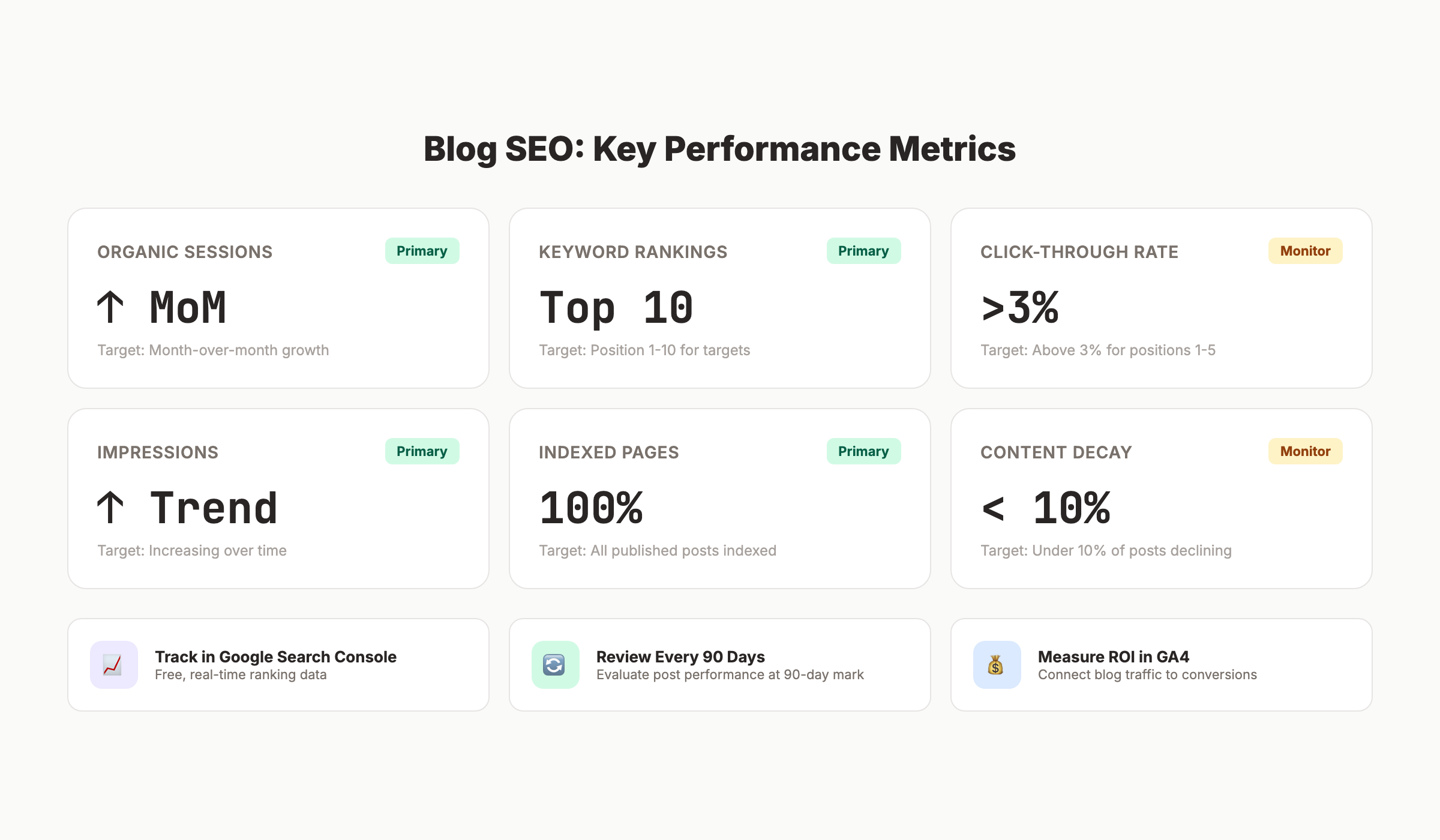
| KPI | What It Measures | Target |
|---|---|---|
| Organic sessions | Raw traffic volume | Month-over-month growth |
| Keyword rankings | Search visibility | Top 10 positions for target keywords |
| Impressions | Search footprint size | Increasing over time |
| Average CTR | Title and meta effectiveness | Above 3% for positions 1-5 |
| Pages with rankings | Content coverage breadth | Growing with publishing volume |
| Indexed pages | Crawl health | All published posts indexed |
ROI Measurement Beyond Traffic
Traffic is a proxy metric. Revenue is the real metric. Connect your blog to conversions by:
- Setting up goals in GA4 for form fills, trials, and purchases
- Tracking which blog posts generate the most leads
- Attributing revenue to blog-assisted conversions (not just last-click)
- Calculating cost per lead from blog vs. paid channels
Read measure content marketing ROI for a full attribution framework. SEO delivers up to 748% ROI as a long-term channel — but only if you measure it.
When to Update vs. Create New Content
Update existing content when: the post ranks on page 2 but has not moved in 90 days, impressions are declining, or the topic has materially changed. A content audit identifies all three scenarios at scale.
Create new content when: you have identified a keyword gap, you want to expand into a new topic cluster, or a subtopic requires dedicated coverage to satisfy search intent.
3,500+ blogs published. 92% average SEO score. See what Stacc can do for your site. Start for $1 →
Chapter 8: Blog SEO for AI Search Engines
AI search has changed the top of the funnel. Google AI Overviews, Perplexity, ChatGPT, and Gemini now answer queries directly. They cite sources. The sources that get cited see brand exposure, referral traffic, and authority signals that feed back into traditional rankings.
Blog SEO in 2026 requires optimizing for both. The fundamentals are the same. The surface area has expanded.
How AI Search Cites Blog Content
AI search engines pull from high-authority, well-structured content that directly answers questions. They favor:
- Clear, direct answers early in the content
- Content with strong E-E-A-T signals
- Structured formatting (headers, tables, numbered lists)
- Pages that already rank well in traditional search
- Content with citations, data, and original research
Being invisible in traditional search makes you invisible in AI search. Rankings are still the gateway.
Optimizing for AI Overviews
AI Overviews appear at the top of Google for informational queries. They pull summarized answers from multiple sources. To maximize inclusion:
- Answer the primary question within the first 150 words
- Use question-format H2s that match common search queries
- Include data points and statistics with attribution
- Structure content so individual sections are self-contained answers
The posts most likely to appear in AI Overviews already rank in positions 1-5. Prioritize ranking first, then optimize for citation.
Structured Content for AI Citation
AI systems parse structure. They extract information from tables, numbered lists, and clearly delineated sections more reliably than dense prose. Every chapter of this guide is structured for AI citation — each H2 section answers a specific question on its own.
Write answers that stand alone. A reader (or AI) should be able to drop into any section and get a complete answer without reading everything before it.
E-E-A-T Signals in Blog Posts
E-E-A-T — Experience, Expertise, Authoritativeness, Trustworthiness — is how Google evaluates content quality. For blogs, E-E-A-T signals include:
- Author bios with credentials, experience, and professional links
- Citations linking to authoritative external sources
- Original data or case studies from your own work
- Author bylines on every post (not anonymous)
- Last-updated dates showing content is maintained
- Transparent publishing standards in an About or Editorial page
E-E-A-T is not a single factor. It is a collection of signals that tell Google this is content from a real expert, not a content farm.
The Citability Advantage
The blogs that win in AI search are the ones that are easy to cite. That means:
- Clear statistics with source attribution
- Defined terms and concepts
- Numbered frameworks and named methodologies
- Direct, quotable sentences that answer common questions
Write content that you would want to cite. Write content that a journalist would quote. That is the content AI search surfaces. Read get cited in AI search for a full optimization framework.
Rank everywhere. Do nothing. Blog SEO, Local SEO, and Social on autopilot. Start for $1 →
Frequently Asked Questions
Does blogging help SEO?
Yes. Blogging is one of the most effective SEO investments a website can make. Sites with active blogs earn 97% more inbound links than those without. Each post targets a keyword, builds internal linking opportunities, and signals publishing authority to Google. The effect compounds over time.
How long does blog SEO take to work?
Most blog posts begin establishing rankings within 60-90 days of publication. Competitive keywords in high-authority niches can take 6-12 months. The timeline accelerates when you publish consistently, build internal links, and earn backlinks.
How many blog posts do you need to rank?
There is no fixed number. What matters is topical coverage — owning a cluster of related keywords with a pillar page and supporting cluster posts. For most topics, a pillar page plus 8-15 supporting posts establishes enough topical authority to rank competitively. Read how many blog posts to rank for a detailed breakdown by niche.
What is the best blog post length for SEO?
The best length is whatever it takes to fully satisfy search intent for your target keyword. Informational guides typically rank at 2,000-5,000 words. How-to posts often rank at 1,200-2,000 words. Check your top-ranking competitors and match their depth. See the blog post length data for benchmarks by content type.
How often should you publish blog posts for SEO?
The more consistently you publish, the faster you build authority. New blogs benefit most from 12-20 posts per month to establish a topical footprint. Established blogs maintain and grow with 8-30 posts per month. The constraint is quality — every post must meet a minimum standard for on-page SEO, depth, and accuracy.
Is SEO for blogs still worth it in 2026?
Yes. Despite zero-click search growth and AI Overviews, organic search still drives the majority of website traffic for most industries. 56% of consumers have purchased from companies after reading their blog content. The rules have evolved — E-E-A-T matters more, AI citation optimization is now necessary — but the core equation holds: consistent, optimized blog content builds authority and drives leads.
Blog SEO is not a tactic. It is an infrastructure decision. Every optimized post you publish is a permanent asset that works around the clock. The question is not whether to do it — it is whether you are doing it fast enough to stay ahead.
Start with keyword research. Nail your on-page fundamentals. Build internal links. Publish consistently. Measure what works. The compounding begins immediately.
Written and published by Stacc. We publish 3,500+ articles per month across 70+ industries. All data verified against public sources as of March 2026.
