Ghost CMS SEO: settings, meta data, schema, publishing cadence, and the ranking tactics that turn a fast Ghost site into an organic traffic engine.
Ghost ships with cleaner SEO defaults than almost any platform on the market. Sitemaps generate automatically. Schema renders by default. Canonical tags handle themselves. And yet most Ghost blogs still rank on page 3 for the terms that should be theirs.
The reason is not the platform. It is that publishers launch their Ghost sites with empty meta descriptions, a default subdomain, one post a month, and zero internal link strategy. Then they blame the tool.
This Ghost SEO guide fixes every one of those gaps. We will walk through each setting that affects rankings and every per-post field worth filling. Then we will cover the schema Ghost outputs by default and the content strategy that turns a Ghost blog into a traffic engine.
We publish 3,500+ blog posts across 70+ industries through the theStacc platform. We have audited dozens of Ghost sites for publishers who picked the platform for its speed. They then watched their blog flatline because no one turned the SEO settings into a strategy. The fixes repeat. So do the wins.
Here is what you will learn:
- Why Ghost is one of the strongest SEO foundations available today
- Every Ghost Settings field that influences search rankings
- On-page SEO for posts, pages, tag archives, and author pages
- The schema and meta data Ghost generates automatically
- How to add advanced schema and analytics through Code Injection
- Content strategy that compounds traffic on a Ghost blog
- Common Ghost SEO mistakes and the fix for each
- How to scale Ghost publishing without burning out
Chapter 1: Is Ghost Good for SEO?
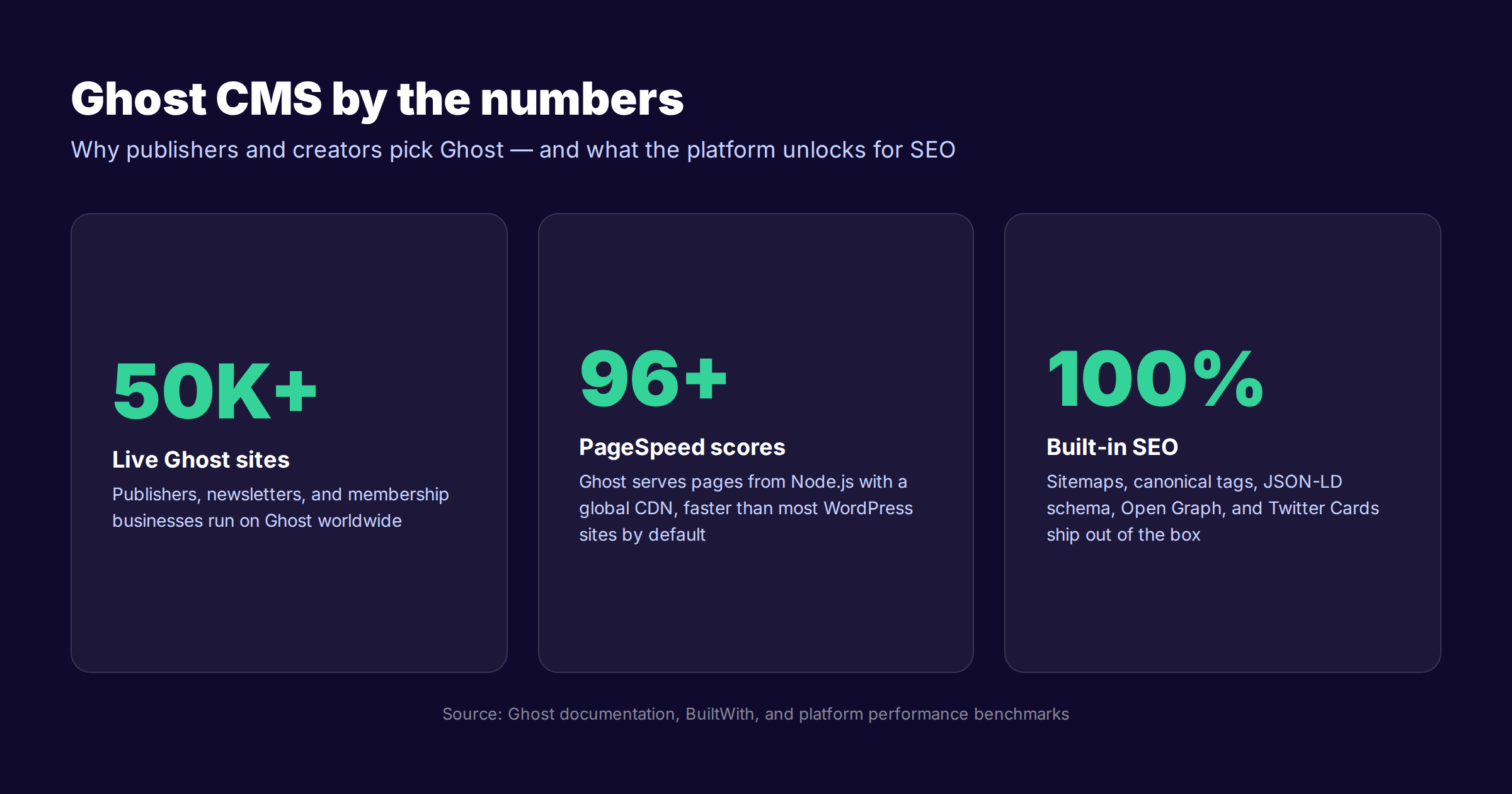
Yes, Ghost is genuinely good for SEO. The platform serves clean semantic HTML from Node.js, ships an automatic XML sitemap, renders Article schema by default, and exposes every per-post meta field you need without a plugin. Most ranking problems on Ghost sites are configuration and content velocity issues, not platform limitations.
The case for Ghost rests on four pillars.
The first is speed. Ghost is built on Node.js and serves pages with aggressive caching. Ghost Pro adds a global CDN on top. Most Ghost sites score above 90 on mobile PageSpeed Insights with default themes. Speed is a confirmed Google ranking signal, and slow sites lose 53% of mobile visitors when load time exceeds three seconds.
The second pillar is clean code. Ghost themes render proper semantic HTML5 with one H1 per page, ordered heading hierarchy, and standard article elements. The platform does not inject the layers of div wrappers and inline styles that bloated WordPress themes are famous for.
The third pillar is built-in SEO infrastructure. Sitemaps, canonical URLs, Open Graph tags, Twitter Cards, and JSON-LD Article schema all ship by default. According to Ghost's official SEO documentation, publishers do not need any plugins to cover the technical SEO basics. The platform handles them automatically.
The fourth pillar is editorial focus. Ghost was built for publishers and creators, not page builders. The post editor is fast. The admin panel does not bury meta fields in five tabs. The result is that writers actually fill out the SEO fields instead of skipping them out of friction.
Where Ghost Falls Short for SEO
Honest pros need honest cons. Ghost has real limitations worth naming up front.
The plugin ecosystem is small. WordPress users come to Ghost expecting Yoast or RankMath and find neither. Ghost ships with the basics, but advanced features like content scoring, redirect management UIs, and bulk meta editing do not exist out of the box.
Programmatic SEO at scale is harder. Ghost does not support dynamic page templates that pull from external data sources without custom Integrations. If your strategy depends on publishing 10,000 location pages or product variants, you will fight the platform.
Tag and author archive control is limited. By default, Ghost indexes every tag and author page. Thin archives with one or two posts dilute crawl budget. You handle this through Code Injection rather than a checkbox.
Redirect management requires file uploads. Ghost lets you bulk import redirects through a YAML or JSON file, but there is no friendly UI for one-off redirects. Most teams forget this exists until they migrate a post and lose rankings.
Ghost vs WordPress vs Substack for SEO
Three platforms dominate the publisher and creator market. The right pick depends on your business model and how much SEO control you actually need.
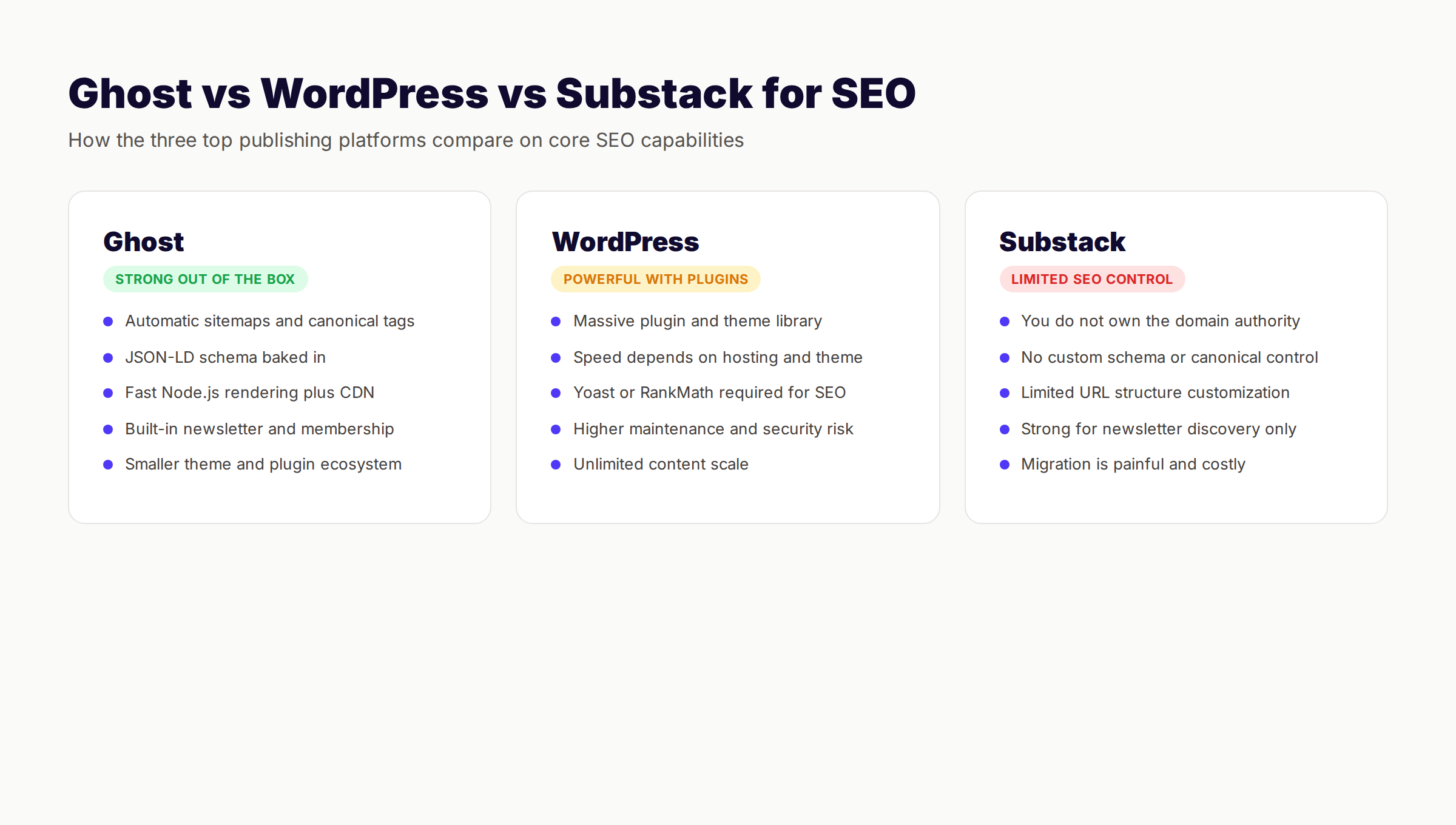
| Capability | Ghost | WordPress | Substack |
|---|---|---|---|
| Default semantic HTML | Strong | Theme dependent | Limited |
| Native sitemap | Auto-generated | Plugin required | Auto-generated |
| Schema markup | Article + Person built in | Plugin required | Minimal |
| Page speed | Fast (Node.js + CDN) | Hosting dependent | Fast |
| URL structure control | Full | Full | Limited |
| Plugin ecosystem | Small | Massive | None |
| Custom domain | Yes | Yes | Yes (paid) |
| Migration friendly | Yes | Yes | Painful |
| Ideal for | Publishers, creators, newsletters | Blogs at scale, programmatic SEO | Newsletter-first audiences |
If you run a publication, newsletter, or membership business, Ghost is the strongest pick. If you publish thousands of pages monthly or need WooCommerce integration, WordPress wins on raw scale. If your distribution strategy is newsletter-first and you do not care about search rankings, Substack is fine — but you trade SEO control for distribution. We covered the full WordPress vs Ghost decision in a separate guide including pricing and feature breakdowns.
Chapter 2: Ghost Publication Settings for SEO
Before you optimize a single post, configure the publication-level settings. These apply site-wide and form the SEO foundation every post inherits.
Open your Ghost admin panel. Click the gear icon in the lower left to open Settings. The SEO-critical settings live across five tabs: General, Design, Code Injection, Integrations, and Labs.
General Tab Configuration
This is where you set the foundation that every page on your Ghost site inherits.
Publication title. This becomes the default page title suffix and the homepage title. Keep it under 30 characters so it does not push your post titles past the 60-character search snippet limit. Match it to your brand exactly.
Publication description. This powers the homepage meta description and the og:description fallback. Write 145 to 155 characters. Lead with what you publish and who you help. Include one keyword that defines your niche.
Site icon. Upload a square 256x256 PNG. This becomes your favicon and influences how Google shows your site in search results, especially on mobile. Make it readable at 16x16 pixels.
Publication cover. Used as the homepage hero and as a fallback Open Graph image when individual posts lack their own. Pick a 1200x630 image that reflects your brand.
Timezone. Sets the published timestamp on every post. Search engines use freshness signals, so configure this correctly before publishing the first piece. Most international publishers should use UTC.
Language. Sets the lang attribute on every page. Critical for Google to serve the right SERP and for screen readers. Match this to the primary language of your content.
Design Tab Configuration
The Design tab controls your active theme and homepage layout. From an SEO angle, three settings matter most.
Active theme. Use the official Casper theme or a vetted third-party theme. Avoid heavily customized themes that have not been updated in 12 months — they often break schema or load excessive JavaScript. Casper ships with all the right schema and speed defaults.
Homepage structure. Configure whether the homepage shows recent posts, featured posts, or a specific tag. Most publishers should show recent posts in reverse chronological order to give freshness signals to crawlers.
Custom code injection (theme level). Some themes allow per-theme code in the admin. We will handle most code injection through the platform-level setting in a moment.
Custom Domain
Connecting a custom domain is not optional. It is the most common Ghost SEO mistake — publishers launch on yoursite.ghost.io, write 20 posts, and only then connect the real domain.
By that point, you have built backlinks, indexed pages, and brand mentions on the wrong host. Migrating loses some signal. Always connect the custom domain before publishing the first post.
Ghost Pro handles SSL automatically. If you self-host, configure Let's Encrypt through Ghost CLI. HTTPS is a confirmed Google ranking signal and a hard requirement for trust signals.
Robots.txt and Sitemap
Ghost handles both automatically. Your sitemap lives at /sitemap.xml and updates whenever you publish or update a post. Your robots.txt lives at /robots.txt and allows crawlers to access content while blocking utility paths.
You can override the robots.txt by adding a routes.yaml file to your installation, but most publishers should leave the defaults in place. The platform configures both files correctly for SEO out of the box.
Submit your sitemap to Google Search Console on day one. Do the same in Bing Webmaster Tools. Confirm both crawlers can index your homepage and a sample post within 48 hours of going live.
Chapter 3: Per-Post SEO Inside the Ghost Editor
Every Ghost post has its own meta data settings hidden behind the gear icon in the right-hand sidebar. Most writers never open it. That is where rankings leak.
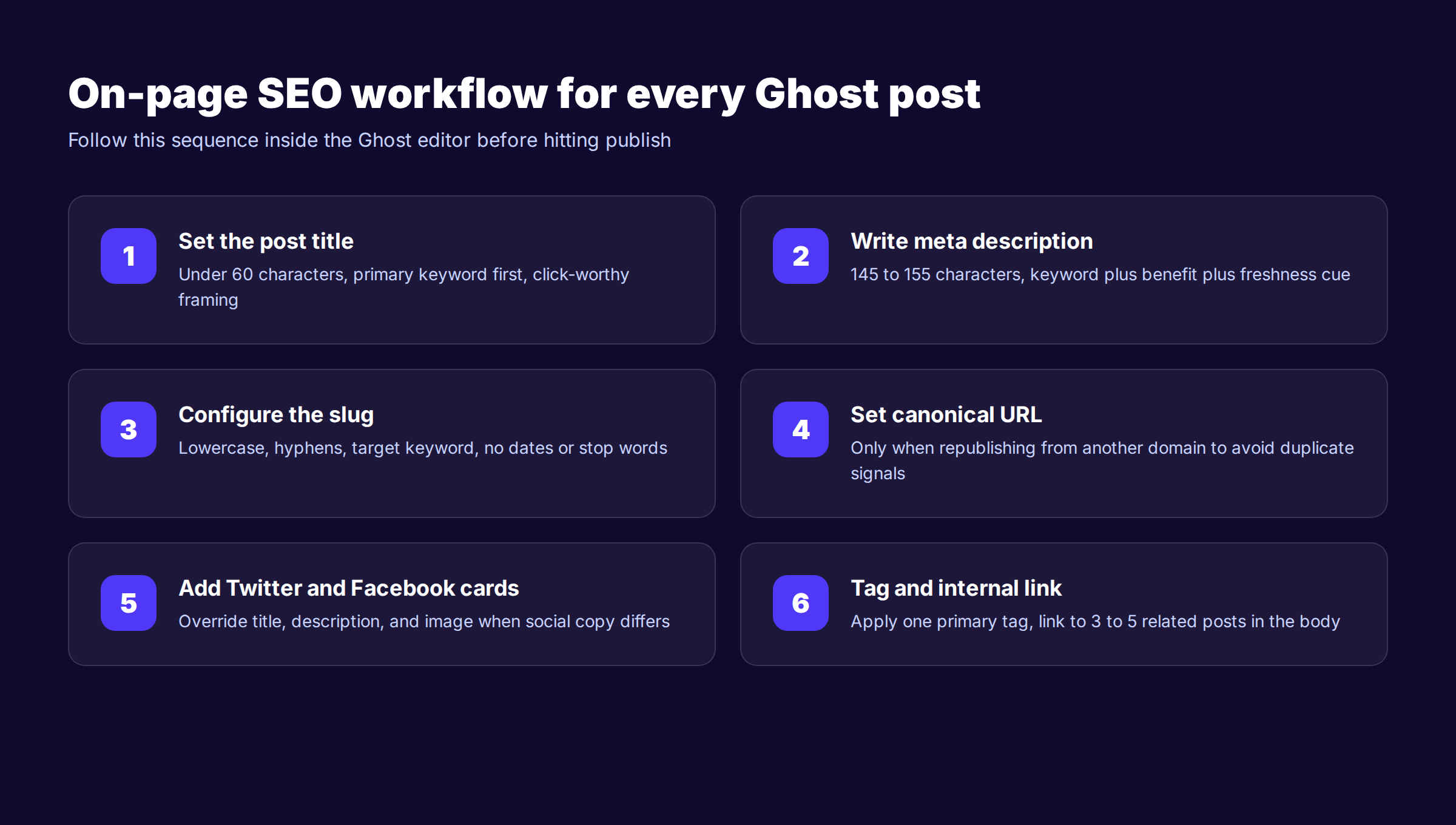
Click the gear icon. Scroll to the Meta Data section. Six fields wait for you on every post.
Post Title
The post title appears as the H1 on the page and as the meta title in search results unless overridden. Keep it under 60 characters for full SERP display. Place the primary keyword in the first half. Write for humans first, then check that the keyword reads naturally.
Bad: "5 Tips for SEO" Better: "5 Ghost SEO Tips That Lift Organic Traffic in 2026"
The better version includes the keyword, signals freshness with the year, and promises a specific outcome. Match the search intent of the keyword you are targeting. If users want a list, deliver a list.
Meta Title
This is the title tag that appears in search results. Ghost uses the post title by default. Override it when the post title reads great on the page but does not match your target keyword. Also override it when the post title runs longer than 60 characters.
Many ranking publishers use a different meta title from the visible H1. The H1 sells the click on social and email. The meta title sells the click on Google.
Meta Description
This is the single field most often left blank, and it costs more clicks than any other miss. Ghost falls back to your excerpt or the first 145 characters of the post. Both are usually terrible meta descriptions.
Write a custom meta description for every post. 145 to 155 characters. Lead with the value the post delivers. Include the keyword naturally if it fits. End with a curiosity hook or freshness signal like "Updated 2026" or "with 12 examples."
Bad: "In this post we are going to explore the world of SEO for Ghost CMS sites and look at strategies that work." Better: "The complete Ghost SEO guide for 2026. Settings, meta data, schema, and content tactics that turn Ghost blogs into ranking machines."
URL Slug
The URL slug is the part of the URL after your domain. Ghost auto-generates the slug from your post title, but you should always edit it before publishing.
Rules for a strong Ghost slug:
- Lowercase only
- Hyphens between words, never underscores or spaces
- Three to five words maximum
- Include the primary keyword
- Remove stop words like "the", "a", "and"
- No dates unless you commit to never updating the post
Bad slugs: /how-to-do-ghost-seo-the-complete-guide-for-2025 Better slug: /ghost-seo-guide
Slug changes after publishing require a 301 redirect to preserve link equity. Set the right slug the first time.
Canonical URL
Only fill this in when republishing content from another source. The canonical URL tells search engines which version of a page should be treated as the original. By default, Ghost uses the post's own URL.
If you are syndicating a guest post from Medium or LinkedIn, set the canonical to your Ghost URL so you keep the ranking authority. If you are republishing a Ghost post on another site, set the canonical on that site back to your Ghost URL. We covered the full canonical tag implementation in our canonical guide.
Feature Image
The feature image powers the Open Graph image, the Twitter card image, the homepage thumbnail, and often the social share preview. Always set one.
Use 1200x630 pixel images. PNG or JPEG. Under 300 KB after compression. Include text overlay if the image will appear in social feeds where the post title is truncated.
Set the feature image alt text. Ghost asks for this when you upload. Describe what is in the image, not just the post topic. Alt text helps with image search rankings and accessibility.
Twitter and Facebook Cards
Ghost lets you override the Open Graph and Twitter Card metadata per post. Use this when the social copy needs to be different from the meta description.
For most posts, the defaults are fine — Ghost pulls from your meta title, meta description, and feature image. Customize them when you want a punchier hook on X or a different angle for LinkedIn audiences.
Chapter 4: Schema and Structured Data on Ghost
Schema markup is structured data that tells search engines what your page is about. Ghost generates the most important schema types automatically. Most publishers never need to touch them.
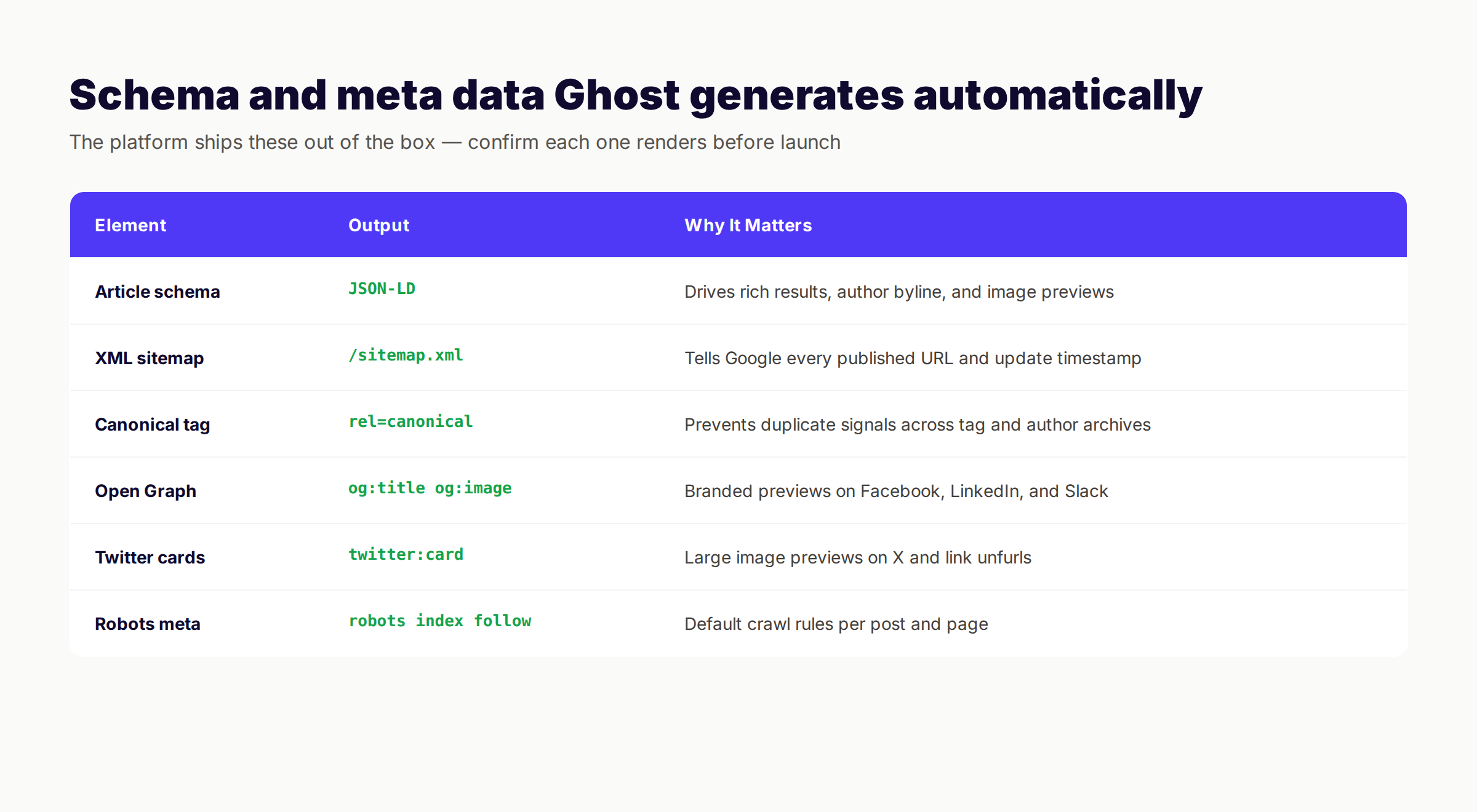
What Ghost Generates Automatically
Open any Ghost post. View source. Search for "application/ld+json". You will find Article schema with the following fields populated:
- Article headline
- Description
- Image
- Date published
- Date modified
- Author name and URL
- Publisher name, logo, and URL
- Main entity URL
This is the schema Google needs for rich results in news, top stories, and standard article snippets. According to Google's structured data documentation, Article schema is recommended for all blog and news content.
Ghost also outputs Open Graph and Twitter Card meta tags on every page. Run a sample post through the Facebook Sharing Debugger and the Twitter Card Validator before launching to confirm both render correctly.
Adding Custom Schema Through Code Injection
Some schema types are not built into Ghost. You add them through the Code Injection setting under Settings → Code Injection.
FAQ schema for posts with a FAQ section:
<script type="application/ld+json">
{
  "@context": "https://schema.org",
  "@type": "FAQPage",
  "mainEntity": [{
    "@type": "Question",
    "name": "Is Ghost good for SEO?",
    "acceptedAnswer": {
      "@type": "Answer",
      "text": "Yes. Ghost ships with sitemaps, canonical tags, Article schema, and Open Graph tags by default."
    }
  }]
}
</script>
HowTo schema for step-by-step posts. BreadcrumbList schema for category and tag pages. Organization schema for your homepage.
We recommend adding schema to specific posts using the per-post Code Injection field under the post settings, not the site-wide setting. Site-wide schema applies to every page on your site, which is rarely what you want.
For the full schema overview, see our schema markup SEO guide.
Verifying Schema With Rich Results Test
Run every important post through the Google Rich Results Test. It tells you which schema types Google detected, which fields are valid, and what errors need fixing.
A Ghost post should always show Article schema as eligible for rich results. If it does not, your theme is overriding the default head tags. Pick a Ghost-blessed theme or update the theme's default.hbs to restore the default schema output.
Chapter 5: Site Structure and Internal Linking
Ghost ships with strong defaults for site structure. The platform separates posts, pages, tags, and authors into clean URL paths. But the internal link graph between those pages is up to you.
Tag Structure
Tags in Ghost work like categories in WordPress. Each tag creates an archive page at /tag/your-tag/. Use tags as topic clusters, not as labels. A tag should represent a coherent topic that holds at least 8 to 10 posts.
Bad tag structure: 47 tags with one or two posts each. Crawl budget waste. Thin content. Dilution of internal authority.
Good tag structure: 8 to 12 primary tags. Each tag has 10 or more posts. Each tag page has a custom description that explains the topic. Tags map to your main content pillars.
Set custom meta data on every tag page through Settings → Tags → click a tag → click the gear icon. Add a description, a meta title, and a feature image. Tag pages can rank for category keywords if you treat them as content.
Internal Linking Strategy
Internal links are the most underused SEO lever on Ghost sites. The platform does not auto-suggest related posts inside the editor. You have to wire links in manually.
We follow the hub and spoke model when working with Ghost publishers. Pick a primary pillar topic. Write an in-depth pillar post that covers the topic from every angle. Then write 8 to 15 cluster posts that link back to the pillar. Each cluster post links to two or three other cluster posts.
Rules for internal links inside Ghost posts:
- 3 to 5 internal links per 1,000 words
- Descriptive anchor text that includes the target post's keyword
- Link from new posts to older, established posts to pass authority
- Link from cornerstone older posts back to new posts to speed indexing
- Avoid linking the same target more than twice in one post
Check the Ghost editor for a related posts widget. Most themes ship one. If yours does not, install a theme that does or add it through the theme's template files.
Author Pages
Every Ghost post has an author. Author pages live at /author/name/ and aggregate all posts by that author. They rank for author name searches if you fill them out.
Fill in the author bio, profile image, location, and social links. Add a custom meta title and description. For E-E-A-T signals, link the author bio to credentials, published work elsewhere, and verified social profiles. Our E-E-A-T for blogs guide covers the full setup.
Chapter 6: Core Web Vitals and Page Speed
Ghost is fast by default. Most sites score 90 or above on mobile PageSpeed Insights with the Casper theme and standard image sizes. But three patterns kill speed on Ghost sites.
The first is oversized feature images. A 5MB hero image tanks Largest Contentful Paint regardless of how fast the platform is. Compress every image to under 300 KB. Use WebP format when possible. Ghost serves responsive image versions automatically when you upload through the editor.
The second is heavy third-party scripts. Analytics, chat widgets, ad networks, and social embeds all add JavaScript that delays interactive load. Audit every script in Code Injection. Remove what you do not actively use.
The third is custom themes with old code. Some Ghost themes ship with jQuery, slow font loading, and uncached CSS. Pick a theme built in the last 12 months or stay on Casper.
Measuring Core Web Vitals
Run your homepage and three sample posts through PageSpeed Insights. Look at the three Core Web Vitals metrics:
- Largest Contentful Paint (LCP). Target under 2.5 seconds. Usually controlled by feature image size and font loading.
- Interaction to Next Paint (INP). Target under 200 milliseconds. Replaces First Input Delay in 2024. Controlled by JavaScript execution time.
- Cumulative Layout Shift (CLS). Target under 0.1. Controlled by image dimensions and font loading patterns.
A healthy Ghost site scores in the green on all three. If yours does not, our Core Web Vitals optimization guide walks through every fix.
Image Optimization Workflow
For every image you upload to Ghost:
- ✓ Resize to the actual display width plus 2x for retina screens
- ✓ Compress with TinyPNG, Squoosh, or ImageOptim
- ✓ Convert to WebP when supported by your CDN
- ✓ Add descriptive alt text in the upload dialog
- ✓ Lazy load below-the-fold images via the markdown image syntax
Ghost serves responsive image variants automatically when you upload through the editor. Take advantage of this by uploading at the largest size you might ever need, then letting Ghost generate the smaller variants.
Stop building SEO infrastructure post by post. We publish to your Ghost site on a fixed cadence, written and optimized for search, with all meta data filled in and internal links wired automatically.
Chapter 7: Content Strategy for Ghost Blogs
Ghost handles the technical SEO. The content is on you. And content is where most Ghost sites lose the ranking game.
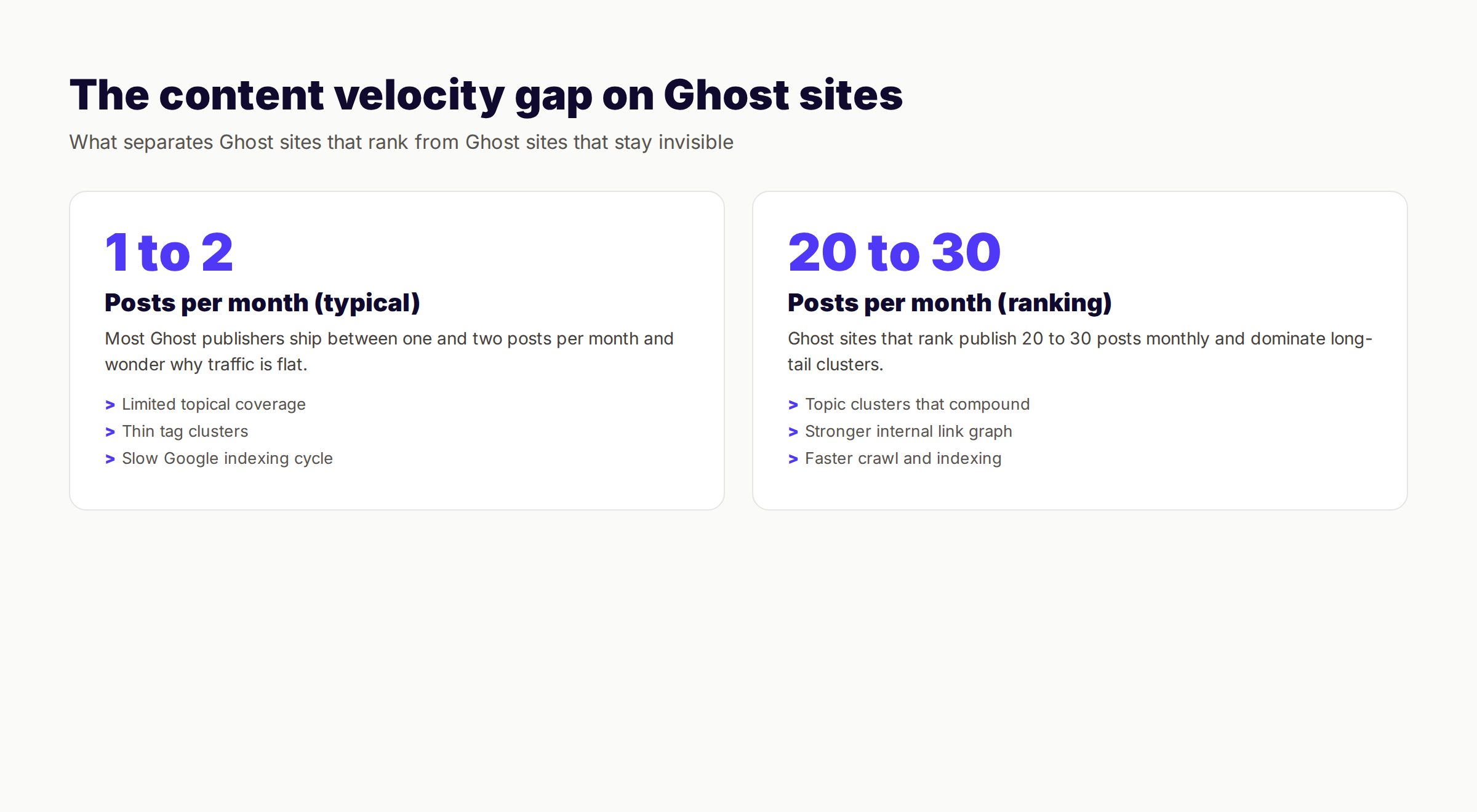
The pattern we see across hundreds of Ghost audits is the same. Publishers ship one or two posts a month. They write what they feel like writing. There is no topic cluster strategy. There is no internal link plan. There is no keyword targeting.
Then they wonder why a year of work delivered 200 organic visits a month.
Publishing Cadence That Compounds
Ghost sites that rank publish at least 20 posts per month. Some publish 40 to 60. The Ghost sites we work with through theStacc publish on a consistent monthly cadence for 12 months. Over that period they typically see 5x to 15x organic traffic growth.
The math is simple. Google needs content to crawl, index, and rank. Topical authority builds on volume plus quality plus interlinking. One post a month does not generate enough surface area for Google to understand what your site is about.
If 30 posts a month sounds impossible, you are not alone. Most publishers cannot maintain that cadence with a writer or two. That is the gap theStacc fills: we publish fully optimized posts to your Ghost blog from $99 a month.
Keyword Research for Ghost Publishers
Keyword research is the discipline of finding the search terms your audience actually types. You do not need expensive tools to start.
Free starting points:
- Google Search Console (your existing impressions)
- Google Autocomplete and "People Also Ask"
- Reddit threads in your niche
- Your competitors' top-ranking pages via free Ahrefs Webmaster Tools
Paid tools we recommend: Ahrefs, Semrush, or Mangools for deeper research. See our keyword optimization guide for the full process.
For each Ghost post, target one primary keyword and two to three semantic variations. Place the primary keyword in the title, the first 100 words, at least one H2, the meta description, and one image alt text.
Topic Clusters on Ghost
The strongest content structure on Ghost is the topic cluster. Pick a pillar topic. Write a 3,000+ word pillar post that covers the topic completely. Then write 10 to 20 cluster posts that go deep on subtopics and link back to the pillar.
Example pillar: "The Complete Ghost SEO Guide" (this post) Example clusters:
- Ghost meta description best practices
- Ghost schema markup setup
- Ghost vs WordPress for publishers
- Ghost theme SEO comparison
- Ghost migration from WordPress
Each cluster post links to the pillar. The pillar links to every cluster post. Tag every post with the cluster tag so the tag archive also reinforces the topical structure.
Content Velocity Through Automation
Most Ghost publishers cannot write 30 quality posts per month with their existing team. The math does not work — a freelance writer at $200 per post costs $6,000 a month for 30 posts, plus editing and SEO time.
This is the gap we built theStacc to fill. We publish SEO articles directly to your Ghost blog through the Ghost Admin API. Each article is researched, written, SEO-optimized with meta data, internal links, and feature images, then published on a schedule we agree on with you. All for $99 a month.
This is the done-for-you SEO model — you keep your platform, your brand voice, and your domain authority. We handle the writing, optimization, and publishing.
Chapter 8: Advanced Ghost SEO Through Code Injection
Code Injection is the Ghost feature that lets you add custom HTML, CSS, and JavaScript to every page without editing your theme. It lives under Settings → Code Injection.
Use Site Header for code that needs to run on every page. Use Site Footer for tracking pixels and end-of-page scripts. Use per-post Code Injection (under each post's settings) for one-off additions.
Essential Site Header Additions
<!-- Google Search Console verification -->
<meta name="google-site-verification" content="your-verification-code" />

<!-- Google Analytics 4 -->
<script async src="https://www.googletagmanager.com/gtag/js?id=G-YOUR-ID"></script>
<script>
  window.dataLayer = window.dataLayer || [];
  function gtag(){dataLayer.push(arguments);}
  gtag('js', new Date());
  gtag('config', 'G-YOUR-ID');
</script>

<!-- Bing verification -->
<meta name="msvalidate.01" content="your-bing-code" />
Our Google Analytics 4 setup guide covers the full GA4 implementation including custom events for Ghost.
Noindex Thin Tag Pages
By default, Ghost indexes every tag archive. This creates duplicate content issues and wastes crawl budget on tags with one or two posts. Add this snippet to Site Header to noindex tag pages with too few posts:
<script>
  if (window.location.pathname.startsWith('/tag/')) {
    // Add logic to check post count or noindex specific tags
    document.head.innerHTML += '<meta name="robots" content="noindex,follow">';
  }
</script>
A cleaner approach: use routes.yaml to control which tag pages get indexed. This requires self-hosted Ghost or Ghost Pro's routes editor.
Adding LLMs.txt for AI Crawlers
LLMs.txt is the emerging standard for telling AI crawlers what content they can use to train models. Create a file at yourdomain.com/llms.txt with your content licensing policy. On Ghost, you upload this through the static files section or through a routes.yaml configuration.
This is increasingly important as AI search reshapes traffic patterns. Sites that signal their content correctly to AI crawlers maintain better visibility in AI-generated answers.
Chapter 9: Ghost Migration and SEO
Migrating to or from Ghost without a redirect plan kills rankings. Here is how to do it without losing organic traffic.
Migrating From WordPress to Ghost
WordPress to Ghost is the most common migration path. The official Ghost importer handles content, but you must handle URL changes and redirects manually.
Migration checklist:
- ✓ Export your WordPress content via Tools → Export
- ✓ Map old WordPress URLs to new Ghost URLs
- ✓ Set up 301 redirects in Ghost's redirects.json or routes.yaml
- ✓ Migrate feature images and update internal links
- ✓ Recreate categories as Ghost tags
- ✓ Verify schema renders on imported posts
- ✓ Submit the new sitemap to Google Search Console
- ✓ Monitor Search Console for crawl errors for 60 days post-migration
Our 301 redirects guide walks through redirect mapping and implementation in detail.
Migrating From Substack to Ghost
Substack to Ghost is a growing migration path because Substack does not let you own your domain authority. Use the official Ghost Substack importer to bring posts and subscribers.
The SEO win is that Ghost lets you control canonical URLs, schema, and meta data — none of which Substack exposes. The migration usually delivers a 30 to 60 percent organic traffic lift within six months if combined with consistent publishing.
Slug Changes Within Ghost
When you change a post's slug after publishing, Ghost does not auto-create a redirect. You must add one manually through the Labs → Redirects settings.
The format for redirects.json:
[
  {
    "from": "/old-slug/",
    "to": "/new-slug/",
    "permanent": true
  }
]
Always test redirects after upload by visiting the old URL and confirming a 301 response with the new URL.
Chapter 10: Common Ghost SEO Mistakes
We have audited dozens of Ghost sites. These are the mistakes that repeat across nearly every site we see.
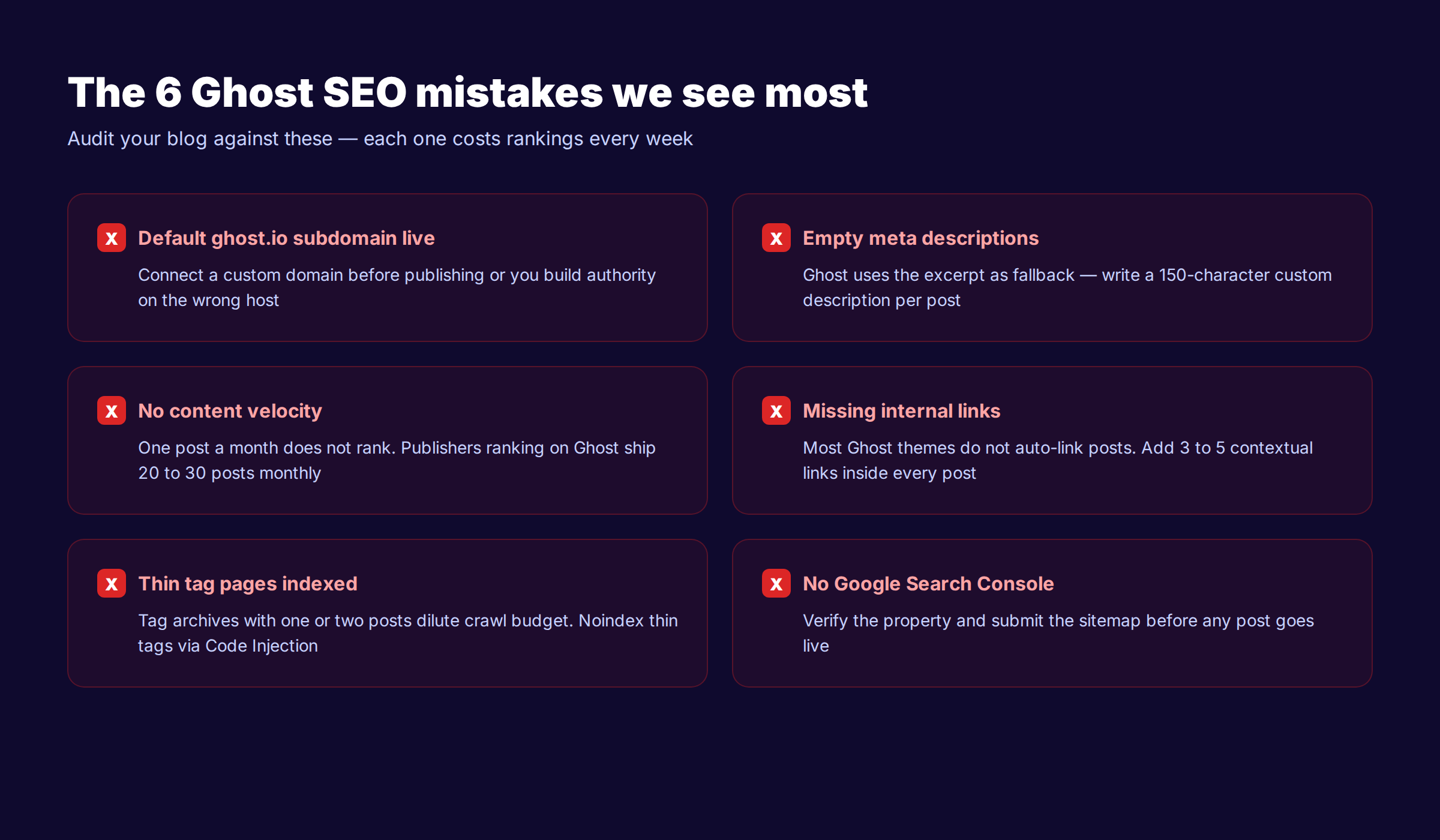
Mistake 1: Default Subdomain Still Live
Publishers launch on yoursite.ghost.io because connecting a custom domain feels intimidating. They write 20 posts, build backlinks to the wrong host, then migrate later and lose authority.
The fix. Connect your custom domain before publishing the first post. Ghost Pro handles SSL automatically. Self-hosted users configure Let's Encrypt through Ghost CLI.
Mistake 2: Empty Meta Descriptions
Ghost falls back to the post excerpt or the first 145 characters when you skip the meta description field. Both are usually terrible.
The fix. Write a custom meta description for every post. 145 to 155 characters. Lead with value. Include the keyword. Use a freshness signal.
Mistake 3: No Content Velocity
One post a month does not rank in 2026. Google rewards consistent publishing combined with topical depth. Most Ghost sites flat-line because they publish too rarely.
The fix. Ship at least 20 posts per month. Use AI writing tools if your team cannot maintain the cadence manually. Or use theStacc to publish on that cadence automatically.
Mistake 4: Missing Internal Links
Ghost themes do not auto-suggest related posts in the editor. Most writers skip internal links entirely. The internal link graph stays sparse and rankings suffer.
The fix. Add 3 to 5 contextual internal links to every post. Link to the pillar post, to two cluster posts, and to one or two related older posts. Use descriptive anchor text that includes the target keyword.
Mistake 5: Thin Tag Pages Indexed
Every Ghost tag creates an archive page. Tags with one or two posts dilute your crawl budget and create duplicate content issues.
The fix. Consolidate tags. Aim for 8 to 12 primary tags with 10 or more posts each. Add custom meta data to every tag page. Noindex tags below the threshold through routes.yaml.
Mistake 6: No Google Search Console Property
Some publishers launch a Ghost site and never verify Google Search Console. They miss every indexing error, mobile usability problem, and manual action notification.
The fix. Verify Search Console on day one. Submit the sitemap. Set up email alerts for critical issues. Check the Coverage and Performance reports weekly for the first 90 days.
Mistake 7: Ignoring Author Pages
Ghost author pages are an underused E-E-A-T signal. Most sites leave the author bio blank and miss the chance to demonstrate expertise.
The fix. Fill in every author profile. Add a 100-word bio with credentials. Link to verified social profiles. Add a profile photo. Wire the author URL into Article schema so Google associates the post with a real expert.
Mistake 8: Forgetting Redirects on Slug Changes
When you change a slug, Ghost does not auto-create a redirect. The old URL returns 404. Backlinks break. Rankings drop.
The fix. Always add a 301 redirect in redirects.json when changing a slug. Test the redirect after upload. Update internal links pointing to the old slug.
Chapter 11: The Ghost SEO Launch Checklist
If you are launching a new Ghost site or auditing an existing one, work through this checklist before any content goes live.
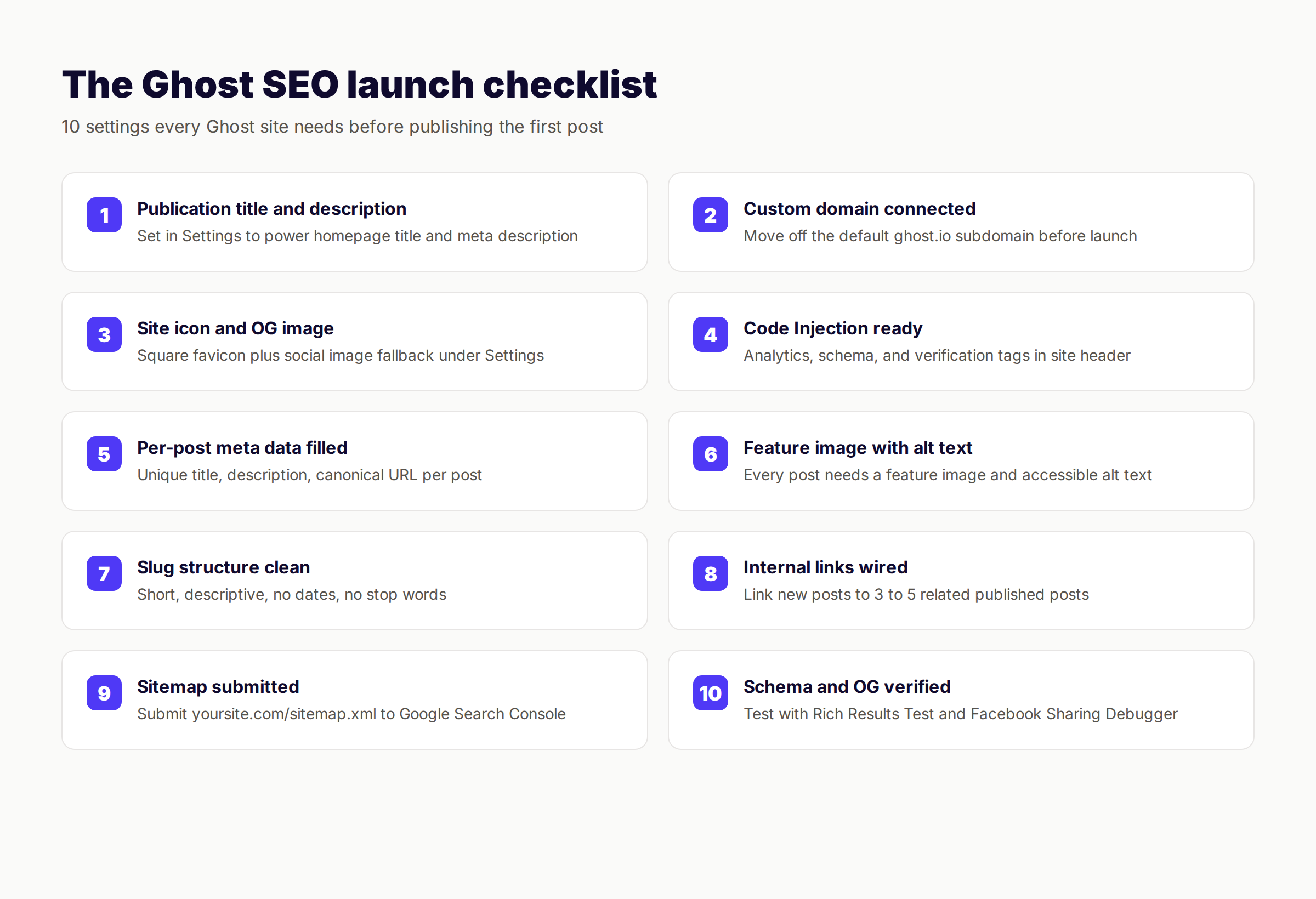
Publication settings
- ✓ Publication title set
- ✓ Publication description filled (145 to 155 characters)
- ✓ Site icon uploaded (256x256 PNG)
- ✓ Publication cover image uploaded (1200x630)
- ✓ Timezone configured
- ✓ Language set
Domain and hosting
- ✓ Custom domain connected
- ✓ SSL active (HTTPS)
- ✓ WWW vs non-WWW canonical chosen
- ✓ DNS records pointing to Ghost host
Tracking and verification
- ✓ Google Search Console verified
- ✓ Bing Webmaster Tools verified
- ✓ Google Analytics 4 installed via Code Injection
- ✓ Sitemap submitted to Search Console
Per-post setup
- ✓ Post title under 60 characters
- ✓ Meta title overridden where needed
- ✓ Meta description filled per post
- ✓ URL slug short and keyword-rich
- ✓ Feature image with alt text
- ✓ Canonical URL set only when republishing
Site structure
- ✓ Tags consolidated (8 to 12 primary)
- ✓ Author profiles complete
- ✓ Internal linking strategy active
- ✓ Related posts widget enabled
Technical health
- ✓ PageSpeed Insights green on three sample pages
- ✓ Core Web Vitals in passing range
- ✓ Schema verified with Rich Results Test
- ✓ Open Graph verified with Facebook Debugger
- ✓ Mobile usability passing in Search Console
Content engine
- ✓ Editorial calendar with at least 20 posts per month
- ✓ Pillar topics mapped to tag clusters
- ✓ Keyword research complete for the first 30 posts
- ✓ Publishing workflow documented
Chapter 12: Scaling Ghost SEO Without Burning Out
The honest truth most SEO guides skip: doing all of this yourself does not scale. A typical publisher who follows every step in this guide spends 20 to 30 hours a week on content production and optimization. That is a full-time job before you write a single post.
There are three paths forward.
Path 1: Hire In-House
A content marketer who handles writing, SEO, and Ghost publishing costs $70,000 to $120,000 a year fully loaded. Plus benefits, software, and management overhead. Expect 4 to 8 posts a month from one person if they handle SEO and editorial together.
Path 2: Hire Freelancers
Freelance writers cost $100 to $300 per post for SEO-optimized content. Editing, SEO review, and Ghost publishing fall on you. Budget 30 to 60 minutes per post of internal time. At 30 posts per month, that is 15 to 30 hours of your time on top of freelancer costs.
Math: 30 posts × $200 average = $6,000 a month plus 20 hours of your time.
Path 3: Use theStacc
theStacc is the done-for-you SEO platform we built specifically for this problem. We publish SEO articles directly to your Ghost blog through the Ghost Admin API.
Every post includes:
- Keyword research and SERP analysis
- 1,200 to 2,500 word article
- Meta title and meta description filled
- Feature image generated
- Internal links wired to your existing content
- Schema and Open Graph verified
- Published on a schedule we set with you
Cost: $99 a month for 30 articles. That is $3.30 per article versus $200 per article through freelancers — a 60x cost difference at higher quality and zero management overhead.
Ready to stop writing and start ranking? theStacc writes and publishes SEO articles to your Ghost blog. Zero writing required. Zero management. Just rankings.
What practitioners are saying on X
AI search advice ages quickly. Here is high-signal public discussion from SEO and growth operators — context for your roadmap, not a substitute for primary data.
- @hridoyreh (Mar 2026): Widely shared SEO skill tree: foundations, research, technical, on-page, content, links, AI SEO/GEO, analytics, UX, brand, programmatic — useful map for stats and how-to posts. See the post on X.
- @jakezward (Feb 2026): 2026 SEO predictions emphasize AI Overview share-of-SERP, schema for LLM token efficiency, brand mentions in AI answers as a KPI, proprietary data as a moat, and content refresh beating net-new AI slop. See the post on X.
- @alexgroberman (Jul 2026): Case narrative: organic value plus multi-engine citations (ChatGPT, Perplexity, Grok) from knowledge-hub pages, category authority links, commercial intent content, and tight internal linking — not thin product copy. See the post on X.
Grok, AI Overviews, and multi-engine visibility
Analytics and SEO setup pages should keep entity names and steps extractable for AI Overviews, ChatGPT, Perplexity, and Grok.
- Google AI Overviews: Use passage-ready answers, tables, and FAQ schema where relevant.
- ChatGPT / Perplexity: Cite named sources next to key claims.
- Grok: Maintain accurate entity facts on-site and in high-signal X posts.
Publish content built for Google and AI citations. theStacc Content SEO ships SEO-scored articles structured for rankings and generative engines.
Frequently Asked Questions
Yes. Ghost is better for SEO out of the box because it ships with sitemaps, canonical tags, Article schema, and Open Graph tags by default. WordPress requires plugins like Yoast to match what Ghost gives you natively. WordPress wins on plugin scale and programmatic SEO, but for a content-focused publisher Ghost requires less configuration to rank.
Ghost has SEO built in. You add the post-specific layer through the Meta Data panel inside the post editor. Set the meta title, meta description, URL slug, canonical URL, and feature image on every post. For site-wide SEO, configure the publication title, description, and Code Injection with Google Analytics and Search Console verification.
Yes. Ghost generates automatic XML sitemaps at /sitemap.xml, canonical URLs on every page, Article schema in JSON-LD format, Open Graph tags, Twitter Cards, and robots.txt by default. The platform also exposes per-post meta data fields including custom meta title, meta description, canonical URL, and feature image alt text.
No. Ghost does not have a plugin ecosystem like WordPress. The platform handles the technical SEO basics natively. Advanced needs like schema beyond Article type, redirects, and Search Console integration are handled through the built-in Code Injection setting under Settings → Code Injection.
Ghost is one of the fastest content platforms available. Built on Node.js with built-in caching, most Ghost sites score above 90 on mobile PageSpeed Insights with the default Casper theme. Ghost Pro adds a global CDN. Speed is a confirmed Google ranking factor and Ghost gives you a strong baseline.
The default Casper theme is the safest pick. It is maintained by the Ghost team, ships with proper schema and semantic HTML, and loads fast. Third-party themes vary widely — some break schema or load heavy JavaScript. If you use a custom theme, run it through the Rich Results Test and PageSpeed Insights before launch.
Ghost sites that rank publish 20 to 30 posts per month consistently for at least 12 months. Topical authority compounds with volume plus quality plus internal linking. One post a month is not enough to build the surface area Google needs to rank a site. Our how many blog posts to rank analysis covers the full data.
Yes. Many high-traffic publications run on Ghost including OpenAI, Duolingo, Kickstarter, and Unsplash. The platform handles every technical SEO requirement and the speed advantage often makes Ghost sites outrank WordPress competitors with weaker technical foundations. The deciding factor is content velocity and quality, not the platform.
The Bottom Line
Ghost is a strong SEO platform. The defaults are clean, the speed is real, and the per-post meta data fields are easier to fill than WordPress equivalents. The platform removes the technical friction that kills most blogs before they start.
What Ghost does not solve is the content production problem. Ranking requires 20 to 30 posts a month of SEO-optimized content, consistent for at least 12 months. Most publishers cannot maintain that pace alone, and the agency or freelance model costs $6,000 a month or more.
If you want to stop thinking about Ghost SEO and start seeing rankings, theStacc handles the work. We publish SEO articles directly to your Ghost blog from $99 a month. We handle keyword research, writing, meta data, internal links, and publishing. You keep your platform, your brand, and your authority.
This article was researched and published by the theStacc editorial team. We publish 3,500+ blog posts across 70+ industries through the theStacc platform, including dozens of Ghost CMS publishers. All Ghost features and behaviors verified against the official Ghost documentation as of May 2026.
Related Reading
- WordPress vs Squarespace vs Webflow: Which CMS Is Best for SEO
- The Complete Squarespace SEO Guide
- Wix SEO Guide for 2026
- How to Write SEO Blog Posts That Rank
- Best Done-For-You SEO Tools
Related Tools & Resources
Free SEO Tools:
Best Lists:
Sources & references

Researched, written, and published articles that compound organic traffic.
Weekly local SEO teardowns
One practical email a week. Map Pack, GBP, AI Overviews — no fluff. Unsubscribe anytime.