
Apple Maps SEO (2026): Apple Business Connect & Siri Visibility
Apple Maps SEO guide: Apple Business Connect setup, ranking factors, Siri search visibility, and how to optimize for iPhone users finding your business.
Apple Maps SEO: The Complete Guide (2026)
Most local businesses pour every dollar into Google. They optimize their Google Business Profile, chase Google Reviews, and track Google Maps rankings. And they completely ignore the 1 billion+ iPhone users who search for local businesses through Apple Maps every day.
That blind spot costs real revenue. Apple Maps is the default navigation app on every iPhone, iPad, Mac, and CarPlay device. When a customer asks Siri “find a dentist near me,” the results come from Apple Maps. Not Google.
This guide covers everything you need to know about Apple Maps SEO. You will learn how to claim your listing through Apple Business Connect, which ranking factors matter most, and how Apple Maps differs from Google Maps.
We publish 3,500+ blogs across 70+ industries and track local SEO trends daily. This 8-chapter guide covers the full playbook for Apple Maps optimization in 2026.
Here is what you will learn:
- Why Apple Maps SEO matters more than ever in 2026
- How to set up and optimize your Apple Business Connect profile
- The 6 ranking factors that determine Apple Maps visibility
- How Apple Maps SEO differs from Google Maps SEO
- How to use Showcases, photos, and reviews for higher engagement
- Multi-location management strategies
- Common mistakes that kill your Apple Maps rankings
Table of Contents
- Chapter 1: Why Apple Maps SEO Matters in 2026
- Chapter 2: Apple Business Connect Setup and Verification
- Chapter 3: Apple Maps Ranking Factors
- Chapter 4: Apple Maps vs Google Maps SEO
- Chapter 5: Optimizing Your Apple Business Connect Profile
- Chapter 6: Reviews, Ratings, and Reputation on Apple Maps
- Chapter 7: Showcases, Photos, and Visual Features
- Chapter 8: Apple Maps for Multi-Location Businesses
- Chapter 9: Measuring Apple Maps Performance
- Chapter 10: Common Apple Maps SEO Mistakes
- FAQ
Chapter 1: Why Apple Maps SEO Matters in 2026 {#chapter-1}
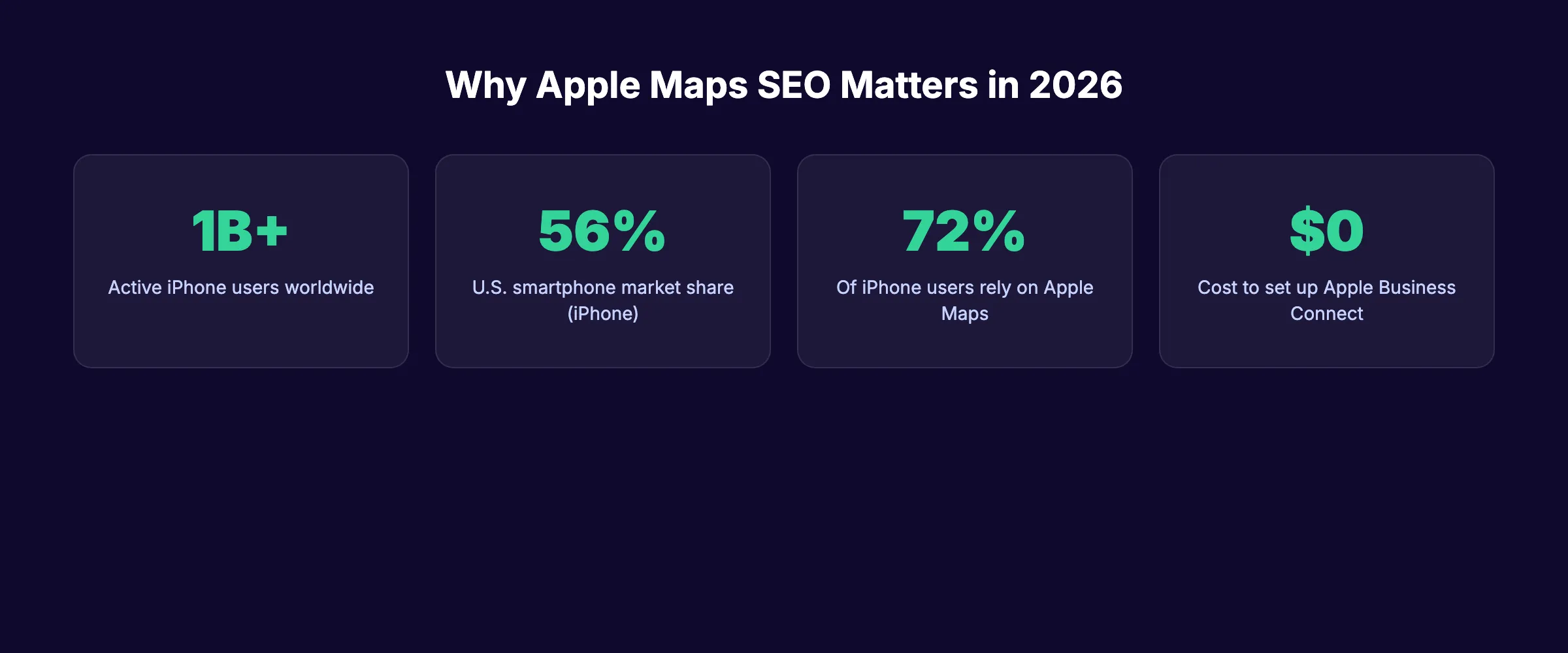
Apple Maps is no longer the glitchy app it was in 2012. Apple has invested billions into rebuilding its maps platform from the ground up. In 2026, Apple Maps powers local discovery for over 1 billion active devices worldwide.
Most businesses treat Apple Maps as an afterthought. That creates an opportunity for the ones that do not.
The iPhone Market Share Advantage
Apple holds roughly 56% of the U.S. smartphone market. Every one of those devices defaults to Apple Maps for navigation, Siri queries, and Spotlight searches.
When someone taps an address in Safari, Messages, or Mail on an iPhone, Apple Maps opens. Not Google Maps. That default behavior drives billions of map interactions each year without the user ever choosing a maps app.
The iPhone demographic also skews toward higher-income consumers. Businesses targeting affluent local customers cannot afford to ignore this channel.
Siri, CarPlay, and the Voice Search Connection
Siri processes billions of requests weekly. A significant portion of those are location-based queries like “coffee shops near me” or “closest gas station.”
Every Siri local search pulls results from Apple Maps. If your business does not appear in Apple Maps, Siri will never recommend you. That is a hard fact most local SEO strategies ignore entirely.
CarPlay extends this further. Drivers using Apple CarPlay rely exclusively on Apple Maps for navigation and business discovery. Restaurants, gas stations, and retail stores near highways miss significant traffic without Apple Maps visibility.
Apple Maps Ads Are Coming
Apple plans to launch search advertising in Apple Maps during summer 2026. Ads will appear in U.S. and Canadian search results with a “light blue ad tag” label.
This signals Apple is serious about making Maps a commercial platform. Businesses that establish strong organic presence now will have an advantage when paid placement launches.
Chapter 2: Apple Business Connect Setup and Verification {#chapter-2}
Apple Business Connect is the free platform that lets you manage how your business appears across Apple Maps, Siri, Wallet, and Safari. Think of it as Apple’s version of Google Business Profile.
Setting up your listing takes about 15 minutes. Verification can take a few days.
Step 1: Create Your Apple ID
You need an Apple ID to access Apple Business Connect. If you already have one for personal use, create a separate Apple ID for business management.
Go to businessconnect.apple.com and sign in. Apple will prompt you to agree to the terms of service and set up your business account.
Step 2: Search for Your Business
Apple Maps already lists most established businesses through third-party data providers like Yelp, TripAdvisor, and Foursquare. Search for your business name and address to see if a listing exists.
If your business appears, claim it. If it does not, create a new listing from scratch.
Step 3: Verify Ownership
Apple offers several verification methods:
| Verification Method | Timeline | Best For |
|---|---|---|
| Phone call | Instant to 24 hours | Single locations |
| Email verification | 1-3 days | Businesses with domain email |
| Document upload | 3-7 days | New businesses without web presence |
You must complete verification before your edits go live. Apple reviews all changes to maintain data quality.
Step 4: Complete Your Profile
After verification, fill out every field in your profile. Incomplete listings rank lower than complete ones. We cover the full optimization process in Chapter 5.
Your Apple Maps listing reaches 1 billion+ iPhone users for free. Stacc handles local SEO across Google and Apple Maps so you do not have to. Start for $1 →
Chapter 3: Apple Maps Ranking Factors {#chapter-3}
Apple Maps uses a different algorithm than Google Maps. Understanding these differences is critical for ranking on maps platforms.
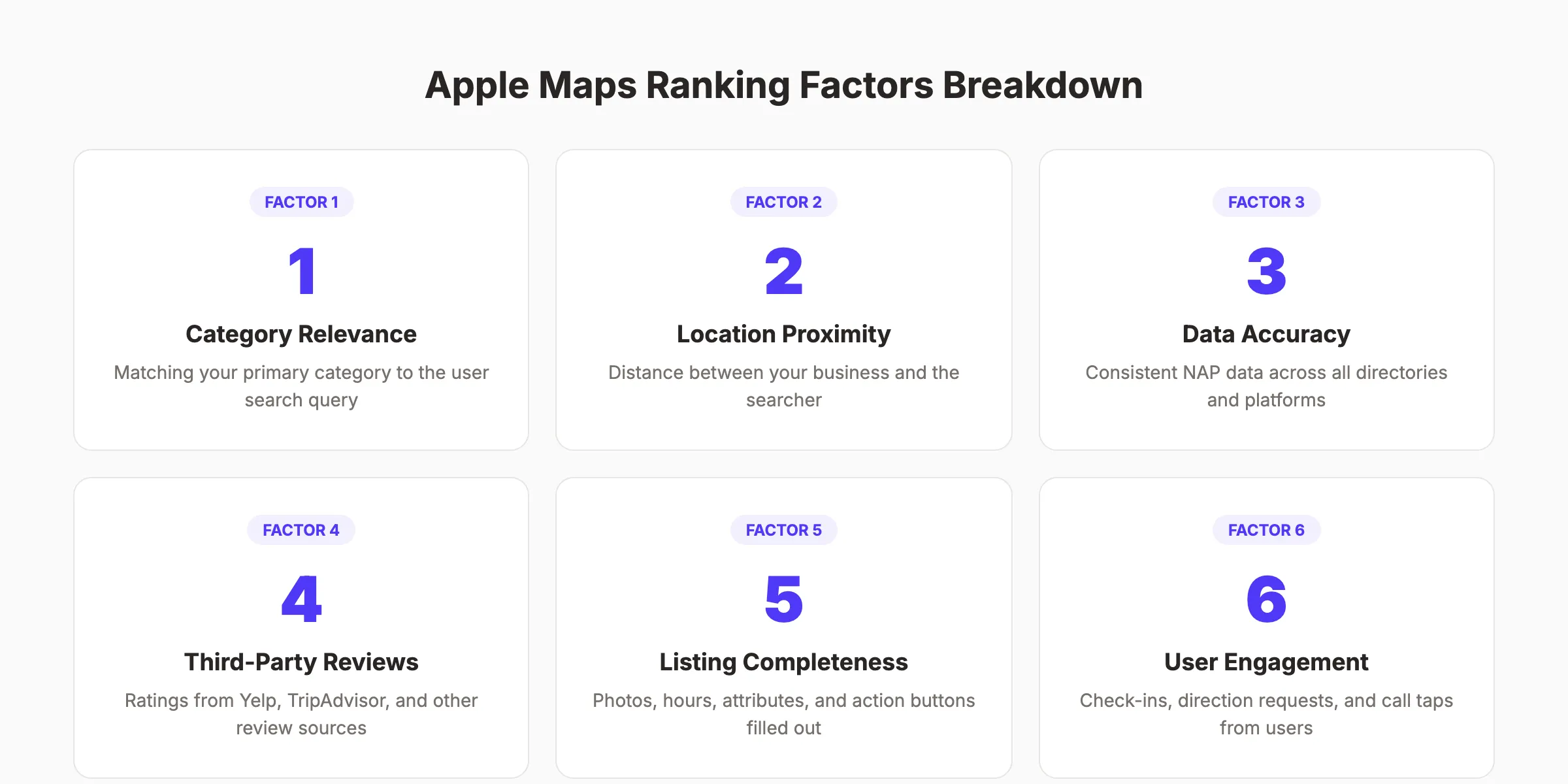
Apple places more weight on data accuracy and less weight on engagement signals like review volume. Here are the 6 factors that matter most.
Factor 1: Category Relevance
Your primary category is the single most important ranking signal on Apple Maps. Apple matches user search queries against business categories before anything else.
Choose the most specific category available. A “Thai Restaurant” will outrank a generic “Restaurant” for Thai food searches. This mirrors how GBP categories work, but Apple is even stricter about category matching.
Factor 2: Location Proximity
Distance between the searcher and your business matters heavily. Apple Maps gives strong preference to nearby results, especially for mobile and Siri queries.
You cannot change your physical location. But you can ensure your address pin is accurately placed on the map. Incorrect pin placement pushes you further from nearby searchers in the algorithm.
Factor 3: NAP Data Accuracy
NAP stands for Name, Address, and Phone number. Apple cross-references your Business Connect data against dozens of third-party sources.
Inconsistencies between your Apple listing, Yelp profile, website, and other directories cause ranking drops. Maintaining NAP consistency across every platform is non-negotiable for Apple Maps SEO.
Factor 4: Third-Party Reviews
Apple Maps does not have its own review system. It pulls ratings and reviews from Yelp, TripAdvisor, Foursquare, and other industry-specific platforms.
Your Yelp reviews directly impact how your business appears in Apple Maps search results. A 4.5-star Yelp rating shows up right on your Apple Maps place card.
Factor 5: Listing Completeness
Complete profiles rank higher than sparse ones. Apple rewards businesses that fill out every available field: hours, photos, logo, website URL, action buttons, and attributes.
Think of it as a completeness score. Each missing field is a missed ranking signal.
Factor 6: User Engagement Signals
While less prominent than on Google, Apple does track user behavior. Direction requests, phone call taps, website clicks, and check-ins all send positive signals.
Businesses with higher engagement rates tend to maintain stronger rankings over time.
Chapter 4: Apple Maps vs Google Maps SEO {#chapter-4}
Apple Maps SEO and Google Maps SEO share some overlap. But the platforms differ in important ways that affect your optimization strategy.
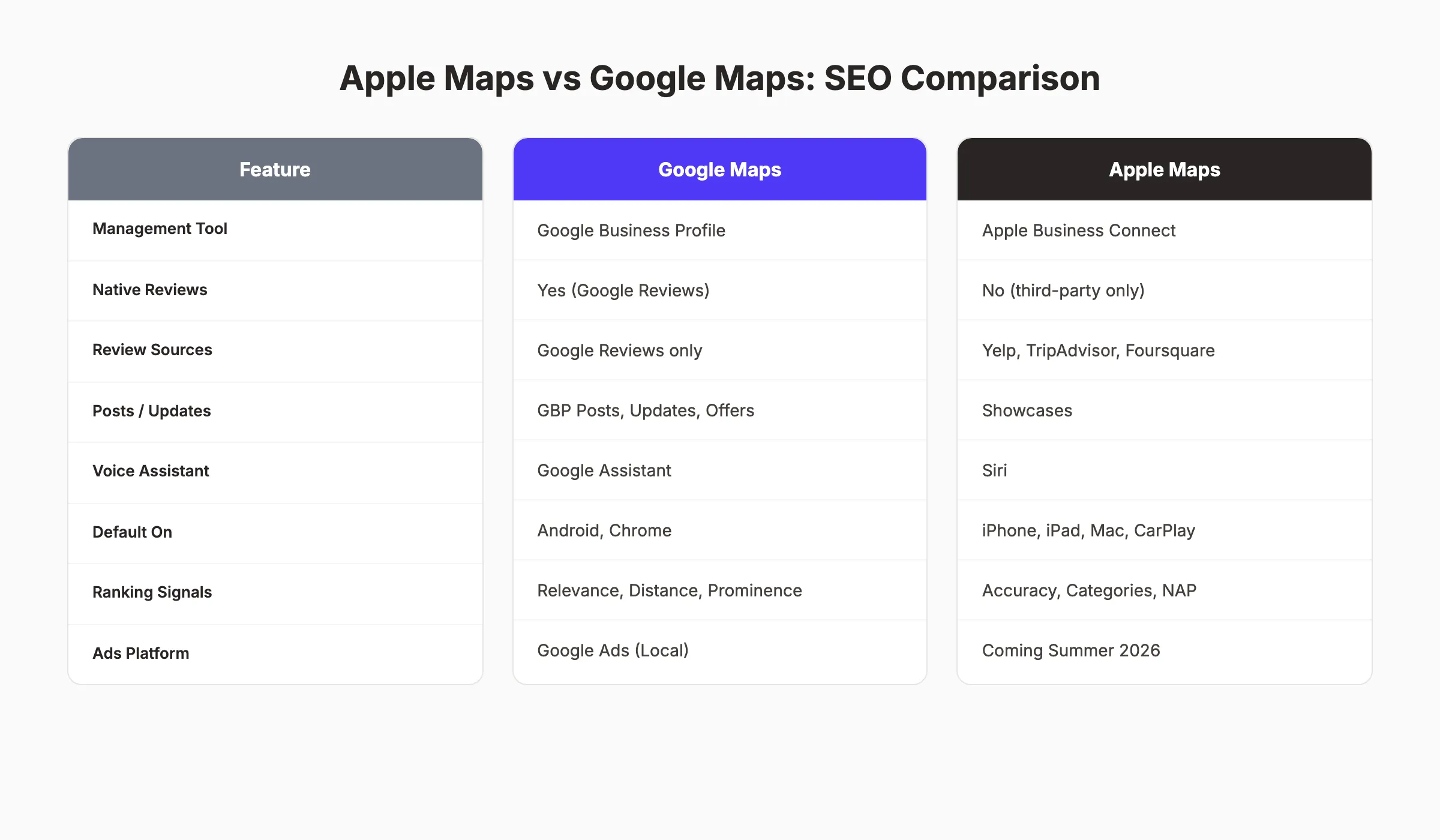
Here is a side-by-side comparison of the 2 platforms.
Platform Comparison Table
| Feature | Google Maps | Apple Maps |
|---|---|---|
| Management tool | Google Business Profile | Apple Business Connect |
| Native reviews | Yes (Google Reviews) | No (third-party only) |
| Review sources | Google Reviews only | Yelp, TripAdvisor, Foursquare |
| Business posts | GBP Posts, Offers, Events | Showcases |
| Voice assistant | Google Assistant | Siri |
| Default on | Android, Chrome | iPhone, iPad, Mac, CarPlay |
| Primary ranking signals | Relevance, distance, prominence | Category, accuracy, proximity |
| Ads platform | Google Ads (Local) | Coming summer 2026 |
| Analytics | GBP Insights | Business Connect Insights |
| Bulk management | GBP bulk upload | CSV bulk upload |
Key Differences That Matter
Reviews work differently. Google owns its review ecosystem. Your Google review count and rating directly affect Google Maps rankings. Apple pulls reviews from Yelp and other platforms, so you must manage your reputation across multiple sites.
Content publishing works differently. Google lets you post updates, offers, and events through GBP Posts. Apple uses a feature called Showcases, which functions similarly but with different formatting rules.
Ranking signals differ. Google weighs prominence heavily. That includes review volume, link signals, and brand mentions. Apple emphasizes data accuracy, category precision, and listing completeness.
The audience differs. Google Maps reaches Android and desktop users. Apple Maps reaches iPhone, iPad, and Mac users. In the U.S., that is a roughly even split.
The Right Strategy: Optimize for Both
The best local businesses do not choose one platform. They optimize for both Google and Apple Maps simultaneously. The work overlaps significantly.
Strong NAP consistency, accurate categories, quality photos, and active review management benefit both platforms. The incremental effort to maintain Apple Business Connect alongside your GBP is minimal.
Stacc manages your local SEO across every platform that matters. 30 GBP posts per month, starting at $49. Start for $1 →
Chapter 5: Optimizing Your Apple Business Connect Profile {#chapter-5}
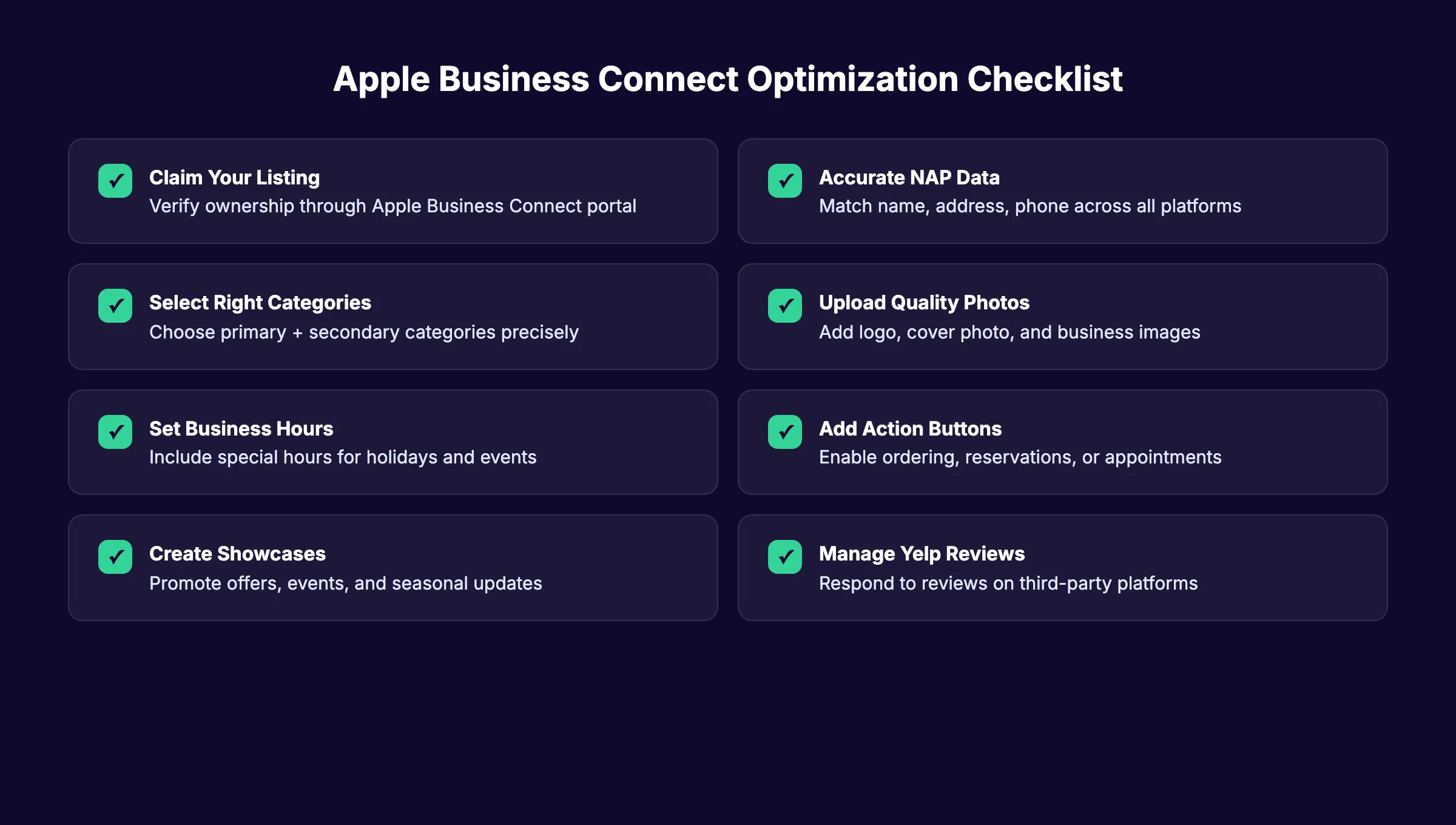
Claiming your listing is step one. Optimization is where the rankings happen. Follow this checklist to maximize your Apple Maps visibility.
Business Name and Description
Use your exact legal business name. Do not stuff keywords into your business name. Apple is strict about this and may reject listings that add extra terms.
Your description should clearly state what you do and who you serve. Keep it factual. Apple reviews descriptions manually and removes promotional language.
Categories and Subcategories
Select your primary category with extreme precision. This is the single most important field in your entire listing.
Add secondary categories that accurately reflect your other services. A law firm that handles family law and estate planning should list both. Review Apple’s category taxonomy carefully. It differs from Google’s category system.
Business Hours
Set accurate regular hours. Add special hours for holidays, seasonal changes, and events. Incorrect hours lead to negative user experiences and decreased engagement.
Apple Maps displays hours prominently on your place card. Users who arrive at a closed business will not return.
Contact Information
Add your primary phone number, website URL, and email address. Every contact field you fill improves your listing completeness score.
Ensure the phone number matches what appears on your website, Yelp profile, and all other local citation sources.
Action Buttons
Apple Business Connect supports action buttons for specific business types:
- Order food (restaurants)
- Reserve a table (restaurants)
- Book an appointment (service businesses)
- Buy tickets (entertainment venues)
These buttons link to third-party providers like OpenTable, DoorDash, and Yelp. Enabling the right action buttons increases user engagement and sends positive ranking signals.
Attributes
Add every relevant attribute to your listing. Attributes include:
- Wheelchair accessibility
- Payment methods accepted
- Parking availability
- Wi-Fi availability
- Outdoor seating
- Pet-friendly policies
Each attribute helps Apple match your business to filtered searches. A user searching for “pet-friendly restaurants” will only see businesses with that attribute.
Chapter 6: Reviews, Ratings, and Reputation on Apple Maps {#chapter-6}
Apple Maps does not collect its own reviews. Your reputation on Apple Maps depends entirely on third-party review platforms.
This makes review management across multiple platforms essential for Apple Maps SEO success.
Where Apple Maps Gets Its Reviews
Apple Maps aggregates reviews from these primary sources:
| Platform | Business Types | Impact |
|---|---|---|
| Yelp | All businesses | Highest impact |
| TripAdvisor | Hotels, restaurants, attractions | High for travel |
| Foursquare | All businesses | Moderate |
| Industry-specific | Varies (healthcare, automotive) | Moderate |
Yelp carries the most weight. Apple has maintained a long-standing partnership with Yelp that dates back to the original Apple Maps launch. Your Yelp star rating and review count appear directly on your Apple Maps place card.
How to Improve Your Apple Maps Reviews
Focus on Yelp first. Build a complete Yelp profile with photos, hours, and service descriptions. Ask customers for reviews on Yelp specifically, not just Google.
Respond to every review. Yelp penalizes businesses that ignore reviews. Active review management across platforms signals quality to both Yelp and Apple Maps.
Do not ignore TripAdvisor. If you run a restaurant, hotel, or tourist-facing business, TripAdvisor reviews appear prominently in Apple Maps. Claim your TripAdvisor listing and keep it updated.
The Exception: Google Reviews Do Not Count
Here is a critical difference. Your Google Reviews do not appear on Apple Maps. A business with 500 Google Reviews and zero Yelp reviews will look unreviewed on Apple Maps.
Many businesses have strong Google review profiles but weak Yelp presence. Fix that gap to improve your Apple Maps visibility.
Your reviews power your rankings on both Google and Apple Maps. Stacc helps local businesses build consistent visibility across every platform. Start for $1 →
Chapter 7: Showcases, Photos, and Visual Features {#chapter-7}
Apple Business Connect gives you visual tools to make your place card stand out. These features affect both user engagement and ranking signals.
What Are Showcases?
Showcases are Apple’s version of GBP Posts. They let you promote time-sensitive content directly on your Apple Maps place card.
You can create 3 types of Showcases:
- Promotions: Highlight discounts, deals, and special offers
- Events: Announce upcoming events, openings, or seasonal specials
- New products: Feature menu changes, new services, or arrivals
Each Showcase includes an image, title, description, and optional call-to-action link. Showcases expire after a set period, keeping your place card fresh.
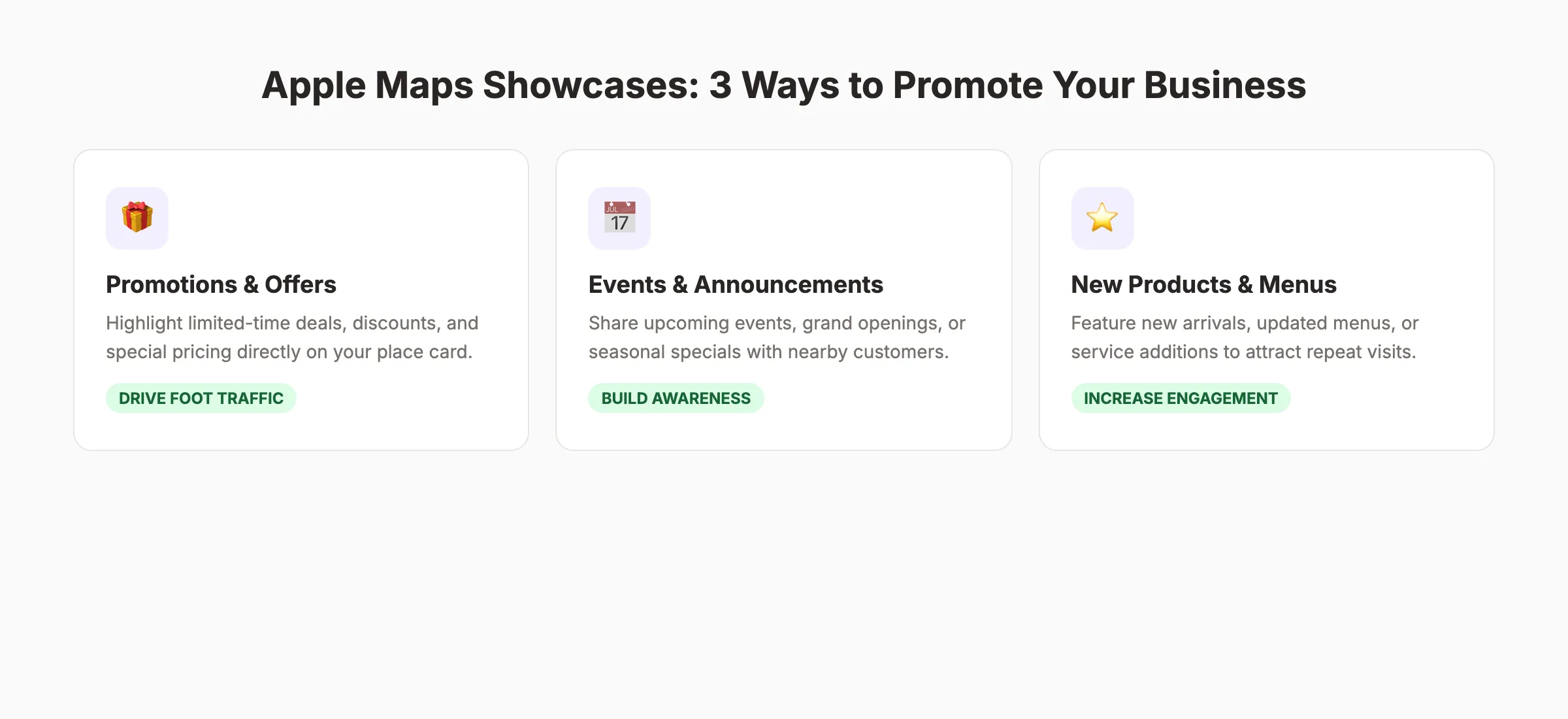
Photo Optimization
Your place card includes several photo opportunities:
Logo. Upload a high-resolution version of your business logo. This appears as your profile icon across Apple Maps, Siri results, and Spotlight.
Cover photo. This is the hero image on your place card. Choose a photo that shows your business at its best. Exterior shots work well for retail. Interior shots work better for restaurants and service businesses.
Photo gallery. Add at least 5 photos showing your products, services, team, and location. High-quality images increase user engagement with your listing.
Apple reviews all uploaded photos. They reject blurry images, screenshots, and photos with overlaid text or watermarks.
Apple Maps Place Card Anatomy
Your Apple Maps place card is the first thing customers see. It includes:
- Business name and category
- Star rating (from Yelp/TripAdvisor)
- Address and distance
- Hours of operation
- Phone number and website
- Action buttons
- Photos and Showcases
- Reviews from third-party sources
Every element of this card should be complete and accurate. An incomplete place card signals low quality to both Apple and potential customers.
Chapter 8: Apple Maps for Multi-Location Businesses {#chapter-8}
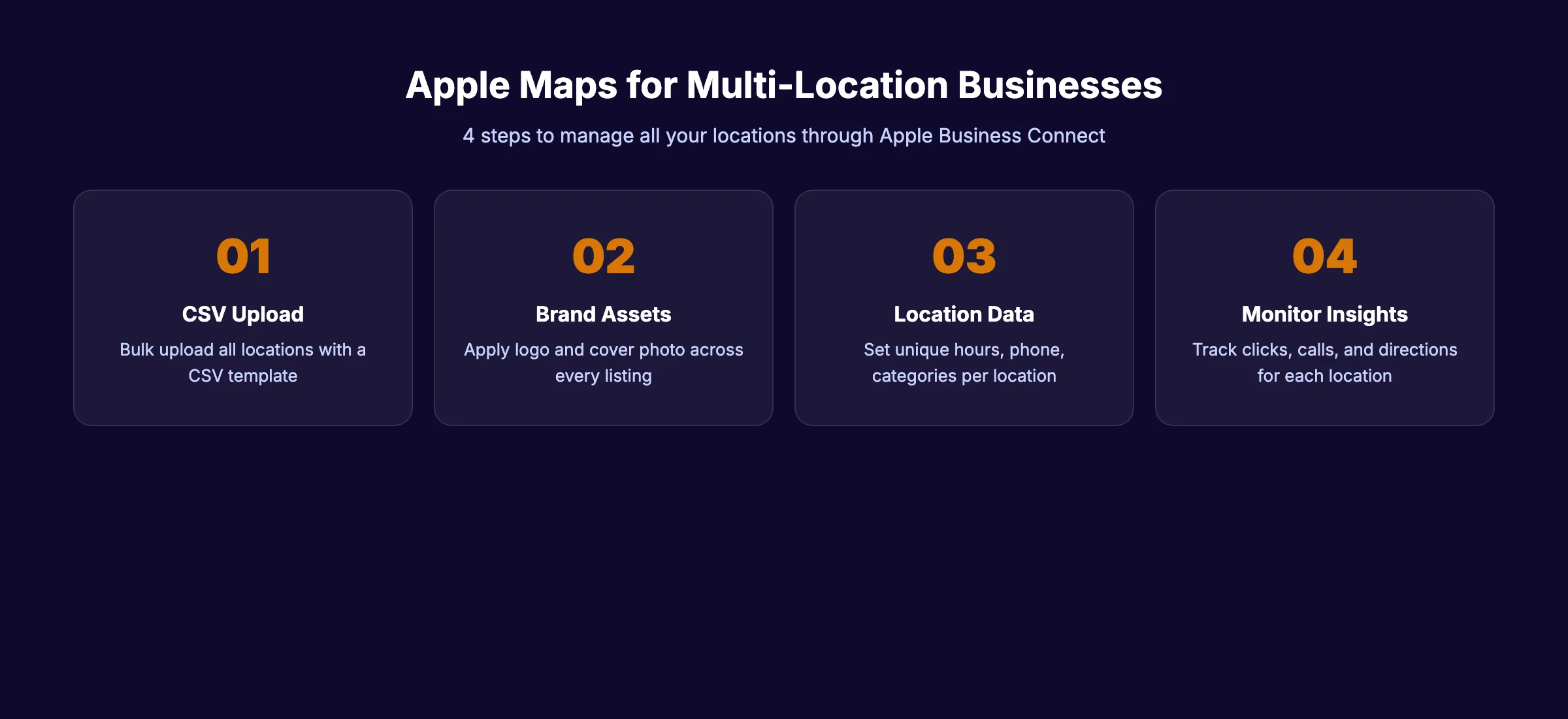
Managing Apple Maps listings for multiple locations requires a systematic approach. Apple Business Connect supports bulk management through CSV uploads and API access.
Bulk Location Management
Apple Business Connect allows CSV bulk uploads for businesses with 10 or more locations. The process works like this:
- Download the CSV template from Apple Business Connect
- Fill in data for each location (name, address, phone, hours, categories)
- Upload the completed CSV file
- Apple verifies each location individually
For businesses managing hundreds of locations, Apple offers an API for programmatic updates. This is similar to the multi-location management approach you would use for Google Business Profile.
Maintaining Consistency Across Locations
Each location needs its own unique listing with location-specific details:
- Unique phone number per location
- Location-specific hours (not headquarters hours)
- Location-specific photos
- Location-specific categories (if services differ)
Do not copy-paste identical descriptions across all locations. Apple may flag duplicate content across listings.
Brand-Level vs Location-Level Management
Apple Business Connect offers two tiers of control:
| Level | Controls | Best For |
|---|---|---|
| Brand level | Logo, brand name, global policies | Franchises, chains |
| Location level | Hours, photos, Showcases, attributes | Individual stores |
Brand-level settings cascade to all locations. Location-level settings override brand defaults. This hierarchy keeps your brand consistent while allowing local customization.
Chapter 9: Measuring Apple Maps Performance {#chapter-9}
Apple Business Connect provides analytics through its Insights dashboard. These metrics help you track how customers interact with your listing.
Available Metrics
Apple Business Connect Insights tracks:
- Total impressions: How many times your listing appeared in search results
- Direction requests: Users who tapped “Directions” to your business
- Phone calls: Users who tapped your phone number
- Website clicks: Users who tapped through to your website
- Share actions: Users who shared your listing with others
- Showcase views: Engagement with your promotional content
What Apple Does Not Track
Apple does not provide keyword-level data. You cannot see which specific search terms triggered your listing. This contrasts with Google Business Profile, which shows search query data.
Apple also does not provide competitor benchmarking data. You cannot directly compare your performance against nearby competitors within the Insights dashboard.
Building Your Own Tracking System
To fill these gaps, use these approaches:
- Add UTM parameters to your Apple Business Connect website URL
- Track Apple Maps referral traffic in Google Analytics
- Use call tracking software to measure calls from Apple Maps
- Monitor Yelp analytics alongside Apple Insights
- Run monthly local SEO audits that include Apple Maps
Comparing your Apple Maps data alongside local SEO statistics and Google Maps data gives you a complete picture of your local search performance.
Chapter 10: Common Apple Maps SEO Mistakes {#chapter-10}
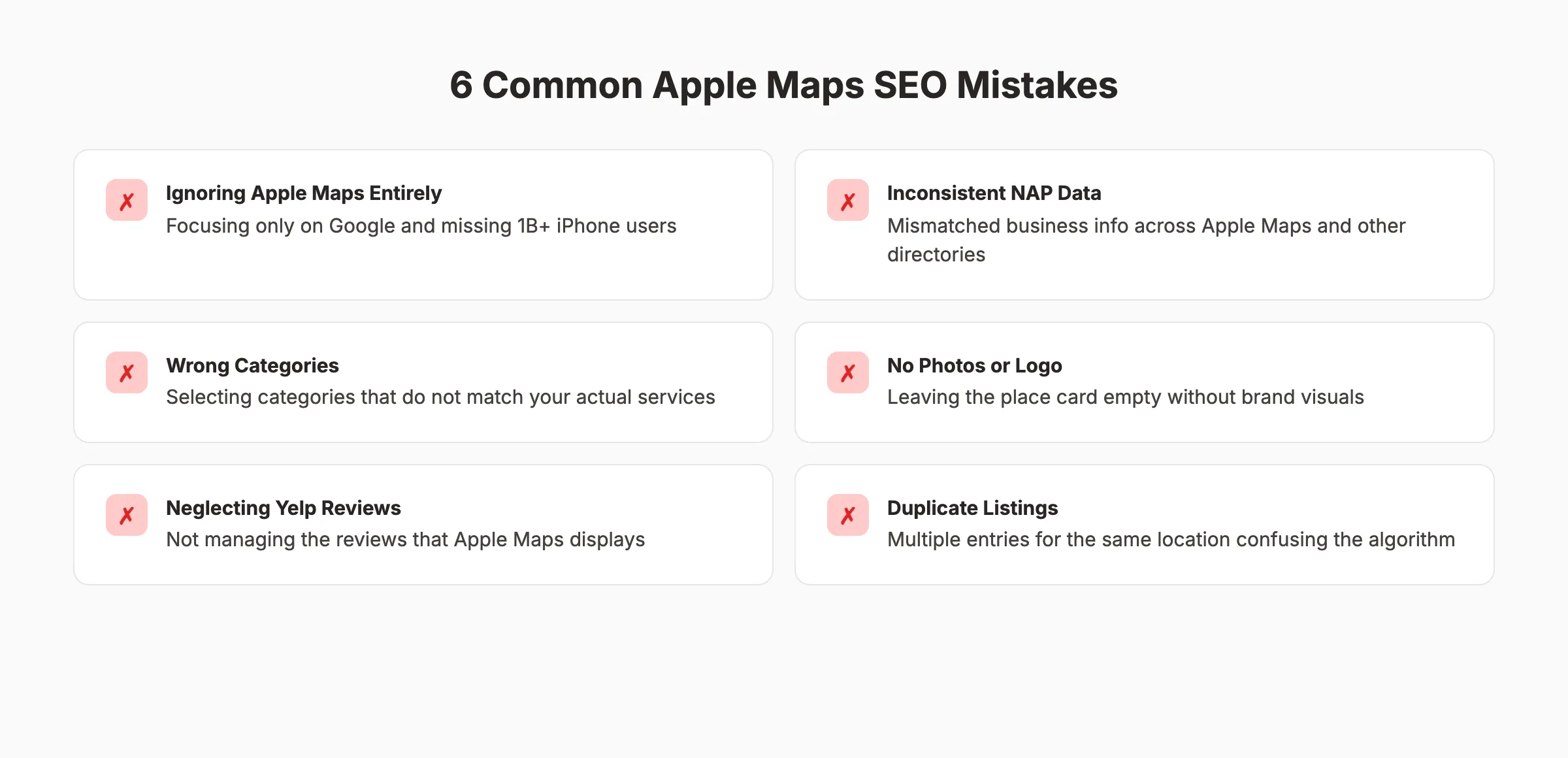
These are the errors we see most often. Each one directly hurts your Apple Maps rankings.
Mistake 1: Ignoring Apple Maps Entirely
The most common mistake is not having a strategy for Apple Maps at all. Over half of U.S. smartphone users carry an iPhone. Skipping Apple Maps means skipping half your potential local audience.
Mistake 2: Inconsistent NAP Data
Your business name, address, and phone number must match exactly across Apple Business Connect, your website, Yelp, and every other directory. Even small differences like “St.” versus “Street” can cause issues.
Run a NAP consistency audit across all platforms at least once per quarter.
Mistake 3: Choosing Wrong Categories
Selecting overly broad categories reduces your relevance for specific searches. Select the most specific category that accurately describes your business. Add secondary categories only for services you actually provide.
Mistake 4: Neglecting Yelp
Your Yelp profile directly powers your Apple Maps reputation. A business with no Yelp reviews will display no stars on Apple Maps. That kills click-through rates.
Invest in building your Yelp presence alongside your Google review strategy.
Mistake 5: Empty Place Cards
Listings without photos, hours, or descriptions look abandoned. Users skip them. Apple ranks them lower. Fill out every single field in your Business Connect profile.
Mistake 6: Duplicate Listings
Multiple listings for the same location confuse the Apple Maps algorithm. They split your engagement signals and reviews across entries. Search for duplicates and request removal through Apple Business Connect.
Stop losing customers on the platform they actually use. Stacc builds your local presence across Google Maps, Apple Maps, and every directory that drives traffic. Start for $1 →
FAQ {#faq}
Is Apple Maps SEO different from Google Maps SEO?
Yes. Apple Maps uses different ranking factors than Google Maps. Apple prioritizes category accuracy, NAP consistency, and third-party reviews from Yelp. Google emphasizes engagement signals, review volume, and prominence. The platforms also use different management tools: Apple Business Connect versus Google Business Profile. You should optimize for both platforms simultaneously.
How do I claim my business on Apple Maps?
Visit businessconnect.apple.com and sign in with your Apple ID. Search for your business name and address. If your listing exists, claim it and verify ownership through phone, email, or document upload. If no listing exists, create one from scratch. Verification typically takes 1 to 7 days depending on the method you choose.
Does Yelp affect Apple Maps rankings?
Yelp has a major impact on Apple Maps. Apple Maps pulls reviews, ratings, and business data from Yelp to display on your place card. A strong Yelp profile with positive reviews and complete information directly improves how your business appears in Apple Maps search results. Businesses with no Yelp presence show no star ratings on Apple Maps.
How do Apple Maps Showcases work?
Showcases are promotional cards that appear on your Apple Maps place card. You create them through Apple Business Connect. Each Showcase includes an image, title, description, and optional link. You can promote offers, events, or new products. Showcases expire after a set time period, so you need to create new ones regularly to keep your listing active.
Can I track how many customers find me through Apple Maps?
Apple Business Connect Insights provides data on impressions, direction requests, phone calls, website clicks, and Showcase views. You cannot see specific search keywords. Add UTM parameters to your website URL in Business Connect to track Apple Maps traffic in your own analytics platform.
Should small businesses bother with Apple Maps SEO?
Absolutely. Apple Business Connect is free. Setup takes 15 minutes. Over half of U.S. smartphone users carry iPhones, and every Siri local search pulls from Apple Maps. The effort required is minimal compared to the potential reach. Any business that invests in local SEO should include Apple Maps optimization as a core part of its strategy.
Start Ranking on Apple Maps Today
Apple Maps SEO is the most overlooked opportunity in local search. One billion devices, zero competition from most local businesses, and a free management platform.
The businesses that set up Apple Business Connect today will have a significant head start when Apple Maps ads launch this summer. Do not wait for your competitors to figure this out first.
Stacc handles your entire local SEO stack. Blog content, local listings, and review management across Google and Apple. All on autopilot. Start for $1 →
Related Tools & Resources
Free SEO Tools:
Best Lists:

Written by
Siddharth GangalSiddharth is the founder of theStacc and Arka360, and a graduate of IIT Mandi. He spent years watching great businesses lose organic traffic to competitors who simply published more. So he built a system to fix that. He writes about SEO, content at scale, and the tactics that actually move rankings.
Automate your Google Business Profile content
30 GBP posts, local SEO articles, and review responses. Published every month automatically.
30-day trial · Cancel anytime
theStacc
Stop writing SEO content manually
30 blog articles, 30 GBP posts, and social media content. Published every month. Automatically.
Try for free$1 for 3 days · Cancel anytime