
How to Write a Blog Post That Ranks (8 Steps)
Learn how to write a blog post that ranks on Google. 8 steps from keyword research to publishing. Includes templates and examples. Updated March 2026.
96.55% of all web pages get zero organic traffic from Google. Over 7.5 million blog posts go live every single day. Most of them rank for nothing because they skip the process that separates content from ranking content.
Knowing how to write a blog post is not enough. Knowing how to write a blog post that ranks on Google requires a specific process: keyword selection, SERP analysis, structured outlining, on-page optimization, and strategic linking. Skip any step and the post sits on page 10 collecting dust.
We have published 3,500+ blog posts across 70+ industries with a 92% average SEO score. This guide covers the exact 8-step process we use to write posts that reach page 1.
Here is what you will learn:
- How to choose a keyword with real ranking potential
- How to analyze the SERP and beat what currently ranks
- How to structure a post that Google and readers both love
- The on-page SEO elements that directly affect rankings
- How to add links and media that boost authority
- The editing and publishing process that maximizes impact
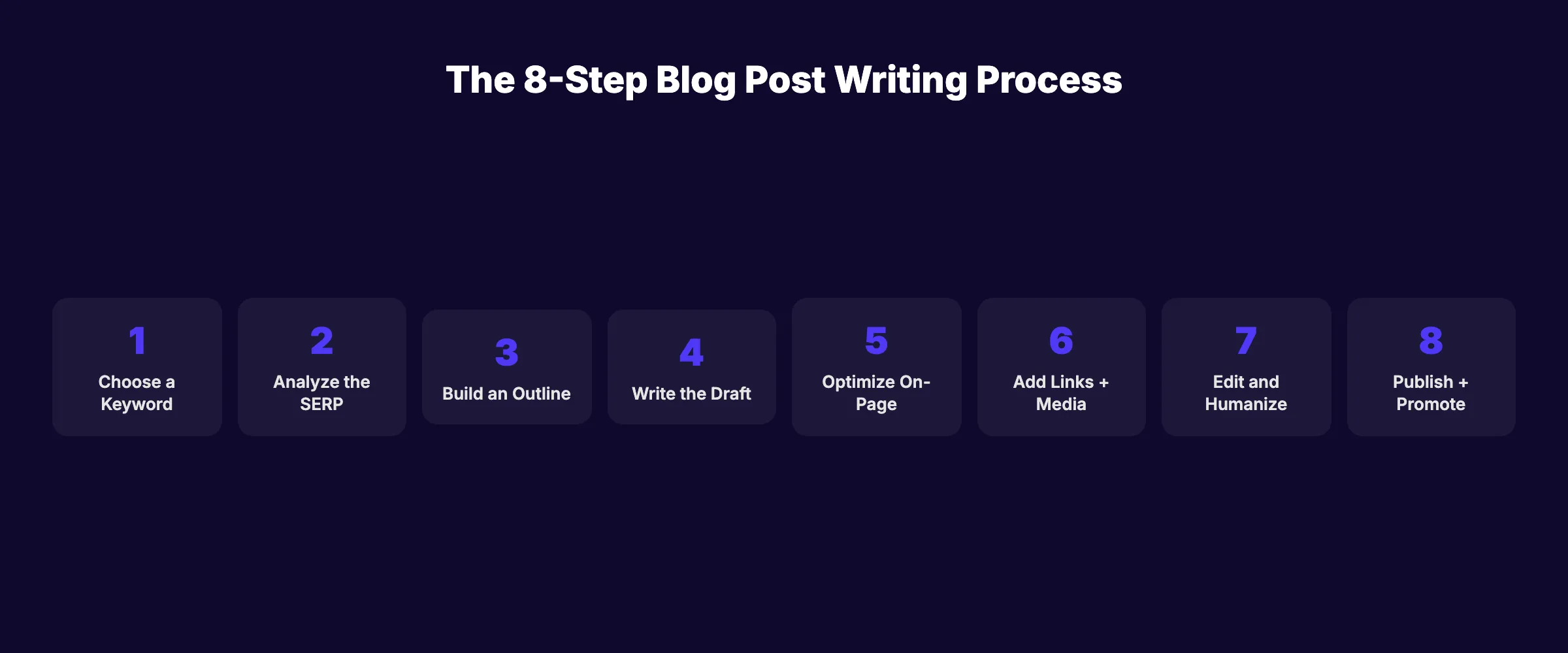
Step 1: Choose a Keyword With Ranking Potential
Every blog post starts with a keyword. Writing without a target keyword is publishing blind. You need a term people actually search for.
How to Find the Right Keyword
Use keyword research tools (Ahrefs, Semrush, or Google Keyword Planner) to find terms with:
- Search volume above 100 per month. Below that, the traffic ceiling is too low.
- Keyword difficulty matching your domain authority. New sites target KD under 20. Established sites can target KD 40+.
- Clear search intent. The keyword tells you what format the searcher expects (guide, list, comparison, how-to).
Match the Keyword to a Content Type
| Keyword Pattern | Content Format | Example |
|---|---|---|
| ”how to [X]“ | Step-by-step guide | ”how to write a blog post" |
| "best [X]“ | Ranked listicle | ”best SEO tools" |
| "[X] vs [Y]“ | Comparison | ”Ahrefs vs Semrush" |
| "what is [X]“ | Definition + guide | ”what is topical authority" |
| "[X] tips” | Numbered tips list | ”blog writing tips” |
The format must match search intent. A “how to” keyword requires step-by-step structure. A “best” keyword requires a ranked list. Mismatching format and intent guarantees failure regardless of content quality.
Why this step matters: A post targeting the wrong keyword or wrong format will never rank. Keyword selection determines the ceiling. Everything else optimizes toward it.
Step 2: Analyze the SERP Before Writing
Before writing a single word, study what currently ranks for your keyword. Open Google and search your target keyword. Read the top 5 results.
What to Look For
- Content format. Are the top results guides, listicles, or tools? Match the dominant format.
- Word count. Count the approximate words in each top result. Your post needs to be at least as long or longer.
- Header structure. Note every H2 and H3 heading. These reveal the subtopics Google expects to see.
- Content gaps. What do ALL 5 results miss? This is your opportunity to add something new.
- People Also Ask. Capture 4 to 6 questions from the PAA box. These become your FAQ section.
The Competitive Edge
The posts ranking on page 1 set the quality bar. Your job is to clear that bar and add something they do not have. Original data, a unique framework, better examples, or a more practical structure.
Pages ranking in positions 1 to 3 average 2,100+ words. Positions 8 to 10 average 1,400 words. The average blog post across the internet is only 1,333 words. Most posts are too thin to compete.
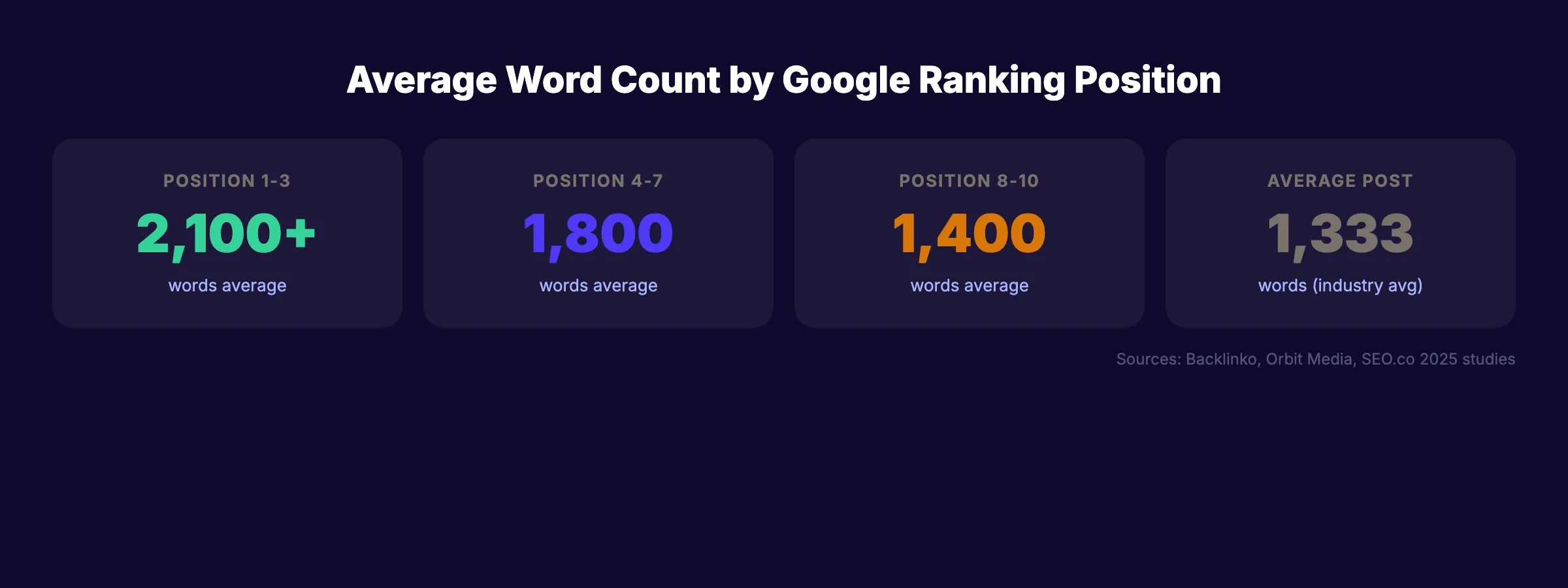
Why this step matters: SERP analysis prevents you from writing content that is shorter, thinner, or differently formatted than what Google already ranks. You compete with what exists, not what you imagine.
Stop writing. Start ranking. Stacc publishes 30 optimized articles per month. Each follows this exact process. Start for $1 →
Step 3: Build a Detailed Outline
Never write from a blank page. An outline ensures every section serves the keyword, covers every subtopic the SERP expects, and flows logically.
Outline Structure
Use this framework for every blog post:
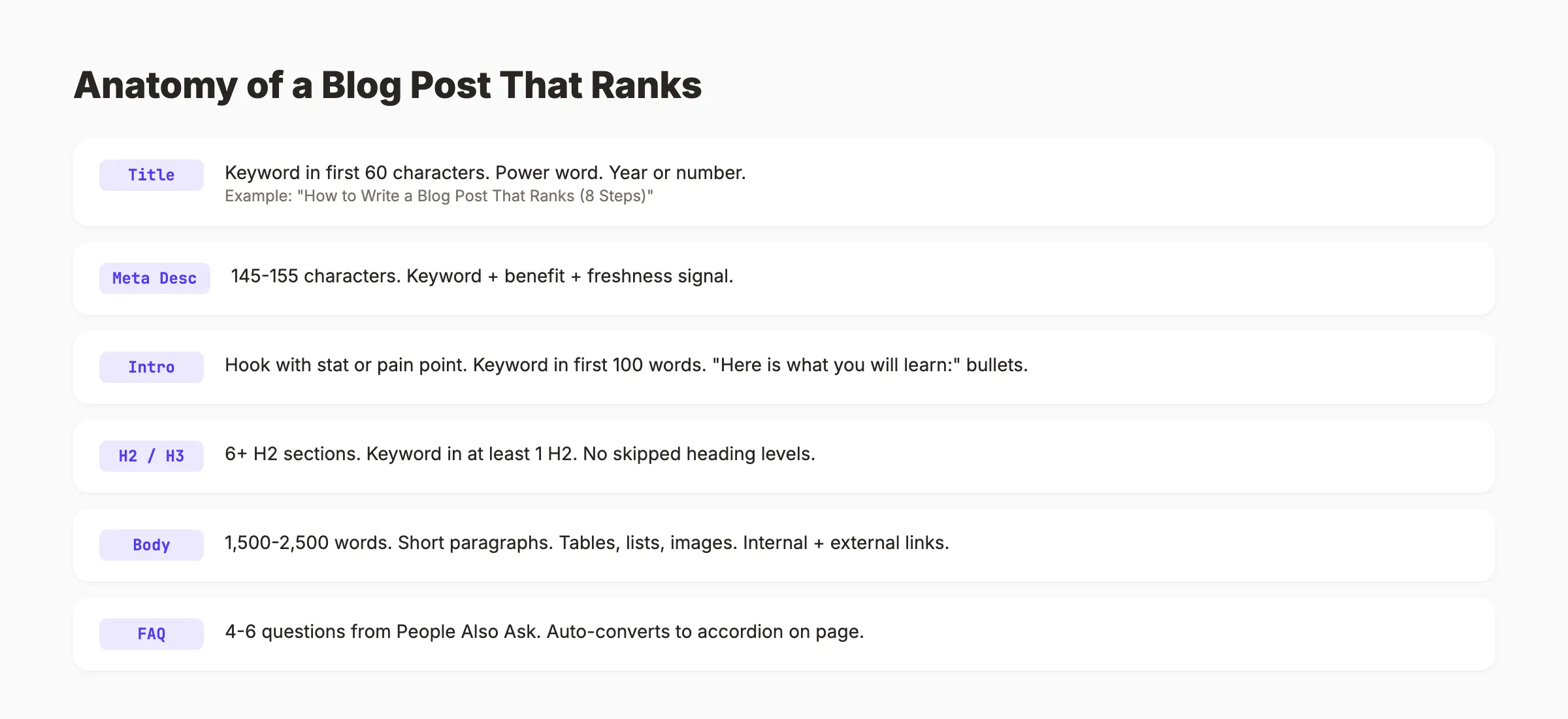
- Title (H1): Include the primary keyword in the first 60 characters.
- Introduction (no heading): Hook with a stat or pain point. Primary keyword in the first 100 words. End with a “Here is what you will learn” bullet list.
- Body sections (H2s): 6 to 10 H2 sections covering each major subtopic. Include the keyword in at least 1 H2.
- Subsections (H3s): Break long H2 sections into H3s for scannability.
- FAQ section: 4 to 6 questions sourced from People Also Ask and related searches.
- Closing (no heading): 2 to 3 sentences restating the core takeaway.
Plan Your Links and Media
For each section, note:
- Which internal links to include (and verify they exist)
- Which external sources to cite for data claims
- Where to place images, tables, or checklists
Planning links and media in the outline stage prevents scrambling after the draft is finished.
For a complete outlining process, see our blog post outline guide.
Why this step matters: An outline keeps the post focused and prevents scope creep. Posts written from outlines rank better because they cover every expected subtopic in a logical order.
Step 4: Write the First Draft
With keyword selected, SERP analyzed, and outline built, writing becomes execution rather than guesswork.
Writing Rules That Produce Ranking Content
- Short paragraphs. 1 to 3 sentences maximum. Dense paragraphs increase bounce rate.
- Active voice. “Google ranks pages based on relevance” instead of “pages are ranked by Google based on relevance.”
- Specific numbers. “92% of pages” instead of “most pages.” Specificity builds credibility and earns citations.
- No filler transitions. Delete “furthermore,” “moreover,” and “in conclusion.” Start each section with the point.
- One idea per paragraph. Each paragraph makes one claim, supports it, and moves on.
The Opening Formula
The first 100 words determine whether someone reads or bounces. Use this pattern:
- Hook: A surprising stat or a pain point the reader recognizes.
- Problem: What the reader is struggling with.
- Promise: What this post delivers.
- Credibility: Why the reader should trust you.
- Preview: A bullet list of what they will learn.
Use AI to Draft, Humans to Edit
AI tools speed up first drafts. But raw AI output ranks 23% lower on average than human-written content. The winning approach: use AI for research and drafting speed, then edit with human expertise, original examples, and data.
For more on this workflow, see our guide on using AI to write blog posts.
Why this step matters: The draft is the raw material. Quality writing creates content that readers engage with, which sends behavioral signals (time on page, scroll depth, low bounce rate) that Google uses to evaluate ranking worthiness.
Step 5: Optimize On-Page SEO Elements
After writing the draft, optimize the elements that Google reads first.
Title Tag
- Include the primary keyword in the first 60 characters
- Add a power word (complete, proven, essential) or a number
- Keep under 60 characters to avoid truncation in search results
Example: “How to Write a Blog Post That Ranks (8 Steps)“
Meta Description
- 145 to 155 characters
- Include the primary keyword
- State the benefit to the reader
- Add a freshness signal (year or “Updated”)
Use our meta description generator to create optimized descriptions.
Header Hierarchy
- One H1 (the title, usually handled by your CMS)
- Multiple H2s for main sections
- H3s for subsections under each H2
- Never skip levels (H2 directly to H4)
- Include the primary keyword in at least 1 H2
URL Slug
- Short and descriptive
- Include the primary keyword
- Use hyphens, no stop words
- Example:
/blog/write-blog-post-ranks
Keyword Placement
Place the primary keyword in these 7 locations:
- Title tag (first 60 characters)
- URL slug
- First 100 words
- At least 1 H2 heading
- Meta description
- At least 1 image alt text
- Naturally throughout the body (1-2% density)
For a complete on-page guide, see our on-page SEO guide.
Why this step matters: On-page elements are the primary way Google understands what your page is about. Missing keyword placement in the title or H1 can prevent ranking regardless of content quality.
Your SEO team. $99/month. 30 optimized articles with proper on-page SEO. Published automatically. Start for $1 →
Step 6: Add Links and Media
Links and media transform a text post into a ranking asset.
Internal Links
Add 3 to 5 internal links per 1,000 words. Link to related content on your site using descriptive anchor text. Internal links distribute authority to your important pages and help Google crawl your site.
External Links
Add 2 to 3 external links to authoritative sources. Link to the specific page with the data you reference, not a homepage. External links to .gov, .edu, or major industry studies build trust.
Images
Add at least 1 image per 500 words. Options include:
- Screenshots and annotated examples
- Data visualizations and charts
- Comparison tables
- Process diagrams
- Checklists and infographic cards
Every image needs descriptive alt text that includes the keyword where relevant. Optimize file size (under 200KB, WebP format) for page speed. See our blog image optimization guide.
Tables and Lists
Google favors structured content. Tables earn featured snippets. Bulleted lists earn list snippets. Use them wherever data can be organized into rows and columns or sequential items.
Why this step matters: Internal links boost the ranking power of your service pages. External links build trust. Images increase time on page. All 3 send positive signals to Google.
Step 7: Edit and Humanize
The first draft is never the final version. Editing turns a draft into a piece that reads naturally and passes quality checks.
Content Quality Checklist
- Every claim has supporting evidence (stat, example, or link)
- No hedging language (“might,” “could potentially,” “perhaps”)
- No filler transitions (“furthermore,” “moreover,” “additionally”)
- No contractions (write “do not” instead of the contracted form)
- Active voice throughout
- Every paragraph under 3 sentences
- Every sentence under 20 words
Humanization Pass
If you used AI for drafting, run a humanization check. Remove AI patterns like:
- “In conclusion” or “In today’s world”
- Three parallel items with identical structure
- Overly formal language that no human would say
- Generic statements with no specific data or examples
Readability Check
Target an 8th-grade reading level. Short sentences. Simple words. No jargon unless you define it. Readers scan before they read. If the page looks like a wall of text, they bounce.
Fact Check
Verify every statistic and claim. Outdated data hurts credibility and E-E-A-T signals. Link to the original source for every data point.
Why this step matters: Google measures user engagement signals. A post with high bounce rate and low time-on-page signals poor quality regardless of keyword optimization. Editing directly improves these metrics.
Step 8: Publish and Promote
Publishing is not the finish line. It is the starting point for distribution.
Pre-Publishing Checklist
- Title tag under 60 characters with keyword
- Meta description 145-155 characters with keyword
- Feature image uploaded and displaying correctly
- All internal links verified (no 404s)
- All images have alt text
- Mobile preview looks correct
- Page loads under 3 seconds
- Schema markup added (Article or HowTo)
Submit for Indexing
After publishing, submit the URL to Google Search Console. Use the URL inspection tool and click “Request Indexing.” Google typically indexes new pages within 1 to 7 days.
Promote the Post
- Share on social media (LinkedIn, Twitter/X, Facebook)
- Repurpose into social media posts (quotes, key stats, infographics)
- Send to your email list
- Share in relevant online communities (without spamming)
- Add internal links from existing posts to the new one
Track Performance
Monitor in Google Search Console after 30, 60, and 90 days:
- Impressions: Are people seeing your page in search results?
- Clicks: Are they clicking through?
- Average position: Where are you ranking?
- Queries: Which keywords trigger your page?
If the post ranks on page 2 after 60 days, update it. Add more depth, better examples, and fresher data. Most posts need 1 to 2 updates before they reach page 1.
The Content Compound Effect
Every blog post you publish builds on the last. Post 1 targets one keyword. Post 10 covers an entire topic cluster. Post 30 creates a content hub with dozens of internal links reinforcing each other. This compounding effect is why businesses publishing consistently for 6 to 12 months see exponential traffic growth while businesses publishing sporadically see flat lines.
The compound effect only works with consistency. Publishing 4 posts per month for 12 months produces dramatically better results than publishing 48 posts in one month and stopping. Google rewards sustained publishing velocity. Each new post adds another indexed page, another keyword target, and another set of internal links that strengthen your entire site.
For a deeper look at how content compounds into topical authority, see our dedicated guide on building topical authority.
Why this step matters: A post that is never promoted or tracked is a post that is abandoned. The most successful blogs treat every published post as an ongoing asset, not a completed task.
3,500+ blogs published. 92% average SEO score. See what Stacc can do for your blog. Start for $1 →
FAQ
How long should a blog post be to rank on Google?
Pages in positions 1 to 3 average 2,100 to 2,500 words. Positions 8 to 10 average 1,400. The average blog post is only 1,333 words. Write enough to fully cover the topic. For competitive keywords, plan for 1,500 to 2,500 words. For low-competition long-tail keywords, 800 to 1,200 words can work. Quality and depth matter more than word count alone.
How long does it take for a blog post to rank?
Most blog posts start showing ranking movement within 60 to 90 days. Reaching page 1 typically takes 3 to 6 months for moderately competitive keywords. Low-competition keywords can rank in 30 to 60 days. Highly competitive terms may take 6 to 12 months of consistent optimization. For detailed timelines, see our guide on how long SEO takes.
Can AI-written blog posts rank on Google?
Yes, with editing. AI-assisted content that includes human editing, original data, and expert review performs within 4% of human-written content. Pure AI output without editing ranks 23% lower on average. The key is using AI for speed and humans for quality. See our full AI content ranking study.
How many blog posts per month do I need to rank?
Businesses publishing 4+ posts per month rank for 3x more keywords than those publishing sporadically. Consistency matters more than volume. 4 well-optimized posts per month outperform 20 thin posts. For a detailed breakdown, see our post on how many blog posts you need to rank.
What is the most important SEO element of a blog post?
The title tag. It tells Google and searchers what the page is about. A title with the primary keyword in the first 60 characters, a power word, and a clear benefit outperforms pages with weak or missing title optimization. After the title, the header structure (H2s and H3s) is the second most important structural element.
Should I update old blog posts or write new ones?
Both. New posts expand your keyword coverage. Updating old posts improves rankings for existing keywords. Posts that rank on page 2 often reach page 1 with a single content refresh (adding depth, updating data, improving structure). Allocate 70% of effort to new content and 30% to updates. See our guide on updating old blog posts.
Writing a blog post that ranks is a repeatable process. Choose the right keyword. Study what currently wins. Build a detailed outline. Write with clarity. Optimize every on-page element. Add links and media. Edit until it reads naturally. Publish and track. The businesses ranking on page 1 follow this process consistently. The ones on page 10 skip steps.

Written by
Siddharth GangalSiddharth is the founder of theStacc and Arka360, and a graduate of IIT Mandi. He spent years watching great businesses lose organic traffic to competitors who simply published more. So he built a system to fix that. He writes about SEO, content at scale, and the tactics that actually move rankings.
30 SEO blog articles published every month
Keyword-optimized, scheduled, and live on your site. Automatically.
30-day trial · Cancel anytime
theStacc
Stop writing SEO content manually
30 blog articles, 30 GBP posts, and social media content. Published every month. Automatically.
Start Your $1 Trial$1 for 3 days · Cancel anytime