
Local Keyword Research: 8 Steps to Find Keywords
Learn local keyword research in 8 actionable steps. Find geo-modified keywords, analyze local search intent, and map terms to pages. Updated for 2026.
Most local businesses pick keywords by guessing. They target “plumber” or “dentist” and hope the right people find them. That guess costs them 6 to 12 months of wasted effort and zero local rankings.
46% of all Google searches carry local intent. That is 4.6 billion searches per day where someone wants a nearby business. If your keyword list does not match those searches, your competitors collect the calls, foot traffic, and revenue instead.
This guide walks you through local keyword research in 8 steps. Each step builds on the last. You will finish with a keyword list mapped to real pages on your site.
We publish 3,500+ blog posts across 70+ industries. Local keyword research is the foundation of every campaign we run for service businesses. The process below is the same one our clients use to rank in the local pack within 60 to 90 days.
Here is what you will learn:
- The difference between implicit and explicit local keywords
- How to build a seed keyword list from your services and locations
- Free tools that surface local keyword data
- How to evaluate difficulty and volume for local terms
- A framework for mapping keywords to the right pages
- How to track and refine your keyword strategy over time
What Is Local Keyword Research?
Local keyword research is the process of finding search terms people use when they look for products, services, or businesses in a specific area. It differs from standard keyword research in one critical way: geography shapes every decision.
A dentist in Austin does not compete with dentists in Chicago. Their keyword list should reflect that. Local keyword research accounts for city names, neighborhoods, zip codes, and “near me” modifiers.
There are 2 types of local keywords:
| Type | Definition | Example |
|---|---|---|
| Explicit | Includes a location in the query | ”plumber in Dallas” |
| Implicit | Triggers local results without a location | ”emergency plumber” |
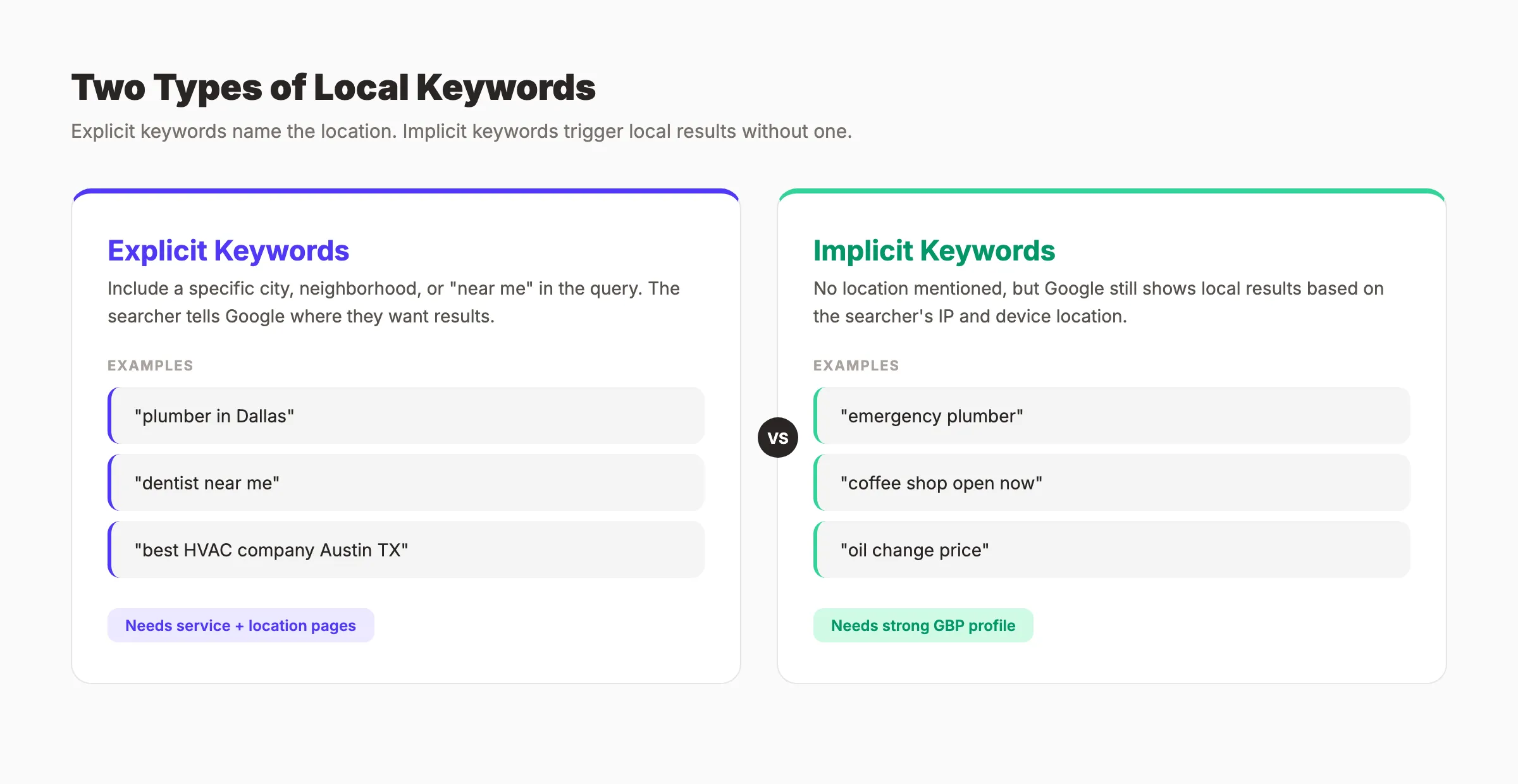
Google treats both types as local searches. The difference matters for your content strategy. Explicit keywords need location-specific service pages. Implicit keywords need a strong Google Business Profile to appear in the local pack.
According to BrightLocal research, 80% of U.S. consumers search for local businesses at least once per week. Nearly a third search daily. That volume makes local keyword research one of the highest-ROI activities for any service business.
Step 1: List Your Services and Locations
Every local keyword has 2 parts: what you do and where you do it. Start by listing both.
Open a spreadsheet. Create 2 columns.
Column A. Services: Write down every service your business offers. Be specific. A roofer does not just do “roofing.” They do roof repair, roof replacement, roof inspection, emergency roof tarping, gutter installation, and storm damage repair.
Column B. Locations: List every city, neighborhood, and suburb you serve. Include your primary city, surrounding towns, and any areas within a 30-minute drive.
Here is a sample for a plumbing company:
| Services | Locations |
|---|---|
| Drain cleaning | Houston |
| Water heater repair | Katy |
| Sewer line replacement | Sugar Land |
| Emergency plumbing | The Woodlands |
| Pipe leak repair | Spring |
| Garbage disposal repair | Pearland |
Why this step matters: Skipping the service-location matrix means you miss dozens of keyword combinations. A plumber targeting only “plumber Houston” ignores “drain cleaning Katy” and “water heater repair Sugar Land.” Those long-tail terms often convert at 2 to 3 times the rate of broad keywords.
Pro tip: Check your Google Business Profile categories for service ideas you may have forgotten. Google lists every category it associates with your business type.
Your goal is a list of 10 to 20 services and 5 to 15 locations. That creates 50 to 300 potential keyword combinations before you even open a research tool.
Step 2: Build Your Seed Keyword List
Seed keywords are the raw building blocks of your research. They combine your services and locations with common modifiers local searchers use.
Take your service-location matrix from Step 1. Now add a third layer: keyword modifiers.
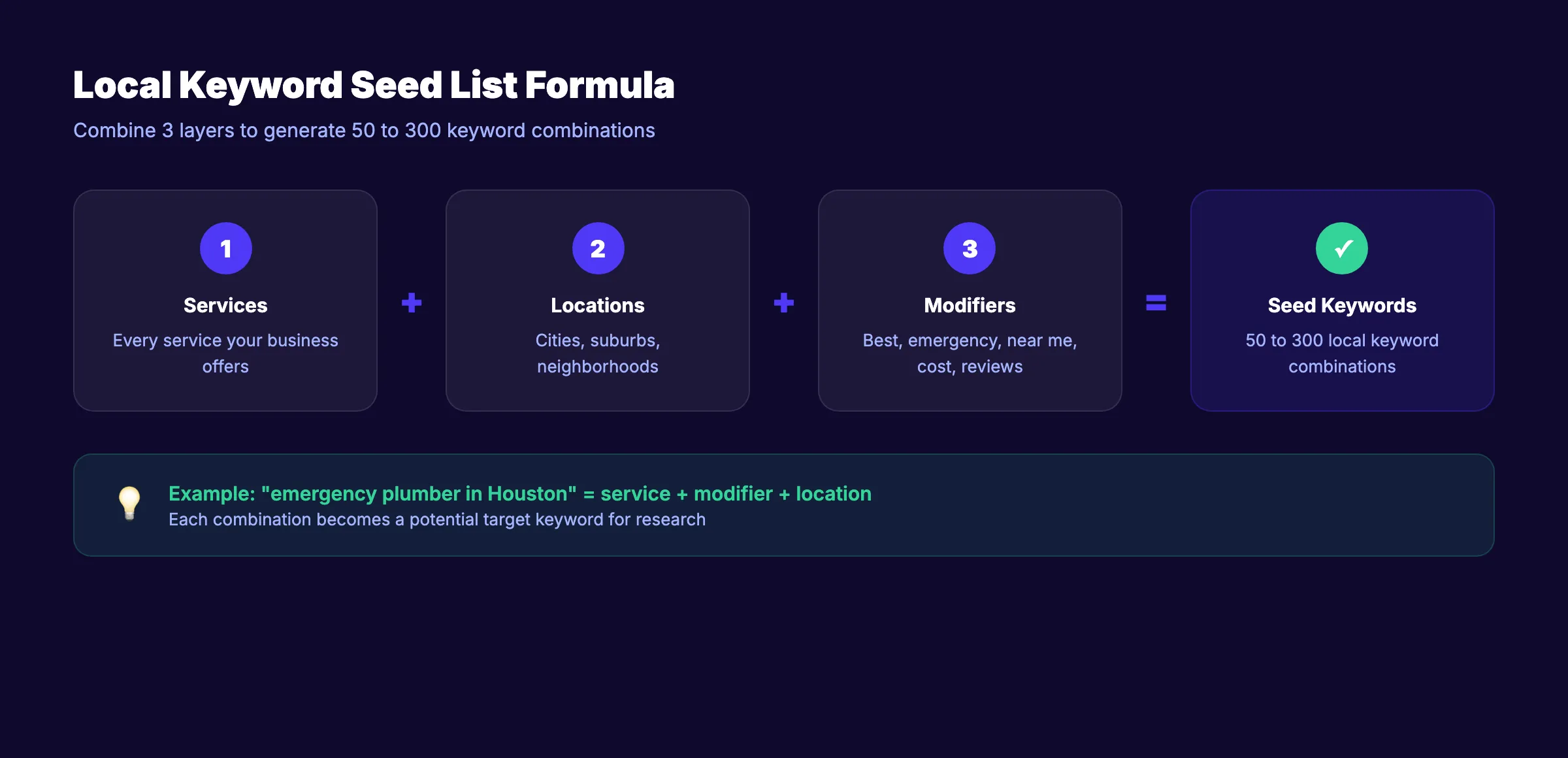
Common local keyword modifiers fall into 5 categories:
| Modifier Type | Examples |
|---|---|
| Location | ”in [city]”, “near [neighborhood]”, “[zip code]“ |
| Proximity | ”near me”, “close by”, “nearby” |
| Quality | ”best”, “top rated”, “affordable”, “cheap” |
| Urgency | ”emergency”, “24 hour”, “same day”, “open now” |
| Intent | ”cost”, “price”, “reviews”, “free estimate” |
Combine your services with these modifiers to create seed phrases:
- “emergency plumber in Houston”
- “best drain cleaning near me”
- “affordable water heater repair Katy”
- “24 hour plumber Spring TX”
Write 30 to 50 seed keywords. Do not filter yet. Volume and difficulty come later. Right now, you want quantity.
Why this step matters: Your seed list determines the scope of your entire keyword research process. A thin seed list produces a thin keyword strategy. Broad seeds catch long-tail opportunities that competitors overlook.
Pro tip: Read your Google reviews and competitor reviews on Google Maps. Customers describe your services in their own words. Those phrases often match real search queries. A customer writing “fixed my leaky faucet same day” reveals the keyword “same day faucet repair.”
Local keyword research is the foundation of every ranking. Stacc builds keyword-targeted content for local businesses on autopilot. Start for $1 →
Step 3: Use Free Tools to Find Local Keywords
You do not need a $200/month SEO tool to do local keyword research. Several free tools provide enough data to build a solid keyword list.
Google Keyword Planner
Open Google Keyword Planner through your Google Ads account. You do not need to run ads to use it.
- Click “Discover new keywords”
- Enter 3 to 5 seed keywords from Step 2
- Change the location setting to your city or service area
- Review the results for search volume and competition level
The location filter is critical. National volume numbers mean nothing for a local business. A keyword with 10,000 monthly searches nationally might have 200 in your city. That 200 is the number that matters.
Google Autocomplete and Related Searches
Type your seed keywords into Google. Watch the autocomplete suggestions. These are real queries people search for. Scroll to the bottom of the results page and check “Related searches” for more ideas.
Google Business Profile Insights
Your GBP dashboard shows the actual search queries people used to find your profile. Go to Performance and review “Search queries.” This data comes straight from Google and reflects your real local audience.
People Also Ask
Search your main keywords and note every question in the “People Also Ask” box. These questions become FAQ content and blog post topics. Questions like “How much does a plumber charge per hour in Houston?” reveal commercial intent keywords.
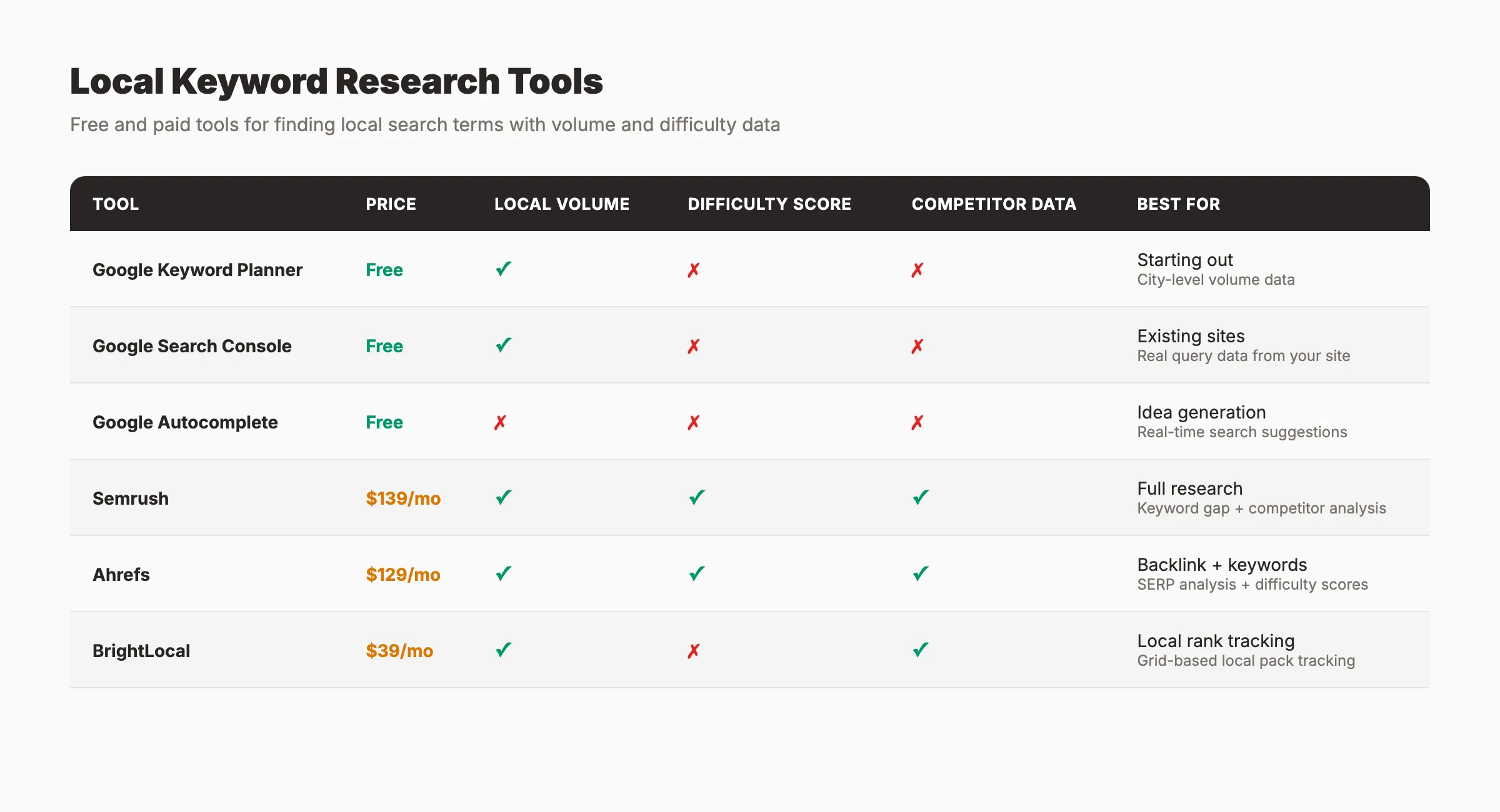
For deeper research, consider the best keyword research tools and best free SEO tools. Paid tools like Semrush and Ahrefs offer local keyword filters that speed up the process.
Why this step matters: Tools turn guesses into data. Without volume and competition data, you might spend months targeting keywords nobody searches for. Or you might target keywords where the top 10 results all have domain authority above 70.
Step 4: Analyze Search Intent Behind Each Keyword
Not every local keyword deserves its own page. The type of content Google shows for a keyword tells you what kind of page to create.
Search each keyword on your list. Look at the top 5 results. What shows up?
| What You See | Intent Type | Page to Create |
|---|---|---|
| Local pack + service pages | Transactional | Service page |
| Blog posts + guides | Informational | Blog post |
| Review sites + directories | Commercial | Comparison or review page |
| Map results only | Navigational | GBP optimization |
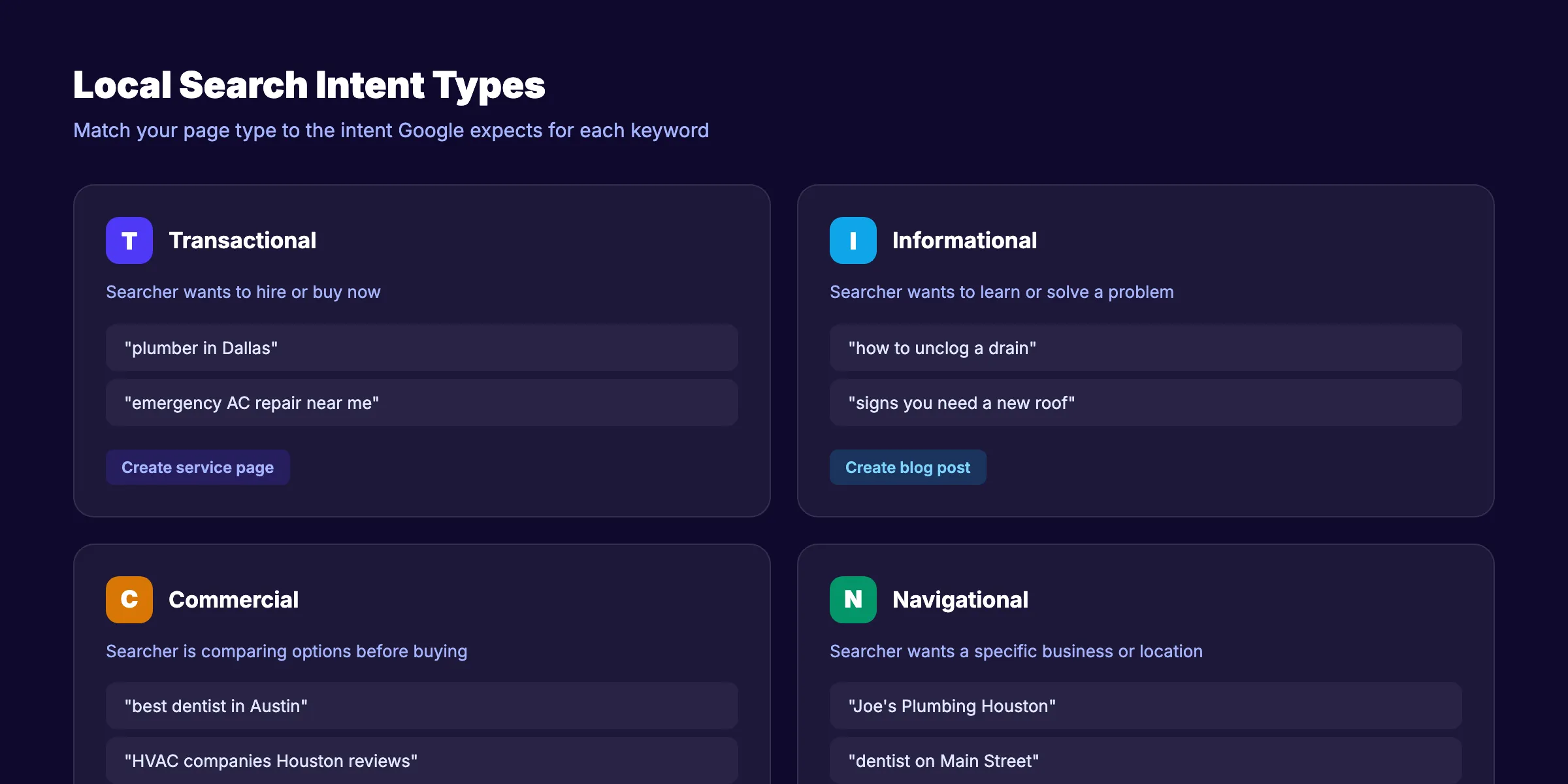
Understanding search intent prevents a common mistake: creating a blog post for a keyword that Google ranks service pages for. If “plumber in Dallas” shows 10 service pages in the results, writing a blog post about plumbing in Dallas will not rank.
Group Keywords by Intent
Organize your keyword list into 3 buckets:
Service page keywords: “drain cleaning Houston”, “water heater repair Katy”, “emergency plumber near me”
Blog content keywords: “how to unclog a drain”, “signs you need a new water heater”, “what to do during a pipe burst”
GBP keywords: “plumber near me”, “best plumber [city]”, “plumber open now”
This grouping determines your entire content strategy. Service keywords go on service pages. Informational keywords become blog posts that link to those service pages. GBP keywords require profile optimization.
Why this step matters: Matching intent is the single biggest ranking factor. A perfectly optimized page targeting the wrong intent will not rank. Google has 15+ years of click data telling it what users want for each query. Match that expectation or get filtered out.
Pro tip: Watch for keywords where the local pack appears above organic results. Those keywords signal strong local intent and require both a service page and an optimized Google Business Profile.
Step 5: Evaluate Keyword Difficulty and Volume
Not all keywords are worth targeting. Some are too competitive. Others have zero search volume. This step separates the winners from the time-wasters.
For each keyword on your list, you need 3 data points:
| Metric | What It Tells You | Where to Find It |
|---|---|---|
| Monthly search volume | How many people search this term | Google Keyword Planner, Semrush, Ahrefs |
| Keyword difficulty | How hard it is to rank in the top 10 | Semrush, Ahrefs, Moz |
| Local pack presence | Whether map results appear | Manual Google search |
How to Prioritize Local Keywords
Score each keyword on a simple scale:
High priority: Volume above 100/month + difficulty under 40 + local pack present. These are your money keywords. Target them first with dedicated service pages.
Medium priority: Volume 50 to 100/month + difficulty 40 to 60. Worth targeting with optimized blog content or secondary service pages.
Low priority: Volume under 50/month + difficulty above 60. Skip these unless they represent high-value commercial terms where a single conversion justifies the effort.
Here is an example scoring table:
| Keyword | Volume | Difficulty | Local Pack | Priority |
|---|---|---|---|---|
| plumber houston | 2,400 | 55 | Yes | Medium |
| emergency plumber houston | 590 | 35 | Yes | High |
| drain cleaning katy tx | 110 | 22 | Yes | High |
| sewer line replacement sugar land | 40 | 18 | Yes | High |
| best plumber in houston | 880 | 48 | Yes | Medium |
Notice the pattern. Lower-volume, geo-modified keywords often have lower difficulty. “Drain cleaning katy tx” has a difficulty of 22 versus “plumber houston” at 55. The specific term is far easier to rank for and converts better because the searcher knows exactly what they need.
Why this step matters: Targeting high-difficulty keywords with a new or low-authority site wastes months of effort. Local businesses win by stacking dozens of low-difficulty, geo-modified keywords. Each page ranks faster, builds authority, and compounds over time. That is the Content Compound Effect in action.
Stop guessing which keywords to target. Stacc publishes 30 keyword-targeted articles per month for your local business. Start for $1 →
Step 6: Spy on Competitor Keywords
Your competitors have already done keyword research for you. They just do not know it. Every page they rank for reveals a keyword you should consider targeting.
Find Your Local Competitors
Search your top 5 keywords on Google. Note which businesses appear in both the local pack and organic results. These are your true SEO competitors. They may differ from your business competitors.
Extract Their Keywords
If you use Semrush or Ahrefs, enter a competitor domain and filter by:
- Location: your city or state
- Position: top 20
- Volume: above 50
This shows every keyword your competitor ranks for in your market. Export the list.
Without paid tools, use this manual method:
- Visit each competitor website
- Read their service page titles and H1 headings
- Check their blog post topics
- Note their Google Business Profile categories
- Read their FAQ sections for question-based keywords
For a detailed process, see our guide on how to analyze competitor keywords.
Find the Gaps
Compare your keyword list to your competitors’ keywords. Look for terms they rank for that you do not target. These gaps are your fastest path to new rankings.
Also look for keywords where competitors rank on page 2 or 3. Their page was good enough to get close but not good enough to break through. A better page from you can leapfrog them. Learn more about finding content gaps in our dedicated guide.
Why this step matters: Competitor analysis cuts your research time by 50% or more. Instead of guessing what local customers search for, you see proven keywords that already drive traffic to businesses like yours.
Step 7: Map Keywords to Pages on Your Site
A keyword list without a page plan is just a spreadsheet. This step assigns every keyword to a specific URL on your site.
The Local Keyword Mapping Framework
Each keyword maps to 1 page. Each page targets 1 primary keyword and 2 to 3 secondary keywords. Never assign the same primary keyword to 2 different pages. That causes keyword cannibalization, where your own pages compete against each other.
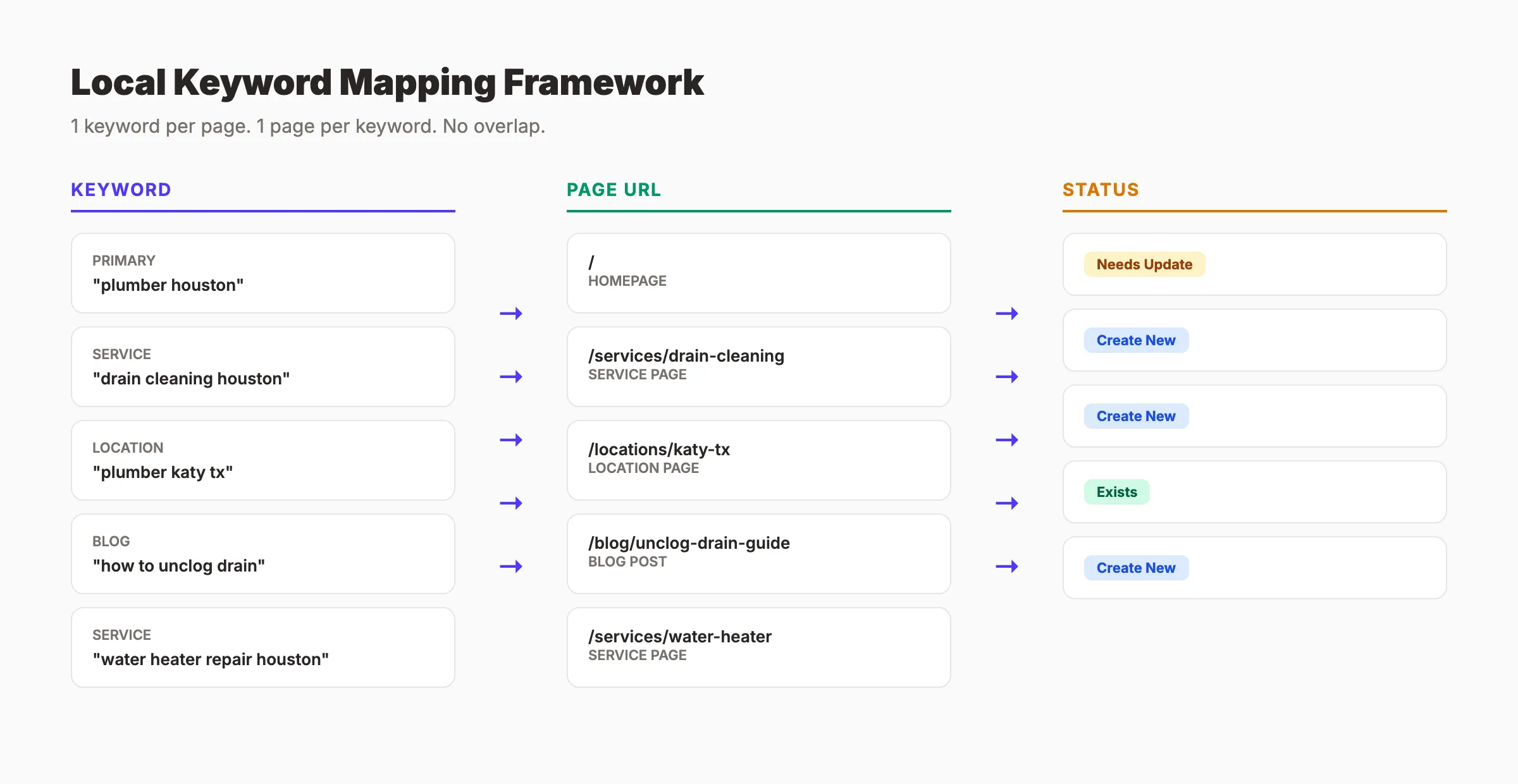
Use this mapping structure:
| Page Type | Primary Keyword Pattern | Example |
|---|---|---|
| Homepage | [business type] + [primary city] | “plumber houston” |
| Service page | [service] + [city] | “drain cleaning houston” |
| Location page | [business type] + [suburb/area] | “plumber katy tx” |
| Blog post | [informational query] | “how to unclog a drain” |
| GBP landing | [near me] variations | ”plumber near me” |
Build Your Page Plan
Create a spreadsheet with these columns:
- Target URL (existing or new page)
- Primary keyword
- Secondary keywords (2 to 3)
- Search volume
- Current ranking (if any)
- Content status (exists, needs update, or needs creation)
For existing pages, check your current rankings in Google Search Console. You may already rank on page 2 for terms that need only minor optimization. Those pages deliver the fastest wins.
For new pages, prioritize high-priority keywords from Step 5. Create service pages before blog posts. Service pages drive direct conversions. Blog posts build authority and feed internal links to those service pages.
Why this step matters: Without a map, you will accidentally create duplicate content, cannibalize keywords, or leave high-value terms without a page. The map is your execution plan for the next 3 to 6 months of content creation.
Pro tip: Build your keyword map as a topical map. Group related service pages and blog posts into clusters. A plumber might have clusters for “drain services,” “water heater services,” and “emergency plumbing.” Each cluster strengthens the others through internal linking.
Step 8: Track Rankings and Refine Quarterly
Local keyword research is not a one-time task. Search patterns shift. New competitors enter your market. Google updates its local algorithm 3 to 4 times per year. Your keyword strategy must evolve with these changes.
Set Up Tracking
Track your primary keywords in a rank tracking tool. Free options include Google Search Console for organic positions. Paid tools like BrightLocal or Semrush track local pack positions and map rankings by zip code.
Track these metrics monthly:
| Metric | Target | Tool |
|---|---|---|
| Organic position | Top 10 | Google Search Console |
| Local pack position | Top 3 | BrightLocal, Local Falcon |
| Click-through rate | Above 3% | Google Search Console |
| Impressions growth | Month-over-month increase | Google Search Console |
Quarterly Keyword Audit
Every 90 days, review your keyword list:
- Add new keywords. Check Google Search Console for queries where you appear on page 2 or 3. These are keywords Google already associates with your site. A small content update or new internal link can push them to page 1.
- Remove dead keywords. Drop terms with zero impressions after 90 days. Redirect those pages to related content.
- Update seasonal terms. Some local keywords spike at certain times. “AC repair” surges in summer. “Snow removal” peaks in winter. Plan content 30 to 60 days ahead of these spikes.
- Monitor competitor moves. Check if competitors launched new service pages or started ranking for terms you target.
Why this step matters: The businesses that rank year after year treat keyword research as an ongoing process. A quarterly audit takes 2 to 3 hours and often reveals 10 to 20 new keyword opportunities.
Pro tip: Pair your keyword tracking with local link building. As your domain authority grows, previously difficult keywords become reachable. Re-evaluate medium-priority keywords from Step 5 every quarter.
Your local SEO runs on autopilot. Stacc handles keyword research, content creation, and publishing for local businesses. Start for $1 →
Results: What to Expect
After completing these 8 steps, you will have a keyword strategy built on data instead of guesses.
Here is a realistic timeline:
- Week 1: Complete keyword research and page mapping (Steps 1 to 7)
- Days 30 to 60: New service pages and blog posts indexed and ranking for low-difficulty terms
- Days 60 to 90: Local pack improvements for geo-modified keywords
- Months 3 to 6: Consistent traffic growth as your content library compounds
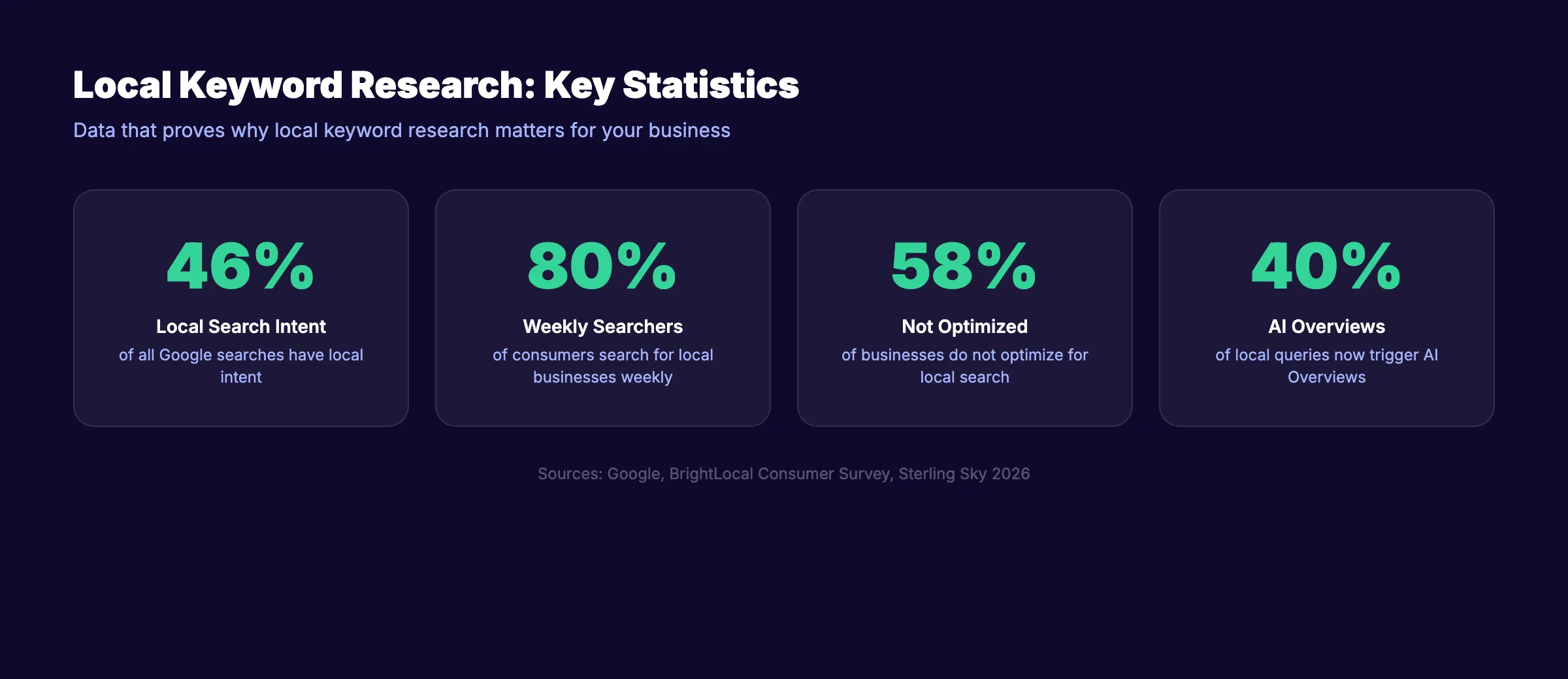
58% of businesses do not optimize for local search. Only 30% have a local SEO plan. By completing this guide, you are already ahead of the majority.
The key metric to watch is impressions in Google Search Console. Rising impressions mean Google sees your site as relevant for more local queries. Rankings and clicks follow.
For industry-specific guidance, check our local SEO guides for dentists, home service companies, law firms, and restaurants. Each guide includes keyword examples and content strategies tailored to that industry.
Frequently Asked Questions
How many local keywords should I target?
Start with 20 to 30 primary keywords mapped to individual pages. A typical local business needs 1 homepage, 5 to 10 service pages, 3 to 5 location pages, and 10 to 15 blog posts. Each page targets 1 primary keyword and 2 to 3 secondary keywords. Expand your list by 10 to 15 keywords each quarter as you publish more content.
Do I need paid tools for local keyword research?
No. Google Keyword Planner, Google Search Console, and Google Autocomplete provide enough data for most local businesses. Paid tools like Semrush and Ahrefs save time and offer deeper competitor data. But free tools work for businesses starting out or operating on a tight budget. Our list of free SEO tools covers the best options.
What is the difference between local keywords and regular keywords?
Local keywords carry geographic intent. The searcher wants results near a specific location. Regular keywords lack geographic context. “Best CRM software” is a regular keyword. “Best accountant in Denver” is a local keyword. Google determines local intent using the query text, the searcher’s location, and historical click patterns.
How often should I update my local keyword list?
Review your keyword list every 90 days. Check Google Search Console for new queries driving impressions. Add seasonal keywords 30 to 60 days before demand spikes. Remove keywords with zero impressions after 3 months. A quarterly audit takes 2 to 3 hours and keeps your strategy aligned with actual search behavior.
Should I create separate pages for each location I serve?
Yes, if each location page offers unique content. A plumber serving Houston, Katy, and Sugar Land should have 3 location pages with different testimonials, service details, and local references for each area. Avoid creating thin pages that only swap out the city name. Google penalizes doorway pages with duplicate content. Every location page needs unique value.
How do I find keywords for a new business with no data?
Start with competitor analysis (Step 6). Search your main services in your city and study the top 5 results. Use Google Keyword Planner with your city filter. Check Google Business Profile categories for your industry. Read customer reviews on competitor profiles for the exact language customers use. Within 90 days, your own Google Search Console data will reveal the queries people use to find you.
Local keyword research separates businesses that rank from businesses that guess. The 8 steps in this guide give you a repeatable process that works for any local business in any market. Start with Step 1 today and build your keyword map this week.
Stacc publishes keyword-targeted content for local businesses on autopilot. 30 articles per month. $99. No content team required.
Related Tools & Resources
Free SEO Tools:
Best Lists:

Written by
Siddharth GangalSiddharth is the founder of theStacc and Arka360, and a graduate of IIT Mandi. He spent years watching great businesses lose organic traffic to competitors who simply published more. So he built a system to fix that. He writes about SEO, content at scale, and the tactics that actually move rankings.
Automate your Google Business Profile content
30 GBP posts, local SEO articles, and review responses. Published every month automatically.
30-day trial · Cancel anytime
theStacc
Stop writing SEO content manually
30 blog articles, 30 GBP posts, and social media content. Published every month. Automatically.
Start Your $1 Trial$1 for 3 days · Cancel anytime